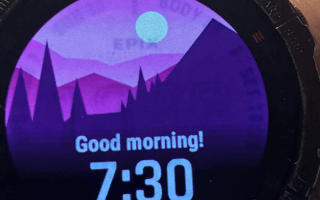
[gallery size="medium" ids="97838,97839,97837,102785,102783,102784"] LED industry experts reassure us that "AMOLED Burn In is a thing of the past". Try telling that to these unlucky Garmin owners. Let's discuss the issues and what to do about them. The Facts Burn-in is an inherent risk with all AMOLED displays, including those used in smartwatches like the Garmin Epix Gen 2 and Venu series. However, its severity and likelihood depend on several factors, including usage, display settings, and how well the manufacturer offsets burn-in risk through software. Surprisingly, even Garmin’s older Memory-in-Pixel (MIP) displays, used in the Fenix 6 Pro and Fenix 7, have shown burn-in, despite their transreflective nature being more resistant to this issue. AMOLED screens work by individually lighting up organic pixels. Over extended periods, these organic materials degrade at different rates, made worse when displaying static images for prolonged periods. This results in the ghosting effect you can see in the pictures above. Typically, the burn-in will be remnants of previously displayed images, usually watch faces, that remain visible. For MiP displays, burn-in is less common but can occur with prolonged static content, as seen in a documented case of a five-year-old Fenix 6 Pro. Interestingly, the latest wave of screen tech - MicroLED displays - uses durable inorganic materials, which are considered significantly less prone to burn-in than AMOLED or OLED, but not entirely immune. Potential issues, including LED ageing, are different from showing prolonged static and high-brightness content, manufacturing imperfections, and minor thermal effects that might cause uneven performance. While these risks are minimal, extended use of static elements with Always-On Display could theoretically cause subtle degradation over many years. https://the5krunner.com/2025/09/05/garmin-battery-gate-why-auo-microled-panels-drain-battery-industry-expert-speaks/ Q: Is Burn-In Inevitable? Yes and no. Yes, in the long run: All OLED/AMOLED displays, and to a lesser extent MiP displays, degrade over time, making burn-in an eventual reality if used long enough. No, for most users: Many people will replace or upgrade their smartwatch before a noticeable burn-in occurs. Q: What Worsens My Chances of Ruining My $1,000 Watch? Simply put, you run a higher risk if you have a static, bright image on any part of the display for a long time. Always-On Display (AOD) – Keeping the screen on 24/7 with static elements accelerates degradation, as reported with the Garmin Epix Gen 2 after four years of AOD use. High Brightness Levels – Brighter pixels degrade faster, particularly on AMOLED screens. Static Screen Elements – Persistent images like watch faces, status bars, and widgets "burn in" faster. Long-Term Use – Devices worn daily for years, such as the Fenix 6 Pro or Epix Gen 2, will inevitably show some wear on the display. How Manufacturers Reduce Burn-In Garmin, Apple, and other smartwatch makers implement various techniques to delay or minimise burn-in: Pixel Shifting – Slightly and repeatedly move screen elements, avoiding long periods of static images. Auto-Dimming – to reduce brightness in certain conditions. Screen Timeouts – that turn off the display after inactivity. Adaptive screen Elements – Some screen elements are designed to fade or change position subtly over time or in certain conditions. Garmin offers dynamic watch faces that relocate elements periodically to reduce static display time. Does your 3rd-party CIQ watch face override any of these mitigation strategies? You might want to think very carefully about using 3rd-party watch faces, not tuned to minimise burn-in risks. Preventing or Delaying AMOLED and MiP Burn-In You bought a Garmin watch with a beautiful AMOLED or MiP display to show it off in its glory. As you've probably guessed, the solution is to NOT show it off in all its glory! Limit Always-On Display: Use the display only when necessary, especially for AMOLED models like the Epix Gen 2 or Venu 3. Lower Brightness: Use auto-brightness or manually reduce it to preserve pixel life. Change Watch Faces Regularly: Avoid static elements that stay on-screen; opt for Garmin’s dynamic watch faces. Enable Battery Saver Mode: Many watches reduce display activity in this mode. Use Darker Watch Faces: AMOLED pixels degrade faster when showing bright colours; darker themes reduce stress on pixels. Enable Gesture-Based Display: For models supporting it, use wrist gestures to activate the display instead of AOD. Q: If I Get AMOLED or MiP Burn-In, Can I Get a Garmin Replacement? You have a good case, especially if this happens within 2 years, regardless of how you used your watch brightness settings and watch faces. After two years, things get trickier. The manufacturer's warranty in the UK does not compromise your legal rights under the Consumer Rights Act (2015). To get a remedy, you must show: AMOLED or MiP screen burn-in is a design flaw or premature defect rather than expected ageing. Reports of burn-in on MiP displays, like the Fenix 6 Pro, may strengthen this argument. The product did not meet reasonable durability expectations for its price and intended use. Other users have experienced similar premature burn-in, indicating a possible widespread issue (see photos from Reddit forums for Epix Gen 2 and Fenix 6 Pro). If you had bought a $50 watch 3 years ago, I doubt you have a case. However, if you've spent £1000 on a watch like the Epix Gen 2 or Fenix 7, expecting it to last more than 2 years without significant burn-in is reasonable, especially given Garmin’s marketing of these devices as durable fitness trackers. Take Out AMOLED and MiP burn-in is a real issue on Garmin watches, including high-end models like the Epix Gen 2 and Fenix 6 Pro. It just takes quite a long time to materialise. It will likely take over two years for burn-in to be noticeable on AMOLED screens, and even longer for MiP displays. As the Garmin Epix Gen 2 was released on January 18, 2022, I expect these stories to become more widely reported. If it happens to you after 2 years from purchase, your only recourse will likely be directly with Garmin. You should outline your problem with pictures of similar problems taken from Garmin and Reddit forums as evidence for a widespread issue, and then stress to Garmin your expectation of "reasonable durability", citing other owners' examples of the problem, including MiP display cases. Good luck. If it has not happened to you, turn down the brightness, change the screensavers/watch faces regularly, and consider disabling AOD or using gesture-based display activation to extend your watch display's lifespan.