ClimbPro
Accuracy
Approximately reliable but rarely precisely accurate at any single moment.
Best for
Pacing effort on significant climbs during cycling, trail running and hiking.
Weakness
Free-ride position can be 100 to 200 metres ahead of the current position on some Edge models.
In short: ClimbPro pops up a dedicated screen as the rider or runner approaches a significant climb, showing how much distance, elevation and gradient remain to the summit. It runs on Edge cycling computers and on mapping-capable Garmin watches, using either a loaded course’s elevation data or, on recent Edge models, an onboard map layer to detect climbs without a route.
In practice, I rely on ClimbPro for most rides in unfamiliar territory with any significant climb, where the difference between pacing for a 2-kilometre climb and being surprised by a 4-kilometre one shapes the rest of the day. On familiar Surrey hills, the per-climb screen pops up too often, even at the medium-to-large setting, so I keep the threshold set to “only large climbs” for local riding and revert back for trips. The feature’s most useful screen for me is not the headline gradient profile but the simple “metres ascent remaining” number, which calibrates effort better than gradient alone — gradient changes second by second on a varied climb. Still, the metres remaining figure tells you exactly how much suffering is left. The most underrated use is hiking and ultra-trail running on routes with significant vertical, where descent tracking matters as much as climbs and is something Garmin’s own pages do not really highlight.
Quick answers
How does ClimbPro work?
ClimbPro identifies significant climbs on a route or the road ahead, then displays a dedicated screen as the rider or runner approaches each one. The screen shows the remaining distance, elevation, and gradient, updating continuously. Detection works from a loaded course’s elevation data or, on recent Edge models, from an onboard map layer.
Does ClimbPro work without a course?
Yes, but only on the Edge 540, Edge 840, Edge 1040, Edge 1050 (and newer) and Edge MTB in free-ride mode. No Garmin watch supports course-free ClimbPro at the time of writing. All mapping-capable Fenix, Forerunner, Enduro, Epix, MARQ, tactix, Quatix and Venu X1 watches require a loaded course with elevation data.
Which Garmin devices have ClimbPro?
ClimbPro is on all current Edge cycling computers with mapping and on mapping-capable watches in the Fenix, Forerunner, Enduro, Epix, MARQ, tactix, Quatix and Venu X1 ranges. Non-mapping watches, including the Venu 4, Venu 3, Vivoactive 6 and the Instinct series, are not supported.
Why does a climb not show up in ClimbPro?
The most likely cause is that the climb falls below the classification threshold. A hill segment must be at least 500 metres long, have at least 3 per cent average gradient, and meet the climb score threshold (length in metres multiplied by grade in per cent). Lowering the sensitivity to “all climbs” shows shorter ascents.
ClimbPro — A Deep Dive
When ClimbPro Is Actually Useful
- Long rides in unfamiliar territory, where pacing depends on knowing whether the next climb is 3 kilometres or 5.
- Hiking and ultra-trail routes with significant ascent, where descent tracking becomes as useful as climb tracking.
- Any ride where the rider needs a single number to calibrate effort — the “metres ascent remaining” figure works better than instantaneous gradient on varied climbs.
- Local riding with the sensitivity threshold set to “only large climbs,” to avoid the per-climb screen interrupting on every familiar small rise.
Introduction
ClimbPro is a Garmin feature that identifies climbs on a planned route or on the (predicted) road ahead, then shows the remaining distance, elevation, and gradient so the rider or runner can pace each ascent. The bolded name ClimbPro appears on Edge cycling computers and on mapping-capable Garmin watches, and Garmin writes it as one word. The feature is sometimes referred to as Climb Pro in third-party coverage.
The primary use case is road and gravel cycling, where knowing how much of a climb remains is central to pacing power output. ClimbPro also runs on mapping-capable watches in the Fenix, Forerunner, Enduro, Epix, MARQ, tactix, Quatix, and Venu X1 ranges, supporting ultra-trail running, trail running, and hiking on routes with significant vertical gain. The important caveat is that the feature only describes climbs its algorithm has identified, and its knowledge of gradient comes either from the elevation data embedded in the course file or from onboard map data whose accuracy varies by location.
What the ClimbPro Screen Shows
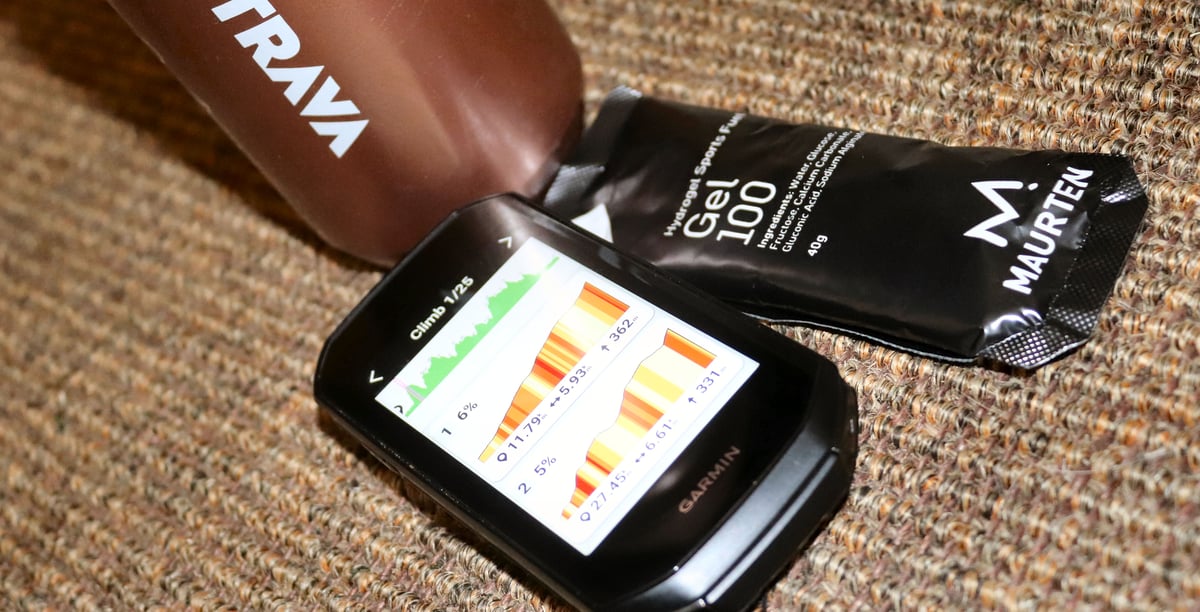
The per-climb screen is the primary display.
As a rider or runner approaches a detected climb, the device automatically switches to a dedicated screen that shows the current position on the climb, the distance and remaining ascent to the summit, and the average gradient, all of which update continuously. A coloured gradient profile shows the climb’s shape with the current position marked, and colour segments on this detailed view indicate the gradient of each section rather than the climb’s overall average.
The preview list is the second display context. It appears in the course details before the activity starts and as a dedicated page within the timer loop during the activity. Each upcoming climb is listed with its distance from the current position, length, average gradient and category, with completed climbs marked and retained for reference. Colour coding in the preview reflects the overall average gradient of each climb, which differs from the per-climb screen’s section-by-section logic.
Pre-climb alerts and descent tracking are part of the ClimbPro 2.0 revision introduced with the Enduro in 2021. A configurable banner appears at the start of each climb or at a set distance before the climb begins. For running and hiking activities on watches, descents appear alongside climbs in the list and trigger their own per-segment screens. Descents are not generally shown in ClimbPro for cycling activities, though the feature continues to evolve across firmware generations.
How Garmin Calculates It
ClimbPro has two calculation modes. The course-based mode operates on any ClimbPro-capable device and reads elevation from the active course .fit file. The free-ride mode operates only on the Edge 540, Edge 840, Edge 1040, Edge 1050 and Edge MTB. It uses a supplementary onboard map layer to anticipate the road ahead, classifying climbs along the expected path. Free-ride is suppressed whenever a course or navigation is active, so the two operate separately within any single activity.
A segment qualifies as a climb only when three conditions are met simultaneously: the climb score, calculated as length in metres multiplied by average gradient in per cent, meets the threshold; the segment is at least 500 metres long; and the average gradient is at least 3 per cent. On the free-ride-capable Edge models, the rider chooses one of three thresholds in the Climb Detection setting: “all climbs” at 1,500, “medium to large climbs” at 3,500 (the default), and “only large climbs” at 8,000. On watches, the Climb Detection setting is documented as applying only to cycling activities; running, trail running, and hiking appear to use a fixed threshold of 3,500 with no rider adjustment on most current firmware.
Climb Category and Grade Colour Coding
Garmin uses two colour schemes simultaneously: climb category (the overall difficulty of an entire climb) on the elevation preview, and grade zone (the steepness of each section) on the per-climb screen.
| Category | Climb score (length × grade %) | Grade zone (per-section) | Colour |
|---|---|---|---|
| None (below Cat 4) | Below 8,000 | Below 0% (descent) | Green |
| Cat 4 | 8,000 to 16,000 | 0 to 3% | Green |
| Cat 3 | 16,000 to 32,000 | 3 to 6% | Yellow / gold |
| Cat 2 | 32,000 to 48,000 | 6 to 9% | Orange |
| Cat 1 | 48,000 to 64,000 | 9 to 12% | Red |
| HC (Hors Catégorie) | Above 64,000 | Above 12% | Dark red |
Technical Basis
ClimbPro’s accuracy rests on two foundations: the elevation data source and the device’s knowledge of the rider’s position. Course-based mode depends entirely on the elevation data embedded in the course file, typically sourced from a digital elevation model. Public DEM data for most of the developed world is typically accurate to within 5 to 15 metres vertically at each elevation point, with larger errors in steep, wooded or recently changed terrain.
Free-ride ClimbPro on the Edge 540, Edge 840, Edge 1040, Edge 1050 and Edge MTB uses a supplementary climb map layer that Garmin ships with the device. The Edge 540, 840, 1050 and MTB include this layer pre-installed. The Edge 1040 requires the supplementary map layer to be installed through Garmin Express for free-ride mode to operate. Position accuracy in dense tree cover, canyons and urban environments translates directly into the feature showing the rider further ahead or behind on the climb than they actually are.
Garmin does not document whether the displayed elevation and grade values are read from the DEM along the loaded or predicted course, or whether they come from the device’s standard real-time elevation and grade fields, which are derived from the barometric altimeter and 3D GPS. Please comment below if you have a definitive answer on this.
What Affects the Reading
The two main error causes are:
- Incorrect or missing DEM/course elevation information
- Incorrect live GPS position
The most common cause of wrong behaviour is poor elevation data in the course file. A course built from a GPX track may have inherited altimeter noise from the recording device. A course imported from Strava can arrive with no elevation information if it was stripped during export; most modern Strava exports include elevation, but the outcome depends on the export method. When a Garmin device recalculates a course mid-ride, the new segment may lack the original file’s elevation detail, which can cause ClimbPro to misidentify climbs on the recalculated portion.
GPS position error has its biggest effect in dense tree cover, canyons and urban environments. For trail running and hiking, particularly under trees, the rider may be placed farther from the summit than the device suggests, even when the gradient and total ascent values remain correct.
Two lesser causes are worth noting. A specific failure occurs when the rider stops following a course but does not cancel navigation: the Edge keeps ClimbPro in course-based mode rather than switching to free-ride, because free-ride is suppressed whenever any course or navigation is active. Separately, climb merging and splitting vary with the sensitivity threshold — a climb with a short flat or downhill section in the middle may be identified as one climb at the “only large climbs” setting and as two separate climbs at the “all climbs” setting.
How Accurate Is It
ClimbPro gives a reliable overall picture rather than pinpoint accuracy at any single moment. The total ascent and climb length figures are only as accurate as the elevation data the device reads. Small errors at each elevation point add up across a long climb, so the total ascent figure should be treated as approximate rather than definitive. The gradient shown is the average for the current section of the climb, not the exact current grade; on climbs with varied pitches, the two can differ noticeably.
<p “>A notable accuracy issue affects free-ride ClimbPro, most commonly reported on the Edge 1040. Forum reports have identified cases where the feature places the rider 100 to 200 metres ahead of where they actually are on the climb. The gradient reads correctly, but the remaining-distance figure counts down too fast, and the climb-complete notification fires before the rider reaches the summit. The Edge 540 and 840 show the same symptoms to a lesser extent. Garmin addressed some cases in firmware updates; others remain.
Competitor Equivalents
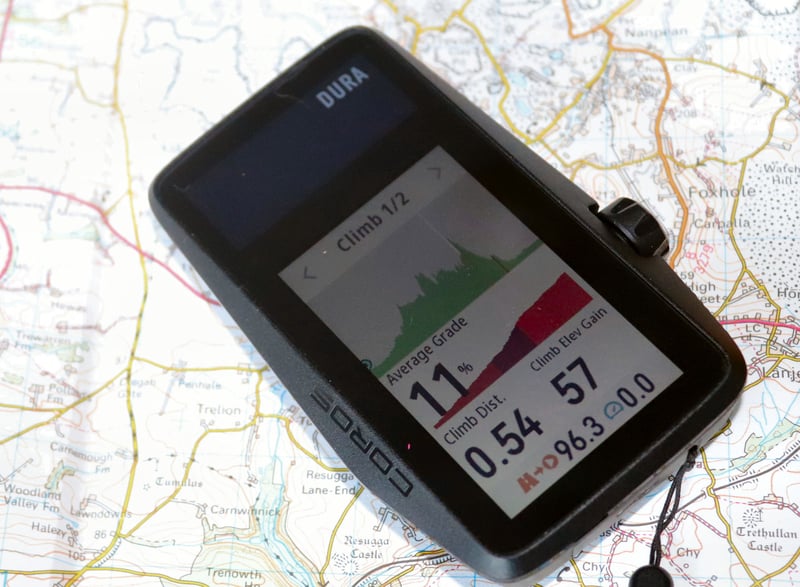
- Coros launched Hill Alerts in March 2026 as its ClimbPro equivalent, available only in Run, Trail Run and Hike modes on Pace 4, Pace Pro, Pace 3, APEX 4, APEX 2, APEX 2 Pro, NOMAD, Vertix 2 and Vertix 2S; the feature requires a loaded route. Separately, the Coros DURA cycling computer has its own pre-existing route-based Climb feature. Neither offers course-free climb detection.
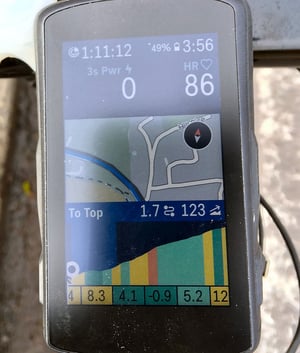
- Hammerhead CLIMBER on Karoo shows 100-metre colour-coded profile segments with remaining distance and elevation, and operates with or without a loaded route; it was the first cycling computer to offer course-free climb detection.
- Suunto Climb Guidance on Vertical, Race, Race S, Race 2 and Ocean classifies loaded-route climbs into five colour-coded section categories.
- Wahoo Summit Segments (loaded-route) and Summit Freeride (course-free) on Roam v2, Bolt v2 and newer devices use lower thresholds than Garmin’s, scaling from 400 metres at 3 per cent gradient down to 250 metres at 7 per cent, so that shorter, steeper ramps appear.
History and Development Timeline
- 16 August 2018: ClimbPro launches on the Fenix 5 Plus, positioned as a trail-running and hiking feature for the watch’s new onboard topographic maps.
- 24 April 2019: Cycling support arrives with the Edge 530 and Edge 830.
- February 2021: ClimbPro 2.0 launches with the Garmin Enduro and rolls out to the Fenix 6, MARQ, Forerunner 945 and Forerunner 745. Adds descent tracking for non-cycling activities and a configurable pre-climb alert.
- March 2022: Hammerhead ships Predictive Path Technology for CLIMBER on the Karoo 2 — the first cycling computer to offer course-free climb detection.
- Mid-2022: Garmin’s free-ride ClimbPro follows on the Edge 1040 in public beta.
- 2023: Suunto launches the Vertical with Climb Guidance.
- April 2023: Edge 540 and Edge 840 ship with free-ride ClimbPro and the Climb Explore widget.
- 2023: Wahoo Summit Freeride reaches Roam v2 and Bolt v2.
- Subsequent Edge launches, Edge 1050 and Edge MTB, share the same free-ride capability.
- March 2026: Coros joins the category with Hill Alerts.
Watch-side, course-free climb does not yet exist on any key brand at the time of writing, according to the current firmware. Every Forerunner, Fenix, Suunto Race, Suunto Vertical, Coros APEX and Coros Vertix requires a loaded route or course for its climb feature to operate.
Which Garmin Devices Support It
ClimbPro requires onboard mapping capability and is present on all current Edge cycling computers with mapping, and on mapping-capable watches in the Fenix, Forerunner, Enduro, Epix, MARQ, tactix, Quatix and Venu X1 ranges. Non-mapping watches, including the Venu 4, Venu 3, Vivoactive 6 and the Instinct series, do not support ClimbPro. The Instinct omission reflects both the lack of onboard maps and Garmin’s feature segmentation across its outdoor lines. Free-ride (course-free) ClimbPro is restricted to the Edge 540, Edge 840, Edge 1040, Edge 1050 and Edge MTB; no watch in any series currently supports climb detection without a loaded course.
Where to Find It
- Per-climb screen (watch or Edge): appears automatically at the start of each detected climb; requires ClimbPro enabled in the activity profile.
- Course preview (watch or Edge): Navigation > Courses > [select course] > Climbs; lists all detected climbs with length, gradient and elevation before the activity starts.
- In-activity summary page (watch or Edge): accessed within the timer loop page cycle during the activity; lists all remaining climbs with completed climbs marked.
- Climb explore widget (Edge 540, 840, 1040, 1050 and MTB): via the widget list or by panning the map outside any activity; browses categorised climbs near the current location.
- Garmin Connect mobile activity summary: post-ride, under the activity details page; shows each completed climb with profile, grade and time.
- Garmin Connect course planner: detected climbs appear as an optional map layer toggled from the course planner map controls; available on all Garmin Connect accounts regardless of whether the rider’s device supports ClimbPro.
Common Problems and Misreadings
When an expected climb fails to appear, see the FAQ above for details on classification thresholds. When a climb appears but with the wrong gradient or ascent figures, the cause is bad elevation data in the course file itself. This is most often a problem with courses whose elevation was stripped, smoothed or never added at export. Rebuild the course in the Garmin Connect course planner if the problem persists.
The per-climb screen appearing 100 to 200 metres before the rider reaches the climb, and completing early, is the documented position alignment issue in free-ride mode. Reports are most common on the Edge 1040, with Edge 540 and 840 showing the same symptoms less often. Updating the supplementary map layer through Garmin Express resolves some cases; others persist even on well-mapped main roads and sit as a known limitation. On course-based rides, the same symptom usually points to elevation data in the course file that places the summit earlier than the actual terrain does.
When ClimbPro keeps showing the course’s climbs after the rider has stopped following the route, the Edge is still registering active navigation. End navigation explicitly from the Edge’s navigation menu to switch ClimbPro back to free-ride behaviour. A related effect: a climb that appears as one ascent on some rides and two separate ascents on others has usually been crossed at different sensitivities, or built from different course files with different elevation smoothing.
How to Use It
On Edge 540, 840, 1040, 1050 and MTB: open the activity profile, select ClimbPro, and configure four settings.
- Mode: “Always” for free-ride detection on every ride; “When Navigating” for course-based only
- Climb Detection: sensitivity threshold (all climbs / medium and large/large only)
- Terrain Type: matches the surface; Garmin does not fully document what these changes mean
- Alert: banner at the start of each climb or at a set distance before it
<p “>On watches: Activity Settings > ClimbPro. Status is fixed at “When Navigating.” Per-activity configuration covers the pre-climb alert and the descent display. <p “>Course file quality matters. Courses built in the Garmin Connect course planner use Garmin elevation data and work reliably. Komoot imports are generally good. Strava exports need elevation enabled, or they arrive as flat profiles, and ClimbPro shows nothing.
Altimeter calibration before a hilly ride or hike improves real-time ascent accuracy. It does not affect climb detection.
How It Connects to Other Features
ClimbPro draws its route and elevation data from [LINK: course-following] and works on top of the map layer provided by [LINK: topo-maps]. For pacing, it complements PacePro on running watches and [LINK: power-guide] on Edge cycling computers, all three of which benefit from high-quality elevation data in the course file. Post-activity, ClimbPro’s climb splits feed into [LINK: hill-score] on watches that support it.
