Garmin watches collect recovery data every night. HRV status, Body Battery, sleep score, training load ratio. The numbers are there every morning. For runners and cyclists, Garmin translates this data into Daily Suggested Workouts and Training Readiness scores. For strength training, the translation stops. The watch can tell you your Body Battery is 35, but it has no opinion on what that means for your gym session.
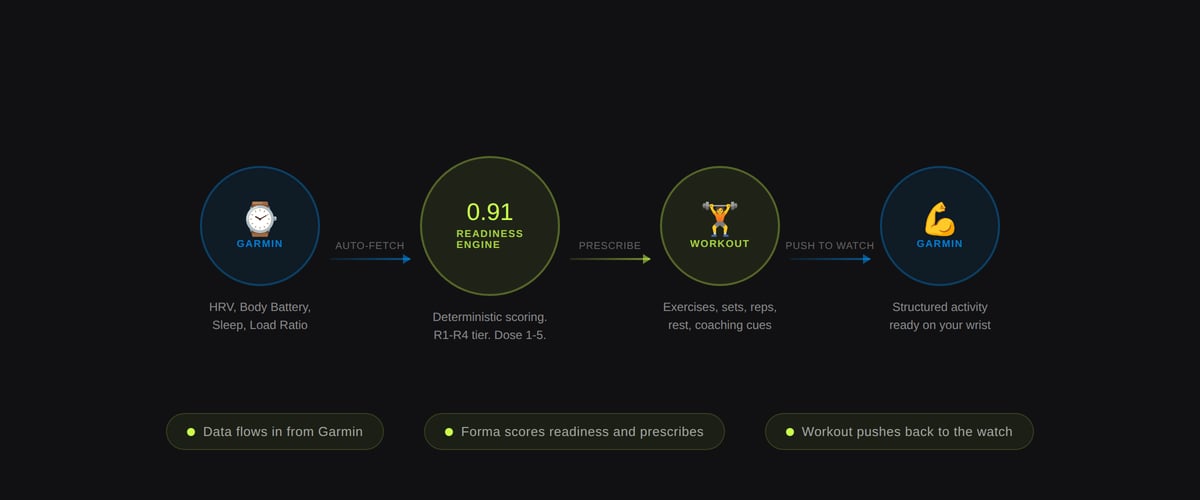
Forma is a tool that closes that gap. It reads four Garmin recovery metrics, scores daily readiness, and generates a structured strength workout matched to the user’s recovery state. The workout then pushes directly to the Garmin watch as a structured activity. A Connect IQ widget keeps the key numbers visible on the watch face throughout the day: Training Dose (how hard to train, scored 1 to 5) and Training Window (OPEN, CLOSING, or CLOSED). The basic workout generator is free with no account required. Pro features (auto-fetch and push to watch) come with a 28-day free trial.
No AI involved. The engine is entirely deterministic. Same inputs, same output, every time.
What Problem Does It Solve?
Most Garmin users who lift weights are in one of two camps: they either ignore their recovery data entirely when planning gym sessions, or they look at it, draw some vague conclusion about how recovered they are, and then do whatever they were planning to do anyway.
The second group is the interesting one. They already believe the data has value. The friction is in the translation. Going from “my Body Battery is 52 and my HRV is unbalanced” to “today should be a moderate hypertrophy session, not a heavy day” requires a set of rules that Garmin does not provide for strength training.
Garmin’s own recent strength training survey confirms the appetite. The survey asked users how frequently they lift, what motivates them, and which third-party tools they turn to when Garmin’s native features fall short. It listed FitBod, Hevy, and Strong by name. The gap is large enough that Garmin is actively researching how to address it.
Forma provides the rules today. Connect your Garmin account, and the tool pulls your morning metrics automatically, scores your readiness, and returns a complete workout: session type, exercises, sets, reps, rest periods, and coaching cues. The same inputs will always produce the same output. There is no randomisation, no machine learning, and no subjective override.
How the Readiness Engine Works
The engine takes five inputs: HRV status (balanced, unbalanced, or low), Body Battery (0 to 100), sleep score (0 to 100), training load ratio (acute-to-chronic), and HRV low streak (consecutive days of low HRV). Each is normalised and weighted into a composite readiness score:
- HRV status carries the highest weight (40%), reflecting its established role as a recovery indicator
- Body Battery contributes 25%, capturing overnight autonomic recovery
- Sleep score accounts for 20%
- Training load ratio carries 15%, flagging overreaching before it becomes a problem
The fifth input, HRV low streak, does not contribute to the composite score directly. Instead, it acts as a hard override: two or more consecutive days of low HRV force the engine into R1 (Recover) regardless of what the other metrics say. This is the safety catch. A single bad night can produce a misleading low HRV reading, but two consecutive days of suppressed HRV is a reliable signal that the body needs rest, not a push.
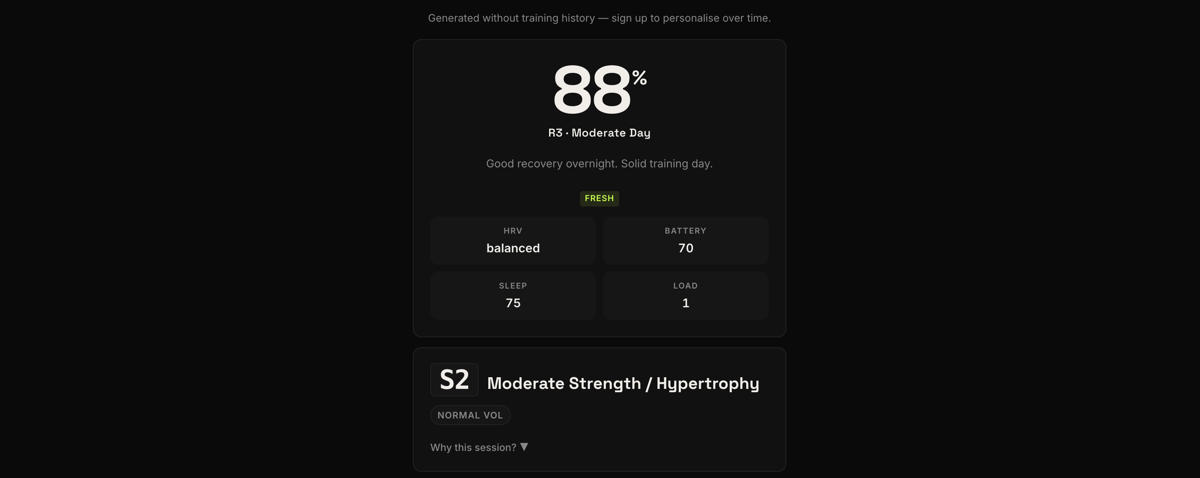
The composite score maps to one of four readiness tiers:
- R4 (Train Hard): All systems are recovered. Heavy compound work is available.
- R3 (Moderate): Moderate strength and conditioning. The most common tier, with roughly half of all user sessions landing here.
- R2 (Easy): Conditioning or low-intensity only. The body is managing accumulated load.
- R1 (Recover): Active recovery. The engine will not prescribe any demanding work.
Additional hard overrides exist beyond the HRV streak: Body Battery below 30 caps the tier at R2. A training load ratio above 1.5 forces R1. These overrides exist because the composite score alone can mask individual metrics that are clearly out of range. A user with 95 sleep score but 20 Body Battery should not be prescribed heavy deadlifts, even if the weighted average technically reaches R3.
Training Dose and Training Window
The readiness tier feeds two user-facing concepts that Forma introduces: Training Dose and Training Window.
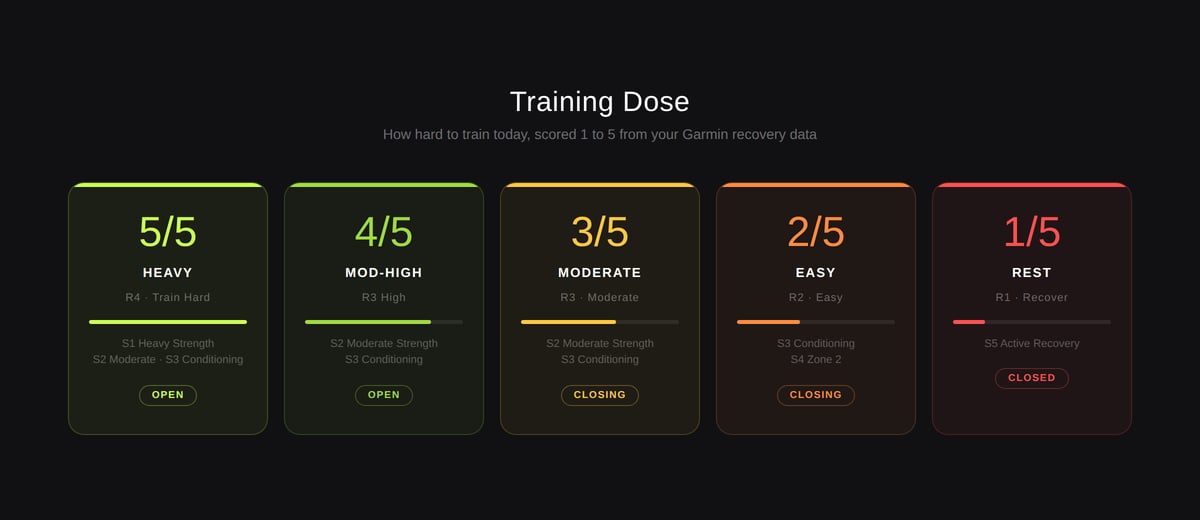
Training Dose is a 1 to 5 scale that tells the user how hard to train today. It maps directly from the readiness tier: R4 produces a Dose of 5 (Heavy), R3 high produces 4 (Moderate-High), R3 produces 3 (Moderate), R2 produces 2 (Easy), and R1 produces 1 (Rest). This is the number that appears on the Connect IQ widget and throughout the app. It is designed to be understood in two seconds. You glance at your watch, see “4/5”, and know today is a solid training day.
Training Window describes whether conditions are favourable for demanding work: OPEN means the body is recovered and ready for high-intensity training. CLOSING means moderate work is appropriate but the window for heavy sessions is narrowing. CLOSED means rest or very light activity only.
These two concepts are Forma’s primary outputs. Everything else, the workout prescription, the exercise selection, the volume adjustments, flows downstream from them.
What a Workout Looks Like
Each readiness tier unlocks a set of session types. R4 allows heavy strength (S1), moderate strength (S2), or conditioning (S3). R3 allows S2 and S3 only. R2 is limited to conditioning and zone 2 work. R1 prescribes active recovery.
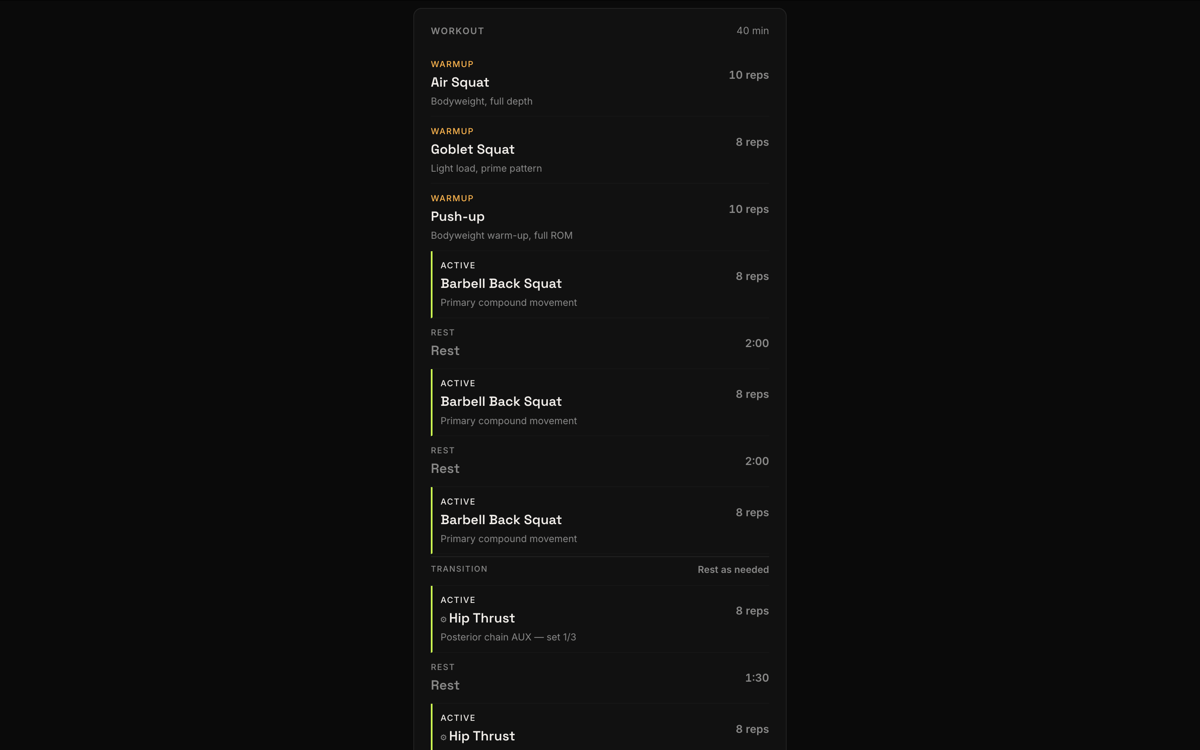
Once the session type is selected, the engine builds the workout from block templates. An S1 Heavy Strength session includes a primary hinge or squat pattern at low reps and high intensity, a secondary push or pull pattern at moderate reps, and auxiliary core work. An S2 Moderate Strength session shifts toward hypertrophy ranges, with higher reps, greater volume, and broader movement-pattern coverage. The current exercise library contains over 50 exercises spanning seven movement patterns: hinge, squat, push, pull, carry, locomotion, and core.
For users who create a free account, exercises rotate between sessions using a deterministic pattern rotation system. If the user trained a hinge pattern yesterday, the engine deprioritises hinge-dominant sessions today and promotes squat- or push-dominant sessions instead. This serves two purposes: it prevents repetitive sessions and ensures weekly muscle group coverage. It also functions as a basic form of muscular fatigue management by avoiding the same movement patterns on consecutive days. The user does not need to think about any of this.
Weekly fatigue state adds another layer. The engine tracks hard sessions (S1 and S3) over a rolling seven-day window. Four or more hard sessions in seven days triggers a FATIGUED state, which automatically reduces volume and blocks S1 sessions unless readiness is R4. Two or fewer hard sessions triggers a FRESH state with full volume. Users report that this creates a natural autoregulation pattern where roughly one easier week emerges every three to four weeks, driven entirely by recovery signals rather than a predetermined calendar. This resembles a reactive autoregulation approach rather than traditional periodisation.
Every workout includes a warm-up, main working blocks with specific sets, reps, and rest periods, and a cool-down. Coaching cues are attached to exercises, covering bracing, tempo, eccentric control, and common form errors.
The Garmin Connection
When Forma launched in April 2026, it required manual input. The user checked their Garmin watch, noted their HRV status, Body Battery, sleep score, and training load ratio, then entered the numbers into the web form. It worked, but it added friction to a tool whose entire purpose was to remove a daily decision.
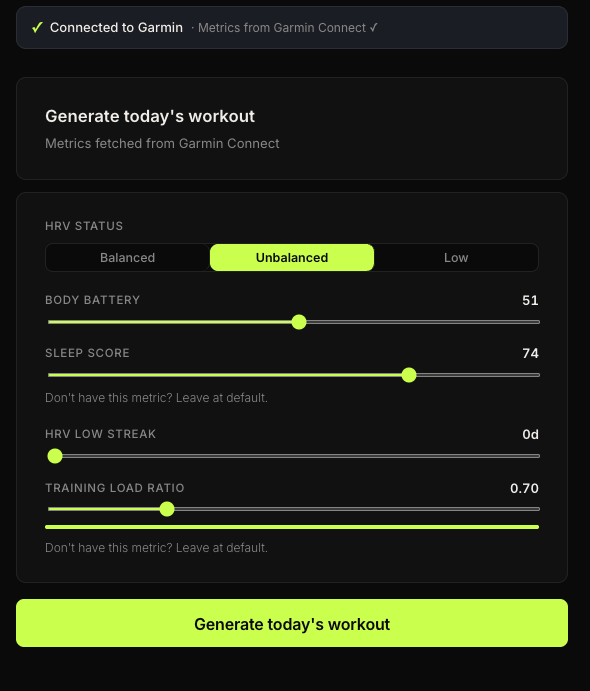
That friction is now gone. Users connect their Garmin account once through the Forma web app (app.forma.coach). From that point forward, Forma pulls the morning’s recovery metrics automatically. Open the app, and the readiness score is already calculated. The workout is ready to generate with a single tap.
The connection also enables push to watch. After generating a workout, users can push it directly to their Garmin as a structured activity. The workout appears in Garmin Connect with named exercises, set counts, rep targets, rest timers, and coaching cues embedded in the step notes. Walk into the gym, start the activity on the watch, and follow along. No phone required during the session.
This closes the loop that Forma was designed around: Garmin data flows in, a readiness decision flows out, and the resulting workout flows back to the watch. The user’s only action is opening the app and tapping “generate.”
The Connect IQ Widget
The most recent addition is a Connect IQ widget, available free on the Garmin Connect IQ Store. It puts Training Dose and Training Window on the watch face, visible at a glance without opening any app.
The widget runs in two modes:
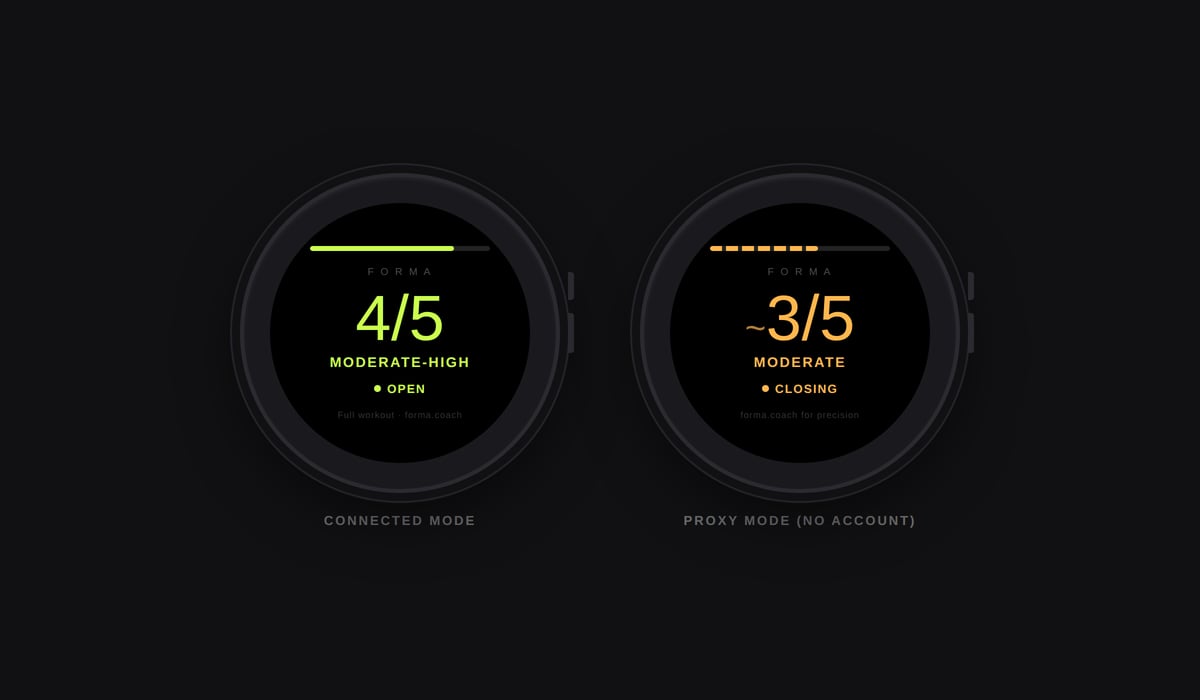
Proxy mode works without a Forma account. The widget reads Body Battery and Stress data directly from the watch sensors and estimates a Training Dose on-device. The display shows a tilde prefix (~4/5) to indicate this is an estimate from two inputs rather than the full five-input engine. It is useful for users who want a quick directional read on their training day without connecting anything.
Connected mode links to a Forma account via a six-digit pairing code. In this mode, the widget fetches the authoritative Training Dose and Training Window from the Forma backend, which uses the full five-input readiness engine (HRV status, Body Battery, sleep score, training load ratio, and HRV low streak). The display shows a clean number without the tilde, and the Training Window (OPEN, CLOSING, or CLOSED) appears below.
The widget is compatible with 37 Garmin devices including the Forerunner 255, 265, 955, 965, Fenix 7 and 8 series, Enduro, and Venu 3. The Instinct 2 series is excluded due to its monochrome display.
For users who do not want a full workout prescription and just want a daily “should I go hard or take it easy?” signal on their wrist, the widget in proxy mode delivers that with zero setup.
What the Data Shows
Since launching in April 2026, Forma has generated over 700 workout decisions across more than 300 unique users. The data reveals several patterns worth noting.
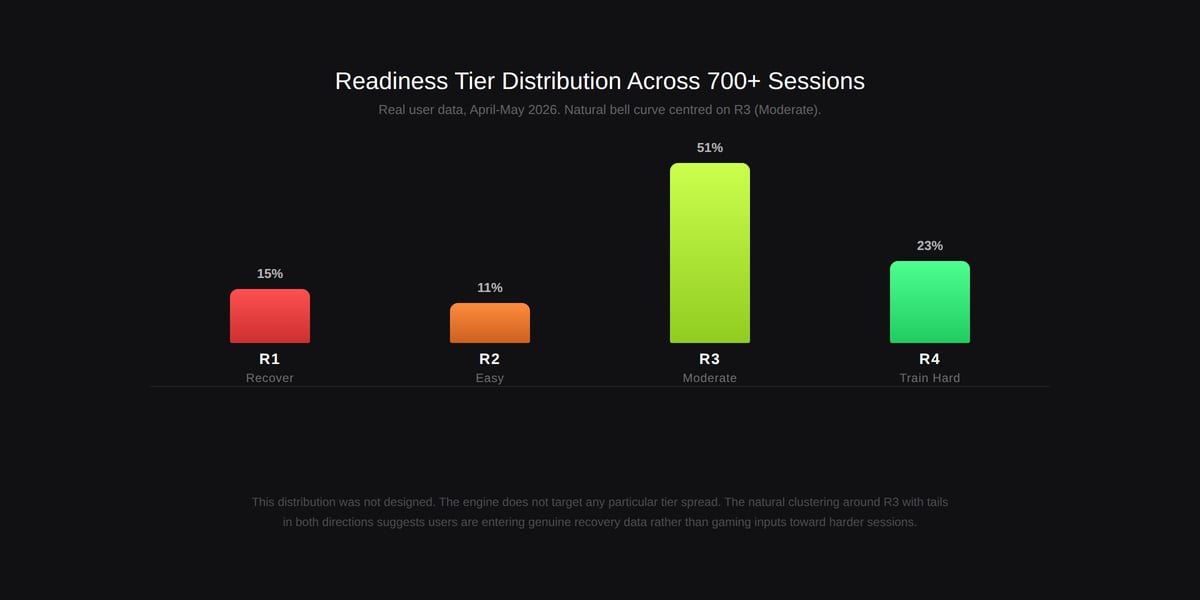
The readiness tier distribution follows a natural bell curve: R3 (Moderate) accounts for roughly 51% of all sessions, R4 (Train Hard) for 23%, R1 (Recover) for 15%, and R2 (Easy) for 11%. This distribution is important because it was not designed. The engine does not target a particular tier distribution. The fact that real user data clusters around moderate readiness with tails in both directions suggests that users are entering genuine recovery data rather than gaming the inputs toward harder sessions.
Session type distribution reflects this: S2 (Moderate Strength) is the most prescribed session, followed by S1 (Heavy Strength). S5 (Recovery) sessions appear regularly, confirming that the engine does pull users back on days when recovery data warrants it. S3 (Conditioning) sessions fill the gaps. S4 (Zone 2) sessions emerge less frequently and primarily for users with longer usage histories, as the engine needs sufficient session data to trigger the weekly fatigue logic that routes users toward lower-intensity work.
The average Body Battery across all sessions is 64, and the average sleep score is 74. The average training load ratio is 1.0, which is the default value. This confirms what was suspected from launch: many Garmin watches in the mid-range (particularly the Forerunner 255) do not surface training load ratio in an easily accessible location, so most users leave it at the default. The engine handles this gracefully since training load ratio carries only 15% of the composite weight.
Early users who have stayed with the tool report that the system’s value becomes more apparent over time. One user noted: “I punched in my numbers and it suggested Train Hard. That is exactly what I did this morning.” Another described it as “really impressive, it definitely is something useful.” A third has been generating sessions consistently since launch week.
Device Compatibility
Forma works with any Garmin watch that reports Body Battery and HRV status. This covers most of the Forerunner, Fenix, Enduro, and Venu lines. Mid-range watches like the Forerunner 255 lack Training Readiness, but Forma does not need it. It works directly from the raw metrics.
Some watches lack a training load ratio or sleep score. The tool handles this with default values. The training load ratio defaults to 1.0 (balanced), and users without a sleep score can leave it at the default. The engine still functions, though with slightly reduced precision.
For the web app with Garmin auto-fetch, users connect their Garmin account once and metrics are pulled automatically on each visit. For the Connect IQ widget, proxy mode works entirely on-device with no account required. Connected mode requires a free Forma account and a one-time pairing via a six-digit code.
What It Does Not Do
Forma does not track what happens during the workout. The current version does not log sets, count reps, or measure bar speed. Weight tracking and progressive overload are on the development roadmap. Today, the tool focuses exclusively on the pre-workout decision: what type of session to do, and exactly what that session should contain.
It does not fully account for muscular fatigue. Garmin’s recovery metrics are biased toward cardiovascular and autonomic recovery. HRV, Body Battery, and sleep score reflect the central nervous system and cardiac readiness. They say nothing directly about whether your quads have recovered from Tuesday’s squat session. The pattern rotation system partially mitigates this by avoiding repeated loading of the same muscle groups, but it tracks movement patterns rather than actual tissue recovery. This is a limitation that no wearable currently addresses well for strength training.
Forma does not run a multi-week periodisation programme. Each day’s workout is prescribed independently based on that morning’s recovery state. There is no mesocycle structure, no planned deload week, and no progressive overload curve. The natural autoregulation pattern described above is emergent, not programmed.
It is also not a replacement for a coach. Users following a structured programme from a trainer can use the readiness tier and Training Dose as a guide to session intensity while relying on their programme for exercise selection and progression. Forma is opinionated about daily intensity. It is not opinionated about long-term programming goals.
Current State and Roadmap
Forma launched in early access in April 2026 as a free, manual-input web tool. In its first two weeks, over 300 unique users generated more than 700 workout decisions through organic reach and editorial coverage. The readiness tier distribution across all users follows the natural bell curve described above, centred on R3 (Moderate).
Since launch, the product has shipped several major updates: Garmin auto-fetch (removing manual input entirely), push to watch (structured workouts sent directly to the Garmin device), an expanded exercise library with over 50 exercises, coaching cues on all exercises, weekly fatigue-based volume adjustment, and the Connect IQ widget with both proxy and connected modes.
An insight system is also live for returning users. It tracks decision history and builds a training personality profile over time. After several sessions, the system begins generating next-day predictions: an estimate of tomorrow’s likely readiness tier and session type based on the user’s historical patterns. This is not prescriptive. It is informational, designed to help users anticipate whether tomorrow looks like a training day or a rest day before they go to sleep.
The roadmap includes in-workout tracking (sets, reps, weight), progressive overload recommendations, and equipment-aware exercise selection for users who train with specific gym setups.
The tool is built and maintained by a solo developer training on a Forerunner 255.
Summary
Forma turns Garmin recovery metrics into structured strength workouts. It fills a specific gap: the missing translation between what Garmin measures overnight and what to do in the gym the next morning.
The engine is deterministic. The workouts are specific. The limitations (particularly around muscular fatigue measurement and long-term periodisation) are openly acknowledged. Garmin data flows in, a readiness decision flows out, and the workout pushes back to the watch. A Connect IQ widget keeps Training Dose and Training Window visible on the wrist throughout the day.
For Garmin users who already check their recovery data each morning and wonder what to do with it, Forma provides the answer. Try it at app.forma.coach (free, no sign-up required), or install the Connect IQ widget directly on your watch.
Forma is an independent project. It is not affiliated with or endorsed by Garmin or the5krunner. Guest mode is free. Pro and Ultra plans are available with a 28-day free trial.
Quick answers
Which Garmin watches work with Forma?
Any Garmin watch that reports Body Battery and HRV status is compatible with the web app and Garmin auto-fetch. This includes most models in the Forerunner, Fenix, Enduro, and Venu lines. Watches that lack a training load ratio or sleep score still work; the engine substitutes default values for missing metrics. The Connect IQ widget supports 37 devices (API 4.1.0 and above). The Instinct 2 series is excluded due to its monochrome display.
Does Forma replace a strength training programme?
It replaces the daily session selection, not the long-term programme. Forma prescribes each day’s workout independently based on that morning’s recovery data. It does not manage multi-week periodisation, planned deload weeks, or progressive overload targets. Users following a structured programme from a coach can use the readiness tier and Training Dose as a guide to session intensity, while relying on their programme for exercise selection and progression.
How does Forma handle back-to-back gym days?
Registered users benefit from a pattern rotation system that tracks which movement patterns were trained in recent sessions. If a hinge pattern was loaded yesterday, the engine deprioritises hinge-dominant work today and promotes squat or push patterns instead. This reduces the risk of loading the same muscle groups on consecutive days. The rotation is deterministic and requires no manual input.
What is the Connect IQ widget?
The Forma widget is a free Connect IQ app that shows your Training Dose (1 to 5) and Training Window (OPEN, CLOSING, or CLOSED) on your Garmin watch face. In proxy mode, it uses on-device Body Battery and Stress data to estimate a dose with no account needed. In connected mode, it links to your Forma account and shows the authoritative five-input readiness result. Install it from the Connect IQ Store.
Do I need a Forma account?
No. The web app works as a guest with no account and no login. Enter your metrics manually and get a workout. Creating a free account unlocks pattern rotation between sessions, weekly fatigue tracking, and the insight system. Garmin auto-fetch and push to watch are Pro features (£19/month), available with a 28-day free trial. The Connect IQ widget works without an account in proxy mode.
How does Garmin auto-fetch work?
Auto-fetch is a Pro feature. Connect your Garmin account once through the Forma web app. From that point, Forma pulls your morning HRV status, Body Battery, sleep score, and training load ratio automatically each time you open the app. No daily data entry needed. A 28-day free trial is available for new users.
Can I push the workout to my watch?
Yes. Push to watch is a Pro feature (included in the 28-day free trial). After generating a workout, tap the push button and it appears in Garmin Connect as a structured activity with exercises, set counts, rep targets, rest timers, and coaching cues in the step notes. Start the activity on your watch and follow along.
Is it free?
Guest mode (manual input, no account) is free and always will be. Creating a free account unlocks pattern rotation, weekly fatigue tracking, and the insight system. Pro (£19/month) adds Garmin auto-fetch and push to watch. Ultra (£39/month) adds equipment-aware exercise selection on top of Pro. The Connect IQ widget in proxy mode is also free. Both paid tiers include a 28-day free trial with card upfront.
If you enjoyed reading this, here is another in the Indie Spotlight series: Type to Run Weekly Coach: AI Training Plans for Garmin.
Last Updated on 12 October 2026 by tfk the5krunner
Small things I always use
- Garmin 90-degree charging adapter: Charges your Garmin from any USB-C cable. Essential when travelling. I use one.
- Body Glide: The blue anti-chafe stick swimmers and runners carry. I use it.
- Speedo earplugs: Fewer ear infections and no cold-water dizziness. I use them.
- Dryrobe Advance: My winter changing robe for open-water swims. I use one. A cheaper option is the AONYIYI changing robe.
- Maurten: Race fuel that stays easy on the stomach. I use them.
- Garmin charging puck: The quickest way to top up before a session. I use one.
- Injinji: Toe socks that stop rubbing, so you run more. I use them.
- Ultimate toe protectors: Stop black toenails on long runs. They work. I use them.
- Compressport R2 v2 calf sleeves: My calf sleeves of choice. I use them.
- Cellucor C4: My pre-workout before hard sessions.
- TPU tubes: Schwalbe Aerothan, Tubolito and Pirelli SmarTube. Light, tiny spares. I use all three.
- G8 insoles: Adjustable insoles that are good. I use them.
- Cycplus Cube: A 97g electric pump that gets a road tyre rideable in two minutes. I carry one. 5% off with code THE5KRUNNER.
Watches and sensors
- Polar H10: My daily driver for waking HRV.
- Polar Verity Sense: My backup arm-worn HR sensor.
- Nomad bedside charger: Charges my iPhone and Apple Watch overnight. I use it, and many of their bands.
- Train.Red: The best muscle oxygen sensor I’ve used.
- Tymewear: Accurate heart rate and reliable ventilatory zones. I use it to pace endurance rides over an hour.
- Garmin Forerunner 970: A pro-grade triathlon watch. I use this.
- Apple Watch Ultra 4: My daily smartwatch. No phone needed on rides.
- Garmin Fenix 9 Pro: I’ve just bought one.
On the bike
- Continental GP5000 for everyday riding, and Aero 111 on the front for special occasions.
- Helmets: Specialized S-Works Evade 3 for road riding, and Rudy Project Wing for TT-style races. I use both.
- Ravemen FR300: A front light that mounts under your Garmin or Wahoo. I use one.
- Wahoo TRACKR Radar: I use it on one bike and Varia on the other. They perform the same.
- Garmin Varia RTL515: Radar that warns you of cars from behind. I use this model.
- Wahoo ELEMNT Roam 3: The bike computer that’s easy to use. I use mine on most rides.
- Favero Assioma Pro RS2: Accurate power pedals that swap easily between bikes. I use this model.
Home and indoor training
- NPE Runn: Makes my basic treadmill smart, sending more accurate speed and distance to my watch and Zwift. I use it.
- Google Wifi: Keeps Zwift connected in my pain cave. I use it.
- Apple TV 4K: Zwift on the big screen. I use two.
- Google Nest Doorbell (wired, 2nd gen): My video doorbell, running in both Google Home and Apple Home. I use it.
Health, recovery and sleep
- FreeStyle Libre 3 Plus: Shows how my blood sugar responds to diet.
- hDrop: Measures my sweat loss in summer and indoors.
- Fourth Frontier Zone: Checks my heart under load in hard sessions.
- Oura Ring 5: My partner’s recovery tracker of choice.
- Kineon MOVE+: Red light therapy for niggles. It works.
- Eight Sleep: A cooling mattress cover my partner and I use nightly.
Reader-Powered Content

This content is not sponsored. It’s mostly me behind the labour of love, which is this site, and I appreciate everyone who supports it.
Support the site: Follow (free, fewer ads) · Subscribe (paid, ad-free) · Buy Me A Coffee ❤️
Written by real people, with AI assistance. Fact-checked and verified for originality. See the Editorial Policy. FTC: Affiliate Disclosure — some links pay commission. As an Amazon Associate, I earn from qualifying purchases.

tfk is the founder and author of the5krunner, an independent endurance sports technology publication. With 20 years of hands-on testing of GPS watches and wearables, and competing in triathlons at an international age-group level, tfk provides in-depth expert analysis of fitness technology for serious athletes and endurance sport competitors. ID
