Cadence (Running Dynamics)
Accuracy
Generally, within 1–2 spm of video analysis for the chest strap and pod at controlled paces
Best for
Targeting technique improvements
Weakness
Pace-dependent — readings at different effort levels are not directly comparable without controlling for speed
Plain English: Cadence is how many steps per minute a runner takes — counting both feet — and it rises naturally with speed, so the number means very little unless compared at the same effort level.
In practice, Cadence is one of the metrics I periodically monitor, ranging from two-hour runs to five-minute VO2 max intervals. The most practically useful thing I have done as a result is to incorporate efforts to maintain race cadence during training, which appears to reduce injury by lowering impact per foot strike. What the data showed me is that Garmin does not flag that my cadence falls disproportionately when I fatigue, compared to stride length, making it an earlier warning of gait breakdown that tends to precede injury for me than stride length alone does.
Frequently Asked Questions
What is a good running cadence on Garmin?
Most recreational runners fall between 140 and 165 spm at easy paces, with trained athletes typically registering 165 to 180 spm at controlled efforts. The 180 spm figure is widely cited but derives from elite race-pace observations and is not an appropriate target for slower or less-experienced runners.
Should I be trying to hit 180 steps per minute?
The 180 spm figure derives from Jack Daniels’ observations of elite runners at the 1984 Olympics and does not apply universally to recreational runners at slower paces. A more practical target is five to ten per cent above a runner’s own freely chosen cadence at a given training effort, not a fixed universal number.
Why does my cadence drop towards the end of a long run?
Neuromuscular fatigue reduces the rate at which motor units can be recruited to sustain stride frequency, resulting in a progressive decline in cadence that typically accompanies lengthening of ground contact time and rising vertical oscillation. This is a recognised physiological response to cumulative effort, not a form breakdown, and resolves with adequate recovery.
Why is my cadence different when I use a chest strap versus just the watch?
Chest strap and wrist accelerometers are calibrated independently and produce systematically different absolute values — the discrepancy does not indicate a fault in either device. Mixing the two data sources within a single trend dataset creates a step change that resembles a training-induced change but is a sensor-change artefact; use one sensor type consistently.
Cadence — A Deep Dive
When Cadence Is Actually Useful
- In my early running days, I used Garmin’s metronome alongside the cadence readout to gradually raise my entire cadence range — a few steps per minute at a time over several months — which remains by far the most effective form change I have made.
- Cadence is one of my primary data fields across all distances. I use it to set and adjust pace in real time, deliberately targeting cadence changes rather than stride length because that is the lever I can actually tweak consciously mid-run.
- I have noticed that my cadence falls disproportionately when I fatigue relative to stride length, and this tends to precede injury — the apparent link is not perfect. Still, a sustained, unexpected drop in cadence is now the signal I act on first.
- I have used cadence to play to my strengths: I am more aerobically capable than I am muscularly strong, so raising cadence to go faster loads the cardiovascular system — where I have capacity — whereas pushing stride length demands muscular force I do not always have, particularly late in a race or long run.
Introduction
Cadence is the rate at which a runner takes steps, expressed as the total number of steps per minute, counting both feet. It tells an athlete how quickly the feet are turning over at any given moment during a run and serves as a primary indicator of running stride frequency.
Cadence, within Garmin’s Running Dynamics suite, is defined as steps per minute (spm), combining left and right foot contacts. A reading of 170 spm means the runner is taking 170 individual steps — 85 with each foot — every minute. The metric is among the most established in running biomechanics, predating wearable technology by several decades, and it sits alongside ground contact time, vertical oscillation, stride length, ground contact time balance, and vertical ratio in the six-metric suite Garmin introduced in 2014. Cadence is the most widely available of the six metrics: it can be recorded from a chest strap, a waist-worn pod, the watch’s own wrist accelerometer, or a footpod, depending on the device and accessory in use. The principal limitation of cadence as a standalone metric is its dependence on pace — cadence rises naturally as a runner moves faster, which means a reading taken during an easy recovery run is not directly comparable to one recorded at threshold effort or during a race.
What the Number Actually Means
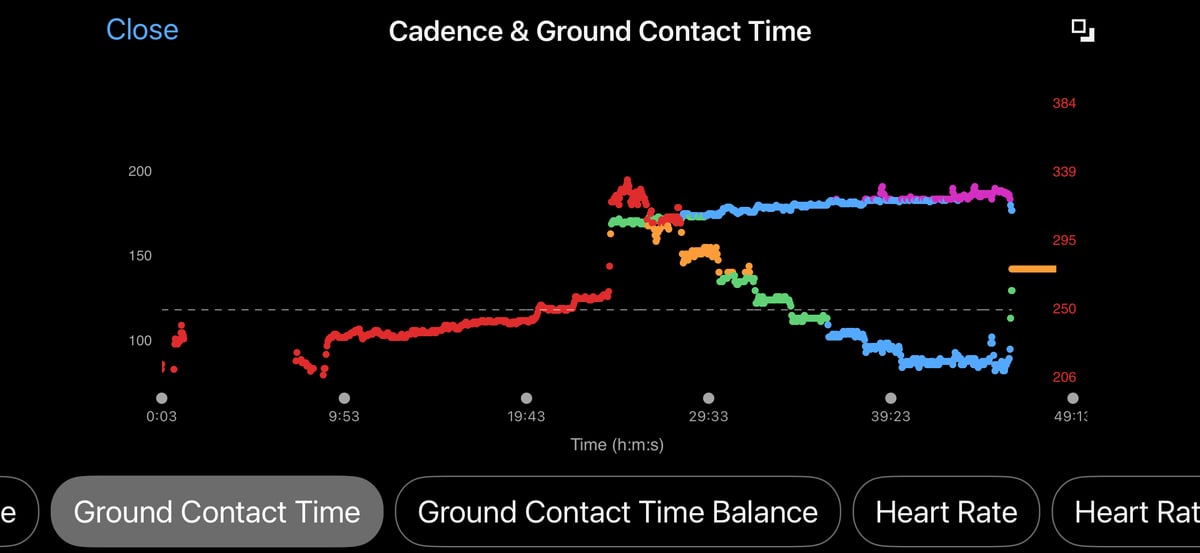
Cadence measures stride frequency: a higher value indicates faster leg turnover, while a lower value indicates a longer stride cycle at the same speed. Because cadence and stride length are mathematically linked at any given pace — increasing one requires decreasing the other — a runner raising cadence from 160 to 170 spm at constant speed must shorten each stride proportionately. For most recreational runners, cadence at easy to moderate paces ranges from 140 to 165 spm; trained athletes typically register 165 to 180 spm during controlled efforts. A figure of 180 spm is widely cited as an efficiency target, originating from Jack Daniels’ observations of elite runners at the 1984 Olympics. Still, subsequent research has not supported it as a universal optimum for recreational runners. Garmin displays cadence against a colour-coded percentile gauge: red below 153 spm, orange 153 to 163, green 164 to 173, blue 174 to 183, and purple above 183; a runner at an easy pace will frequently register red or orange while threshold efforts register green or blue in the same training block, which is normal and not a form signal. Age and sex do not materially affect appropriate cadence at a given speed; height has a modest indirect influence, as taller runners tend to have longer natural stride lengths and may prefer a slightly lower cadence at equivalent effort.
| Garmin colour | Cadence range (spm) | Typical runner profile | Interpretation note |
|---|---|---|---|
| Purple | 184 and above | Elite or fast club runner at race effort | Uncommon at easy pace; normal at 5km race effort for trained runners |
| Blue | 174–183 | Trained runner at threshold or tempo effort | Expected at hard efforts; at easy pace may indicate short, choppy stride |
| Green | 164–173 | Recreational to club runner at moderate effort | Typical target range for easy to moderate running in trained athletes |
| Orange | 153–163 | Recreational runner at easy or recovery pace | Normal at genuinely easy effort; not a form problem in isolation |
| Red | 152 and below | Beginner runner or any runner at very slow pace | Review in context of pace — low cadence at slow speed is expected, not a fault |
All zone boundaries are based on Garmin’s reference population of runners using chest-worn sensors. Wrist-based values are calibrated separately and may differ slightly. Zone colour at any given reading reflects effort level as much as running form — compare readings at equivalent paces across sessions, not across different effort levels within a single run.
How Garmin Calculates It
Garmin derives cadence from foot-strike timing events detected by a triaxial accelerometer. The sensor registers each foot contact as a distinct impulse in the vertical and anterior-posterior acceleration signal; the interval between successive events determines the instantaneous step rate, expressed as a per-minute figure from the observed strike frequency over a short rolling window.
The location of the accelerometer varies by sensor type: a chest strap (HRM-Run, HRM-Tri, HRM-Pro, HRM-Pro Plus, HRM-600, HRM-Fit) detects thoracic movement, the Running Dynamics Pod detects movement at the waistband, and the watch’s wrist accelerometer detects arm swing — a correlate of foot-strike cadence rather than a direct measurement. Each sensor type is calibrated independently; the reference population used to define the colour zone boundaries was established with chest-worn sensors.
Cadence is recorded continuously throughout any running activity and requires no additional conditions beyond an active running gait. The metric does not update during walking. It is valid on a treadmill because it depends entirely on accelerometer data rather than GPS-derived speed. The HRM-Fit and HRM-Pro Plus must be paired via ANT+ — not Bluetooth — for the watch to receive running dynamics, including cadence; a Bluetooth-only pairing transmits heart rate but not dynamics, a distinction not prominently documented in Garmin’s consumer-facing materials.
What Affects the Reading
Sensor position introduces a systematic difference in absolute values: chest, waist-pod, and wrist measurements are not interchangeable, and switching sensor type mid-training block creates a step change in the trend dataset that resembles a training-induced change but is an artefact of sensor change. Footwear and running surface have modest effects — highly cushioned shoes and soft terrain,n such as grass or sand, marginally alter the accelerometer signal — but neither is large enough to materially affect practical interpretation. Hills affect cadence in both directions: uphill running typically reduces cadence as stride length contracts, while downhill running may increase it as the runner shortens steps to control braking forces.
Pace is the dominant variable: a difference of 10-20 spm between easy and race effort in the same runner is typical and reflects normal biomechanical adaptation rather than measurement error. Treadmill running tends to produce a lower cadence than overground running at equivalent effort because the moving belt partially drives foot turnover mechanics, allowing some runners to adopt a longer, slower stride; the cadence reading is metrologically valid in this context, but the value is not directly comparable to outdoor sessions.
How Accurate Is It
Chest strap and pod cadence measurements are generally within one to two steps per minute of values derived from video analysis at controlled paces — an error magnitude unlikely to affect practical training decisions. Wrist-based cadence is reliable during steady-state running on flat terrain but less precise during acceleration, sharp directional changes, and on trails, where arm movement decouples from the foot-strike rhythm. Independent characterisation of wrist-based error under varied ecological conditions is limited as of early 2026; testing reported on dcrainmaker.com and elsewhere indicates acceptable accuracy for road running, but greater scepticism is warranted on technical trails.
The more important distinction is between absolute accuracy and trend reliability. Absolute accuracy — how closely the reading matches a laboratory ground truth — matters less than whether consistent changes in a single runner’s cadence dataset reflect real changes in running mechanics. Trend reliability is strong for chest and pod sensors within a stable dataset, provided the same sensor type is used consistently. Research supporting cadence optimisation as a training target is robust; what the evidence does not establish is any specific spm threshold that improves running economy across all runners.
Competitor Equivalents
- Polar measures cadence natively on the Vantage V3 and Vantage M3 from the wrist, with real-time and post-run displays, but offers no colour-coded percentile zone system,m and further dynamics metrics require a paired Stryd foot pod rather than Polar’s own sensors.
- Apple Watch (Series 6 and later, watchOS 9 and later) measures cadence natively alongside stride length, ground contact time, and vertical oscillation, available in real-time workout views and in the Fitness and Health apps post-run, but offers no percentile zone display.
- Coros (PACE 3, PACE Pro, APEX 2, APEX 2 Pro, VERTIX 2, VERTIX 2S — post-September 2025 firmware) measures cadence natively from the wrist in Road Run and Track Run modes; absolute values have not been independently validated against Garmin’s, and no percentile system is offered.
- Suunto (Race, Suunto 9 series) provides native wrist cadence but no proprietary dynamics accessory ecosystem or percentile display; additional stride metrics require a paired Stryd foot pod.
- Wahoo does not manufacture a wrist-worn running watch and offers no equivalent running cadence metric.
Which Garmin Devices Support It
Any Garmin running watch that accepts ANT+ external sensor pairing has supported cadence — and all five remaining Running Dynamics metrics — via a compatible chest strap or pod since the feature’s introduction in 2014. The HRM-Fit and HRM-Pro Plus must be paired in ANT+ mode; a Bluetooth-only pairing provides heart rate but not heart rate dynamics. Wrist-based cadence, without an external accessory, became available in March 2023 via the Forerunner 265 and Forerunner 965 at launch, with a simultaneous firmware update extending the capability to the Fenix 7 series, Epix Gen 2, Forerunner 255 and 955 series, Enduro 2, Quatix 7, and MARQ Gen 2; all subsequent current Garmin OS devices include it. The Forerunner 165, Venu 3, Venu 3S, and Vivoactive 6 are exceptions. These devices support wrist-based cadence but cannot pair with an external dynamics accessory, making ground-contact time balance unavailable regardless of configuration. Verify the current compatibility list against the Garmin support FAQ before publishing, as firmware updates alter it over time.
Where to Find It
- Activity data field: Add “Cadence” or “Run Cadence” to any custom data screen via Settings > Activity Profiles > [Activity] > Data Screens; displays the current rolling step rate in steps per minute throughout a recorded run.
- Running Dynamics widget: Full summary of all six dynamics metrics with colour zone indicators; accessible via the widget loop during or after a run.
- Widget glance: Shows the most recently recorded cadence value from the last completed run; visible in the widget loop without entering the full widget.
- Morning Report: Available on Fenix 8-generation and equivalent current devices; cadence from the prior day’s activity may appear within the running dynamics summary, though content adapts to recent activity and is not always surfaced.
- Garmin Connect app — activity detail: The Running Dynamics section within a recorded activity shows average and maximum cadence, a cadence-over-time graph aligned with the pace trace, and, on supported devices, a zone breakdown; no Connect Plus subscription required.
- Garmin Connect app — trends: Performance Stats section charts average cadence across multiple activities over time.
- Garmin Connect web: Cadence appears under the Running Dynamics tab in the activity details view; the historical Performance Stats cadence chart is primarily a mobile app feature and is not fully replicated in the web interface.
Common Problems and Misreadings
The most frequent misreading is comparing cadence across runs of different intensities. A runner recording 158 spm on an easy long run and 174 spm during a 10km race has not experienced a form change: lower cadence at lower effort is a normal biomechanical response to reduced speed demand, as noted in What Affects the Reading. Meaningful comparisons require controlling for pace — from easy runs to easy runs, and from threshold efforts to threshold efforts.
Discrepancies between wrist and chest-strap cadence values are not a fault in either device. They reflect the systematic calibration difference between sensor positions discussed in What Affects the Reading. Switching between sensor types creates a visible step change in the trend dataset that carries no physiological meaning; treat the two series as distinct and use one sensor type consistently within any trend dataset. See FAQ above for details.
Cadence declining across a long run, or registering lower than expected after a hard training block, typically reflects neuromuscular fatigue rather than a sensor fault. As cumulative effort increases, stride frequency drops, ground contact time lengthens, and vertical oscillation rises — a recognised fatigue signature that resolves with adequate recovery and is not a form problem requiring intervention. See FAQ above for details.
How to Improve It
The principal evidence-based mechanism for cadence adjustment is gradual step-rate elevation above a runner’s freely chosen cadence. Heiderscheit and colleagues demonstrated that increasing step rate five to ten per cent above preferred cadence reduces loading at the knee and hip without increasing oxygen consumption. A practical approach is to identify a target cadence five per cent above the current preferred cadence at a defined effort level and to practise holding it during portions of easy runs — typically ten to fifteen minutes at a time — using an audio metronome set to the target beat rate. Abrupt large increases risk overloading the calf and Achilles complex; raise cadence incrementally and set the target specific to a given training pace, not derived from race effort.
Short accelerations of approximately 20 to 30 seconds at controlled fast effort — commonly called strides — provide a low-volume neuromuscular stimulus for faster leg turnover. Including four to six strides at the end of easy runs, two to three times per week, builds familiarity with higher step rates without meaningful added training stress.
Scientific Basis
Heiderscheit BC, Chumanov ES, Michalski MP, Wille CM, Ryan MB. Effects of Step Rate Manipulation on Joint Mechanics during Running. Medicine and Science in Sports and Exercise. 2011. PMID: 20581720. Increasing step rate five to ten per cent above preferred cadence reduced knee and hip loading without increasing oxygen consumption — the primary biomechanical rationale for cadence-targeted gait modification. https://pubmed.ncbi.nlm.nih.gov/20581720/
Moore IS. Is There an Economical Running Technique? A Review of Modifiable Biomechanical Factors Affecting Running Economy. Sports Medicine. 2016;46(6):793–807. Cadence, ground contact time, and vertical oscillation were identified as the modifiable biomechanical variables most consistently associated with running economy, with caveats on direction of causality for recreational runners. [EDITOR: confirm URL before publishing] doi:10.1007/s40279-016-0474-4
Cavanagh PR, Williams KR. The Effect of Stride Length Variation on Oxygen Uptake During Distance Running. Medicine and Science in Sports and Exercise. 1982;14(1):30–35. PMID: 7070254. Recreational runners do not spontaneously select their most economical stride length, and externally imposed stride changes alter oxygen cost — the historical basis for cadence as a training variable. https://pubmed.ncbi.nlm.nih.gov/7070254/
Tartaruga MP, Brisswalter J, Peyre-Tartaruga LA, Avila AOV, Alberton CL, Coertjens M, et al. The Relationship between Running Economy and Biomechanical Variables in Distance Runners. Research Quarterly for Exercise and Sport. 2012;83(3):367–75. PMID: 22978185. Significant associations between cadence, vertical oscillation, and running economy at submaximal speeds support the suite-level rationale for Garmin’s Running Dynamics metrics as indicators of movement efficiency. https://pubmed.ncbi.nlm.nih.gov/22978185/
How It Connects to Other Features
Cadence and [LINK: stride-length] are mathematically inseparable: Garmin derives stride length by dividing GPS pace by cadence rather than measuring it directly, so any cadence error propagates into the stride length figure, and any change in one at constant pace requires an inverse change in the other. Cadence and Ground Contact Time (GCT) move in predictable opposition as pace changes — rising cadence compresses available foot contact time — and the two metrics are most informative when read together.
[LINK: vertical-oscillation] tends to decrease as cadence increases because higher step frequency reduces the height of each ballistic phase, while [LINK: vertical-ratio], which divides vertical oscillation by stride length, incorporates cadence indirectly and is degraded by cadence instability such as that seen during wrist-based measurement on technical terrain. Running Power draws on the same accelerometer hardware as the dynamics suite, with horizontal deceleration at foot contact — one component of the power calculation — derived from the same signal used to calculate cadence.
[LINK: running-economy], available with the HRM-600, requires cadence as one of its inputs alongside ground contact time, ground contact time balance, and step speed loss; running economy is unavailable from wrist-based dynamics alone.
[LINK: step-speed-loss] captures braking force at each foot contact and is higher in runners with low cadence and pronounced braking per stride, making cadence and step speed loss complementary rather than redundant signals.
