Workout Writer: Structured Workouts for Apple Watch and Garmin
Structured workout plans usually start as text. A coach describes a session in a sentence. A website publishes a neat session in a few lines. A runner jots something down in Notes on the way to the track. Each form is easy to read, but each still has to be translated into the rigid structure a watch expects: warm-ups, steps, repeats, recoveries, and targets.
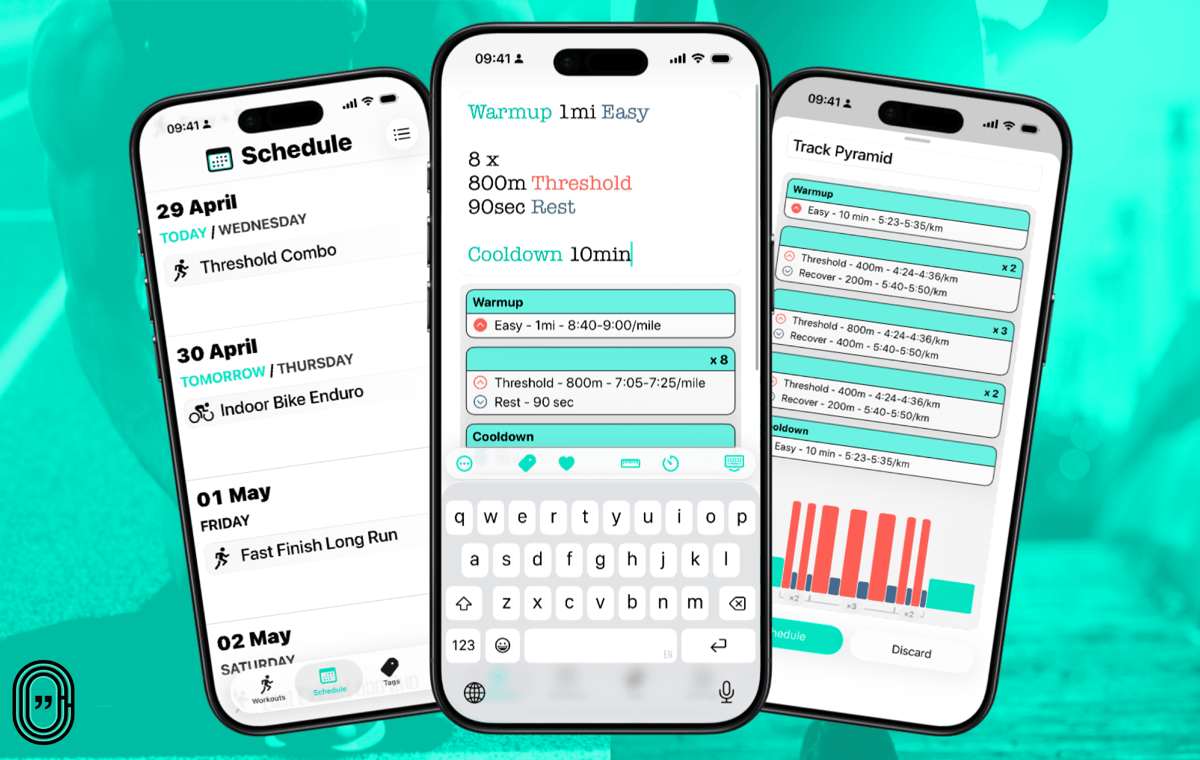
Workout Writer is built to ease that translation. The athlete types a running or cycling workout in plain text, checks the structured preview, and schedules it for Apple Watch or Garmin.
The app is a focused utility. It addresses one task: getting a known session from text onto a watch faster than manual entry allows.
How it works
Workout Writer currently supports running and cycling. The athlete chooses the sport, types the session, reviews the preview, and schedules the structured workout. On the day of training, it appears in the watch’s built-in workout app, ready to start.
A simple running session might read:
Warmup 2km Easy
8 x 800m @ 3:30/km, 90sec Rest
Cooldown 10 min
Cycling sessions can use time, power, cadence, heart rate, or effort tags, depending on configuration.
The parser is rules-based rather than AI-based. The preview is instant, and the results are repeatable. Recognition is shown as the athlete types, so any mistranslation surfaces immediately.
Effort tags
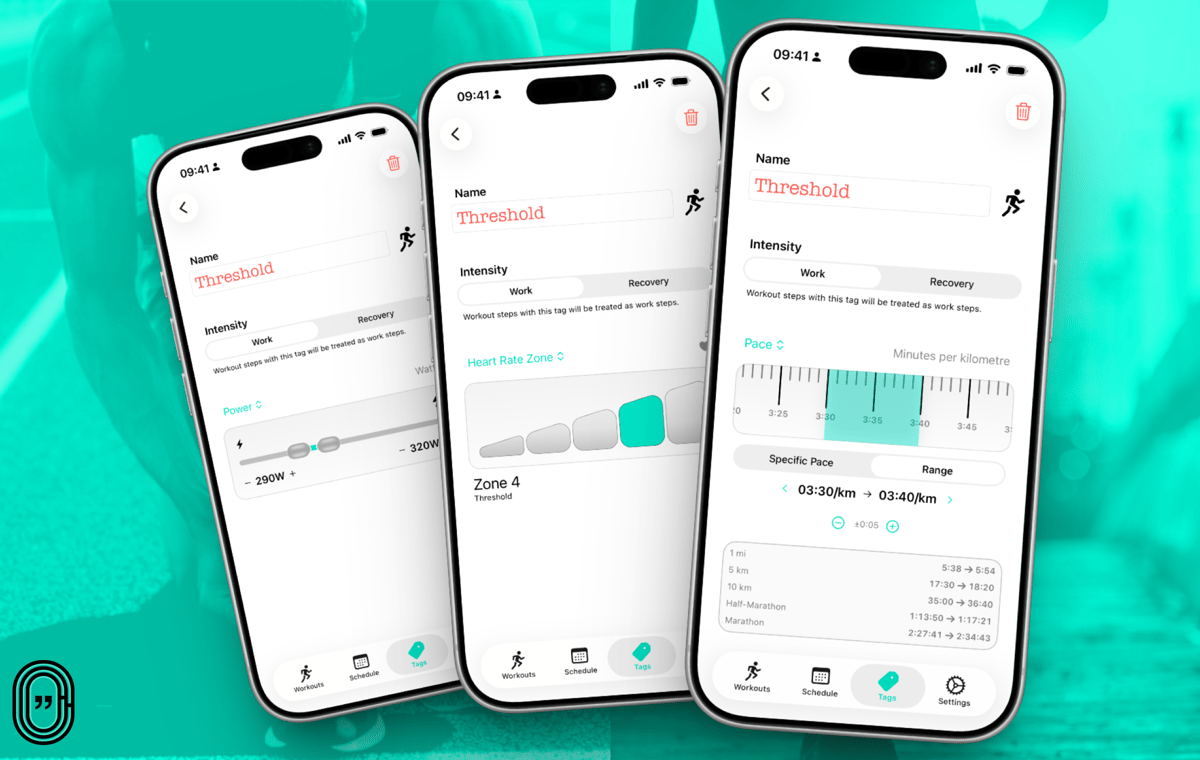
The tag system is the most distinctive element of the app. Tags are named efforts such as Easy, Tempo, Threshold or VO2Max. Each tag can be configured to target a specific metric: pace, cycling speed, heart rate, power, or cadence.
That allows a workout to be written by intent rather than by fixed numbers.
Warmup 2km Easy
5 x 1km Tempo, 2 min Float
Cooldown 10 min
For one runner, Tempo might be a pace range. For another, a heart-rate zone. For a cyclist, it might be a power zone or a specific wattage range. The written session stays the same, while the targets reflect the athlete’s use of it.
The benefit applies even to private workouts. As fitness changes, tags can change with it. A saved session can be scheduled again with current targets rather than rewritten from scratch.
The system becomes more useful when workouts are shared. The structure stays constant, while the targets remain personal to each recipient.
Sharing workouts
Workouts can be shared via a link or a QR code.
The simple case is sending a session to a training partner. The more interesting case is a group workout. A coach or run leader writes the session once, sends a link to the group, or places a QR code beside the track. Athletes scan, open the workout, and send it to their own watches.
The same approach extends to wider distribution. A coach, club, website, newsletter, or social post can link to a session, and the recipient can open it directly on their phone rather than manually rebuilding it.
Tags make this more useful than sharing static numbers. A club session can specify Easy, Tempo, Threshold or Hard, while each athlete uses their own configured targets where available.
Most structured workout tools cater to the individual athlete who is willing to tap into everything. Few make reuse straightforward, or make distribution to a mixed-ability group practical.
Importing text from websites and plans
The app includes an iOS share extension. Workouts found on a website, in a training plan, or in another app can be copied or shared directly into Workout Writer. When requested, the app uses AI to reformat the text into something it can parse.
That reduces manual rewriting when a workout already exists as text. Much published training content remains human-readable rather than structured for direct import by devices.
AI and external tools
The core parser uses rules and pattern matching, not AI. The choice still makes sense in an LLM-heavy environment because the preview is instant and the results are repeatable. The normal workflow keeps workout text on the device.
An AI workout-generation feature exists for athletes seeking help or inspiration from a prompt. It is a separate, optional action rather than part of the parsing flow.
Workout Writer also accommodates external LLM use. The app can generate a personalised guide describing the athlete’s preferred units, tags and formatting rules. That guide can serve as a system prompt for the LLM of their choice.
Shortcuts support allows external workflows to pass workout text into Workout Writer for scheduling. The capability should expand as Apple improves how external AI services communicate with apps.
Limitations
The scope is deliberately narrow. The app is iOS-only at present, supports running and cycling, and outputs to Apple Watch and Garmin. Athletes on Android, Coros or Suunto must still enter sessions manually on their own platforms. Those additional platforms sit on the developer’s roadmap.
Coaching, calendar, analytics, social, and training-diary features fall outside the scope of the design.
The parser still expects a recognisable format. Plain text means structured plain text rather than free-form prose. A clearly written workout typically converts cleanly, including text copied directly from a website. Vague or unusual wording may need adjustment.
The preview is the safety net. Recognition is visible before anything is sent to the watch, so any failure is obvious and immediate.
Take Out
Workout Writer is a plain-text structured workout builder for runners and cyclists using an iPhone with Apple Watch or Garmin.
The premise is straightforward. Workouts are often easiest to write as text, but watches need them as structured steps. The app turns typed sessions into structured workouts faster than manual entry on a watch platform.
The tag system extends that further. Workouts can be written around effort names, while each athlete keeps personal targets for pace, power, heart rate or cadence.
For individuals, that means quicker workout creation, with even a routine Thursday session that can be made more intentional. For coaches, clubs and training partners, it means workouts that can be shared without forcing everyone onto identical numbers.
Workout Writer is the bridge between the workout as written and the workout on the watch.
Availability and pricing
Workout Writer is available on the App Store. It is free to download and try, with a limited number of custom workouts. Premium features, including unlimited custom workouts, AI features, and workout sharing, are available with a subscription or as a lifetime purchase.

Quick answers
Does Workout Writer support Garmin watches?
Yes. Workout Writer schedules structured workouts directly to Garmin alongside Apple Watch, with the iPhone handling creation and sync.
Is Workout Writer free?
The app is free to download with a limited number of custom workouts. Unlimited workouts, AI features and workout sharing require a subscription or a one-off lifetime purchase.
What are effort tags in Workout Writer?
Effort tags are named workout intensities, such as Easy, Tempo, or Threshold, that each athlete configures with their own pace, heart rate, power, or cadence targets. The same written session can be reused as fitness changes occur and shared with athletes, each seeing targets relevant to them.
Author: SimonB, edited by the5krunner.
This post is part of the Apple Watch guide for endurance sport on this site, which covers the full lineup, watchOS, accuracy data, the medical roadmap, and the complete set of articles.
Last Updated on 28 June 2026 by the5krunner
My favourite kit and nutrition
- Garmin Fenix 9 Pro — I’ve just bought one.
- Injinji – Runners protect your toes. Avoid discomfort and minor injury. Run more. Run faster. I use them.
- Garmin 90-degree charging adapter — A small keyring adapter you can use anywhere. Essential when away. I use one.
- Garmin charging puck — the fastest and most reliable way to top up your Garmin before a session. I use one.
- Ravemen FR300 — Front light that mounts directly under your Garmin or Wahoo head unit. Keeps your bars clean and your beam pointed where it matters. I use one.
- Body Glide – The blue anti-chafe stick that all swimmers and many runners use. I use it.
- Maurten — The race nutrition trusted by elite athletes. Gels and drink mixes engineered to be easy on the stomach. I use them.
- Garmin Varia RTL515 — A radar rear light that alerts you to vehicles approaching from behind. Pairs with your Edge or Wahoo. I use this model.
- Favero Assioma Pro RS2 — The power-meter pedals most serious cyclists choose. Accurate, easy to move between bikes. I use this model.
- Garmin Forerunner 970 — A serious choice for a pro-grade triathlon watch. I use this.
- Polar H10 — My daily driver for accurate, waking HRV readings.
- Wahoo ELEMNT Roam 3 — The bike computer that has the feature Garmin lacks: usability. I use mine on most rides.
Reader-Powered Content

This content is not sponsored. It’s mostly me behind the labour of love, which is this site, and I appreciate everyone who supports it.
Support the site: Follow (free, fewer ads) · Subscribe (paid, ad-free) · Buy Me A Coffee ❤️
All articles are written by real people, fact-checked, and verified for originality. See the Editorial Policy. FTC: Affiliate Disclosure — some links pay commission. As an Amazon Associate, I earn from qualifying purchases.

tfk is the founder and author of the5krunner, an independent endurance sports technology publication. With 20 years of hands-on testing of GPS watches and wearables, and competing in triathlons at an international age-group level, tfk provides in-depth expert analysis of fitness technology for serious athletes and endurance sport competitors. ID
