PacePro
Dependent on course file elevation quality
Hilly road races and trail events with a known course profile
Fixed targets do not adapt to performance during the race
Frequently Asked Questions
Does PacePro adjust the target pace during a run, or are the targets fixed?
Targets are fixed at strategy creation and remain static throughout the activity. Only the cumulative ahead/behind display updates in real time as the runner progresses through each split.
What is the difference between PacePro and Grade-Adjusted Pace?
PacePro sets a pre-calculated target pace for each split before the race begins, based on the segment’s average gradient. Grade-Adjusted Pace is a live data field that shows the flat-ground equivalent of the runner’s current effort in real time, using barometric altimeter data.
Can a PacePro plan be created from a previous activity?
Yes — save the previous activity as a course in Garmin Connect, then use that course as the basis for a new PacePro strategy. The elevation profile from the original activity will be used to calculate the split targets.
What happens to PacePro guidance if the runner goes off course?
Route deviation corrupts the cumulative ahead/behind figure, but forward guidance recovers from the point the runner returns to the planned route. The time accumulated during the detour should be disregarded from that point onward.
PacePro — A Deep Dive
When PacePro Is Actually Useful
- On a relatively flat half-marathon in 2024, PacePro handled my negative split planning perfectly — with a few taps, I had a set of split targets I could trust and actually execute on race day.
- A trail race with a course diversion and a flawed elevation profile was a bad experience: the detour added roughly a minute I had not planned for (the plan recovered), and four kilometre-sections had targets that were materially wrong due to elevation data errors in the course file.
- On hilly races, I now use Grade-Adjusted Pace (or power) as my real-time effort signal rather than following PacePro targets — even with Elevation-Based splits enabled, numerous short climbs and descents within each segment are not properly accounted for.
Garmin PacePro (Pace Pro) is a race pacing tool that divides a course into individual splits and assigns a target pace to each one, adjusted for the average gradient of that segment, so that a runner expends roughly equal effort across varied terrain rather than equal time per kilometre on flat and hilly sections alike. The runner provides a target finish time and a split preference — positive, negative, or even — and the feature uses the elevation profile from a loaded course to derive a different target pace for each segment. The PacePro Plan is then displayed on the watch during the activity, showing the target pace for the current split, the runner’s actual pace, and the cumulative gap relative to the plan.
PacePro requires an accurate course file to function as intended. Where the course profile differs materially from the actual race route — due to errors in the source file, course changes, or route deviations — the split targets will be calculated against the wrong gradients, rendering guidance unreliable.
What the PacePro Metrics Actually Mean
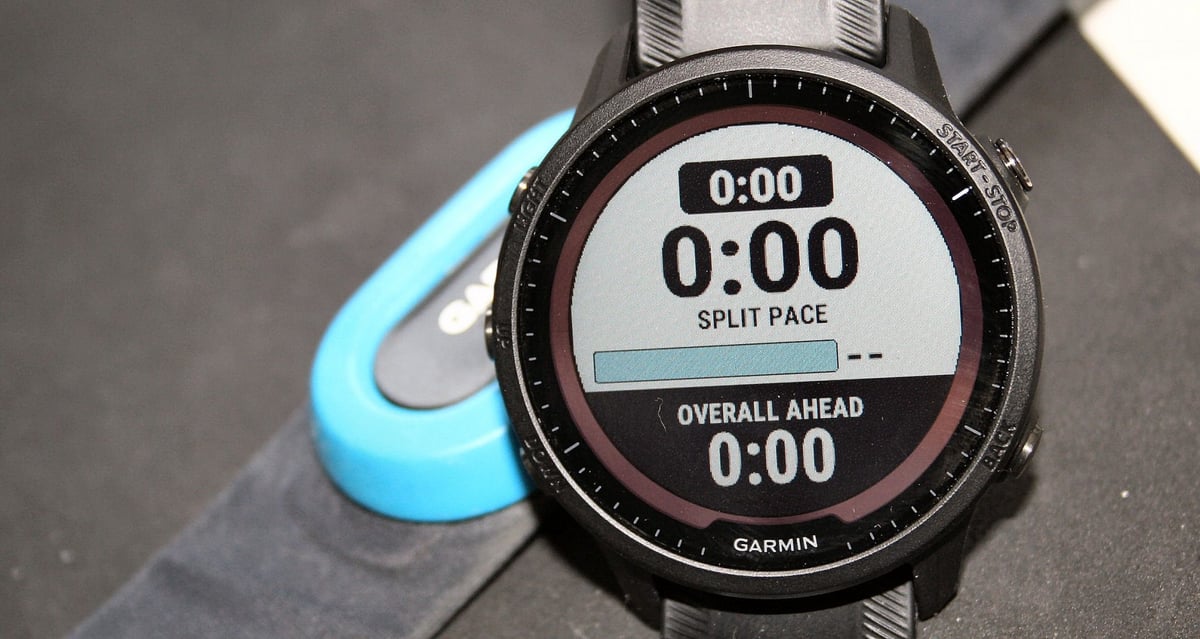
Each split target represents the pace at which the runner should complete that segment in order to stay on track for the goal finish time. The pace varies between splits because equal physical effort produces different speeds across different gradients. The cumulative ahead/behind figure shown during the activity is a running total of time gained or lost across all completed splits plus the current split to date — not a snapshot of current versus target pace. The split-level target pace is the more actionable figure for moment-to-moment execution.
When PacePro is created without a specific course — using only a target race distance and goal time — all splits receive the same flat target pace because gradient data is absent. The uphill effort slider is absent in this mode.
How Garmin Calculates It
A PacePro Plan is built in Garmin Connect and synced to the device before the activity begins. When a course with elevation data is selected, Garmin Connect reads the elevation profile, calculates the average gradient for each split, and applies a grade-adjusted calculation — derived from the established relationship between running speed and energy cost at gradient — to translate the flat-equivalent target pace into a gradient-based target for each segment.
Three split options are available: Every Kilometre, Every Mile, and Elevation-Based. The first two use fixed distances and average the gradient across each full segment; Elevation-Based instead creates splits at hill-start points, avoiding gradient averaging but producing uneven split distances. Two further sliders control uphill effort weighting and the preference for an overall positive or negative split. PacePro accepts goal paces between 4 and 20 minutes per mile and supports a maximum activity distance of 150 miles; the feature operates only on the outdoor run, trail run, and ultra run activity profiles.
What Affects the Reading
Course file accuracy is the primary variable. Where the elevation profile is incorrect, gradient adjustments will be wrong, and targets will misrepresent the terrain’s actual demand. Fixed-distance splits average the gradient over each full kilometre or mile, so a climb and descent within the same split produce a target that understates the required effort on the climb; Elevation-Based splits avoid this at the cost of uneven split distances. Route deviation corrupts the cumulative ahead/behind figure, but forward guidance recovers from the point the runner returns to the planned route.
How Accurate Is It
The relevant accuracy question is whether, when followed, split targets produce an evenly distributed effort across the course. This depends on the accuracy of the elevation data in the course file and the validity of the grade-adjusted calculation. The grade-adjusted effort model draws on research by Minetti et al. (2002), who measured the metabolic cost of running across gradients from −0.45 to +0.45 and established the non-linear relationship between gradient and energy expenditure that current grade-correction models use. The model is well-validated for moderate gradients typical of road and trail races; above approximately 25–30 per cent gradient, runners typically transition to hiking, and the model’s predictions become less reliable because it assumes continuous running mechanics.
Competitor Equivalents
- Polar Race Pace sets a flat, even-pace target for a given distance and goal time with no grade adjustment; it is functionally closer to a pace band than a course-based strategy.
- Suunto Race Pacer, available as a third-party SuuntoPlus app, supports flat, even-pace and negative-split targets by distance or time but has no grade adjustment.
- Apple Pacer, introduced in watchOS 9, sets a flat target pace for a distance and goal time with no grade adjustment; Apple’s Race Route feature allows racing a previous effort on a repeated course, but is a ghost function rather than a pre-planned strategy.
- Coros has no native grade-adjusted pacing feature; the COROS Pace Pro is a watch model name, not a pacing function.
- Wahoo has no equivalent grade-adjusted course pacing feature.
Which Garmin Devices Support It
Garmin introduced PacePro in August 2019 on the Fenix 6 series. The feature is available on all current mid-range and above running watches, including the Fenix 8 series, Enduro 3, Forerunner 970, Forerunner 570, Forerunner 965, Forerunner 265, Venu X1, Venu 4, Vívoactive 6, and Forerunner 55 and 245 series. It is absent on the Instinct 3 series and the Forerunner 165. On devices with onboard maps — including the Fenix 8, Enduro 3, Forerunner 265, Forerunner 965, Forerunner 570, and Forerunner 970 — the elevation profile is read from the stored map data. On non-mapped devices such as the Forerunner 55 and Forerunner 245, elevation data comes from the course file itself.
Where to Find It
- Garmin Connect Mobile — More > Training & Planning > PacePro Pacing Strategies > Create PacePro Strategy.
- Garmin Connect Web — Training & Planning > PacePro Pacing Strategies > + Create PacePro Strategy; displays the course map, altitude profile, colour-coded pace curve, and per-split table; adjusting any variable updates all views immediately.
- On the watch — activate — within an outdoor running activity, hold the menu button > Training > PacePro Plans > select plan > Start. The path may be listed as Navigation > Courses on some device generations.
- On the watch — create (mapped devices only) — select PacePro from within a loaded course and enter a goal pace or time.
- During the activity, a dedicated screen displays split target pace, actual pace, remaining distance for each split, and cumulative gap; no data field setup required.
- Post-activity — planned-versus-actual pace comparison in the activity detail view in both app and web. No Connect Plus subscription required.
Common Problems and Misreadings
Identical targets for every kilometre mean the strategy was created based solely on distance and time. A course file with elevation data is required for differentiated splits. See FAQ above for detail.
Targets that feel wrong on climbs almost always indicate a course file elevation error — check the altitude profile in Garmin Connect against a mapping source before race day.
Brief GPS loss does not corrupt the ahead/behind figure — tracking is position-based and resumes from the reacquired point. Time accumulated during a deliberate route deviation should be disregarded on return to the planned route. See FAQ above for details.
How to Improve It
PacePro targets are fixed at strategy creation against a goal time. Improving the goal time requires improving the underlying fitness — primarily aerobic capacity and the ability to sustain a high fraction of maximal aerobic speed over the race distance. For undulating races, uphill-specific training — hill repetitions at a controlled effort and threshold runs on rolling terrain — improves climbing efficiency and recovery speed from climbs.
Before setting a goal time for an important race, verify the altitude profile in the Garmin Connect strategy view against the actual race route.
Scientific Basis
Minetti, A.E., Moia, C., Roi, G.S., Susta, D., Ferretti, G. (2002). Energy cost of walking and running on extreme uphill and downhill slopes. Journal of Applied Physiology, 93(3), 1039–1046. Measured the metabolic cost of running across gradients from −0.45 to +0.45, establishing the non-linear relationship between gradient and energy expenditure that underpins grade-adjusted pace models, including those used in Garmin’s calculations.
Abbiss, C.R., Laursen, P.B. (2008). Describing and understanding pacing strategies during athletic competition. Sports Medicine, 38(3), 239–252. Found that during prolonged efforts lasting more than two minutes, even or slightly negative pacing yields better outcomes than positive splits — the scientific rationale for grade-adjusted even-effort pacing on undulating courses.
How It Connects to Other Features
PacePro is most directly related to [LINK: grade-adjusted-pace], the live data field that recalculates current running pace as its flat equivalent in real time — PacePro defines the per-split target before the race. At the same time, Grade-Adjusted Pace provides the real-time effort signal during it. [LINK: climbpro] operates on the same loaded course file but shows remaining distance and elevation for the current climb rather than pace targets. Race Predictor provides estimated finish times based on current VO2 max and is the natural starting point for setting the PacePro goal time.
