Garmin Respiration Rate
Garmin Respiration Rate measures how many breaths an athlete takes per minute, recorded continuously during sleep and during certain recorded activities. It provides a window into cardiorespiratory load that heart rate alone cannot supply.
Garmin primarily uses respiration rate as a sleep quality signal and a recovery indicator in the Health Snapshot tool. The metric is passive — it requires no action from the wearer — but its accuracy is materially lower than chest-strap-derived measurements, and it cannot yet replace clinical spirometry or laboratory gas analysis as a fitness assessment tool.
What the Number Actually Means
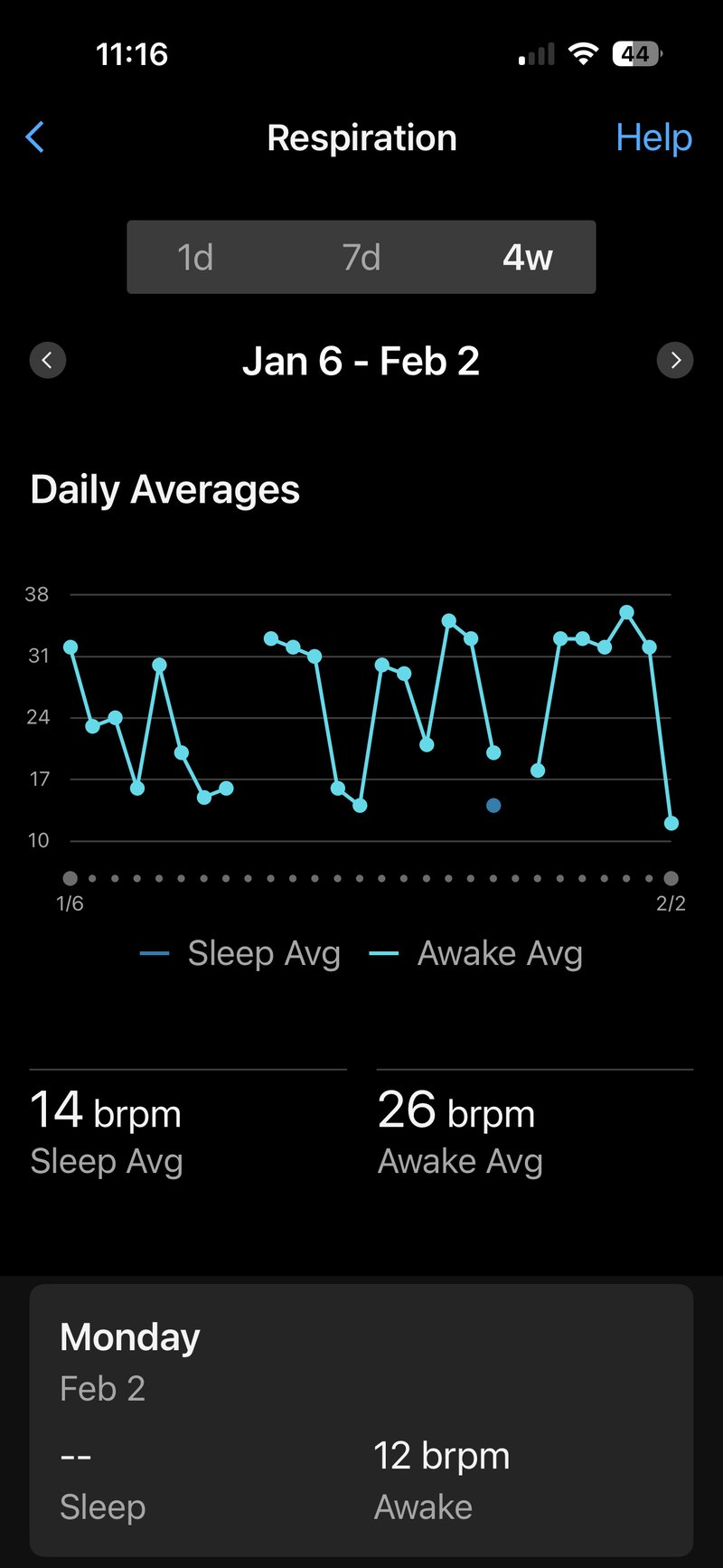
A healthy adult at rest breathes between 12 and 20 times per minute. During sleep, a well-recovered athlete will typically sit at the lower end of that range or below it. An elevated resting or sleeping respiration rate — particularly one that trends upward over several nights — often signals incomplete recovery, accumulating fatigue, or the early stages of illness.
During exercise, the respiratory rate rises in proportion to intensity. At easy aerobic efforts, it remains moderate; at threshold and above, it climbs sharply as the body attempts to expel carbon dioxide faster than it is produced. Garmin does not currently derive a training metric directly from exercise respiration rate, but the data is recorded and visible in the activity file.
How Garmin Calculates It
Garmin derives respiration rate from the optical heart rate sensor using a technique called photoplethysmography-derived respiration, abbreviated PDR. The Elevate optical sensor detects subtle fluctuations in blood volume at the wrist that correspond to respiratory effort. Firstbeat Analytics processes these signals to estimate the number of breath cycles per minute.
During sleep, the watch continuously calculates the respiration rate and presents the average for each sleep stage. The metric updates each night and feeds into the overall sleep score and the Health Snapshot reading. A minimum of approximately two hours of wear is required for the algorithm to establish a reliable nightly baseline.
During recorded activities, respiration rate is captured as a data stream when the activity profile supports it. The watch does not require a chest strap to record the metric, though a Garmin HRM-Pro Plus or HRM-600 strap will produce a more accurate reading than wrist-based derivation alone.
Interpretation
| Respiration Rate (breaths per minute) | Clinical Classification | Context for Athletes |
|---|---|---|
| Below 12 | Bradypnoea (abnormally slow) | May appear in highly trained endurance athletes during deep sleep; warrants attention if sustained during waking rest |
| 12–20 | Normal adult range | Typical resting and sleeping range; fit athletes often sit at the lower end |
| 21–24 | Mildly elevated | May indicate incomplete recovery, early fatigue, or environmental stress; review trend over 3–5 nights |
| 25–30 | Moderately elevated (tachypnoea) | Consistent readings in this range during sleep warrant investigation; rule out illness, wrist fit issues, or altitude exposure |
| Above 30 | Significantly elevated | Unlikely in a resting athlete without acute illness or sensor error; verify watch fit before drawing conclusions |
Source: NHS clinical guidance and American Thoracic Society reference standards
What Affects the Reading
Wrist fit is the single largest source of error in optical respiration rate measurement. A watch worn too loosely during sleep will pick up movement artefacts that the algorithm may misinterpret as respiratory cycles, producing an inflated reading. The watch should sit one to two finger-widths above the wrist bone and fit snugly enough that it does not rotate freely.
Illness reliably elevates the respiratory rate before other symptoms become apparent. Athletes who notice a sustained upward drift in their nightly respiration rate — without a corresponding change in training load — may be in the early stages of infection. Garmin surfaces this signal through the Health Snapshot and the health status glance on supported devices.
Altitude raises respiration rate as the body compensates for reduced oxygen partial pressure. Athletes travelling to high altitude for training or competition should expect elevated readings for the first several days, regardless of their fitness level. Garmin’s altitude acclimation feature notes the environmental context but does not automatically adjust the baseline respiration rate.
Alcohol consumption elevates respiration rate during sleep and disrupts the normal pattern of respiratory variation across sleep stages. A single evening of alcohol consumption can produce a reading that resembles the early recovery signature of illness.
Wrist-based respiration rate during exercise is less stable than during sleep because movement artefact increases substantially with activity. At moderate to high intensities, readings from the wrist sensor carry a wider error margin than at rest. A chest strap provides a more reliable exercise measurement.
How Accurate Is It
Wrist-derived PDR respiration rate has been validated against reference polysomnography in sleep settings with reported mean absolute errors of approximately 0.5 to 1.5 breaths per minute under controlled conditions. Real-world accuracy varies considerably depending on wrist fit, skin tone, and movement during sleep.
During exercise, wrist-based respiration rate accuracy degrades at intensities above the lactate threshold. A 2021 study in the Journal of Clinical Medicine comparing wrist-based PDR with spirometry found agreement within 2 breaths per minute at easy efforts but divergence of 4 or more breaths per minute at high intensity. The metric is more useful as a trend indicator than as an absolute clinical measurement in either context.
Competitor Equivalents
- Apple Watch — Apple measures respiratory rate during sleep via wrist-based PDR and reports it within the Health app under Respiratory. The calculation method is broadly similar to Garmin’s, though Apple does not integrate the metric into a training readiness or recovery score.
- Polar — Polar records breathing rate during exercise using chest-strap-based impedance pneumography on the H10 strap, which is more accurate than wrist-based derivation. Sleep breathing rate is available via the Nightly Recharge feature on compatible devices. The exercise measurement is materially more reliable than Garmin’s wrist-based approach when the H10 is in use.
- Coros — Coros does not currently offer a dedicated respiration rate metric. Breathing frequency data is absent from the Coros training ecosystem as of March 2026.
- Suunto — Suunto records sleep breathing rate on the Race and Vertical series via wrist-based optical sensing. The metric feeds into the Suunto Sleep Score but is not integrated into a broader recovery indicator, unlike Garmin, which surfaces it through Health Snapshot.
- Wahoo — Wahoo does not offer a respiration rate metric on its ELEMNT cycling computers. The metric is absent from the Wahoo ecosystem.
Which Garmin Devices Support It
Garmin introduced respiration rate monitoring in 2019 on the Fenix 6 series.
Sleep respiration rate is available on the Fenix 8 series and later models in the same tier, including the Fenix E, Enduro 3, Tactix 8, and Quatix 8. The Forerunner 970 and Forerunner 570 support it, as do the Venu 4 and Venu X1. The Vívoactive 6 supports sleep respiration rate as part of its health tracking suite. The feature was introduced broadly across Garmin’s mid- and high-tier devices with the Fenix 6 generation and has been present in all subsequent flagship and mid-range releases.
Exercise respiration rate, as a recorded data stream, requires a device on the Garmin OS unified codebase — broadly, the Fenix 8 and Forerunner 970 platforms released from mid-2024 onwards. Prior-generation devices, including the Forerunner 965, Forerunner 265, and Epix Pro Gen 2, record sleep respiration rate but offer more limited exercise respiration rate integration within the Garmin Connect interface.
The Forerunner 165 and Forerunner 55 support sleep respiration rate at a basic level but do not display the metric as a standalone glance or link it to a recovery score, as higher-tier devices do. The Instinct 3 records the metric during sleep but does not surface it within a full health status view.
Where to Find It
On the watch, respiration rate is accessible as a widget glance on devices that support the health glance stack. The glance shows the previous night’s average and, on supported devices, a seven-day trend graph. During a recorded activity, respiration rate can be added as a data field on any screen that supports custom data fields; it is not present in the default activity layouts and must be added manually through the activity settings menu.
In Garmin Connect Mobile, the sleep respiration rate appears in the Sleep section of the Health Stats tab. Tapping the metric reveals a detailed view with the nightly reading graphed alongside sleep stages, allowing the athlete to observe how breathing rate varies across light, deep, and REM sleep. Historical trend data covering up to four weeks is accessible without a Garmin Connect Plus subscription. The Health Snapshot tool, available from the Today tab on compatible devices, records a 60-second reading of the live respiratory rate alongside heart rate, HRV, pulse ox, and stress — this reading is stored in Garmin Connect and can be reviewed in the Health Snapshot section of the app.
On the Garmin Connect web, sleep respiration rate is available in the Health Stats section, but with less granularity than in the mobile app. The stage-by-stage breakdown available in the app is absent from the web interface; only the nightly average is shown.
Common Problems and Misreadings
Athletes frequently report that their nightly respiration rate appears implausibly high — readings above 25 breaths per minute in a resting adult with no illness history are almost always the result of a loose watch fit during sleep rather than a genuine physiological elevation. Checking the fit and cleaning the sensor window resolves the majority of these cases.
A sudden one-night spike in respiration rate is less informative than a sustained multi-night trend. Single-night outliers can result from a warm sleeping environment, consuming alcohol, or an unusually late training session. Garmin’s seven-day trend view is more useful for identifying genuine recovery problems than any individual nightly reading.
Some athletes find that their exercise respiration rate data field shows flat or implausible values during high-intensity intervals. This is a known limitation of wrist-based PDR at elevated heart rates and high cadence. The sensor is not malfunctioning; the signal-to-noise ratio at high intensity is insufficient for reliable derivation. A compatible chest strap resolves this.
Respiration rate during sleep is sometimes confused with sleep apnoea screening. Garmin does not diagnose or screen for sleep apnoea. The metric measures average breathing frequency; it does not detect apnoeic events, oxygen desaturation episodes, or the airflow interruptions that characterise the condition. Athletes with concerns about sleep apnoea should seek a clinical sleep study.
How to Improve It
Respiration rate at rest and during sleep decreases as aerobic fitness improves. Sustained aerobic training — particularly at easy effort levels performed consistently over months — strengthens the respiratory muscles, improves chemoreceptor sensitivity, and reduces the ventilatory demand at any given workload. The effect is gradual and reflects genuine physiological adaptation rather than short-term fluctuation.
Deliberate breathing practice, including diaphragmatic and slow-cadence techniques, can reduce resting respiratory rate in athletes who habitually breathe shallowly. Training the habit of nasal breathing during easy runs has been associated in some research with a lower exercise ventilation rate at submaximal intensities, though the effect on the Garmin-recorded metric depends on whether the adaptation translates into sleep-breathing behaviour.
Recovery quality directly influences the nightly reading. Athletes carrying accumulated fatigue from high training loads will typically show elevated nightly respiration rates compared to their baseline. Planned recovery weeks produce a measurable reduction in the metric, which can be tracked in Garmin Connect’s trend view.
Other Points
Elevated resting respiratory rate is associated with increased risk of all-cause mortality, independent of other cardiovascular risk factors. A 2011 study by Parkes (published in Primary Care Respiratory Journal) found that resting respiratory rates above 20 breaths per minute were linked to significantly higher mortality risk in a general adult population, suggesting the metric has clinical relevance beyond athletic recovery monitoring.
Resting respiratory rate increases during detraining periods as aerobic fitness declines. Research on detraining physiology indicates that the ventilatory adaptations gained through endurance training — including improved respiratory muscle efficiency and reduced ventilatory demand at submaximal workloads — begin to reverse within two to four weeks of inactivity, producing a measurable rise in resting breathing frequency (Mujika and Padilla, Sports Medicine, 2000).
Frequently Asked Questions
- What is a normal respiration rate for a runner? A healthy adult at rest breathes 12 to 20 times per minute. Fit endurance athletes often fall at the lower end of this range, or slightly below it, during sleep. Readings above 20 during sleep that persist across multiple nights warrant attention, though fit and movement artefact should be ruled out first.
- Why does my Garmin respiration rate change so much night to night? Night-to-night variation of one to three breaths per minute is normal and reflects genuine physiological variation driven by training load, hydration, ambient temperature, and sleep quality. Variation greater than five breaths per minute that is not explained by illness or alcohol is more likely to reflect measurement noise from a loose fit or movement during sleep.
- Does Garmin’s respiration rate track breathing during a run? Yes, on supported devices, respiration rate is recorded as a data stream during running activities and can be added as a data field. However, wrist-based measurement during running is less accurate than during sleep due to movement artefact. An HRM-Pro Plus or HRM-600 chest strap provides more reliable readings during exercise.
- Can Garmin detect sleep apnoea from respiration rate? No. Garmin respiration rate measures average breathing frequency; it does not screen for sleep apnoea. Detecting apnoeic events requires measuring airflow interruptions and oxygen saturation patterns, which the Garmin sensor does not provide. Speak with a GP or sleep specialist if sleep apnoea is a concern.
- Why is my respiration rate high even though I feel fine? A single elevated reading is rarely clinically significant. Check that the watch was worn snugly during sleep and that the optical sensor was clean and unobstructed. If the reading has been elevated for three or more consecutive nights without a change in training load or sleep environment, consider whether early illness, altitude exposure, or increased stress may be a factor.
Scientific Basis
- Charlton, P.H. et al. (2021). Breathing rate estimation from the electrocardiogram and photoplethysmogram: a review. IEEE Reviews in Biomedical Engineering. Comprehensive technical review of PDR and related derivation methods; directly relevant to the wrist-based approach Garmin employs.
- Massaroni, C., Nicolò, A., et al. (2025). Breath-by-Breath Measurement of Respiratory Frequency and Tidal Volume with a Multiple-Camera Motion Capture System During Cycling Incremental Exercise. Sensors, 25(8). Validates motion capture-based respiratory frequency assessment during incremental cycling exercise and underscores the feasibility of real-time respiratory monitoring in athletic contexts.
- Nicolò, A. et al. (2020). The importance of respiratory rate monitoring: from healthcare to sport and exercise. Sensors, 20(21). Establishes the physiological rationale for respiration rate as a training and recovery marker across sport contexts.
- Firstbeat Technologies (2014). Firstbeat Athlete — Physiological Background. Firstbeat white paper. Documents the Firstbeat Analytics engine’s use of HRV-derived physiological signals, the broader framework within which respiration rate estimation sits on Garmin devices.
How It Connects to Other Features
Respiration rate feeds directly into [LINK: health-snapshot], where it is recorded alongside resting heart rate, heart rate variability, stress score, and pulse ox as a composite sixty-second health reading. The metric also contributes contextual data to [LINK: sleep-score], where Garmin’s algorithm considers breathing frequency across sleep stages as one signal of sleep depth and quality. Elevated nightly respiration rate can suppress [LINK: body-battery] recovery overnight, creating a visible connection between the two metrics in the Health Stats view. Athletes monitoring [LINK: hrv-status] will find that nights with elevated respiration rate often coincide with suppressed HRV, reflecting the same underlying autonomic stress response.
