Garmin’s trail navigation has stopped working — and the company has yet to fix it
For two months, owners of two of Garmin’s most expensive outdoor watches have been unable to use them for one of the key purposes for which they were principally bought by lots of us. The trails have disappeared.
A change to the software powering the Fenix 8 Pro and Enduro 3 — both positioned as Garmin’s premier devices for trail and endurance sports — removed the ability to clearly see trail routes on the watch face during navigation. The maps still load. The watch still tracks position. But the trails themselves render as faint, near-invisible lines, mostly indistinguishable from the background at running pace. Switch to hiking mode, and the display works normally. Thus, the problem is specific to running.
The problem was first noticed in December 2025 and has survived every software update since, including the public release issued this month. Garmin has acknowledged the issue in its forum, where it became the most-raised topic and has confirmed that the matter has been escalated internally. Nothing since.
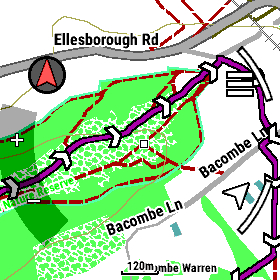
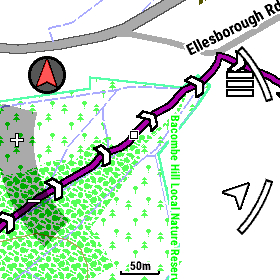
The commercial context is worth holding in mind. The Fenix 8 Pro retails for $999, and the Enduro 3 retails for $899. Both were launched in September 2025, explicitly stating that they represent Garmin’s most capable trail navigation hardware. The watches carry full topographic mapping — a feature that commands a significant premium over simpler devices — and it is precisely that feature which doesn’t work properly. A watch reduced to plotting a line through featureless terrain is demoted to the role of an expensive, mid-range running watch.
The problem appears wider than the wearable range. Owners of the GPSMAP H1i Plus and certain inReach devices have reported similar failures, suggesting a shared issue in Garmin’s mapping software rather than a fault confined to a single product line. That broadens the question from an isolated slip to something more structural about how Garmin manages software changes across its device portfolio.

For participants of the beta software scheme who spent months reporting the issue, the experience has prompted a more fundamental question about the programme’s purpose. Let’s see what happens.
Garmin has not said when it expects to resolve the problem, and again acknowledged the issue on their forums on 24 Feb 2026, soon after this article was published.
Source material provided by Dan Cross, an Enduro 3 owner and Garmin beta programme participant. Forum threads: original beta report; community discussion; persistence confirmed; stable release thread; GPSMAP and inReach map issues.
For the complete Garmin Fenix series guide, covering all current models, history and buying advice: Garmin Fenix hub.
For model comparisons, upgrade advice and the inReach subscription reality: Garmin Fenix 8 buying guide.For the complete guide to hiking technology, navigation, and off-grid safety, see the .
Last Updated on 3 October 2026 by tfk the5krunner
Small things I always use
- Garmin 90-degree charging adapter: Charges your Garmin from any USB-C cable. Essential when travelling. I use one.
- Body Glide: The blue anti-chafe stick swimmers and runners carry. I use it.
- Speedo earplugs: Fewer ear infections and no cold-water dizziness. I use them.
- Dryrobe Advance: My winter changing robe for open-water swims. I use one. A cheaper option is the AONYIYI changing robe.
- Maurten: Race fuel that stays easy on the stomach. I use them.
- Garmin charging puck: The quickest way to top up before a session. I use one.
- Injinji: Toe socks that stop rubbing, so you run more. I use them.
- Ultimate toe protectors: Stop black toenails on long runs. They work. I use them.
- Compressport R2 v2 calf sleeves: My calf sleeves of choice. I use them.
- Cellucor C4: My pre-workout before hard sessions.
- TPU tubes: Schwalbe Aerothan, Tubolito and Pirelli SmarTube. Light, tiny spares. I use all three.
- G8 insoles: Adjustable insoles that are good. I use them.
- Cycplus Cube: A 97g electric pump that gets a road tyre rideable in two minutes. I carry one. 5% off with code THE5KRUNNER.
Watches and sensors
- Polar H10: My daily driver for waking HRV.
- Polar Verity Sense: My backup arm-worn HR sensor.
- Nomad bedside charger: Charges my iPhone and Apple Watch overnight. I use it, and many of their bands.
- Train.Red: The best muscle oxygen sensor I’ve used.
- Tymewear: Accurate heart rate and reliable ventilatory zones. I use it to pace endurance rides over an hour.
- Garmin Forerunner 970: A pro-grade triathlon watch. I use this.
- Apple Watch Ultra 4: My daily smartwatch. No phone needed on rides.
- Garmin Fenix 9 Pro: I’ve just bought one.
On the bike
- Continental GP5000 for everyday riding, and Aero 111 on the front for special occasions.
- Helmets: Specialized S-Works Evade 3 for road riding, and Rudy Project Wing for TT-style races. I use both.
- Ravemen FR300: A front light that mounts under your Garmin or Wahoo. I use one.
- Wahoo TRACKR Radar: I use it on one bike and Varia on the other. They perform the same.
- Garmin Varia RTL515: Radar that warns you of cars from behind. I use this model.
- Wahoo ELEMNT Roam 3: The bike computer that’s easy to use. I use mine on most rides.
- Favero Assioma Pro RS2: Accurate power pedals that swap easily between bikes. I use this model.
Home and indoor training
- NPE Runn: Makes my basic treadmill smart, sending more accurate speed and distance to my watch and Zwift. I use it.
- Google Wifi: Keeps Zwift connected in my pain cave. I use it.
- Apple TV 4K: Zwift on the big screen. I use two.
- Google Nest Doorbell (wired, 2nd gen): My video doorbell, running in both Google Home and Apple Home. I use it.
Health, recovery and sleep
- FreeStyle Libre 3 Plus: Shows how my blood sugar responds to diet.
- hDrop: Measures my sweat loss in summer and indoors.
- Fourth Frontier Zone: Checks my heart under load in hard sessions.
- Oura Ring 5: My partner’s recovery tracker of choice.
- Kineon MOVE+: Red light therapy for niggles. It works.
- Eight Sleep: A cooling mattress cover my partner and I use nightly.
Reader-Powered Content

This content is not sponsored. It’s mostly me behind the labour of love, which is this site, and I appreciate everyone who supports it.
Support the site: Follow (free, fewer ads) · Subscribe (paid, ad-free) · Buy Me A Coffee ❤️
Written by real people, with AI assistance. Fact-checked and verified for originality. See the Editorial Policy. FTC: Affiliate Disclosure — some links pay commission. As an Amazon Associate, I earn from qualifying purchases.

tfk is the founder and author of the5krunner, an independent endurance sports technology publication. With 20 years of hands-on testing of GPS watches and wearables, and competing in triathlons at an international age-group level, tfk provides in-depth expert analysis of fitness technology for serious athletes and endurance sport competitors. ID

Silence is never good – a company has to communicate.
Garmin has been terrible lately i.t.o. introducing issues, not responding to users on their own forums, leaving people stranded after updates broke functionality, etc. It’s very disappointing.
They won’t even supply older firmware files for users to roll back to versions that worked for them, even though it’s possible. But profits are up, and that’s what they seem to care about most these days. I’m a Garmin fan, I like my watches, so I hope that they’ll improve.
Very frustrated about this too. Talkytoaster maps to the rescue!
indeed so: Talky Toaster
Just installed the British Isles map on my Fenix 8 Pro 51mm, works beautifully! Now added to every single profile that has GPS on. Garmin’s decision to make the TT map available as a layer is very convenient indeed.
Surprisingly, in spite of the much greater level of details, performance is exactly the same as with the stock Garmin map. Happy days!
Thanks for looking into this! Garmin is finally taking notice of this “concern…”
https://forums.garmin.com/outdoor-recreation/outdoor-recreation/f/enduro-3/431684/trails-invisible-while-navigating-on-enduro-3/2013553
coincidence?
Thanks for using your platform to identify the issue. The YouTube reviewers never bother
yw
Is the Fenix 7/7 pro unaffected by this?
Doesn’t look like it: https://www.reddit.com/r/Garmin/comments/1rgf3vd/fenix_7_pro_maps_messed_up_after_update_to_2511/
Garmin has really messed this up!
What a mess. I had a forerunner 970, that I hadn’t used maps on for a while, and they must of been updated too. I ended up returning the watch but before I did I noticed there was no trail detail all of a sudden. Trails were so faint I could hardly see them. At the time I chalked it up to just not using them regularly and being familiar with how they originally looked.
My Fenix 7X pro was using the factory maps and this issue was not there. After reading the article I updated using Garmin express and Viola I have this bug now! Finally something new for the Fenix 7 after a long time. Cannot thank Garmin enough.
This indicates it is a maps issue not a firmware version problem.
Appears to be fixed with a map theme update (shown as Etyp in Express and Explorr app) as of March 9.