Pacier for Garmin: Turn a Training Plan Photo Into a Structured Watch Workout
Garmin’s workout builder works, but it was not designed for runners following multi-week training plans from books. Anyone who has tried to manually enter an 18-week Pfitzinger or Daniels cycle into Garmin Connect, session by session, step by step, with specific pace targets for each interval, knows how tedious that process can be. Many runners will either give up partway through or put up with the monotony and vow never to do a book-based training block again.
Paicer is a web-based tool that attempts to eliminate that manual entry. The idea is straightforward: photograph or scan a workout, and Paicer converts it into a structured Garmin workout that syncs directly to the watch.
How It Works
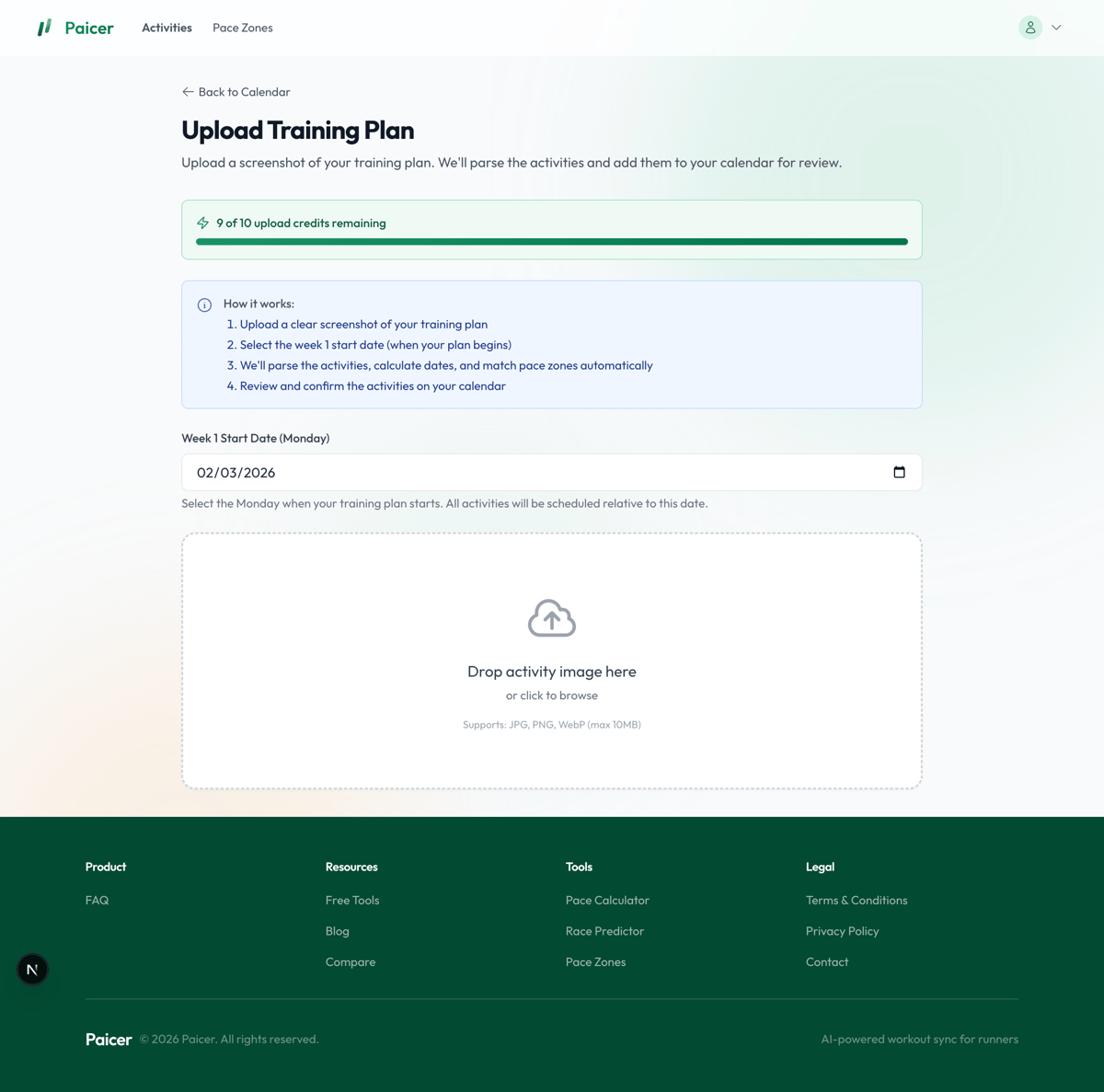
The user uploads an image. This could be a photo of a book page, a screenshot from a PDF, or even a handwritten plan on paper. Paicer uses an AI vision model (Anthropic’s Claude) to read the image and extract the workout structure: warm-up, intervals, recovery periods, cool-down, pace targets, and distances.
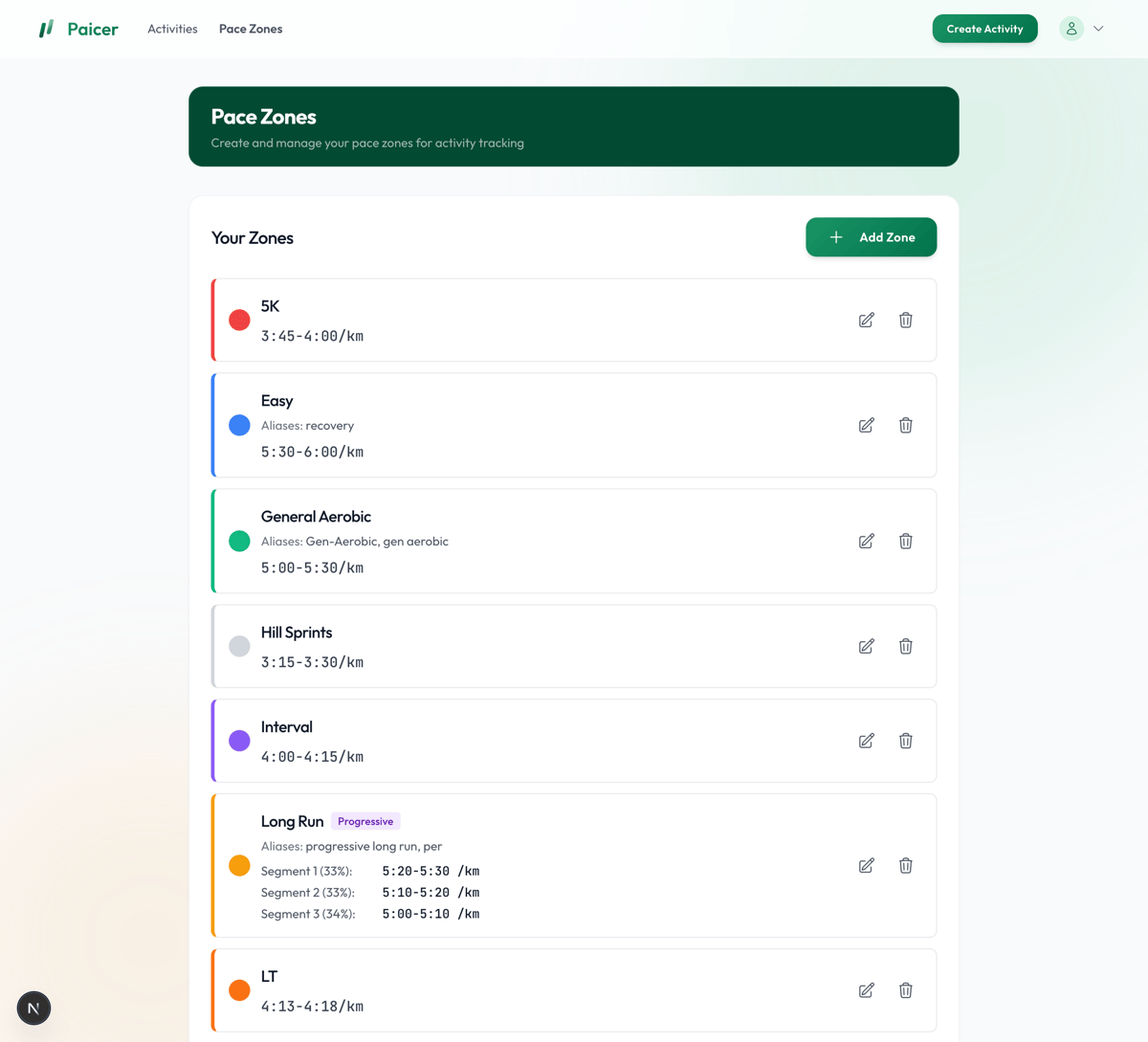
The extracted data is then matched against the user’s own pace zones. Paicer maintains a pace zone system where runners define their training zones (easy, tempo, threshold, interval, etc.) with associated pace ranges. When a workout references “marathon pace” or “LT pace,” Paicer maps those to the user’s defined targets rather than applying generic values.
Once parsed, the workout appears as a structured Garmin workout with each step, duration, and pace target populated. Users can review and edit individual steps before syncing. The finished workout is then pushed to Garmin Connect and appears on the watch like any other structured workout, with real-time pace guidance, lap alerts, and step-by-step progression.
What It Handles
Training books vary significantly in how they describe sessions. One plan might read “10 mi with 6 mi @ half marathon pace,” while another could prescribe something like “6 x 1000m at 5k pace w/ 1 min jog.” Paicer’s parsing handles many different styles, including:
- Simple distance or time-based runs (e.g., “8 miles easy”)
- Interval sessions with defined recovery (e.g., “5 x 1km at threshold with 90s jog”)
- Embedded pace segments within longer runs (e.g., “14 mi with 8 mi at marathon pace”)
- Warm-up and cool-down steps are added automatically where the plan implies them
The AI model interprets natural language descriptions rather than requiring a specific format, so it works across different plan styles.
Full Plans vs. Single Workouts
Paicer is not limited to one workout at a time. You can photograph an entire page from your training book (say, all seven days of Week 12 from Pfitz 18/55) and Paicer will parse every session on the page in one go. You select the week start date before uploading, and each workout is automatically assigned to the correct day of the week.
Parsed workouts land on a calendar where you can review them, drag sessions to different days if needed, and edit individual steps before syncing. If a day already has a scheduled workout, you can see both and decide how to handle the conflict manually.
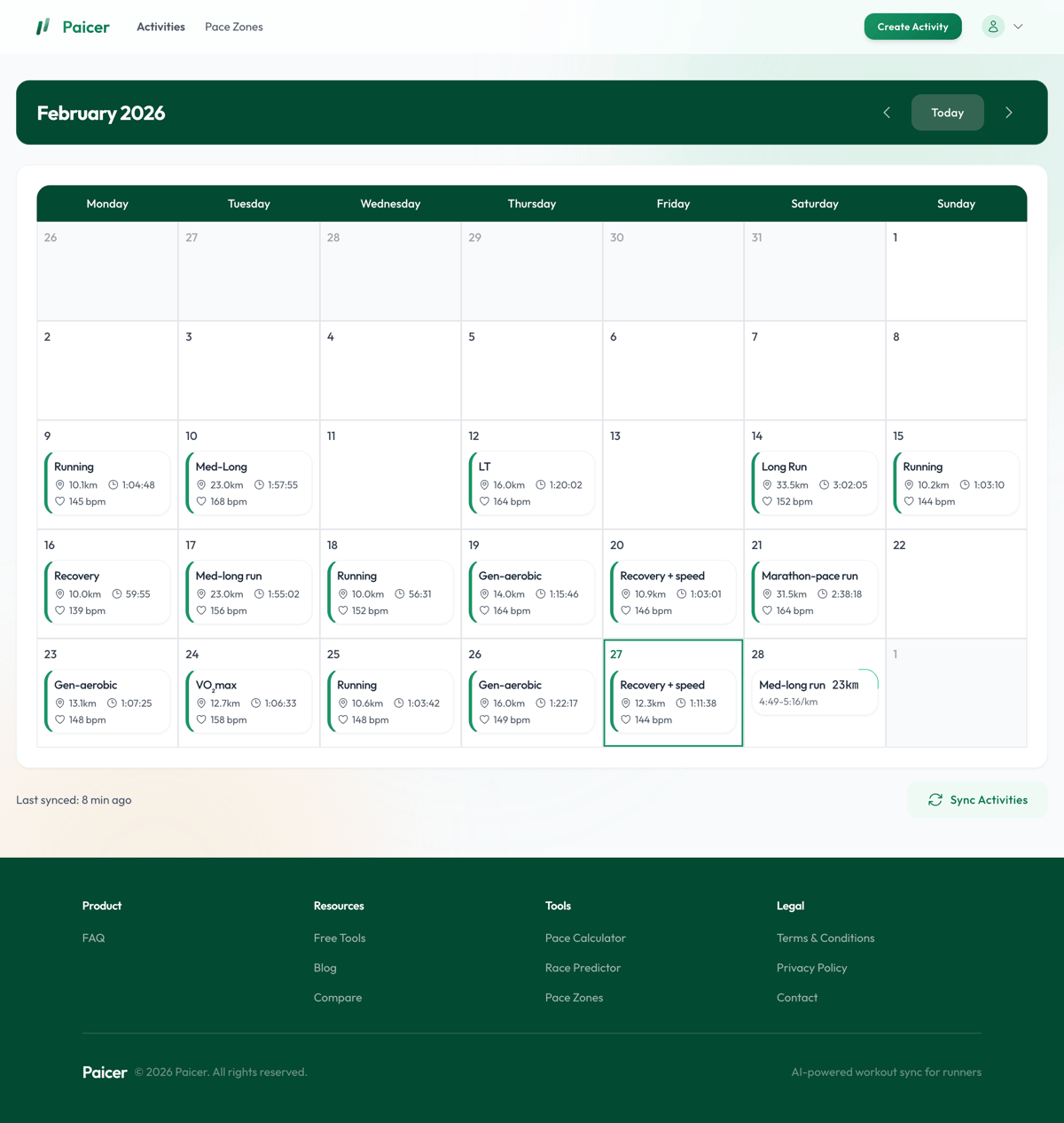
For runners working through an entire training block, this means you can upload a page per week as you go, building out your calendar progressively rather than entering sessions one at a time.
Data Handling
Paicer processes images of training plan pages, so it is worth explaining what happens to them. According to the developer, uploaded images are processed in memory and not written to disk or any persistent storage on Paicer’s servers. Once the workout structure has been extracted, the image is discarded. Paicer retains only the functional workout data: step types, distances, durations, and pace targets.
On the AI side, Paicer uses Anthropic’s Claude API for image parsing. Anthropic’s data usage policy confirms that API inputs are not used for model training. Anthropic retains API inputs for up to 30 days for safety and abuse monitoring purposes, after which they are automatically deleted. This is Anthropic’s standard API logging window, separate from Paicer’s own data handling.
Supported Devices
At the time of writing, Paicer supports Garmin only. This includes any Garmin watch that supports structured workouts via Garmin Connect, including the Forerunner series, Fenix and Enduro lines, and the Venu series. If your Garmin watch can receive structured workouts from Garmin Connect, it will work with Paicer.
Support for Coros and Polar is on the roadmap. The developer has confirmed these are planned, but has not committed to a specific timeline.
Things to Note
Paicer is currently in free closed beta. Users can sign up with an email address and receive access once invited.
Parsing accuracy depends on image quality. A clear, well-lit photo of a printed page works well; a blurry photo at an angle or a low-resolution scan may produce errors. Users can review and edit parsed workouts before syncing, allowing them to manually correct mistakes.
What’s Next
The current version focuses on doing one thing well: getting the workout from the page to the watch. Future plans include:
- Planned vs. actual comparison. Fetching activity data from Garmin after you complete a session, so you can compare what you were supposed to run against what you actually ran.
- Training load tracking. Monitoring volume and intensity trends over time to help manage fatigue and recovery.
- Performance analytics. Pace progression charts, weekly volume summaries, and fitness trend visualisation.
- Multi-week plan management. Full training plan lifecycle support, rather than uploading one week at a time.
Summary
For runners who follow structured training plans from books or PDFs and use a Garmin watch, Paicer removes the most tedious part of the process. It does not replace the plan or the coach. It just gets the workout onto the watch without the manual data entry.
Paicer is free during the beta period. Sign up at paicer.app.
Author: George, founder of Pacier, edited by the5krunner
If you enjoyed reading this, here is another in the Indie Spotlight series: Klimat Strava Weather App: 80 Million Activities Later.
Last Updated on 12 October 2026 by tfk the5krunner
Small things I always use
- Garmin 90-degree charging adapter: Charges your Garmin from any USB-C cable. Essential when travelling. I use one.
- Body Glide: The blue anti-chafe stick swimmers and runners carry. I use it.
- Speedo earplugs: Fewer ear infections and no cold-water dizziness. I use them.
- Dryrobe Advance: My winter changing robe for open-water swims. I use one. A cheaper option is the AONYIYI changing robe.
- Maurten: Race fuel that stays easy on the stomach. I use them.
- Garmin charging puck: The quickest way to top up before a session. I use one.
- Injinji: Toe socks that stop rubbing, so you run more. I use them.
- Ultimate toe protectors: Stop black toenails on long runs. They work. I use them.
- Compressport R2 v2 calf sleeves: My calf sleeves of choice. I use them.
- Cellucor C4: My pre-workout before hard sessions.
- TPU tubes: Schwalbe Aerothan, Tubolito and Pirelli SmarTube. Light, tiny spares. I use all three.
- G8 insoles: Adjustable insoles that are good. I use them.
- Cycplus Cube: A 97g electric pump that gets a road tyre rideable in two minutes. I carry one. 5% off with code THE5KRUNNER.
Watches and sensors
- Polar H10: My daily driver for waking HRV.
- Polar Verity Sense: My backup arm-worn HR sensor.
- Nomad bedside charger: Charges my iPhone and Apple Watch overnight. I use it, and many of their bands.
- Train.Red: The best muscle oxygen sensor I’ve used.
- Tymewear: Accurate heart rate and reliable ventilatory zones. I use it to pace endurance rides over an hour.
- Garmin Forerunner 970: A pro-grade triathlon watch. I use this.
- Apple Watch Ultra 4: My daily smartwatch. No phone needed on rides.
- Garmin Fenix 9 Pro: I’ve just bought one.
On the bike
- Continental GP5000 for everyday riding, and Aero 111 on the front for special occasions.
- Helmets: Specialized S-Works Evade 3 for road riding, and Rudy Project Wing for TT-style races. I use both.
- Ravemen FR300: A front light that mounts under your Garmin or Wahoo. I use one.
- Wahoo TRACKR Radar: I use it on one bike and Varia on the other. They perform the same.
- Garmin Varia RTL515: Radar that warns you of cars from behind. I use this model.
- Wahoo ELEMNT Roam 3: The bike computer that’s easy to use. I use mine on most rides.
- Favero Assioma Pro RS2: Accurate power pedals that swap easily between bikes. I use this model.
Home and indoor training
- NPE Runn: Makes my basic treadmill smart, sending more accurate speed and distance to my watch and Zwift. I use it.
- Google Wifi: Keeps Zwift connected in my pain cave. I use it.
- Apple TV 4K: Zwift on the big screen. I use two.
- Google Nest Doorbell (wired, 2nd gen): My video doorbell, running in both Google Home and Apple Home. I use it.
Health, recovery and sleep
- FreeStyle Libre 3 Plus: Shows how my blood sugar responds to diet.
- hDrop: Measures my sweat loss in summer and indoors.
- Fourth Frontier Zone: Checks my heart under load in hard sessions.
- Oura Ring 5: My partner’s recovery tracker of choice.
- Kineon MOVE+: Red light therapy for niggles. It works.
- Eight Sleep: A cooling mattress cover my partner and I use nightly.
Reader-Powered Content

This content is not sponsored. It’s mostly me behind the labour of love, which is this site, and I appreciate everyone who supports it.
Support the site: Follow (free, fewer ads) · Subscribe (paid, ad-free) · Buy Me A Coffee ❤️
Written by real people, with AI assistance. Fact-checked and verified for originality. See the Editorial Policy. FTC: Affiliate Disclosure — some links pay commission. As an Amazon Associate, I earn from qualifying purchases.

tfk is the founder and author of the5krunner, an independent endurance sports technology publication. With 20 years of hands-on testing of GPS watches and wearables, and competing in triathlons at an international age-group level, tfk provides in-depth expert analysis of fitness technology for serious athletes and endurance sport competitors. ID
