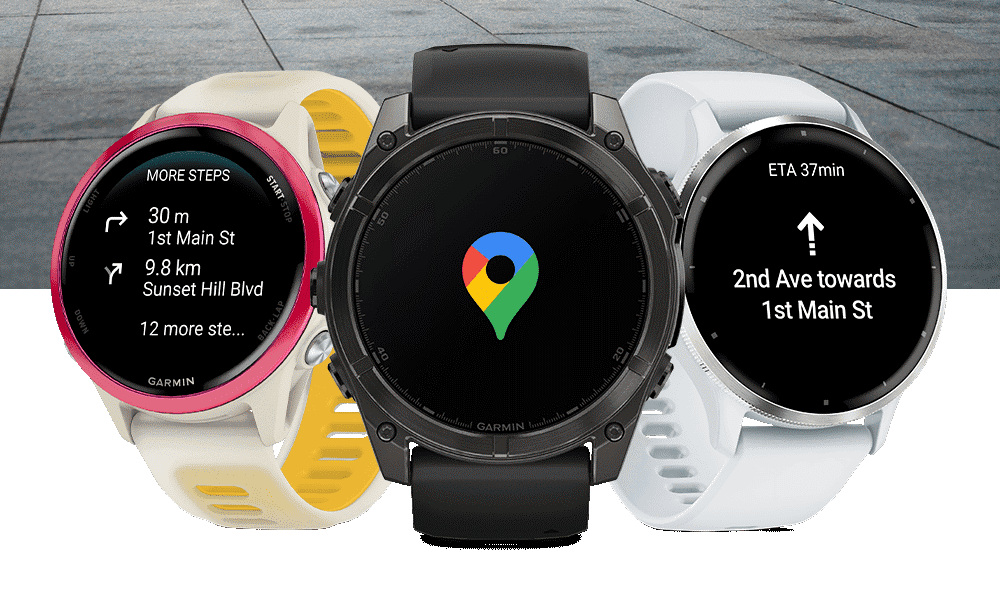
 Google Maps on Garmin: A New Option with Caveats
This site first reported the hookup between Garmin and Google Maps a few weeks ago; today it happened. Garmin officially launched a Google Maps app for select smartwatch models via the Connect IQ Store. The app offers turn-by-turn navigation for walking, cycling, or running, but comes with notable limitations compared to Garmin’s native navigation tools.
Who Is It for
This is not a pro navigation tool, but it is handy for people who love Google Maps.
If you carry your (Android) phone with you as you walk about a city, this will be a great option, but it will work anywhere, including in a car on the roads or whilst running in a forest. The new app is probably aimed at similar demographics to those Apple targeted in September 2021 when it released walking directions.
If you are looking for a map on your wrist, this is not for you. The map stays firmly put on your (Android) phone. It’s the turn-by-turn directions you will get.
Think of it as Google Maps continuously sending notifications to your Garmin watch.
What It Does Well
- Clear Turn-by-Turn Directions: The watch vibrates and displays the next turn (distance, arrow, street name), allowing you to keep your phone in your pocket. Handy for a rainy day or in a crowd.
- Activity Tracking Continues: You can continue running, riding, or walking while navigating.
- Preview Options: Tap the screen to view your next three steps.
- Free & Easy: Available at no cost via the Connect IQ Store.
- The Power of Google Maps: Complex routes, with rich supporting information, can be easily created in Google Maps.
Where It Falls Short
- Phone-Dependent & Android-Only: All navigation is mirrored from your phone. Navigation stops instantly if your watch disconnects or your phone goes out of range. There’s no iOS support.
- No In-Watch Search or Routing: You must set your destination in the Google Maps app. The watch cannot perform searches, display breadcrumbs, or build routes independently for Garmin.
- No Offline Maps: Unlike Garmin’s native course navigation, this app does not support offline routing or map downloads, so navigation ceases without a Bluetooth connection. However, you can download offline Google Map tiles periodically on your Android phone. If you go out of cell range, whatever is cached on your phone will be usable and visible on the watch.
- Battery & Performance: Continuous Bluetooth streaming of directions will negatively impact watch battery life and increase phone data usage.
- No Map Display on Watch: The CIQ app shows only text and turn arrows, not a visual map. For anyone accustomed to even the simplest of breadcrumb trails, this is limiting.
- Minimal Garmin Integration: The app does not integrate with Garmin’s navigational ecosystem, lacking compatibility with ClimbPro, Garmin courses, or POIs. It operates as a standalone experience.
Real-World Feedback
From the r/Garmin community:
“So, no maps, no iOS. It’s basically just sending notifications from the phone… Not even breadcrumbs, just turn notifications. Pass.”
Someone else noted:
“It’s not even using the watch’s GPS. It’s using the phone’s GPS and just sending these ‘texts’, right?”
Summary Table
| Feature | Google Maps CIQ
(Garmin) |
Native Garmin
Navigation |
|---|---|---|
| Search/route on Watch | No,
phone-only routing |
Yes |
| Offline Maps/Courses | No, kinda | Yes |
| iOS Support | Android-only | Both iOS & Android |
| Phone Dependence | Yes | Optional |
| Breadcrumb Trail | No | Yes |
| Vibration for Turns | Yes | Yes |
| Battery Efficiency | Will drain faster | More efficient |
| Integration with
Garmin Tools |
No | Full integration |
compatible Models
Most watches are compatible, but notable omissions are Instinct and Fenix 6.
-
Forerunner: 165 / 165 Music, 265 / 265S, 570, 955, 965, 970
-
Venu: Venu 3, Venu 3S, Venu X1
-
Vivoactive: Vivoactive 5, Vivoactive 6
- Fenix: Fēnix 7 & 8 series (includes Pro, Solar, Sapphire, X/XX variants)
-
Epix Gen 2 & Epix Pro (all sizes)
-
Enduro 2 & 3
-
MARQ Gen 2 series (Adventurer, Commander, Aviator, Carbon)
-
tactix 7 & 8 (Pro and Elite editions)
-
Approach S50/S70, D2 Mach 1, Descent G2, quatix 7/8 variants
I think this list is correct, please let me know if not.
Final Thoughts
The Google Maps CIQ app is simple, convenient, and free, but does not replace Garmin’s native navigation. Its reliance on a tethered Android phone, lack of independent functionality, and limited Garmin integration make it best for casual use, like urban strolls or simple errands.
This app has its place. It is a valuable addition. Install it, and I bet lovers of Google Maps will use it occasionally. Let’s face it: the Garmin navigational ecosystem is vastly powerful and feature-rich, but it’s hardly easy or convenient to use for mini-navigations.
Sure, the features are limited. Perhaps Google has more grandiose plans to send map tiles to the watch. Whilst that would solve several problems, it might potentially annoy Garmin, who would prefer us to buy its map-enabled products, it would also create some quite considerable technical issues transferring map tiles to the watch and displaying them – a task already done on Garmin watches by the likes of dwMAP.
Sources & Resources
Last Updated on 29 January 2026 by the5krunner
Reader-Powered Content

This content is not sponsored. It’s mostly me behind the labour of love, which is this site, and I appreciate everyone who supports it.
Support the site: Follow (free, fewer ads) · Subscribe (paid, ad-free) · Buy Me A Coffee ❤️
All articles are written by real people, fact-checked, and verified for originality. See the Editorial Policy. FTC: Affiliate Disclosure — some links pay commission. As an Amazon Associate, I earn from qualifying purchases.

tfk is the founder and author of the5krunner, an independent endurance sports technology publication. With 20 years of hands-on testing of GPS watches and wearables, and competing in triathlons at an international age-group level, tfk provides in-depth expert analysis of fitness technology for serious athletes and endurance sport competitors.

Given how many phones are stolen directly out of the hands of people, especially within cities, then this app will hopefully make people safer.
Very much agree with this, taking your phone out in large areas of London puts you at serious risk of robbery, glancing at watch removes this risk.
If they do a simple share location to garmin and then garmin internal routing can work like with Apple Maps that’s gonna be better
yes that’s POI sharing.
that also seems to be on the cards.
Fingers crossed an iOS version is coming soon.
I’m pretty happy with this addition. One particular really good use case for this with me, is walking through an unknown downtown in a city, where I often punch in a destination in Google maps for walking directions. Without having to walk around with my phone in my hand looking like a lost tourist (and attractive prey for a phone thief), I can’t just look at my watch like I’m checking the time to see where I need to turn.
There’s a little room for improvement still, and hopefully this is a work in progress… first, I want Google Maps integration that lets me save a waypoint on the phone app to the watch, which I think Apple Maps already has if I’m not mistaken. And second, I’d like for it to show me a LITTLE more information than just the name of the street, an arrow, and the distance. Something like a screenshot of what the intersection looks like, and also let me view some of my watch’s data at the same time like… what time it is, would be a good start.
Still, I’m really happy with where this is going, and kudos to Google for making it free, and to Garmin for not sticking it behind their own paywall.
I’ve seen a lot of critics who have basically been saying “So all it does is send turn-by-turn directions from your Google Maps app to your wrist?”
Yeah, that IS all it does. And it’s great. For years there was never a way to do that before. So I don’t understand the complaining.
Also it’s awesome that the TBT directions come up on your watch without having to manually start an app or activity or anything, which is fantastic. Just start a route on your Google Maps app on your phone, and boom, directions pop up on your watch at the same time. I honestly didn’t even know 3rd party apps could do that (and maybe that’s where the “partnership” between google and garmin on this comes in)
I kinda like it. But why isn’t the Instinct line supported? That would be the watches which would benefit best.
Could someone please upload he application file for those who aren’t on the compatible list?
that used to be a .PRG file.
however the method has changed and I think this is probably no longer possible.
please post or email me the PRG file and I will post if the comments system doesn’t allow you