Garmin’s new battery feature plays catch-up — Apple did it five years ago
Garmin has updated its Connect app for iOS to display real-time battery percentages in the device list — a change that required a dedicated app update to deliver what iPhone owners have had as a basic feature since iOS 14 in September 2020.
The addition went unannounced. Garmin’s official notes for the app only cite generic bug fixes; the feature was identified by u/Dismal_Factor_9062 in the r/Garmin community before any wider coverage appeared. A pattern this site has noticed before.
The contrast with Apple is pointed. For over 5 years, iPhone owners have been able to see core battery management info on a home screen widget that shows charge levels for every paired Bluetooth device simultaneously — AirPods, Apple Watch, keyboards, the lot – any standard Bluetooth accessory — without opening a single app. Garmin owners, paying upwards of $1000 for a Fenix 8 or Forerunner, have until now been required to navigate to each device page individually to check whether their watch needed charging before a morning run. As the image shows below for my Garmin HRM 600 chest strap, the battery information was previosuly squirrelled awy in the depths of the device information pages – now just one tap shows me the 73% charge info I need to know. Nice!.
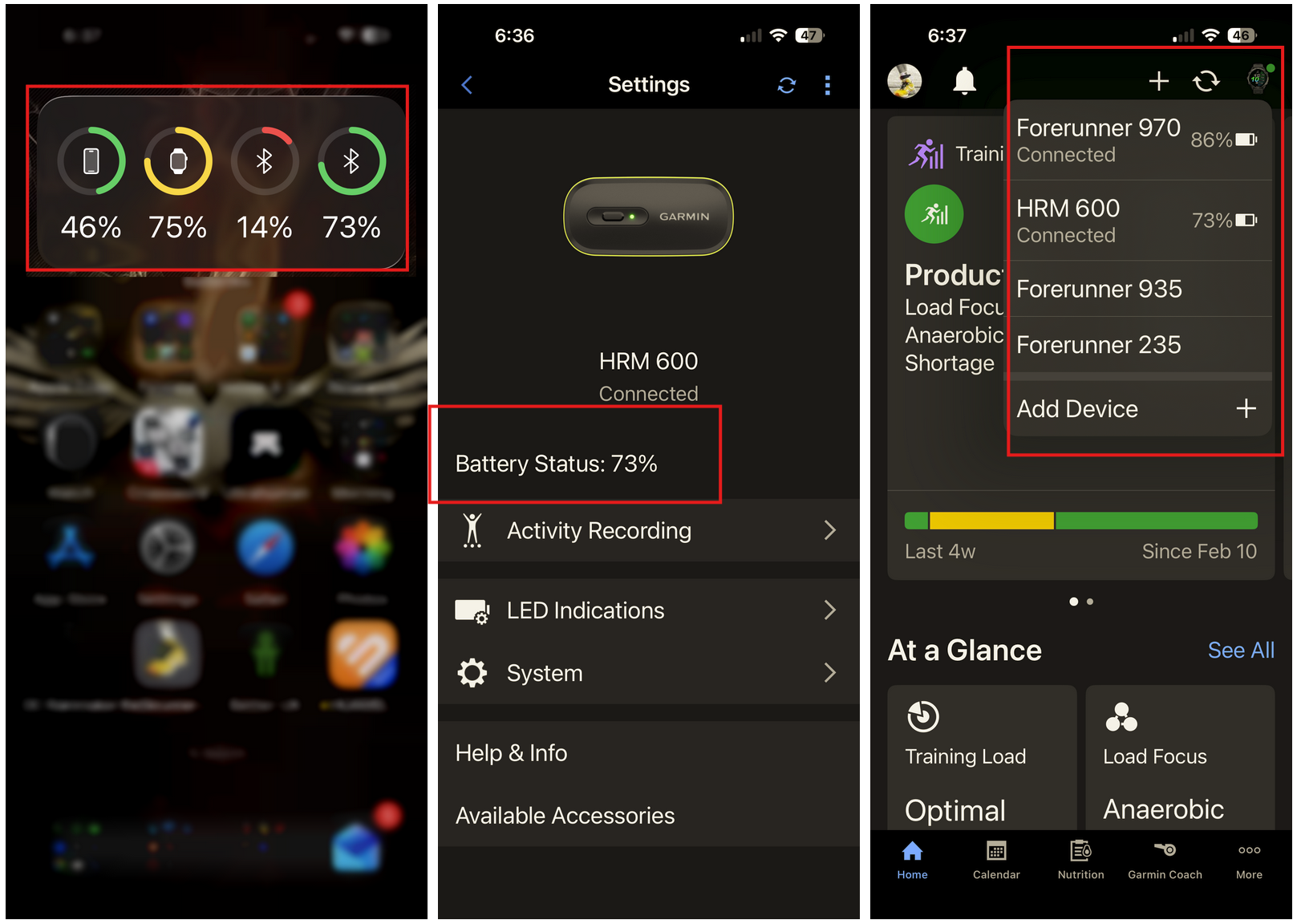
As you can see, the update adds a live percentage and battery icon to the device switcher. Confirmed support covers the Forerunner 955 and the Epix Gen 2; broader compatibility across the range is expected. A secondary addition, also shown above, provides a direct shortcut for pairing new hardware via “Add Device +”, which is much easier than the taps previously required.
Available now on the Apple App Store. An Android release has not yet appeared on Google Play; a corresponding build is expected to follow in the coming weeks.
Last Updated on 23 February 2026 by the5krunner
Reader-Powered Content

This content is not sponsored. It’s mostly me behind the labour of love, which is this site, and I appreciate everyone who supports it.
Support the site: Follow (free, fewer ads) · Subscribe (paid, ad-free) · Buy Me A Coffee ❤️
All articles are written by real people, fact-checked, and verified for originality. See the Editorial Policy. FTC: Affiliate Disclosure — some links pay commission. As an Amazon Associate, I earn from qualifying purchases.

tfk is the founder and author of the5krunner, an independent endurance sports technology publication. With 20 years of hands-on testing of GPS watches and wearables, and competing in triathlons at an international age-group level, tfk provides in-depth expert analysis of fitness technology for serious athletes and endurance sport competitors.

Totally unrelated:
I can’t use a two finger click on the apple trackpad to open a link in a new tab, a two finger click on the iPads screen works fine.
This seems to be a incompatibility of you publishing system, on other sites it works.
thank you
are you logged in ? are you using an ad blocker?
if you are a subscriber and logged in there should be no issues but I do limit some functionality to non subscribers (eg ability to copy text). I know that when i’ve done that it might have other unintended knock on effects similar to what you describe…i thought i’d fixed them.I’ve just made anohter change, please try that again
I just tried and it makes no difference.
I can use the trackpad only to scroll and zoom.
Marking text is blocked for me no matter if im logged in, logged off, add blocker (on the iPad) on or off.
Right click is only possible via touch, not via the trackpad. Also no difference in settings.
The only thing wich is limiting my way of reading is the way of opening links in new tabs.
I didn’t check how it is if i disable the network-wide add blocker.
i flushed my server cache, which i may not have done earlier. this might make a difference.
it won’t happen in subscriber mode 😉