Garmin PacePro
PacePro is a race pacing tool that divides a course into individual splits and assigns a target pace to each one, adjusted for the gradient of that segment, so that a runner expends roughly equal effort across varied terrain rather than equal time per kilometre on flat and hilly sections alike.
PacePro (Pace Pro) calculates a personalised pacing strategy before the race begins. The runner provides a target finish time and, optionally, a split preference — positive, negative, or even — and the feature uses the elevation profile of a loaded course to derive a different target pace for each kilometre or mile split. Steeper climbs receive a slower target; flats and descents receive a faster one. The strategy is then displayed on the watch during the activity, showing the target pace for the current split, the runner’s actual pace, and the cumulative gap relative to the plan.
PacePro requires an accurate course file to function as intended. Where the course profile loaded to the watch differs materially from the actual race route — due to GPS drift in the source file, course changes, or route deviations — the split targets will be calculated against the wrong gradients, and guidance will be unreliable from the point of divergence.
What the PacePro Metrics Actually Mean
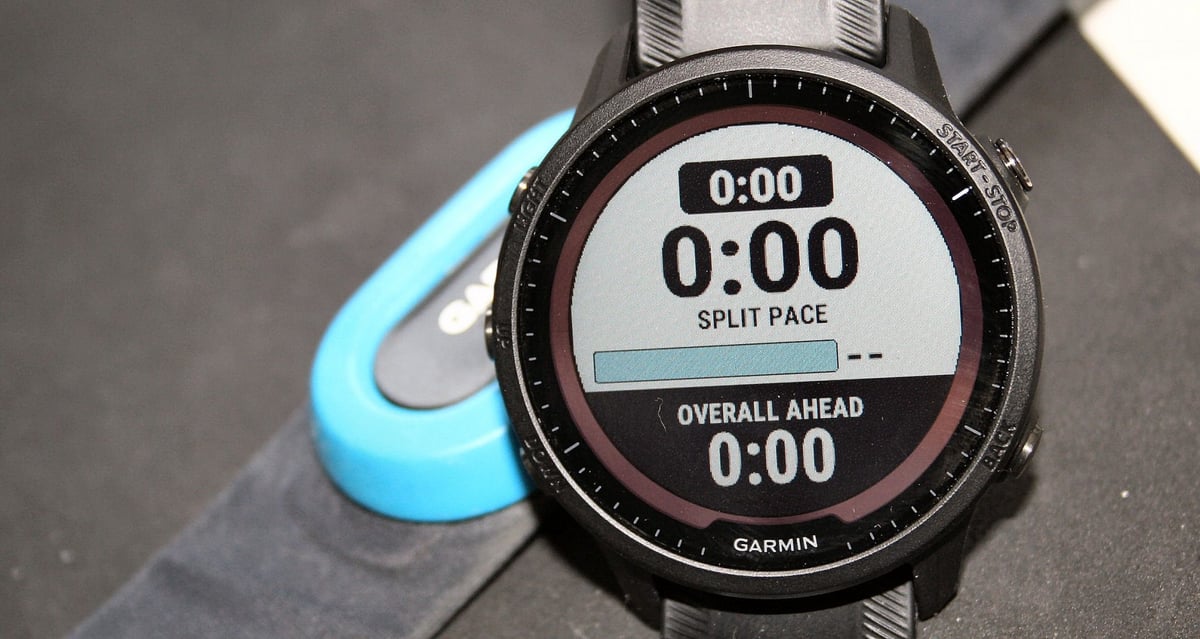
Each split target represents the pace at which the runner should complete that segment in order to stay on track for the goal finish time. The pace varies between splits because equal physical effort produces different speeds across different gradients.
During the activity, the watch displays the current split’s target pace, the runner’s current actual pace, and a running total of how far ahead of or behind the plan the runner is. A positive gap — ahead of plan — indicates the runner is accumulating time against the target. A negative gap indicates time lost. The metrics represent tactical execution tools calibrated against a preset goal.
When PacePro is created without a specific course — using only a target race distance and goal time — all splits receive the same flat target pace, because gradient data is absent. The uphill effort slider is absent in this mode.
How Garmin Calculates It
Garmin introduced PacePro in 2019 on the Fenix 6 series. The PacePro Plan is built in Garmin Connect as a PacePro Strategy and synced to the device before the activity begins.
When a course with elevation data is selected, Garmin Connect reads the elevation profile and calculates the average gradient for each split. It then applies a grade-adjusted effort model — derived from the established relationship between running speed and metabolic cost at gradient — to translate the flat-equivalent target pace into a gradient-based target pace for each segment. Splits on steeper positive gradients receive slower targets; splits on negative gradients or flats receive faster ones.
Three split options are available: Every Kilometre, Every Mile, and Elevation-Based. The first two use fixed distances; Elevation-Based instead creates splits at hill-start points, with a slider to control sensitivity. Fixed splits average the gradient across the whole segment; Elevation-Based avoids this but produces uneven split distances. Two further sliders control uphill effort weighting and the preference for an overall positive or negative split.
Once active, progress against the plan is tracked by GPS position rather than accumulated distance. Brief GPS signal degradation leaves the plan intact because a new position fix is re-established once the signal returns.
PacePro strategies are created on watches that support mapping or in Garmin Connect.
What Affects the Reading
Course file accuracy is the primary variable: where the elevation profile is incorrect, gradient adjustments will be wrong, and targets will misrepresent the terrain’s true effort.
Fixed-distance splits average the gradient over each full kilometre or mile, so any climb and descent within the same split cause the target to understate the required effort. Elevation-Based splits avoid this by placing boundaries exactly at hill start/end points, at the cost of uneven split distances.
Route deviation corrupts the cumulative ahead/behind figure, but forward guidance recovers once back on course, with any time or distance deviation disregarded from that point onward.
The pace cap constrains use at the extremes: PacePro accepts goal paces between 4 and 20 minutes per mile (approximately 2:28 to 12:25 per kilometre) and supports a maximum activity distance of 150 miles (approximately 241 kilometres). The feature operates on outdoor run, trail run, and ultra run activity profiles; treadmill and indoor activities fall outside its scope.
How Accurate Is It
The relevant accuracy question for PacePro is whether, when followed, split targets produce an evenly distributed physiological effort across the course. That outcome depends on two factors: the accuracy of the elevation data in the course file, and the validity of the grade-adjusted effort model underpinning the calculations.
The grade-adjusted effort model draws on the same body of research that informs grade-adjusted pace calculations more broadly. Minetti et al. (2002) measured the metabolic cost of running at gradients from −0.45 to +0.45 and established the non-linear relationship between gradient and energy expenditure that current grade-correction models use. The model is well-validated for moderate gradients typical of road and trail races. At very steep gradients — above approximately 25-30 per cent — runners typically transition to hiking, and the model’s predictions become less reliable because it assumes continuous running mechanics.
Real-world testing has identified course file quality as the dominant source of error. Where the elevation profile contains significant inaccuracies, split targets diverge from what the actual terrain demands, and the cumulative ahead/behind figure accumulates error that conflicts with perceived effort. No peer-reviewed study of PacePro’s absolute accuracy under race conditions has been identified in the published literature as of March 2026.
PacePro calculates each split target from the average gradient of that kilometre or mile. A split containing a steep climb followed by a descent may average close to flat, producing a target that bears no relation to the effort the terrain demands. This effect is most pronounced on rolling trail courses where elevation change is distributed unevenly within splits.
The feature’s value is specific to undulating terrain. On flat courses, a simple even-pace target produces the same result.
Competitor Equivalents
- Polar — Race Pace: Available on Grit X, Grit X Pro, Pacer, Pacer Pro, Vantage M/M2/V2/V3, Grit X2 Pro, and Vantage M3. Race Pace sets a flat target pace for a given distance and goal time and shows the runner’s ahead-of- or behind-the-target status against a steady, even-pace target. No grade adjustment and no course elevation profile are used. The feature is functionally closer to a simple pace band than to a course-based strategy.
- Suunto — Race Pacer (SuuntoPlus): Available as a third-party SuuntoPlus app. Supports flat even-pace targets and negative-split options by distance or time. No grade adjustment. Community requests for a PacePro equivalent were present in public forums as of mid-2025, but no native equivalent had been introduced by that date.
- Apple — Pacer: Introduced in watchOS 9 (2022). Sets a flat target pace for a distance and goal time; shows ahead/behind against an even-pace target. No grade adjustment. Apple also offers Race Route, which allows the runner to race a previous effort on a repeated course, but this is a competitive ghost function rather than a pre-planned grade-adjusted strategy.
- Coros: No native equivalent as of March 2026. The COROS Pace Pro is a watch model name, not a pacing feature. No pre-race grade-adjusted course pacing plan is available on Coros devices.
- Wahoo: No equivalent grade-adjusted course pacing feature has been identified on Wahoo devices.
All current competitor implementations that offer pacing guidance use flat, even-pace targets. PacePro is, as of March 2026, the only mainstream consumer running watch feature that calculates per-split gradient-adjusted targets from a course elevation profile and displays them dynamically during a race.
Which Garmin Devices Support It
Garmin introduced PacePro in August 2019 on the Fenix 6 series.
PacePro is available across a wide range of current Garmin running watches, extending from flagship to mid-tier devices. Among current-generation models, it is supported on the Fenix 8 series (all variants), the Enduro 3, and the Forerunner 570 and Forerunner 970, as well as later models in the same tier. It is also present on the Forerunner 265 and Forerunner 965, as well as on the Venu X1, Venu 4, and Vívoactive 6. The Forerunner 55 and Forerunner 245 series also support PacePro, extending the feature to entry-level devices.
The feature is absent from older device models and from newer ones that fall below the current threshold, such as the Instinct 3 series and the Forerunner 165.
Within the compatible device range, there is an operational difference between mapped and non-mapped devices. On devices with onboard topographic maps — the Fenix 8, Enduro 3, Forerunner 265, Forerunner 965, Forerunner 570, Forerunner 970, and the epix Pro Gen 2 — the elevation profile is read from the stored map data. On non-mapped devices such as the Forerunner 55 and Forerunner 245, elevation data comes from the course file itself; if the course was created without an accurate elevation profile, the split targets will reflect whatever elevation data the file contains.
Where to Find It
PacePro plans are created in Garmin Connect before a run begins, using the PacePro Pacing Strategies menu.
- In the Garmin Connect mobile app, the path is More > Training & Planning > PacePro Pacing Strategies > Create PacePro Strategy.
- In Garmin Connect web, the path is Training & Planning > PacePro Pacing Strategies > + Create PacePro Strategy.

Both interfaces allow the runner to select a saved course or a flat race distance, enter a goal time, and configure the split preference and uphill effort level. The Garmin Connect web interface provides the most complete strategy-building environment: after entering a goal time, the web view displays the course map, an altitude profile overlaid with a colour-coded pace curve — slower splits in blue, faster splits in red — and a per-split table listing the target pace for each kilometre. Adjusting the goal time, the uphill effort slider, or the negative split preference updates all three views immediately, allowing the runner to see the effect of each change across the full course before saving. The completed plan syncs to the watch automatically.
On the watch, a PacePro plan is activated within an outdoor running activity. From the activity, hold the menu button, navigate to Training > PacePro Plans, select the plan to use, then press Start. On some device generations, the path runs through Navigation > Courses — the specific menu structure varies by device model and firmware version.
Once active, PacePro occupies its own activity data screen, displaying the current split’s target pace, the runner’s current actual pace, the distance remaining in the current split, and the cumulative gap. This screen appears automatically; manual configuration of data fields is unnecessary.
PacePro is an active-session feature only. Post-activity, Garmin Connect shows a planned-versus-actual pace comparison in the activity detail view in both the mobile app and the web interface. Strategy creation and use are available on Garmin Connect’s free tier.
Common Problems and Misreadings
Runners who create a PacePro strategy for a race distance rather than a specific course sometimes find that the split targets are identical for every kilometre. This is expected behaviour. With only a race distance and goal time, PacePro has nothing to apply a gradient adjustment against, so all splits receive the same flat pace. Creating the strategy against an actual course file — from Garmin Connect’s course library, a downloaded GPX file, or a previous run trace — is necessary to achieve differentiated split targets.
The on-watch display of cumulative ahead/behind time is sometimes mistaken for an instantaneous comparison of pace. The figure represents the accumulated time gained or lost across all completed splits plus the current split to date — a running total, rather than a snapshot of current versus target pace. The split-level target pace, shown at the top of the screen, is the more actionable figure for moment-to-moment execution.
Some runners report that PacePro targets feel too aggressive on climbs or too conservative on flat sections compared to perceived effort. This usually reflects a mismatch between the actual terrain and the elevation data in the course file. Checking the altitude profile in the Garmin Connect strategy view before race day — and comparing it against a known, accurate elevation source such as a mapping application — can help identify such discrepancies.
When the watch briefly loses GPS signal and then reacquires it, PacePro resumes guidance from the reacquired position on the course file. Because tracking is position-based rather than distance-based, the brief outage leaves the ahead/behind calculation intact. Runners who deviate from the planned route and then return to it will find that forward guidance recovers from the rejoin point. The ahead/behind total accumulated during the detour will not be recalculated and should be disregarded from that point.
Trail runners using fixed kilometre or mile splits often find PacePro targets unreliable on rolling terrain. Switching to Elevation-Based splits in Garmin Connect resolves the gradient-averaging problem but produces variable split distances, which some runners find harder to pace against.
How to Improve It
PacePro targets are fixed at strategy creation and are set against a goal time. Improving the goal time that PacePro can reliably target requires improving the underlying fitness that sustains the goal pace — principally aerobic capacity and the ability to sustain a high fraction of maximal aerobic speed over the race distance.
For undulating races, the ability to maintain consistent effort on climbs is a meaningful determinant of how well a runner can execute a gradient-adjusted strategy. Uphill-specific training — including hill repetitions at a controlled effort and sustained threshold runs on rolling terrain — improves climbing efficiency and the speed of recovery from climbing.
The quality of PacePro guidance also depends on how well the course file reflects the actual terrain. Before setting a goal time for an important race, review the altitude profile in the Garmin Connect strategy view and verify that the major climbs and descents match those in the race route.
Frequently Asked Questions
- Does PacePro automatically adjust my pace while I run, or are the targets fixed? The split targets are fixed at the point the strategy is created. PacePro calculates each split’s target pace from the course elevation profile before the run begins; all targets remain static throughout the activity. What changes in real time is the display showing how far ahead of or behind the preset targets the runner is.
- What is the difference between PacePro and Grade-Adjusted Pace? PacePro assigns a static target pace to each split, calculated from that split’s average gradient, before the run begins. Grade Adjusted Pace (GAP) is a separate data field that recalculates the runner’s current instantaneous pace as its flat-ground equivalent in real time, using the barometric altimeter. PacePro sets the race plan; GAP shows the live effort-equivalent pace. On variable terrain within a single kilometre, a runner can use GAP as a real-time execution tool to match effort to the PacePro split target, running faster on flat sections and slower on steep ones within the same split while keeping grade-adjusted output on target.
- Can I create a PacePro Plan for a race I have never run before? Yes, provided a course file for the race is available. Download or import the course into Garmin Connect — most major road races publish GPX files — and create a PacePro strategy based on it. The accuracy of the split targets will depend on the quality of the elevation data in that file. Check the altitude profile in Garmin Connect after importing to confirm the major features of the course are represented correctly before building the strategy.
- Why does PacePro say I am behind when I feel like I am running to effort? The most common cause is a course file that underestimates the gradient of the section being run. If the file records a climb as shallower than it actually is, the target pace for that split will be set faster than the terrain warrants, and the runner will fall behind plan while still running at appropriate effort. Check the altitude profile of the course file against an independent source. A secondary cause is banking time early on flat or downhill sections, which then creates an apparent deficit when the terrain becomes demanding.
- Do PacePro Plans work on a treadmill? No. PacePro requires an outdoor running activity with GPS tracking and a preloaded course. Treadmill, indoor, and unplanned outdoor activities fall outside the types it supports.
- Can I create a PacePro Plan on the watch itself? On mapped devices — those with onboard topographic maps — a strategy can be created directly on the watch during course navigation by selecting PacePro from the course options and entering a goal pace or goal time. This method requires a course that was loaded from Garmin Connect; courses drawn on the device using the on-device route tool are outside its scope. Strategies created via Garmin Connect and synced to the watch are supported on all devices.
Scientific Basis
Minetti AE, Moia C, Roi GS, Susta D, Ferretti G. “Energy cost of walking and running at extreme uphill and downhill slopes.” Journal of Applied Physiology 93(3):1039–1046, 2002. This study measured the metabolic cost of running across gradients ranging from −0.45 to +0.45 in 10 elite runners, establishing a non-linear relationship between gradient and energy expenditure that underpins grade-adjusted pace models, including those used in Garmin’s calculations. Running cost was minimised at approximately −0.20 gradient and increased steeply on positive slopes.
Abbiss CR, Laursen PB. “Describing and understanding pacing strategies during athletic competition.” Sports Medicine 38(3):239–252, 2008. This review established the performance case for controlled pacing in endurance events. The authors found that during prolonged efforts lasting more than two minutes, even or slightly negative pacing — distributing work consistently across the race rather than starting fast — yields better outcomes than positive splits. This provides the scientific rationale for grade-adjusted even-effort pacing as a performance strategy on undulating courses.
How It Connects to Other Features
PacePro is most directly related to [LINK: grade-adjusted-pace], the live data field that recalculates current running pace as its flat equivalent in real time. The two features complement each other: PacePro defines the per-split target before the race, while the Grade-Adjusted Pace data field provides the runner with a real-time effort signal for each split.
PacePro also connects to [LINK: climbpro], which operates on the same loaded course file but serves a different function. ClimbPro shows the remaining distance and elevation for the current climb; pace targets lie entirely outside its scope.
The Race Predictor feature provides estimated finish times for standard race distances based on the runner’s current VO2 max estimate. These predicted times are a natural starting point for setting the PacePro goal time.
For races where effort distribution is tracked post-event, Training Load provides context for the session’s physiological cost. Reviewing post-race Training Load alongside the PacePro execution data can indicate whether pacing was conservative, accurate, or too aggressive for the fitness level at that point in training.
