COROS Spring 2026 Update: Hill Alerts (ClimbPro), Pace Strategy (PacePro) and Hybrid Fitness (Hyrox) Tested
COROS has released its Spring 2026 firmware update. The three headline additions are Hybrid Fitness (Hyrox) mode, Hill Alerts, which provides real-time climb and descent guidance on the watch, and Pace Strategy, which generates terrain-adjusted pacing plans for road and trail events. Significant kudos to the brand for making them available on current and prior-generation hardware, though its earliest watches are missing out.
This article covers how each feature works and what to expect in practice.
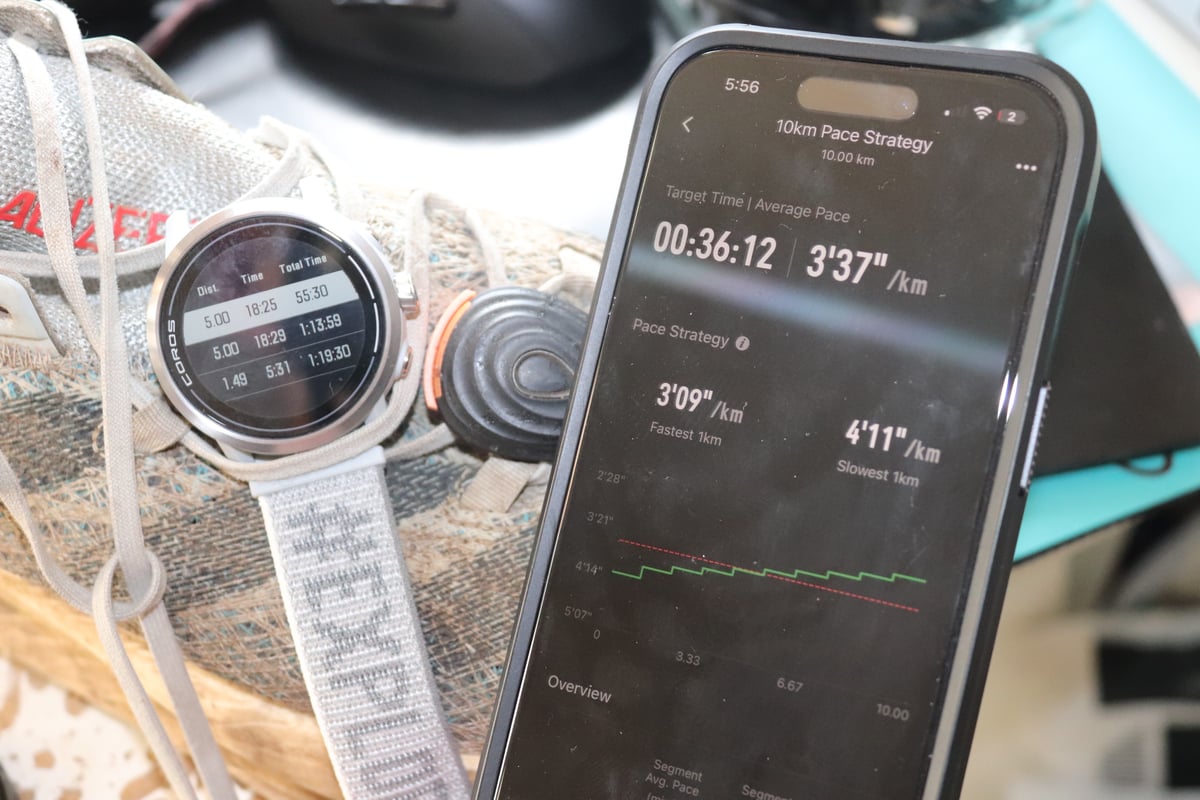
What’s in the update
The full feature list is actually more impressive than the headline suggests. There are several additional enhancements across a range of areas. Here’s the full list:
- Pace Strategy — terrain-adjusted race pacing for road and trail
- Hill Alerts — real-time climb and descent guidance on the watch
- Hybrid Fitness — repeated run-to-exercise tracking in a single mode
- Weekly Distance widget — current week volume visible from the watch face
- Passcodes — 4-digit PIN lock required when the watch leaves the wrist
- Race Predictor trend view — predicted finish times tracked over time as your fitness changes
- Pause Options — dial press menu for lap review and workout navigation mid-activity
- Finish Pause — choose whether a structured workout pauses at the final stage
- Multisport improvements — mode switching and mid-activity Change Activity
- Nutrition Alerts — increments now selectable from 5 to 60 minutes by the exact minute
- Sleep Mode — now runs to the listed Wake Time; display adjusted to reduce disturbances
- Rock Climbing — summary improvements, Auto Pitch detection, Rest phase, outdoor stats
- COROS DURA — media controls, map road-type refinements, lap screen improvements
- Large Font for Notifications — increased text size for incoming alerts
Device compatibility
| Feature | PACE 4 | APEX 4 | NOMAD | PACE Pro | PACE 3 | APEX 2/2 Pro | VERTIX 2/2S | DURA |
|---|---|---|---|---|---|---|---|---|
| Pace Strategy | Yes | Yes | Yes | Yes | Yes | Yes | Yes | No |
| Hill Alerts | Yes | Yes | Yes | Yes | Yes | Yes | Yes | Yes |
| Hybrid Fitness | Yes | Yes | Yes | Yes | Yes | Yes | Yes | No |
| Weekly Distance | Yes | Yes | Yes | Yes | Yes | Yes | Yes | No |
| Passcodes | Yes | Yes | Yes | Yes | Soon | Soon | Soon | No |
| Race Predictor Trend | Yes | Yes | Yes | Yes | Yes | Yes | Yes | No |
Pace 2, Apex Pro, Vertix 1, and Apex 42/46mm receive the Race Predictor Trend only.
All headline features available on devices released since 2022. Passcode support is limited to the four current-generation watches for now, with wider rollout to follow.
Hill Alerts
Hill Alerts requires a route loaded from the COROS app. Any route with significant elevation changes triggers the feature automatically in Run, Trail Run, and Hike modes.
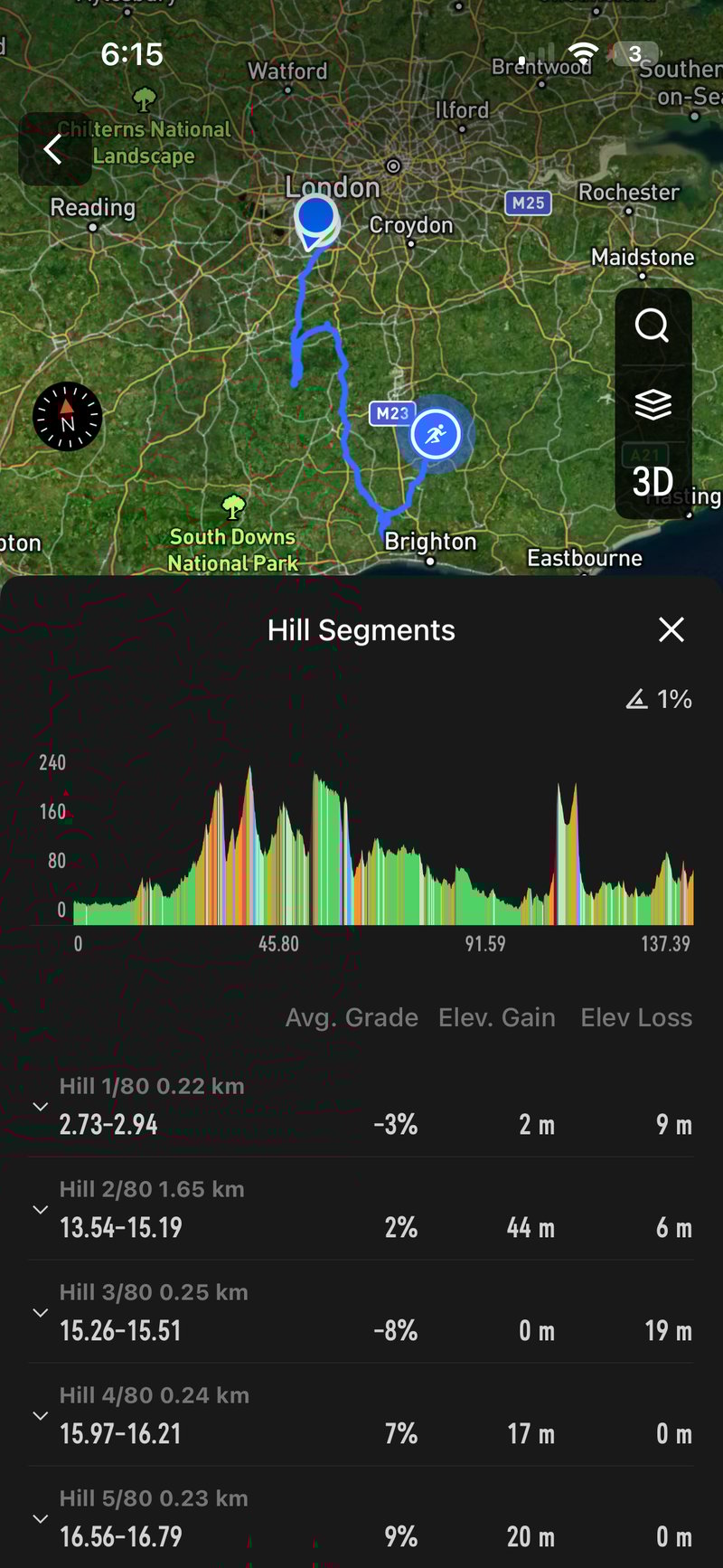
Before the run, the app’s Hill Segments view shows every climb and descent colour-coded by difficulty, with distance, grade, and difficulty rating for each. On the watch, Elevation Details in the navigation menu displays the full course profile with total gain and loss.
During the run, the watch alerts you at three points: at the start of a hill, showing segment length, elevation change, and average grade; during the climb, showing remaining distance, remaining elevation, and current grade; and at the end of the segment, confirming completion. The feature can be turned off in settings.
Initial tests and thoughts: As Garmin found when it launched its ClimbPro equivalent, this is a tricky feature to get right. GPS positioning is never perfect, and at the slow speeds of a steep climb, that can produce significant positioning and reported grade error, to the point where the feature becomes unreliable – this is likely where Coros will suffer, as it shows the current (likely inaccurate) grade. I haven’t tested COROS Hill Alerts to that level of detail yet, but I plan to do so shortly. I couldn’t find a way to adjust the hill-detection algorithm’s sensitivity via a grade threshold, which, from experience with competitors’ equivalents, is a seemingly small but important option; otherwise, shallow rollers clutter the screen on undulating courses.
The obvious omission is cycling support, though COROS would counter that a power target is more useful on the bike. A less obvious annoyance is that hill detection doesn’t appear to be visible on older saved routes. I could only see the climb segments in the app when creating a new route, and even then, they disappeared when I returned to the route later. On the watch itself, the gradient shading along each hill segment is clear and well executed — comparable to what Hammerhead does on its cycling computers and arguably better visually than Garmin on AMOLED displays.
Pace Strategy
Plans are created in the COROS app under Profile, then Pace Strategy, and synced to the watch before the event.
Distance-based plans (road)
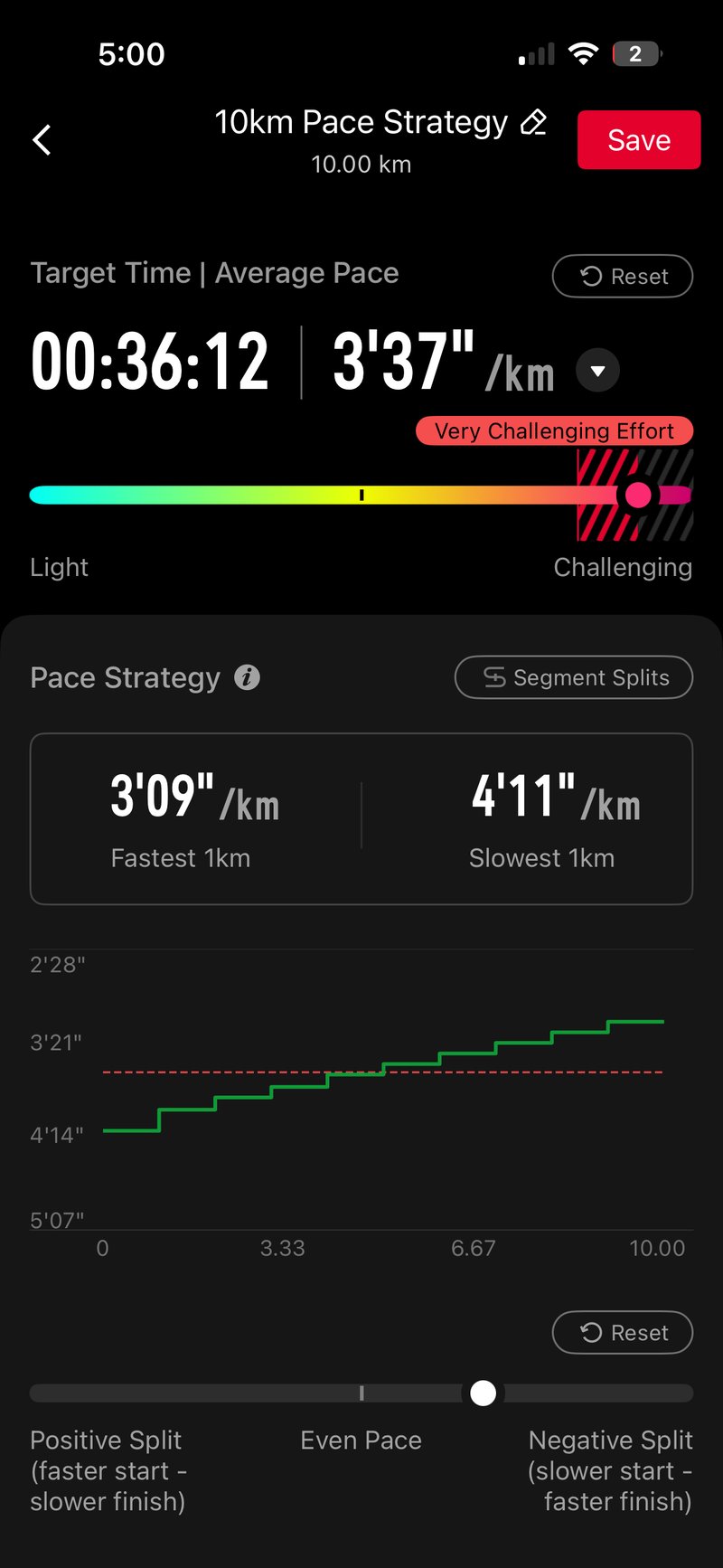
Choose a preset distance (5km to a marathon) or enter a custom distance. COROS generates a target time based on your current fitness data, which you can adjust via a slider or dropdown. You can then set a positive or negative split profile, or use Expand and Edit to manually adjust any individual segment. Changes to individual segments automatically change the overall target time.
Thoughts: This is a nicely executed feature and very easy to use. My only initial criticism is that the positive/negative split slider allows unrealistically wide ranges even on flat courses — nothing that a bit of common sense can’t handle.
Route-based plans (trail and ultra)
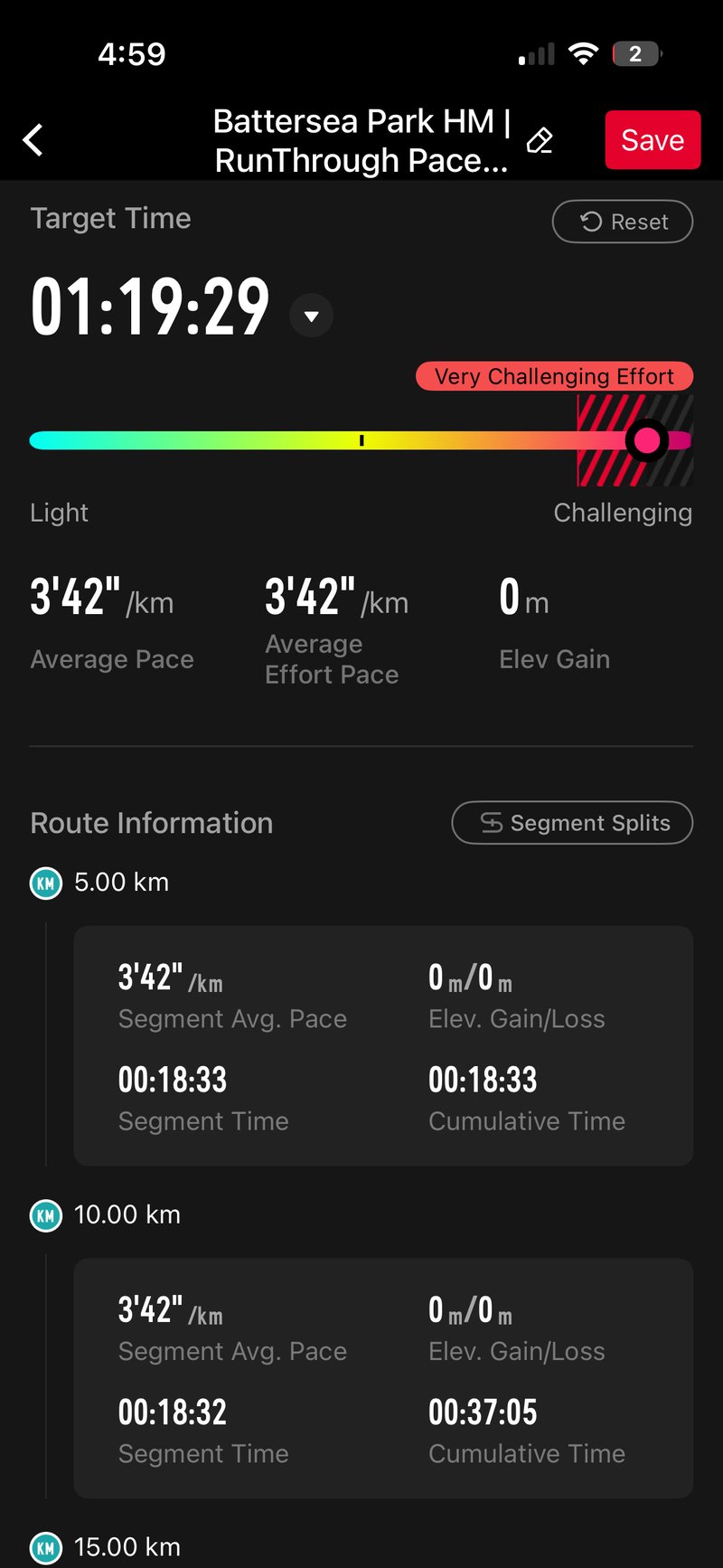
Select a saved route. COROS generates target paces for each segment based on the elevation profile and fitness level. If the event is within three days, entering a start date and time adds forecasted weather conditions by segment. Aid station stop times can be entered for any waypoint. A landscape view in the app shows the complete pacing graph with a weather overlay. For events beyond 50 kilometres, COROS suggests reviewing the generated plan against personal course knowledge before race day.
Thoughts: This feature looks good on paper, but has a significant limitation in practice. Unlike the Garmin equivalent, there is no option to split by hill — only by distance, in 1km, 5km, or 10km intervals. That initially sounds fine, but long splits will likely include multiple climbs and descents, and pacing to an average target across mixed terrain won’t work. The average pace COROS assigns will also be imprecise because it cannot fully account for the cumulative effects of repeated ascents and descents within a single split.
As with all competitor equivalents, the feature is vulnerable to route deviations on race day. If you are off course,rse the current split will likely run longer than planned, and you will need to mentally account for the resulting time difference. Once you are back on the correct line, subsequent segments should resume accurately from the next split onwards.
A nice detail is that weather is added to the plan if your event start is within three days – useful for long hikes or ultras, where conditions can change mid-route.
On the watch
Open the chosen activity mode, scroll to Pace Strategy, and select the plan. Four dedicated data fields are available during the activity: target pace for the current section; estimated finish time and distance remaining; time ahead of or behind target; and, for route-based plans, remaining time, distance, and elevation to the next waypoint. There’s a countdown to each waypoint, plus a screen showing the time against the target and the planned stop duration.
On completion, the app summary includes a full Pace Strategy breakdown comparing actual against planned paces by segment. Nice!
Hybrid Fitness
Hybrid Fitness tracks events that alternate running with functional exercise stations. The eight stations in the mode are SkiErg, Sled Push, Sled Pull, Burpee Broad Jumps, Rowing, Farmer’s Carry, Sandbag Lunges, and Wall Balls — the exact Hyrox race format, though COROS uses its own names. Amazfit appears to have licensed the Hyrox name directly, which may explain why COROS has not used it.
Three sub-modes are available. Race mode tracks all eight stations and run intervals in order, with Individual, Doubles, or Relay format options and Auto or Manual transitions. In Auto-Transition, the watch detects segment completion without any button press. Training mode is open-format, with Continuous, Fixed, or Manual rest options between stations. Test mode follows a standardised benchmarking format: 1km run, 50 burpees, 100 lunges, 1km rowing, 30 push-ups, 100 wall balls.
Tests and thoughts: Advancing through sub-events uses the bottom-left button, requiring 15 presses across a full Hyrox race. That works, but in testing, I kept accidentally pressing the larger crown instead, which paused the recording. Even with Activity Lock properly enabled, a crown press would be a more natural way to advance than the bottom button. Unlike Garmin, there is no undo option for an accidental advance — mildly irritating in training, but in a race, you would simply ignore it and carry on. I note there is an auto transition mode, which I’ll test at some point, but if that works well, I’d prefer it to a manual press. A couple of manual presses in a triathlon are OK, but in the speedy world of multiple activity changes that is Hyrox, automatic is best.
One important positive: COROS pairs with a Stryd footpod in Hybrid Fitness mode. For anyone taking Hyrox seriously, this matters because the runs are always indoors and GPS-based distance will be woefully inaccurate. on most watches, Stryd addresses that, giving reliable pacing data across all eight one-kilometre run sections.
Passcodes, Weekly Distance, and Pause Options
Passcodes are set up under System > More Settings> Passcode. A 4-digit PIN locks the watch if it is off the wrist for more than 1 minute. Activity Lock, found in the same menu, disables the prompt during tracked activities, which is useful when the watch is worn over a sleeve.
The Weekly Distance widget shows Run, Bike, and Swim totals for the current calendar week, with a per-day breakdown, accessible by scrolling through Daily Data items on the watch face.
Pause Options changes the dial press behaviour during activities. Set via System, Activity Interface, Dial Press, the Pause Options setting opens a mid-activity menu to pause, review laps, jump to a structured workout stage, or change activity type, all without stopping the recording.
Note: A 1-minute lockout is not sufficient if you ever have a payment system on the watch.
FAQ
Does COROS Hill Alerts work without a loaded route?
No. Hill Alerts only activate when you are navigating a route that has been synced from the COROS app. It is not available as a standalone feature outside of active route navigation.
Which COROS watches support Pace Strategy?
Pace Strategy is available on the PACE 4, APEX 4, NOMAD, PACE Pro, PACE 3, APEX 2, APEX 2 Pro, VERTIX 2, and VERTIX 2S. The DURA cycling computer and earlier watches, including the PACE 2, APEX Pro, VERTIX 1, and APEX 42/46mm, do not receive Pace Strategy in this update.
Can I use Hybrid Fitness mode for Hyrox training sessions, not just races?
Yes. Training mode within Hybrid Fitness is open-format and designed for standalone workout sessions. It records each segment as a separate event, allows custom rest periods, and lets you rename individual stations in the app summary after the session.
Verdict
This is an excellent update. The features are important ones and generally well implemented, with only a few edge-case limitations. This particular set of features compares well with similar upgrades from competitors that were either buggy or missing critical features when launched.
It’s definitely worth pointing out a significant point of difference here to recent Garmin feature updates. While Garmin fixes bugs across several generations of products, its new features are generally limited to the most current generations. Coros is clearly maxxing out how far back its features are applied to its older watch generations, outdoing Garmin by a couple of years.
Last Updated on 31 March 2026 by the5krunner
Reader-Powered Content

This content is not sponsored. It’s mostly me behind the labour of love, which is this site, and I appreciate everyone who supports it.
Support the site: Follow (free, fewer ads) · Subscribe (paid, ad-free) · Buy Me A Coffee ❤️
All articles are written by real people, fact-checked, and verified for originality. See the Editorial Policy. FTC: Affiliate Disclosure — some links pay commission. As an Amazon Associate, I earn from qualifying purchases.

tfk is the founder and author of the5krunner, an independent endurance sports technology publication. With 20 years of hands-on testing of GPS watches and wearables, and competing in triathlons at an international age-group level, tfk provides in-depth expert analysis of fitness technology for serious athletes and endurance sport competitors.
