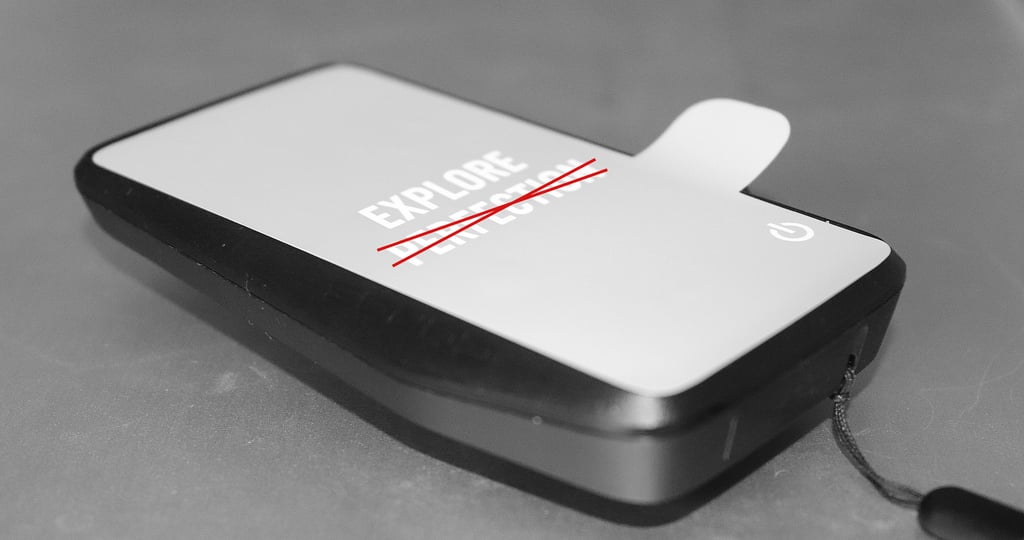
Coros Dura Review: Outstanding Battery Life and Simplicity, with Drawbacks
Overview: The Coros Dura Solar GPS bike computer brings impressive battery life, rugged durability, and user-friendly controls, making it an appealing choice for endurance cyclists who value practicality over advanced data features. At least, that’s the theory; in reality, it has many significant bugs, poorly thought-through features, even more numerous smaller bugs, and usability annoyances. If you want to follow a 400-mile route, stay within cell range on a relatively small, dull map with a couple of other metrics displayed, and don’t value the accuracy of what is recorded, then Dura is for you.
Dura’s only standout feature is the claimed battery performance, further boosted by solar. You could get everything else and more from a good, cheaper and equally less widely-known bike computers like Lezyne, Bryton or Magene; buy a $10 battery pack, and you’re sorted. Even 2-year-old models from Wahoo and Garmin are often similarly priced in sale periods and do a superior job.
COROS Dura Review Summary - impressive battery life, rugged durability, user-friendly controls, but...
COROS Dura Review Summary
Let’s start with an overview, but if you’re considering buying, I STRONGLY suggest you read on for the details afterwards.
Battery Life Claims and Performance Details:
COROS Dura stands out for its claimed battery life of up to 120 hours (40-80 in real-world use), plus solar charging capabilities.
GPS is very accurate on roads and trails.
Rerouting whilst navigating depends on internet connectivity, which is problematic in low-signal areas.
The displayed and recorded metrics are not always correct – power peaks are missed, and low cadence is incorrectly recorded.
Key Features and Competitors:
The Dura’s battery, solar charging, digital crown, and rugged, waterproof design set it apart.
Priced at around $250, it’s more affordable than the excellent Wahoo Elemnt Roam and Garmin Edge Explore 2, with seemingly similar functionality and longer battery life.
Competitors lack a few of Dura’s unique features, like the solar boost.
However, Dura lacks the richness of competitors’ features.
The similarly priced Wahoo Bolt 2 has onboard intelligent maps with re-routing that does not need a phone, and it links to external training plans and externally created structured workouts, neither of which Dura supports.
Dura now imports routes from Strava, Komoot and Ride With GPS via the COROS app.
User Experience and App Integration:
The bike computer and companion app strike a good balance between organisation and functionality, but lack aesthetic appeal and a comprehensive understanding of how riders interact with their technology.
The COROS app offers ways to manually plan routes, sync them from Strava, Komoot and Ride With GPS, and download them from race organisers’ websites.
It ticks the boxes, but using it is clunky and sometimes cumbersome.
That said, anyone happy with the COROS ecosystem may like Dura.
Design and Physical Qualities:
With a 2.7-inch always-on MIP display, visibility in direct sunlight, and rugged waterproofing, the Dura is built for long, challenging rides, albeit with a relatively small display.
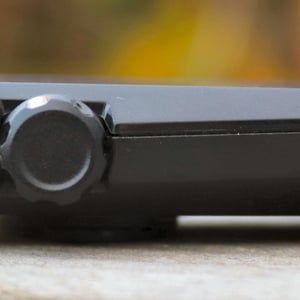
Practical design choices, such as the innovative scroll wheel and Garmin mount compatibility, cater to functionality over flash.
Whilst the scroll wheel is great when you are sitting at home, the reality of using it has left me frustrated by how many times I’ve inadvertently tapped it, paused the ride, and then struggled to navigate back to resume it whilst bouncing along a track.
Pros
- Industry-leading battery life with genuine solar boost in direct sunlight
- Logical menu structure and a digital crown that’s quick to learn
- Climbing profile on planned routes
- Strong sensor support: ANT+/BLE, Varia, smart trainers (FE-C), Shimano Di2 and SRAM RED AXS, with configurable shifter-button page control
- Strong spec sheet for the price (dual-frequency GNSS, solar, IP67, MIP)
Cons
- Several odd design choices, software and hardware
- Digital crown is way too sensitive, especially in-ride
- Not pretty
- Display is dull by default but readable
- Poor, old-tech touchscreen, not always responsive
- Less customisation depth than Garmin
- No on-map street names, no freeride climb, no fully offline rerouting
- Maps are not pre-loaded and must be downloaded manually
- No on-device 3rd party apps
- Data and sensor recording errors observed at launch, no official COROS confirmation of fix
- GPX route import is fiddly
- TrainingPeaks plan sync can be unreliable
- Slow re-routing when navigating
- Re-routing and route-to-start require an internet-connected phone
- Inconsistent turn-by-turn alerts
Updates Since Publication (May 2026)
This review was written on the October 2024 firmware. Coros has since shipped multiple firmware updates and one major companion-app revision (App 4.0). The factual feature additions taken from the Coros release notes are listed below. The original criticisms in the body of this review remain unchanged, where Coros has not made an official, factual statement to the contrary.
- Navigation: street names on turn-by-turn alerts, three re-routing modes (auto, manual, off), reverse-direction routing, road versus cycling-path differentiation, road versus trail-surface differentiation, a global topographic map layer, and up to 100 stored routes on the device.
- Audio: voice alerts for upcoming turns, speed and distance via a paired phone or headphones, currently in English, French, Japanese and Chinese; customisable on-device sound settings (which alerts produce tones).
- Activity pages: up to 10 data pages per activity profile (previously 6); chart-style data fields for power, speed, heart rate and cadence; power-to-weight (W/kg) field; turn-by-turn data field; CORE body-temperature integration; full-screen data fields on navigation pages.
- Power and sensors: left/right power balance, pedalling smoothness and torque effectiveness for compatible power meters; “power meter compatibility optimisation” referenced in release notes; accessory custom names; accessory low-battery alerts.
- Performance metrics: Maximum Mean Power (MMP) curve; cycling personal records, including longest ride, most elevation gain, and best average power across durations from 1 to 60 minutes.
- Drivetrain integration: Shimano Di2 button behaviour is now user-configurable, including the ability to change data pages with auxiliary shifter buttons. SRAM RED AXS auxiliary buttons can also change pages. Added support for the 11-32T (X12) electronic drivetrain.
- Strava: Strava Live Segments now supported on Dura.
- Spring 2026: media controls added to Dura, lap-screen improvements, and further map road-type refinements.
For an at-a-glance buyer view, see the FAQ at the foot of this review.
Usability
Usability is perhaps the most important of all features, and Coros Dura superficially scores highly on its usability in many respects.
While it offers a solid choice of headline features, it lacks Garmin’s more extensive configuration options. This simplification allows Coros to organise features with a straightforward, logical menu system that’s much easier for new users to navigate than Garmin’s.
The digital crown enhances ease of use, like the Apple Watch, allowing quick scrolling and selection. Dura also supports Di2 buttons, enabling menu control via Shimano brake levers, and from December 2025, the Di2 button behaviour is user-configurable.
Though the touchscreen allows another type of interaction, the screen isn’t as responsive as those on the competition and struggles when wet.
An issue is the digital crown’s sensitivity to accidental taps during a ride, which can pause the activity and move the default ‘RESUME’ option—finding and pressing the resume option when riding is then a tad fiddly, aka borderline impossible.
Additionally, the crown’s functionality is inconsistent; one rotated click usually shifts between screens, but sometimes it takes two, and different pages animate transitions in varying directions, which feels inconsistent.
So, it’s a usable bike computer, but also definitely not a polished one.
Aesthetics
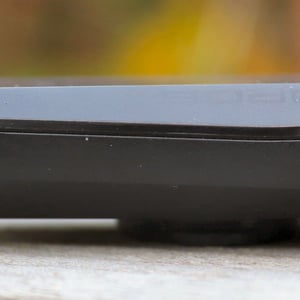
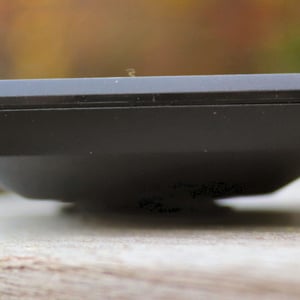
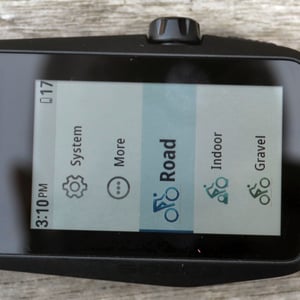
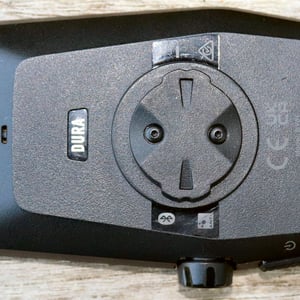
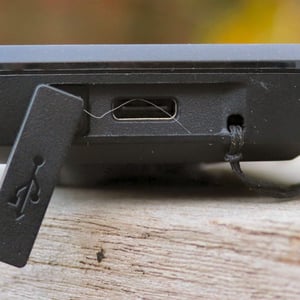
The aesthetic design of Dura is poor.
It’s an odd-looking thing with a weird shape, strange proportions and more than a hint of ugliness. I wouldn’t want it as my main bike computer for that reason. Bryton had a history of odd-shaped bike computers, but their recent ones mimic the traditional Garmin case design, as did Stages and others. We must applaud Coros for trying to be different, but they failed this time. Better luck next time.
That said, the Edge 1050’s angular case shape harks back to Bryton. Oh well!
The display area on the Dura is larger than that of a Wahoo Bolt and pretty much the same as the Garmin Edge 540/840, but stretched slightly lengthways. The proportions make good use of the area and, for example, benefit the route map by giving it a little more vertical space to play with, so more of the route can often be shown. But the solar panel throws off the proportions.
Battery Life
If you plan mammoth bike adventures or forget to charge your tech, Dura might be one for you one day. It’s also great for commuters with other things on their minds than charging the battery every other day.
Reality might match the claimed 80-hour battery life, although I’m not entirely sure how much of a boost the solar panel will deliver for much of the year where I live. It certainly won’t hurt.
Battery Life Test Stats in the real world
- Over my recent autumnal rides, I’ve gained a 1% solar boost over the last 15 hours, unlike the 0.8% per hour claimed for better conditions with low sunlight. It would help if you had direct sunlight to charge meaningfully. It’ll only add any meaningful charge in direct light in the summer.
- I got 32 hours of ride time on the latest firmware, with 18% of the battery remaining after a full charge, enabling a high backlight level and dual-frequency precision. That equates to a 40-hour battery life. However, setting a lower backlight and lower precision easily gives 60 hours, perhaps the claimed 80 hours.
But here’s the rub. Garmin Edge 1040 Solar has 180 hours of battery life with solar and 90 hours without. Garmin Edge 1040 is a highly advanced navigation tool that mostly works. Buy the Dura and get a far less navigationally featured product.
The Target Customer for Coros Dura
Target: Ultra-distance cyclists, adventurers and bike-packers who stay in cell phone range (hmmm, think about it)
Target: People who don’t want to charge regularly – commuters and the forgetful
Target: Existing Coros watch owners
If Coros can establish some presence and positive brand image linked to long battery life, then the allure of infrequent charging will spread to customer groups that don’t especially need it, just as it did for watches.
Maps, Routing, Re-Routing and Getting Lost
Maps & Navigation are key to Coros’s offer, which targets long-distance biking adventurers. It has to get maps & navigation right. It doesn’t.
Routing
GPX routes are cumbersome to load manually and require too many steps.
I would expect Coros to support a default routing device, with a GPX file manually shared with the iOS Coros app, so it automatically appears on Dura within seconds.
Whilst the process of ‘automatically’ syncing a favourite route from Strava to Dura is bearable, Dura sometimes gets the route type wrong from Strava, and when it thinks it’s not a ride, the climb features don’t work.
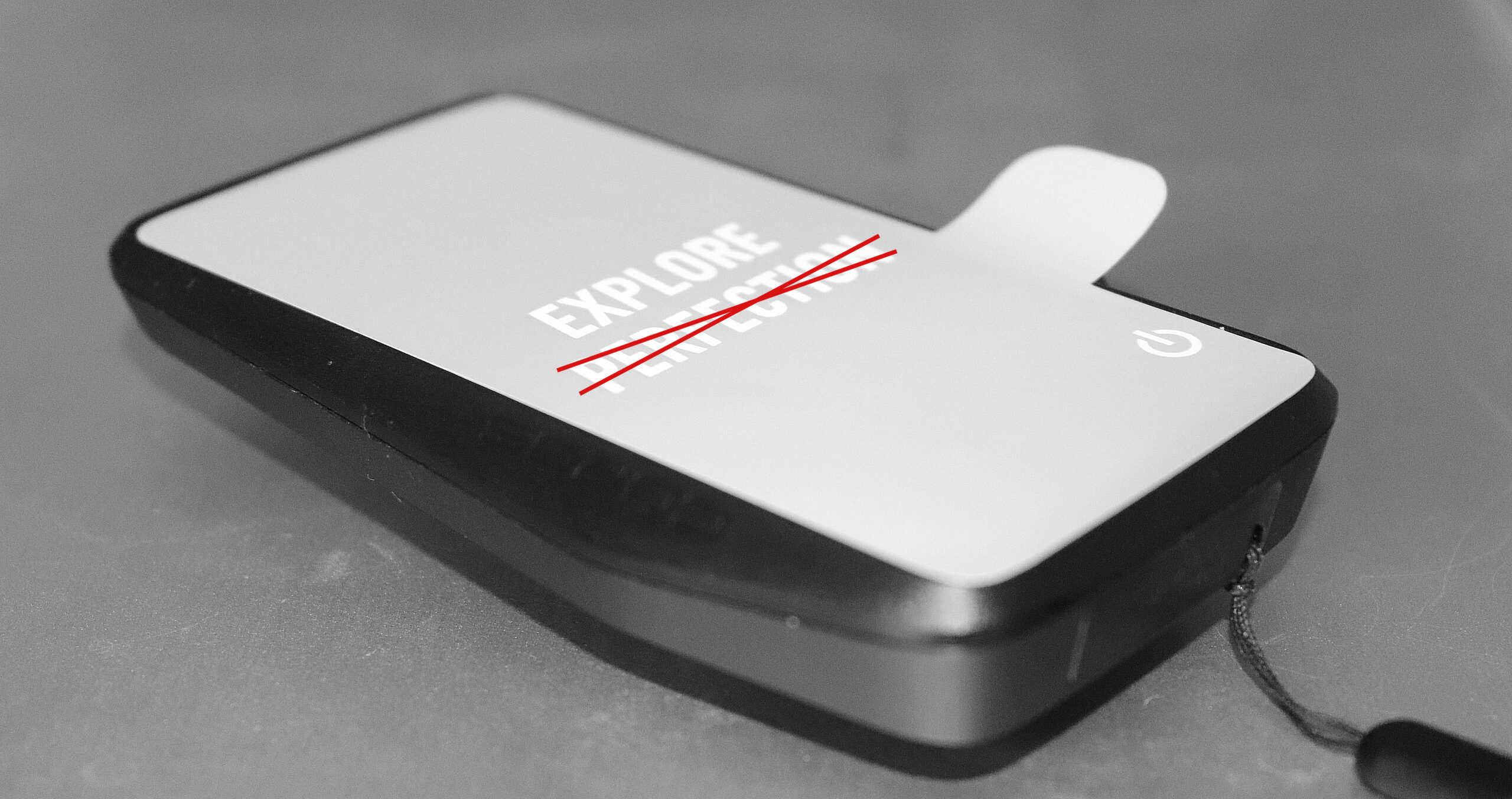
You’ll need a connected smartphone in cell range to get you to the start or back onto your route if you make a detour or get lost.
Since the App 4.0 update of July 2025, Coros has added three re-routing modes selectable per route: auto, manual, or off. The September 2025 firmware also raised on-device route storage to 100 routes, and routes can be followed in reverse.
Using the Map
The map zoom doesn’t work properly with a touchscreen that’s sometimes unresponsive. Panning and zooming on the navigation screen can sometimes take more than 5 seconds to respond, in contrast to the rapid switching between data pages.
A worthy innovation is the Coros split screen. A smaller map is permanently fixed in place, and the digital crown scrolls through metrics below it. I like the idea here, but others might prefer a dedicated map screen with fixed data fields, as found on all competitors’ bikenavs. Larger screens are needed for this feature to be more effective.
On the map screen, it seems intuitive that the digital crown will control zoom. It doesn’t.
The pinch-to-zoom and +/- touchscreen zoom buttons don’t work well and often require multiple attempts. When the screen decides to re-render, it’s pretty ‘quick’, usually showing something instantly or within 3-5 seconds at worst.
When re-routing, screen pixelation can occur, implying that its underpowered, cheap processor is only just fit for its purpose.
The +/- zoom buttons work in the wrong direction, e.g. ‘-‘ zooms in to more detail. I changed the scroll behaviour of the digital crown, which could be the cause.
Just one navigation…
The map colours are not good, making it hard to discern the route. Garmin is also guilty of this, but many other competitors, like Wahoo and Hammerhead, do a good job of presenting a clear route on low-powered, low-resolution screens. Coros has since added road-versus-cycling-path differentiation (App 4.0, July 2025) and, in the January 2026 firmware, road-versus-trail-surface differentiation. A global topographic map layer is now also available via the Coros app’s Map Manager.
Completed parts of the route have a coloured line that is too wide for such a small screen.
The direction arrows sometimes fail to appear. Even with maximum backlight, they are hard to discern from the line width for the upcoming route.
When TBT messages appear, they are clear but often fail to appear. I did not get an audio alert for upcoming turns, but I got plenty of clear audio alerts for other events. Coros has since added Voice Alerts for upcoming turns, speed and distance via a paired phone or headphones, currently available in English, French, Japanese and Chinese. Street names now also appear in turn-by-turn alerts on the device itself, though they apply only to routes synced after the App 4.0 update. Street names do not appear on the underlying map view: per Coros, this requires more processing power than Dura has, and the feature has so far only been available on the newer Pace Pro watch.
When slowing for junctions or stopping at them, the screen rotates, probably due to a compass/speed algorithm flaw.
Off-course messages sometimes cover the entire screen when your phone is n not connected to the internet. You don’t want that distraction at speed on a bumpy trail.
As the crow flies, navigation back to the route is given when there is no internet connection. This happens with other competitors who lack intelligent on-device maps. However, Coros needs to consider exactly what point they want you to head to.
One weird navigating bug…
After getting a GPS lock, switching between routes, and navigating to a route start, I once got a 50m (fifty metres) GPS error on my progress screen. It took several miles and turns to rectify my position, and we ran in parallel until it was rectified.
Coros Climb Pro Feature
If you follow a route, there is a bonus – the climb feature.
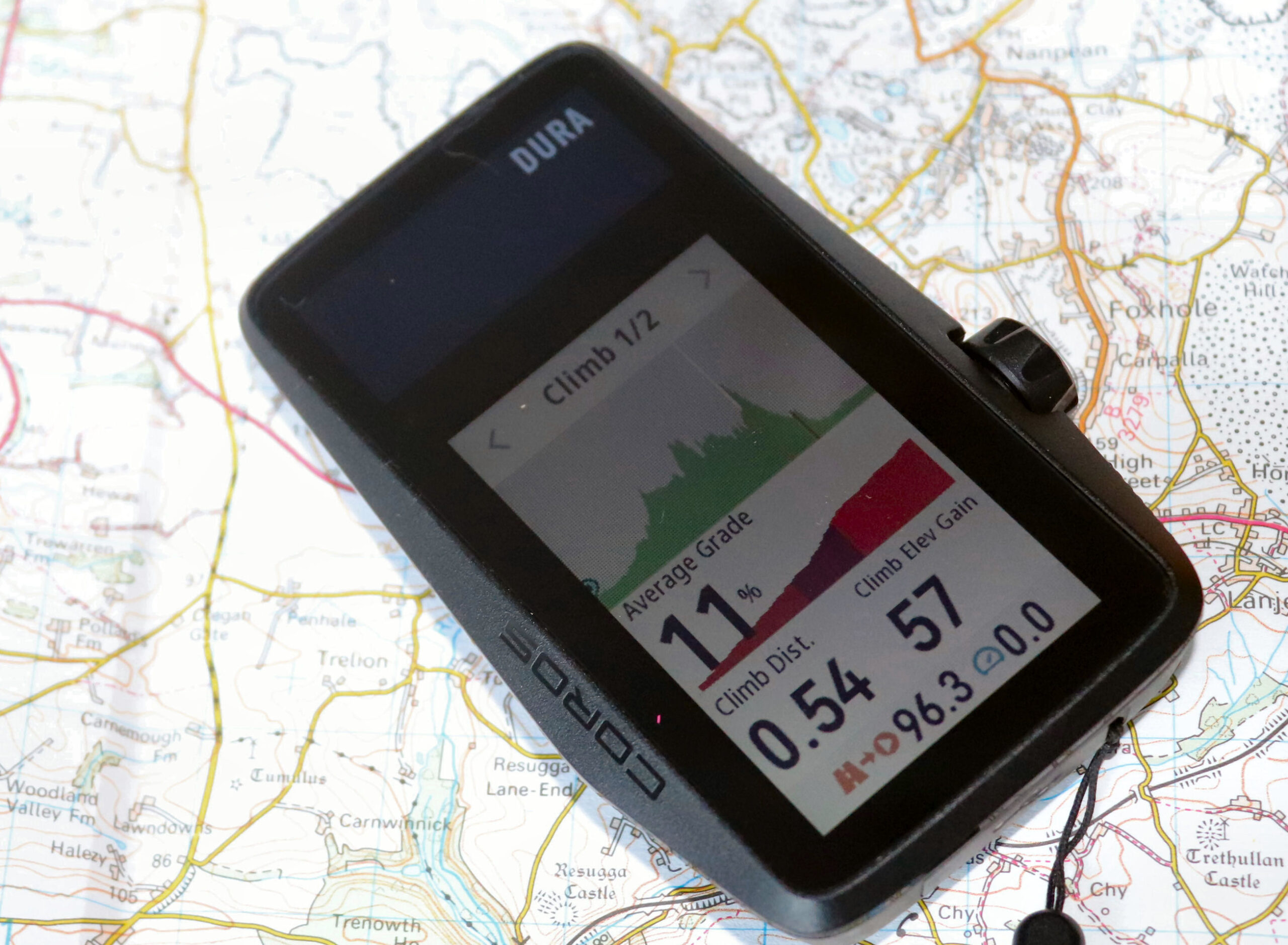
Dura determines and isolates the climbs from your GPX file and shows a special screen to give more climb-specific information when you attack them on the road. This is one of the newer must-have features for keen cyclists, and companies must offer their own flavour to be taken seriously.
Coros has a minimum viable product here. The definition of a climb (length, gradient, and inclusion of flats) is not configurable. Furthermore, this feature doesn’t work any of the time you freeride without a route – for me, that’s 95% of the time. Per Coros documentation, this remains the case in May 2026: the climb feature still requires a loaded route and is not available in freeride.
You’ll have to make your call on whether this is useful for your kind of riding. For me, it’s almost useless.
Coros Dura – Previous Models and Review of the History
Coros started trading in 2018 with its LIVALL smart helmets before introducing the lightweight Coros Pace M1. It was essentially a ripoff of the Garmin Forerunner 235, but in its day, its price, features, and light weight made it an attractive purchase for runners simply wanting a watch to wear during sports.
The company progressed quickly with four main thrusts that differentiated it from the competition.
- Awesome battery life
- Targeting niche sports – climbing and ultra running
- Either attractively low prices or slightly discounted prices with quality case materials
- A good number of tick-box features
Futures?
The latest Coros Pace Pro running watch is now priced at parity with what Coros thinks is its competition. This suggests a move toward lower-value-for-money products. Yet the company’s partnership with Decathlon might signal that value will remain important and that bike computers are, too (Decathlon sells lots of cheap bikes).
Dura is very much in the mould of older Coros devices and is priced sensibly (for when it’s fixed). It claims a good battery life, targets niche uses (ultra-riding adventurers, Coros watch owners), and has many high-level, tick-box features.
As a newcomer to the bike computer market, Coros effectively starts the navigation piece from scratch. Navigation is a must-have to bump the selling price; without it, you compete with budget bike computers, mostly on price, screen type, and size. Unfortunately, the navigation feature set is a significant technical barrier to entry, as it is extremely difficult to complete comprehensively. Sacrifices must be made at the start of a multi-year software development escapade, but that compromise immediately removes some of the price premium above budget competitors.
Detailed Coros Dura Accuracy Review
Q: Is Coros Dura accurate?
A: Almost every review I’ve read seems to say it is. Hmmm. Strange.
I can certainly confirm that, based on its GPS tracks, it is as good as any other bike computer, as it should be with dual-frequency precision.
Yesterday, I did a sneaky 50-miler around the Surrey hills with friends, and you can see the top blue track from the Edge 1050 below. I had to look very hard for sections where the Dura’s red track differed and showed through, and I highlighted those. These differences are trivial, to the point of being irrelevant. However, if I zoomed in and recalled exactly where I cycled, Dura was probably MORE accurate than Edge 1050 by a couple of metres in those spots.
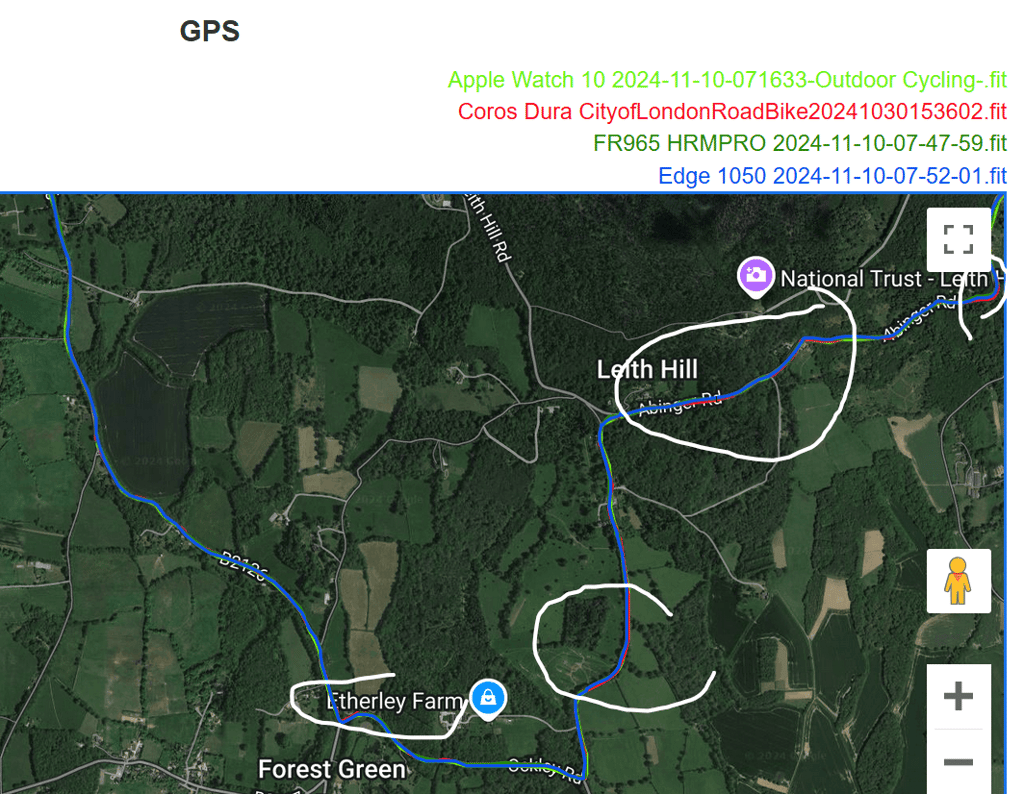
Here are four other relatively long rides. There’s nothing to see here. All is good in GPS-land.


Coros Dura Elevation and Grade Accuracy
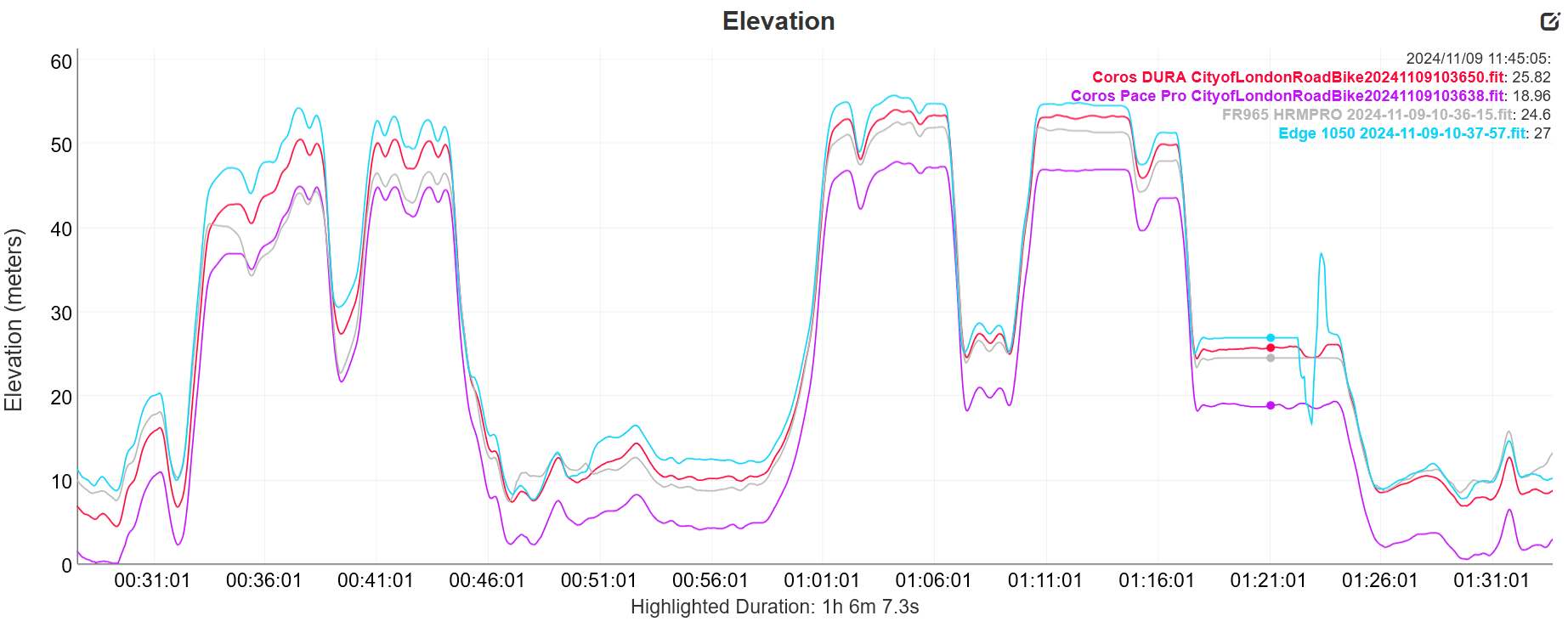
I’ve been running some tests recently on the grade accuracy of the Edge 1050; from those tests, I found that Dura is notably better than the Edge 1050, probably approaching ‘correct’.
Elevation is related to ‘instant’ grade but can be calculated differently. When we look at rides, Edge 1050’s elevation is probably accurate for several reasons, including its auto-calibration. However, DURA is similar and probably correct enough for most people’s uses. I have no issues with Dura’s elevation accuracy per se.
Here is an example.
Coros Dura Incorrectly Records Data
Coros Dura frequently records significantly incorrect cadence. The example below shows the cadence from Assioma DUO pedals recorded on Dura (red) and the same data recorded on Garmin. You can see significant 40rpm periods that are wrong. It does this in most rides where a period of zero cadence is recorded as the last known cadence.
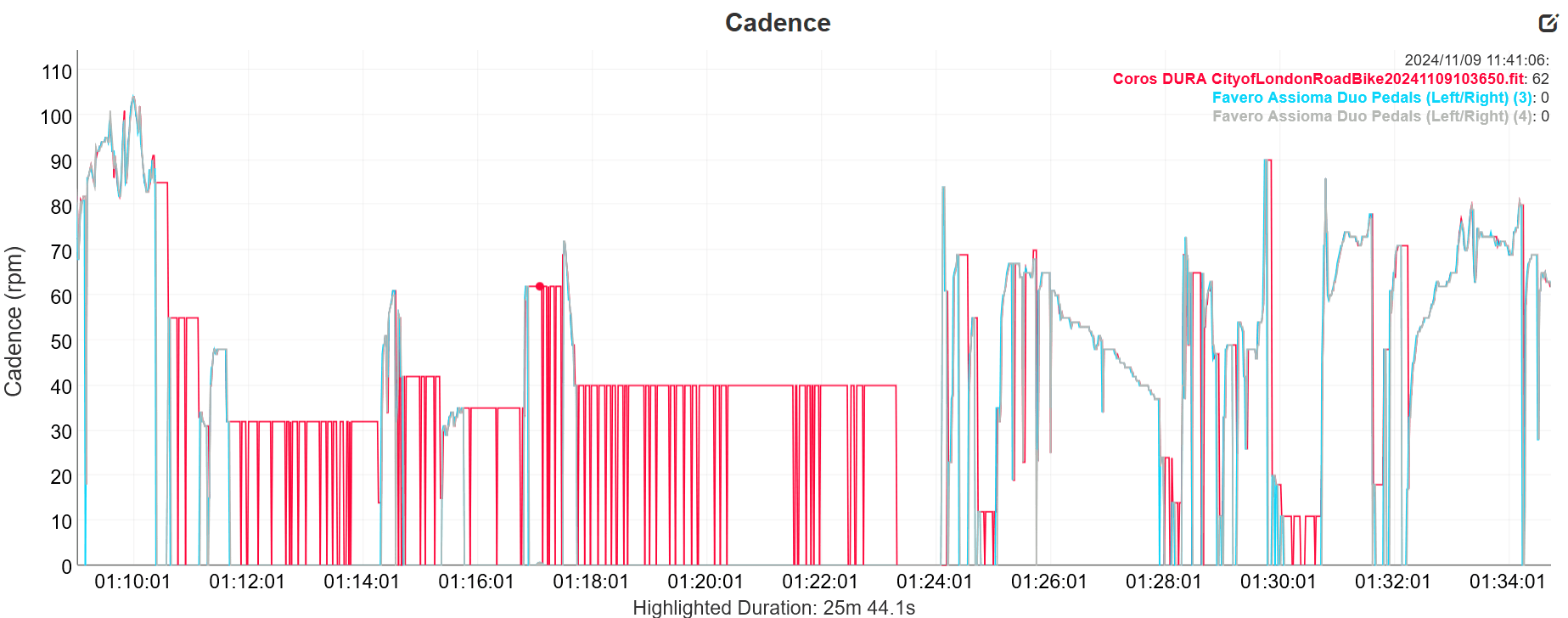
It’s only cadence data, so it’s not important, right?
Incorrectly Timestamped Data
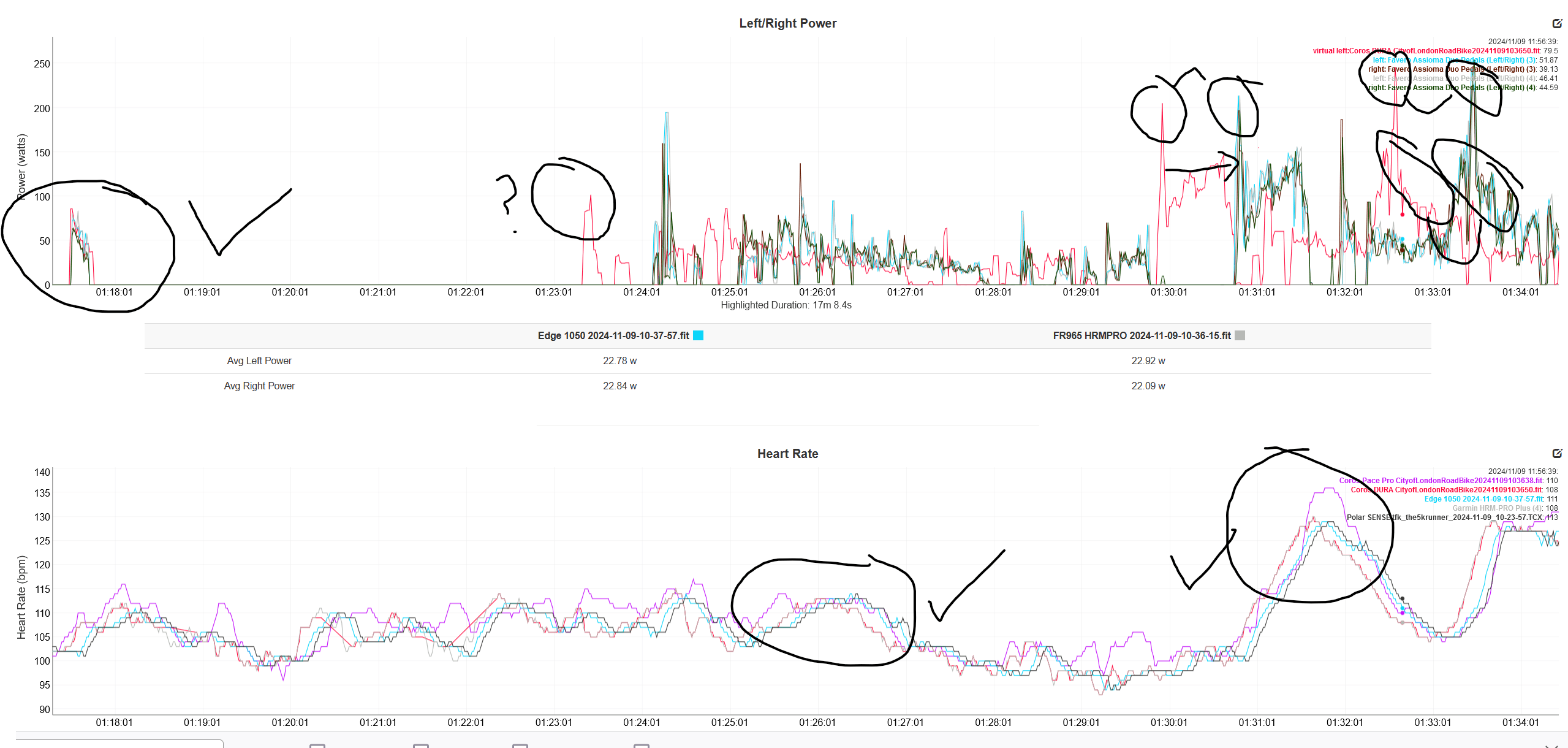
Incorrect timestamps appear on some data but not others – even inside the same workout.
Sometimes, after I stop cycling for a few minutes, I see Dura records differently than other devices. It seems to ignore periods of zero power data. If you look at the peak on the left, you can see that the data are in sync, but the peaks on the right no longer match. Note that this is NOT due to auto-pause; unlike power, the 2nd graph shows that the HR data is in sync for the entire section duration. #VeryStrange.
Dropped Power Data
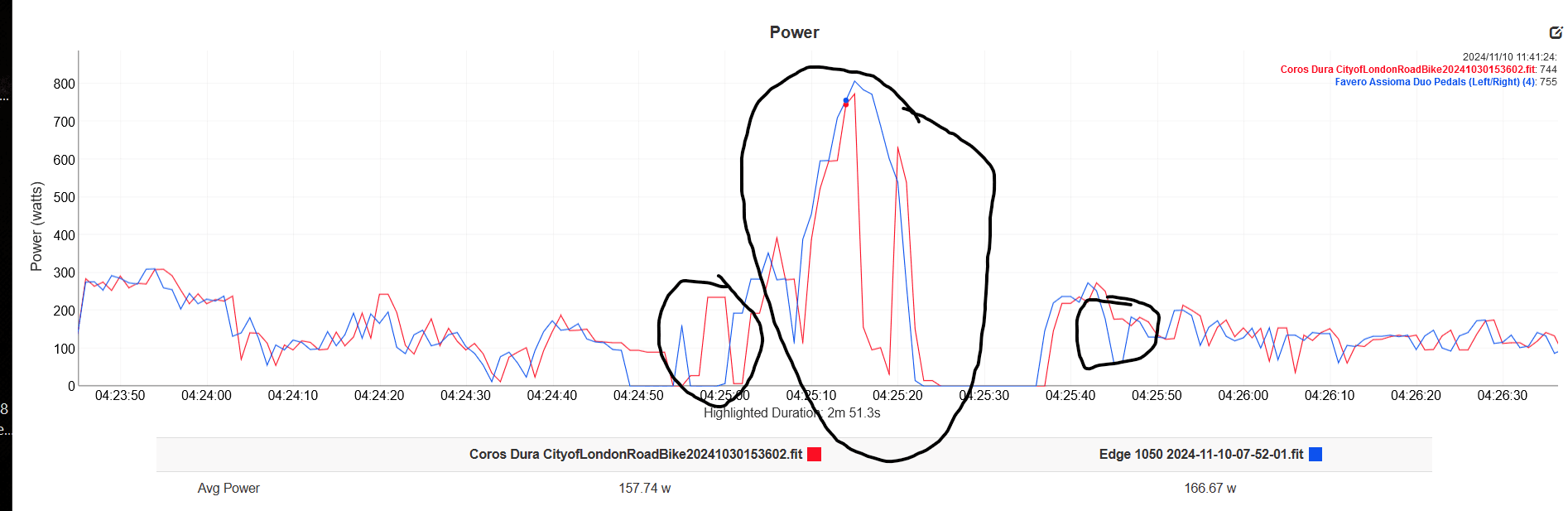
Here is an example from last week: I sprinted up over Hampton Palace Bridge at the end of a long ride. I noticed on the Dura display that I was doing very low watts – something like 180w when it was well over 500w, so I investigated the data recorded. As you can see, Dura fails to record a large portion of the power data in the circled section, yet elsewhere it’s Okay.
dcrainmaker also reported sticky power errors (the same type as the cadence error I found). Coros release notes during 2025 reference “power meter compatibility optimisation”, and the firmware now adds left and right power balance, pedalling smoothness and torque effectiveness for compatible power meters. Coros has not issued an official statement on whether the sticky-cadence and dropped-power behaviours observed here have been resolved. Anyone affected at launch should retest on the current firmware before drawing fresh conclusions.
Effects On Mean-Max (CP Curve)
Here is one example of not recording a few sprints over a ride. It’s simply wrong and useless data.
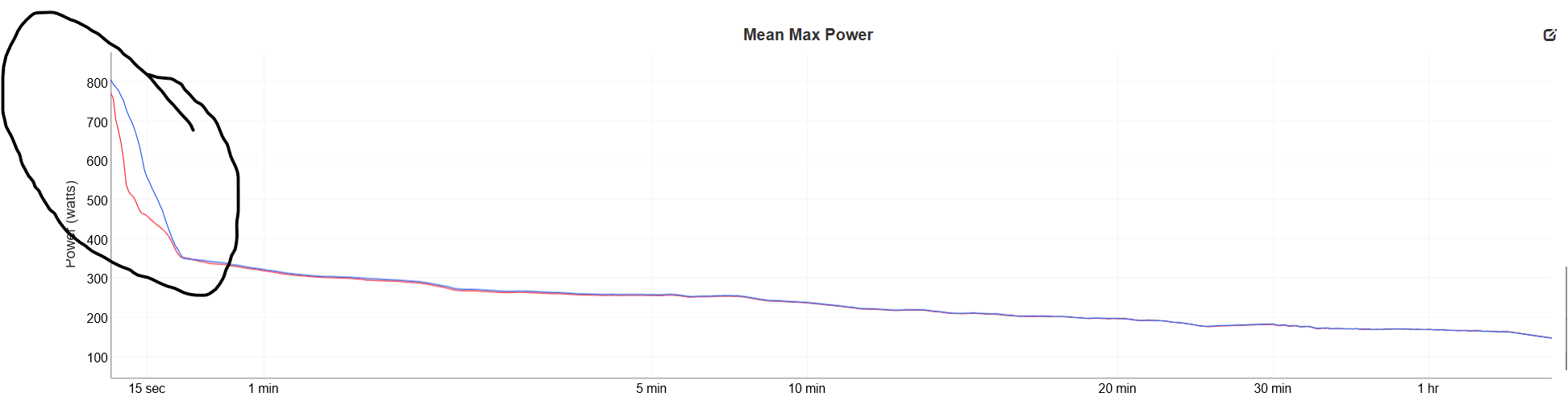
The timestamping error further affects the CP curve, thereby overestimating long-duration power averages! (not shown, but it does!)
The December 2025 firmware introduced a Maximum Mean Power (MMP) curve directly on the device’s FTP card, displaying historical bests against recent efforts across durations from 1 second to 4 hours, alongside cycling personal records for longest ride, most elevation gain, and best average power across those durations.
Coros Dura Accuracy – Take-Out
The product appears not to have been designed or tested by real cyclists at any time during its development! Yet the company seems content to associate GB Olympic Gold Medallist Alex Yee with the product in its marketing. I don’t doubt Mr Yee had the product on his handlebars, but I doubt he ever used the data. I tried to make sense of Yee’s FTP and ride data here.
Furthermore, I know DcRainmaker pointed out several errors to the company some months ago, but I’m not entirely sure if he reported these or different errors. Given that the company has restocked the product and resumed sales, Coros has no excuse for not having fixed the fundamental issues by now. I think GPLAMA also stated he doubted that Coros would get the product fixed this year, and he was right! At the current rate of progress, I doubt the product will be ready to buy before Q3 2025.
I’m amazed that other reviewers, some of whom are ex-pro cyclists, didn’t find these kinds of errors.
Structured Workout Support
The Coros app has a straightforward tool for building structured workouts and scheduling them on your calendar. If one is due today, you are automatically prompted with such workouts, and they execute well enough with a smart trainer.
Performance cyclists require structured workouts and a plan that syncs with 3rd-party sources like TrainingPeaks (TP) and FinalSurge. TP should work, but I re-authorised the connection to that platform and still haven’t gotten any of this week’s scheduled workouts.
Coros likely does enough here for most long-distance adventure cyclists by catering for occasional manually created workouts.
Cross Platform Support
Interesting developments in May 2026 as Coros and Wahoo partner up to cross-sell each other’s devices and allow workout data into each other’s apps. This might signal that Coros has no plans to refresh the Dura to a Gen 2 model. Why would Wahoo have partnered so closely with a direct competitor of its ELEMNT devices?
Detailed Coros Dura Technical Specifications
These are the detailed technical specifications of the Coros Dura. If Coros delivers them alongside good software, it’ll be a GOOD bike computer for the money.
- 2.7-inch Memory-in-Pixel (MIP) touch screen. 400x240px
- Digital Crown plus one additional button and touchscreen
- Form Factor: 99.5 x 60.8 x 15.7mm. Weight: 97g (+44g for the mount)
- Space: 32Gb
- Water Proofing: IPX67
- Out-front Garmin mount compatibility
- Multi-constellation GNSS (GPS, GLONASS, Galileo, Beidou, QZSS) + Dual-Frequency(L1+L5)
- Connectivity: WiFi, Bluetooth
- Sensors: 12xBLE sensors, ANT+, ANT+ including FE-C, Varia, Di2, SRAM RED AXS (auxiliary buttons can change data pages)
- Onboard Sensors – temperature, compass, baro-altimeter, accelerometer, gyroscope. Up to 10 customisable activity data pages per profile (raised from 6 in App 4.0), including an optional split-screen display and chart-style data fields
- Live Tracking, Group Ride, Safety Alert, Crash Detection (planned)
- Free, basic on-device maps with re-routing intelligence from cloud-based Google Maps via smartphone. Three re-routing modes (auto, manual, off). Street names appear on turn-by-turn alerts but not on the underlying map view. Global topographic map layer available. Road versus cycling-path and road versus trail-surface differentiation on the map. Up to 100 stored routes on the device.
- Voice Alerts for turns, speed and distance via paired phone or headphones (English, French, Japanese, Chinese)
- Customisable on-device sound settings
- Physiology/Performance Metrics – Yes, some (FTP, Recovery, Training Load, Maximum Mean Power curve, cycling personal records including longest ride and best average power across durations from 1 to 60 minutes)
- Power meter data: left/right balance, pedalling smoothness and torque effectiveness for compatible meters; power-to-weight (W/kg) data field; CORE body-temperature sensor integration
- Strava Live Segments – Yes
- Structured workout support – Yes, native only
- Training plan support – Yes, native only
- ClimbPro Support – Yes, only when following a planned route
- 3rd-Party App Integration – Yes, mostly outbound (Strava, Komoot, TrainingPeaks, Ride With GPS, Relive, Final Surge, Decathlon), but also inbound Strava routes.
- Claimed Battery life: 120 hours (70 hours in high accuracy mode)
- Charge Time: 2.5 hours
- Claimed Solar Boost is greater than the exposure time, i.e., Coros claims power for Dura forever if in direct sunlight (2 minutes charge for every 1 minute of exposure)
Many Coros features come with a catch. The box is ticked, but the details behind the feature are sparse.

Yes, there are maps, but the underlying map view still does not show street names, and you must download them manually. Yes, there are structured workouts, but not from external sources. Yes, there is ClimbPro, but not in freeride like some competitions. And so the list goes on. To be fair to Coros, Dura’s feature set is all some cyclists need. Still, other cyclists looking for a rich range of features similar to Garmin or a well-integrated ecosystem like Wahoo might expect more from the specs than they get – smoke and mirrors.
I get it
Look, I get it. I did a leisurely one-day, 200-miler with friends over the summer. It was a worrying PITA using the Karoo’s limited battery (since improved) – a device I otherwise love. I took a battery pack, and it was fine. The route was straightforward, and other cyclists were doing the same event. I don’t think I made a single wrong turn. Coros Dura would have been perfectly fine for me on the day.
However, this bike computer is supposedly targeted at you if you are doing 5-day wilderness rides without cell coverage. But we both know you won’t buy it.
Coros Dura Review – Takeout
Coros Dura is a brilliant idea, executed poorly with slightly sub-standard componets and shabby software, all sold to you too quickly.
Other than money, I can’t imagine what was in the minds of Coros’ executives when they tried to sell this product a few months ago. As the product returns to stock with a pre-Christmas production run and a raft of problems that won’t go away by Christmas (I’m not specifying which Christmas), I can’t imagine what is still on the minds of the same Coros executives. Again…other than your money.
Coros Dura is thus fair game for a critical review like this one.
You would be crazy to buy this product in 2024, expecting that the company will rectify the problems quickly. The software, bugs like dropped power, and data appear fixable. Still, much of the software glue between different aspects of the ecosystem may have systemic implications and not so easily changed – for example, with the efficiency of the various ways you get routes and structured training plans onto Dura. Then we come to the hardware issues like the poorly responsive touchscreen and overly sensitive digital crown – are they fixable without improved hardware components?
It wouldn’t surprise me if the company abandoned this product altogether. There is too much to do, which, even when done, will still leave a product as the best choice for only a very small niche group of endurance cyclists, the brand loyalists. That said, the first Hammerhead Karoo was much maligned at launch. I only got one to review later in its life, and I couldn’t see what all the fuss was about – it was great. The point is that Hammerhead mostly fixed Karoo 1 and then went on to success with its two follow-up models. SRAM acquired the company, and now Karoo 3 is awesome.
Update, May 2026: Coros has not abandoned the product. Multiple firmware updates have shipped from January 2025 through to the spring 2026 release, the device remains on sale at $249, and no Gen 2 has been announced. The factual feature additions are listed at the top of this review and reflected in the technical specifications.
I dislike writing negative reviews and always try to see why any given product might be useful for someone other than myself, i.e. you. There are too many flaws for me to spend more time on this. Don’t buy it. You see very few detailed critical reviews because they do not generate affiliate revenue yet require a week of work. If you want to support critical reviews, please buy me a coffee or subscribe. I’ve just saved you 250 bucks, right? Thank you.
Alternative:

Coros Dura price: where to buy
The Coros Dura is priced at $249 in the United States, £249 in the United Kingdom and 289 euros in Europe, as stated in the FAQ below. Check the price in your market before you buy.
Coros Dura FAQ
Is the Coros Dura worth buying in 2026?
Coros has shipped multiple firmware updates over the 18 months since this review was first published. The factual additions, listed in full at the top of this review, include street names on turn-by-turn alerts, three re-routing options, voice alerts in four languages, a topographic map layer, road versus trail surface differentiation, up to 100 stored routes, ten configurable data pages, Strava Live Segments and customisable Di2 button behaviour. The hardware concerns identified in this review (touchscreen responsiveness, digital crown sensitivity, screen size, aesthetics) are unchanged. At $249, Dura is a defensible purchase if battery life and simple route-following are your priorities. For richer navigation and a broader ecosystem, the Garmin Edge 540 and Hammerhead Karoo 3 remain the safer choices.
How much does the Coros Dura cost?
$249 in the United States, £249 in the United Kingdom, 289 euros in Europe, AUD 449 in Australia, CAD 399 in Canada. The device is occasionally bundled with a discounted Coros heart rate monitor during peak sale windows. Coros also operates verified 20% military and student discount programmes via partner verification.
Has Coros released a Coros Dura 2 or a successor?
No. As of May 2026, the original Dura remains the only Coros bike computer on sale, and no successor has been announced. Coros has continued to ship firmware features through to spring 2026, so the device is still in active development.
Did Coros fix the power and cadence accuracy problems identified at launch?
Coros release notes during 2025 reference “power meter compatibility optimisation”, and the firmware now adds left and right power balance, pedalling smoothness and torque effectiveness for compatible power meters. Coros has not issued a specific official statement confirming that the sticky-cadence and dropped-power behaviours documented in this review have been resolved. Anyone affected at launch should retest on the current firmware before drawing fresh conclusions.
Does Coros Dura now show street names on the map?
Partially. Street names appear on turn-by-turn alerts and as the upcoming-turn data field as of the App 4.0 update of July 2025. Per Coros, they apply only to routes synced after that update. Street names do not appear on the underlying map view itself. Coros has stated that on-map street names and points of interest require more processing power than Dura provides, and the feature has so far been rolled out only on the newer Pace Pro watch.
What is the real-world battery life?
In testing on the October 2024 firmware, around 32 hours of ride time with maximum backlight and dual-frequency GPS, extrapolating to roughly 40 hours of continuous use. With a lower backlight and All Systems GPS mode (the default), 60 to 80 hours is realistic. The 120-hour claim assumes the most efficient settings without active sensors. Solar adds genuinely meaningful charge only in direct sunlight, most useful during long summer rides at lower latitudes.
Does the Coros Dura need a phone connected to navigate?
For pre-loaded GPX routes, no. The device has onboard global maps, and turn-by-turn navigation works offline. For smart re-routing back to a route after a deviation, the Coros app must be running on a connected phone with internet access. Without a phone, Dura draws a dotted line back to the nearest point on the route. Since App 4.0, re-routing prompts can be set to auto, manual or off per route.
Does ClimbPro work on Dura when freeriding without a route?
No. The climb feature only activates when following a route loaded from the Coros app. Per Coros documentation, this remains the case in May 2026. Riders who rarely pre-load routes will see little benefit from the feature.
Can the Coros Dura sync structured workouts from TrainingPeaks or FinalSurge?
Yes. Both connections are officially supported. Workouts scheduled in TrainingPeaks sync to the Coros calendar and then to Dura. Re-authorise the connection from the Coros app’s Profile page if scheduled workouts fail to appear.
How many routes can I store on the Coros Dura?
Up to 100 routes since the September 2025 firmware update. Coros recommends that individual routes do not exceed 2,000 kilometres.
Does Coros Dura support Strava Live Segments?
Yes. Strava Live Segments were added to Dura via firmware in late 2024. Linked Strava starred segments sync automatically.
Does Coros Dura support electronic shifting?
Yes. Shimano Di2 and SRAM RED AXS are supported. From the December 2025 update, Di2 shifter buttons can be configured to control data-page changes and other functions on Dura. SRAM RED AXS auxiliary buttons can also change pages. The 11-32T (X12) electronic drivetrain is supported.
What sensors and accessories work with Coros Dura?
Bluetooth and ANT+ heart-rate monitors, power meters, speed and cadence sensors, Garmin Varia radar, smart trainers (FE-C), CORE body-temperature sensors, and electronic drivetrains from Shimano and SRAM. The device supports up to 12 simultaneous Bluetooth sensors. Tyre-pressure systems are not supported as of May 2026.
Are there voice or audio alerts?
Yes. Voice Alerts for upcoming turns, speed, and distance play through a connected phone or paired headphones when the Coros app is open. Currently available in English, French, Japanese and Chinese. On-device tones are independently configurable starting with the December 2025 firmware.
Is the Coros Dura touchscreen any good?
It is the weakest input method on the device. It can be unresponsive, particularly for map zoom and pan, and it struggles when wet. The digital crown and back button are more reliable. This is a hardware-level constraint that no firmware update is likely to resolve.
How does Coros Dura compare with Garmin Edge 540 or Hammerhead Karoo 3?
Edge 540 and Karoo 3 have richer map detail, more configurable training metrics, broader third-party ecosystems and on-map street names. Karoo 3, in particular,r has the most polished navigation experience. Dura’s advantages are battery life, solar charging, instant wake from sleep and a $249 price that undercuts both. For ultra-distance and bikepacking, Dura is the simpler, longer-lasting choice. For everyday training, group rides and metric-driven cyclists, the Garmin and Hammerhead options remain stronger.
How long does a full charge take?
Approximately 2.5 hours from empty to full via USB-C.
Is Coros Dura waterproof?
It is rated IP67. Withstands rain and brief immersion. Not designed for sustained submersion.
Can I mount the Coros Dura on standard out-front mounts?
Yes. Dura uses the Garmin quarter-turn mount standard and is compatible with K-Edge and most third-party out-front mounts. The supplied out-front mount fits 31.8mm and 25.4mm handlebars.
What about the Coros and Wahoo partnership announced in May 2026?
The partnership cross-sells devices and shares workout data between the Coros and Wahoo apps. Neither company has indicated plans to merge product lines. For Dura owners, the practical effect is broader interoperability for workout data. Whether the partnership signals reduced Coros hardware investment in the bike-computer space remains an open question.
Should I wait for a Coros Dura 2?
No public announcement, no leaks, no clear timeline. If you need a bike computer now, decide on the current Dura on its own merits. If you can wait six to twelve months and are unsure, the Garmin Edge 540 or Karoo 3 is a safer purchase, given Coros’s silence on a successor.
Updated May 2026. Originally written on the October 2024 firmware.
This review is marked as OPINION.
The Dura is the outlier in a watch-led range. See the wider context in our COROS GPS watch guide.
Last Updated on 9 October 2026 by tfk the5krunner
Small things I always use
- Garmin 90-degree charging adapter: Charges your Garmin from any USB-C cable. Essential when travelling. I use one.
- Body Glide: The blue anti-chafe stick swimmers and runners carry. I use it.
- Speedo earplugs: Fewer ear infections and no cold-water dizziness. I use them.
- Dryrobe Advance: My winter changing robe for open-water swims. I use one. A cheaper option is the AONYIYI changing robe.
- Maurten: Race fuel that stays easy on the stomach. I use them.
- Garmin charging puck: The quickest way to top up before a session. I use one.
- Injinji: Toe socks that stop rubbing, so you run more. I use them.
- Ultimate toe protectors: Stop black toenails on long runs. They work. I use them.
- Compressport R2 v2 calf sleeves: My calf sleeves of choice. I use them.
- Cellucor C4: My pre-workout before hard sessions.
- TPU tubes: Schwalbe Aerothan, Tubolito and Pirelli SmarTube. Light, tiny spares. I use all three.
- G8 insoles: Adjustable insoles that are good. I use them.
- Cycplus Cube: A 97g electric pump that gets a road tyre rideable in two minutes. I carry one. 5% off with code THE5KRUNNER.
Watches and sensors
- Polar H10: My daily driver for waking HRV.
- Polar Verity Sense: My backup arm-worn HR sensor.
- Nomad bedside charger: Charges my iPhone and Apple Watch overnight. I use it, and many of their bands.
- Train.Red: The best muscle oxygen sensor I’ve used.
- Tymewear: Accurate heart rate and reliable ventilatory zones. I use it to pace endurance rides over an hour.
- Garmin Forerunner 970: A pro-grade triathlon watch. I use this.
- Apple Watch Ultra 4: My daily smartwatch. No phone needed on rides.
- Garmin Fenix 9 Pro: I’ve just bought one.
On the bike
- Continental GP5000 for everyday riding, and Aero 111 on the front for special occasions.
- Helmets: Specialized S-Works Evade 3 for road riding, and Rudy Project Wing for TT-style races. I use both.
- Ravemen FR300: A front light that mounts under your Garmin or Wahoo. I use one.
- Wahoo TRACKR Radar: I use it on one bike and Varia on the other. They perform the same.
- Garmin Varia RTL515: Radar that warns you of cars from behind. I use this model.
- Wahoo ELEMNT Roam 3: The bike computer that’s easy to use. I use mine on most rides.
- Favero Assioma Pro RS2: Accurate power pedals that swap easily between bikes. I use this model.
Home and indoor training
- NPE Runn: Makes my basic treadmill smart, sending more accurate speed and distance to my watch and Zwift. I use it.
- Google Wifi: Keeps Zwift connected in my pain cave. I use it.
- Apple TV 4K: Zwift on the big screen. I use two.
- Google Nest Doorbell (wired, 2nd gen): My video doorbell, running in both Google Home and Apple Home. I use it.
Health, recovery and sleep
- FreeStyle Libre 3 Plus: Shows how my blood sugar responds to diet.
- hDrop: Measures my sweat loss in summer and indoors.
- Fourth Frontier Zone: Checks my heart under load in hard sessions.
- Oura Ring 5: My partner’s recovery tracker of choice.
- Kineon MOVE+: Red light therapy for niggles. It works.
- Eight Sleep: A cooling mattress cover my partner and I use nightly.
Reader-Powered Content

This content is not sponsored. It’s mostly me behind the labour of love, which is this site, and I appreciate everyone who supports it.
Support the site: Follow (free, fewer ads) · Subscribe (paid, ad-free) · Buy Me A Coffee ❤️
Written by real people, with AI assistance. Fact-checked and verified for originality. See the Editorial Policy. FTC: Affiliate Disclosure — some links pay commission. As an Amazon Associate, I earn from qualifying purchases.

tfk is the founder and author of the5krunner, an independent endurance sports technology publication. With 20 years of hands-on testing of GPS watches and wearables, and competing in triathlons at an international age-group level, tfk provides in-depth expert analysis of fitness technology for serious athletes and endurance sport competitors. ID

Such a childish and hateful review post 😉
You seem to be very pro-coros in your postings elsewhere (which is fine). Coros has made some great products.
I am keen to correct factual errors.
What factual aspect do you object to about this review?
I’m waiting…
Note: anyone here working for or on behalf of Coros needs to state that
That’s a very negative review… I use the Cosos Dura and I’m loving it coming from a Wahoo Bolt V2. Mapping could be better (visual difference road/off-road and labels) but this should be improved in Q1 2025. Otherwise it ticks al the boxes for me and it has been 100% reliable. You should read the review from bikepacking.com, I agree with it.
Thank you for your comment
I’ve seen that review
I imagine the Coros brand and eco-system would appeal to existing Coros watch buyers.
So maybe that’s Coros’ short term goal – just sell to existing Coros users.
Then over time with greater brand awareness hope to grow sales outside their existing base.
But either way, you need the product to deliver on some key functions, which you and other reviews say then don’t. Pity.
yes, I think i cover that, above, in the target markets section.
the menus are are essentially identical to those on the watch, so an easy jump across for watch owners. (and an easy jump in for those new to coros as it’s straightforward to understand, much more so than garmin has been)
the only way they will grow beyond the existing base is by targetting niches and/or building upon the attractiveness of excellent battery life.
the price is ‘about right’. The truly informed buyer will find something better. But it’s hard to be informed when this class of product is so complex. Personal recommendations, reviews, athlete sponsorships should help navigate the complexity but…
Hi, i saw that 2 days ago on FB, cyclist relevant but not Dura one.
https://www.facebook.com/share/2r92EbFKZWsLD3zZ/
—-
Calling all cyclists! 🚴
COROS has an upcoming testing project to gather HR data to help improve our cycling HR accuracy, and we need your help.
https://forms.gle/yqFBgJ2JP2xQCAVR8
“However, this bike computer is supposedly targeted at you if you are doing 5-day wilderness rides without cell coverage. But we both know you won’t buy it.”
Send to be a lot of people riding the Tour Divide right now that would disagree.