Garmin publishes no accuracy figure; false alarms on sharp stops are the common complaint
Solo road rides and outdoor runs with a phone in the pocket
Needs a phone with mobile data, and never calls the emergency services
Quick answers
Does Garmin Incident Detection call the emergency services?
No. The Garmin Connect app sends a message to the wearer’s assistance contacts, and neither the watch nor the app contacts the emergency services. Venu watches with voice functionality dial the emergency services only when the wearer triggers assistance by hand, never automatically after a detected incident.
Does Garmin Incident Detection work without a phone?
Only on a watch with an active LTE service. Every other watch or Edge must be connected by Bluetooth to the Garmin Connect app on a phone that has a mobile data signal, and on an iPhone the app must stay running in the background.
Which activities does Garmin Incident Detection work with?
Garmin limits it to outdoor GPS activities, chiefly walking, running and cycling, and the exact list of activity profiles varies by device. It does not work inside third-party Connect IQ apps, so an activity recorded through a Connect IQ app is not covered.
What is the difference between Incident Detection and Fall Detection on a Garmin?
Incident Detection runs during a supported activity and is designed to detect crashes on the move. Fall Detection is only available on the Venu 4, and it can run all day or only during activities. Both send the same message and location to the wearer’s assistance contacts.
Incident Detection – a deep dive
When Incident Detection is actually useful
I’ve never found it useful.
Introduction
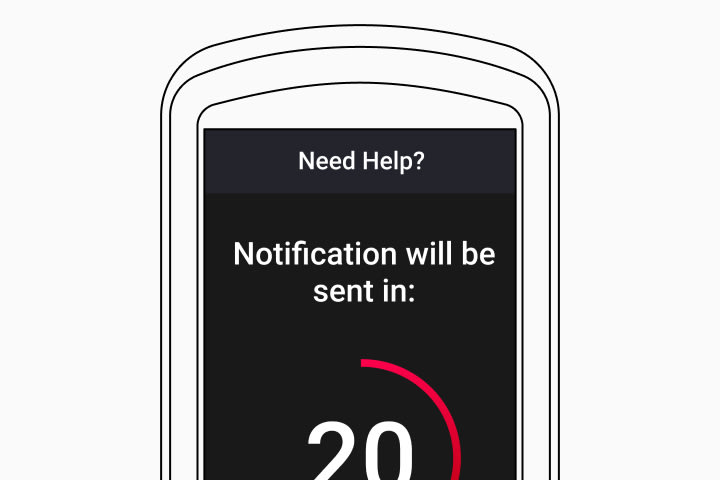
Garmin Incident Detection is the crash alert built into Garmin watches and Edge bike computers. When the device senses a crash or hard fall during an outdoor activity, it messages the wearer’s chosen contacts with their location. Garmin’s Forerunner 970 manual describes it in one line: “When the Forerunner watch detects an incident during certain outdoor activities, the watch sends an automated message, LiveTrack link, and GPS location (if available) to your emergency contacts.”
It belongs to Garmin’s group of safety and tracking features, alongside Assistance, which sends the same message when the wearer asks for help by hand, and LiveTrack, which supplies the location link. Garmin calls all of them supplemental features that “should not be relied on as a primary method to obtain emergency assistance”, because the alert goes only to friends or family who have agreed to receive it.
What happens when Garmin Incident Detection triggers
A detected incident starts a countdown on the device and on the paired phone. The Forerunner 970 manual says contacts are “informed after 15 seconds have elapsed”, while Edge manuals and older watch manuals give 30 seconds. The wearer can cancel the message during that time. If the countdown runs out, the Garmin Connect app sends a text message and an email with the wearer’s name and GPS location to up to three assistance contacts, and each contact must have accepted an invitation before the alert reaches them. The watch also ends and saves the current activity, then starts a new one so that the location keeps being tracked.
How Garmin detects an incident
Garmin states that detection uses an integrated accelerometer, which is how the Edge Explore 1000 press release introduced it in 2015, and its running blog describes the trigger as a drastic change in movement. GPS must be switched on for the feature to work. Garmin does not publish the method beyond that. The most plausible reading is that the device looks for a sharp spike in acceleration followed by a period with little movement, because that is the pattern of a crash, and because accelerometer fall detectors in published research work on thresholds of that kind. DC Rainmaker, testing the Edge 820 in 2016, thought it combined the accelerometer with GPS data, which would let speed confirm that the rider has stopped. The thresholds themselves are unknown.
What affects Garmin Incident Detection
Garmin designed the feature around road cycling: the Edge 820 launch footnote says it is “intended for road cycling use”, and the Edge 1030 manual calls it “primarily designed for road use”. Sudden braking and a sprint finish also produce sharp changes in movement, which is where false alerts come from. Activity profile decides whether it runs at all, so an indoor activity, a profile without GPS or a Connect IQ app leaves the athlete uncovered. There is no sensitivity setting, so the feature is simply on or off for each activity profile.
The alert depends on the link to the phone. Without a Bluetooth connection to a phone with mobile data, or an LTE watch with an active plan, the device can detect an incident but has no way to send the message. Garmin also requires the Garmin Connect app to stay running in the background on an iPhone, and a force-closed app breaks the chain. Garmin also says the watch must be worn on the wrist for it to work properly.
How accurate is Garmin Incident Detection
Garmin publishes no detection rate and no false alarm rate. The available evidence is observation. DC Rainmaker found the Edge Explore 1000 hard to set off on purpose in 2015, then saw false positives on the Edge 820 a year later that he could not explain. Garmin owners report false alerts at sprint finishes and when stopping hard for a coffee, according to the5krunner’s Fix Files.
Competitor equivalents
- Apple Watch has Fall Detection, which can call the emergency services and notify emergency contacts after a hard fall, plus Crash Detection for severe car crashes.
- COROS offers a manual SOS through Safety Alerts on most of its watches, while automatic Crash Detection is limited to its DURA and DURA 2 SOLAR bike computers.
- Polar has no automatic incident detection in its official documentation.
- Suunto has no automatic incident detection, although its Emergency Info sports app stores emergency contact and medical details on the watch.
Which Garmin devices support Incident Detection
Garmin introduced Incident Detection in 2015 on the Edge Explore 1000, which its press release called “the first Garmin device to offer incident detection”. The Edge 820 brought it to mainstream bike computers in July 2016, and watches followed around 2019, when Garmin added it to the vivoactive 3 Music, Fenix 5 Plus series and Forerunner 645 Music and launched it on the Forerunner 45, 245 and 945. Today the rule is that current Edge computers and most current Garmin GPS watches carry it, while the activity profiles covered vary by model, so the owner’s manual is the place to check. The Forerunner 970, 170, 165 and 70 manuals all list it. LTE models such as the Forerunner 945 LTE and Fenix 8 Pro can send the alert over their own mobile connection. Fall Detection is only available on the Venu 4.
Where to find Incident Detection on Garmin
- Garmin Connect app: More > Safety & Tracking > Safety Features > Get Started, then add up to three assistance contacts and send each a request.
- On the watch: Settings > Safety & Tracking > Incident Detection > Activities, to switch it on or off for each supported activity.
- On an Edge: Menu > Safety & Tracking > Incident Detection.
Common problems and misreadings
A false alert is the most common problem, and the fix is to cancel it on the watch or the phone before the countdown ends. See Quick answers above for why it never reaches the emergency services.
Contacts who never accepted the invitation receive nothing, even after a real incident, so the setup is not finished until each one has said yes.
Garmin keeps the feature active while an activity is paused, until the activity is saved or discarded. After a trigger, the watch saves the activity and starts a new one, so a detected incident, real or false, leaves the ride or run split into two files.
How to improve Incident Detection
Incident Detection is not a trainable metric. Its reliability depends on setup: accepted contacts, a phone with signal, GPS switched on and a supported activity profile.
Scientific basis
Bourke AK, O’Brien JV, Lyons GM. Evaluation of a threshold-based tri-axial accelerometer fall detection algorithm. Gait and Posture, 2007. PMID 17101272. Showed that thresholds on accelerometer data can separate real falls from everyday movement, the principle behind Garmin’s accelerometer-based detection.
Candefjord S, Sandsjö L, Andersson R and colleagues. Using smartphones to monitor cycling and automatically detect accidents. International Cycling Safety Conference, 2014. Applied automatic accident detection to cyclists, the use case Garmin launched with. Neither study tested Garmin’s own algorithm.
How Incident Detection connects to other Garmin features
Every alert carries a LiveTrack link, so contacts can follow the athlete’s position after the message arrives, and the same link goes out when Assistance is triggered by hand. On the bike, it sits alongside the Varia rearview radar, which warns the rider about traffic before anything happens. Garmin is defending a patent case over fall detection, covered in Garmin sued over fall detection. The other safety features are listed on the Garmin safety features page, and Garmin’s own setup guide is on its Incident Detection support page.
Small things I always use
- Garmin 90-degree charging adapter: Charges your Garmin with any USB-C cable. Essential when travelling. I use one.
- Body Glide: The blue anti-chafing stick swimmers and runners carry. I use it.
- Speedo earplugs: Fewer ear infections and no cold-water dizziness. I use them.
- Dryrobe Advance: My winter changing robe for open-water swims. I use one. A cheaper option is the AONYIYI changing robe.
- Maurten: Race fuel that stays easy on the stomach. I use them.
- Beet It Sport nitrate shots: Beetroot shots I take in the days before a race. I use them.
- Garmin charging puck: The quickest way to top up before a session. I use one.
- Injinji: Toe socks that stop rubbing, so you run more. I use them.
- Ultimate toe protectors: Stop black toenails on long runs. They work. I use them.
- Compressport R2 v2 calf sleeves: My calf sleeves of choice. I use them.
- Cellucor C4: My pre-workout before hard sessions.
- TPU tubes: Schwalbe Aerothan, Tubolito and Pirelli SmarTube. Light, tiny spares. I use all three.
- G8 insoles: Adjustable arches, perfect position. I use them.
- Cycplus Cube: A 97g electric pump that gets a road tyre rideable in two minutes. I carry one. 5% off with code THE5KRUNNER.
Health, recovery and sleep
- Kineon MOVE+: Red and infrared light for sore knees, Achilles and other joints after hard training. I use it.
- FreeStyle Libre 3 Plus: Shows how my blood sugar responds to diet. Occasional use.
- hDrop: Measures my sweat loss in summer and indoors. I use it.
- Fourth Frontier Zone: Checks my heart under load in hard sessions.
- Oura Ring 5: My partner’s recovery tracker of choice.
- Eight Sleep: A cooling mattress cover my partner and I use nightly.
Watches and sensors
- Polar H10: My daily driver for waking HRV.
- Polar Verity Sense: My backup arm-worn HR sensor.
- Nomad bedside charger: Charges my iPhone and Apple Watch overnight. I use it, and many of their bands.
- Train.Red: The best muscle oxygen sensor I’ve used. Occasional use.
- Tymewear: Accurate heart rate and reliable ventilatory zones. I use it to pace endurance rides over an hour.
- Garmin Forerunner 970: A pro-grade triathlon watch. I use this.
- Apple Watch Ultra 4: My daily smartwatch. No phone needed on rides.
On the bike
- Continental GP5000 for everyday riding, and Aero 111 on the front for special occasions. I use both.
- Helmets: Specialized S-Works Evade 3 for road riding, and Rudy Project Wing for TT-style races. I use both.
- Ravemen FR300: A front light that mounts under your Garmin or Wahoo. I use one.
- Ravemen FR1000: The light and the computer mount in one unit, so nothing else goes on the bars. Better than mine.
- Ravemen FR1500SE: 1,500 lumens hanging under your Garmin, for proper night rides.
- Ravemen FR1100SE: 1,100 lumens under your Garmin, and up to 46 hours on slow flash.
- Ravemen FR500: A brighter FR300 with the same mount.
- Wahoo TRACKR Radar: I use it on one bike and Varia on the other. They perform the same.
- Garmin Varia RTL515: Radar that warns you of cars from behind. I use this model.
- Wahoo ELEMNT Roam 3: The bike computer that’s easy to use. I use mine on most rides.
- Favero Assioma Pro RS2: Accurate power pedals that swap easily between bikes. I use this model.
Home and indoor training
- NPE Runn: Makes my basic treadmill smart, sending more accurate speed and distance to my watch and Zwift. I use it.
- Google Wifi: Keeps Zwift connected in my pain cave. I use it.
- Apple TV 4K: Zwift on the big screen. I use two.
- Google Nest Doorbell (wired, 2nd gen): My video doorbell, running in both Google Home and Apple Home via Starling. I use it.
Reader-Powered Content

This content is not sponsored. It’s mostly me behind the labour of love, which is this site, and I appreciate everyone who supports it.
Support the site: Follow (free, fewer ads) · Subscribe (paid, ad-free) · Buy Me A Coffee
Written by real people, with AI assistance. Fact-checked and verified for originality. See the Editorial Policy. FTC: Affiliate Disclosure — some links pay commission. As an Amazon Associate, I earn from qualifying purchases.
