As good as the watch’s GPS, but the map freezes at the last known position when the phone loses signal
Letting family or a support crew follow a race, a long ride or a solo run
Needs the phone and a mobile signal; text message invites need Connect+
Quick answers
Is Garmin LiveTrack free?
Yes. Inviting followers by email is free for up to 50 recipients, and you can share a link through messaging apps once a session is running. Sending LiveTrack invites by text message from the app needs a Garmin Connect+ subscription.
Does Garmin LiveTrack work without a phone?
Only on watches with LTE and an active LTE plan, such as the Forerunner 945 LTE, Fenix 8 Pro, Fenix 9 Pro inReach models, quatix 8 Pro and D2 Mach 2 Pro. Every other Garmin needs its paired phone carried during the activity, with a good mobile signal.
How do I make Garmin LiveTrack start automatically?
Switch on Auto Start in the LiveTrack settings of the Garmin Connect app, and LiveTrack begins whenever a compatible outdoor activity starts. On supported watches, the LiveTrack menu under Safety and Tracking also lets the wearer choose which activities start it.
What can followers see on Garmin LiveTrack?
Followers see the current location, average pace, elapsed time, distance, elevation gain and any planned route. The graphs below the map add current pace, speed, current elevation, heart rate and cadence.
LiveTrack – a deep dive
When LiveTrack is actually useful
The main use is to know where someone is and how likely they are to be safe. If they keep moving, they’re probably safe (or lost). You can estimate their ETA at their destination – the are they home in time for dinner factor.
With the advent of smartphone features like Apple’s Find My, this garmin feature that requires the same phone is of far less use than it used to be.
It’s perhaps most useful to share your position with a wider circle of friends who wouldn’t have your Find My position. That may include friends on race day or fellow riders in the same group.
Introduction
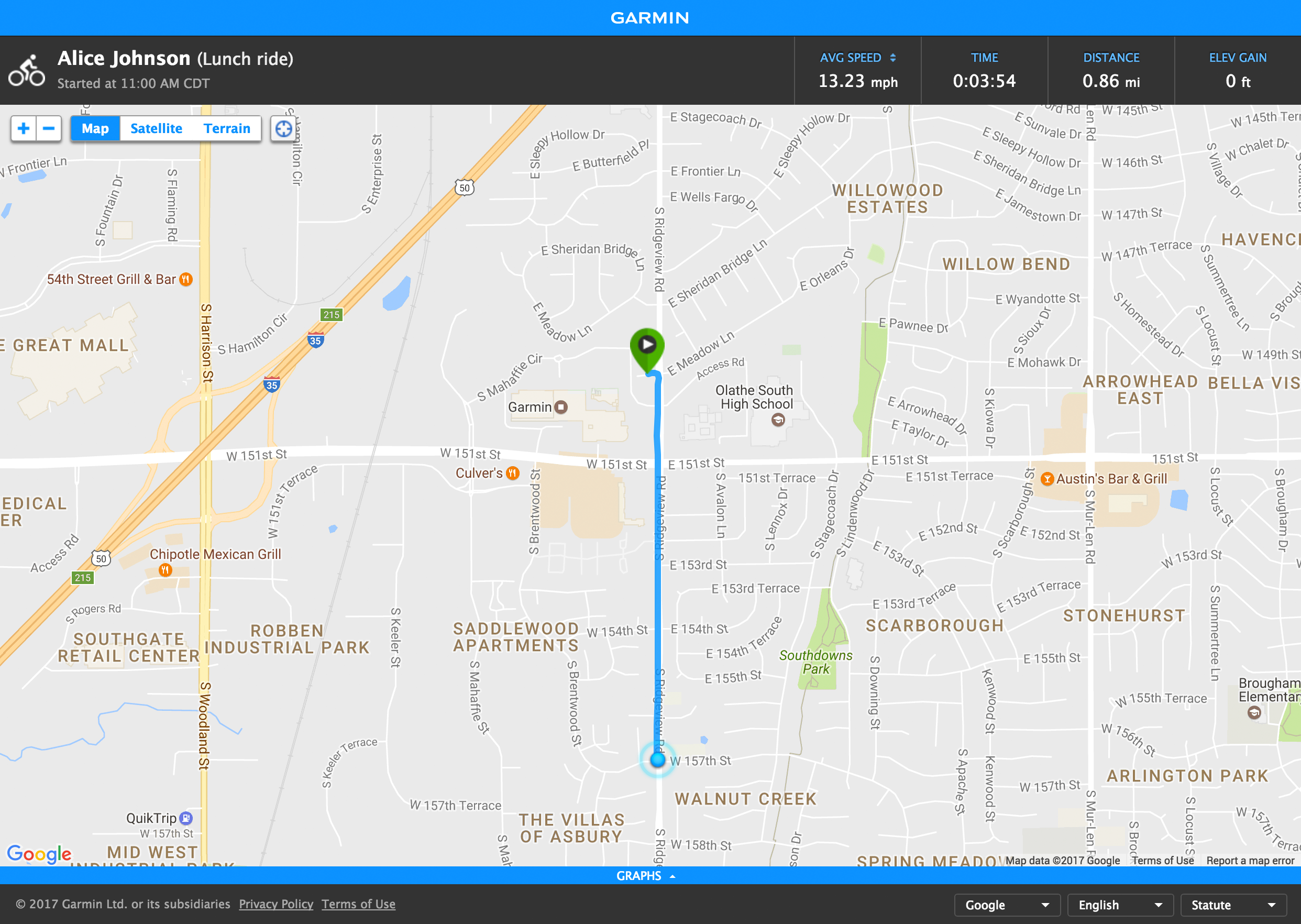
Garmin LiveTrack, often searched as Garmin live tracking or Live Track, shares an athlete’s position with chosen people while an activity is recorded. Garmin’s support page defines it this way: “LiveTrack location sharing creates a real-time view of your location during an activity so friends and family can follow along.” Followers open a web page from the link they receive.
LiveTrack is also the location link inside Garmin’s other safety features: Incident Detection and Assistance both send a LiveTrack link with their alert, and GroupTrack shows the positions of friends on compatible map-enabled Garmin devices. Its limitation is the phone. Unless the watch has its own LTE connection, the session lasts only as long as the paired phone has a mobile signal.
What followers see on Garmin LiveTrack
The LiveTrack page shows the current location, average pace, elapsed time, distance, elevation gain and a planned route if one is loaded, and its graphs add current pace, speed, current elevation, heart rate and cadence. Followers can also send messages back during the activity, through Spectator Messaging, and audio messages play through Bluetooth headphones paired to the watch. When the activity is paused, Garmin says “LiveTrack continues updating your location and sharing it with followers until the activity is saved or discarded.” Because LiveTrack keeps counting speed during a pause, the average speed on the LiveTrack page can differ from the figure in the saved activity.
How Garmin LiveTrack works
Garmin states the requirements rather than the method. The device must be paired and connected to the Garmin Connect app, the phone must be carried during the activity with a good mobile signal, and LiveTrack must be set up in the app before its first use. Garmin also advises switching off any VPN, because a VPN affects location performance. The most plausible reading of those requirements is that the watch sends its position and sensor data to the phone over Bluetooth, and the phone uploads it to Garmin’s servers, which serve the web page. Garmin does not publish how often the position updates.
When the signal drops, Garmin says the page “will display your last known location” and picks up again when the phone reconnects. LTE watches skip the phone and upload over their own connection when they have an active plan.
What affects LiveTrack
The mobile signal decides most of it, so a race through a crowded city centre or a ride through hills with poor coverage can leave followers watching a frozen dot. Garmin also advises getting a good GPS signal before starting, so that the map shows the start.
How accurate is Garmin LiveTrack
The position on the map comes from the watch’s own GPS, so the GPS accuracy of the watch sets the limit. The delay is the weaker part, because every update travels from the watch to the phone and then to Garmin’s servers before a follower sees it. Garmin publishes no delay figure. Owners have reported race-day faults such as links that expire and positions that freeze, covered in the5krunner’s Fix Files.
Competitor equivalents
- COROS added Live Tracking in its August 2026 update, with links that can be scheduled before an activity or started on demand, and a planned route shown to followers.
- Apple Watch offers Check In in Messages, which can start from a workout, but it has no live map page for followers.
- Polar has no live location sharing in its official documentation.
- Suunto has no built-in live location sharing; its Safe sports app shows the current coordinates, altitude difference and distance from the start on the watch itself.
Which Garmin devices support LiveTrack
Garmin introduced LiveTrack in January 2013 on the Edge 810 and Edge 510 bike computers, eight months after it first offered live tracking through its Garmin Fit phone app in May 2012. Today almost every current Garmin watch and Edge supports it when paired with a phone, and Garmin’s rule is to search the owner’s manual for “LiveTrack” to confirm a model. The D2 Mach 2 Pro, Fenix 8 Pro, Fenix 9 Pro inReach series, Forerunner 945 LTE and quatix 8 Pro can also run it over LTE with an active subscription.
Where to find LiveTrack on Garmin
- Garmin Connect app: More > Safety & Tracking > LiveTrack, then Sharing Settings to add email recipients, text message sharing or GroupTrack.
- Starting a session: Start LiveTrack under the device in the same menu, or switch on Auto Start.
- On the watch: Settings > Safety & Tracking > LiveTrack > Activities, on watches that can start it by activity, and a LiveTrack icon shows while a session is live.
Common problems and misreadings
A follower who never receives the invitation should check spam, junk and filtered folders. See Quick answers above for what the free tier sends.
A frozen dot usually means the phone lost its signal, and the page shows the last known location until the connection returns. A VPN on the phone can produce the same symptom.
When two Garmins are paired to one phone, the session can start on the wrong one unless the right device is chosen under Devices in the LiveTrack settings.
How to improve LiveTrack
LiveTrack is not a trainable metric. A reliable session comes from a phone with signal, Auto Start switched on and the correct device selected in the app.
How LiveTrack connects to other Garmin features
LiveTrack supplies the location link in every Incident Detection alert, and a course loaded for course following can appear on the LiveTrack page as the planned route. Since November 2026, riders who share LiveTrack can appear to nearby drivers in Waze, explained in Garmin’s Waze bike alerts. LiveTrack is different from Garmin Locate, which lets a contact request the position of an LTE watch with an inReach plan without the wearer starting a LiveTrack session, as covered in Garmin Locate explained. The other safety features are listed on the Garmin safety features page, and Garmin’s own guide is on its LiveTrack support page.
Small things I always use
- Garmin 90-degree charging adapter: Charges your Garmin with any USB-C cable. Essential when travelling. I use one.
- Body Glide: The blue anti-chafing stick swimmers and runners carry. I use it.
- Speedo earplugs: Fewer ear infections and no cold-water dizziness. I use them.
- Dryrobe Advance: My winter changing robe for open-water swims. I use one. A cheaper option is the AONYIYI changing robe.
- Maurten: Race fuel that stays easy on the stomach. I use them.
- Beet It Sport nitrate shots: Beetroot shots I take in the days before a race. I use them.
- Garmin charging puck: The quickest way to top up before a session. I use one.
- Injinji: Toe socks that stop rubbing, so you run more. I use them.
- Ultimate toe protectors: Stop black toenails on long runs. They work. I use them.
- Compressport R2 v2 calf sleeves: My calf sleeves of choice. I use them.
- Cellucor C4: My pre-workout before hard sessions.
- TPU tubes: Schwalbe Aerothan, Tubolito and Pirelli SmarTube. Light, tiny spares. I use all three.
- G8 insoles: Adjustable arches, perfect position. I use them.
- Cycplus Cube: A 97g electric pump that gets a road tyre rideable in two minutes. I carry one. 5% off with code THE5KRUNNER.
Health, recovery and sleep
- Kineon MOVE+: Red and infrared light for sore knees, Achilles and other joints after hard training. I use it.
- FreeStyle Libre 3 Plus: Shows how my blood sugar responds to diet. Occasional use.
- hDrop: Measures my sweat loss in summer and indoors. I use it.
- Fourth Frontier Zone: Checks my heart under load in hard sessions.
- Oura Ring 5: My partner’s recovery tracker of choice.
- Eight Sleep: A cooling mattress cover my partner and I use nightly.
Watches and sensors
- Polar H10: My daily driver for waking HRV.
- Polar Verity Sense: My backup arm-worn HR sensor.
- Nomad bedside charger: Charges my iPhone and Apple Watch overnight. I use it, and many of their bands.
- Train.Red: The best muscle oxygen sensor I’ve used. Occasional use.
- Tymewear: Accurate heart rate and reliable ventilatory zones. I use it to pace endurance rides over an hour.
- Garmin Forerunner 970: A pro-grade triathlon watch. I use this.
- Apple Watch Ultra 4: My daily smartwatch. No phone needed on rides.
On the bike
- Continental GP5000 for everyday riding, and Aero 111 on the front for special occasions. I use both.
- Helmets: Specialized S-Works Evade 3 for road riding, and Rudy Project Wing for TT-style races. I use both.
- Ravemen FR300: A front light that mounts under your Garmin or Wahoo. I use one.
- Ravemen FR1000: The light and the computer mount in one unit, so nothing else goes on the bars. Better than mine.
- Ravemen FR1500SE: 1,500 lumens hanging under your Garmin, for proper night rides.
- Ravemen FR1100SE: 1,100 lumens under your Garmin, and up to 46 hours on slow flash.
- Ravemen FR500: A brighter FR300 with the same mount.
- Wahoo TRACKR Radar: I use it on one bike and Varia on the other. They perform the same.
- Garmin Varia RTL515: Radar that warns you of cars from behind. I use this model.
- Wahoo ELEMNT Roam 3: The bike computer that’s easy to use. I use mine on most rides.
- Favero Assioma Pro RS2: Accurate power pedals that swap easily between bikes. I use this model.
Home and indoor training
- NPE Runn: Makes my basic treadmill smart, sending more accurate speed and distance to my watch and Zwift. I use it.
- Google Wifi: Keeps Zwift connected in my pain cave. I use it.
- Apple TV 4K: Zwift on the big screen. I use two.
- Google Nest Doorbell (wired, 2nd gen): My video doorbell, running in both Google Home and Apple Home via Starling. I use it.
Reader-Powered Content

This content is not sponsored. It’s mostly me behind the labour of love, which is this site, and I appreciate everyone who supports it.
Support the site: Follow (free, fewer ads) · Subscribe (paid, ad-free) · Buy Me A Coffee
Written by real people, with AI assistance. Fact-checked and verified for originality. See the Editorial Policy. FTC: Affiliate Disclosure — some links pay commission. As an Amazon Associate, I earn from qualifying purchases.
