
Zwift Click controllers – hands on
In the image above, you can make out that I’ve been using the prototype version of the new Zwift Click. I’d never used steering in Zwift, so it was a novel and enjoyable experience. Of course, the new controllers do much more than steer; they turn; they help you navigate Zwift’s various onscreen menus whilst keeping your hands on the bars.
Combining them with the single rear cog (Zwift Cog) is the real boost. This makes it far easier to use any number of bikes on your Zwift-Ready smart trainer.
These media loaners came with a Zwift-Ready KICKR Core, which I am returning. This content is not paid for.
When can I buy them?
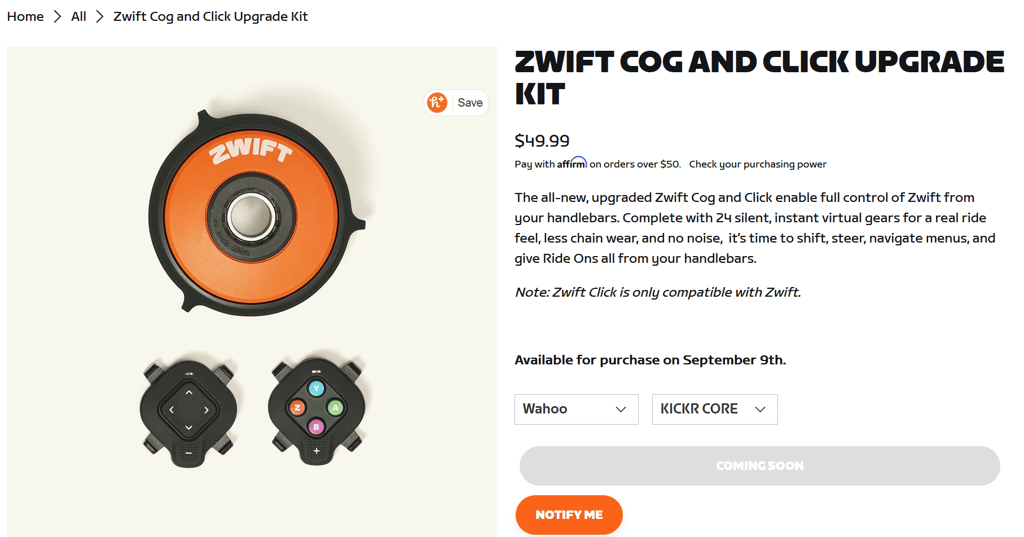
With the caveats below, the Zwift Cog and Click upgrade kits for all Zwift Cog-compatible trainers are available to pre-order from Zwift.com (£49.99 / €49.99 / USD$49.99) and will ship from September 9th.
Is this an upgrade or a new purchase?
It’s kinda both, I suppose. These new controllers are designed to replace the original Zwift Click and Zwift Play controllers, which will continue to work but no longer be sold once any remaining stock has been sold.
I never used the previous version, but this one works reasonably well, whereas the older one looks less ergonomic. They’re cheap as chips, so if you fancy an upgrade, fill your boots.
What do you get?
There are two units, each with five buttons and LED status indicators. They are slightly chunkier than the original Click controllers, and their rubber coating makes them sweat-proof. There’s a somewhat positive, clicky feedback.
Q: Where can I stick them?
A: Anywhere. They claim to be compatible with any handlebar type, but I found them just about OK on my flat bars and a bit fiddly to install around my 11-speed Ultegra hoods.
Both scenarios eventually worked fine, but there are too many detachable bits, and the straps can be unsightly.
Rechargeable Battery?
They use coin cell batteries, which should be suitable for 100 hours or so.
So, what do they actually do?
They lack any braking, tho I can’t see why you’d need it much.
You get a full menu and game control, but I found the virtual shifting most useful. Unlike real gears, the trainer I used responded near instantly and silently.
Even better, you get 24 virtual gears, a possible boost from your current real gearing.
The left pod has Directional buttons for navigating menus, selecting routes, and steering through Zwift’s virtual terrain.
The steering is responsive, but the avatar’s movement is slow. I suppose it’s realistic in lateral movement to real steering.
I’m not a gamer and have only rarely used traditional game controllers. I get the point, but I am unfamiliar with them. Thus, for me, there was a learning curve with the buttons on the right pod. You’ll probably get used to them super quickly. You can select menu choices, go back, PowerUps, and give Ride Ons.
I’m a bit of a cycling Luddite, so this all seems too gamified. I get the benefit of easy virtual gear changing. Sure, it’s nice to flick through the menus from a controller, but I’m happy doing that with a mouse or touchscreen (OK, I guess the buttons are useful here too 🙂 ). I can’t see the point of steering, I suppose.
Connectivity:
Bluetooth.
The two controllers are linked together and appear as one device for pairing. You only have to pair one. You can only pair one.
Compatibility with Original Click
There is some interoperability, but I’d bin the old one and move on.
Firmware: Upgrades?
Yep, in the Zwift companion app
Onboarding:
The onboarding tutorial was pretty good at explaining the whole setup and functions of the buttons. You can even virtually rotate the controller buttons, I’m not quite sure why. I assume it’s because you need to get the + and – on each controller in the most ergonomic place for you, and the other buttons are relative to that position, so you might want to change their function. Something like that.
Fancy a video run-down?
Shane’s content is always engaging, light-hearted and clear.
Problems
- Flapping Strap in certain positions.
- No initial Standalone Purchase Option
- Learning curve for newbies like me
- The buttons could have a slightly better feel and click, but they are perfectly fine
- The attachment mechanism will eventually be improved, but it works fine.
Buying
Initially, the Click V2 is unavailable as a standalone purchase; it comes as part of Zwift Cog and Click upgrade kits or includes Zwift Ready smart trainers.
The upgrade kit price is $49.99 in the US, £49.99 in the UK, and €49.99 in the EU.
- Upgrade kits are for Wahoo, Elite, Van Rysel, JetBlack, and Garmin-Tacx trainers.
- Zwift Ready trainers that include the new Click controllers will be available from Wahoo, Elite, Van Rysel, JetBlack, and Garmin-Tacx (USA only) starting from €250 // £279.99 // $299.99
Last Updated on 29 January 2026 by the5krunner
Reader-Powered Content

This content is not sponsored. It’s mostly me behind the labour of love, which is this site, and I appreciate everyone who supports it.
Support the site: Follow (free, fewer ads) · Subscribe (paid, ad-free) · Buy Me A Coffee ❤️
All articles are written by real people, fact-checked, and verified for originality. See the Editorial Policy. FTC: Affiliate Disclosure — some links pay commission. As an Amazon Associate, I earn from qualifying purchases.

tfk is the founder and author of the5krunner, an independent endurance sports technology publication. With 20 years of hands-on testing of GPS watches and wearables, and competing in triathlons at an international age-group level, tfk provides in-depth expert analysis of fitness technology for serious athletes and endurance sport competitors.

Fantastic hands-on review! The new Zwift Click 2 sounds like a real winner—combining ergonomic enhancements, Swiss-army-knife functionality, and a wallet-friendly price is exactly what Zwifters needed. Love that you found the buttons “sweat-proof” with satisfying, tactile feedback, and that the virtual shifting is nearly instantaneous and whisper-quiet—those are game-changers for indoor riding.