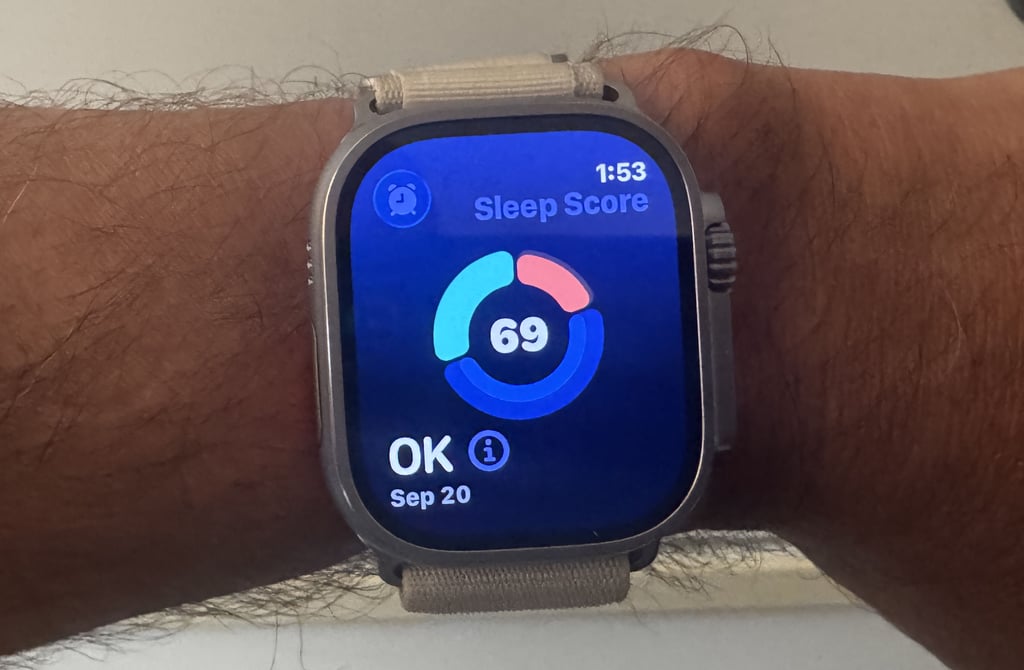
How Apple Watch’s Sleep Score Is Calculated: How to use it for sleep tracking.
Are you struggling with inconsistent sleep? I decoded Apple’s Sleep Score to help. Learn how it works and find simple ways to boost your rest, helped by your Apple Watch.
TL;DR: Get 7-9 hours of sleep and a consistent bedtime to improve your Apple Sleep Score. Use science and wearables to make it happen.
This article covers everything you need to know about Apple’s Sleep Score. It examines how Apple calculates the score, how it is presented and used in the Apple ecosystem, plus the scientific validation and issues surrounding its use.
Apple Sleep Score – A Quick Overview
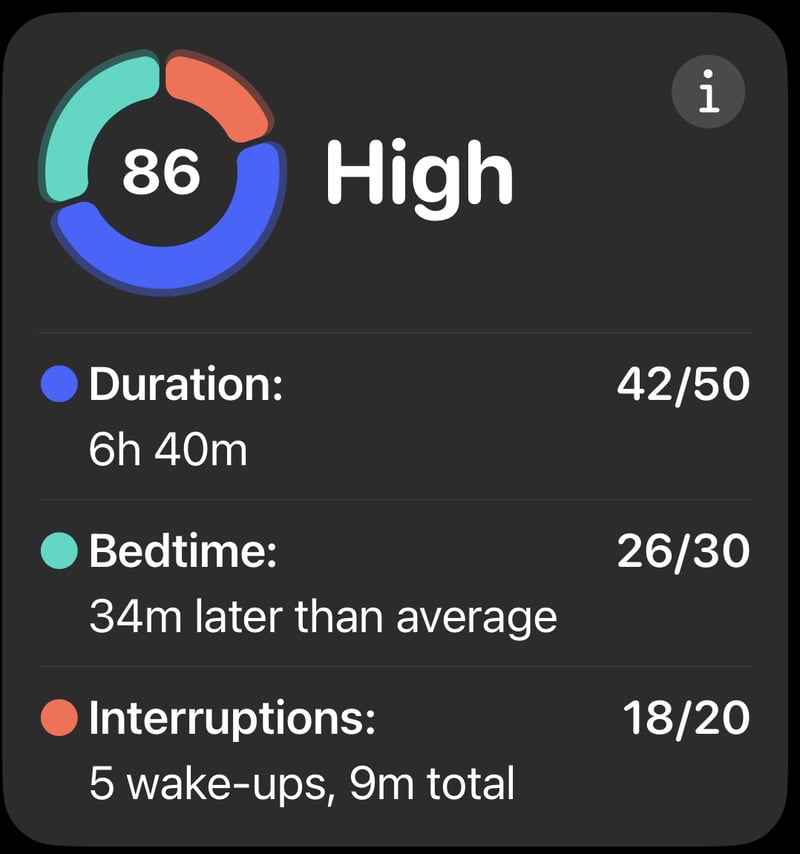
In talking with Apple, the company confirms three areas that comprise the full Sleep Score. Each is scored and can total a maximum of 100 points:
- Duration Sleep Score: Max. 50 points.
- Bedtime Sleep Score: 30 points.
- Interruption Sleep Score: 20 points.
These areas break down further, where deductions are made for the sleep behaviours shown to make a negative difference.
Duration Sleep Score (Max. 50 points)
This score is the most important and considers the total amount of sleep and the quality of its sleep stages.
Deductions
Deductions are made when you sleep less than 7 hours and 50 minutes.
- For two hours less than that, you lose 13 points.
- The deduction is not linear. So you will lose fewer than 6 points for one hour less, but more than 20 for an additional lost hour.
- There is no concept of too much sleep, and no deductions are made for that.
Then there are deductions for quality
- 5 points are docked for a low DEEP sleep stage score.
- 5 further points for a low REM Sleep stage score.

Bedtime Sleep Score (30 points)
The bedtime component looks at your routine and is most interested in how the time you go to bed differs from normal.
Deductions
- Going to bed 15 or more minutes later than normal incurs a linear deduction of approximately one point per 5 minutes.
- More precisely, there is a 10-point deduction for going to bed 60 minutes later than normal.
- More precisely, there is a full 30-point deduction for going to bed 150 minutes later than normal. You score zero.
- Going to bed earlier than 60 minutes is not penalised
- Going to bed more than 60 minutes earlier incurs a 1 point deduction per 30 minutes, to a maximum of 6 points deducted
Jet lag is not penalised, and there is no reference to when you go to sleep versus when you go to bed. The former is accounted for in the duration component.
Interruption Sleep Score (20 points)
This score combines your time spent awake during the night and the number of wake events.
Deductions
- Up to 11 minutes Spent Awake is not penalised
- After 11 minutes, approximately one point is deducted for every 4 minutes spent awake.
- More precisely: 50 minutes of awake time gives a 10-point deduction
- Two sleep Interruptions are not penalised
- Approximately one point is deducted for every two further wake events
What’s Wrong with Your Sleep Scores? Why is it hard to measure?
Apple’s Sleep Score and its competitors are useful in aiding our understanding of sleep, but they are not the correct measures of sleep quality.
Why Sleep Stages Matter: Deep sleep is known to support physical recovery (muscle repair), and REM sleep aids cognitive health. The National Sleep Foundation, 2017, recognises both are important.
The hardest thing to determine is what exactly a good night’s sleep is. Sleep quality doesn’t have units of measure nor a precise and universally agreed definition. However, Apple’s stated approach agrees with broad recommendations from the National Sleep Foundation, which recommends 7-9 hours for optimal health.
Furthermore, the Sleep Score is a composite score. You are adding together different things that are not additive – it’s almost like the sleep score is: 2 apples plus 3 pears plus 4 bananas equals 9 fruit. But a score of 9 doesn’t mean you will always have 2 apples. It’s useful mathematical nonsense.
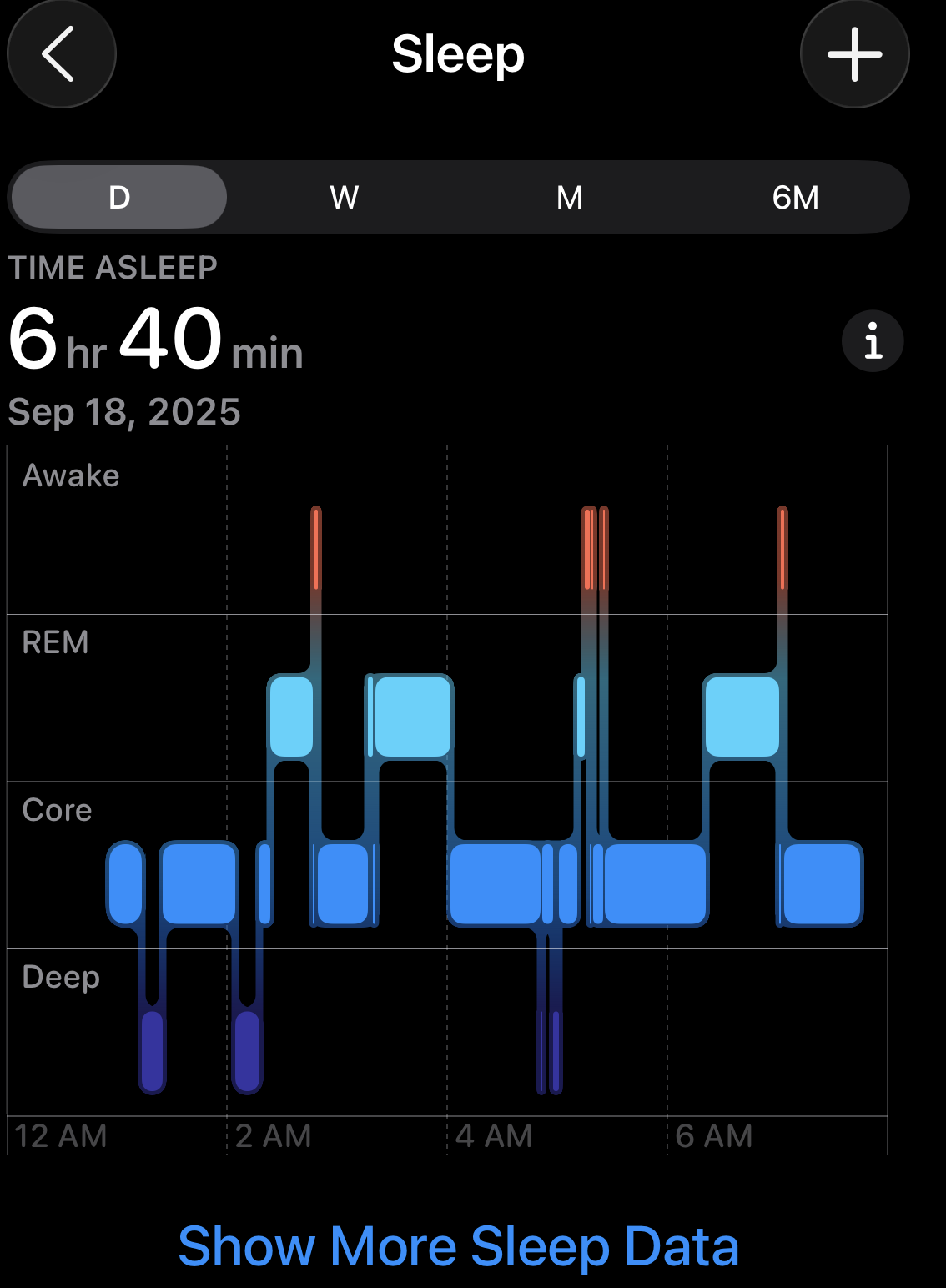
Whilst consistency and duration are the key factors outlined above, you will get a notable boost to the score by getting good DEEP and REM sleep. However, Apple does not accurately determine REM and DEEP sleep stages; the company claims 63% accuracy in its sleep stage determination.
While the algorithm has minor unknowns, the overall calculation methods used to achieve these points are understood and partly validated by sleep researcher Rob ter Horst, who validated Apple’s algorithm in his analysis. (Have a watch here).
Apple Sleep Score – What Raw Data is Used?
Apple Watch 6, Watch Ultra, SE2 and all later models support Sleep scores, using similar internal motion and heart rate sensors.
- 3-axis Accelerometer Signals will record arm movements while you sleep. These determine Sleep stage classifications (Awake, Core, Deep, REM) and interruptions.
- Heart Rate is another input to Sleep stage tracking and interruptions
- Respiratory Rate is used in Sleep stage tracking and interruptions
- Blood Oxygen (SpO2) plays a minor role in detecting sleep disruptions
- Your Historical Sleep Data develops a baseline pattern of typical sleep durations and sleep stages.
- Wrist temperature sensors play a minor role in tracking changes to baseline trends. (More: finding optimal sleep temperature for recovery)
Apple Sleep Score does not use strain, recovery, HRV, or stress.
Cautions on using alternatives to the Apple Watch
Oura Ring, Whoop, Eight Sleep and other tools can provide sleep data (e.g., duration, heart rate) to Apple Health when not wearing an Apple Watch. However, the native Apple Sleep Score may not be reliably calculated if 3rd party sleep stage calculations are incompatible or if you switch between sources. For example, Apple Watch data will be prioritised when available. So, using the devices’ native apps for accurate sleep scoring is best.
Look more closely at the permissions you have granted to various sleep apps in Health to ensure you use one consistent source.
Apple Sleep Score Presentation
Your Apple Watch collects Apple’s raw sleep data, with initial feedback simply presented on the Watch and more detailed feedback and analyses on your iPhone.
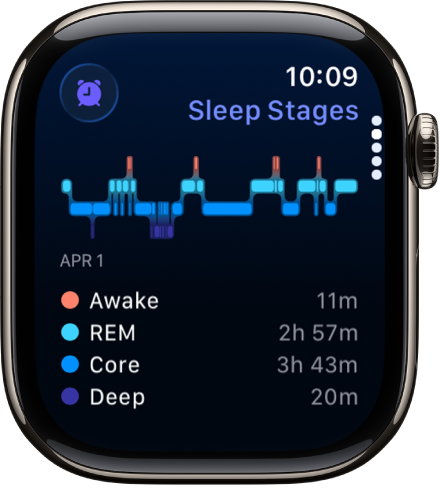
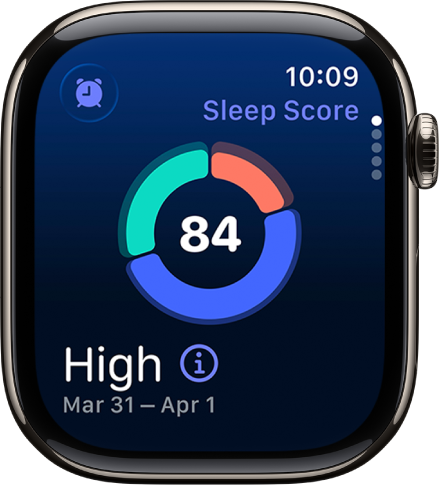
Here are two images showing sleep stages and the nightly sleep score on the watch. The sleep score visual has a similar visual feel to Apple’s famous fitness rings, presenting the information in a clear, glanceable way.
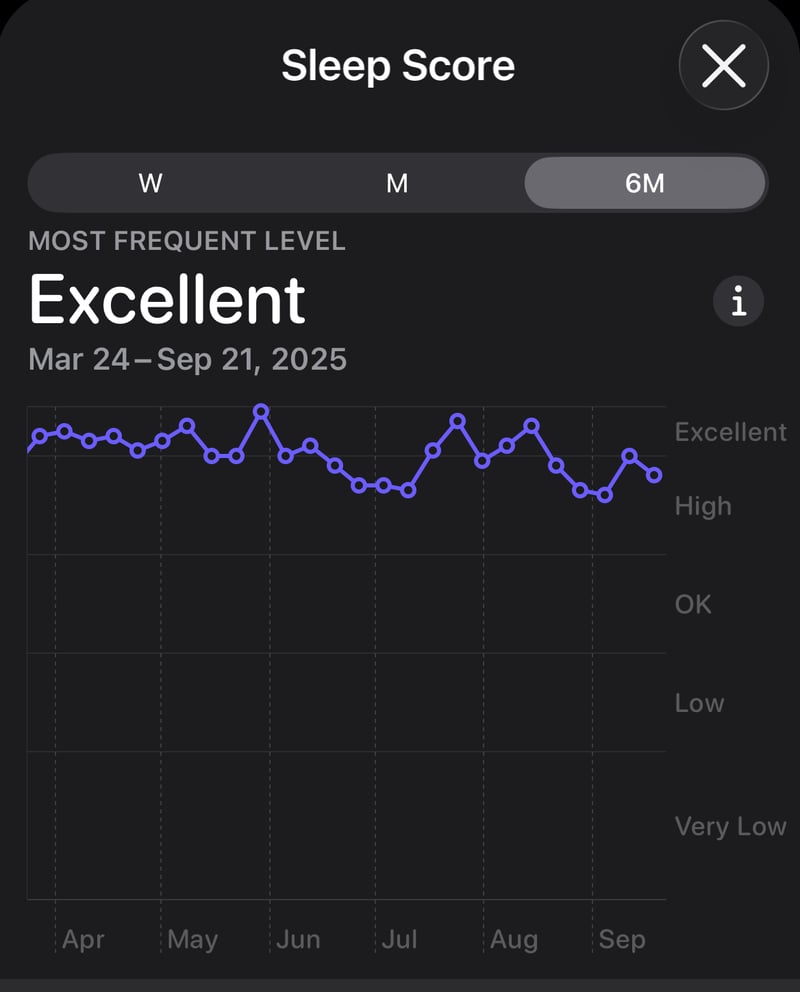
Here are two examples of nightly and trended sleep scores over 6 months. These help you spot trends you might miss from one night to the next eg my second chart clearly shows progressive worsening throughout the year.
Apple Sleep Score FAQ
Q: How Accurate Is Apple Watch’s Sleep Score?
A: Apple’s Sleep Score includes other calculations that don’t necessarily reflect reality – like the 63% sleep stage accuracy (Apple, 2023). It’s impossible to say how accurate the Score is, nor to compare it to other brands’ scores; no one knows what is ‘correct’, so we can’t know how accurate the tech is compared to an unknown. That said, consistent use of the Apple Watch should indicate sleep quality trends.
Q: Can I Improve My Apple Sleep Score Without Changing My Sleep Habits?
A: No. The Sleep Score will come from your habits and your body’s reaction. Sleep consistency, duration and hygiene are factors that all of us can improve. Small changes, like setting a bedtime reminder or avoiding caffeine after 2 PM, can boost your score without major habit shifts.
Q: Do Third-Party Devices Like Oura Ring Work With Apple’s Sleep Score?
A: They might. Oura Ring and Whoop update Apple Health, but their sleep data may not align with Apple’s algorithm, leading to inconsistent scores. Stick to one device for best results.
Q: Why Does My Apple Sleep Score Vary Day to Day?
A: Daily variations come from changes in sleep duration, bedtime consistency, or interruptions like waking up. Less significant factors can also make a difference. Day-to-day variations can be expected, so check your iPhone for more meaningful, longer-term trends.
Q: What’s the Difference Between a Good Sleep Score and a Good Night’s Sleep?
A: A high Sleep Score reflects Apple’s algorithm and metrics (duration, consistency, interruptions), which may not reflect your real-world experience.
How to Boost Your Apple Sleep Score
Use Apple Watch’s sleep schedule feature to remind you to go to bed consistently, ensure you wind down 30-60 minutes before bedtime, avoiding all screens.
According to the National Sleep Foundation, the best sleep environment is typically cool (60-67°F), quiet and dark. You might want to try blackout blinds, ambient or white noise machines to counteract street noise, and advanced tools like Eight Sleep to personalise bed temperatures for you and your partner at each stage of sleep.
Don’t fret over one poor night of sleep or your sleep data for that night. Set aside 5 minutes once a week to review trends in the Health app. Look at all your Apple vitals rather than Sleep to identify weak spots.
These steps will raise your score and improve energy and mood throughout the day.
Take Out – Use Apple’s Sleep Score to identify weak spots
It’s important to distinguish between getting a good sleep SCORE and getting a good night’s sleep. They will not always match.
That said, it’s interesting to see what Apple has included in its Sleep Score as the constituents ultimately come from independent scientific research. We can probably all agree that each sleep component must make some difference, but we might not agree that Apple’s 0-100 ranking is correct.
I appreciate that many people have significant trouble sleeping and its impact on their lives. It’s only fair that such people are interested in improving their sleep. Along with good Sleep Hygiene, Apple’s Sleep Score indicates where to focus to improve your sleep.
The bottom line for most of us is that we don’t need a Sleep Score – just focus on consistency and getting 7-9 hours of sleep.
Have you managed to achieve a Sleep Score of 100? Was that your best night of sleep?
Sources
- National Sleep Foundation’s sleep time duration recommendations: methodology and results summary. https://pubmed.ncbi.nlm.nih.gov/29073412/ DOI: 10.1016/j.sleh.2014.12.010
- Phillips, A.J.K., Clerx, W.M., O’Brien, C.S. et al. Irregular sleep/wake patterns are associated with poorer academic performance and delayed circadian and sleep/wake timing. Sci Rep 7, 3216 (2017). https://doi.org/10.1038/s41598-017-03171-4
- Meta-analysis of quantitative sleep parameters from childhood to old age in healthy individuals: developing normative sleep values across the human lifespan https://pubmed.ncbi.nlm.nih.gov/15586779/ DOI: 10.1093/sleep/27.7.1255
- Sleep Disturbances and Their Impact on Cognition in Individuals With Pure Cerebellar Disease https://www.researchsquare.com/article/rs-390742/v1 DOI: https://doi.org/10.21203/rs.3.rs-390742/v1
- Apple (2023): Estimating Sleep Stages From Apple Watch
- Apple: Learn how to set up sleep tracking on Apple Watch
- wiki: Sleep Hygiene
https://www.youtube.com/watch?v=aore9SIpZkQ
Last Updated on 29 January 2026 by the5krunner
Reader-Powered Content

This content is not sponsored. It’s mostly me behind the labour of love, which is this site, and I appreciate everyone who supports it.
Support the site: Follow (free, fewer ads) · Subscribe (paid, ad-free) · Buy Me A Coffee ❤️
All articles are written by real people, fact-checked, and verified for originality. See the Editorial Policy. FTC: Affiliate Disclosure — some links pay commission. As an Amazon Associate, I earn from qualifying purchases.

tfk is the founder and author of the5krunner, an independent endurance sports technology publication. With 20 years of hands-on testing of GPS watches and wearables, and competing in triathlons at an international age-group level, tfk provides in-depth expert analysis of fitness technology for serious athletes and endurance sport competitors.
