Should You Buy the Fitbit Air? The Three Buyer Paths
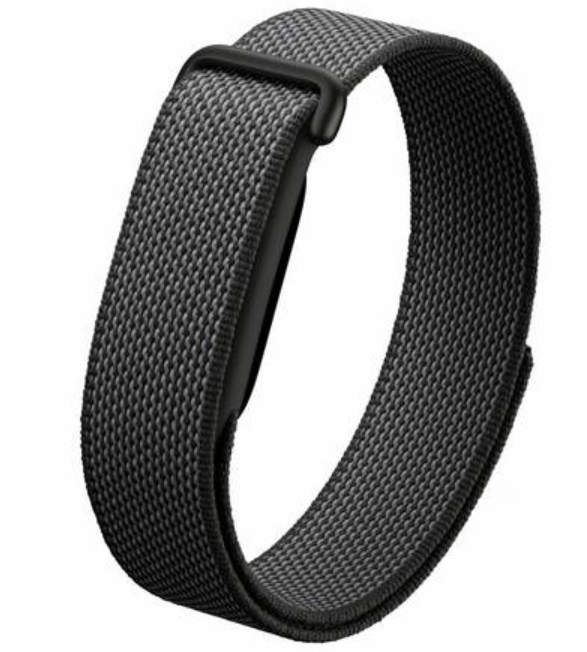
The Fitbit Air ships on 26 May for $99 with no subscription. The interesting question is not whether the device sells. It is which existing Fitbit customers will upgrade and why. Three groups account for most of the likely demand, far outstripping those who already own a Garmin or Whoop.
| Buyer | Old Device | Audience |
|---|---|---|
| The legacy band owner | Charge 3-5, Inspire 2-3, Luxe, Flex, Alta | HUGE! |
| The legacy watch owner | Versa 2-4, Sense 1-2 | LARGE |
| The Pixel Watch owner | Pixel Watch 1-4 (compatibility caveat) | MEDIUM |
Path 1: The Legacy Fitbit Band Owner
Charge 3, Inspire 2, Luxe, Alta, Flex. Fitbit shipped tens of millions of these over the past decade. The installed base is the biggest single target for the Fitbit Air. Most units are now three to six years old, with degraded batteries and perished straps.

For this buyer:
- The Air is a direct replacement, not a new behaviour
- A cheap upgrade by today’s standards
- The form factor, app, and metrics carry over cleanly
- The Google Health app rebrand on 19 May forces a software transition anyway
- The existing Fitbit Premium subscription transitions to Google Health Premium at the same price
- No relearning required
This is the easiest sale Google has. The buyer already trusts the brand. The device they own is on its last legs.
Path 2: The Legacy Fitbit Watch Owner
Versa 2 through 4, Sense 1 and 2. The Air is not a like-for-like replacement for a watch. It is the wellness companion for sleep, comfort, and screen-free wear. The watch keeps doing watch things, sports and some smarts. Note also that the Fitbit watch line itself has been effectively discontinued, so there is no direct watch successor inside the Fitbit brand.
For this buyer:
- Keep the existing watch on the wrist by day for notifications and screen
- Add the Air at night for sleep tracking, silent wake, and overnight comfort
- Both devices feed the same Google Health account, no duplication
You are not replacing a watch with a band. The Air sits in the gap a watch does not fill: the hours the watch is on the bedside table.
Path 3: The Pixel Watch Owner
The Air complements the Pixel Watch big time. Wear the watch by day with notifications and full features. Take it off at night and switch to the Air for sleep tracking and silent wake. Or split by activity: watch for workouts, Air for everything else.
Compatibility:
- Pixel Watch 4: dual-pairing confirmed in launch coverage
- Pixel Watch 1, 2, 3: Google’s help documentation implies support but the launch coverage focuses on Pixel Watch 4. We need to tie this down with Google.
- Both devices feed the same Google Health account with automatic data routing and de-duplication
Audience is notably smaller than the legacy Fitbit installed base but with a potentially higher rate of intent. You might want 24/7 wellness data and a more comfortable sleep companion than the watch provides. This is how you get it.
The Verdict
The legacy band owner buys because their device is dead. The watch owner adds the Air to fill the gap their watch leaves at night. The Pixel Watch owner does the same.
For the Whoop and Garmin angle on this same launch, see Garmin Cirqa vs Fitbit Air. For deeper specification analysis, see the Fitbit Air buyer’s guide. For the full picture of the Google Fitbit ecosystem including Pixel Watch and Google Health: Google Fitbit and Wear OS hub. For the broader context on why the Fitbit watch line ended, see Fitbit Watches Are Dead.
Why is Google doing this? It seems too good to be true.
It is too good to be true. Google wants you enmeshed in its ecosystem and sharing your fitness data with its AI model. It will phrase the benefits to you in terms of the true level of insights you will likely get. But really it wants to learn about humanity’s health and activity.

Quick answers
Will my old Fitbit data transfer to the Fitbit Air?
Yes. All historical Fitbit data carries across to the Google Health app and remains accessible after the rebrand on 19 May 2026. No manual export or import is required. The same account holds the old data and the new Fitbit Air data side by side.
Does my existing Fitbit Premium subscription work with the Fitbit Air?
Yes. Fitbit Premium becomes Google Health Premium on 19 May at the same price. Existing subscribers continue at the same rate and gain access to the new Gemini Health Coach. New Fitbit Air buyers receive a three-month Premium trial in the box.
Can I keep using my old Fitbit alongside the Fitbit Air?
You can keep both devices in the Google Health account, but only the Pixel Watch has confirmed dual-pairing with the Fitbit Air. Legacy Fitbit bands and watches will continue to sync independently to the same account.
Is the Fitbit Air a replacement for my Fitbit Versa or Sense?
Not directly. The Versa is a watch with a screen, on-device GPS, notifications, and apps. The Air is a screenless band. If your Versa is failing, the Air is a sidegrade in form factor and a step down in feature count. The Fitbit watch line itself has been discontinued, so there is no direct successor inside the Fitbit brand. Most owners will keep the Versa and add the Air rather than replace it.
Can I pair the Fitbit Air with my Pixel Watch 3 or Pixel Watch 2?
Probably yes, but unconfirmed at launch. Google’s help documentation references ‘Google Pixel Watch’ without specifying a generation, implying support across all four generations. The launch coverage focuses exclusively on the Pixel Watch 4. Verify before purchase if dual-pairing is the primary reason for buying.
What happens to my Fitbit account when the Google Health app launches?
The Fitbit app rebrands to Google Health on 19 May 2026. The account, data, and subscription transfer automatically. The app icon changes, the colour scheme changes, and the Gemini Health Coach becomes the headline new feature. No action is required from the buyer beyond an app update.
What is the difference between the Fitbit Air and the Charge 6?
The Charge 6 has a screen, on-device GPS, contactless payments, and notifications. The Air has none of these. The Air is the simpler, cheaper, screen-free option for buyers who want background wellness tracking without a display on the wrist. The Charge 6 is for buyers who want a band with a screen.
Should I upgrade my old Fitbit band to the Air?
If the existing band is more than three years old, yes. Battery degradation, strap wear, and outdated sensors all argue for replacement. The Air is the direct successor in form factor for Charge, Inspire, Luxe, Flex, and Alta owners. The Google Health app rebrand on 19 May forces a software transition anyway, so the upgrade moment is built in.
Will my legacy Fitbit still work after 19 May 2026?
Yes. Existing Fitbit devices continue to sync to the renamed Google Health app. The rebrand does not deprecate any hardware. End-of-life timing for older models follows the schedule Fitbit already publishes, which is independent of the app rename.
Does the Fitbit Air sync with iOS?
Yes. The Fitbit Air is compatible with both iOS and Android. The Google Health app is available on both platforms. The one exception is dual-pairing with the Pixel Watch, which works on Android only because the Pixel Watch itself requires an Android phone.
Should I buy the Fitbit Air now or wait for the Garmin Cirqa?
If you own a Garmin watch, wait for Cirqa. Ecosystem integration matters more than the spec sheet. If you do not, the Fitbit Air is the safer purchase: confirmed price, confirmed shipping date, confirmed feature set.
Last Updated on 29 June 2026 by the5krunner
My favourite kit and nutrition
- Garmin Fenix 9 Pro — I’ve just bought one.
- Injinji – Runners protect your toes. Avoid discomfort and minor injury. Run more. Run faster. I use them.
- Garmin 90-degree charging adapter — A small keyring adapter you can use anywhere. Essential when away. I use one.
- Garmin charging puck — the fastest and most reliable way to top up your Garmin before a session. I use one.
- Ravemen FR300 — Front light that mounts directly under your Garmin or Wahoo head unit. Keeps your bars clean and your beam pointed where it matters. I use one.
- Body Glide – The blue anti-chafe stick that all swimmers and many runners use. I use it.
- Maurten — The race nutrition trusted by elite athletes. Gels and drink mixes engineered to be easy on the stomach. I use them.
- Garmin Varia RTL515 — A radar rear light that alerts you to vehicles approaching from behind. Pairs with your Edge or Wahoo. I use this model.
- Favero Assioma Pro RS2 — The power-meter pedals most serious cyclists choose. Accurate, easy to move between bikes. I use this model.
- Garmin Forerunner 970 — A serious choice for a pro-grade triathlon watch. I use this.
- Polar H10 — My daily driver for accurate, waking HRV readings.
- Wahoo ELEMNT Roam 3 — The bike computer that has the feature Garmin lacks: usability. I use mine on most rides.
Reader-Powered Content

This content is not sponsored. It’s mostly me behind the labour of love, which is this site, and I appreciate everyone who supports it.
Support the site: Follow (free, fewer ads) · Subscribe (paid, ad-free) · Buy Me A Coffee ❤️
All articles are written by real people, fact-checked, and verified for originality. See the Editorial Policy. FTC: Affiliate Disclosure — some links pay commission. As an Amazon Associate, I earn from qualifying purchases.

tfk is the founder and author of the5krunner, an independent endurance sports technology publication. With 20 years of hands-on testing of GPS watches and wearables, and competing in triathlons at an international age-group level, tfk provides in-depth expert analysis of fitness technology for serious athletes and endurance sport competitors. ID

I’m a Garmin user forever & just bought one to try it out. It’s only €99, comes with €45 Google Store credit & the cost can be spread over three months for free. Longer term I can see myself moving to a Pixel watch whenever my 965 starts to expire.