Fitbit Air Review: A $99 Whoop Alternative With A Catch
It’s cheap, but its leading AI compensates for shortcomings, which include not recording 80% of your data.
The Fitbit Air is the brand’s first new device in nearly four years, its first screenless tracker, and the first wearable launch in three years with the credentials to move the market. It will be a commercial success. But the low-end design ethos, the prior-generation optical sensor, and the unusually narrow pod will not tempt the serious Whoop user away. The casualties are more likely Polar Loop and Amazfit Helio, which are still working to establish a foothold at the budget end of this category.
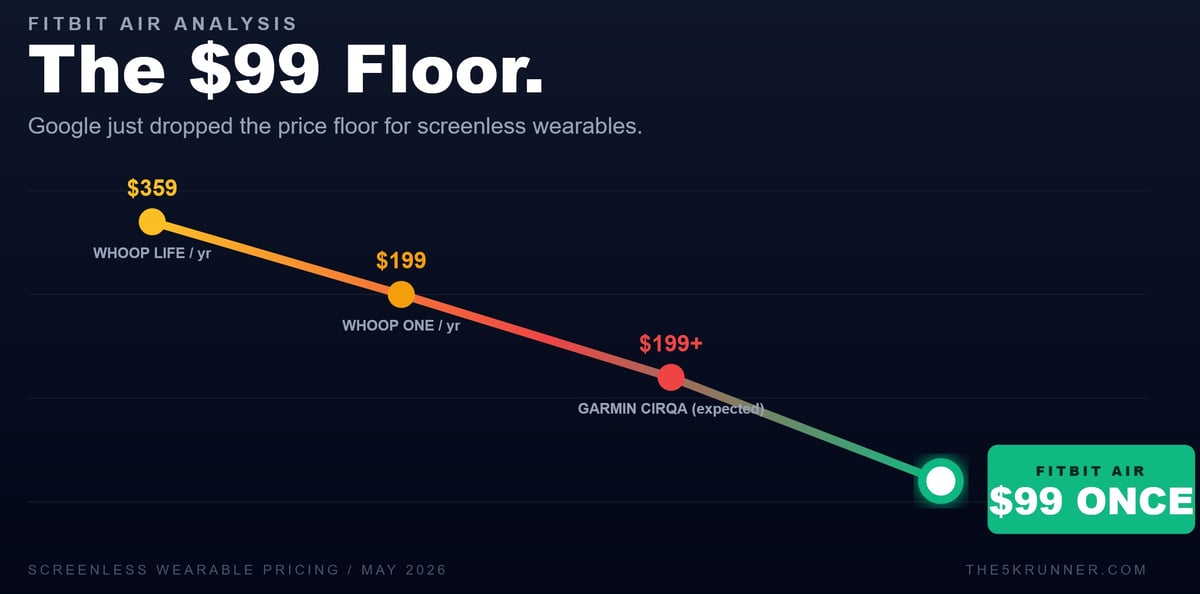
Now available for $99.99, it appears to land squarely in Whoop territory while breaking with the subscription model. One interesting takeaway is that Air is a great basic tracker, but to truly compete with Whoop‘s higher-end subscription features, you must get the Health subscription and the AI bundled with it. The Google Health subscription is cheaper, but you still need it if y ou are buying this instead of Whoop.
The implications of the Fitbit Air go far beyond Whoop and will threaten Oura 5 and others. But it will also threaten your data. The reason it’s so cheap is that Google wants to train its AI Health model with your data. If you opt out of data sharing, you lose capability. If you don’t get the subscription, you lose the capability.
This review covers the hardware, the new Google Health app, how the Air compares to its rivals, and who should buy it. It is based on testing on the released firmware – the one you will experience. Full heart rate accuracy data against a chest strap and a multi-night sleep comparison will be added in June.
Heads Up: I bought this with my own money. I have no relationship with Fitbit.
Listen to the discussion
Fitbit Air: Early Verdict
Early Verdict
Google’s Fitbit Air does what it sets out to do. At $99, with no required subscription for the core experience, it is the most accessible, screenless tracker on the market with credibility. The 7-day battery claim holds up, wear comfort is genuine across day and night, and steady-state heart rate tracking is reliable. The AI Health Coach is the most interesting and impressive part of the package.
The limitations are the predictable ones: heart rate struggles during high-intensity intervals and weightlifting; no bicep band at launch; and serious athletes will still reach for a Whoop or a Garmin.
Pros
Price and Value
- $99 outright cost with no mandatory subscription, undercutting Whoop at $200 to $359 per year
- Lower long-term ownership cost than any credible subscription-based competitor
- Three months of Google Health Premium included free
- Lower psychological barrier than premium wearables for first-time buyers
Comfort and Wearability
- 12 grams total weight, including band, 5.2g pebble alone
- Genuinely disappears on the wrist across day and overnight wear in testing
- Discreet enough to pair with a traditional or sports watch on the same body
- Better fit for small wrists than most watches
Battery and Charging
- 7-day battery confirmed accurate, possibly slightly conservative, in testing
- 5-minute fast charge delivers a full day of use – remarkable
- Magnetic bidirectional charger with USB-C cable
Sleep and Recovery
- Smart Wake vibration alarm at the optimal sleep cycle point
- HRV, resting heart rate, breathing rate, and SpO2 during sleep
- Full sleep stages and Sleep Score, strong in initial use
- 15 per cent sleep accuracy improvement (per Google’s claims and testing)
Google Health and AI
- Gemini-powered Health Coach with context awareness and adaptive training plans
- The Gemini subscription is market-leading, but how good is your data?
- Cross-platform full support on iOS and Android
- Strava sync now covers all activity types, including indoor workouts
- Data remains exportable via Google Takeout even after a Premium cancellation
- Stronger AI infrastructure than any single competitor
Cons
Price and Value
- The $99pa subscription is needed for AI coaching and more advanced features.
Hardware Limitations
- No screen means no glanceable time, no live workout feedback, no notification content, no app interaction without a phone
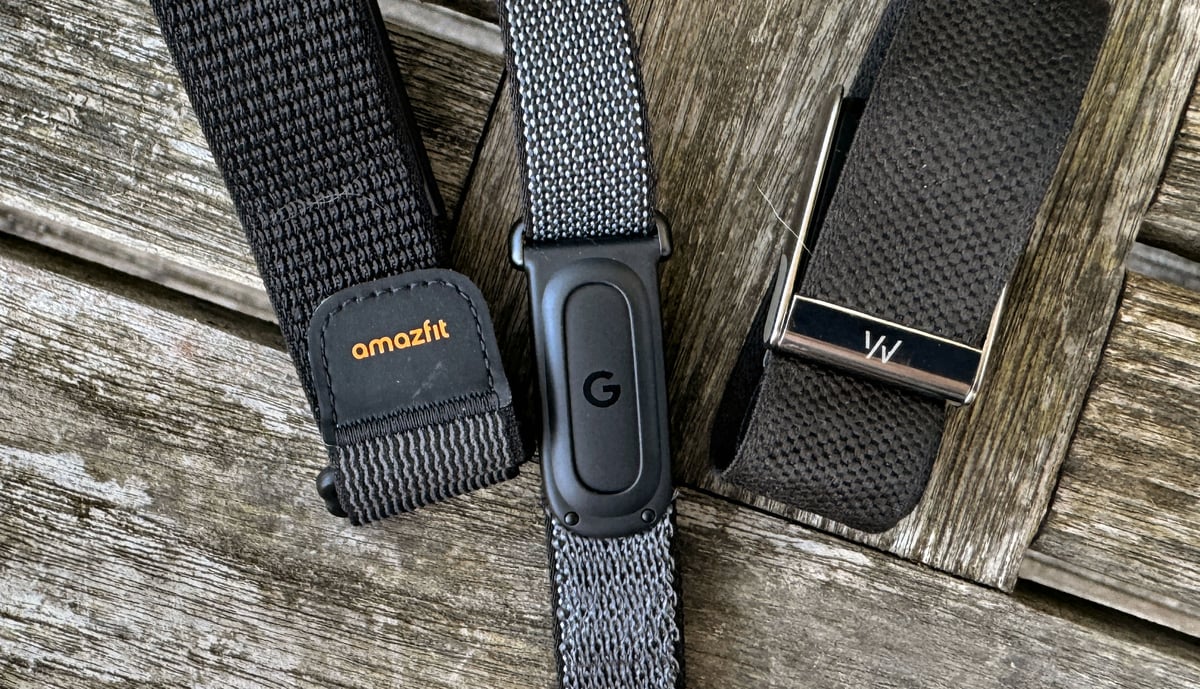
- The default band feels cheap and is narrow, dwarfed on even my thin wrists
- Connected GPS only, so route tracking accuracy and battery both depend on the phone you happen to be carrying
- Single-LED status interface means battery, sync, and firmware states are all communicated through pulse patterns that the wearer has to memorise
- No ECG, no advanced cycling integrations, no external sensor support, no chest strap pairing
- It’s a 5-year-old sensor with a suboptimal array configuration that no amount of modern algorithms can make market-leading.
- HR broadcast is highly limited; it likely won’t support what most people want.
- Must be removed from the wrist to charge, unlike Whoop’s on-wrist battery pack
For Serious Athletes
- Optical heart rate accuracy can drop or lock during intervals, weights, and dynamic cycling, and there is no bicep band at launch to fix it
- Automatic detection does not reliably catch weightlifting or other non-cardio sessions
- Only 5 activity types are auto-detected, low compared to Whoop.
- No structured workout execution, no interval timer, no race-day features, no advanced running or cycling metrics
- Cardio Load and Daily Readiness are inherited from the Pixel Watch platform and remain unproven against Garmin’s training load methodology
- Recovery scoring is simpler than Whoop’s and may not meet athlete-grade scrutiny
Battery Life
- 7-day battery is half of Whoop’s 14-day specification and below the Polar Loop and Amazfit Helio Strap
- For a screenless device whose moat is wear-and-forget convenience, sub-Whoop battery and a charge-off-wrist requirement are the weakest lines on the spec sheet
Software and Connectivity
- The Health Coach, the most-promoted feature, sits behind a paywall after the 3-month trial at $79 per year
- Subscription creep is the predictable Google pattern; expect more features to migrate behind Premium over the next 18 months
- Apple Health sync is one-way at launch: Google Health reads from it but cannot write back
- Bluetooth heart rate broadcasting works to some devices, but not all
- Full cross-platform ingest from Garmin, Apple, and Whoop is promised for later in 2026, but is not present at launch
- Pixel Watch 4 does not pair with iPhone, locking iOS buyers out of the most useful multi-device configuration
- The Health App clearly isn’t finished, with UI quirks and bugs.
- Completed workouts might not show for 10-30 minutes.
- Completed workouts might not export to TCX in full, even after changing the time range.
Data and Privacy
- Sleep stages and Sleep Score are processed in Google’s cloud, so overnight results need an internet connection
- Every biometric reading flows to Google’s cloud and ties to a Google account
- Google has committed not to use Fitbit health data for ads, but the commitment is a policy, not a technical barrier
- Google will use your data to train its AI models unless you specifically opt out
- Long-term product roadmap is unknown, and Fitbit-branded hardware may not survive the next Google strategy pivot
User Review
( votes)Where the Fitbit Air Fits in the Screenless Tracker Market
The screenless tracker category has three established players: Whoop, with its multi-wear-position ecosystem, superb app, and 14-day battery life; Polar Loop, with solid hardware and an OK app; and the Amazfit Helio Strap, the cheapest of the established trio, with decent hardware and app. The Oura Ring 4 occupies an adjacent ring-format category that serves a similar customer purpose. Again, excellent hardware and excellent app. Into that grouping arrives the Fitbit Air – cheaper than all of them, with no subscription required for basic operation. For a full breakdown of the category the Air is entering, see our guide to recovery trackers and lifestyle bands. The Air sits within the wider Google Fitbit and Wear OS ecosystem, which also covers Pixel Watch and the Google Health platform. Full technical specifications are on the Fitbit Air spec page.
Google’s positioning is unambiguous. Rishi Chandra, vice president of Health and Home, noted that the Air targets people who find existing wearables too complicated, too bulky, or too expensive. The intent is a device that a casual buyer can wear without learning anything new. Remember that. The Air is pitched to the parent, the partner, the grandparent, or the wellness-curious buyer who has resisted wearables to date, rather than to the endurance athlete who already owns a Garmin or the latest Apple Watch Ultra 3.
For an existing Pixel Watch owner, the Air doubles as a comfortable sleep-and-workout band that pairs and shares with the same account. For a Whoop owner, it offers an alternative: the same form factor at a lower price, without a recurring fee, but with far fewer features without the Health subs.
Design, Hardware, and the Pebble System
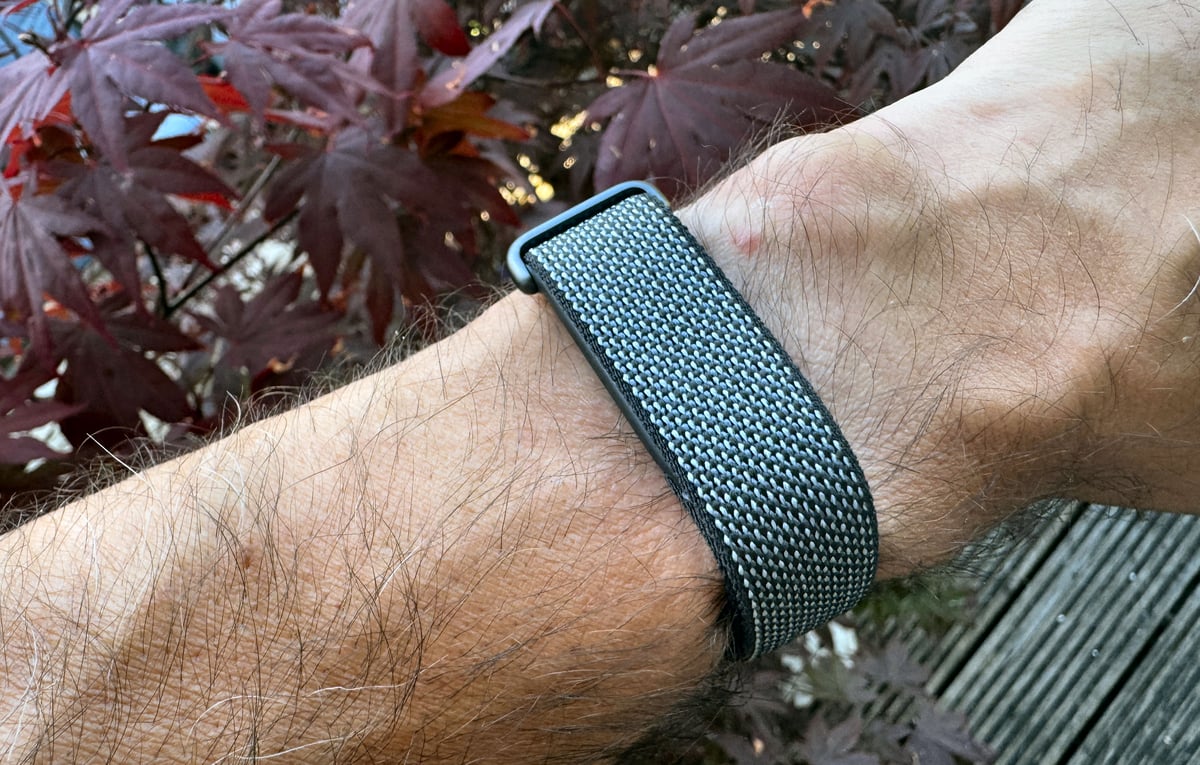
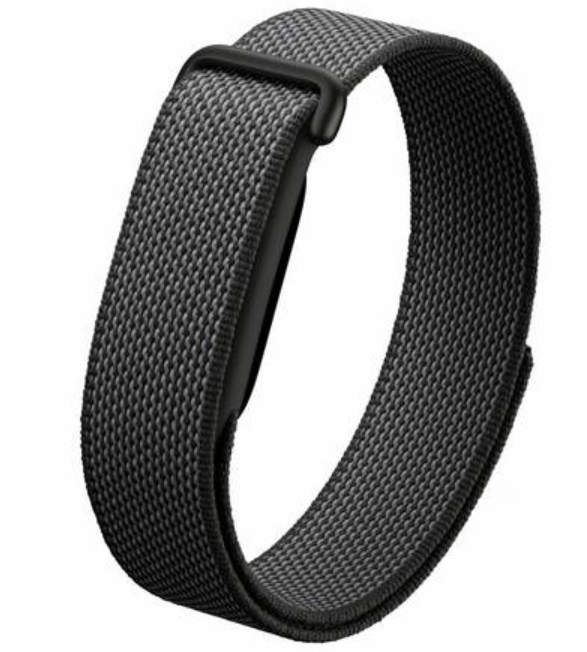
The Fitbit Air separates into two pieces: a pebble (Google’s term) and a band that the pebble snaps into. The pebble is the same across every band variant, so swapping bands changes the look without changing the device.
- Pebble construction: polycarbonate and PBT plastics
- Pebble weight: 5.2g
- Total weight with Performance Loop: 12g
- Size comparison: 25 per cent smaller than the Fitbit Luxe, 50 per cent smaller than the Inspire 3
- Display: none, replaced by a single status LED
- Buttons: none
- Status LED behaviours: pulsing white for charging, flashing red for low battery, fast blinking white for firmware update, solid red for critically low battery
- Battery and pairing check: double-tap the pebble to wake the LED
- Vibration motor: silent alarms, smart wake, low battery alerts
- Band swap: press the device through the band, line up the alignment markings on the new band, snap into place, then double-tap to confirm the LED flashes
At 12 grams, the Fitbit Air sits in the territory where wearers forget they have it on. Whoop figured this out a decade ago. Google has now matched it on weight and beaten it on price. In initial wear, the comfort claim holds: the device disappears on the wrist across both day and overnight use.
Sensors and Health Tracking
The Fitbit Air carries an optical heart rate sensor, a 3-axis accelerometer and gyroscope, red and infrared sensors for blood oxygen monitoring, and a skin temperature sensor. Heart rate is sampled at an unusually low rate of 2-second intervals.
The platform delivers heart rate variability (HRV), resting heart rate, breathing rate, and SpO2 estimation during sleep. HRV is calculated using the RMSSD metric. AFib detection runs in the background and flags irregular rhythms. The manual ECG app available on the Charge 6 and the Pixel Watch is absent here, but for most buyers, that gap doesn’t matter. For anyone managing a known arrhythmia, it is the sole feature that sets the Fitbit Air apart from the Charge 6.
The optical heart rate sensor is a Charge 6-class component, not the higher-specification sensor in the Pixel Watch. The cheaper component choice is deliberate. The Pixel Watch sensor would have pushed the price beyond $99.99 or compromised the seven-day battery in a 5.2g pebble. Google’s placatory nod instead gives you new algorithms derived from the Pixel Watch 4 platform, which Google says deliver slightly better performance than the Charge 6 baseline.
Testing confirms the optical heart rate sensor is reasonably reliable for steady-state cardio, including running and cycling at constant effort. It struggles, as wrist optical sensors do, with high-intensity interval training and weightlifting, where rapid heart rate changes and wrist flexion degrade accuracy. I also encountered a worrying example of cadence lock on the treadmill.
Bluetooth 5.0 LE supports syncing with the Google Health app, but direct heart rate broadcasting is limited to select hardware, such as Peloton and Concept2, and, notably, does not work with a Garmin bike computer.
Heart Rate Accuracy
Heads Up: Near the end of my testing, I spotted something that no one else seemed to notice. During exercise, Fitbit Air consistently records to TCX about once every 5 seconds, not once every 2 seconds as specified. Essentially, 80% of the data is missing. On that basis, how can you call it accurate? It appears to use a gated confidence mechanism to discard data points it has low confidence in, and what’s left is mostly right unless impacted by effects similar to cadence lock. Then, when worn on the bicep, the accuracy (of the 20% of your data points) closely matches a chest strap.
Testing follows the site’s standard HR methodology: i.e. two to four independent reference devices worn simultaneously, across multiple intensity zones, with DCRAnalyzer software used for bias and limits-of-agreement calculations, and visual comparison of overlaid second-by-second data. Comparison devices used across this test series include the Fourth Frontier Zone ECG chest strap (reference), Polar Verity Sense bicep sensor (optical reference), Apple Watch Ultra 3 (wrist optical reference), Whoop MG (direct competitor reference), and Amazfit Helio Strap (direct competitor reference).
The starting point for understanding the Air’s wrist accuracy is its hardware design. The sensor array is not circular, which means it is fighting physics from the outset to achieve good optical readings – it just can’t be class-leading. The band is also narrower than ideal for full light isolation, making ambient light leakage easier, and flipping is also possible, but I have never experienced that. These are sensor-class and design-class problems, not individual defects with my Fitbit Air. The Whoop and Amazfit Helio Strap on the wrist share similar constraints and yield similar results.
Road Cycling, Wrist
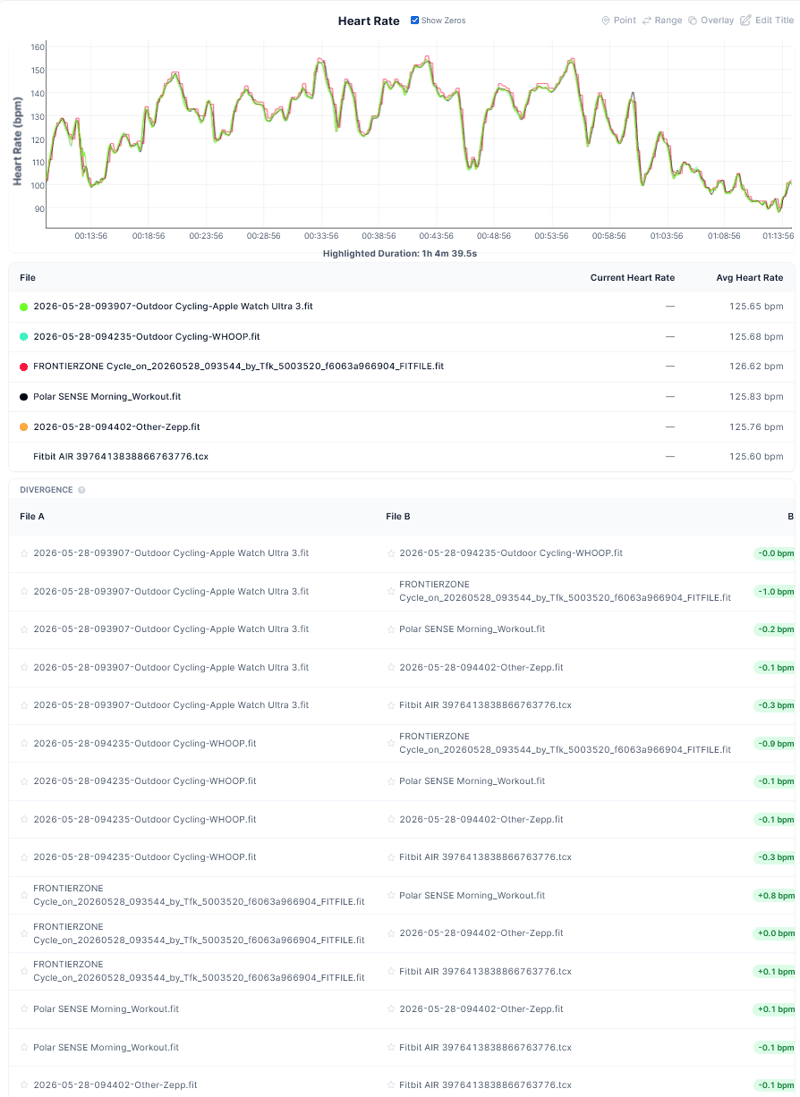
An outdoor road ride at 32 degrees Celsius produced an Excellent result: a bias of -0.3 to +0.1 bpm against multiple references and limits of agreement of ±4 to ±6 bpm. All devices on this ride agreed closely, which is more likely in hot conditions. Vasodilation dilates blood vessels near the skin, making every optical sensor’s job easier. This result flatters the Air; cooler conditions could be less forgiving.
A road bike sprint test on the same day produced a rated Excellent result, with an average of 134.96 bpm, bias -0.8 bpm, and limits of agreement ±6 bpm against a TymeWear VitalPro reference via Wahoo ELEMNT. The Amazfit Cheetah 2 Ultra, in the same test, returned ±3 bpm. The wider LoA for the Air reflects several instances where it missed the peaks, pushing data into a different training zone at threshold intensities.
Indoor Treadmill Intervals, Wrist
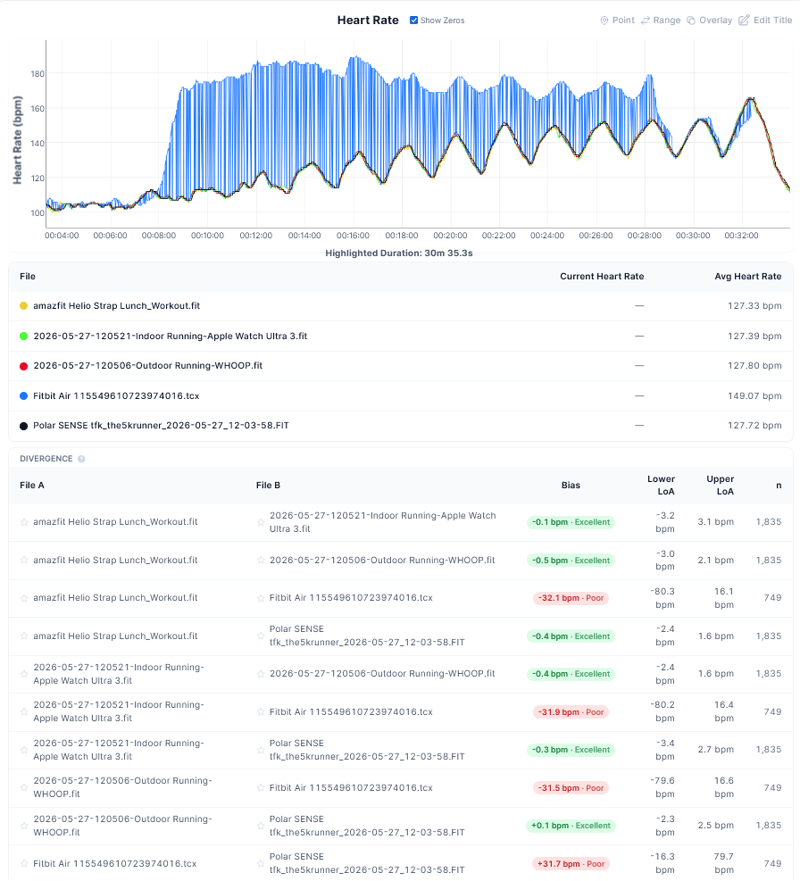
The most serious finding in this test series. The Air produced cadence-locked heart rate on the treadmill, reading approximately 37 bpm above the actual value for sustained periods. All four other devices in the same session (Apple Watch Ultra 3, Amazfit Helio Strap, Whoop MG, and Polar Verity Sense) agreed closely at 131-132 bpm, with a bias under 0.5 bpm. The Air was the sole outlier.
Cadence lock can occur when the optical sensor latches onto the foot-strike rhythm rather than the pulse wave. The Air’s narrow band and non-circular sensor array make it more susceptible than a wider-bodied watch to this and other kinds of motion effects. The behaviour appeared after a firmware update to the live consumer version; whether it is firmware-induced or a consistent treadmill-specific issue remains to be seen. The implication is significant: a 37 bpm overestimate inflates TRIMP, Training Load, and lowers Readiness calculations for that session.
Gym, Wrist
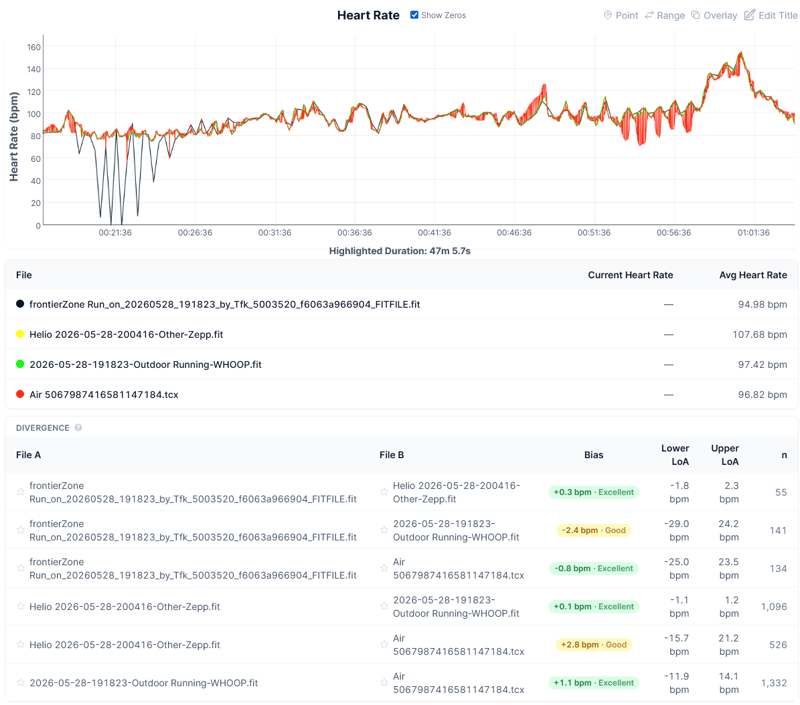
An upper-body and core session covering compound lifts and wall ball produced a statistically Good to Excellent result on bias: -0.8 bpm versus the Fourth Frontier ZONE (Excellent), +1.1 bpm versus Whoop MG (Excellent), and +2.8 bpm versus the Amazfit Helio Strap (Good). Limits of agreement were wide, ranging from ±13 to ±24 bpm, reflecting motion artefacts during dynamic arm movements, including a compressed grip. The chart shows a pattern consistent with optical signal confusion between arm movement and pulse wave. For steady upper-body work, the data is usable; for dynamic movements, it degrades.
Open Water Swim, Wrist Under Wetsuit
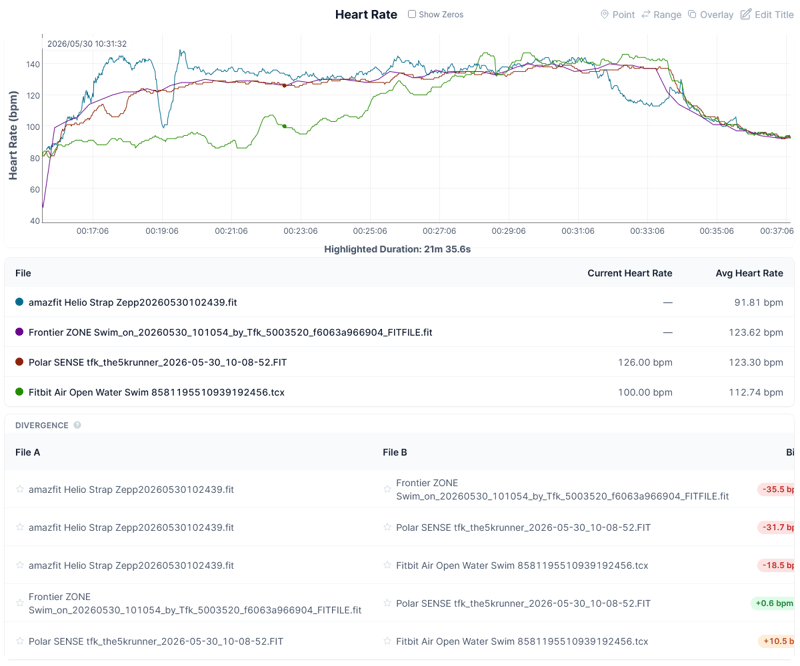
The Air was worn under a wetsuit during open-water swimming to reduce flipping and water ingress, alongside a Polar Verity Sense and an Amazfit Helio Strap on the other arm, and a Fourth Frontier ZONE ECG chest strap. Against the ZONE reference: bias -10.9 bpm, limits of agreement -21.7 to +41.7 bpm. Against Polar Verity Sense: an underestimate of approximately 10.5 bpm. The data was largely unusable for the first 28 minutes, then partially recovered. Poor is the appropriate rating for swim-specific HR accuracy.
A separate app issue made the swim problem worse: manually classifying a workout as Swim in Google Health causes the data to disappear. The workaround is to classify the session as a Run. This is a known bug, and Google is working on a fix.
Running, Bicep (Whoop Sleeve Workaround)
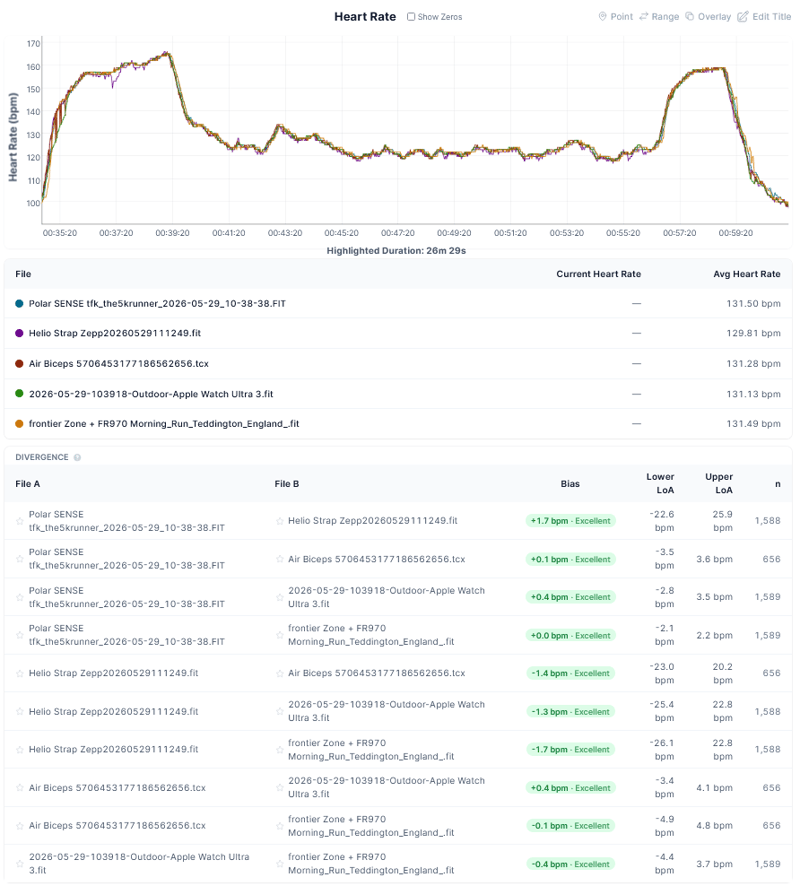
The Air pebble was placed in a Whoop Any-Wear compression sleeve on the upper arm, centralised with rubber shims cut from a washing-up glove to prevent rotation. Full details of the sleeve setup are here. A run including 2 x 4 minutes hard produced the following results against three independent references: bias +0.1 bpm versus Polar Verity Sense (Excellent), +0.4 bpm versus Apple Watch Ultra 3 (Excellent), and -0.1 bpm versus Garmin FR970 chest strap (Excellent). Limits of agreement ±3 to ±5 bpm across all three. Average HR 131.3 bpm.
This is the same level of accuracy as a Polar Verity Sense or a chest strap. The upper arm removes the two structural problems that hurt wrist accuracy: the wider, more stable contact reduces light leakage, and the bicep location is less affected by wrist flexion and arm swing mechanics. No official Fitbit Air bicep band exists yet; third-party options are expected within months.
Long Yoga and Varied Gym Workout
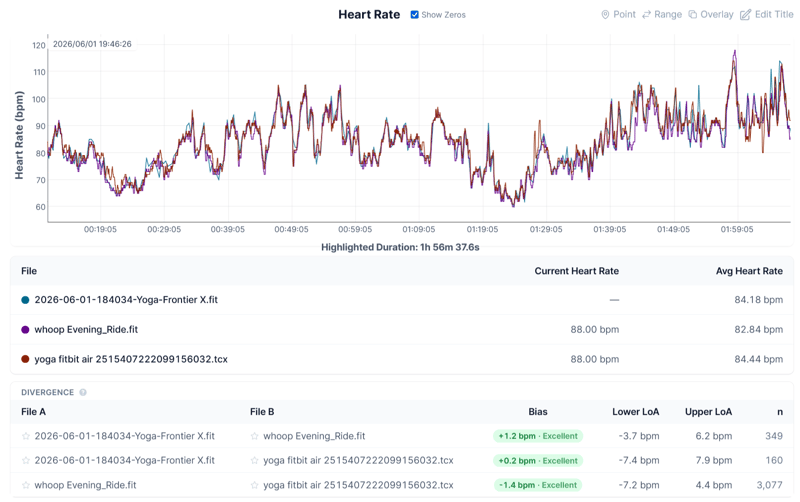
Fitbit Air performed excellently. Avg HR 84.44 bpm. Bias: +0.2 bpm vs Frontier X, -1.4 bpm vs Whoop. All agreements were rated excellent.
This was a hard hour-long yoga session followed by a ski erg and a mixture of moderate core and shoulder work. The air was great. The pebble’s incredible lightness is hard to describe. It is the lightest fitness device I’ve worn, and you simply don’t notice it. It creates a transparent experience in sport.
Long Zone 2-3 Outdoor Ride
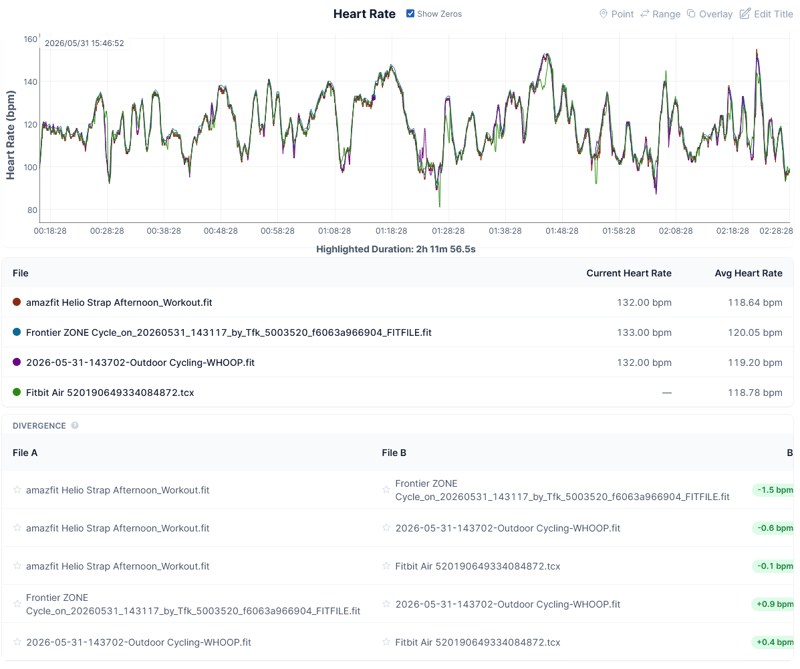
Fitbit Air performed excellently. Bias +0.4 bpm vs WHOOP (n=1,573). Strong agreement with Frontier ZONE reference strap (via WHOOP bias -0.9 bpm, n=393). All excellent.
I was pleasantly surprised by the excellent performance here. Ride position was generally relaxed and non-aggressive, though I probably clung on down the windy 60km/h descent from Ranmore Common. The road surface was below average in terms of bumpiness, and that somewhat violent movement can create problems for an optical sensor. Not so the Air. At least not this time.
Long Zone 2-3 Run over 10 miles
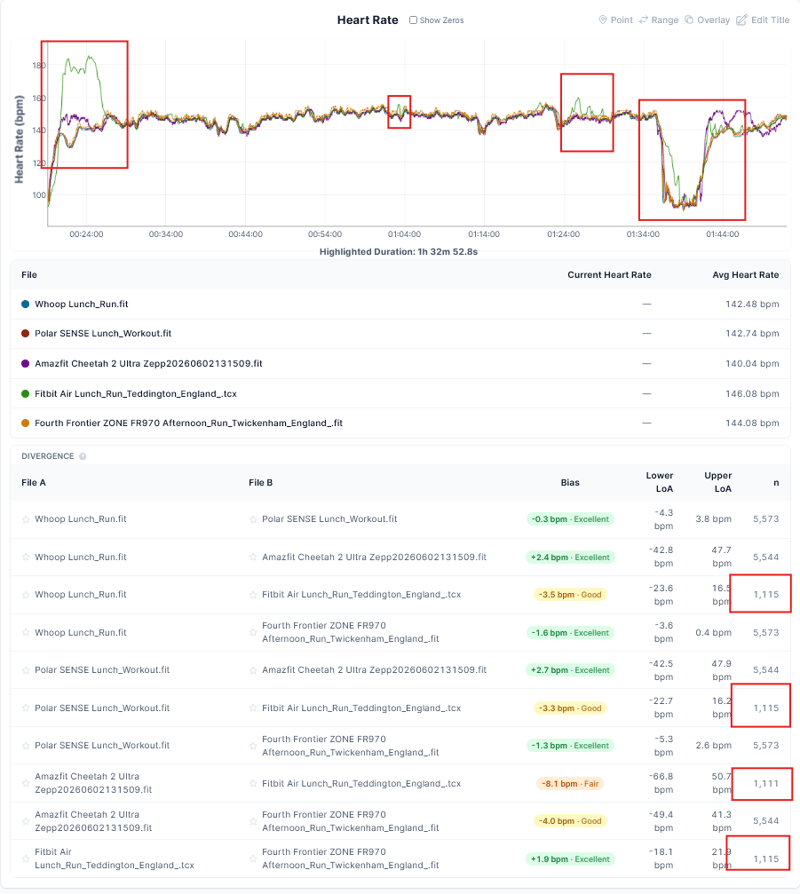
Two noticeable but short-duration errors occurred when accelerating from a stationary position to the cruising speed. Heart rate was notably over-recorded. For the extended periods of constant effort, the Fitbit Air was very close to the reference chest strap.
Detailed Per-Second Comparative Trend Time-Series Charts, plus Overview Table
Highly detailed graphs and statistical comparisons for each session are in the gallery further below. Full test data is available at the individual test posts: road bike sprint, treadmill and gym, bicep sleeve setup, open water swim.
Overview Statistical Performance Results Against Reference and other devices For All Tests
| Activity | Position | Reference | Bias | LoA | Verdict |
|---|---|---|---|---|---|
| Road ride, outdoor (32°C) | Wrist | Multiple, all agreeing | -0.3 to +0.1 bpm | ±4 to ±6 bpm | Good |
| Road bike sprint (32°C) | Wrist | TymeWear VitalPro ECG | -0.8 bpm | ±6 bpm | Good (with missed peaks) |
| Zone 2-3 outdoor ride, Surrey Hills | Wrist | Fourth Frontier ZONE ECG | +0.4 bpm vs Whoop; -0.9 bpm vs Frontier ZONE | -6.7 to +7.6 bpm vs Whoop; -4.8 to +3.0 bpm vs Frontier ZONE | Good |
| 10-mile steady run, Teddington | Wrist | Fourth Frontier ZONE ECG | +1.9 bpm | -18.1 to +21.9 bpm | Excellent (N=1,115 vs 5,573 — confidence-gated) |
| 10-mile steady run, Teddington | Wrist | Whoop MG | -3.5 bpm | -23.6 to +16.5 bpm | Good |
| 10-mile steady run, Teddington | Wrist | Polar Verity Sense | -3.3 bpm | -22.7 to +16.2 bpm | Good |
| Treadmill intervals | Wrist | Polar Verity Sense | +37 bpm (cadence lock) | n/a | Fail |
| Gym, upper body and core | Wrist | Fourth Frontier ZONE ECG | -0.8 bpm | ±24 bpm | Good (motion artefact was poor) |
| Yoga, ski erg, core and shoulder | Wrist | Fourth Frontier ZONE ECG | +0.2 bpm vs Frontier ZONE; -1.4 bpm vs Whoop | -7.4 to +7.9 bpm vs Frontier ZONE; -7.2 to +4.4 bpm vs Whoop | Good |
| Open water swim | Wrist under wetsuit | Fourth Frontier ZONE ECG | -10.9 bpm | -21.7 to +41.7 bpm | Poor |
| Run, 2 x 4 min hard | Bicep (Whoop sleeve) | Polar Verity Sense | +0.1 bpm | ±3 to ±5 bpm | Good |
| Run, 2 x 4 min hard | Bicep (Whoop sleeve) | Apple Watch Ultra 3 | +0.4 bpm | ±3 to ±5 bpm | Good |
| Run, 2 x 4 min hard | Bicep (Whoop sleeve) | Garmin FR970 (chest) | -0.1 bpm | ±3 to ±5 bpm | Good |
Here are 7 detailed performance charts and analyses summarised above.
Activity and Workout Detection
Activity tracking on the Fitbit Air operates in two modes. Common exercises are detected automatically and recorded in the background. Anything else can be started manually from the Google Health app, with live metrics streamed back to the phone during the session.
- Auto-detected activities: running, walking, cycling, rowing, and elliptical
- Manually startable from the app: roughly 40 activity types, including yoga, kickboxing, circuit training, dancing, canoeing, and aerobics
- Retrospective logging: more than 140 activity types, including household chores
- GPS: none on-device. The Fitbit Air uses GPS data from a paired phone to track distance and pace.
- Offline storage: 7 days of detailed data. 1 day offline only.
- Training metrics: Cardio Load and Daily Readiness scores, both inherited from the Pixel Watch platform
- Manual logging via Health Coach: snap a photo of a piece of cardio equipment or a circuit whiteboard to log the session
Connected GPS is the right decision for this device. Anyone who wanted on-device GPS was always going to buy a Charge 6, a Pixel Watch, or a sports watch. The accuracy you experience is determined solely by your phone model.
Testing findings:
- Automatic detection works well for a limited range of cardio activities, including running, walking, cycling, rowing, and elliptical training. It does not reliably detect weightlifting, swimming or other non-cardio sessions, which need to be started manually or logged retrospectively. Step counting appears slightly overcooked.
- The biggest problem is the delay in showing you a completed workout. It’s at least 10 minutes, and sometimes 30 minutes, before you can see your workout. Sometimes you will have to jump through hoops to find, edit and log a workout that was missed, a problem you never have with buttons.
Sleep Tracking and Smart Wake
Sleep is where Fitbit Air is set to make its reputation. The 12-gram total weight and screenless design make it comfortable enough to wear overnight, and the sensors capture sleep stages, duration, sleep schedule, and a Sleep Score. Skin temperature data feeds into the sleep model.
Google claims the new sleep algorithm is 15 per cent more accurate than the previous learning model at capturing interruptions, naps, and stage transitions. The figure comes from Google’s own footnotes and has not been independently validated. In initial use, sleep tracking appears strong, in line with what the Fitbit platform has historically done well. A detailed multi-night comparison will follow.
Two practical points on how sleep tracking works. Sleep stages and Sleep Score are calculated in Google’s cloud rather than on the device, so an internet connection is required to see overnight results. A smaller on-device model handles the Smart Wake alarm. The platform also requires a 7-day calibration period before it delivers fully personalised scores.
Smart Wake is the feature that sets the Fitbit Air apart from Whoop and the Polar Loop in the sleep category. It’s a feature found on Eight Sleep but not widely on wearables. The vibration motor wakes the wearer at the optimal point in the sleep cycle.
For buyers who already own a Pixel Watch, the Air is positioned as the nighttime partner: wear the watch by day, switch to the Air for sleep, and the data flows into the same account. This is the kind of paired hardware that very many people have been asking other brands for.
Battery Life and Charging
Battery life on the Fitbit Air is rated at up to seven days. Initial testing confirms the claim is accurate, possibly slightly conservative, as is often the case with new batteries. The figure is half what Whoop claims and broadly in line with the Polar Loop and the Amazfit Helio Strap. The compensating factor is charging speed: 5 minutes for a decent charge is highly impressive and super practical.
Full battery specifications, including exact charge times and battery type, are on the Fitbit Air spec page. The status LED, pulsing white for charging, flashing red for low, solid red for critical, is the only on-device battery indicator.
One genuine drawback of Whoop is the charging method. The Fitbit Air must be removed from the wrist and placed on its magnetic cable, whereas Whoop charges from an on-wrist battery pack with no tracking downtime. For a device whose appeal is uninterrupted 24/7 data, removing it to charge is a real, if minor, gap in the recovery dataset.
The Google Health App and Health Coach
For a screenless tracker, the app is the product. The Fitbit Air launches alongside a substantial software change: the Fitbit app rebrands as Google Health on 19 May 2026, available on Android and iOS. The Gemini-powered Health Coach, in public preview since October 2025 with around 500,000 participants and over a million pieces of feedback, leaves beta the same week.
The Health Coach takes the data from the Air, plus anything else the customer connects, and turns it into personalised guidance. It can build adaptive fitness plans, suggest recovery windows, analyse sleep disruptions, and answer health questions in conversation. In the United States (with other markets to follow), access to medical records is available.
Test Finding: The app is clearly unfinished (as of June 2026). Much of it looks clean, but some aspects are cluttered and poorly designed. Better than many other competing apps in ease of use, provided you don’t hit one of the many bugs.
In use, the Health Coach is the standout feature. It is context-aware, factoring in weather to prompt hydration reminders on hot days, and personal history, such as recovery from a specific injury. It can generate full adaptive training plans, including marathon plans that adjust daily cardio load targets to fitness level. A photo-logging feature lets the coach read a gym logbook or a whiteboard and update workout details. For users running multiple devices, the app builds a reconciled data stream, prioritising the most accurate source rather than double-counting steps or calories. Its utility for serious, structured training is the open question, and one that the full review will test.
Test Finding: Workout recommendations are more than adequate for fitness improvement, but those targeting specific athletic goals may be disappointed.
Two routes feed third-party data into the platform. Google Health Connect, the existing Android API, handles app-to-app sync on Android phones. The new Google Health API, a renamed and expanded version of the existing Fitbit API, supports cross-platform sync with partners such as Peloton.
A practical caveat: the current build pulls in basic metrics, such as steps and sleep, from devices like Garmin via Health Connect, but does not yet ingest full workout activities. The Apple Health connection is also one-way at launch: Google Health can read data from Apple Health but cannot yet write data back to it. Owners considering the Fitbit Air as a data aggregator for an existing wearable should treat full ingest as planned, not as a current capability.
Strava sync is better than on older Fitbit models. Where previous Fitbits synced only GPS-based outdoor activities, the Air syncs all activity types, including indoor workouts. Don’t worry if you cancel your Premium subscription; the underlying data is retained and can be exported through Google Takeout.
Having used Google’s wearable and app AI tools on and off for the past year, I rate the Health offering as having the most sophisticated AI insights available today. By the end of 2026, the gap between Google Health and the apps from Whoop, Polar, Oura, and Garmin will be wider, not narrower.
Google Health Premium Subscription
Every Fitbit Air ships with a three-month Google Health Premium trial. After the trial, the subscription continues at standard Google Health Premium pricing. Existing Fitbit Premium subscribers keep their lower legacy rate. Subscribers to Google One AI Pro and AI Ultra get Health Premium included. The split between free and paid features is sharper than on most competitors.
- Free with the Fitbit Air: all health metrics including HRV, SpO2, breathing rate, and resting heart rate; full sleep stages and Sleep Score; activity tracking with Cardio Load and Daily Readiness; manual workout logging; smart wake alarms
- Paid with Google Health Premium: Ask Coach 24/7, adaptive weekly fitness plans, detailed sleep insights from the Coach, proactive insights and trends, the workout library, and the mindfulness library.
- Standard pricing: $9.99 per month, or $99 per year billed annually
- Existing Fitbit Premium subscribers: keep the lower $79 per year legacy rate
- Trial: three months included with every Fitbit Air purchase
- Bundled access: included for Google One AI Pro and AI Ultra subscribers
With a free Whoop band, you must have a subscription. On the Fitbit Air, the free tier is meaningful as a core and basic option for low-grade use.
Bands, Colourways, and the Stephen Curry Special Edition
The Fitbit Air launches with three band families and a special edition. The Performance Loop ships in the box: a textile band made from recycled materials with a micro-adjustable stainless steel buckle, available in Obsidian, Fog, Lavender, and Berry. The Active Band is silicone, sweatproof and waterproof, in the same four colours, and costs $34.99 standalone. The Elevated Modern Band is made of polyurethane, features a stainless steel buckle, and is priced at $49.99 in Moonstone, Obsidian, and Porcelain.
The Fitbit Air Special Edition adds a co-designed Stephen Curry Performance Loop in rye brown with game-day orange, priced at $129.99. It carries an additional water-resistant coating and a raised interior print engineered to increase airflow during high-intensity movement.
Testing finding: the Performance Loop, the textile band in the box, is comfortable and flexible but retains moisture and dries slowly. The silicone Active Band is by far the better choice for water and sweat-heavy use.
The omission at launch is a bicep band. Whoop and Amazfit both offer one as an option, and on a screenless tracker, the bicep is a more accurate location for optical heart rate during dynamic exercise. Google knows this. Expect a bicep band within months.
Pairing with Pixel Watch (Multi-Device Use)
Multi-device support is a launch feature, not a future capability. A Pixel Watch and a Fitbit Air can be paired with the same Google Health account simultaneously, and the app automatically handles data from both devices.
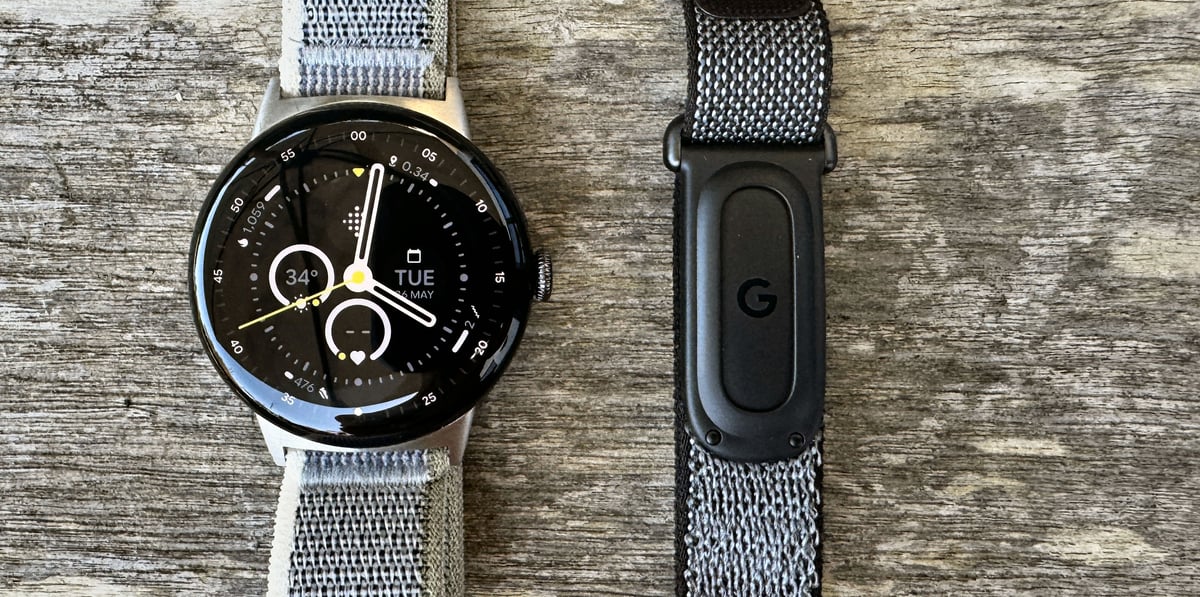
The dual-device pairing requires an Android phone because the Pixel Watch remains Android-only. iPhone owners can use the Fitbit Air on its own with the Google Health app, but cannot pair it with a Pixel Watch.
- Concurrent pairing: Pixel Watch and Fitbit Air on a single account
- Automatic de-duplication: the app picks the best source for overlapping metrics
- Priority setting: the customer can specify which device feeds which metric
- Filtered view: the app can display data by device
- Use case: Pixel Watch by day, Fitbit Air for sleep and workouts, both feeding the same account. Perfect.
- Roadmap: support for additional Fitbit devices is planned shortly after launch
- Cross-platform ambition: Apple Watch, Garmin, Whoop, and Oura support has been promised for later in 2026.
For an existing Pixel Watch 4 owner, this is the most useful addition the Air brings to the launch package. Oura has the most to lose: once Google Health ingests Oura data for free, the ring’s $69.99 annual subscription is harder to justify.
Fitbit Air vs Whoop, Polar Loop, Amazfit Helio Strap, and Oura Ring 4
| Specification | Fitbit Air | Whoop 5.0 | Polar Loop | Amazfit Helio Strap | Oura Ring 4 |
|---|---|---|---|---|---|
| Price | $99.99 | From $199 / year | $199 | $99.99 | From $349 |
| Subscription | Optional ($99 / year) | Mandatory (hardware included) | None | Optional ($69.99 / year) | Mandatory ($69.99 / year) |
| Battery life | 7 days | 14 days | 8 days | 10 days | 8 days |
| On-device GPS | No | No | No | No | No |
| Bicep option | No (at launch) | Yes | No | Yes | Ring (n/a) |
Whoop 5.0 remains the category benchmark for battery life (14 days versus the Air’s 7) and for the breadth of its band and clothing ecosystem, particularly the bicep option. It loses on the pricing model and probably the image too: Whoop is subscription-only, with no outright purchase option, whereas the Air sells for $99.99 with the band included and a free tier that genuinely works.
The Polar Loop is hardware-competent, but the app remains a fraction of what Whoop or Amazfit offer, with a dated interface which the company has told this site will be updated in 2026. The Fitbit Air’s Google Health app is materially more sophisticated, particularly in its AI coaching.
The Amazfit Helio Strap matches the Air in price point and battery claims, but has a far less mature AI coaching layer. The Fitbit Air’s advantage lies in the Google Health platform and how it works with the Pixel Watch.
The Oura Ring 4 sits in the adjacent ring-format category, costs more, requires a subscription, and lacks vibration feedback. For sleep tracking, it is category-leading; for workout tracking, the Air’s wrist form factor is more flexible but can only be “truly” accurate on the biceps.
WHOOP subscribers are locked into 12- and 24-month contracts, and the first WHOOP 5.0 renewal window is now open, as it was released in May 2025. Whoop’s depth on biomarkers, ECG, and the bicep ecosystem remains category-leading. The Fitbit Air gives buyers who don’t use the full value of the subscription an alternative for the first time.
Who Should Buy the Fitbit Air (and Who Should Skip)
The Fitbit Air is a deliberate, narrowly aimed product. Matching the device to the buyer matters more here than with most launches.
Buy the Fitbit Air if:
- You want passive 24/7 tracking without a screen on the wrist
- You already own a Pixel Watch 4 and want a more comfortable sleep and workout companion
- You are upgrading from an old faceless strap or older, worn out Fitbit.
- You resist subscription-only models like Whoop
- You value Smart Wake vibration as a sleep feature
- You are a first-time wearable buyer looking for the cheapest credible screenless tracker
Skip the Fitbit Air if:
- You need a manual ECG on demand
- You train phone-free and need an integrated GPS
- You are committed to the Garmin or Apple ecosystem with no plans to switch platforms
- You specifically want a bicep band at launch
- You want to be able to broadcast HR (limited compatibility)
- You need cross-platform data ingest from Garmin or Apple today rather than later in 2026
Take Out
On the surface, this appears to be the most credible Whoop alternative yet, at $99.99, sitting in the wellness category alongside the Polar Loop and the Amazfit Helio Strap, below Garmin’s competent training tier. Credible, but with reservations: the app, the band size, the proprietary HR broadcast, and HR accuracy that is not yet comprehensive. For serious athletes, it is a Whoop tickler, not a Whoop killer. For the budget-conscious end of the market, the job it is built to do, it does more than well enough.
The Fitbit Air is a well-judged, deliberately minimal entry into the screenless category. The hardware does its job. The 7-day battery is honest, the comfort is real, and heart rate is good enough for most users, though not yet a match for Whoop wrist-to-wrist. The real killer product is the Google Health app and the Health Coach, more developed than anything Polar, Amazfit, or Oura have shipped. Whoop too, to some degree. The Google hardware now exists to feed the company’s Health ecosystem. Parts of the app still lack polish, but the AI side is market-leading, as you would expect from Gemini.
The cross-platform Google Health vision, in which the Air becomes one input among many, alongside Garmin, Apple, and Whoop devices, is the long game. At launch, the capability is not quite there. Apple Health sync is one-way, and full workout ingest from rival wearables is still to come. If you buy a Fitbit Air today, hoping your Garmin workouts will flow seamlessly into the same account tomorrow, then hold fire. That is not there yet.
For the typical reader here, I’m not sure quite where it fits alongside your other training devices and ecosystems. The Air does not add 24/7 wellness data and AI coaching to your mix. It expects your other devices to mix with it.
Counterpoint: Why are we getting excited about a 25-year-old activity-tracker format?
The verdict so far: the most credible Whoop alternative on the market, credible on price rather than capability. A wellness device, not a training device. For casual and entry-level buyers it is a genuine Whoop killer. Serious athletes will still want Whoop’s strain and recovery depth, or a Garmin. Bought with the right expectations, it is the easiest screenless tracker to recommend at $99.99. Full accuracy tests across a range of sports to follow.

Quick answers
Does the Fitbit Air require a subscription?
No. The base hardware works fully without a subscription, and the free tier covers all health metrics, sleep stages, activity tracking, Cardio Load, Daily Readiness, and smart wake alarms. The Google Health Premium subscription unlocks the Health Coach features, adaptive fitness plans, and the workout and mindfulness libraries. Three months of Premium are included with every Fitbit Air.
Is the Fitbit Air worth it?
Yes. At $99, it represents great value for anyone wanting their first 24/7 activity tracker. In fact, you should really ask why it is so cheap, and the reason for that is that Google wants your data to train its AI Health models. Factor that into the price you are really paying.
Does the Fitbit Air have GPS?
The Fitbit Air has no internal GPS. It uses the connected-GPS from a paired phone to track distance and pace during outdoor workouts. Customers who train phone-free should look at the Charge 6, which has on-device GPS, or step up to a sports watch from Garmin, Apple, or Coros.
Is the Fitbit Air waterproof?
The Fitbit Air is water resistant to 50 metres (5 ATM). It can be worn in the shower, in the pool, and in the sea. Google’s documentation notes that the water-resistant coating on certain bands and components diminishes over time with normal wear and exposure, and is not guaranteed for the lifetime of the device.
How long does the Fitbit Air battery last?
Up to seven days on a single charge. Initial testing confirms the claim is accurate and possibly slightly conservative. A five-minute fast charge delivers a full day of use. A complete charge from empty to 100 per cent takes 60 to 90 minutes. Whoop quotes 14 days for comparison.
Can I wear the Fitbit Air on my bicep?
Not at launch. Google has not released a bicep band, and the in-box Performance Loop is a wrist band only. Bicep wear is a popular configuration for Whoop and Amazfit. Google will add more band options later in the year, and the simple pop-in pebble design is well-suited to cheap third-party bands.
Can I use the Fitbit Air with my Garmin or Apple Watch data?
Eventually, yes. Google has stated that the Google Health platform will accept data from third-party wearables, including Apple Watch, Garmin, Whoop, and Oura. At launch, ingest is limited. The Google Health app pulls in basic metrics like steps and sleep from Garmin via Health Connect, but does not yet ingest full workout activities. The Apple Health connection is one-way: the app reads from it but cannot write back. Treat full cross-platform ingest as planned for later in 2026.
What happens to my existing Fitbit app and Premium subscription?
The Fitbit app rebrands as Google Health on 19 May 2026 on both Android and iOS. Existing Fitbit Premium subscriptions transition to Google Health Premium and keep their lower legacy rate of $79 per year. New subscribers pay $9.99 per month or $99 per year. Reinstall is unnecessary if the Fitbit app is already installed.
Can I use Google Health on a PC or Mac?
Google Health is a mobile-first app, available on Android and iOS only. There is no dedicated desktop or web version. Some account management is possible through Google’s standard account settings in a browser, but viewing your data, using the Google Health Coach, and managing your Fitbit Air require the phone app.
Will my Fitbit data transfer when the Google Health app rolls out?
Yes. The transition from 19 to 26 May 2026 is handled as an in-place app update rather than a fresh install. Existing Fitbit and Pixel Watch data, devices, and settings transfer automatically. Some third-party connections, including Strava and Withings, require a one-off reauthorisation after the update. Fitbit accounts not migrated to a Google account by 15 July 2026 will be deleted.
Does the Fitbit Air work without a phone?
The Fitbit Air requires an initial pairing with a phone running the Google Health app on Android 11 or iOS 16.4 or later. Day-to-day, the device collects and stores data on the wrist and syncs with a phone when it’s in range. Connected features such as GPS, live workout metrics, the Health Coach, and cloud-calculated sleep scores require the phone and an internet connection.
Does the Fitbit Air detect workouts automatically?
Yes, for cardio. The Fitbit Air automatically detects common activities, including running, walking, cycling, rowing, and elliptical. In testing, it does not reliably detect weightlifting or other non-cardio sessions, which need to be started manually or logged retrospectively. Manual workouts start in the Google Health app and cover roughly 40 activity types; more than 140 can be added retrospectively.
Can I get phone notifications on the Fitbit Air?
The Fitbit Air can vibrate for alarms, smart wake, and low battery alerts. There is no display to show notification content, and the vibration motor does not relay calls or texts. Buyers who want a notification preview should consider the Charge 6 or the Pixel Watch.
Can I take an ECG with the Fitbit Air?
The Fitbit Air does not include a manual ECG app. It monitors heart rhythm in the background and issues notifications for irregular rhythms that may indicate atrial fibrillation. For on-demand ECG readings, the Fitbit Charge 6 or the Pixel Watch is the right device.
Can I export Fitbit Air data to Strava?
Yes, and the sync is better than on older Fitbit models. The Air syncs all activity types to Strava, including indoor workouts, where previous Fitbits synced only GPS-based outdoor activities. The connection runs through the Google Health API, the renamed and expanded version of the Fitbit API.
What is the difference between the Fitbit Air and the Fitbit Charge 6?
The Fitbit Air is screenless, smaller, and lighter, with no on-device GPS, manual ECG, or notification display. The Charge 6 retains a screen, on-device GPS, and the manual ECG app. The Air is the better all-day and overnight comfort device. The Charge 6 is the better workout-from-anywhere device.
What is in the box?
The Fitbit Air pebble, the Performance Loop band in the chosen colour, and the magnetic charging cable. Additional bands (Active, Elevated Modern, Stephen Curry Special Edition) are sold separately, starting at $34.99.
Does the Fitbit Air work with an iPhone?
Yes. iOS 16.4 or higher is required. The Google Health app is available on both Android and iOS, and the Health Coach functions identically on both platforms. A Google account is required for setup regardless of phone choice.
Last Updated on 14 September 2026 by the5krunner
My favourite kit and nutrition
- Garmin Fenix 9 Pro — I’ve just bought one.
- Injinji – Runners protect your toes. Avoid discomfort and minor injury. Run more. Run faster. I use them.
- Garmin 90-degree charging adapter — A small keyring adapter you can use anywhere. Essential when away. I use one.
- Garmin charging puck — the fastest and most reliable way to top up your Garmin before a session. I use one.
- Ravemen FR300 — Front light that mounts directly under your Garmin or Wahoo head unit. Keeps your bars clean and your beam pointed where it matters. I use one.
- Body Glide – The blue anti-chafe stick that all swimmers and many runners use. I use it.
- Maurten — The race nutrition trusted by elite athletes. Gels and drink mixes engineered to be easy on the stomach. I use them.
- Garmin Varia RTL515 — A radar rear light that alerts you to vehicles approaching from behind. Pairs with your Edge or Wahoo. I use this model.
- Favero Assioma Pro RS2 — The power-meter pedals most serious cyclists choose. Accurate, easy to move between bikes. I use this model.
- Garmin Forerunner 970 — A serious choice for a pro-grade triathlon watch. I use this.
- Polar H10 — My daily driver for accurate, waking HRV readings.
- Wahoo ELEMNT Roam 3 — The bike computer that has the feature Garmin lacks: usability. I use mine on most rides.
Reader-Powered Content

This content is not sponsored. It’s mostly me behind the labour of love, which is this site, and I appreciate everyone who supports it.
Support the site: Follow (free, fewer ads) · Subscribe (paid, ad-free) · Buy Me A Coffee ❤️
All articles are written by real people, fact-checked, and verified for originality. See the Editorial Policy. FTC: Affiliate Disclosure — some links pay commission. As an Amazon Associate, I earn from qualifying purchases.

tfk is the founder and author of the5krunner, an independent endurance sports technology publication. With 20 years of hands-on testing of GPS watches and wearables, and competing in triathlons at an international age-group level, tfk provides in-depth expert analysis of fitness technology for serious athletes and endurance sport competitors. ID

Article does not mention the Hume band as an alternative which does not have a subscription model.
“Multi-device support is a launch feature, not a future capability. A Pixel Watch and a Fitbit Air can be paired with the same Google Health account simultaneously, and the app automatically handles data from both devices.”
This is android only or iOS as well? Because right now Fitbit devices work with iOS but not the Pixel watch, so they will let the pixel watch connect to iOS?
AFAIK Pixel Watch reamins android only
you can get pixel data to android (historically, recently) if pixel syncs to android first then the app syncs itself to ios
“ It’s a feature found on Eight Sleep but not on wearables.”
I had a 39 euro xiami smart band for some time that had the smart wake feature.
ty good spot
Why do you think Garmin handles cardio load better? I think from what I read the new Fitbit/Google Health algorithm uses a weekly focus and tracks cardioload across your entire day, not just during workouts. For example I haven’t been able to run much lately but I’ve been doing a lot of walking about 15 to 20k steps I am guessing google will capture that right?
the cardio load from walking is trivial, almost to the point of irrelevance for people who would otherwise train a lot
walking can form a useful addition even to elite athletes but the amount of walking has to be considerable to realise the extra benefits. (maybe your 20k steps is 10+ miles, so i’m talking at that level or higher idk the exact number but it’s hours of walking per day)
cardio load needs an accurate input for the chance of an accurate output.
Fitbit uses TRIMP (TRIMP exp?) and Garmin uses EPOC for TL – https://the5krunner.com/garmin-features/training/training-load/
Fitbit uses the Karvonen formula and 220-Age for zone determination. 220-age is wrong. Zones feed TRIMP.
well garmin also have smart wake feature i guess their smaller fit watches are as much as a band as xiaomi band and others 🙂