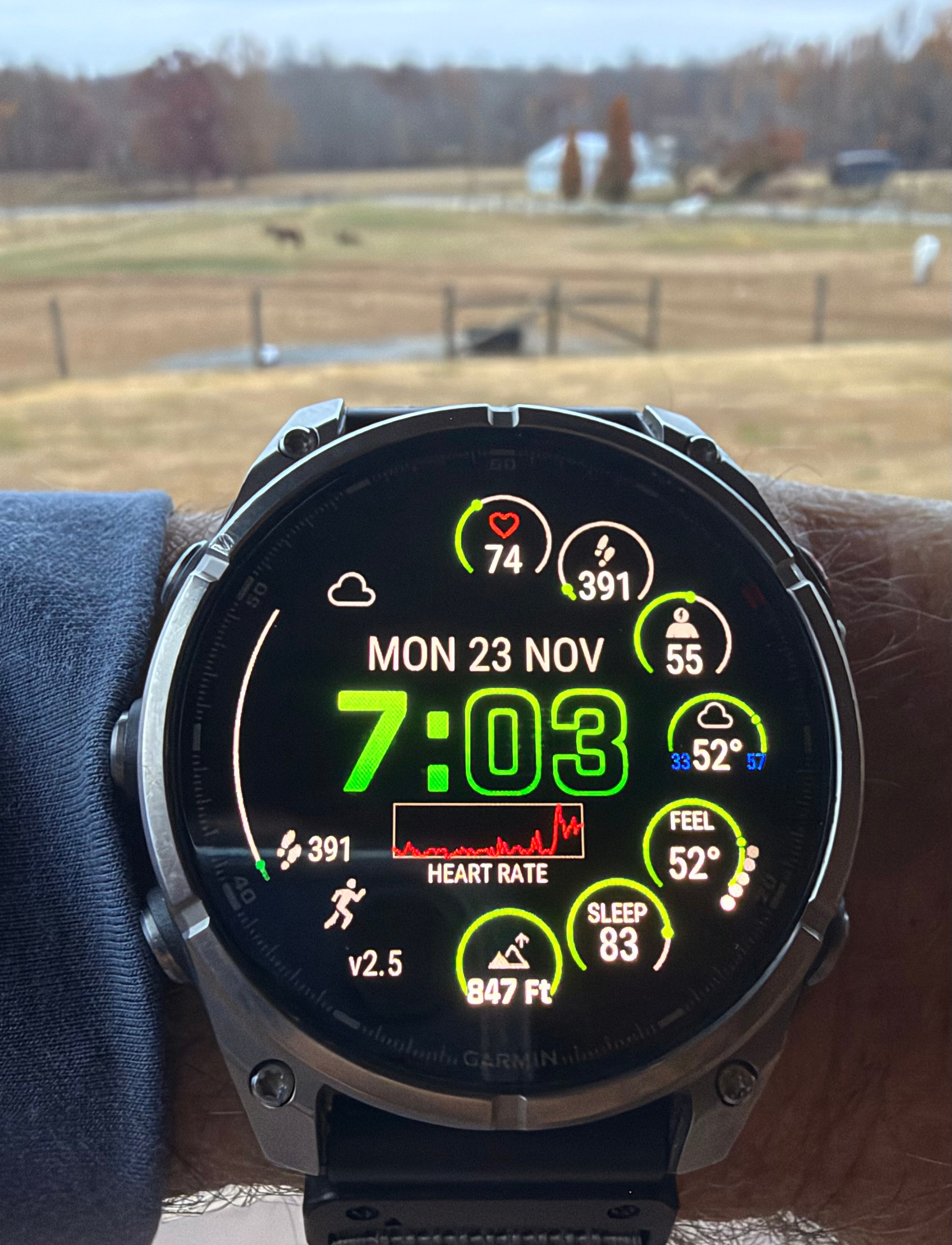
At a trail junction, a quick glance might be enough to check the time, weather or elevation. Between errands, it might be steps or heart rate. The useful readings change through the day, and when there are a few extra seconds, a hold on the screen can bring up more detail without crowding the dial.
Nomadic Max is a Garmin watch face built around maximum choice, maximum customisation and as little need for the phone as possible after setup. Its developer, Erik Gilbert of Nomadic Designs, is a pilot and a Garmin user of more than 20 years, and he borrowed from cockpit instruments: keep what matters in view and the extra detail within reach. Version 2.5 is the current release.
From a quick glance to more detail
TL;DR: Nomadic Max has four layouts with two, three, five or seven gauges, 13 colour themes and a hidden Metrics Page of charts and gauges. On a touchscreen watch, holding parts of the clock changes the theme, the layout or the page.
A wearer might stick with steps and heart rate on a busy day, then switch to a fuller dial at a trail stop to check the weather and the time of sunset. The extra detail can go away just as quickly.
New in version 2.5, on a supported touchscreen with the watch awake:
- Hold the hour digits on the horizontal clock to cycle through colour themes.
- Hold the minute digits to cycle through layouts, when Layout Touch Cycle is switched on. The two- and three-gauge layouts can also use a stacked clock, where a hold in the centre cycles layouts. The five- and seven-gauge layouts use the horizontal clock.
- Hold the small runner icon near the lower left to open the Metrics Page, with either clock style, when Show Personal Metrics Shortcut is switched on. Holding the clock or the return area goes back.
A morning on the Metrics Page
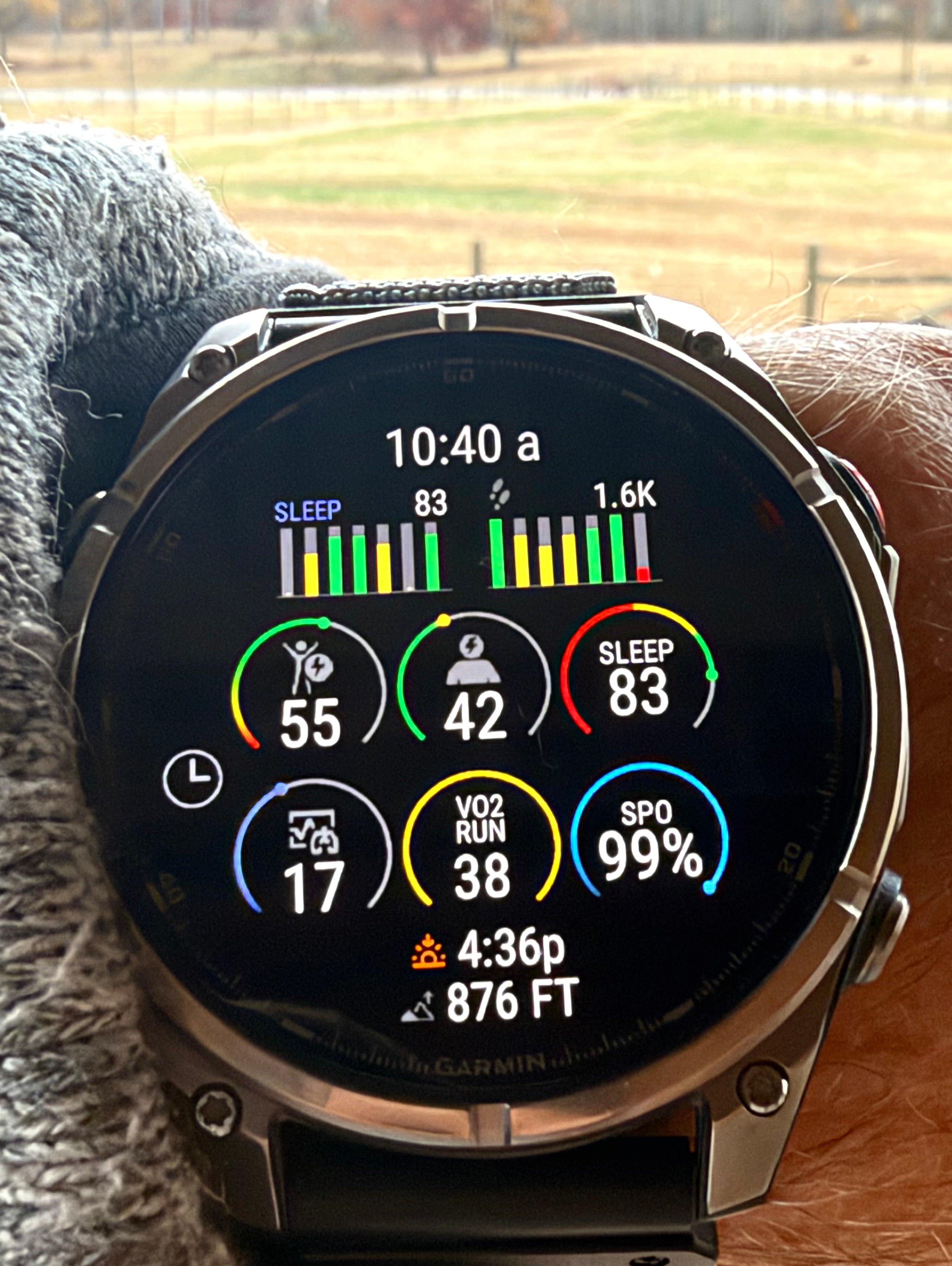
The wrist photo, taken at 10:40 a.m., shows a Sleep Score of 83, 1,600 steps so far that day and a running VO2 max of 38. The step bars show today alongside the previous six days, which puts the current count in context without taking space on the everyday dial.
The page has six configurable gauges, two chart or information panels and two optional readings at the bottom. A wearer could swap the sleep chart for Garmin’s current Training Status, keep the steps chart beside it, and go back to a two-gauge dial. Which readings are available depends on the watch and the data it has.
What to set up on the phone
The face is installed through the Garmin Connect IQ app, which is also where the licence key goes and where each reading is placed. That might mean putting Body Battery on the dial, choosing a heart rate graph, or matching the gauge arcs to one of the 13 named colour themes. Garmin Weather is the default, and MET Norway is an option that falls back to Garmin Weather when it is unavailable.
The Touch and gestures settings can switch off layout cycling or hide the Weather and Metrics shortcuts. There is no separate switch for the hour-hold theme cycle in version 2.5, but the layout and theme can still be set in Connect IQ. A separate setting can bring the Metrics Page back after the watch wakes.
Watch support and always-on display
Nomadic Max supports AMOLED watches, including:
- fenix, epix and quatix: epix (Gen 2) and epix Pro (Gen 2), fenix E, the fenix 8 and 9 families including Pro AMOLED, the fenix 8 Pro 51mm MicroLED, and quatix 7 Sapphire, 7 Pro, 8 AMOLED and 8 Pro.
- Forerunner: select Forerunner 965, 165, 265, 570 and 970 models.
- Others: Venu 3, 3S and 4, vivoactive 5 and 6, and Instinct 3 AMOLED and Instinct Crossover AMOLED.
MIP and Solar models are not supported, and button-only watches do not get the hold shortcuts. The Connect IQ listing has the full list.
Always-on shows the dial rather than the Metrics Page, in one of four modes. Min shows the time and a.m. or p.m., the two-gauge mode keeps two readings visible, Plus adds readouts, and Max shows more of the main dial. In Min mode, Optimize Battery Performance can skip some data refreshes without changing how the dial looks. There is no controlled battery comparison for Nomadic Max yet.
What could work better
Feedback from people who wear a face every day is the best guide to improving it, especially with as many combinations as Nomadic Max has. Gilbert is weighing a few ideas that are not in version 2.5: whether arcs that show a reading sometimes look like progress towards a goal, whether fading both ends would make that clearer, and whether wearers would like to choose which themes appear when holding the hours. The monthly Connect IQ charts track the most popular faces in the store.
More information: the Nomadic Max feature guide.
Author: Erik Gilbert, Nomadic Designs, edited by the5krunner.
Quick answers
Does Nomadic Max work on a Garmin with buttons only?
Yes, on supported AMOLED models, but the hold shortcuts for themes, layouts and the Metrics Page need a touchscreen. Layout and theme can always be set in the Connect IQ app instead. MIP and Solar models are not supported.
How many layouts and colour themes are there?
Four layouts, with two, three, five or seven gauges, and 13 named colour themes. The gauge arcs follow the time colour, and the two- and three-gauge layouts can use a stacked or horizontal clock.
What does Nomadic Max do to battery life?
There is no controlled battery comparison yet. Always-on has four modes, from Min, which shows only the time, to Max, and in Min mode an Optimize Battery Performance setting skips some data refreshes without changing how the dial looks.
If you enjoyed reading this, here is another in the Indie Spotlight series: Indie App Spotlight: DianDian picks one daily habit from your routine.
Next in the series: Indie App Spotlight: Buena Vida sets your calories from tomorrow’s run.
Last Updated on 24 November 2026 by tfk the5krunner
2026 Seasonal Gifts
- Garmin CIRQA: Garmin’s screenless band, which uses your phone as the display. I tested it and sometimes use it as a backup on the site.
- HoloSwim 3 Pro: Swim goggles with GPS and your pace in the lens, so you can swim without a watch. Code THE5KRUNNER takes 10% off. I tested them.
- Kineon MOVE+: Red and infrared light for sore knees, Achilles and other joints after hard training. I use it.
- Fitbit Air: A screenless band for steps, sleep and heart rate, with no subscription needed. It was closest to a manual 9,000-step test. I use it as a backup sometimes.
Small things I always use
- Garmin 90-degree charging adapter: Charges your Garmin with any USB-C cable. Essential when travelling. I use one.
- Body Glide: The blue anti-chafing stick swimmers and runners carry. I use it.
- Speedo earplugs: Fewer ear infections and no cold-water dizziness. I use them.
- Dryrobe Advance: My winter changing robe for open-water swims. I use one. A cheaper option is the AONYIYI changing robe.
- Maurten: Race fuel that stays easy on the stomach. I use them.
- Beet It Sport nitrate shots: Beetroot shots I take in the days before a race. I use them.
- Garmin charging puck: The quickest way to top up before a session. I use one.
- Injinji: Toe socks that stop rubbing, so you run more. I use them.
- Ultimate toe protectors: Stop black toenails on long runs. They work. I use them.
- Compressport R2 v2 calf sleeves: My calf sleeves of choice. I use them.
- Cellucor C4: My pre-workout before hard sessions.
- TPU tubes: Schwalbe Aerothan, Tubolito and Pirelli SmarTube. Light, tiny spares. I use all three.
- G8 insoles: Adjustable arches, perfect position. I use them.
- Cycplus Cube: A 97g electric pump that gets a road tyre rideable in two minutes. I carry one. 5% off with code THE5KRUNNER.
Health, recovery and sleep
- FreeStyle Libre 3 Plus: Shows how my blood sugar responds to diet. Occasional use.
- hDrop: Measures my sweat loss in summer and indoors. I use it.
- Fourth Frontier Zone: Checks my heart under load in hard sessions.
- Oura Ring 5: My partner’s recovery tracker of choice.
- Eight Sleep: A cooling mattress cover my partner and I use nightly (see next).
- Chilipad 2.0: Cools or heats your side of the bed on a schedule, with no subscription. US only. I am testing it; it seems pretty good.
Watches and sensors
- Polar H10: My daily driver for waking HRV.
- Polar Verity Sense: My backup arm-worn HR sensor.
- Nomad bedside charger: Charges my iPhone and Apple Watch overnight. I use it, and many of their bands.
- Train.Red: The best muscle oxygen sensor I’ve used. Occasional use.
- Tymewear: Accurate heart rate and reliable ventilatory zones. I use it to pace endurance rides over an hour.
- Garmin Forerunner 970: A pro-grade triathlon watch. I use this.
- Apple Watch Ultra 4: My daily smartwatch. No phone needed on rides.
On the bike
- Continental GP5000 for everyday riding, and Aero 111 on the front for special occasions. I use both.
- Helmets: Specialized S-Works Evade 3 for road riding, and Rudy Project Wing for TT-style races. I use both.
- Ravemen FR300: A front light that mounts under your Garmin or Wahoo. I use one.
- Ravemen FR1000: The light and the computer mount in one unit, so nothing else goes on the bars. Better than mine.
- Ravemen FR1500SE: 1,500 lumens hanging under your Garmin, for proper night rides.
- Ravemen FR1100SE: 1,100 lumens under your Garmin, and up to 46 hours on slow flash.
- Ravemen FR500: A brighter FR300 with the same mount.
- Wahoo TRACKR Radar: I use it on one bike and Varia on the other. They perform the same.
- Garmin Varia RTL515: Radar that warns you of cars from behind. I use this model.
- Wahoo ELEMNT Roam 3: The bike computer that’s easy to use. I use mine on most rides.
- Favero Assioma Pro RS2: Accurate power pedals that swap easily between bikes. I use this model.
Home and indoor training
- NPE Runn: Makes my basic treadmill smart, sending more accurate speed and distance to my watch and Zwift. I use it.
- Google Wifi: Keeps Zwift connected in my pain cave. I use it.
- Apple TV 4K (4th generation): Zwift on the big screen. I use two.
- Google Nest Doorbell (wired, 2nd gen): My video doorbell, running in both Google Home and Apple Home via Starling. I use it.
Reader-Powered Content

This content is not sponsored. It’s mostly me behind the labour of love, which is this site, and I appreciate everyone who supports it.
Support the site: Follow (free, fewer ads) · Subscribe (paid, ad-free) · Buy Me A Coffee
Written by real people, with AI assistance. Fact-checked and verified for originality. See the Editorial Policy. FTC: Affiliate Disclosure — some links pay commission. As an Amazon Associate, I earn from qualifying purchases.
tfk is the founder and author of the5krunner, an independent endurance sports technology publication. With 20 years of hands-on testing of GPS watches and wearables, and competing in triathlons at an international age-group level, tfk provides in-depth expert analysis of fitness technology for serious athletes and endurance sport competitors. See the gear tfk uses. ID
