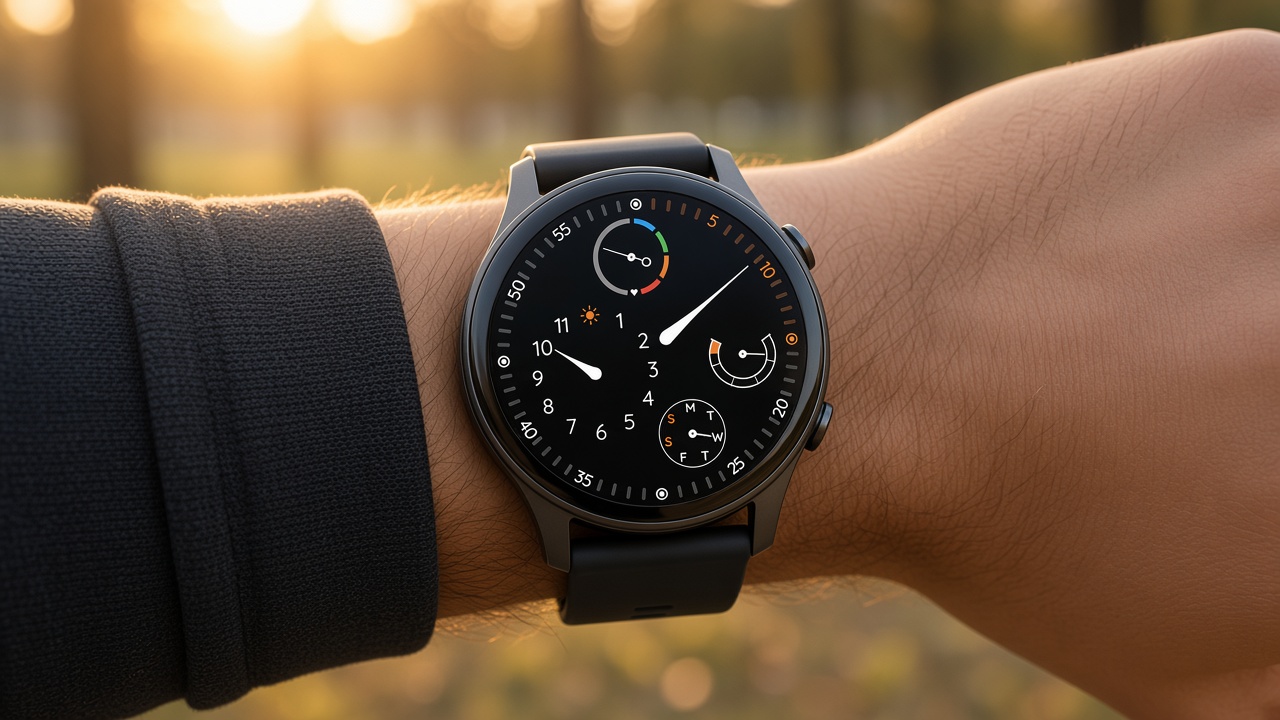
Most analogue faces on a Garmin look exactly the same at 7 a.m. as they do at 7 p.m. They have two hands, twelve indices and perhaps a step count tucked into a corner. Every glance shows the same picture and very little of the wearer’s day: no sense of how hard the heart is working, how much battery is left for the long run on Sunday, or how close the step goal is.
Orbital Analog, an indie Connect IQ watch face from James of Pebbleblack, takes a different route. Instead of fixing the hour, the data and the decoration in place, it puts them in orbit. The hour sits on its own disc, the data dials ride alongside the minute hand, and the whole layout turns once an hour. Its tagline is “Never looks the same twice”, and that is meant literally, because no two minutes of the hour put the dial in the same place.
It works on round AMOLED Garmin watches, from the Forerunner 165 up to the fenix 8 and MARQ, and the current release is version 1.0.3.
How Orbital Analog works
TL;DR: The minute hand steps round once a minute, like a normal analogue minute hand without a second hand. Everything else is locked to it: an hour disc carrying its own hour hand, plus three small dials for heart rate, battery and day of the week. As the minute hand goes round, the whole group goes with it, so the face rearranges itself all hour without anything covering anything else. The minute track around the edge doubles as a step-goal gauge.
The hour is read from the hour disc, which is a small clock dial in its own right. It has upright numerals 1 to 11 and a sun or moon icon in the 12 position: an orange sun for a.m. and a cream moon for p.m. The disc carries a full-size hour hand that points at the current hour on the disc’s own numerals, exactly as on a normal watch. The disc keeps travelling, with its centre always 196.8 degrees round from the minute hand, so it stays roughly opposite the hand and goes full circle every 60 minutes.
The three data dials sit at fixed angles from the minute hand: the battery dial 42.6 degrees ahead, the weekday dial 102.6 degrees ahead and the heart rate dial 59.6 degrees behind. The spacing follows the golden ratio. On a 454-pixel screen such as the Forerunner 965, the hour disc sits 86.7 pixels from the centre (0.382 of the radius) and the three dials 140.3 pixels out (0.618 of the radius), and the same proportions scale to every screen size.
That fixed relationship is why it stays readable. The minute hand can never pass over a dial, because the dials move with it, and the hour hand, at about 71 pixels long, stays inside its own disc and clear of the data. The dial artwork also stays upright as it travels, so the weekday letters and battery gauge never turn upside down. Around the edge, the minute numerals and markers start out cream and turn warm orange as the day’s steps add up.
Worked example: quarter past and quarter to
Picture a runner checking the watch at 7:15 a.m. before heading out, and again at 7:45 a.m. at the end of a 30-minute run. The angles below are clock positions measured clockwise from 12, taken from the face’s source code.
| Element | Offset from minute hand | At 7:15 (quarter past) | At 7:45 (quarter to) |
|---|---|---|---|
| Minute hand | 0° | 90°: 3 o’clock | 270°: 9 o’clock |
| Hour disc (centre) | +196.8° | 286.8°: between 9 and 10 o’clock (about the 48-minute mark) | 106.8°: between 3 and 4 o’clock (about the 18-minute mark) |
| Heart rate dial | -59.6° | 30.4°: 1 o’clock (by the 5-minute numeral) | 210.4°: 7 o’clock (by the 35-minute numeral) |
| Battery dial | +42.6° | 132.6°: about 4:25 (the 22-minute mark) | 312.6°: about 10:25 (the 52-minute mark) |
| Weekday dial | +102.6° | 192.6°: just past 6 (the 32-minute mark) | 12.6°: just past 12 (the 2-minute mark) |
In half an hour, the whole layout has turned exactly 180 degrees. At 7:15, the hour disc is on the left with its hour hand just past 7. At 7:45, it is on the right, with the hand three-quarters of the way from 7 to 8, and the sun icon on the disc confirms it is still morning.
Steps. The minute track has 60 positions, and the face lights them in proportion to the daily step goal: positions equal steps multiplied by 60 and divided by the goal, rounded down. At 6,000 of a 10,000-step goal, that is 36 positions. The 12 o’clock marker is held back until the goal is actually reached, so 35 positions turn orange, from the first tick after 12 round to the 35-minute numeral. That is a little under 60% of the way round, which matches 60% of the goal at a glance. At 10,000 steps, the full circle and the 12 o’clock marker are orange.
Battery. Orbital Analog has not been through a lab test against a stock Garmin face, so there is no exact daily figure to quote. The code shows a face built to behave like an ordinary static AMOLED face. Nothing on the dial changes more than once a minute, there is no second hand, animation, timer or partial-second redraw, and the static artwork is cached and only rebuilt when the minute, battery level, weekday or step count changes. Real-world drain should stay close to a standard static face, but it will depend on the watch model, screen brightness, how often the wrist is raised and whether Always-On is switched on.
Every dial explained
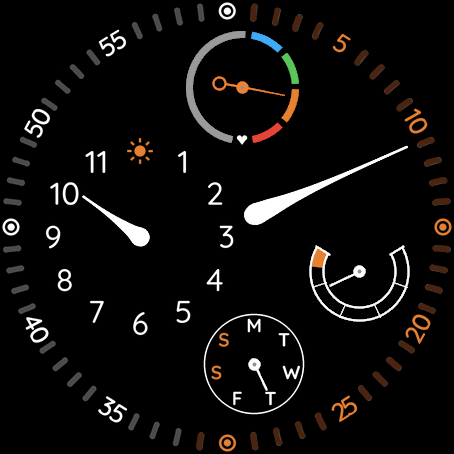
Orbital Analog has no settings menu and no colour themes. Everything below is automatic and comes from data the watch already has.
- Hour disc: upright numerals 1 to 11, a full-size hour hand, and a sun (a.m., orange) or moon (p.m., cream) at the top of the disc.
- Minute hand and minute track: a long, tapered white hand that moves on once a minute, cream numerals at 5, 10, 20, 25, 35, 40, 50 and 55 that follow the curve of the edge, ring markers at 12, 3, 6 and 9, and grey tick bars in between.
- Step tracking: the numerals and markers of the minute track turn warm orange, and the tick bars a dimmer orange, as the day’s steps build towards the goal. The 12 o’clock marker turns orange only when the goal is met.
- Heart rate dial: five flat-ended bars in Garmin zone colours (zone 1 grey, zone 2 blue, zone 3 green, zone 4 orange and zone 5 red), each sized to that zone’s bpm range, with a small heart at the bottom. The zones come from the wearer’s own Garmin heart rate zones, or from age-based maximum heart rate if none are set. The slim pointer is cream at rest and takes on the colour of the current zone, and a grey dash replaces it when there is no recent reading.
- Battery dial: a horseshoe gauge open at the top, running from empty at the upper left, round the bottom, to full at the upper right, in five segments. The first 10% is marked in orange, and the hand turns orange at 10% or below.
- Weekday dial: the letters M T W T F S S in a circle with a stick hand. Saturday and Sunday are in orange, and the hand turns orange at weekends.
The heart rate value comes from the live sensor during an activity, and otherwise from the most recent valid reading in the watch’s heart rate history. The last reading is held for up to 15 minutes before the dash appears.
Orbital Analog and Orbital Analog Lite
There are two versions. The full Orbital Analog costs $3.99 as a one-time purchase, and Orbital Analog Lite is free and keeps the orbit itself.
| Feature | Orbital Analog ($3.99) | Orbital Analog Lite (free) |
|---|---|---|
| Orbiting hour disc with hour hand | Yes | Yes |
| Sun (a.m.) and moon (p.m.) icons | Yes | Yes |
| Minute hand and minute track | Yes | Yes |
| Heart rate dial in zone colours | Yes | No (a small hollow grey ring in its place) |
| Battery dial | Yes | No (a small hollow grey ring in its place) |
| Weekday dial | Yes | No (a small hollow grey ring in its place) |
| Step tracking on the minute track | Yes | No |
| Always-On mode | Yes | Yes |
| Curved date in Always-On | Yes | No |
| Low-battery Always-On (10% or below) | Yes | No |
| Settings or colour themes | None | None |
| Permissions requested | Sensor history and user profile, for heart rate and zones | None |
| Version | 1.0.3 | 1.0.3 |
Lite reads no sensors at all, which makes it an easy way to see whether the orbiting layout suits before paying for the data dials.
Always-On mode
With Always-On enabled, Orbital Analog keeps its character instead of collapsing to two plain lines. The hour disc, its hour hand, the sun or moon, the minute hand and the 12, 3 and 9 markers stay on screen, and the date curves along the bottom edge in cream capitals, such as “23 NOV”. The three data dials are left out to keep the lit area small.
To protect AMOLED screens from burn-in, the whole image shifts by three pixels each minute, and a fine stripe pattern rotates so that no pixel stays lit for more than two minutes in a row. At 10% battery or below, the full version switches to an even leaner Always-On face with thin hands, the hour disc’s ticks, the sun or moon and four edge dots, and no date.
Supported Garmin watches
Both versions support the same 51 Connect IQ device entries, all round AMOLED screens from 360 to 466 pixels across. Several entries cover more than one model, such as the fenix 8 47mm entry, which also covers the 51mm, tactix 8 and quatix 8.
- Forerunner: 70, 165 and 165 Music, 170 and 170 Music, 265 and 265s, 570 (42mm and 47mm), 965 and 970.
- fenix and epix: fenix 8 (43mm, 47mm and 51mm), fenix 8 Pro and MicroLED, fenix 9 and fenix 9 Pro (43mm, 47mm and 51mm), fenix E, epix (Gen 2) and epix Pro (Gen 2) in all three sizes.
- Venu and vivoactive: Venu 2, 2 Plus and 2S, Venu 3 and 3S, Venu 4 (41mm and 45mm), and vivoactive 5 and 6.
- Instinct: Instinct 3 AMOLED (45mm and 50mm) and Instinct Crossover AMOLED.
- Others: Approach S50, S70 and S72, D2 Air X10, D2 Mach 1, 2 and 2 Pro, Descent G2 and Mk3, MARQ (Gen 2) and MARQ (Gen 3), and the matching tactix and quatix models.
Memory-in-pixel and square-screen models are not supported. The full list is on the Connect IQ Store page, and the most popular faces in the store are tracked every month in the Connect IQ charts.
More information: Orbital Analog at Pebbleblack and a video of a full day on the face.
Author: James, developer at Pebbleblack, edited by the5krunner.
Quick answers
Is the moving dial readable at a glance mid-run?
Yes, because the parts never move relative to each other. The heart rate dial is always just behind the minute hand and the battery just ahead of it, so after a day or two the eye goes straight to the right spot. The pointer colour carries the key information, so a blue, green, orange or red flash shows the zone without reading a number. During a recorded activity, Garmin shows the activity’s own data screens, so the face is mostly seen before and after a run.
What does Orbital Analog do to battery life?
There is no lab-measured daily figure, so Pebbleblack does not quote one. The hands move once a minute, there is no second hand or animation, the static artwork is cached, and heart rate comes from data the watch already collects. In Always-On, a stripe pattern keeps a third of the lit pixels dark at any moment, so real-world drain should stay close to a standard static AMOLED face.
Can it be tried before buying?
There is no trial of the paid version, but Orbital Analog Lite is free and has the same orbiting hour disc, hands and Always-On mode. The full version adds the heart rate, battery and weekday dials, step tracking and the Always-On date for $3.99.
If you enjoyed reading this, here is another in the Indie Spotlight series: Indie App Spotlight: LCD 1985 turns a Garmin into a 1985 digital watch.
Next in the series: Indie App Spotlight: PEDAL QUEST puts Mount Fuji on your smart trainer.
Last Updated on 24 November 2026 by tfk the5krunner
2026 Seasonal Gifts
- Garmin CIRQA: Garmin’s screenless band, which uses your phone as the display. I tested it and sometimes use it as a backup on the site.
- HoloSwim 3 Pro: Swim goggles with GPS and your pace in the lens, so you can swim without a watch. Code THE5KRUNNER takes 10% off. I tested them.
- Kineon MOVE+: Red and infrared light for sore knees, Achilles and other joints after hard training. I use it.
- Fitbit Air: A screenless band for steps, sleep and heart rate, with no subscription needed. It was closest to a manual 9,000-step test. I use it as a backup sometimes.
Small things I always use
- Garmin 90-degree charging adapter: Charges your Garmin with any USB-C cable. Essential when travelling. I use one.
- Body Glide: The blue anti-chafing stick swimmers and runners carry. I use it.
- Speedo earplugs: Fewer ear infections and no cold-water dizziness. I use them.
- Dryrobe Advance: My winter changing robe for open-water swims. I use one. A cheaper option is the AONYIYI changing robe.
- Maurten: Race fuel that stays easy on the stomach. I use them.
- Beet It Sport nitrate shots: Beetroot shots I take in the days before a race. I use them.
- Garmin charging puck: The quickest way to top up before a session. I use one.
- Injinji: Toe socks that stop rubbing, so you run more. I use them.
- Ultimate toe protectors: Stop black toenails on long runs. They work. I use them.
- Compressport R2 v2 calf sleeves: My calf sleeves of choice. I use them.
- Cellucor C4: My pre-workout before hard sessions.
- TPU tubes: Schwalbe Aerothan, Tubolito and Pirelli SmarTube. Light, tiny spares. I use all three.
- G8 insoles: Adjustable arches, perfect position. I use them.
- Cycplus Cube: A 97g electric pump that gets a road tyre rideable in two minutes. I carry one. 5% off with code THE5KRUNNER.
Health, recovery and sleep
- FreeStyle Libre 3 Plus: Shows how my blood sugar responds to diet. Occasional use.
- hDrop: Measures my sweat loss in summer and indoors. I use it.
- Fourth Frontier Zone: Checks my heart under load in hard sessions.
- Oura Ring 5: My partner’s recovery tracker of choice.
- Eight Sleep: A cooling mattress cover my partner and I use nightly (see next).
- Chilipad 2.0: Cools or heats your side of the bed on a schedule, with no subscription. US only. I am testing it; it seems pretty good.
Watches and sensors
- Polar H10: My daily driver for waking HRV.
- Polar Verity Sense: My backup arm-worn HR sensor.
- Nomad bedside charger: Charges my iPhone and Apple Watch overnight. I use it, and many of their bands.
- Train.Red: The best muscle oxygen sensor I’ve used. Occasional use.
- Tymewear: Accurate heart rate and reliable ventilatory zones. I use it to pace endurance rides over an hour.
- Garmin Forerunner 970: A pro-grade triathlon watch. I use this.
- Apple Watch Ultra 4: My daily smartwatch. No phone needed on rides.
On the bike
- Continental GP5000 for everyday riding, and Aero 111 on the front for special occasions. I use both.
- Helmets: Specialized S-Works Evade 3 for road riding, and Rudy Project Wing for TT-style races. I use both.
- Ravemen FR300: A front light that mounts under your Garmin or Wahoo. I use one.
- Ravemen FR1000: The light and the computer mount in one unit, so nothing else goes on the bars. Better than mine.
- Ravemen FR1500SE: 1,500 lumens hanging under your Garmin, for proper night rides.
- Ravemen FR1100SE: 1,100 lumens under your Garmin, and up to 46 hours on slow flash.
- Ravemen FR500: A brighter FR300 with the same mount.
- Wahoo TRACKR Radar: I use it on one bike and Varia on the other. They perform the same.
- Garmin Varia RTL515: Radar that warns you of cars from behind. I use this model.
- Wahoo ELEMNT Roam 3: The bike computer that’s easy to use. I use mine on most rides.
- Favero Assioma Pro RS2: Accurate power pedals that swap easily between bikes. I use this model.
Home and indoor training
- NPE Runn: Makes my basic treadmill smart, sending more accurate speed and distance to my watch and Zwift. I use it.
- Google Wifi: Keeps Zwift connected in my pain cave. I use it.
- Apple TV 4K (4th generation): Zwift on the big screen. I use two.
- Google Nest Doorbell (wired, 2nd gen): My video doorbell, running in both Google Home and Apple Home via Starling. I use it.
Reader-Powered Content

This content is not sponsored. It’s mostly me behind the labour of love, which is this site, and I appreciate everyone who supports it.
Support the site: Follow (free, fewer ads) · Subscribe (paid, ad-free) · Buy Me A Coffee
Written by real people, with AI assistance. Fact-checked and verified for originality. See the Editorial Policy. FTC: Affiliate Disclosure — some links pay commission. As an Amazon Associate, I earn from qualifying purchases.
tfk is the founder and author of the5krunner, an independent endurance sports technology publication. With 20 years of hands-on testing of GPS watches and wearables, and competing in triathlons at an international age-group level, tfk provides in-depth expert analysis of fitness technology for serious athletes and endurance sport competitors. See the gear tfk uses. ID
