A HM effort with my new Garmin HRM-600 Replacement
I had a long, hard run with my replacement Garmin HRM-600 at the weekend. Garmin kindly sent me a replacement for the one I bought six months ago, so it was time to try it out in anger.
The HRM performed exactly as a HRM should. Previously, I had issues with extended incorrect values for the first 10-20 minutes of many workouts—annoying and plain wrong. It took Garmin a while to accept that there was a fault, eventually changing the device under warranty as it was just under 6 months old.
The Issues
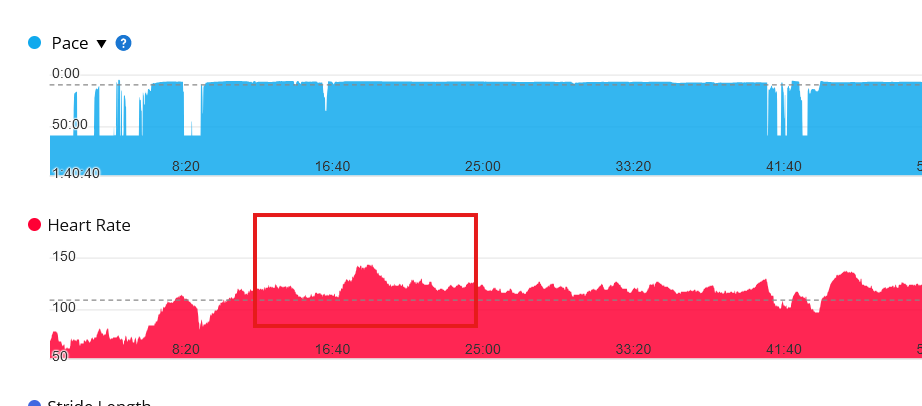
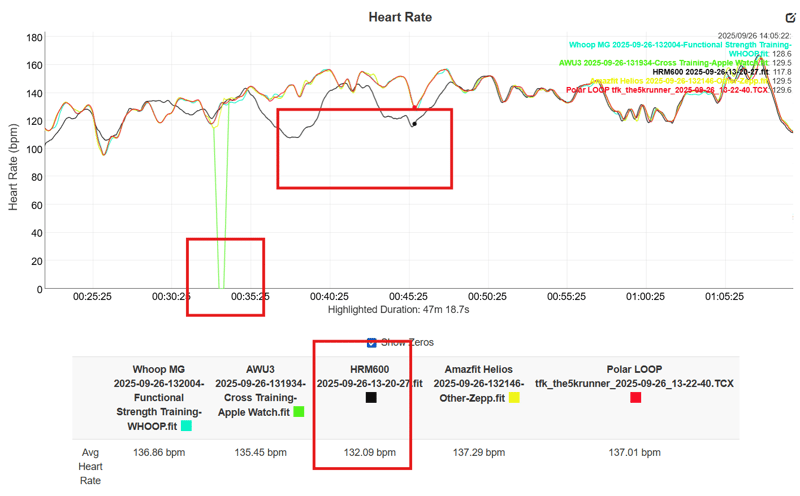
The HRM-600 was great when new, with the kinds of readings you’d expect. However, as the weeks passed, there were increasingly more errors of three kinds—the sort you wouldn’t necessarily notice unless you were comparing to other devices at the same time (something I do regularly, but the average person never does).
- Extended periods of over-recording near the start of a run
- Less frequent periods of short over-recording (below)
- Rare periods of under-reporting (below)
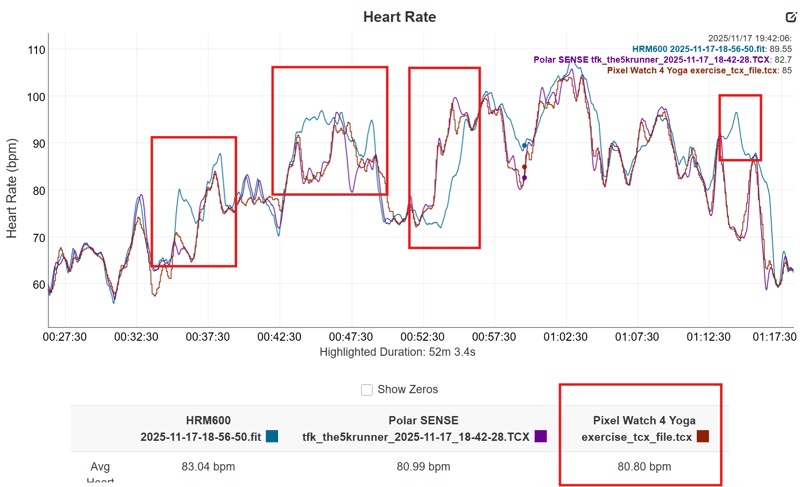
I had also noticed in my review that the RMSSD readings compared to Polar H10 and Wahoo TRACKR appeared understated, or more correctly:
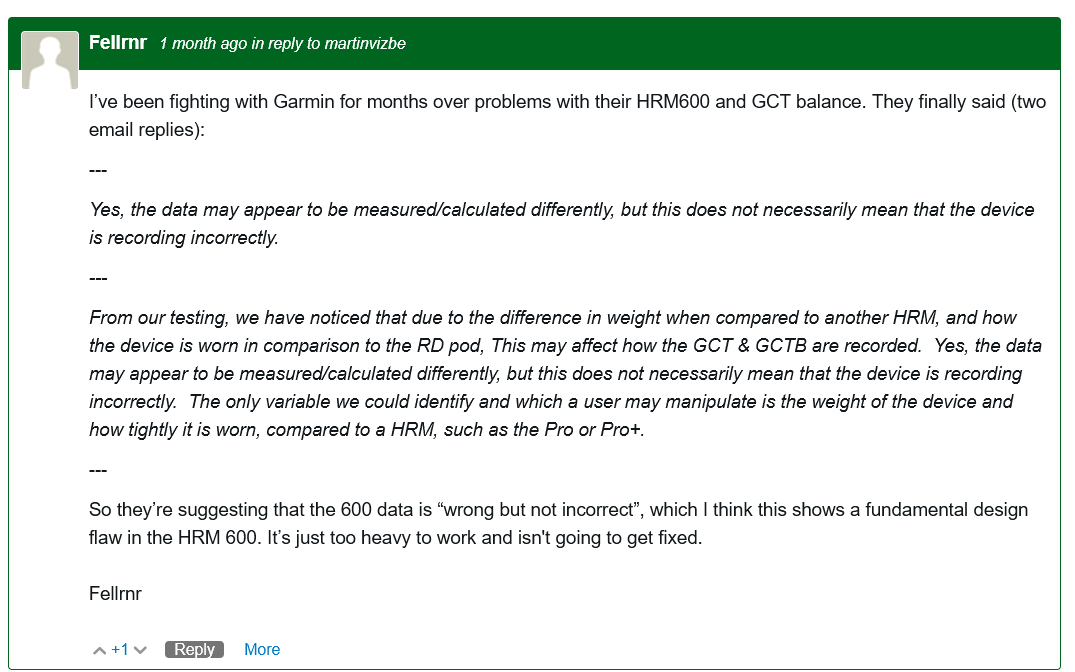
The final straw that prompted me to resolve my outstanding support issue with Garmin was a conversation with @fellrnr (a well-known and reliable technical product reviewer), who experienced GCT balance issues. I won’t publish our private conversation, but here are his comments on the Garmin forums.
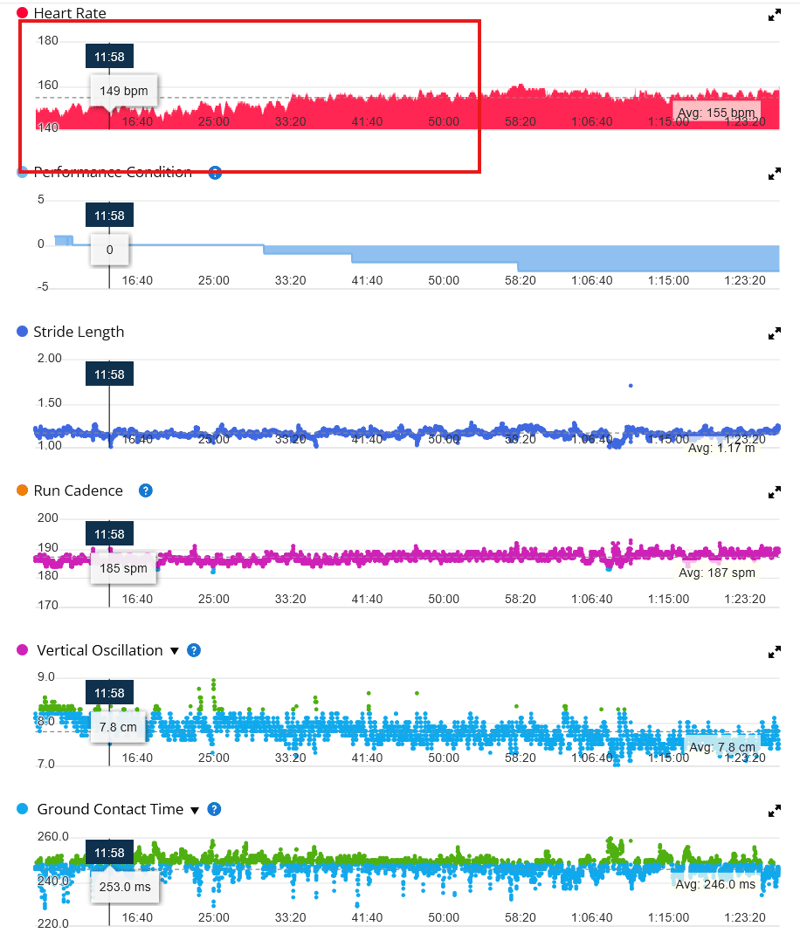
Finally, here is an excerpt from my HM effort over the weekend, where you see it performed excellently (no comparators).
Should you buy the HRM-600?
I’m not sure. I’m not recommending it in my review, so I’ll stick with that call.
One thing I noticed had changed with the replacement was that the pod unclips from the strap much more easily than before. My original one was ridiculously tight, to the point that I inevitably bent the strap when removing the pod.
Remember, the HRM-600 is a caching pod that allows retrieval from watch-free sessions recorded on it. I specifically wanted to download the original file from the pod via cable, which required removing the pod frequently. I perhaps did that 50 or so times before noticing the pattern of errors, and my working theory is that the strap was damaged internally due to the force required to remove the pod (not a user error).
What do you think?
Last Updated on 31 January 2026 by the5krunner
Reader-Powered Content

This content is not sponsored. It’s mostly me behind the labour of love, which is this site, and I appreciate everyone who supports it.
Support the site: Follow (free, fewer ads) · Subscribe (paid, ad-free) · Buy Me A Coffee ❤️
All articles are written by real people, fact-checked, and verified for originality. See the Editorial Policy. FTC: Affiliate Disclosure — some links pay commission. As an Amazon Associate, I earn from qualifying purchases.

tfk is the founder and author of the5krunner, an independent endurance sports technology publication. With 20 years of hands-on testing of GPS watches and wearables, and competing in triathlons at an international age-group level, tfk provides in-depth expert analysis of fitness technology for serious athletes and endurance sport competitors.

I purchased the HRM600 along with the 970 on May 24, 2025. I’ve been training for a marathon every day, washing the strap and HRM600 separately. I’ve removed and reassembled them hundreds of times, and I’ve had no issues so far.
The reliability of left-right balance measurements ultimately varies depending on how people wear them and their running posture.
I ruptured a disc between the L4 and L5 vertebrae three years ago, causing muscle paralysis in the back of my left leg (from the hip to the toe-up).
I’ve recovered a lot, but I still experience muscle loss during toe-up and kicking movements when running. Both the HRM PRO and HRM600 display consistent and accurate left-right balance (the left leg, which is slower to react, has a longer ground contact time). I’ve been following fellrnr’s blog for a long time, but he has a very narrow perspective (still thinking the 910XT is more accurate than the latest models, etc.).
I’ve also upgraded from the 910XT to the 970 every time a new model came out, but the 910XT’s accuracy is terrible compared to the 970 (in South Korea, where there are many tall buildings).
hmm, yes.i’d defintely say the gnss on the 970 is more accurate than the 910xt!
perhaps his 910 just fluked a test (from memory he uses a given route repeatedly, simiarly to how i do it for gnss accuracy testing)
Title says “WordPress title:” just fyi.
I have an HRM 600 with an enduro 3. But Connect claims I can’t generate running tolerance or running economy? Even though it mentions I need an HRM 600 for it? Annoying.
Edit my comment is wrong: as in the reply, a BLE secure conenction is required for some metrics
try pairing it in open mode not BLE secure mode
It’s the other way around. HRM-600 needs to be paired in secure BLE mode to transmit step speed loss, which is a prerequisite for running economy:
https://support.garmin.com/en-CA/?faq=2dHRQGwu9G7u5yfFkNDIV7&partNumber=010-13383-01&tab=topics&topicTag=region_runningdynamics
The idea that an ANT+ connection (as opposed to BLE) is required to use your Garmin HRM strap to the fullest has been outdated ever since ANT+ died (as per DCR) due to EU regulations regarding secure wireless connections. It looks to me that going forward, secure BLE will be the recommended option for all the new Garmin straps.
I double checked and the Enduro 3 manual does mention that running economy is supported. As per the manual, running economy should be calculated after several outdoor runs with an HRM-600 that measures step speed loss:
https://www8.garmin.com/manuals/webhelp/GUID-7AD1A592-9044-4D84-9688-7B5209F85BFF/EN-US/GUID-6E986507-83A1-4051-9F28-EB79400940A5.html
If it still doesn’t work, then something must be broken.
Damn, I just got the HRM 600 as a replacement for my HRM Pro Plus, which broke under warranty. Only got in a recovery run so far, but the GCT Balance seems to be good. I’ll test it in a base run on the road tomorrow to be sure. I really don’t want to replace another strap in the same month.
I not a fan. I had the HRM 200 and I had periods where the heart rate reading would sporadically drop out during steady state run (eg. Consistently 150bpm to suddenly show 75bpm without changing elevation or intensity). So I complained to Garmin and they sent me an HRM 600. All good for a few runs until the issue started happening again more frequently. Both straps tested on a Fenix 8. I’m starting to think that it’s the way the straps are talking to the Fenix 8 which might be the issue as I’ve tried everything from different shirts, wearing it in different positions to even shaving my chest! For now I’ve just gone back to taking my HR reading from my watch as it’s good enough.
Have you checked your R-R intervals on e.g. Runalzye? I’ve noticed on especially road runs the first 5 or 6 minutes my R-R goes crazy, then stabilizes. And I’ve seen how my HR corrects after this period (from over/under prediction to on-target). I’m not saying R-R is the cause, but it seems to be somehow related, and at least, a visible indicator from where the HR readings are struggling.
as a sports device for my use, incorrect hrv is forgivable, incorrect HR isn’t.
I’ve had my HRM-600 since the end of May. Since December, it’s been acting up – showing heart rate errors and missing respiration data. It’s gotten so bad that it’s now unusable for intervals or tempo runs. The HR will suddenly tank from 130 down to 80 bpm, and it’ll record a hard interval in Zone 1 even when I’m running my heart out.
The connection stays solid (I turned off source switching), but the data it sends to the watch is just nonsense. I’ve tried everything: testing indoors and out, using BLE and ANT+, making sure electrodes are wet, and ruling out static electricity. I always hand-wash it carefully and don’t have any other 2.4 GHz devices on me that could interfere. I’m out of options, so I’m sending it back to Garmin for a warranty claim tomorrow. It’s frustrating that it only lasted half a year. I’m back to using my old HRM-Pro Plus, which is way more dependable.
agreed hrm pro plus is more dependable,
Hi everyone, any recent feedback on the HRM 600?
I’ve been dealing with lower back issues tied to physical imbalances, making GCT balance a critical metric for my recovery. Despite consistent work with a PT, my balance hasn’t improved—in fact, it’s trended slightly worse. I lost my original HRM Pro+ a year ago and replaced it with the same model, and I’m starting to wonder if the new sensor provides different baseline data.
From what I’ve gathered, the HRM 600 might not be any more accurate for GCT than the Pro+. Has anyone had similar experiences with GCT shifts after changing sensors, or have ideas on whether the 600 offers any real improvement for tracking imbalances? Other ideas?
Thanks