Huawei Watch GT Runner 2 Review: Tri-Frequency GNSS, Heart Rate and Marathon Mode Tested
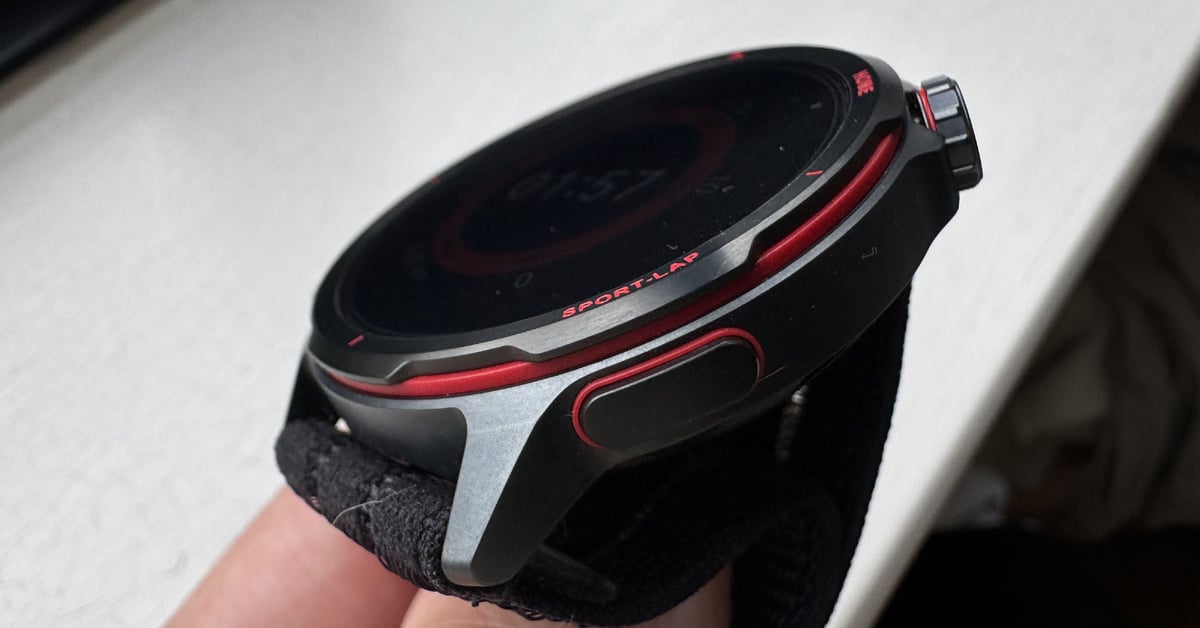
I’ve been extensively testing the Huawei Watch GT Runner 2 for the last month on the roads, on the track, in the pool and in the gym. Now it’s time for a controversial and detailed write-up.
Runner 2 is an impressive piece of lightweight kit, and in several ways it’s one of the best and most beautifully crafted running watches since the Suunto Race. Using it across a range of sports and environments has been great, with a battery that only needed 2 charges, but the downside for me has been the smartphone app and the wider ecosystem.
The company has stated that it is taking sports watches seriously, which should worry some incumbents, given Huawei’s significant financial resources to back its products. Runner 2 shows the first signs of this with some truly outstanding GPS tracks and strong heart rate tracks in almost every workout – as the company says, these are the two measures that underpin every single sports and wellness insight. It’s a bizarre situation where, for over 10 years, many competing sports watch brands have simply produced incorrect base data. We’ve been running blind, believing the wrist data in many cases.
This review will look at how the sports-focused features fared in my testing, less so the smart features. On paper, at least, Runner 2 ticks all the key running competencies, with training plans, physiology and recovery metrics, and a fully personalised in-running experience. More on that in a minute.
Testing context: 4 weeks, >100km running, including track sessions, trail, and road. Cycling. Gym. Swim. Tested against A-grade devices: Garmin Forerunner 970, Apple Watch Ultra 3, Whoop MG, Polar SENSE, Garmin HRM 600, others.
Independence: The watch is a media loaner supplied by Huawei. Tests, results, and opinions are my own. I buy all the gear I use for my own training myself. Buying from the links or becoming a supporter helps the independent content keep flowing.
Huawei Watch GT Runner 2 Summary Review
Outstanding hardware, ecosystem still catching up
Tested over four weeks and more than 100km across road, trail, track, pool and gym. The GT Runner 2 challenges its rivals in GPS precision, heart rate accuracy, and display quality. It falls short in terms of ecosystem maturity and smartphone app refinement. Worth buying if you are already in the Huawei ecosystem and want a quality small-format running watch; worth watching closely if you are not.
Pros
- Class-leading GPS accuracy in urban and obstructed conditions
- First wrist-based heart rate sensor worth training with without a chest strap (for my physiology and use cases, n=1)
- 32 hours GPS battery; 15-minute fast charge – very good
- Intuitive on-wrist interface, easier than Garmin
- Includes running power, dynamic lactate threshold, Marathon Mode, and many more advanced running features
- Map rendering is superior to Garmin (less detail)
- Titanium case, Kunlun Glass 2, 3,000-nit AMOLED display – superb
Cons
- Occasional GPS failures in a limited number of cases
- Smartphone app cluttered, poorly localised for Western runners
- Ecosystem syncs (e.g. Strava) are limited and unreliable at the time of testing
- Spotify support is absent; no TrainingPeaks import
- Heart rate fails in pool swimming
- Training zones did not auto-recalibrate after manual LTHR entry (may have since changed)
This product has been awarded the the5krunner Editor's Choice 2026. The award is given to products that achieve an exceptional standard in independent testing.See all Editor's Choice awards.
What’s New
Runner 2 is a wholly new watch that adds a couple of new running features compared to previous Huawei watches, especially its 2022 predecessor.
The difference that stands out most is the smaller case format, perfect for thin wrists, made with a quality metal, titanium. The AMOLED display is among the best on the market, and it’s protected by Huawei’s Kunlun glass lens, which offers superior scratch resistance compared to Gorilla Glass but without the brittleness of Sapphire. The optical heart rate sensor claims increased accuracy, as does the novel GPS – more on those in the test results section.
There are also several firsts for smartwatches – the first with Kunlun Glass 2, the first with precision-finding Bluetooth 6.0 and the first to boast tri-frequency GNSS, albeit only with BeiDou in China.
| Feature | Huawei Watch GT Runner (old) | Huawei Watch GT Runner 2 (new) |
|---|---|---|
| Case Size | 46.4 mm | 43.5 mm |
| Thickness | 11 mm | 10.7 mm |
| Body Weight | Approx. 38.5 g (body only) | 34.5 g (body only) |
| Case Material | Durable Polymer Fibre | Titanium alloy (front case); fibre-reinforced composite (rear case) |
| Screen Material | Curved glass lens | Kunlun Glass 2 — harder than Gorilla Glass, less brittle than Sapphire |
| Display Size | 1.43 inches AMOLED | 1.32 inches AMOLED |
| Display Resolution | 466 × 466 px | 466 × 466 px, PPI 352 |
| Display Brightness | ~564 nits (measured; unofficial) | 3,000 nits |
| GPS Architecture | Floating antenna design | Dielectric bezel design (bezel acts as antenna) |
| GNSS | GPS + BeiDou + GLONASS + Galileo + QZSS (dual-band, 5-system) | GPS L1+L5 / GLONASS / BeiDou B1I+B1C+B2a (tri-band)/ Galileo E1+E5a
/ QZSS L1+L5 / NavIC (dual-band, 6-system) |
| GPS Battery Life | 20 hours | 32 hours (tested: 15–45% fast charge in 15 minutes) |
| Typical Battery Life | 14 days | 14 days |
| Heart Rate Sensor | TruSeen 5.0+ (±10 BPM claimed) | TruSense (±5 BPM claimed) |
| ECG | No | Yes |
| Sensors | OHR, accelerometer, gyroscope, barometer, SpO2,
skin temperature, ambient light |
OHR, accelerometer, gyroscope, magnetometer, barometer,
temperature, ambient light, ECG, depth, (no SpO2?) |
| Water Resistance | 5ATM | 5ATM + IP69 + freedive to 40m (EN13319) |
| NFC | Yes (payments not functional at launch) | Yes (Curve intermediary at launch in Europe) |
| Bluetooth | BT5.2 | BT6.0 |
| Charging | Wireless (magnetic puck) | Wireless (magnetic puck) |
| Strap Options | Silicone strap | Fluoroelastomer silicone or AirDry woven strap |
| Advanced Running | AI Running Coach, Running Ability Index | Running Power, Dynamic Lactate Threshold, Marathon Mode |
| New Sport Modes | Standard sports | Trail running, Freediving (40m), Golf with maps, Skiing |
The existing Huawei Watches already include advanced features such as Running Dynamics (GCT, VO, Cadence, balance), VO2max, and pace and heart rate zones. The headline new running features are running power (with a power curve) and an updated training load, with dynamic lactate threshold determination. The AI running coach and running ability index are largely unchanged, but a new Marathon mode includes a real-time pacer, lap tracking, and hydration/fuelling reminders.
The Basics & Daily Use
It’s comfortable to wear. The velcro-like strap is a little odd because the design is tricky to tighten: the velcro loop is pulled around the wrist with no lever, rather than pulled backwards over the ‘clasp’.
The buttons have a positive click, and the rotating crown works well, though it is small and tricky to use during sports while wearing gloves. The touchscreen works excellently when dry and better than most others when wet.
The quirk for me is that the button presses work subtly differently from those on other brands I’m more familiar with. You’ll be fine once you’re used to them; it was just that I would press the bottom button expecting to ‘go back’, whereas on Huawei it was the ‘Enter/Go’ button! In a similar vein, to go back precisely one level needs a swipe on the screen, whereas most other brands (e.g. Apple, Garmin) will do this with a button press (the top button press goes all the way back on Runner 2).
I had zero issues with the battery life and no reason to doubt the claims. Even with the screen brightness cranked up beyond the minimum and always on, I got multi-day usage. It’s tricky to give a precise figure for smartwatch battery life, as I exercise with GPS every day, which drains the battery on any sports watch.
There is a wallet facility, but it will only work with CURVE starting on launch day, so I couldn’t test it.
The watch has a built-in speaker with surprisingly good audio for music playback, notifications, and receiving calls via the smartphone. Music support was very much for MP3s copied from the phone rather than the streaming services – Garmin and Apple win here if music is your thing, but the audio quality played from the Watch is the same as Apple, both being better than Garmin.
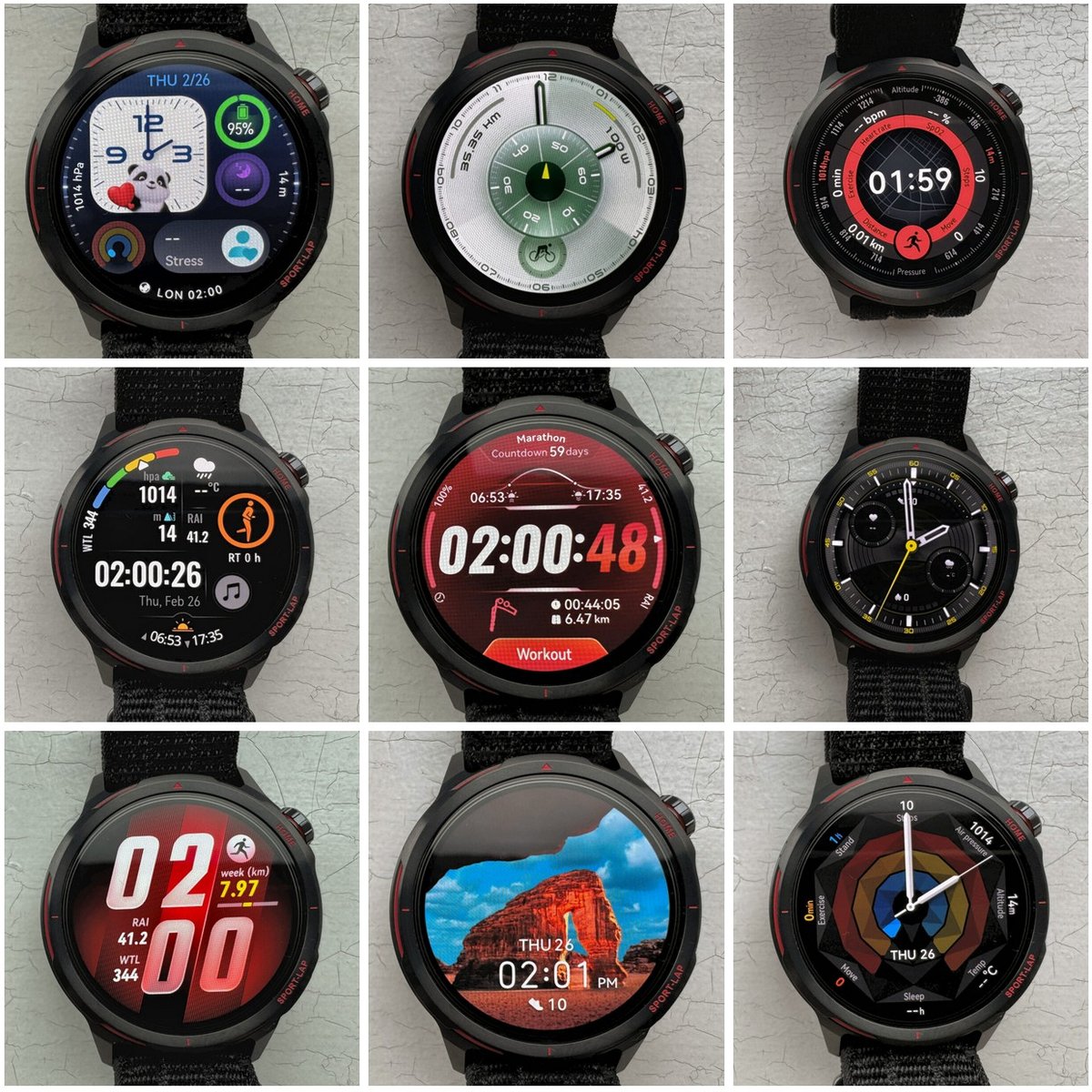
The display is very nicely proportioned with a minimal bezel. It’s super-readable in any light conditions. There is a wide range of watchfaces to sync from the smartphone app – once on the watch, they indicate how battery hungry they are, a nice touch. I seem to have enabled a free 3-month trial of something and now have access to lots of high-quality watch faces – much better than the free ones from Garmin for everyday use. Of course, Garmin has a burgeoning 3rd-party app store to compensate.
Overall, the watch software was intuitive to use – no issues there at all. Definitely better than the complexity of Garmin and the occasional complexity of the Apple Watch. As with almost all sports watches, though, once you are ready to start your exercise, the choice of sports profiles, sports configuration options, screen and metric options is broadly similar. As is the in-exercise experience.
One quirk – the watch interface is generally great but isn’t thought through in every detailed respect – neither is Garmin, BTW. One annoyance was that after a 2-hour indoor workout, I realised that I had chosen outdoor riding. The watch would not let me save the workout because I hadn’t travelled far enough! Hmmm. The watch must do what I want it to do – not the other way around. The same do-as-I-say theme occasionally surfaced on the app, too.
As I touched on earlier, the biggest gripe for me is the smartphone app — I’ll cover that in detail in the App & Connectivity section below.
Running & Training Features
Huawei adds lots of features, none of which are unique, but most fall squarely into the ‘useful’ category.
Starting a run / UI during workouts
The sports profiles are all highly customisable, offering a wide range of features, including goals (distance, time, calories), autopause, reminders (from basic distance to advanced training stress level), and ghost racer/smart companion/pacer. There are four customisable exercise screens (more than enough), and you get dedicated screens added for route, stress, and intensity. Each of the four screens can have up to 6 metrics per screen, and you can choose any from a long list – time distance pace, heart rate, power, elevation, calories, sun phase, steps, many with variants like average, instant, split and zone.
There is a high degree of customisability for what appears on the screen, more than good enough for most runners (not as high as Garmin), and it also covers physiology-based metrics.
Issues – Several non-core sports profiles (e.g., snowboarding) appear to classify the activity rather than include metrics specific to that sport. While diving does have auto dive start and end, that’s it in terms of custom metrics. Triathlon appears to be swim+bike+run only, no deeper multi-sport customisability.
Training features
Training load and power are newly added features. I’ll talk about those and cover the more useful older ones as well.
Structured workouts
Structured workouts are available in courses, which is an odd choice of words. There are tens of pre-made workouts for you, and you can create your own.
The concept of city runs is nice, but the actual “London Level 3 intermediate urban run” had nothing to do with London. Even if it did, I can’t see how it would start at my precise location without complex map functionality.
A custom-structured workout is created in the custom course section of the smartphone app, where you can add movements and rounds. Despite the unusual phrasing, I was able to create some complicated zone-based interval workouts.
Training load/recovery metrics
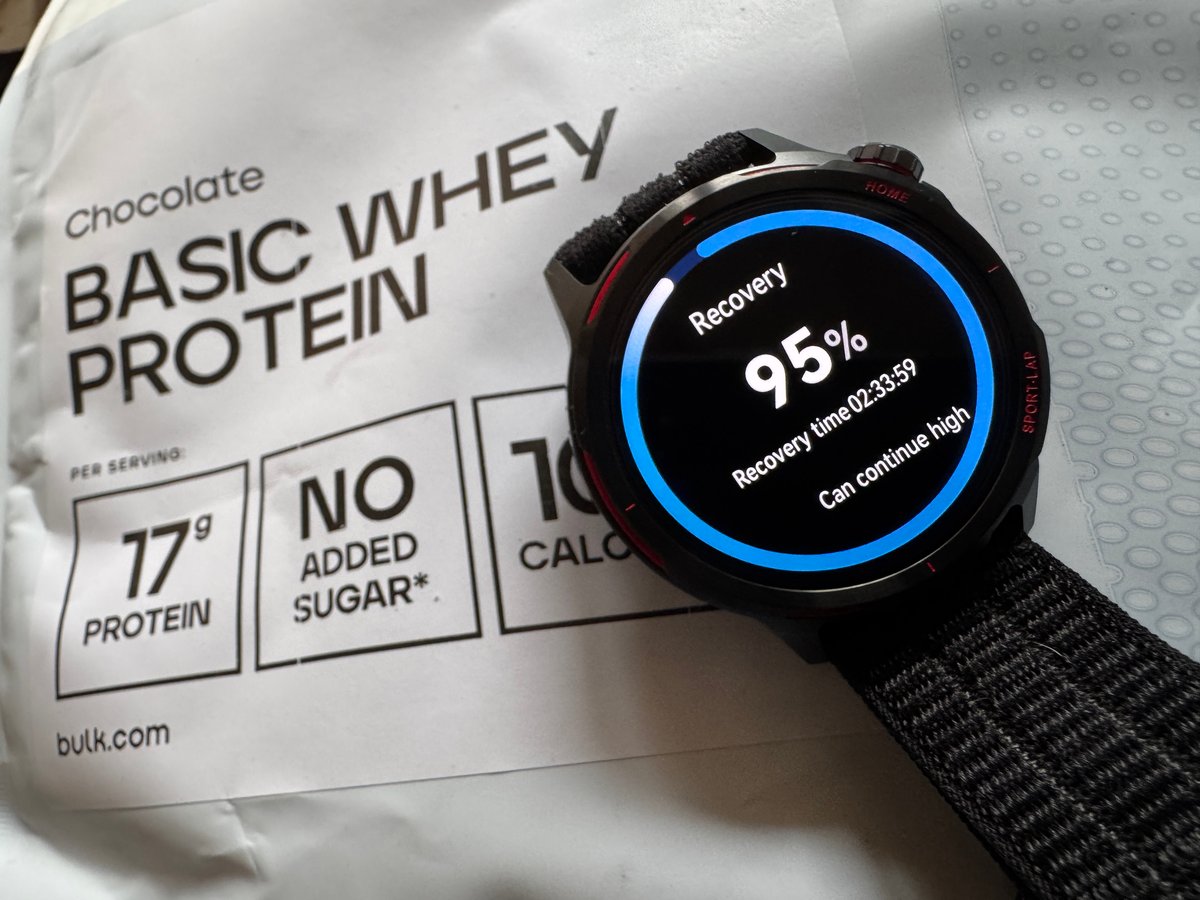
Huawei has focused nicely on presenting some decent runner physiology info on the watch. However, the smartphone app needs work to accurately identify automatic heart rate zones for any of it to work properly (true of all brands).
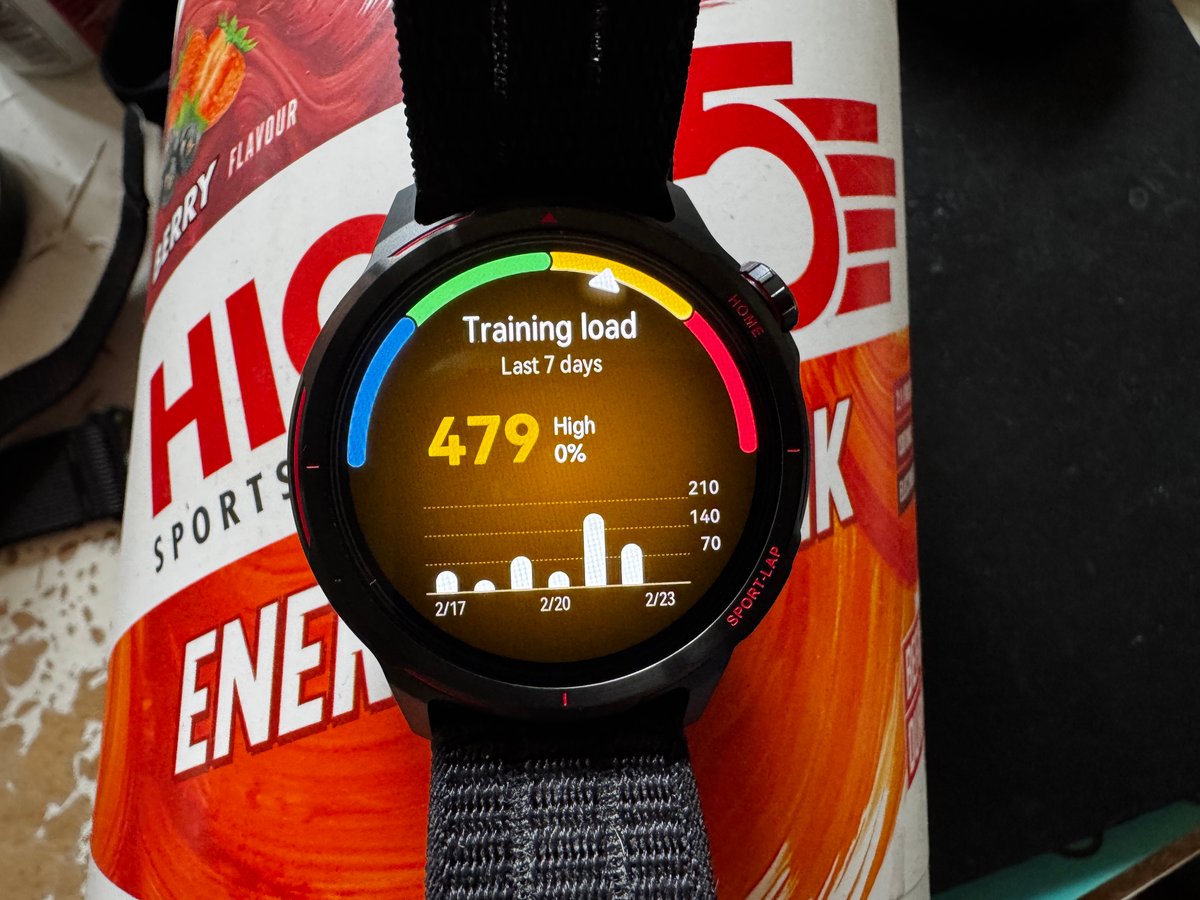
Heart rate zones can be calculated automatically in many ways, but the easiest methods are often inaccurate for many people. e.g. They can be determined based on your maximum and minimum heart rates (the former often inaccurately estimated from the 220-Age formula) or set as percentages of your Lactate threshold (LTHR/LT2/AnT). Those parameters can be manually set in the app or automatically determined by Huawei’s algorithms.
On day 1 of my testing, I manually entered my approximate LTHR (160 bpm) and continued testing. However, the value was not automatically used by the app to reset the zones at the time, so the follow-on metrics, such as training load, training index, and maybe recovery, were incorrect. I later entered the zones’ advanced settings on the app, and that seemed to make the zones correct based on the manual LTHR, also being reasonably estimated as ‘a bit lower’ for cycling (seated) and swimming. My swimming LTHR is probably lower still, but I’m happy manually entering that one.
My impression from the marketing materials was that the LTHR is automatically assessed and updated during exercise. I think Huawei did modify my LTHR at some point, but it should have notified me of the change and asked me to sense-check and approve it.
Running dynamics
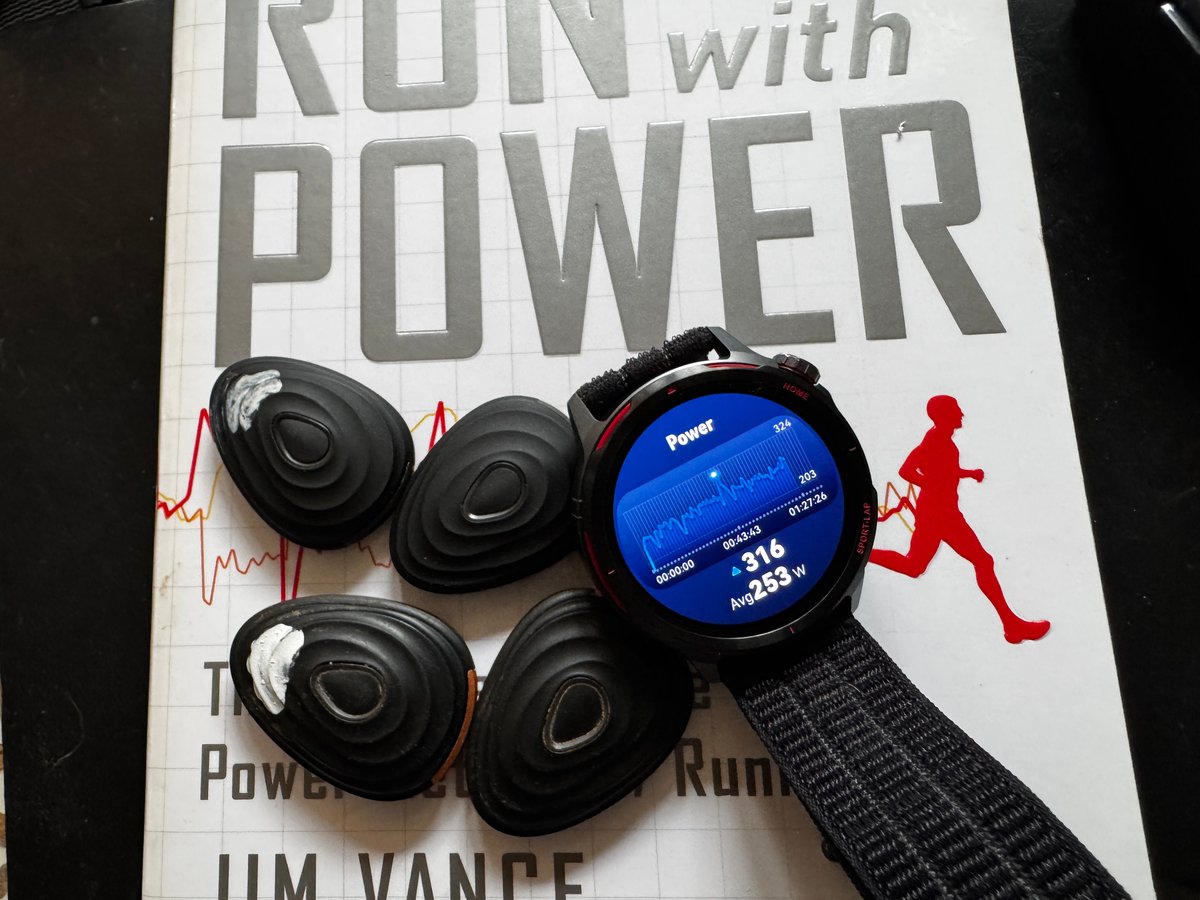
Running dynamics (stride length, cadence, vertical oscillation, and ground contact) were recently added to other models, but Runner 2 now includes a running power metric calculated from the wrist. The alternative to a wrist calculation is a Stryd footpod, but almost all other running watch brands now have wrist-calculated power.
These gait metrics are generally NOT useful to most people, as they are hard to train to improve. That said, cadence and running power can both be very useful for helping you avoid injury, run faster, and sustain moderate efforts over undulating terrain.
Running Dynamics Test results
Due to limitations in the ecosystem, I was unable to export and directly compare the running dynamics metric, so these are the best I could manually note down and compare from a single, steady test run.
- Stride length – 106cm (likely correct). Garmin was the same, and an uncalibrated Stryd footpod reported 108cm.
- Balance – Huawei reported a bias to my right side (49.8: 50.2), which is likely correct
- Vertical Oscillation – 8.1cm (likely an overestimate). Garmin and Stryd broadly agreed at 6.5 cm and 6.47cm, respectively.
- Ground Contact Time – 240ms was slightly higher than Garmin (236ms) and Stryd (235ms)
- Power – Runner 2 shows a peak of 316 W (Apple Watch Ultra 3: 285 W, Stryd 4.0: 300 W) and an average of 253 W (Apple Watch Ultra 3: 246 W, Stryd 4.0: 254 W). There is no gold standard, and no watch brand’s power agrees with any other. This test shows ballpark agreement between Apple, Stryd and Huawei, likely reflecting the use of the same algorithmic principle (i.e., EESA vs GOVSS – Garmin does it differently).
Race predictor / VO2max estimates
The race prediction estimates were a little off for me. I can understand why the shorter race-distance predictions were too slow, as I hadn’t done much work at higher speeds due to a niggle. However, I would have expected the algorithm to extrapolate a steady 10-mile time to an HM race estimate based on the same pace (or a faster pace). Still, it was 6 minutes off (and a further 10-15 minutes slower than a race result last month).
Huawei’s VO2max was effectively the same as consensus figures from other platforms (Garmin, Whoop, etc.). If I combined the consensus VO2max with Daniels/Riegel velocity-decay factors, the resulting race estimates for 5K and HM were in line with what I would expect from the calculation (the HM estimate would still be lower than a race I did a month ago, factoring those in).
My VO2max is probably slightly higher than the estimates from Huawei, Garmin and others. However, there is a mismatch between Huawei’s VO2max /Race Predictions applied to me. They both can’t be right.
Navigation
Casual navigation worked well in my tests. The main pain point was getting the route/course to the watch, which required manual intervention in the app, depending on whether the route was entered manually or generated automatically by Komoot.
When running, the TBT instruction seemed to arrive about 50m before the required turn, but once a wrong turn was made, there was no way to re-route intelligently, as the watch only had the map image and not the route understanding. This is typical of most sports watch brands (not more expensive Garmin watches), and the map’s visuals help you get back on track for the occasional wrong turn.
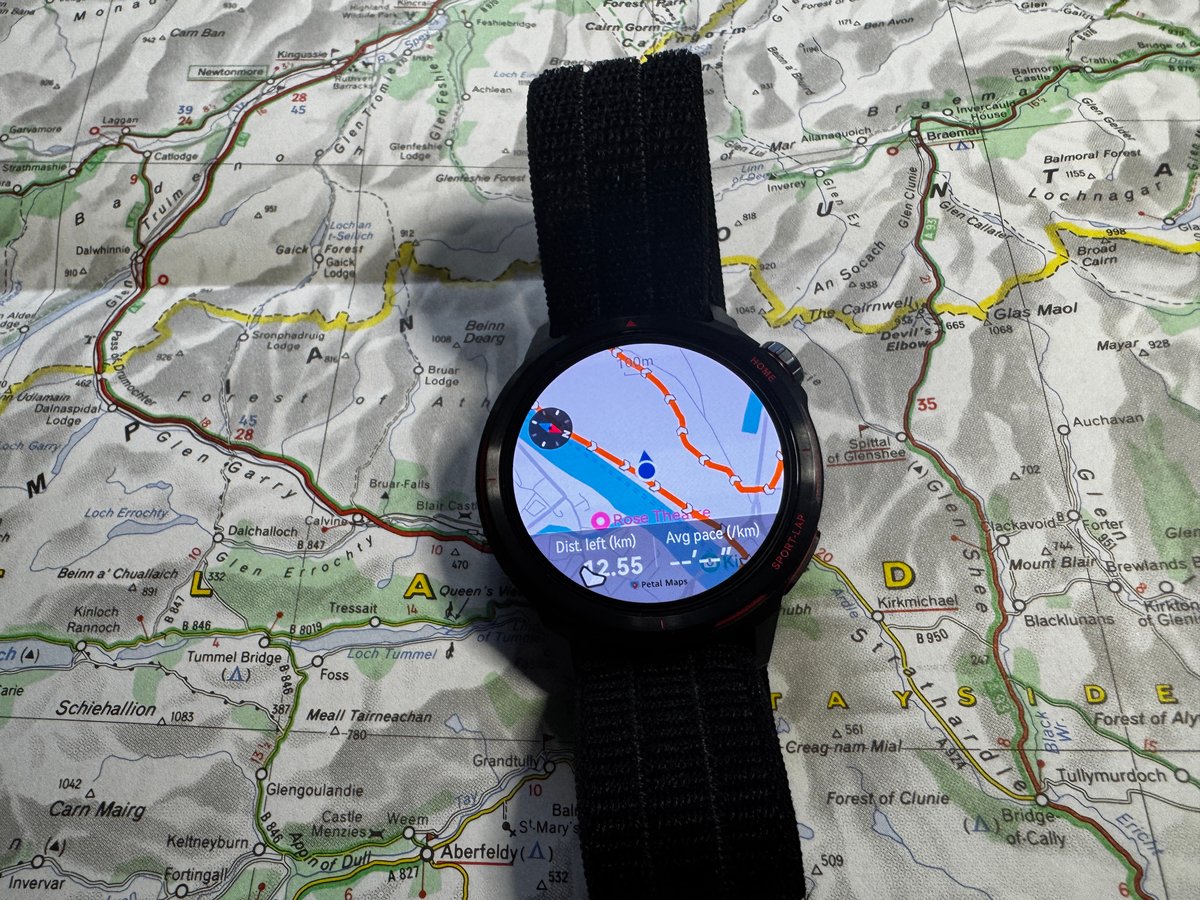
For the routes I already had in the app, sending to the watch took a few taps and no more than a minute. The route you follow in your activity is chosen at the bottom of the ‘go screen’.
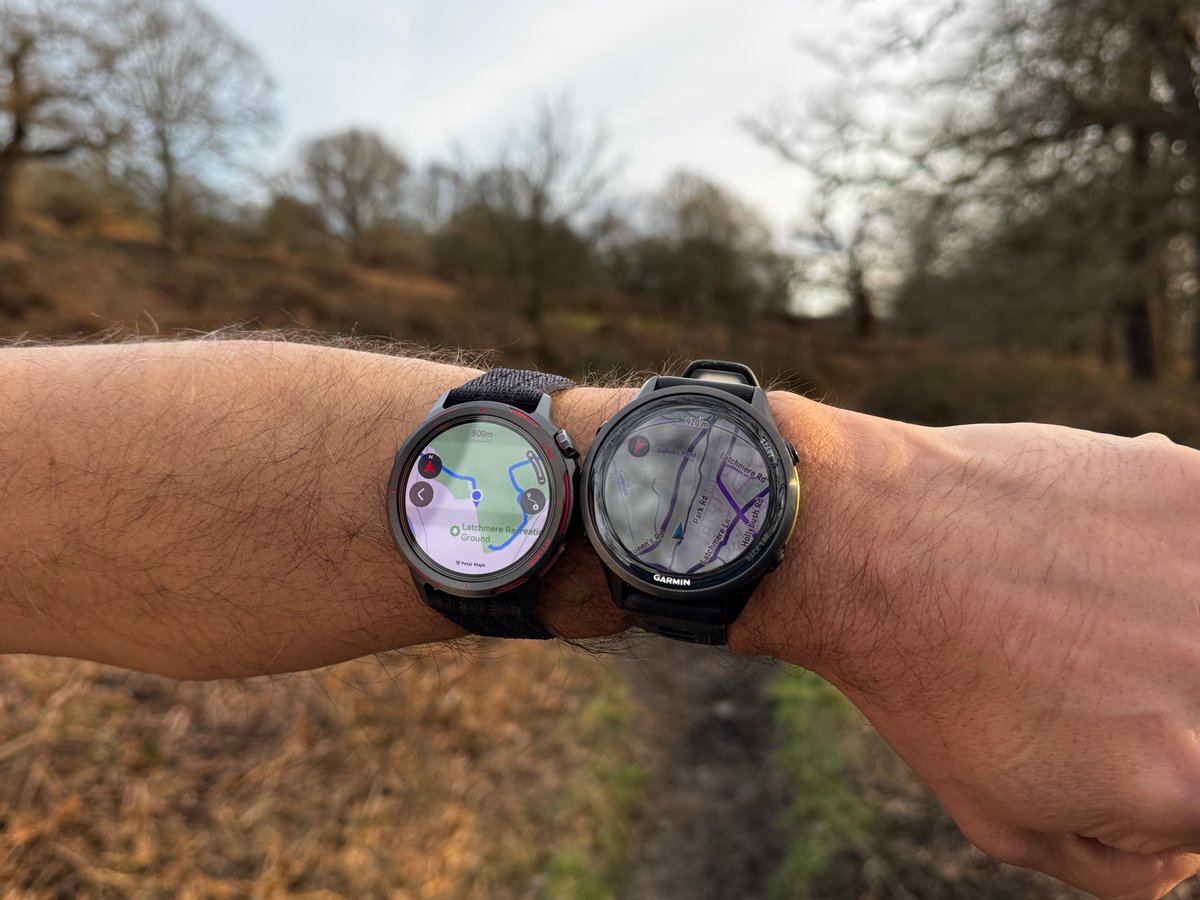
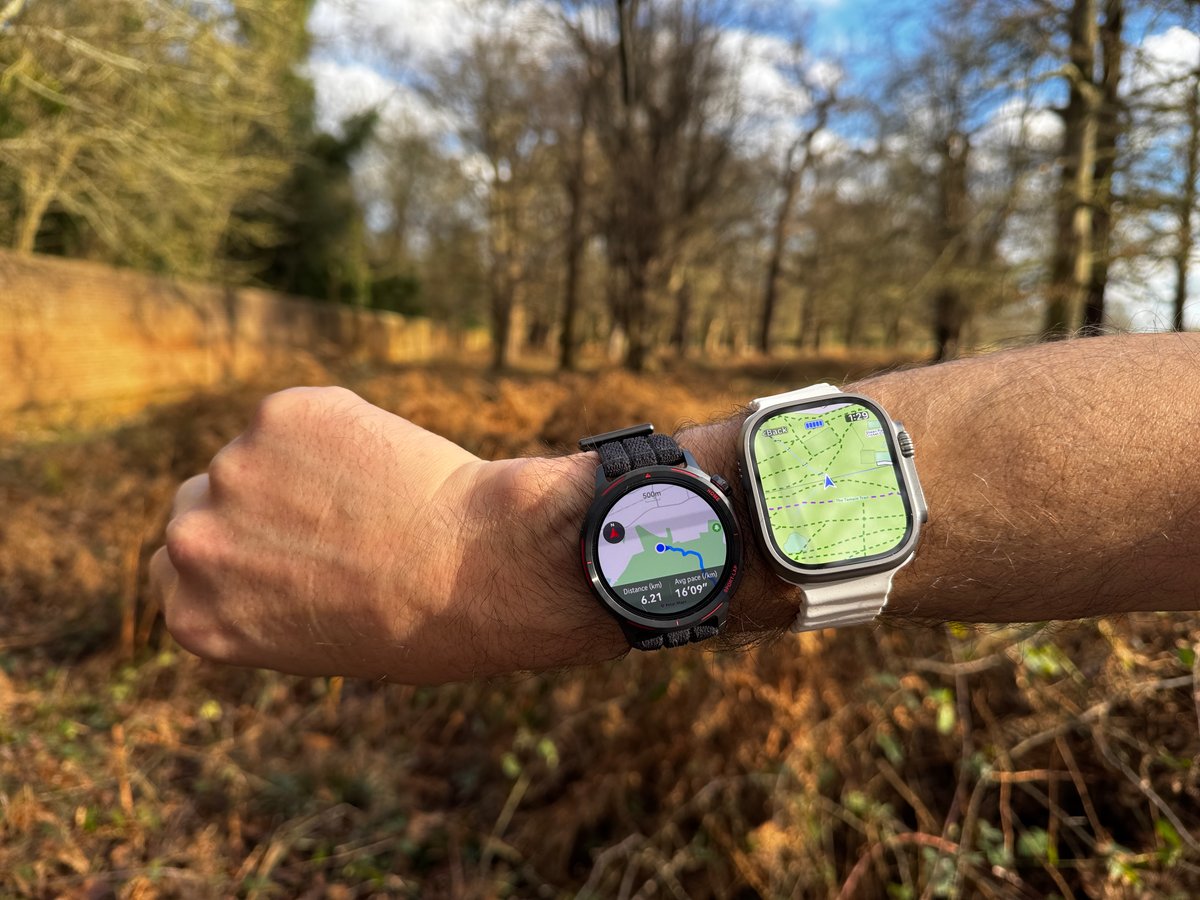
The map rendering is considerably better than Garmin’s, with almost instant rendering when panning and zooming. There is a very, very slight delay. One you’d hardly notice – Garmin can take 10 seconds to draw a map! The map orientation was not stable and tended to rotate around quite a bit at slower speeds (the speeds where you may well be lost or about to get lost, and looking for direction)
What works well on the wrist
I want to talk about usability here. This is a key feature, rarely mentioned.
If I gave you a watch and a 30-second tutorial about what the buttons, screen, and menus broadly do. Would you then be able to handle more complex tasks on your own? e.g. I say to you, “Add a course to your run” or “change the run screen to show pace”.
On the whole, Huawei’s answer to that is “Yes”. If you buy an expensive Garmin watch, you will find navigating it, using it, and understanding its features really quite difficult. Huawei handles usability well, and its menus, icons and tiles have clearly been designed for a round watch display (a strange thing to say, you might think, but many competitors haven’t been as well designed to flow and fit within the confines of a circular display).
I have a few minor criticisms of the need to use the touchscreen more than on some other two-button sports watches, but they are just that, minor. (e.g. Buttons can’t go back one level, awkward touchscreen swipes are sometimes required). Once actually in the workout, the displays and usability of most watches are pretty similar; Huawei is as easy as the rest.
What does not work well for Huawei is the off-the-wrist bit, i.e., its smartphone app. For example, I didn’t like aspects of the organisation, the oddness of some translations, and the use of non-standard words.
Overall: Probably an 8/10. It’s pretty good and intuitive/easy to use.
Competitor Feature Comparison (Garmin, coros, suunto, amazfit)
Intentionally blank. Table to be added
GPS Accuracy
At times, the Huawei WATCH GT Runner 2 demonstrated seemingly perfect GPS accuracy, the best of any sports watch I’ve ever tested in difficult situations. I’ve even mostly validated as true, Huawei’s claims that it can produce good tracks through tunnels. Unfortunately, this excellence was interspersed with moments of inconsistency in easy conditions. There’s a lot to unpack here. Let’s go.
The new tech here is the bezel as a second antenna separated from the body by a thin 1mm coloured ring. Tiny signal timing differences between the two allow the watch to select the higher-quality signals. The result? The theory is that it delivers a more accurate 3D signal measurement (GNSS chipsets have always measured 2D and 3D differences). The GPS signal and accelerometer data are then combined to give a single ‘fused position’. This is sensor fusion.
The majority of my tests used the same reference-grade watches that Huawei used in its testing, i.e., Garmin Forerunner 970 and Apple Watch Ultra 3. Its performance mostly held up in all reception conditions, from challenging to easy – buildings, trees, trail, urban, open. It is suitable for any level of runner, and I doubt many runners or reviewers would notice its minor foibles, except in niche scenarios that occasionally involve trees or turns.
My Standard 10-mile GPS Accuracy Test Results
Most of my tests fit in with my varied training. However, I use a standard methodology for one specific test on every GPS watch and have done so for over a decade. The best results have all come in the last two years, and Huawei has the second-best score ever. Effectively, as far as this one test goes, all these watches are equally accurate. If Huawei could improve its performance on some of the easier sections, I estimate it could score 96-98%, i.e., this current hardware could be the best with merely a firmware tweak.
| Brand | Model | RESULT |
| =1. Suunto | Vertical (2023) | 92% |
| =1. Coros | Pace 3 | 92% |
| =1. Garmin | Forerunner 970 | 92% |
| =4. Huawei | Watch GT Runner 2 | 90% |
| =4. Apple | Watch Ultra 3 | 90% |
| 6. Coros | Pace 4 | 88% |
| 7. Garmin | Fenix 8 | 88% |
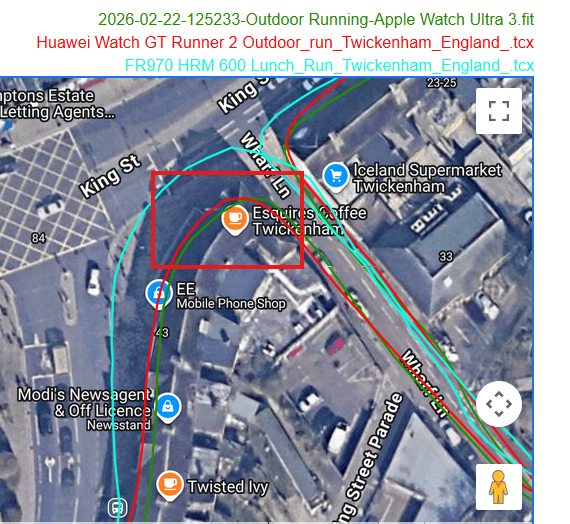
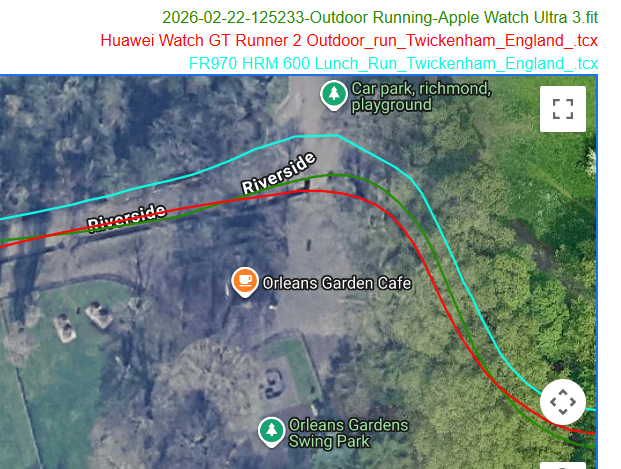
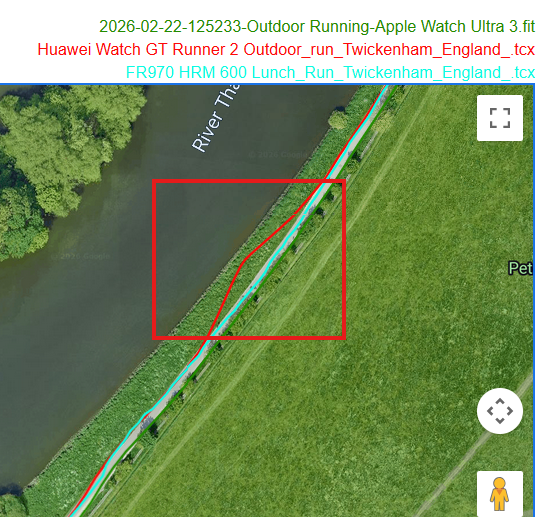
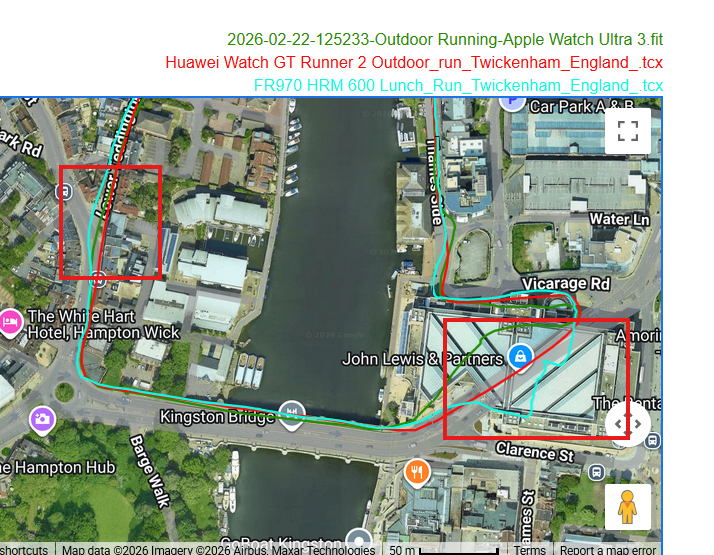
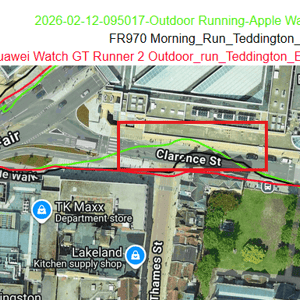
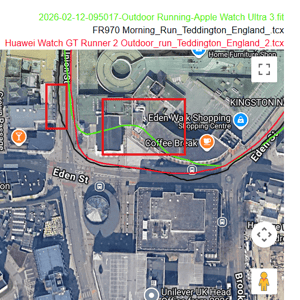
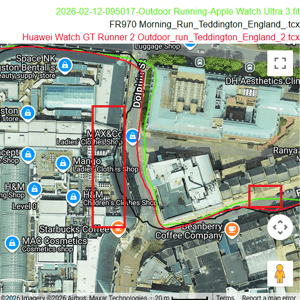
These 4 images from the run show excellent performance through an impossible tunnel and right next to tall buildings with a shop awning overhead. Awesome! Unprecedented! Then, in open skies in a field, it makes a mistake!
GPS Distance tests and a track mode test
Track test details covered here in a deep dive.
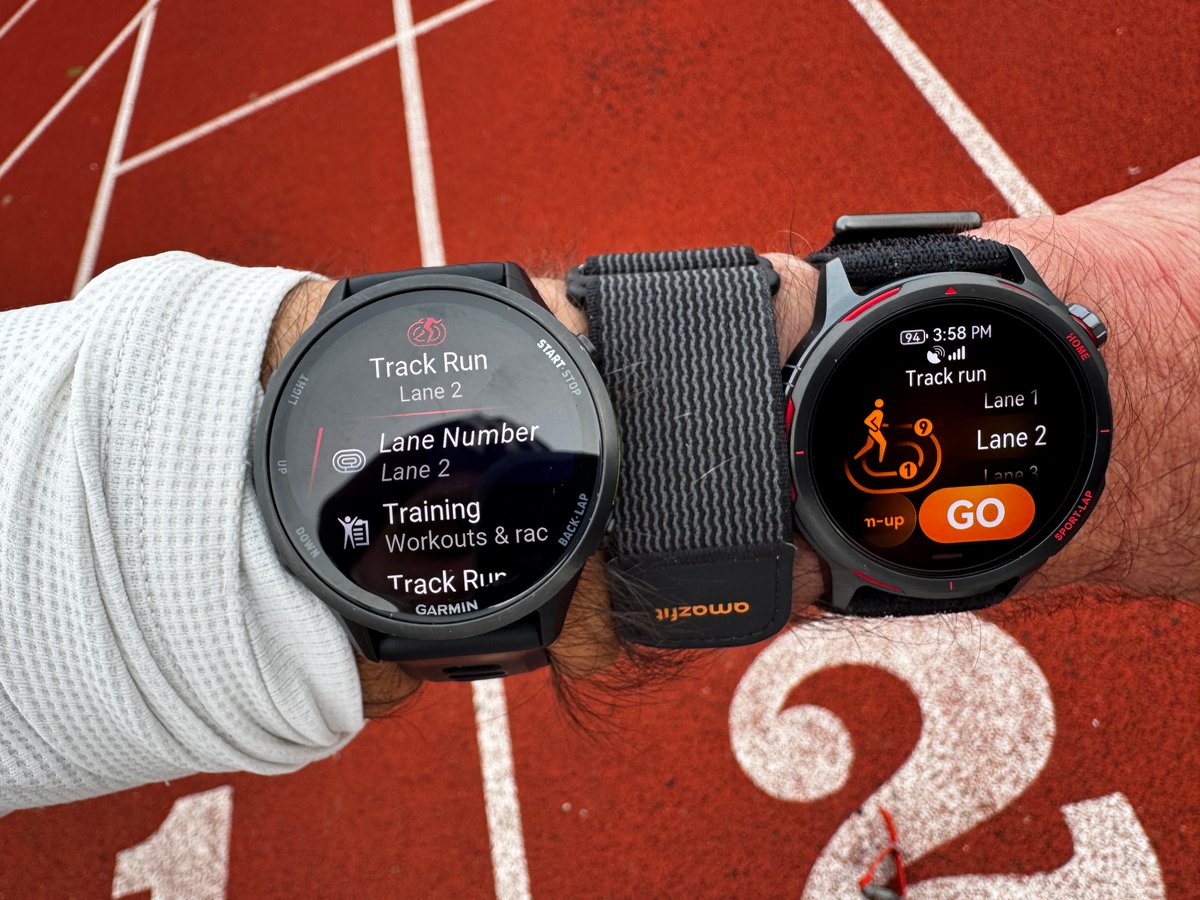
In pure GPS mode across multiple 1600m runs on a track, the distance accuracy results were clear
| Watch | Avg Error | Percentage |
|---|---|---|
| Apple Watch Ultra 3 | 8.22m | 0.50% |
| Huawei Watch GT Runner 2 | 10.02m | 0.62% |
| Garmin Forerunner 970 | 15.02m | 0.92% |
| Amazfit Balance 2 | 46.78m | 2.88% |
Check out this zoomed-in image on the track (but NOT in track mode). It doesn’t quite nail 100% accuracy in Lane 2, but the track looks precise in the repeatable sense. The slight variation in the track you can see accounts for the 10.02m total error.
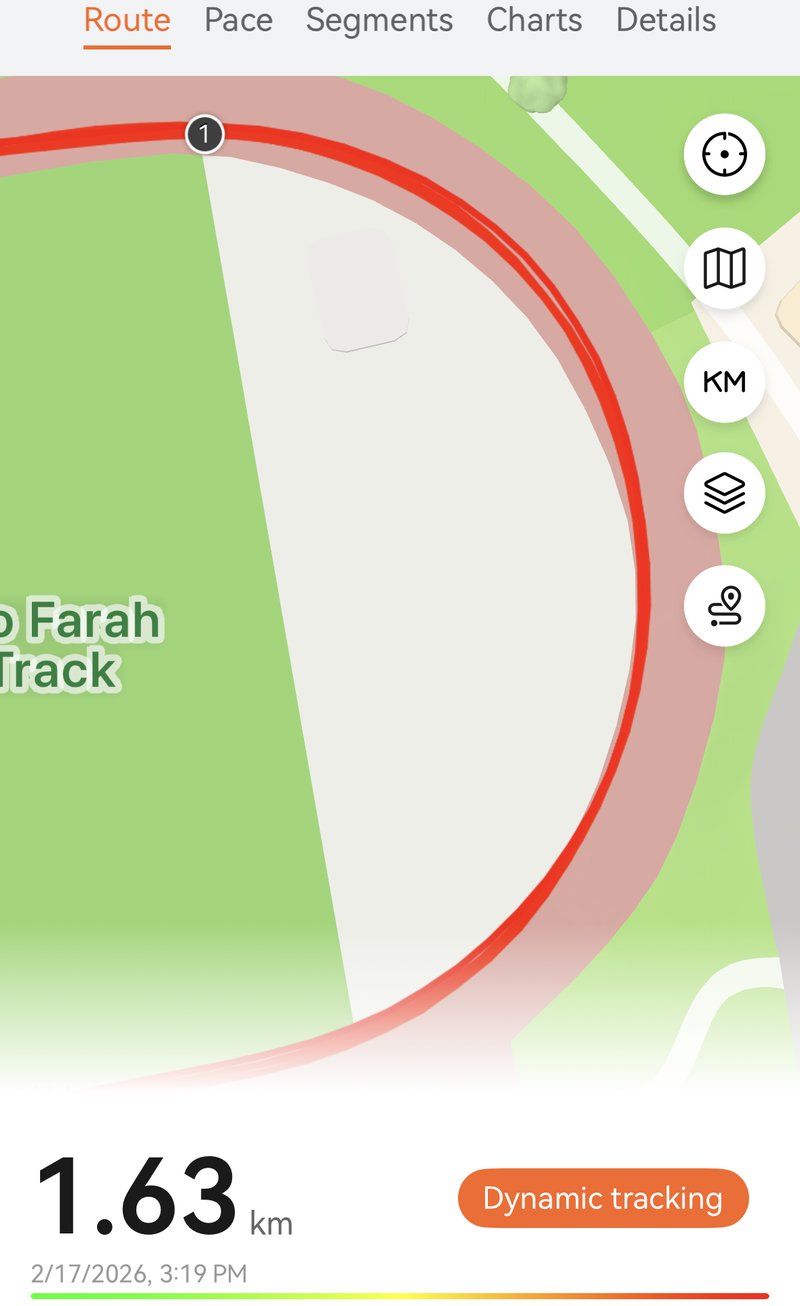
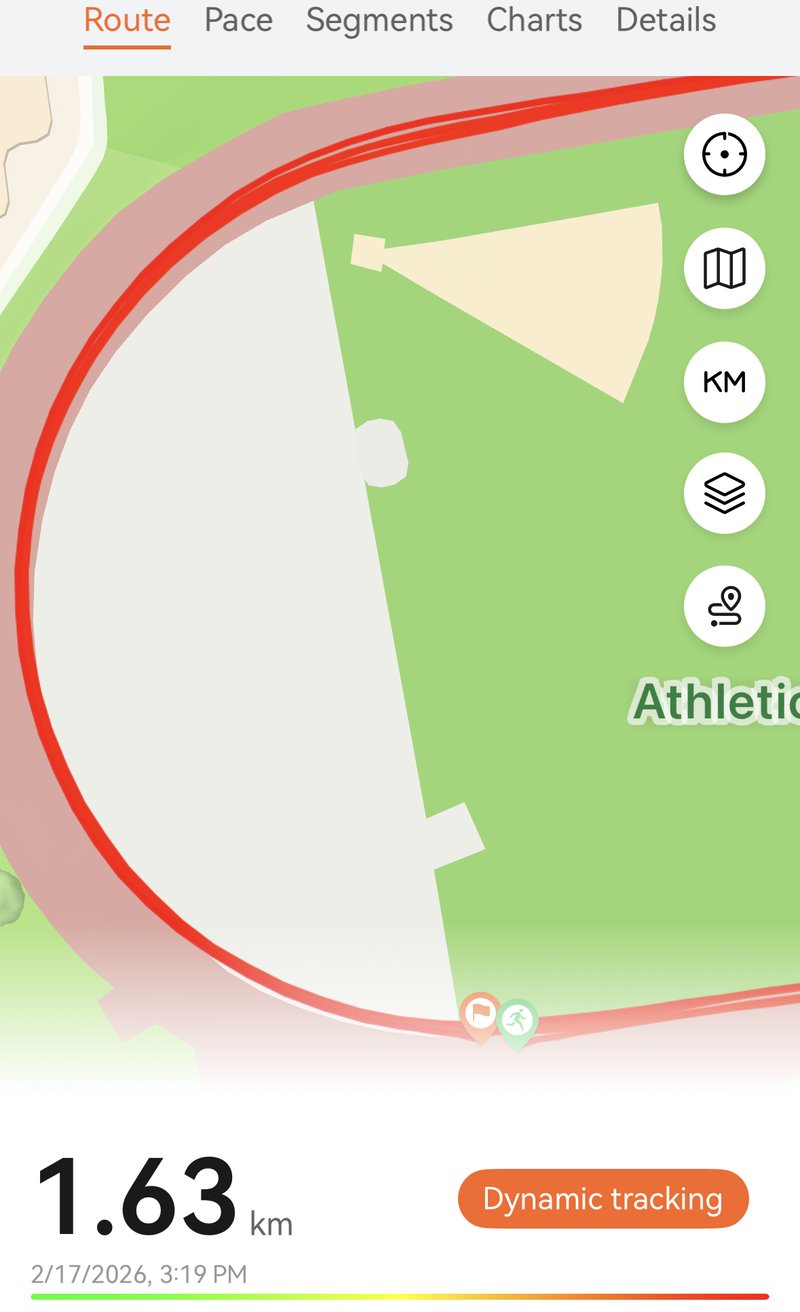
The Apple Watch Ultra 3 delivered the most accurate GPS tracking, with the Huawei a close second. Both devices stayed well under 1% error—impressive given the geometric challenge of tracking curved paths from a wrist-mounted antenna. The Garmin Forerunner 970 remained highly competitive, coming in at just under 1%. I would show an image, but they all seemed nearly perfect, and this review is already image-heavy. So I won’t.
By enabling the dedicated track modes on each watch, I expected the distance accuracy to improve slightly. On the whole…it didn’t.
| Watch | Avg Error | Percentage |
|---|---|---|
| Garmin Forerunner 970 | 11.78m | 0.72% |
| Huawei Watch GT Runner 2 | 15.02m | 0.92% |
| Amazfit Balance 2 | 32.28m | 1.99% |
| Apple Watch Ultra 3 | 48.22m | 2.96% |
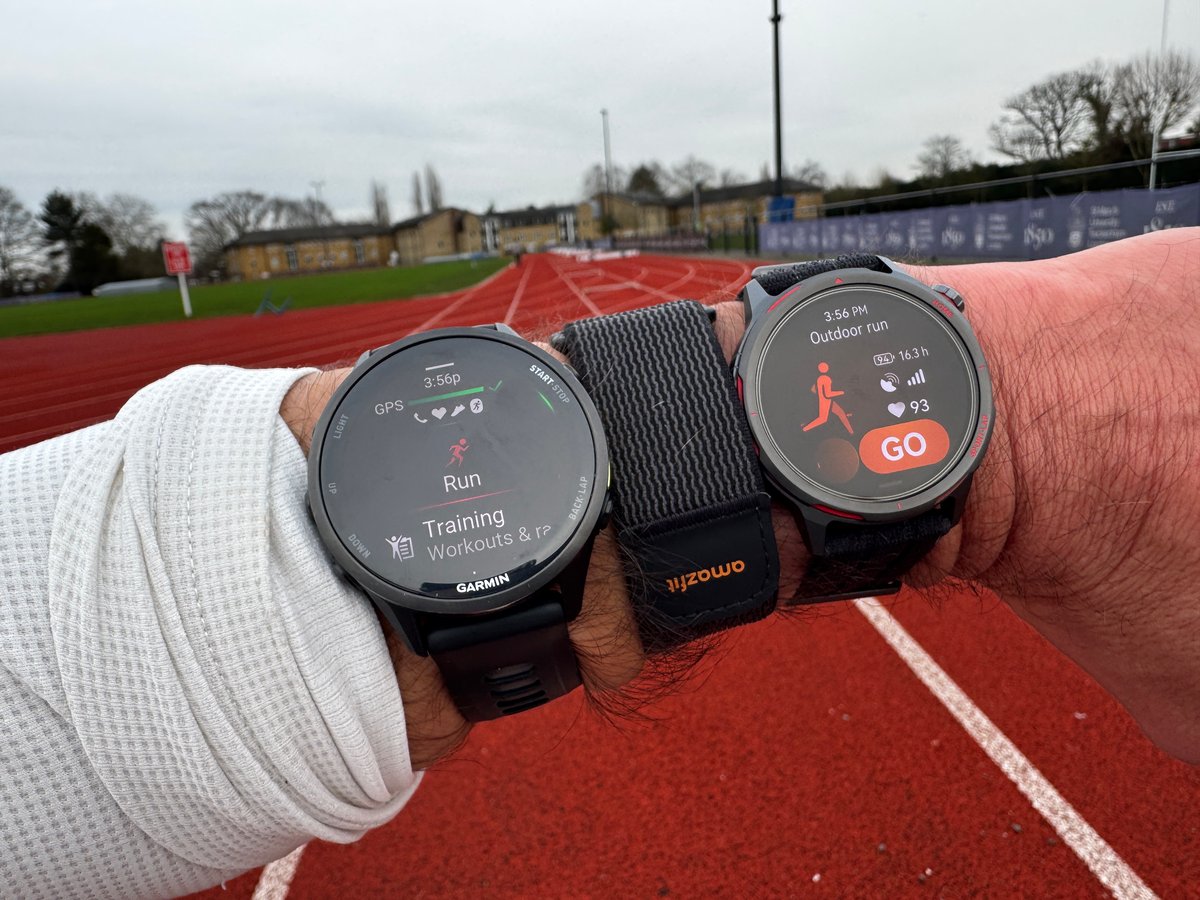
To build up a better picture as to how accurate Runner 2’s distance measurements are, here are the results from four other distance tests
- Trees/Trail – Apple Ultra 3 8.01k, Garmin FR970 8.00k, Huawei Runner 2 8.05k,
- Suburban/Urban Paved – Apple Watch Ultra 3 5.08k, Forerunner 970 4.84k, Huawei Runner 2 4.90k
- Mixed – Apple Watch Ultra 3 16.77k, Garmin Forerunner 970 16.93k, Huawei Runner 2 16.66k
- Grass/trees – Apple Watch Ultra 3 6.56k, Forerunner 970 7.04k, Huawei Runner 2 6.47k
Across those four tests covering mixed terrain and conditions, all three watches perform closely, with none showing a systematic tendency to read long or short. On visual inspection of GPS tracks, the Huawei GT Runner 2 proved most accurate in the urban test — the environment where accuracy is hardest to achieve — though the Forerunner 970 makes the stronger case for the most accurate watch on raw distance alone.
A test for Switchbacks
I got a pre-launch tip from dcrainmaker about switchback issues. Time for some similar testing.
I had previously completed a limited number of switchbacks, which were OK. So I did a contrived test on flat terrain, under trees with tens of different kinds of switchback profiles and using the standard RUN profile, as you can see from the zoomed-out route image below, everything looks good from a distance.
Garmin failed a couple of the turns, but Huawei had a more noticeable issue, failing about 6 of the 40 turns. An interesting pattern emerged. Huawei turned 15 or so metres before the turn. This is simply not possible; the sensors are not predictive to that degree. One possible explanation is post-processing of the track, with too much weight given to the accelerometer data — though I cannot confirm this. Very odd.
All the watches exhibit, at times, parallel tracks to the actual route and slightly truncated switchbacks.
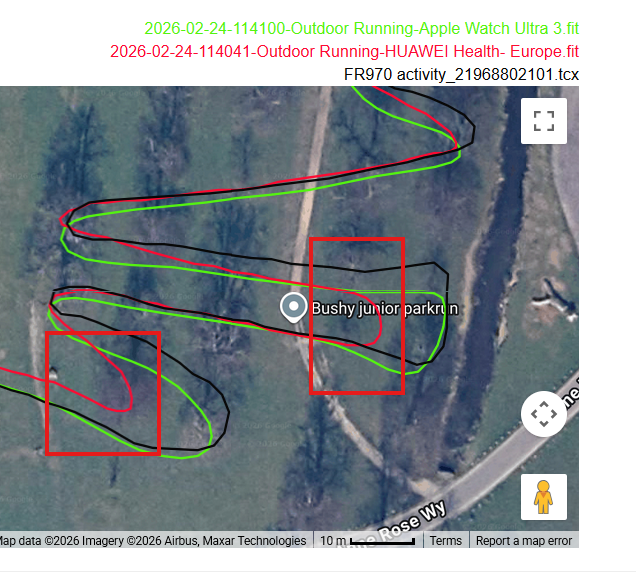
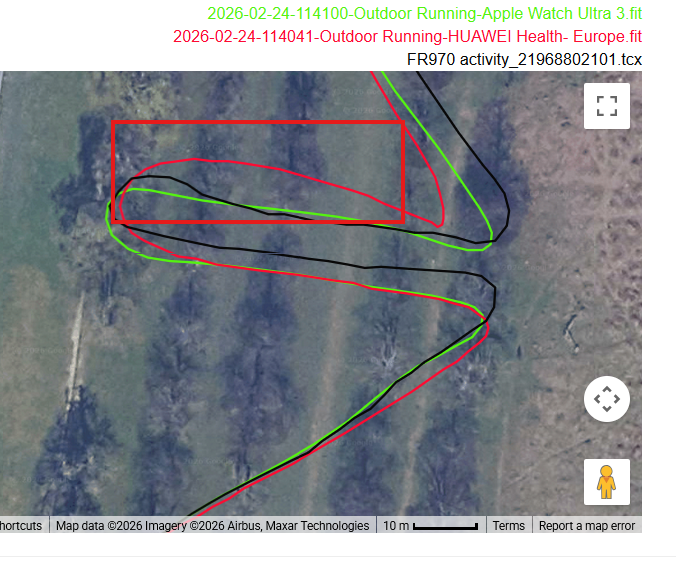
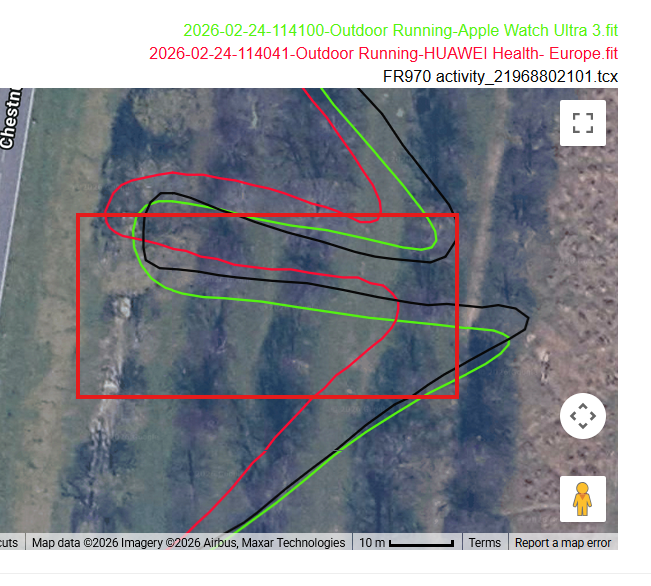
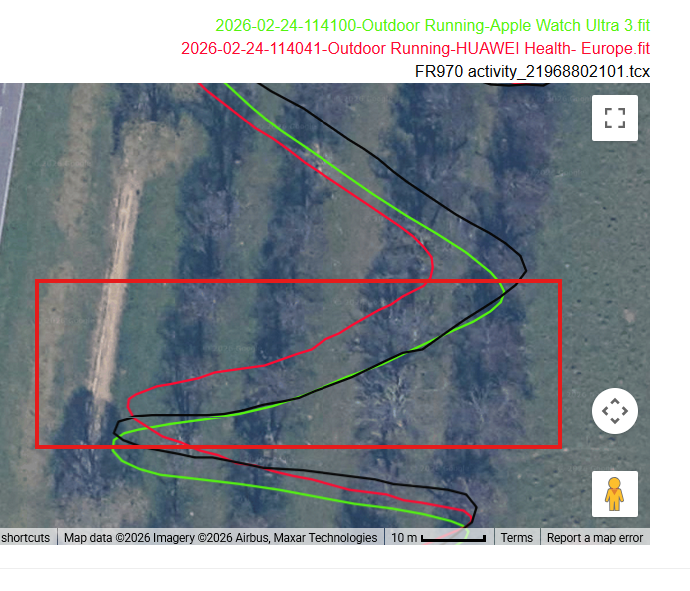
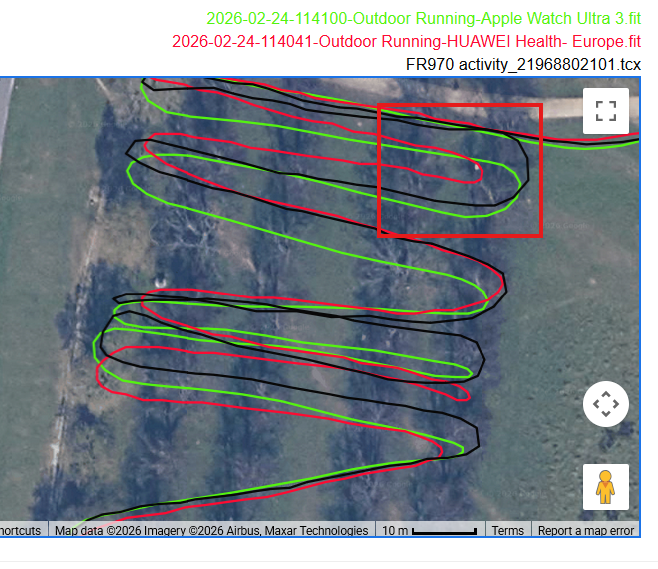
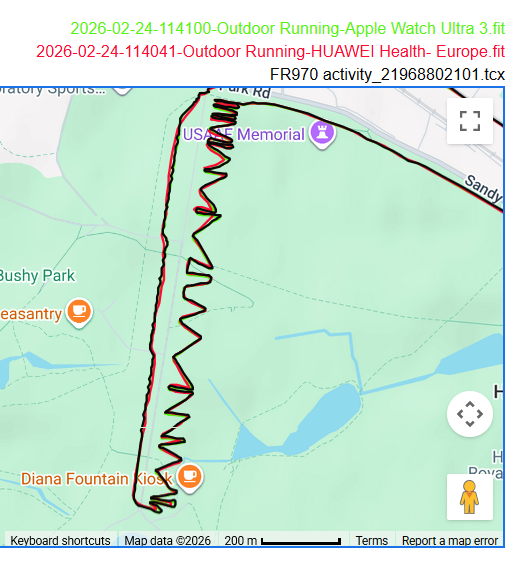
I might do this test again on future watches. It’s quite easy to do, and close to where I live. It is somewhat artificial, though.
Easy Road Cycling Route
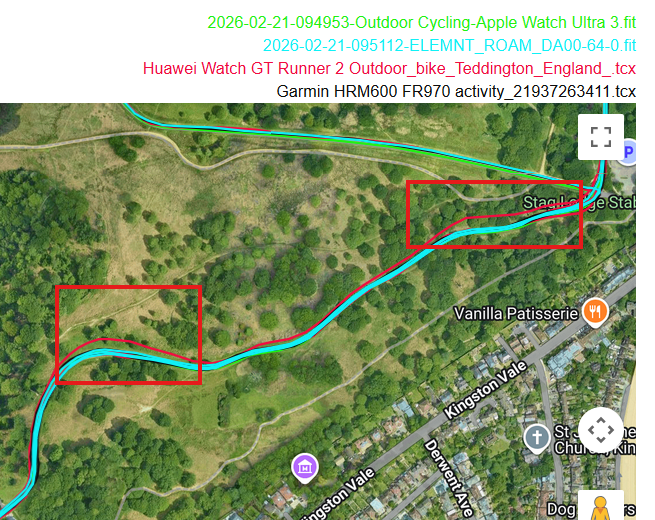
I expected a perfect result here. But the Runner 2 did fail in one place where there were trees involved. That’s a 0.5 km section of a 25km ride, and the difference is unimportant in isolation, but it shouldn’t have happened.
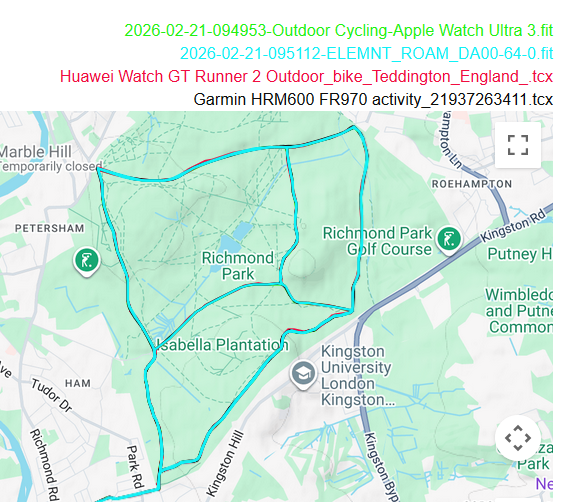
Tall Buildings Test
My test with tall buildings – running close to buildings up to 8 storeys high – produced the best result of any watch on this test by quite some way. The Huawei seemed faultless on this route compared to the others. The overview shows lots of red (Huawei), which is normally a bad sign, as the red route should be hidden by the other two above it. Not this time. The Huawei was pretty much spot-on with where I know I ran, with Garmin and Apple being pretty good but demonstrably not as good when zoomed in. I can’t say that Huawei will give you an accurate track and position during a city marathon, but I can say that Apple and Garmin won’t (use Stryd – a footpod gives distance and pacing precision).
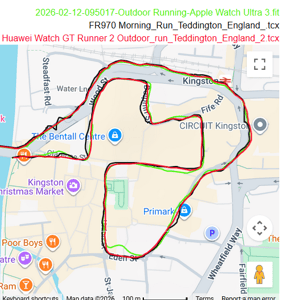
Tunnel Test
This 50m-long tunnel has no GPS, so watches either fail or use internal accelerometers to estimate positional change. Huawei has by far the best results in this tunnel.
Note: In key tests like this one, I did not have two watches close together. It does make a difference to accuracy. In this case the FR970 was held ove the left fingers simlualting correct anetenna direction.
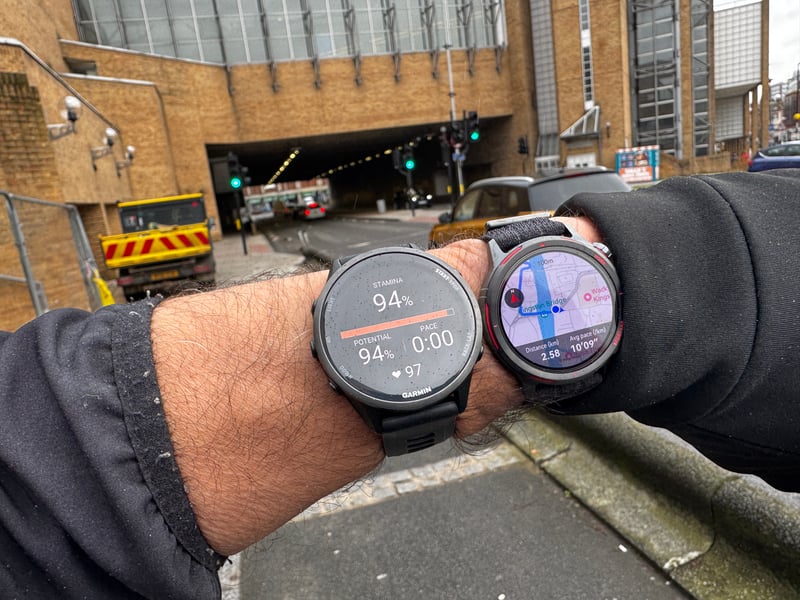
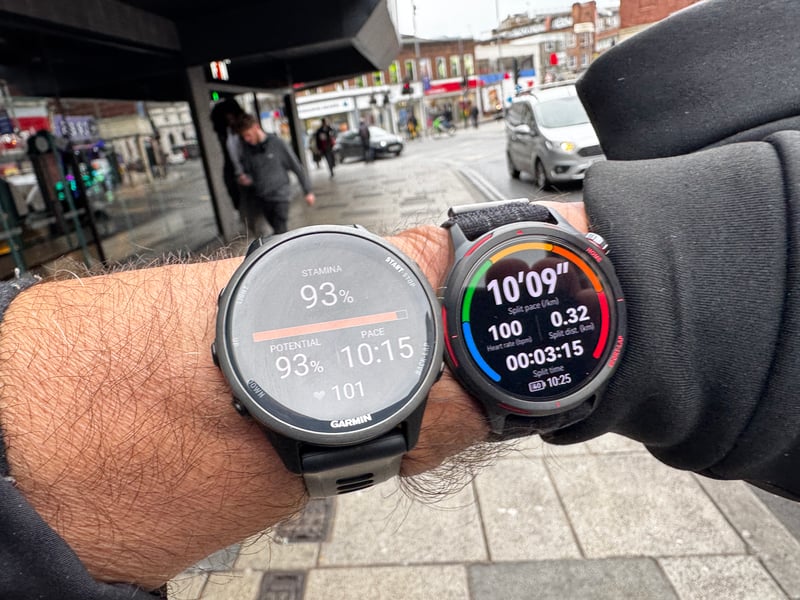
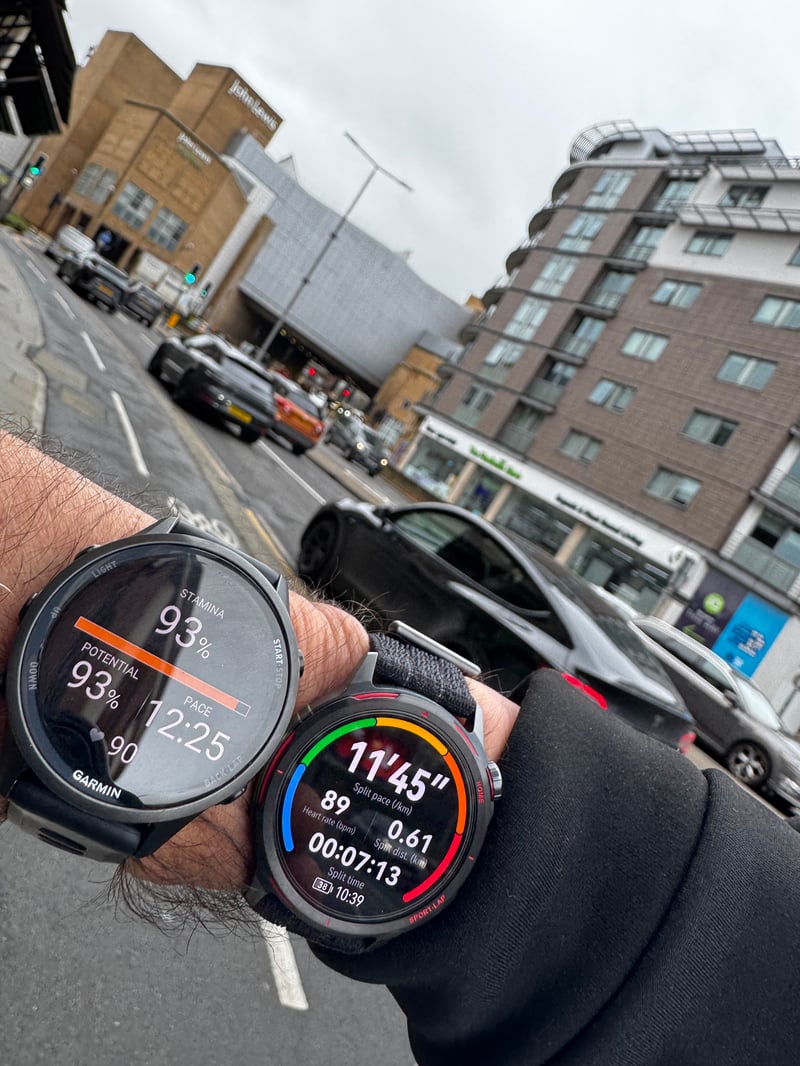
I did 3 tests through this tunnel on different days and in different directions. All of Huawei’s results are better than the rest. Specifically, when running straight and then into the tunnel, the results are best. As shown below, it’s nearly perfect by my historic standards here. However, the other devices are not so bad. It was interesting to note that if I change direction, round the sharp bend, then right into the tunnel, all devices generally perform worse than in the reverse direction. Huawei was less good in that direction, but still the best.
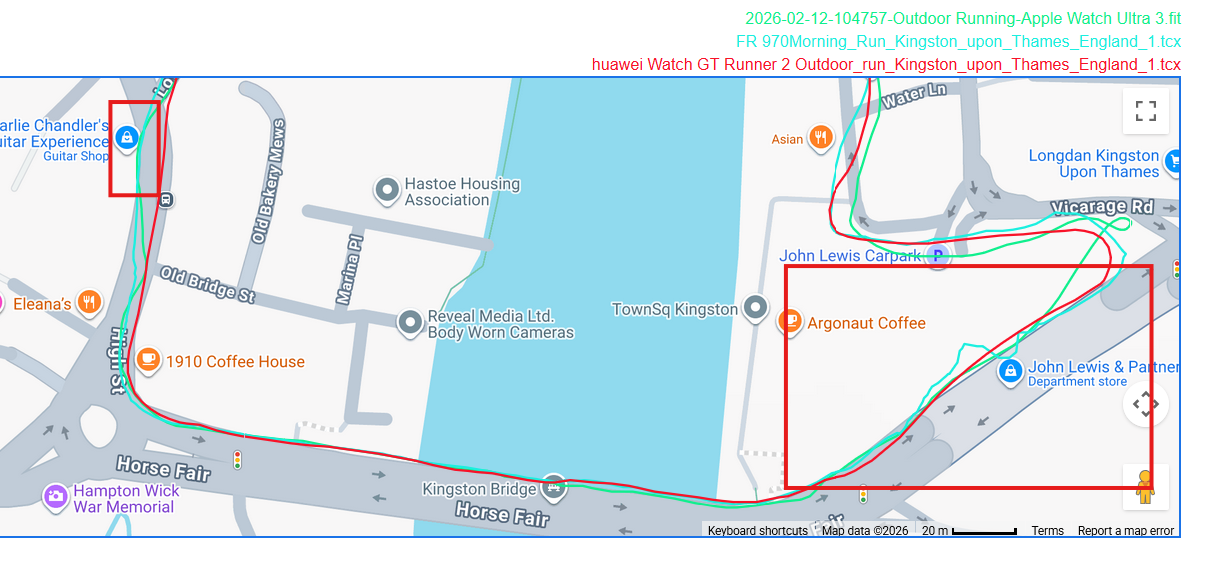
To the left of the image above, you can also see the Apple and Garmin veering leftward away from the wall I’m running next to. This is because they are confused by the distance gleaned from the reflected GPS signal from the wall to the right. Dual-frequency chipsets are supposed to eliminate that. They don’t, although they are noticeably better than previous-generation tech. This type of excellent performance was repeated elsewhere (e.g., the prior test above), and I would attribute Huawei’s excellence to its sensor fusion algorithm rather than to better handling of multipath (reflected and refracted) signals.
Tree Cover Tests
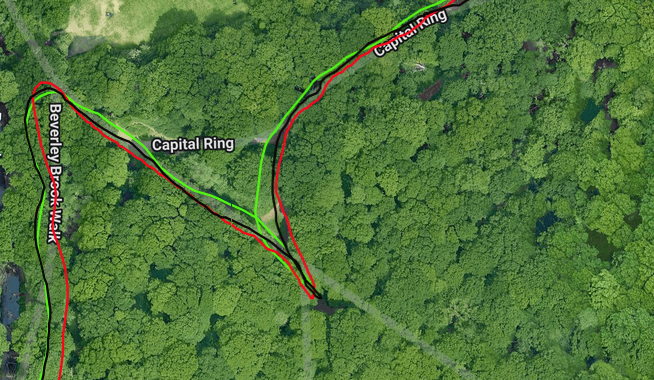
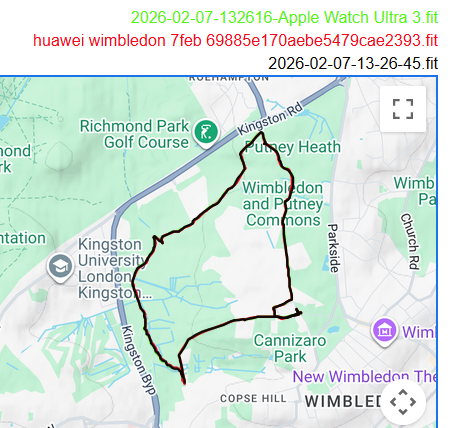
There’s not much to see here. Huawei performed perfectly in the trees and on the two hills along the route.
Heart Rate Accuracy
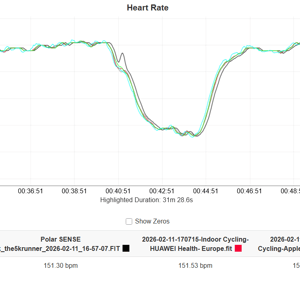
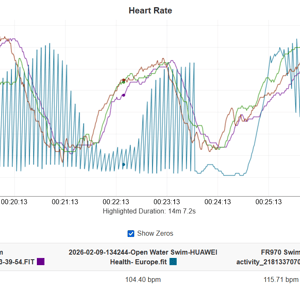
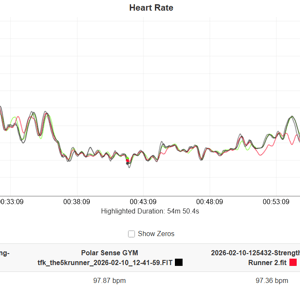
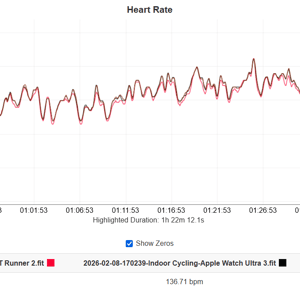
The wrist is the worst place for a PPG/OHR sensor to measure heart rate; results vary depending on physiology, environment and usage. Typically, I get chronically unusable results from all OHR sensors — Coros, Suunto, Garmin, Apple, Amazfit — with occasional gems of usefulness (I use a chest strap). Huawei was actually pretty good overall in my tests, almost to the point where I could use it for my own training. That might sound cynical or harsh, but it’s actually a compliment – I would never say that about any other wrist-based device, none have been good enough for me to use in my training (ever).
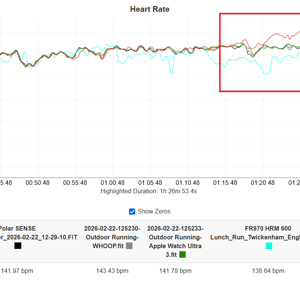
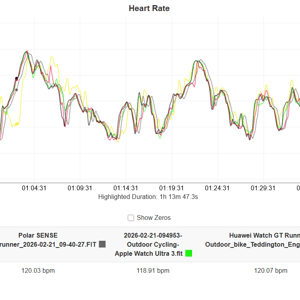
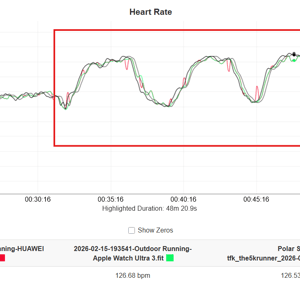
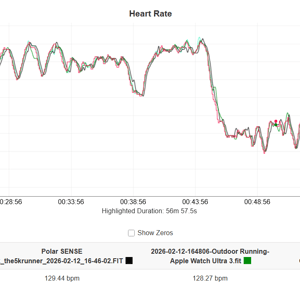
I tested against both peer and reference devices, including Apple Watch Ultra 3, Garmin Elevate Gen 5, Garmin HRM 600, Whoop MG and Polar SENSE. Even my new replacement HRM-600 let me down on a few of these tests, and the best results came from a bicep-worn Polar.
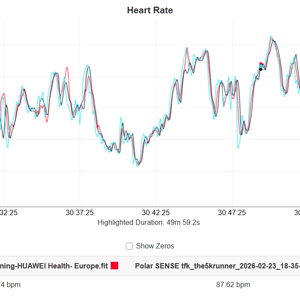
Nine test result charts are shown below as a representative cross-section of well over 20 hours of thorough testing, covering running (indoor and outdoor), yoga, cycling (indoor and outdoor), upper-body strength, gym cardio, pool swimming, and hiking — steady-state, strength, threshold, and short-intervals.
The Runner 2 failed at swimming and had about 10 minutes of overestimating during one steady-state run. The remaining tests showed good agreement with the reference. There were frequently mini spikes and troughs that were not dropouts — unlike the smoothed tracks you see on Apple Watch. They look odd on the charts, but I never noticed them during training, and the errors would likely not affect training load calculations. Huawei needs to fix it, though.
Other Sports
The watch’s name is the giveaway – Runner 2. That’s where its strength lies. So, although it does cover many other sports (I tested yoga, pool swimming, hiking, and others), some with the correct sport-focused metrics, it’s not quite geared up to handle them all as well as it might. e.g., there are triathlon and kite-flying modes, but no duathlon mode. The triathlon mode is fixed, suitable for your first triathlon, but not for serious triathlon training.
AI, Smart Training & Intelligent Marathon coaching
Runner 2 has a dedicated end-to-end Marathon ecosystem (Marathon coaching) and a broader adaptive system that’s been around for a few years.
Huawei seems to have the right components for Marathon training, including a live pacer, fuel/hydration reminders, calendarised adaptive workouts, and a database of key races. I had a few issues using it. Firstly, when I got the watch and had only completed some slow test runs, it wouldn’t let me create what I would consider a conservative plan, saying my target was too fast. Once I’d created a plan, I couldn’t delete it (master plan).
I recently created a new plan: I chose the London Marathon, but then had to enter the distance into the app – it should have known it was 42.2km. The resulting plan had 3 weeks of knowledge of my historic training volume, but got my workout target heart rate zones wrong (Z1, 140-159bpm?!?), even though they were set approximately correctly elsewhere. Going forward, the plan looked sensible, with appropriate progression and sharpening as we approached race day.
The Huawei Ecosystem – What’s Included? (including 3rd parties)
The Huawei ecosystem can be explained as distinct layers, ranging from external partnerships to on-device sensor capabilities.
- Third-party ecosystem — functional but dependent. Payments run through Curve Pay. Music streaming depends on a partnership with Tidal. Mapping falls back to Here WeGo. Travel is served by Trainline and Skyscanner. Fitness data is available via Strava, Komoot, Kocha, YouRun, RacePace, Intervals.icu, and Navikey, with Health Sync acting as a paid bridge for everything else. These are partner-dependent features rather than Huawei’s capability that multiple 3rd parties plug into.
- Proprietary services — Huawei fully controls the middle layer of the ecosystem: Huawei Music, Petal Maps, Mobile Cloud, Huawei Health and Huawei Wallet.
- Phone AppGallery — credible. The phone store carries meaningful names including WhatsApp, TikTok, Telegram, Viber, Snapchat, Amazon, Microsoft, Tidal, Deezer, Booking.com, Trainline, Skyscanner, Adidas, JD Sports, Lufthansa, Here WeGo and Petal Maps. Spotify, Instagram and Netflix are absent, though a Gbox workaround exists for Netflix.
- Huawei Health app — for the watch. The app handles watch face management, device and firmware updates, NFC payment setup via Huawei Wallet, on-watch music management and AppGallery for watch. Health+ adds subscription content including guided workouts, yoga, meditation and sleep music. Wellness tracking covers sleep, HRV, stress, menstrual cycle, hydration and weight. Social features include family health sharing, activity challenges and workout video sharing.
- Watch AppGallery. Beyond the watch face catalogue, meaningful third-party apps are limited to Petal Maps, Komoot, Kocha, YouRun, RacePace, Intervals.icu and Curve Pay.
- Watch sensor platform. The watch measures heart rate, HRV, SpO2, ECG, skin temperature, stress, and sleep stages, and it includes GPS, a barometer, an accelerometer, and a gyroscope.
The App & Connectivity Problem
The ecosystem and smartphone app together are the weak spot. It is an excellent, feature-rich app that covers a wide range of features, from instructor-led training to purchasable watchfaces. It is a reliable app that never crashes. But the experience falls short in several areas, where it doesn’t seem finished or organised, and it isn’t presented in a typical way for a Western running demographic.
- Payments are not yet working (Curve is promised, live at launch Feb 2026)
- Exports to FIT/TCX are promised
- Much of the translation is grammatically correct, but it uses non-standard terms like “COURSE” for a gym class/lesson rather than a running route/path.
- Simple outbound workout syncs seem to have started working only very recently. Still, inbound routes can only be automatically imported from Komoot into the app; the manual sync from there to the watch adds an extra step, similar to what many competitors (not Garmin) require.
- No external structured workouts or plans can be imported (e.g. TrainingPeaks)
- The app seems very much focused on general fitness and wellness, not on the runner experience – the running features are often there, just tricky to find (unlike on the watch, which is highly usable)
- First-time use requires tens of authorisation taps (slightly worse than with Google Pixel and its Watch‘s setup)
These constraints seem to limit potential buyers of the Watch to those who already own a Huawei phone, those who just want to use a basic app as a staging post for Strava, and those who want a modest level of running and fitness coaching.
Who It’s Really Competing With
Let’s cut through the initial marketing positioning. Huawei seemed to imply, prior to launch, that the competition was the Forerunner 970 and the Apple Watch Ultra 3. Reality: those are valid comparators for accuracy testing, with best-in-class accuracy. However, those two watches are quite a bit more expensive, and the real competitors are summarised in this table using my opinions or reviewer consensus, as appropriate.
| Category | GT Runner 2 | Garmin FR265 | COROS Pace Pro | Suunto Race 2 |
|---|---|---|---|---|
| Price | £349, €399 | £429, €499 | £299, €329 | £429, €499 |
| Case Size | 43.5 mm (small) | 46mm (medium) + 42mm (small) | 46mm (medium) | 49mm (med-large) |
| Case Material | Titanium (front case) | Polymer | Polymer | Polymer + steel bezel |
| Lens Glass | Kunlun Glass 2 | Gorilla Glass 3 | Mineral glass | Sapphire crystal |
| GPS Accuracy | Excellent- | Good+ | Good+ | Good |
| HR Accuracy | Good+ | Good+ (consensus) | Good | Good |
| Training Features | Good | Excellent | Very Good | Very Good |
| Build Quality | Excellent | Good | Good | Excellent |
| Ecosystem | Improving | Excellent | Very Good | Very Good |
| Battery (GPS) | 32 hours | 18–24 hours | 31 hours | 55 hours |
- Note: Coros might look like a better bet in that comparison, given the price. However, you get cheaper materials – a lens that will scratch, better sports features, but poorer smart features and links to own-branded phones.
- Note: Suunto’s awesome battery life comes at the cost, to some, of a large format watch – not great for thin wrists.
If you already own and like the original Runner, an upgrade is a good move, but it would be hard to recommend that anyone switch from an existing sports ecosystem to Huawei at this stage. For first-time buyers, your current smartphone brand is an important factor. Again, those with a Huawei phone will benefit from tighter links between it and the Runner 2. You’ll be good to get one, too.
Verdict
Huawei stated it wants to take the sports watch market seriously. With its huge installed base of Huawei-branded smartphones in Asia, its traditional Western rivals might want to start worrying about its potentially large, captive market share and the security, development, and improvements that would come with it.
The Watch itself is solid, and I am highly impressed. Its coloured ring is an unusual design quirk, but I really liked the look and feel of it, as well as the overall package. It generally oozes lightness and quality, important in a small-format sports watch. OK, there are relatively trivial accuracy issues that probably no one other than a couple of other reviewers will notice, but to me, they seem resolvable. I’m excited that this could quickly be tweaked to become the most accurate sports watch ever.
The watch interface is a joy to use compared to some other sports watch brands. It looks and feels similar to Amazfit. Prettier than Coros, but as intuitive. Far more intuitive and simpler than Garmin. Moderately more straightforward and intuitive than Suunto. It’s good. Usability is the feature no one talks about, but it’s the one you use every day.
Then there’s the smartphone app and ecosystem. I’ve noticed modest improvements since I reviewed the Huawei Watch GT 6 Pro a few months ago, and other reviewers have shared a similar view of the app over the past few years. It is reliable, feature-rich and never crashed during testing. If you plan to use the Strava or other links — which now appear more robust — for your post-workout logging, you will be fine. You will fine be, too, if your analytical needs are modest and you are happy to stay within the Huawei Health app. The smart and wellness features that sit beyond the running focus of this review appear promising in the app.
To do the excellent watch justice, the app needs more attention: better organisation, cleaner localisation, and a laser-sharp focus on the runner rather than the general fitness market.

Last Updated on 7 April 2026 by the5krunner
Reader-Powered Content

This content is not sponsored. It’s mostly me behind the labour of love, which is this site, and I appreciate everyone who supports it.
Support the site: Follow (free, fewer ads) · Subscribe (paid, ad-free) · Buy Me A Coffee ❤️
All articles are written by real people, fact-checked, and verified for originality. See the Editorial Policy. FTC: Affiliate Disclosure — some links pay commission. As an Amazon Associate, I earn from qualifying purchases.

tfk is the founder and author of the5krunner, an independent endurance sports technology publication. With 20 years of hands-on testing of GPS watches and wearables, and competing in triathlons at an international age-group level, tfk provides in-depth expert analysis of fitness technology for serious athletes and endurance sport competitors.

The forerunner 970 and fenix 8 are identical hardware other than cosmetic differences or software at the time of testing as they were not released at the same time. If you assume those should have identical performance for a given software generation, it seems like other variations and unreproducible factors like satellite position and transient interference is a larger effect than the difference between any of these watches for GNSS tracking performance within the rubric of your 10 mile testing. In other words these are all likely within the margin of error and functionally equivalent within the constraints of the 10 mile test rubric.
The Huawei industrial design seems quite a notch up from Coros.
garmin has had several quite significant gps firmware upgrades and those devies almost certainly have different antenna properties.
yes the case/design format is really good – like Suunto. Way better than a plastic coros.
Maybe the Garmin SKUs have different antennas but also Garmin is the leader in the antenna engineering. I don’t see a lot of evidence there is much practical performance difference across SKUs in the same generation except possibly something like the Venu X1 or Fenix 7 non-sapphire that do not have multi-band. But even then it’s usually de minimus.
I think these are all pretty good now for GNSS and it is a big lift to establish valid performance differences that exceed experimental error and conditions. You pretty much have to test them all simultaneously or the transient effects from the local weather, RF conditions, and variation in the GNSS constellation will dominate if you compare across different tests. You’d need a statistically large sample to control for that.
Your mileage may vary.
i dont think that’s true so much anymore. sure it was with gps or gps+glonass but not now. lots of satellites are avaialble.
yes the current generation do seem better. that’s why i was impressed by this huawei it was noticably better again (except when it wan’t)
anyway, that’s a positive as there are still wider impreovmeents to be had by all down the line (patents permitting)
Looks like a great watch but you can get 90%+ of its features with Huawei Watch Fit 4 pro for just 160 EUR.
Fit 4 pro is imho still the best watch atm if you consider price/performance/features ratio for runners with thin wrists.
Huawei really wants it, but it’s still afraid, just like Amazfit. In my humble opinion, the next model of a strictly running watch (a Pro model?) should have the following features:
1. 1.5″ screen
2. A battery ~1000mAh (Si/C)(see: Xiaomi Watch 5)
3. An LTE modem is a must
4. An equivalent of Garmin’s ClimbPro feature
5. Signing a contract with Revolut
6. The ability to charge while running (the charging pin is located on the left side of the watch)
If these conditions are met, Huawei/Amazfit have a chance to advance to the top league of sports watches. Right now, it’s a lead-heavy pursuit.
interested in #5, what do you mean there? #6 is too niche.
#1 yes, there needs to be multiple case sizes
#3 yes probably for this brand it is
#4 yes, amazfit has this sort of thing but not as deep as garmin’s.
as per the review tho, there are other fish that need frying first in the ecosystem.
#5 Revolut has 65 million customers Curve has only 6.
#6 This is not a niche thing, anyone who has 1% battery in their watch during training prays for it to recharge.😉
P.S. Give an example of such other fish?🤔
🙂
5 – yes i didnt understand what you meant. dealing with revolut would be better!
6. still a niche senario. ive been there. but invariably i’ve been there without a charger , so even if i had the potential to charge on the wrist i wouldnt have either the charging cable/puck or the battery (you can use your smartphone in many cases but i dont exercise with smartphone…obviously many do)
Herring
#6 We’re still misunderstanding each other.🙈 The charging port on the left side of the watch will allow you to charge the battery while you’re active. Here’s how I imagine it: you’ll have a small power bank in your pocket, shaped like an Apple Watch, connected via a retractable magnetic cable (old Apple laptops), and attached to an additional wristband. In my humble opinion, everyone would carry a mini power bank in their pocket/hand.
i thought something different years agao but with the same end result
repalceable batteries. ie the watch has a small continuous battery onbaord but also a larger battery which can be pressed, it springs out and can be repalced. yo could then carry multiple spares. I suspect my ‘idea’ isn’t easily waterproofed
Hola, pueden decirme dónde aparec el campo de potencia en el reloj o app ya que no lo encuentro? Muchas gracias
I have another idea: it’s an additional strap worn next to the watch, with a holder for an additional battery. We just need to figure out how to connect it to the watch: magnetically or with a cable?🤔
P.S. If any sports watch manufacturer (Garmin, Huawei, Amazfit, etc.) makes the charging port on the left side, third-party companies will be able to handle it. They’ll simply produce the above-mentioned additional battery capsules. I think such an additional battery, the size of the entire watch, could have a capacity of over 2000mAh. It’s worth fighting for! 💪🤞
wireless charging.
put it next to your heart. What could possibly go wrong?
Does the smart training plan require a subscription?