Garmin Epic: A New Way to Capture the Full Story of an Adventure
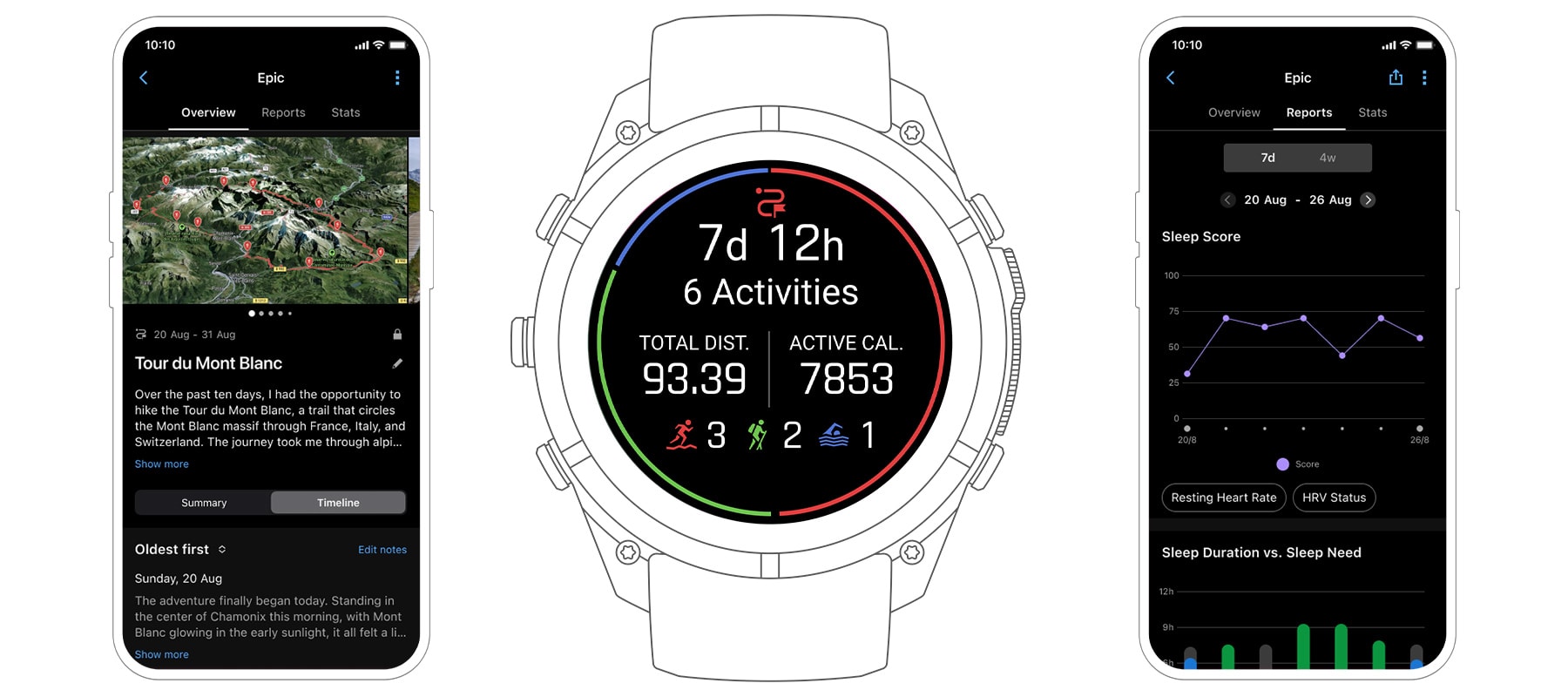
Garmin Epic is a feature that brings a whole adventure or period of activity together in one place. Instead of looking at individual activities, you can create an “epic” that combines your recorded activities, health data, notes and photos over a set period of time.
The idea is simple: an adventure is more than the activities you record on your Garmin device. An epic captures everything around those activities too. For example, a hiking trip might include:
- The hike itself
- Time spent at the campsite
- How well you slept
- Other activities such as swimming or yoga
- How your body responded to the trip
- Notes and photos from each day
This gives you a more complete picture of the experience, from the start of the journey to the end.
Rather than looking at one day of skiing, for example, Garmin Epic lets you capture the entire ski trip. For a stage race, it can bring all the race stages together so you can see the event as one complete experience rather than a collection of individual bike rides.
Common Ways to Use Garmin Epic
Multiday Hiking
For a hiking trip that lasts several days, you can combine all your activities into one epic. You can:
- Combine multiple hiking days into one epic
- Include other activities, such as swimming or mountain yoga
- See how you slept during the trip
- Track how your body responded throughout the adventure
This makes it easier to understand the trip as a whole, rather than reviewing each day separately.
Training Camps
Garmin Epic can also be useful for athletes attending a training camp. You can:
- Group several days of training into one epic
- See your total training volume across the camp
- Review how your fitness and recovery changed over time
This can provide a clearer view of the overall training load and how your body responded.
Cycling Stage Races
For a stage race, an epic can bring the entire event together. You can:
- View all race stages in one epic
- See how you recovered between stages
- Add notes about the overall race
- Keep separate notes for individual stages
- Collect photos from the entire event in one place
Instead of treating every stage as a separate activity, you can look back at the complete race experience.
Ski Trips
Garmin Epic can also capture an entire ski holiday. You can:
- See totals for a week-long ski trip
- View all your ski runs together on one map
- Add photos and notes throughout the trip
- Review how altitude affected your sleep
This gives you a single record of the entire trip rather than a collection of separate ski activities.
Where Can You See Your Epics?
On Your Garmin Device
Depending on your compatible Garmin device, you can manage and review an epic directly from your watch. You can:
- Start and stop an epic
- View planned epics
- See combined totals and charts while the epic is active
- Review the epic after it has finished
In the Garmin Connect App
Garmin Connect provides a broader view of your epic. You can:
- View combined charts and totals for all included activities
- See all activities on one combined map
- Navigate a course across multiple days while tracking your progress
- Share an epic directly from Garmin Connect
If an activity within an epic is shared using LiveTrack location sharing, followers can be directed to the Garmin Connect page, where they can see the full epic.
What Can You Review in an Epic?
Once an epic has been created, you can review the different parts of your journey in one place. This can include:
- All activities on one map — See where your entire adventure took place.
- Photos — View photos from the overall epic and from individual activities.
- Activity feed — See the activities from the entire epic in one feed.
- Daily notes — Record thoughts, experiences and other details throughout the journey.
- Performance and health reports — Review selected performance and health information across the epic.
Together, these features help turn activity data into a more complete record of the experience.
Technical Details and Limits
There are some limits to how Garmin Epic can be used:
- An epic can last for a maximum of 92 days.
- You can plan epic start dates up to 366 days in advance.
- You can have up to 5 future epics planned at the same time.
- You can enable LiveTrack location sharing for an epic.
- You can review completed epics on a compatible Garmin device.
Why Garmin Epic Matters
Most fitness tracking focuses on individual activities. You might record a hike, a bike ride or a ski session and then move on to the next one.
Garmin Epic takes a different approach. It recognises that some experiences cannot be understood by looking at one activity alone.
A multiday hike is not just a series of hikes. A training camp is more than a collection of workouts. A stage race is more than individual race stages. And a ski holiday is more than a list of ski runs.
By bringing activities, health data, photos and notes together, Garmin Epic helps you see the full story behind the data.
Summary
Garmin Epic gives you a way to capture an entire adventure or period of activity in one place. It combines tracked activities with health information, photos and notes to create a complete record of your experience.
Whether you are hiking for several days, attending a training camp, competing in a stage race or spending a week on the slopes, an epic helps you see the bigger picture. It turns individual activities and data points into a single story that you can review, relive and share.
Garmin Fenix 9 range
Every Fenix 9 and Fenix 9 Pro model, including AMOLED, Solar, and inReach variants across all sizes. One link to the full range.

Further reading
- Garmin Fenix 9 vs Fenix 8: which to buy
- Fenix 9: new features explained
- Fenix 9 features will pass to existing Garmin watches
- Garmin Fenix 9 Pro specifications
Last Updated on 3 October 2026 by tfk the5krunner
Small things I always use
- Garmin 90-degree charging adapter: Charges your Garmin from any USB-C cable. Essential when travelling. I use one.
- Body Glide: The blue anti-chafe stick swimmers and runners carry. I use it.
- Speedo earplugs: Fewer ear infections and no cold-water dizziness. I use them.
- Dryrobe Advance: My winter changing robe for open-water swims. I use one. A cheaper option is the AONYIYI changing robe.
- Maurten: Race fuel that stays easy on the stomach. I use them.
- Garmin charging puck: The quickest way to top up before a session. I use one.
- Injinji: Toe socks that stop rubbing, so you run more. I use them.
- Ultimate toe protectors: Stop black toenails on long runs. They work. I use them.
- Compressport R2 v2 calf sleeves: My calf sleeves of choice. I use them.
- Cellucor C4: My pre-workout before hard sessions.
- TPU tubes: Schwalbe Aerothan, Tubolito and Pirelli SmarTube. Light, tiny spares. I use all three.
- G8 insoles: Adjustable insoles that are good. I use them.
- Cycplus Cube: A 97g electric pump that gets a road tyre rideable in two minutes. I carry one. 5% off with code THE5KRUNNER.
Watches and sensors
- Polar H10: My daily driver for waking HRV.
- Polar Verity Sense: My backup arm-worn HR sensor.
- Nomad bedside charger: Charges my iPhone and Apple Watch overnight. I use it, and many of their bands.
- Train.Red: The best muscle oxygen sensor I’ve used.
- Tymewear: Accurate heart rate and reliable ventilatory zones. I use it to pace endurance rides over an hour.
- Garmin Forerunner 970: A pro-grade triathlon watch. I use this.
- Apple Watch Ultra 4: My daily smartwatch. No phone needed on rides.
- Garmin Fenix 9 Pro: I’ve just bought one.
On the bike
- Continental GP5000 for everyday riding, and Aero 111 on the front for special occasions.
- Helmets: Specialized S-Works Evade 3 for road riding, and Rudy Project Wing for TT-style races. I use both.
- Ravemen FR300: A front light that mounts under your Garmin or Wahoo. I use one.
- Wahoo TRACKR Radar: I use it on one bike and Varia on the other. They perform the same.
- Garmin Varia RTL515: Radar that warns you of cars from behind. I use this model.
- Wahoo ELEMNT Roam 3: The bike computer that’s easy to use. I use mine on most rides.
- Favero Assioma Pro RS2: Accurate power pedals that swap easily between bikes. I use this model.
Home and indoor training
- NPE Runn: Makes my basic treadmill smart, sending more accurate speed and distance to my watch and Zwift. I use it.
- Google Wifi: Keeps Zwift connected in my pain cave. I use it.
- Apple TV 4K: Zwift on the big screen. I use two.
- Google Nest Doorbell (wired, 2nd gen): My video doorbell, running in both Google Home and Apple Home. I use it.
Health, recovery and sleep
- FreeStyle Libre 3 Plus: Shows how my blood sugar responds to diet.
- hDrop: Measures my sweat loss in summer and indoors.
- Fourth Frontier Zone: Checks my heart under load in hard sessions.
- Oura Ring 5: My partner’s recovery tracker of choice.
- Kineon MOVE+: Red light therapy for niggles. It works.
- Eight Sleep: A cooling mattress cover my partner and I use nightly.
Reader-Powered Content

This content is not sponsored. It’s mostly me behind the labour of love, which is this site, and I appreciate everyone who supports it.
Support the site: Follow (free, fewer ads) · Subscribe (paid, ad-free) · Buy Me A Coffee ❤️
Written by real people, with AI assistance. Fact-checked and verified for originality. See the Editorial Policy. FTC: Affiliate Disclosure — some links pay commission. As an Amazon Associate, I earn from qualifying purchases.

tfk is the founder and author of the5krunner, an independent endurance sports technology publication. With 20 years of hands-on testing of GPS watches and wearables, and competing in triathlons at an international age-group level, tfk provides in-depth expert analysis of fitness technology for serious athletes and endurance sport competitors. ID

Most interesting: You can create Epics from past activities
Does this feature required Connect+ subscription?
i dont think so
I hope it’s not too trip-focused because I’m gonna abuse it to track my light activities and vitals during a fasting period 😀
It’s been a while since I was that impressed with a new Garmin release.
Garmin did something similar some 13 years ago in garmin Basecamp, garmin adventures, which allowed photos waypoints and tracks, but that was killed later. This might be stepping on some komoot Collections feature