
This is a weekly roundup of significant sports tech problems that the endurance community has encountered and, where possible, resolved. Each entry covers the issue, the affected hardware or software, and the current best fix or workaround known to the community.
Garmin Fenix 8 podcast volume stays at the alarm volume after an alarm or timer
Fenix 8 leaves the media volume at the alarm tone level after an alarm or timer fires while audio is playing. Acknowledging the alert does not return the volume to where the audio had been, so the level has to be set again by hand every time a timer goes off.
The behaviour is confined to Podcast mode. In Music mode the volume drops back to its previous level on its own once the alert has been acknowledged.
Garmin confirmed there is no user-configurable setting that restores the previous media volume after an alarm or timer has used the alarm tone volume, and said a watch consistently leaving media at the alarm level may be unintended behaviour. Garmin has since released software 23.31 and told the owner to update, saying it should resolve the situation. Nobody has confirmed the result yet.
This issue remains unresolved — if you have encountered it and found a fix, the discussion is open on r/the5krunner.
Garmin Forerunner 570 pool swim distance freezes then jumps several lengths on software 17.33
Forerunner 570 can freeze the displayed distance during a pool swim and then jump several lengths at once. One owner in a 25 metre pool sat at 175 metres for several lengths, then jumped to roughly 450 metres, close to the real total, before freezing again. A factory reset improved it slightly but did not stop it.
The fault is not limited to one model. A Forerunner 955 owner reported the same behaviour, and a third swimmer said his distance sometimes corrected itself later in the session and sometimes did not.
Recalibrating the compass is the fix that has held so far. The 955 owner recalibrated his and the freezing stopped. Garmin then asked the other two owners to try a recalibration, and one of them reported no distance problems at all on his next swim. Garmin asked anyone still seeing the fault afterwards to report back.
Suunto Race 2 Resources widget stuck at 90 to 99 percent with no stress recorded after hard training
Suunto Race 2 can leave the Resources widget sitting between 90 and 99 percent whatever the training load. One owner recorded a 36 round HIIT circuit session and the app logged zero hours of stress against 20.5 hours of recovery. Resources fell only to around 75 to 80 percent during the session, returned to near 90 percent while he sat on the sofa, and read 98 percent the next morning.
His six month chart shows the change clearly. From March to July on a Race S the figure moved realistically and dropped below 20 percent after hard sessions. From August on Race 2 it stopped falling below 60 to 70 percent. Another owner finished a two hour ride still showing 85 percent, and a third watched four hours of walking take him down to 80 percent before the figure climbed back to 90 within an hour.
Part of this is the baseline period. The watch needs time to learn an individual, and two to three weeks is the usual advice before reading anything into the numbers. The owner who raised it did not see Resources reach 40 percent until roughly six weeks in, and even then it returned to 88 percent within two hours of ordinary activity such as driving.
Setting the heart rate values by hand is the concrete fix. Suunto’s manual points out that resting heart rate defaults to 60 bpm and maximum heart rate is estimated from age, both of which are wrong for most trained athletes and will distort the stress calculation. Both can be changed under Settings, General, Personal, and Suunto recommends using the lowest heart rate measured during sleep as the resting value.
Suunto app 6.13.6 on Android stuck in a pairing loop with Ambit3 Peak
Suunto app 6.13.6 on Android puts the Ambit3 Peak into an endless pairing loop. The phone confirms the watch is paired, the app immediately starts pairing again, and the cycle repeats. Forgetting the device in Bluetooth settings, unpairing on the watch, a five button hard reset, clearing the app cache and data, reinstalling the app and starting from the watch all failed.
Other owners confirmed the same behaviour on different hardware, including a Pixel 8a, a Lenovo P2 running Android 14 and a Suunto Traverse. An iOS user on 3.14.0 with an Ambit3 Sport Sapphire got through pairing but found syncing very slow and intermittent.
Rolling back to 6.7.12 restored pairing. Sideloading the older APK let one watch pair and resync 35 activities in about 40 minutes. Google Play then pushed 6.13.6 back automatically and the loop returned, so anyone who rolls back also has to turn auto-update off. Suunto does not publish older builds and there is no official checksum to verify a mirror against.
Linux users had no fallback, because SuuntoLink over USB does not run on Linux and the phone app is the only way to sync activities, routes and settings. Suunto released 6.13.7 on 11 September and two Ambit3 Peak owners confirmed that pairing and syncing work again.
Garmin Fenix 8 rowing distance stops short of the Concept2 workout target
Fenix 8 stops recording a Concept2 rowing workout about three metres short of the target. A 5,000 m piece set on the PM5 comes out as 4,997 m on the watch every time, and the watch cuts off the moment the PM5 reaches zero remaining metres rather than waiting for the flywheel to run down. A Forerunner 965 and a Fenix 6 on the same rower never did this.
The fault only appears on workouts with a set distance. A plain Just Row session with no distance target records correctly. The PM5 is on firmware 262.067 from May 2026, and a factory reset of the watch made no difference.
Garmin said no other reports had come in, and asked the owner to remove the Concept2 PM5 under Settings, Sensors and Accessories, pair it again, and record another rowing activity. A second owner then posted a larger version of the same problem: rowing three 2 km intervals, his first came out at 2001 m and the other two at 2253 m and 2254 m, which skews a training log rather than just rounding a number down.
This issue remains unresolved — if you have encountered it and found a fix, the discussion is open on r/the5krunner.
Suunto Run interval workout synced from the app but not showing on the watch
Suunto Run does not show SuuntoPlus interval workouts that the app says are synced and pinned. One owner created a structured workout in the app, assigned it to the Running sport mode, found it under Sync to watch in My SuuntoPlus guides, turned Pin to watch on and synced. On the watch the guide appears nowhere, with no prompt before the exercise and no manual selection under Training mode or Exercise settings. He is on firmware 3.27.18 and had factory reset the watch that morning.
One reply said the feature is not compatible with Suunto Run. The owner disputed that, pointing at the product page and at a video showing an interval session running on the same watch, which leaves either a feature that has been withdrawn or a firmware regression.
A moderator whose own created workouts do sync asked whether a date had been set on the workout, and suggested trying one created without Pin to watch and dated for today. Two more owners have since confirmed the behaviour. One found interval workouts do not sync at all, and another said repeated unpairing and re-pairing changed nothing. A runner who has used native interval workouts daily since January said those still work, and that what broke is syncing plans in from outside platforms such as Runna and TrainingPeaks.
This issue remains unresolved — if you have encountered it and found a fix, the discussion is open on r/the5krunner.
Garmin Fenix 8 missing pool swim lengths in a 25 m pool after software 23.31
Fenix 8 drops whole lengths from pool swim intervals. One owner lost one or two lengths in every one of four consecutive sessions, with intervals that should have read 50 m logged as 25 m. During the swim the watch was still showing 25 m left to go after he had finished the full 50, so the miscount happens live rather than when the activity is saved.
Pool length decides whether it happens. Two sessions of more than a kilometre in a 50 m pool came out clean. A 700 m session in a standard 25 m city pool lost two lengths. The lost lengths have happened during drills and during ordinary freestyle, so stroke type does not explain it.
Garmin asked him to power cycle the watch and reset the swim activity to default settings. He did that and swam three more times: the 50 m pool sessions were correct and the 25 m pool session still lost lengths. Garmin then asked him to reinstall the software, which is done by holding the menu button, going to Watch Settings, System, About, pressing the Light button about eight times and selecting Reinstall Software. He has since moved to 23.31 and reproduced the fault, losing 25 m on two separate 50 m intervals. A second owner reports the opposite error on an Enduro 3, where the watch adds one or two lengths.
This issue remains unresolved — if you have encountered it and found a fix, the discussion is open on r/the5krunner.
Suunto 9 Peak Pro loses Polar Verity Sense heart rate as soon as the activity starts
Suunto 9 Peak Pro pairs with a Polar Verity Sense, shows a pulse on the start screen, then loses it the moment the activity begins. The heart rate field goes to dashes and stays there, and the saved activity has no heart rate data at all. The pulse shown before the start never changes, so the armband delivers one reading and the link then dies.
Polar firmware 3.0.15 is the common factor. Polar withdrew that build shortly after release, and the timing matches when the problem started for the owner who raised it. Polar has since published 3.0.16, which installs through the Polar Flow app over Bluetooth.
Updating to 3.0.16 has not fixed every case. The original reporter installed it and saw no change, and neither did a FlowSync factory reset of the armband. The Polar Beat app on his phone connects to the same armband without any problem, which points at the link between the armband and the watch rather than at the sensor.
Stopping the exercise and starting it again, two or three times in a row, eventually gets the heart rate to appear on a Vertical, and once it does it usually holds for the rest of the session. Similar reports have come in from a Vertical 1, a Vertical 2 that buzzed every three minutes through a 10 km run as the connection dropped and recovered, and a second 9 Peak Pro after Polar Flow forced a firmware update.
Garmin Forerunner 970 audio cuts out through AirPods after software 18.29
Forerunner 970 stops sending audio to AirPods after software 18.29. Using any playback control, skip forward, skip back or pause, kills the sound. The watch screen carries on as though the track is still playing and there is nothing visible to show that anything has gone wrong.
The watch speaker still works, and the same AirPods worked daily with the same watch until the update, so the fault sits in the Bluetooth audio path rather than in the media files or the app.
Disconnecting and reconnecting the headphones restores the sound. That has to be repeated every time a playback control is touched, which makes it a way to finish a run rather than a fix. Garmin asked for a video, and the owner replied that there is nothing a video can capture, because the display looks normal while no audio comes out.
Fenix 8 owners are reporting related audio problems on software 23.31, with frozen music screens and playback volume roughly half what it was before. On the Forerunner side the separate voice and notification volume sliders have gone from the settings menu, and Garmin has said the update changed the volume control experience without confirming whether the missing sliders are intentional.
Garmin Edge 840 lost the entire ride file when saving a multi-day ultra
Edge 840 recorded 630 miles and 61 hours of Race Across the East without missing a beat, then lost the whole activity at the moment of saving. Nothing appears in history for 24 to 26 June and there is no FIT file in the Activity folder. Two file recovery tools found nothing to restore.
Two other riders have lost event files the same way, one a 2000 km event ride and one a Race Across Austria activity. Garmin Support told one of them to create a new activity every 200 km, which is no use for a single continuous event.
The TempFIT folder is the first place to look, because the file is sometimes still sitting there when the Edge is connected over USB. One rider found every folder on his unit empty, and because the Edge now presents itself over MTP rather than as a mass storage drive, ordinary file recovery tools cannot scan it. The encrypted ramdumpc1.zip found on the device holds crash debugging data about which module failed, not the activity itself.
Riders who record long events now save at the end of each day and merge the daily files afterwards with FitFileTools or my free FIT file join tool, and run a second recording device alongside the Edge. That second device is impractical for anyone whose charging time during an event is short.
This issue remains unresolved — if you have encountered it and found a fix, the discussion is open on r/the5krunner.
Suunto Smart Heart Rate strap freezes on one heart rate value about 30 minutes into every session
Suunto Smart Heart Rate strap reads correctly for the first 30 minutes of a session and then sticks on a single value for the rest of the workout, whatever the effort. One owner had used his for three months without trouble before it started. He replaced the battery three times to rule out a dying cell and cleaned the snap connectors with a soft toothbrush, and neither changed anything.
The likeliest cause is the watch losing the Bluetooth connection to the strap and then failing to reconnect, described in the thread as a long-standing fault in Suunto’s Bluetooth firmware rather than anything wrong with the strap. A replacement strap does not solve it: one owner had his exchanged and the new one behaves identically with a Suunto Ocean.
Rebooting the watch regularly is the only thing that has helped. One Race S owner reboots weekly or more often and finds that keeps the dropouts down.
A related result appears when recording to the strap’s own memory with the watch left in a locker room. The heart rate graph in the saved session starts part way in rather than at the beginning, and it happened on two separate sessions.
Wahoo ELEMNT ROAM 3 map hides paths before trails when you zoom out
Zoom the ELEMNT ROAM 3 map out by one level and the wider paths disappear while the narrow dashed singletrack stays drawn. One rider posted screenshots and a video of a ride where the paths he was actually on vanished while much smaller trails remained visible, leaving him zoomed in so tightly that he could not see his route options ahead.
Wahoo support told him the roads and paths on his screen are not large enough to remain visible at that zoom level. His answer is that the dashed trails are smaller still and survive several zoom levels further out, and that the map in the Wahoo phone app draws the same area correctly.
Enabling the bike lanes layer is the workaround. Some paths are classed as bike lanes in the map data and that layer stays visible further out, so part of the network comes back. Plenty of paths are not tagged that way, so it only goes so far.
The underlying map data is OpenStreetMap, which neither Wahoo nor RideWithGPS can edit on a rider’s behalf. Riders who find bad data can file an OSM note with a photo and a GPS tag using StreetComplete on Android, and a volunteer usually corrects it later. Another rider could not reproduce the behaviour on his own MTB ride, so how a given area is tagged appears to decide whether you see it.
Garmin Fenix 8 intensity minutes stuck at one or two minutes and recovery time at zero after software 22.35
Fenix 8 on software 22.35 finished a Zwift ride and recorded no intensity minutes and no recovery time at all, where the same kind of session a week earlier had worked normally. A second owner hit the same thing on the same firmware.
The numbers are not always zero, they are often just far too low. One Fenix 8 AMOLED owner has been getting one or two minutes of intensity at most since 21.39, including a single minute credited for a two hour strength session, and 22.38 changed nothing. A Fenix 8 Solar on 22.44 shows a few minutes where there should be hundreds. Recovery time has been sitting at 0 days on a Fenix 8 Pro since 22.35, and an Instinct 3 shows the same undercount for walks and jogs that never drop below the right heart rate zone.
A hard reboot cleared it for one owner after months of bad numbers, and that is the only fix anyone has confirmed.
Garmin’s replies point at a separate cause that catches indoor riders. Activities recorded by third-party apps, Zwift and the Tacx apps included, never earn intensity minutes at all. Wearing the watch, or pairing the strap to the watch and broadcasting from there, still lets the elevated heart rate count, but it is credited against your resting heart rate rather than attached to the activity. The watch wins as primary wearable, so a watch sitting in low power mode can log a lower heart rate than the strap, and a strap has to be added as a standalone device in Garmin Connect and synced after the session before its data reaches the daily graph. One owner says Garmin has known about the underlying fault for some time and an update is due in November.
Suunto app custom widget shows a different training load value from the built-in training load widget
Suunto app draws a different training load figure in the new customisable widget than it does in the built-in training load widget, from the same data. One owner set his second widget to show training load as a curve and could not get the two to agree. Another reproduced it and measured a gap of about two percent, which he puts down to one widget rounding each day before adding them up and the other adding first.
The sport filter behind those widgets produces the bigger error. A widget comparing ascent this year against last year returned 358 m, nowhere near the real total, because a single sport type was still selected. Deselecting Running to pull in every sport fixes it on Android.
On iOS the same step does nothing. One owner deselected Running and the widget kept returning the same wrong number, which leaves iPhone users with no way to include hiking ascent in the comparison. Another found the same and reckons some metrics are simply not offered for every sport.
A related app and watch TSS mismatch was raised with Suunto customer service and never followed up, so the widget behaviour is being reported through the Beta app feedback route instead.
Wahoo TICKR X bought used still has the previous owner’s offline sessions stored
A used TICKR X arrives with the previous owner’s offline sessions still stored on it and no menu option anywhere to wipe them. One buyer tried resetting it by flipping the battery and found the old sessions still in memory.
The battery flip only counts as a factory reset if it is done in the right order. Take the battery out, put it back in upside down, leave it about three seconds, then take it out again and refit it the correct way round. That is the reset for most Wahoo sensors, and a partial version of it achieves nothing.
Syncing is the other route out. The strap clears its internal memory once the stored sessions have uploaded successfully, so connecting it to Wahoo Fitness and letting the transfer finish should empty it. That does mean a stranger’s sessions land in your own history, which is why the buyer is considering a separate account on an old phone to absorb the transfer.
Suunto Vertical 2 routes disappear from the watch an hour after syncing from the app
Routes marked “use in watch” in the Suunto app sync across and then vanish within the hour. One owner checked a route was loaded an hour before a race and found the route list on the watch empty by the time she started. She had moved from a Vertical to a Vertical 2 assuming the older watch was at fault, and the behaviour followed her to the new one.
The source of the route makes no difference. Routes created in the Suunto app, imported from Strava and imported from Komoot all disappear together. A 9 Peak Pro owner has had the same thing for about a year, checking the night before a race or an hour before a run and finding the list empty, with no pattern to when it happens.
A manual sync from the phone brings them back. One owner had to force a sync twice one morning before the routes reappeared, which is fine at home and useless a few minutes before a start in heavy rain.
The trigger now looks like the activity upload. One owner checked the watch first thing and the routes were there, went to the gym, and once the cross trainer session had transferred to the app the routes had gone. Both affected users are on iOS with an iPhone 13, which is why a moderator suspects the app rather than the firmware and has asked for logs. Logs are sent from the app under profile, settings, scroll to the bottom and send logs to Suunto, followed by an email to su*****@****to.com from the address on your Suunto account.
Garmin Fenix 8 wrist heart rate sensor stopped working after software 23.31 with no green lights
Fenix 8 loses wrist heart rate immediately after 23.31 installs and the green LEDs on the back of the case stay off. One owner finished a workout with every sensor behaving, accepted the update, and the optical sensor was dead as soon as the watch rebooted.
The obvious steps do nothing. He cycled the wrist heart rate toggle off and on, powered the watch down and up three times, synced with Garmin Connect and reinstalled the software. The sensor stayed dark through all of it.
A long power-off brought it back. Holding the Light button until the watch shut down, leaving it off for 90 seconds, then starting it again restored both the optical heart rate sensor and the Pulse Ox sensor. A second owner on a 51mm AMOLED, where the dead sensor also took out stress and the rest of the daily health data, fixed it by waiting longer than 90 seconds after a forced restart before powering the watch back on.
Garmin Fenix 8 battery estimate halved after software 23.31
The battery days estimate drops by roughly half the moment 23.31 installs, while the charge percentage stays where it was. One Fenix 8 47mm AMOLED fell from 12 days to 6 at around 64 percent, running a stock watch face with the always-on display off and the voice assistant already disabled.
The ratio is consistent across the replies: 21 days to 12, 14 to 7 on a Quatix 8, and 16 to 8 after charging to full following the update. A 51mm AMOLED shows it with the same settings.
A soft reset does not shift it. The long power button hold left the estimate where it was, and one owner measured 8 percent system drain overnight with the watch off his wrist, 6 percent of that filed under Other, so the shorter figure looks like real consumption rather than a display error.
Turning OK Garmin off is what restored it. The Quatix 8 owner switched the voice assistant off, powered the watch down and up, charged to 100 percent and had his usual 14 days back. Another went from 12 days to 23 with no restart at all, and can move the estimate between the two figures just by toggling OK Garmin on and off.
Garmin Fenix 8 Bluetooth audio broken with AirPods after firmware 23.31
Firmware 23.31 for the Fenix 8 broke Bluetooth audio for owners running AirPods Pro 3. Audio crackles the moment a track is skipped and cuts out completely after a second skip. The skip button often needs several presses before it registers, and play and pause can take two or three taps to respond. One owner described the watch producing distorted noises and freezing music mid-session during a training run, and a second confirmed the same pattern on runs from 25 minutes to over an hour.
The same AirPods pair without trouble to an iPhone, a Pixel phone, a Pixel Watch 5 and a Windows PC, which puts the fault in the watch firmware rather than the headphones. Garmin support has asked for logs and acknowledged the reports without giving a timeline.
Rolling the firmware back to an earlier version is the only thing that has restored clean audio, and it does not last once the watch pulls 23.31 back down through an automatic update. A separate thread traces the same behaviour back through 22.44, with owners there choosing to stay on the older release.
This issue remains unresolved — if you have encountered it and found a fix, the discussion is open on r/the5krunner.
Suunto Vertical 2 battery draining fast and dropping into power-save mid-run
Suunto Vertical 2 owners are reporting battery behaviour that swings wildly between charge levels. One watch fell from 32 percent to dead in five hours during a run, then slowed its drain rate once the charge sat lower, which is the opposite of how the battery should behave. The watch also dropped into emergency power-save mode mid-run before shutting down completely, and the same owner measured a 10 percent overnight drain with nothing running except sleep tracking.
One reply in the thread argues the watch has no proper way to monitor or manage battery status, and that the percentage shown on screen does not reliably reflect the charge left in the cell. A soft reset after a full charge was suggested as general troubleshooting rather than a fix for the drain.
The one change that produced a measurable result came from the phone side. Turning off background app refresh for the Suunto app dropped the overnight drain from 10 percent to 2 percent the same night. The mid-run drain is what still matters most, since the owner who raised it has a five to seven hour run planned and needs to trust the battery reading rather than get caught by an emergency shutdown partway through.
Garmin Forerunner 570 pace freezes at 0:00 during intervals
Forerunner 570 owners have been dealing with the current pace field freezing at 0:00 per kilometre during fast running, while average pace keeps updating normally in the background. One runner pinned the trigger to running faster than roughly 3:50 per kilometre, and reported that power data recording stops at the same time as the pace freeze. The fault shows up most often during interval sessions with pace targets.
Installing 17.37, the latest firmware available at the time, did not resolve it, so this was not a case of simply updating to the newest release.
Pausing the activity and resuming it got pace and power data moving again mid-run, though the pause had to be repeated every time the freeze came back during a session.
Garmin has since confirmed a permanent fix. Software version 18.29 for the Forerunner 570 series includes a fix described as addressing pace and speed dropouts during interval training, which matches the symptoms reported in the thread.
More from last week’s Fix Files roundup.
Browse every issue in the archive at the Deep Dive Fix Files hub.
Last Updated on 1 November 2026 by tfk the5krunner
Small things I always use
- Garmin 90-degree charging adapter: Charges your Garmin from any USB-C cable. Essential when travelling. I use one.
- Body Glide: The blue anti-chafe stick swimmers and runners carry. I use it.
- Speedo earplugs: Fewer ear infections and no cold-water dizziness. I use them.
- Dryrobe Advance: My winter changing robe for open-water swims. I use one. A cheaper option is the AONYIYI changing robe.
- Maurten: Race fuel that stays easy on the stomach. I use them.
- Beet It Sport nitrate shots: Beetroot shots I take in the days before a race. I use them.
- Garmin charging puck: The quickest way to top up before a session. I use one.
- Injinji: Toe socks that stop rubbing, so you run more. I use them.
- Ultimate toe protectors: Stop black toenails on long runs. They work. I use them.
- Compressport R2 v2 calf sleeves: My calf sleeves of choice. I use them.
- Cellucor C4: My pre-workout before hard sessions.
- TPU tubes: Schwalbe Aerothan, Tubolito and Pirelli SmarTube. Light, tiny spares. I use all three.
- G8 insoles: Adjustable insoles that are good. I use them.
- Cycplus Cube: A 97g electric pump that gets a road tyre rideable in two minutes. I carry one. 5% off with code THE5KRUNNER.
Watches and sensors
- Polar H10: My daily driver for waking HRV.
- Polar Verity Sense: My backup arm-worn HR sensor.
- Nomad bedside charger: Charges my iPhone and Apple Watch overnight. I use it, and many of their bands.
- Train.Red: The best muscle oxygen sensor I’ve used.
- Tymewear: Accurate heart rate and reliable ventilatory zones. I use it to pace endurance rides over an hour.
- Garmin Forerunner 970: A pro-grade triathlon watch. I use this.
- Apple Watch Ultra 4: My daily smartwatch. No phone needed on rides.
- Garmin Fenix 9 Pro: I’ve just bought one.
On the bike
- Continental GP5000 for everyday riding, and Aero 111 on the front for special occasions.
- Helmets: Specialized S-Works Evade 3 for road riding, and Rudy Project Wing for TT-style races. I use both.
- Ravemen FR300: A front light that mounts under your Garmin or Wahoo. I use one.
- Wahoo TRACKR Radar: I use it on one bike and Varia on the other. They perform the same.
- Garmin Varia RTL515: Radar that warns you of cars from behind. I use this model.
- Wahoo ELEMNT Roam 3: The bike computer that’s easy to use. I use mine on most rides.
- Favero Assioma Pro RS2: Accurate power pedals that swap easily between bikes. I use this model.
Home and indoor training
- NPE Runn: Makes my basic treadmill smart, sending more accurate speed and distance to my watch and Zwift. I use it.
- Google Wifi: Keeps Zwift connected in my pain cave. I use it.
- Apple TV 4K: Zwift on the big screen. I use two.
- Google Nest Doorbell (wired, 2nd gen): My video doorbell, running in both Google Home and Apple Home. I use it.
Health, recovery and sleep
- FreeStyle Libre 3 Plus: Shows how my blood sugar responds to diet.
- hDrop: Measures my sweat loss in summer and indoors.
- Fourth Frontier Zone: Checks my heart under load in hard sessions.
- Kineon MOVE+: Red and infrared light for sore knees, Achilles and other joints after hard training. I use it.
- Oura Ring 5: My partner’s recovery tracker of choice.
- Eight Sleep: A cooling mattress cover my partner and I use nightly.
Reader-Powered Content

This content is not sponsored. It’s mostly me behind the labour of love, which is this site, and I appreciate everyone who supports it.
Support the site: Follow (free, fewer ads) · Subscribe (paid, ad-free) · Buy Me A Coffee
Written by real people, with AI assistance. Fact-checked and verified for originality. See the Editorial Policy. FTC: Affiliate Disclosure — some links pay commission. As an Amazon Associate, I earn from qualifying purchases.
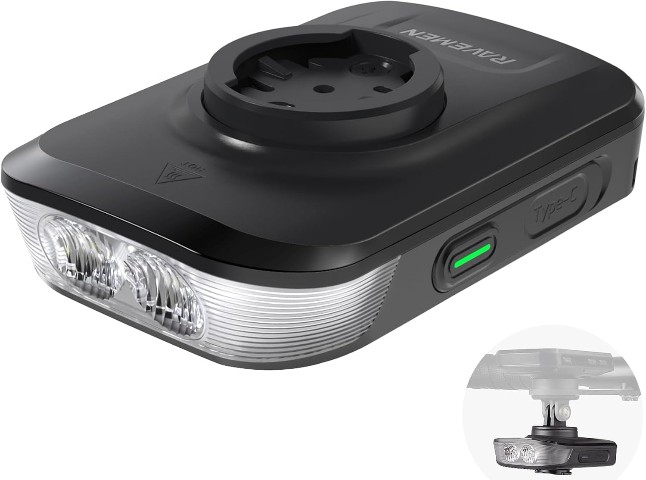
RAVEMEN FR1500SE
1500 lumen front light that mounts under your Garmin or Wahoo, keeping your bars clean.
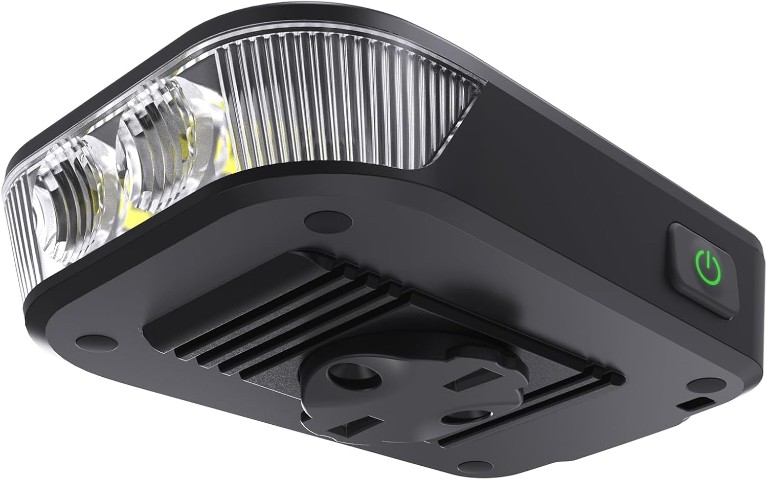
RAVEMEN FR500
500 lumen front light that tucks under your bike computer for a tidy cockpit.

tfk is the founder and author of the5krunner, an independent endurance sports technology publication. With 20 years of hands-on testing of GPS watches and wearables, and competing in triathlons at an international age-group level, tfk provides in-depth expert analysis of fitness technology for serious athletes and endurance sport competitors. See the gear tfk uses. ID
