Modern Garmin watches offer generous internal storage for onboard mapping, but preparing a watch from a Mac is surprisingly difficult. Many current Garmin models use Media Transfer Protocol (MTP) for file transfers. Unlike Windows, macOS does not natively mount MTP devices as accessible drives in Finder.
While Garmin Express handles official updates and map purchases, it provides no interface for third-party map downloads. When a runner or hiker wants to install custom terrain or regional maps, they face a frustrating barrier: the watch charges via USB, but Finder refuses to display it as a storage volume.
Resolving this typically requires third-party MTP file browsers, manual ZIP archive extraction and deep folder navigation, a technical barrier that deters many from using custom maps altogether.
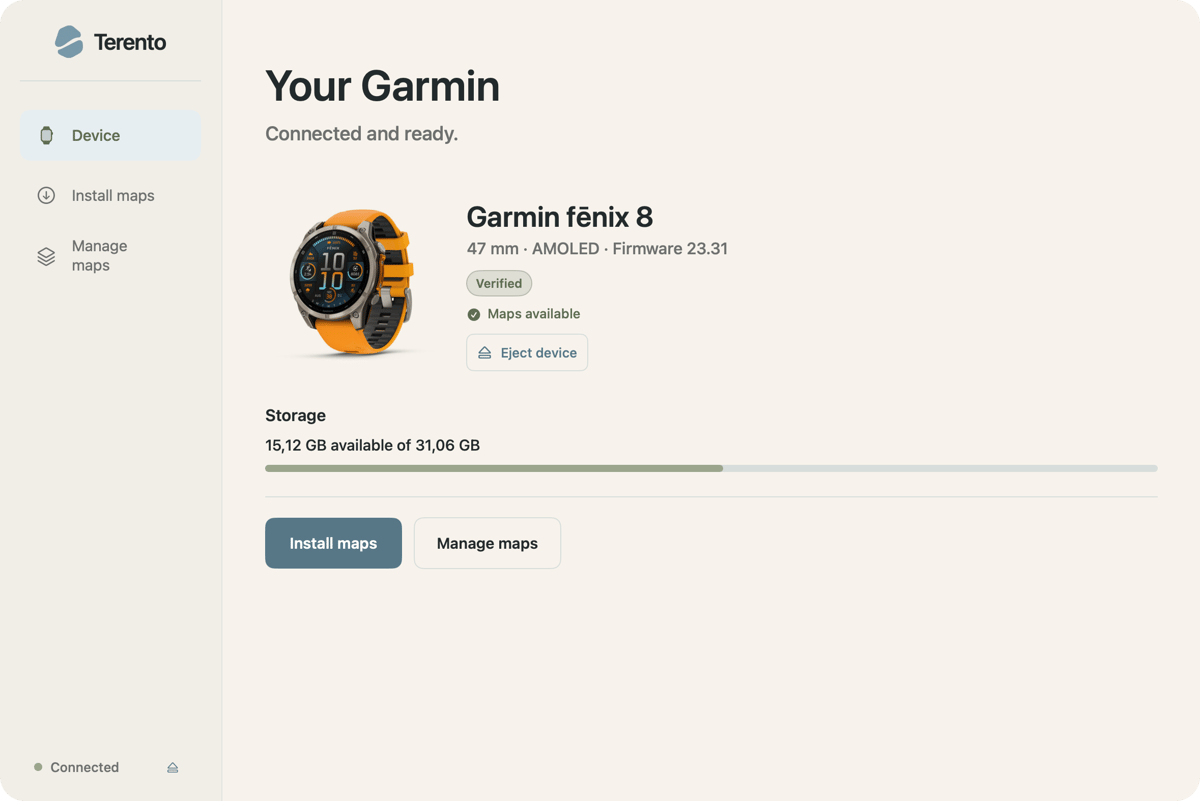
Enter Terento: open-source map management for macOS
Terento is a free, open-source macOS desktop application designed to eliminate the friction between Mac computers and Garmin watches. Created by developer Gediminas, a longtime Garmin user who regularly relies on custom maps for hiking, the app consolidates browsing, downloading, extracting and transferring custom maps into a single interface.
Instead of requiring separate MTP utility programs, which are often branded for Android devices and confuse Mac owners, Terento manages the entire pipeline natively on macOS.
How Terento works
TL;DR: Terento lets Mac users find, install and manage custom third-party maps on MTP-compatible Garmin watches. It handles everything natively through a built-in catalogue or local .img files without using Finder or separate MTP file browsers.
The app presents a unified interface where watch owners can connect their device, select a map provider and transfer files directly over USB.
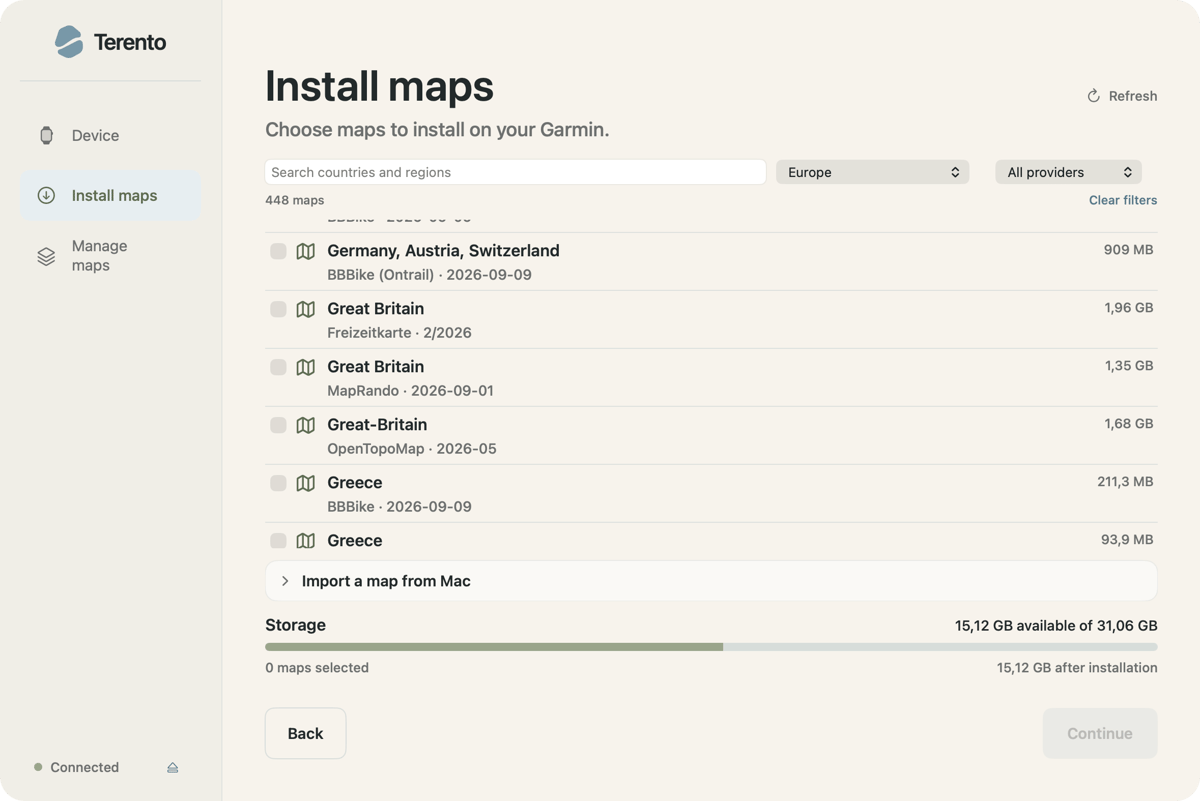
The complete installation workflow consists of three automated phases:
- Detection: Terento recognises connected MTP-compatible Garmin devices and checks available storage space.
- Preparation: The athlete selects a region from the internal catalogue or loads a local .img map file from the Mac, and Terento automatically downloads and extracts the archive.
- Transfer: The app writes the correctly structured .img file directly to the appropriate watch system folder and verifies transfer integrity.
Worked example: installing a 129.2 MB BBBike map on a Garmin fēnix 8
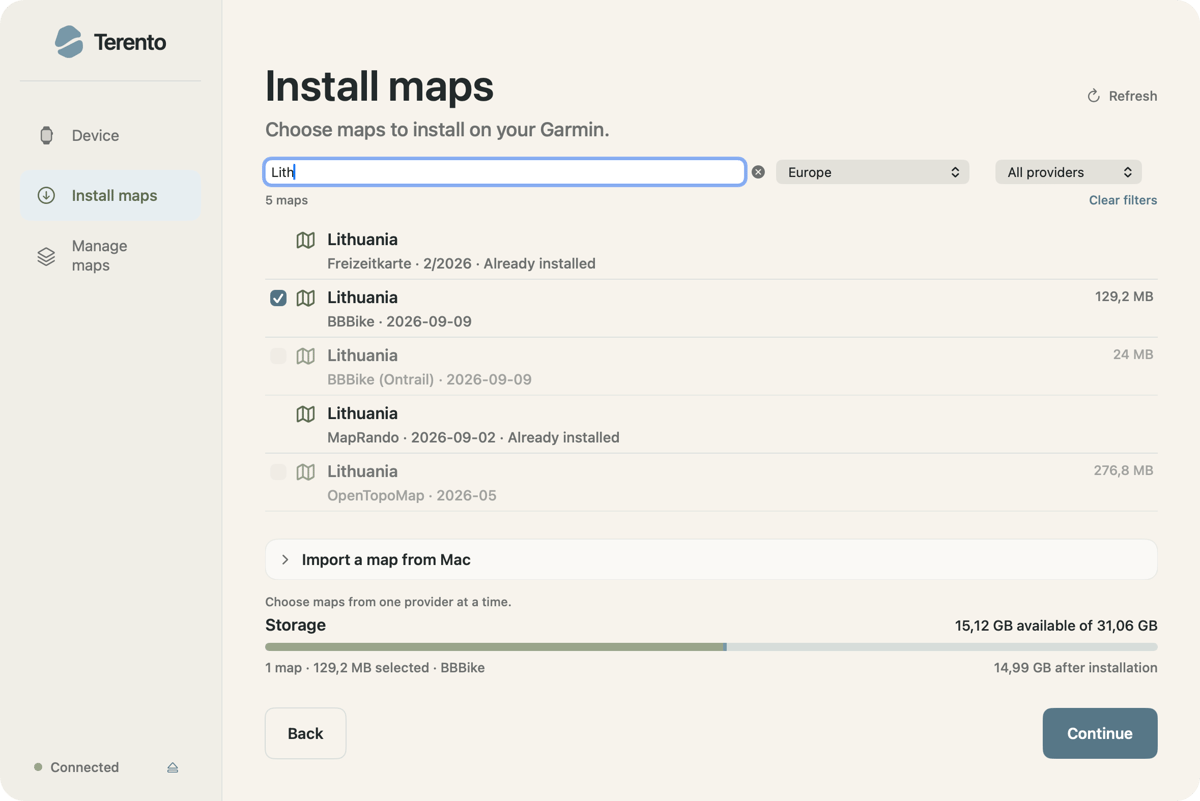
To see how Terento simplifies the workflow, consider a real-world scenario: preparing a Garmin fēnix 8 (47 mm AMOLED) for an upcoming outdoor event.
Connection and storage check: the fēnix 8 is connected to an Apple Silicon Mac via USB. Terento instantly detects the watch, reads Firmware version 23.31, and reports 15.12 GB of available storage out of 31.06 GB.
Map selection: under the Install maps tab, searching for “Lithuania” displays available options across providers. Selecting the BBBike map release shows an exact size of 129.2 MB.
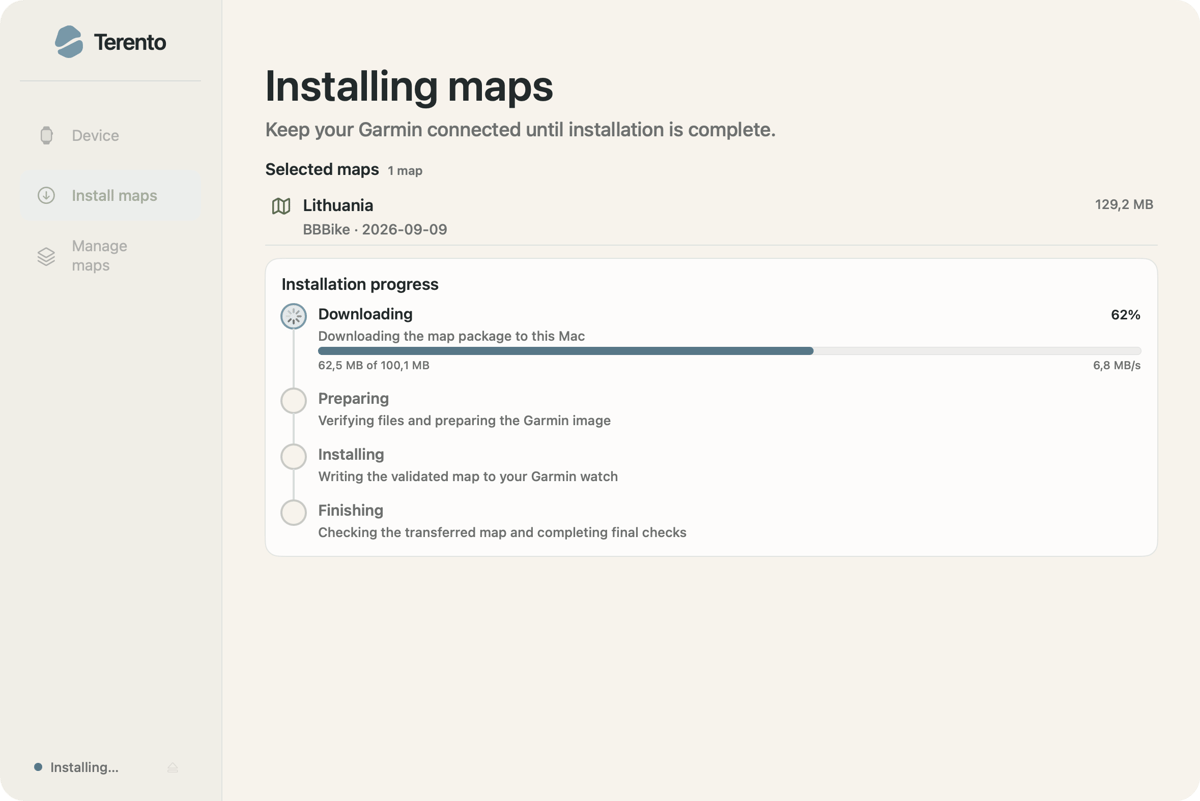
Automated pipeline: clicking Continue and Install maps initiates Terento’s four-stage installation workflow.
- Downloading: pulls the map package directly to the Mac at high speed (for example, 6.8 MB/s).
- Preparing: verifies the files and prepares the Garmin image format.
- Installing: writes the validated map directly to the watch over MTP.
- Finishing: conducts final checks to ensure transfer integrity.
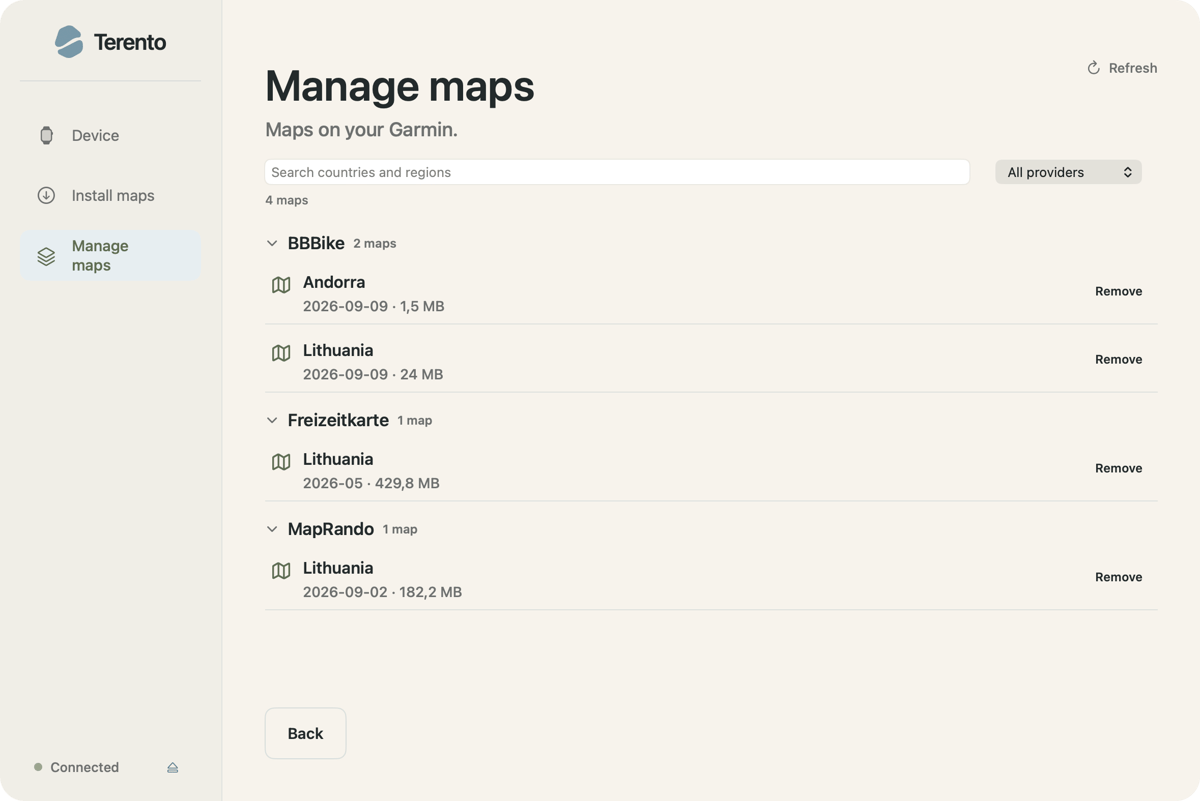
Verification and storage management: within moments, Terento confirms the map is ready and that the watch can be safely disconnected, leaving 14.99 GB of remaining storage. Under Manage maps, the newly installed BBBike map is clearly listed alongside its file size and one-click removal controls.
Integrations, compatibility and key features
Terento is designed as a focused, lightweight utility for endurance athletes using Apple hardware.
- Hardware and OS support: runs natively on Apple Silicon Macs (M1, M2, M3, M4) running macOS 13 (Ventura) or newer.
- Garmin watch compatibility: built for any Garmin smartwatch with onboard mapping and MTP file transfer. Terento maintains a live community compatibility log with verified successful transfers across models like the fēnix 8, fēnix 9 and Forerunner 970/955. A model’s absence from the tracker simply means an installation report hasn’t been submitted yet, not that it is unsupported.
- 1,000+ map sources: built-in direct downloads from major OpenStreetMap contributors, including BBBike, Freizeitkarte, MapRando and OpenTopoMap.
- Contour line add-ons: optional topographic contour overlays for supported OpenTopoMap regions.
- Local file import: allows manual import of custom .img map files sourced outside the built-in catalogue.
- On-device storage management: scans the watch to list installed third-party maps, showing exact file sizes and offering one-click deletion; it protects original Garmin base maps from deletion.
- Update alerts: automatically checks whether an installed catalogue map has a newer version published by the provider.
- Open source and free: distributed under an open-source license with no accounts, subscriptions or hidden paywalls.
Quick answers
Which Garmin models does Terento work with?
Terento is designed for Garmin watches with onboard maps and MTP file transfer. Community members have reported successful installations on models in the fēnix, Forerunner and epix families. The compatibility page brings those results together, but a watch does not need to appear on that page to work with Terento.
Is it safe to install third-party maps?
Terento includes checks to reduce installation risks, but those checks cannot guarantee a third-party map’s accuracy or eliminate transfer errors. Check a newly installed map on the watch before a trip.
Will a Garmin system software update delete custom maps?
No, Garmin firmware updates and official map updates do not erase custom .img files stored in the watch’s custom map directories, though keeping backups on the Mac via Terento is always recommended.
Author: Gediminas, developer of Terento, edited by the5krunner.
If you enjoyed reading this, here is another in the Indie Spotlight series: IntervalCoach Race Recon: training and fuelling from a GPX file.
Last Updated on 12 October 2026 by tfk the5krunner
Small things I always use
- Garmin 90-degree charging adapter: Charges your Garmin from any USB-C cable. Essential when travelling. I use one.
- Body Glide: The blue anti-chafe stick swimmers and runners carry. I use it.
- Speedo earplugs: Fewer ear infections and no cold-water dizziness. I use them.
- Dryrobe Advance: My winter changing robe for open-water swims. I use one. A cheaper option is the AONYIYI changing robe.
- Maurten: Race fuel that stays easy on the stomach. I use them.
- Beet It Sport nitrate shots: Beetroot shots I take in the days before a race. I use them.
- Garmin charging puck: The quickest way to top up before a session. I use one.
- Injinji: Toe socks that stop rubbing, so you run more. I use them.
- Ultimate toe protectors: Stop black toenails on long runs. They work. I use them.
- Compressport R2 v2 calf sleeves: My calf sleeves of choice. I use them.
- Cellucor C4: My pre-workout before hard sessions.
- TPU tubes: Schwalbe Aerothan, Tubolito and Pirelli SmarTube. Light, tiny spares. I use all three.
- G8 insoles: Adjustable insoles that are good. I use them.
- Cycplus Cube: A 97g electric pump that gets a road tyre rideable in two minutes. I carry one. 5% off with code THE5KRUNNER.
Watches and sensors
- Polar H10: My daily driver for waking HRV.
- Polar Verity Sense: My backup arm-worn HR sensor.
- Nomad bedside charger: Charges my iPhone and Apple Watch overnight. I use it, and many of their bands.
- Train.Red: The best muscle oxygen sensor I’ve used.
- Tymewear: Accurate heart rate and reliable ventilatory zones. I use it to pace endurance rides over an hour.
- Garmin Forerunner 970: A pro-grade triathlon watch. I use this.
- Apple Watch Ultra 4: My daily smartwatch. No phone needed on rides.
- Garmin Fenix 9 Pro: I’ve just bought one.
On the bike
- Continental GP5000 for everyday riding, and Aero 111 on the front for special occasions.
- Helmets: Specialized S-Works Evade 3 for road riding, and Rudy Project Wing for TT-style races. I use both.
- Ravemen FR300: A front light that mounts under your Garmin or Wahoo. I use one.
- Ravemen FR1000: The light and the computer mount in one unit, so nothing else goes on the bars. Better than mine.
- Ravemen FR1500SE: 1,500 lumens hanging under your Garmin, for proper night rides.
- Ravemen FR1100SE: 1,100 lumens under your Garmin, and up to 46 hours on slow flash.
- Ravemen FR500: A brighter FR300 with the same mount.
- Wahoo TRACKR Radar: I use it on one bike and Varia on the other. They perform the same.
- Garmin Varia RTL515: Radar that warns you of cars from behind. I use this model.
- Wahoo ELEMNT Roam 3: The bike computer that’s easy to use. I use mine on most rides.
- Favero Assioma Pro RS2: Accurate power pedals that swap easily between bikes. I use this model.
Home and indoor training
- NPE Runn: Makes my basic treadmill smart, sending more accurate speed and distance to my watch and Zwift. I use it.
- Google Wifi: Keeps Zwift connected in my pain cave. I use it.
- Apple TV 4K: Zwift on the big screen. I use two.
- Google Nest Doorbell (wired, 2nd gen): My video doorbell, running in both Google Home and Apple Home. I use it.
Health, recovery and sleep
- FreeStyle Libre 3 Plus: Shows how my blood sugar responds to diet.
- hDrop: Measures my sweat loss in summer and indoors.
- Fourth Frontier Zone: Checks my heart under load in hard sessions.
- Kineon MOVE+: Red and infrared light for sore knees, Achilles and other joints after hard training. I use it.
- Oura Ring 5: My partner’s recovery tracker of choice.
- Eight Sleep: A cooling mattress cover my partner and I use nightly.
Reader-Powered Content

This content is not sponsored. It’s mostly me behind the labour of love, which is this site, and I appreciate everyone who supports it.
Support the site: Follow (free, fewer ads) · Subscribe (paid, ad-free) · Buy Me A Coffee
Written by real people, with AI assistance. Fact-checked and verified for originality. See the Editorial Policy. FTC: Affiliate Disclosure — some links pay commission. As an Amazon Associate, I earn from qualifying purchases.

tfk is the founder and author of the5krunner, an independent endurance sports technology publication. With 20 years of hands-on testing of GPS watches and wearables, and competing in triathlons at an international age-group level, tfk provides in-depth expert analysis of fitness technology for serious athletes and endurance sport competitors. See the gear tfk uses. ID

Thanks for this article, MAC and Garmin works together now 🤓