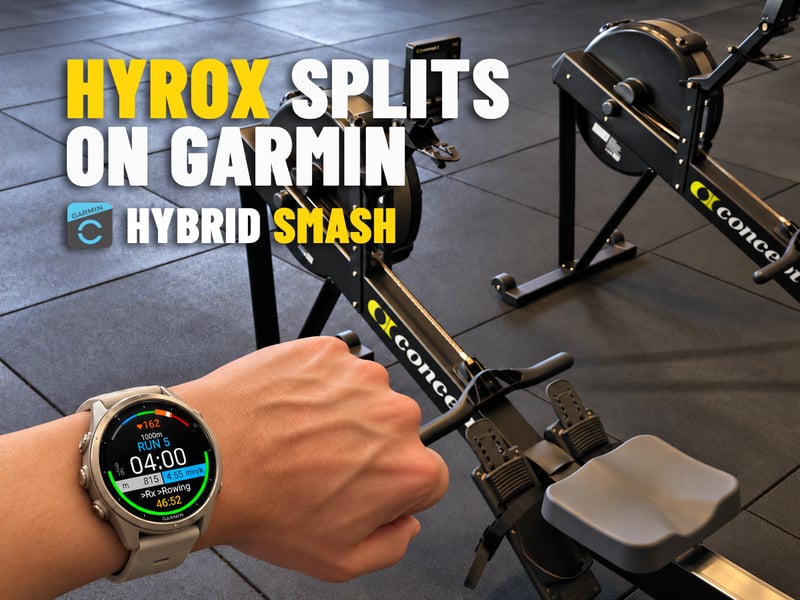
A HYROX race has a simple shape: eight runs of about 1 km, each followed by a workout station, with the Roxzone in between. Getting that shape onto a Garmin is harder. Garmin has no HYROX activity profile, so athletes build their own from a copied Cardio activity, a multisport profile or a 17-step structured workout. One missed or extra LAP press, and the laps stop matching the race.
Group classes add a second problem. A HYROX-style class rarely hands out the order of stations in advance, so there is nothing to build a workout from.
Hybrid Smash is a Garmin Connect IQ app that skips the setup. It knows the race format, so each LAP press closes one segment and names the next. Every run, station and Roxzone is timed, labelled and saved to Garmin Connect. For classes and open-gym sessions, its Free Training mode lets athletes pick the next station on the watch as they go.
Hybrid Smash comes from Multipassionate, the company behind Smash Coach, a HYROX training app that plans each athlete’s week. The worked example below comes from a HYROX race by the company’s founder, Saeed.
The problem: Garmin has no HYROX profile
As of October 2026, no Garmin watch has a built-in HYROX activity. Garmin’s manuals don’t list one, and the5krunner’s HYROX setup guide for Garmin makes the same point. That leaves four do-it-yourself routes, each with a catch:
- A copied Cardio activity. Rename it HYROX, turn GPS off and press LAP at every changeover. It is simple, free and the first method in the5krunner’s guide. But every lap is a number, not a name. One missed or extra press shifts every lap after it, and Garmin’s lap undo isn’t available in gym activities such as Cardio.
- A multisport profile. On watches with custom multisport, a repeating run-and-gym profile keeps runs and stations apart. Each leg is a sport change, though, and the profile can’t name eight different stations.
- A structured workout. Garmin Connect can build a 17-step workout that carries each station’s name. Workouts don’t support lap undo, so one stray press can put the steps out of line with the race.
- Mixed Session. Garmin’s Q1 2026 update added this generic multisport activity to newer watches. Every switch takes a stop, a Next Activity and a pick from a list. After a quick test, the5krunner called it “way too clunky for a race, but just about OK for a slow-paced simulation session”.
None of them suits a group class either. A structured workout needs the order in advance, and a numbered lap can’t say which station it was. A Garmin athlete training for HYROX wants answers to five questions:
- Does it time every run, station and Roxzone, with a name on each lap?
- Can a wrong LAP press be undone?
- Does it know the station targets for my weight class?
- Does it work in a class where nobody knows the order in advance?
- Does the session land in Garmin Connect like any other activity?
Hybrid Smash answers yes to all five.
How Hybrid Smash works on race day
TL;DR: Hybrid Smash is a Connect IQ watch app for HYROX. Race Day follows the race format: a warm-up, then eight rounds of run, Roxzone, station and Roxzone. One LAP press closes each segment and names the next, a short buzz confirms it, and DOWN undoes a wrong press. Station targets follow the athlete’s weight class, and every segment lands in Garmin Connect as a named lap. Free Training records classes and open-gym sessions as they happen, and eight ready-made workouts follow the phases of HYROX training, from Base to Taper. It is a one-time purchase, with no account and no subscription.
Starting a race takes four steps: choose Race Day, open View & Start, press SELECT, then press LAP at every changeover.
HYROX apps for Garmin range from feature-rich platforms, with race plans built on a phone or website, to one-tap timers. Hybrid Smash sits in between, with a clean screen, few options and the splits a HYROX athlete actually uses. Race Day has two settings, Run Pace and Run Type, and everything else follows the race format and the weight class.
Hybrid Smash is rated 4.2 out of 5 from 47 reviews on the Connect IQ store (October 2026), and several reviews mention its simplicity. “I love this app, its simplicity and clear data when competing,” one 5-star review from May 2026 says. “Plus you can ‘backtrack’ if you press the next stage button too early or too far on.” Another, from July 2026, reads: “Excellent app for HYROX racing and training! Contains everything needed to support the race.”
Controls
Three controls run the whole session:
- LAP ends the current segment and starts the next.
- DOWN undoes the last press instantly.
- SELECT opens the in-workout menu, with Undo, Save & Exit and Discard & Exit, while the race clock keeps running.
A short buzz confirms every LAP press, so there is no need to look at the watch. On touchscreen watches with Touch Gestures on, a swipe down does the same as LAP, and a swipe up undoes.
Race clock, weight classes and Roxzones
The session opens with a warm-up. The race clock starts on the LAP press that ends it, so the warm-up is recorded on its own and kept out of the race time.
Hybrid Smash has seven weight classes: Men Open, Women Open, Men Pro, Women Pro, Men Doubles, Women Doubles and Mixed Doubles. The class sets every station weight and the Wall Balls target. The Sled Push, for example, shows 50 m at 152 kg for Men Open, 102 kg for Women Open and 202 kg for Men Pro. Wall Balls are 100 reps in every class, and Mixed Doubles shows both target heights, 2.7/3 m.
With Rox Zones on, the default, each Roxzone is its own segment: one LAP press in, one out. A full Race Day then takes 32 LAP presses, or 17 with Rox Zones off. Hybrid Smash also times a Roxzone before Wall Balls, which official results don’t, so its Run 8 comes out shorter, and its Roxzone total longer, than on the official HYROX results.
On screen and live pace
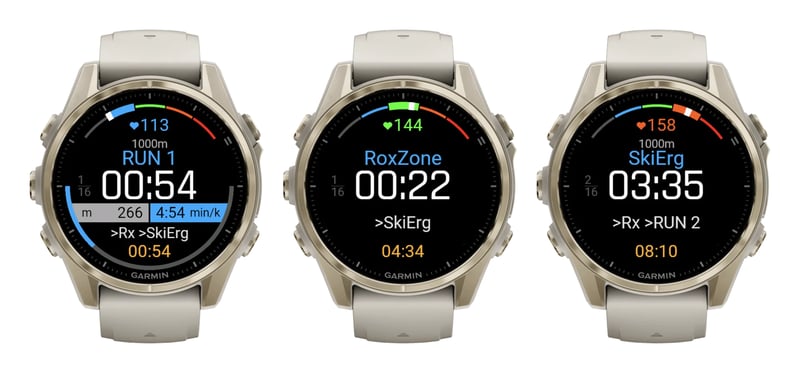
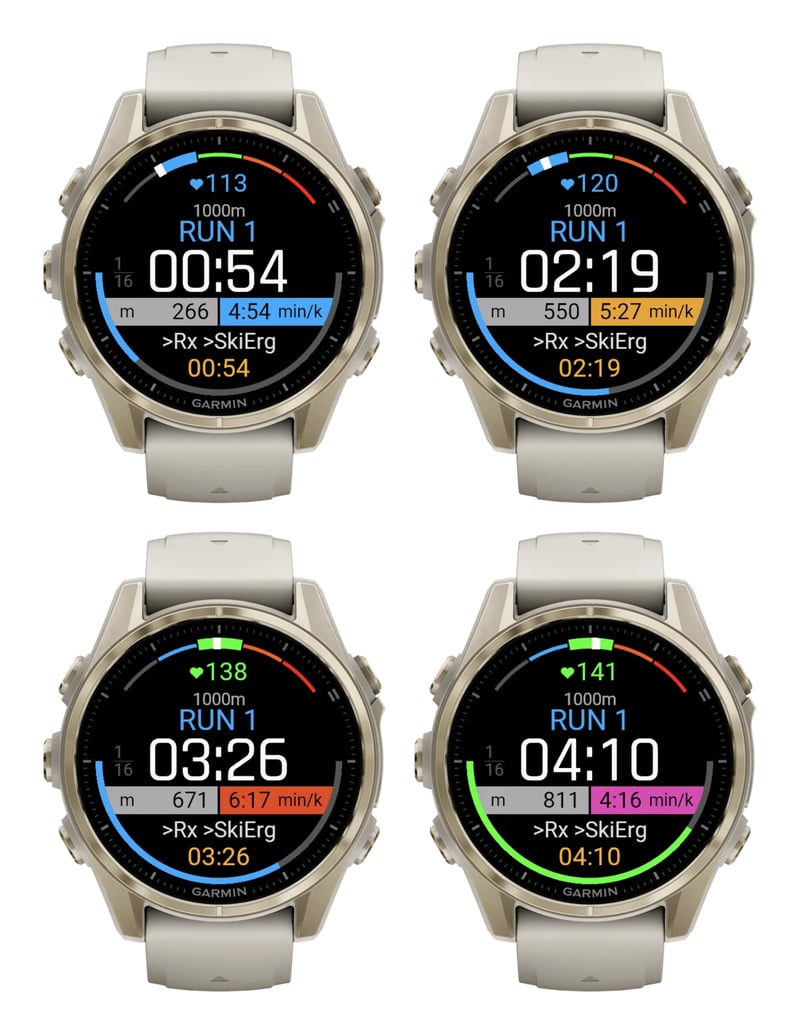
The screen shows the current segment and its timer, the running race time and a preview of what comes next, such as “>Rx >SkiErg”. A heart-rate gauge is coloured by zone, a counter shows the position in the race (for example 4/16), and each station shows its target and weight.
On Indoor and Outdoor runs, a pace bar compares live pace with the target:
- Blue: on target, from 10% faster to 5% slower.
- Orange: 5 to 15% slower.
- Red: more than 15% slower.
- Purple-pink: more than 10% faster.
Since version 26.2, pace reacts in about 3 seconds. Separately, one light pulse signals when a run reaches its target distance.
Before the first session
Auto Pause is a watch setting the app can’t override. Turn it off for running and Cardio in the watch’s activity settings, or a slow sled push can be cut from the station time. Then set the Weight Class in Hybrid Smash’s Settings.
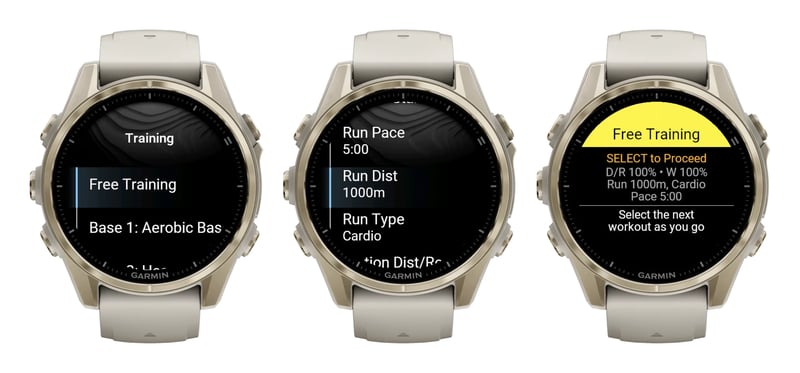
For simulations, Hyrox Sim in the Training menu runs the same eight rounds with all five settings open: Run Pace, Run Dist (200 to 2,000 m), Run Type, Station Dist/Reps and Station Weight (each 25 to 150%). A half simulation is 500 m runs at 50%, and it still takes 32 LAP presses.
Free Training: HYROX classes, recorded as they go
Much of the feedback Multipassionate gets from users is about Free Training. Athletes use it in HYROX-style group classes and to follow other training programmes, because nothing has to be prepared in advance. The instructor calls the next station, and the athlete picks it on the watch.
After the warm-up, a LAP press opens a list of ten options: Run, the eight stations in race order, and Other. Other covers anything outside HYROX, such as kettlebell swings or a plank. The pick is timed until the next LAP press. With Rox Zones on, a Roxzone follows, and then the list opens again.
A session holds up to 20 picks of runs and stations. It finishes by itself after the 20th, or with Save & Exit at any time. Every pick lands in Garmin Connect as a named lap, and time spent on Other adds up in its own total.
Free Training defaults to Cardio. Runs are then timed rather than paced: Run Dist divided by Run Pace sets the target, so 1,000 m at 5:00/km is a five-minute run. Cardio also leaves Garmin’s VO2 max and Endurance estimates untouched. For live pace, switch Run Type to Indoor or Outdoor, and the session then counts as a run.
For sessions that repeat, three slots, Custom 1 to 3, hold up to 20 segments each. They are built on the watch with Add Station, from the same ten options, and saved on every change, with no phone app or website step. Segments can’t be reordered, so remove one and add it again instead.
Eight workouts from Base to Taper
Hybrid Smash also comes with eight ready-made HYROX workouts. Together they form a plan that follows the basic logic of training for a HYROX race, in four phases: Base, Build, Peak and Taper. These are the defaults:
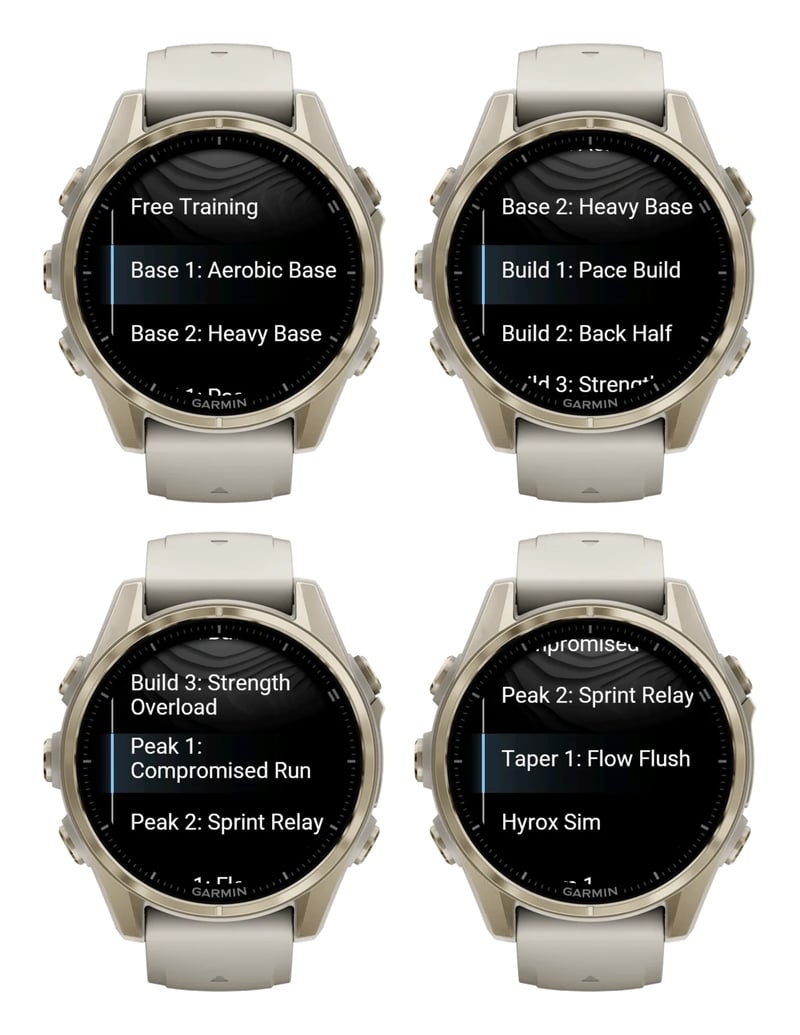
| Workout | Sequence | Runs | Station distance/reps | Station weight |
|---|---|---|---|---|
| Base 1: Aerobic Base | 3 rounds: run, SkiErg, Burpee Broad Jumps, Rowing, Sandbag Lunges | 3 x 600 m | 40% | 60% |
| Base 2: Heavy Base | 3 rounds: run, Sled Push, Sled Pull, Farmers Carry, Wall Balls | 3 x 800 m | 40% | 70% |
| Build 1: Pace Build | First half of the race: a run before SkiErg, Sled Push, Sled Pull and Burpee Broad Jumps | 4 x 1 km | 100% | 100% |
| Build 2: Back Half | Second half: a run before Rowing, Farmers Carry, Sandbag Lunges and Wall Balls | 4 x 1 km | 100% | 100% |
| Build 3: Strength Overload | All eight stations, no runs | None | 50% | 120% |
| Peak 1: Compromised Run | A run before Sled Push, Sled Pull, Sandbag Lunges and Wall Balls | 4 x 1.5 km | 100% | 100% |
| Peak 2: Sprint Relay | A run before each of the eight stations, in race order | 8 x 250 m | 50% | 100% |
| Taper 1: Flow Flush | A run before SkiErg, Rowing, Sled Push and Wall Balls | 4 x 500 m | 25% | 50% |
Base starts with short runs and the stations at 40% of race volume and 60 to 70% of race weight. Build takes each half of the race to full distance and weight, and Build 3 drops the runs to load the stations at 120%. Peak turns race-specific, with 1.5 km runs between the heavy stations, then a sprint relay through all eight. Taper cuts the volume to a quarter and the weight to half before race day.
Each workout keeps its own five settings, and weights follow the weight class. In Base 1, for example, a Men Open athlete’s Sandbag Lunges become 40 m with a 12 kg sandbag. View & Start previews the whole sequence, with every scaled target, before the first LAP press.
Smash Coach for a personal plan
The ready-made plan is the same for everyone. Hybrid Smash doesn’t know an athlete’s race date, fitness or other sports, so it doesn’t personalise the workouts or decide which week to run each one. For that, Multipassionate makes Smash Coach, a separate HYROX coaching app. It plans training week by week around the other sports an athlete plays, such as padel, football or classes, and around injuries, and its sessions go to the athlete’s Garmin.
| Hybrid Smash | Smash Coach | |
|---|---|---|
| Job | Times and paces the session you’re doing now: a race, a simulation, a class or a workout | Plans HYROX training week by week, around your other sports and any injuries |
| Plan | A ready-made plan from Base to Taper, the same for everyone | A personalised plan |
| Where it runs | On the Garmin watch, as a Connect IQ app | smashcoach.app, with an account; sessions go to your Garmin |
| Cost | One-time purchase, with no account and no subscription | Subscription after a free trial |
Worked example: a HYROX Pro race on a Forerunner 965
The numbers below are the founder’s own, from a HYROX race on 17 April 2026 in the Men Pro division. They were recorded on a Forerunner 965 as an indoor run, with a Roxzone timed between every run and station. The race predates the current version of Hybrid Smash but used the same sequence as today’s Race Day.
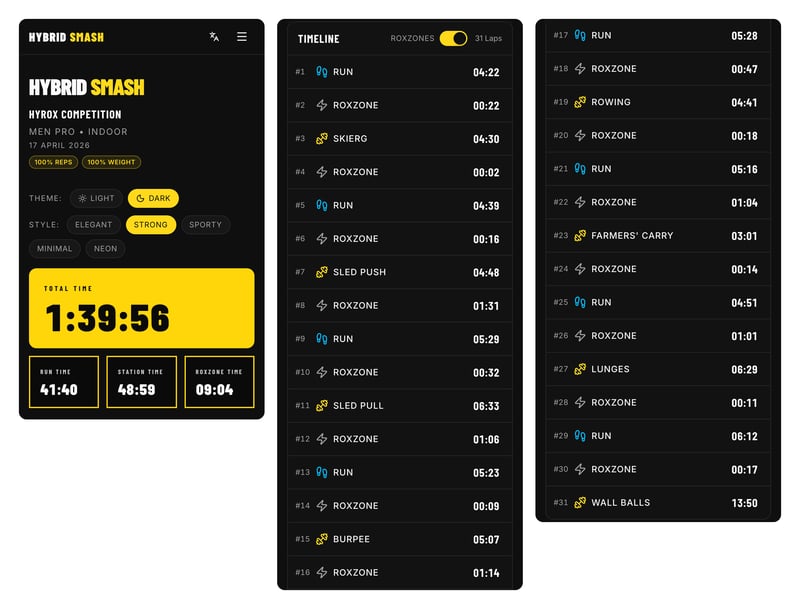
The race time was 1:39:56: 41:40 running, 48:59 on the stations and 9:04 in the Roxzone. The 14:36 warm-up was recorded on its own and kept out of the race time.
| Round | Run | Station | Station time | Roxzones |
|---|---|---|---|---|
| 1 | 4:22 | SkiErg | 4:30 | 0:24 |
| 2 | 4:39 | Sled Push | 4:48 | 1:47 |
| 3 | 5:29 | Sled Pull | 6:33 | 1:38 |
| 4 | 5:23 | Burpee Broad Jumps | 5:07 | 1:23 |
| 5 | 5:28 | Rowing | 4:41 | 1:05 |
| 6 | 5:16 | Farmers Carry | 3:01 | 1:18 |
| 7 | 4:51 | Sandbag Lunges | 6:29 | 1:12 |
| 8 | 6:12 | Wall Balls | 13:50 | 0:17 |
| Total | 41:40 | 48:59 | 9:04 |
Times are as the watch counts them, in whole seconds per segment, which is why the three totals add up to 1:39:43, 13 seconds short of the 1:39:56 race time. Each round’s Roxzones column adds the Roxzone in and out. Round 8 has only one, because none follows Wall Balls.
The sleds showed in the runs that followed them. Run 2 took 4:39. Run 3, straight after the Sled Push, took 5:29, and Run 4, after the Sled Pull, 5:23. Run 7, after the Farmers Carry, was back at 4:51, and Run 8 was the slowest, at 6:12. Wall Balls was the longest station by far, at 13:50, more than a quarter of all station time. The Farmers Carry was the quickest, at 3:01.
Two details show how the watch copes with a real race. The Roxzone after the SkiErg lasted just 2 seconds, because the two presses around it came close together, so that walk is counted in the SkiErg or Run 2 instead, and the race time doesn’t change. And the watch’s indoor distance for the eight runs ranged from 932 m to 1,171 m, which is why Hybrid Smash ends every segment on a LAP press, never on distance.
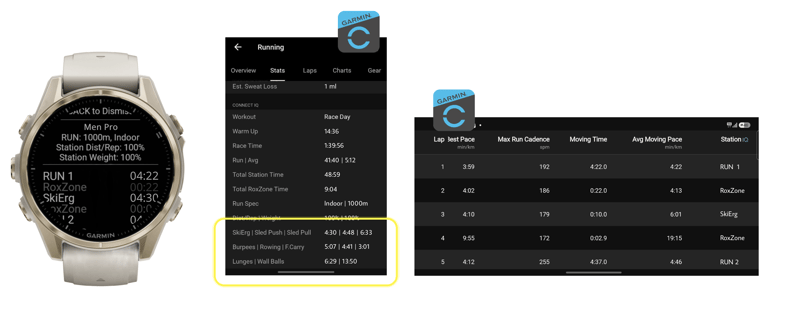
In Garmin Connect, the race shows up as one Indoor Run activity, with a named lap for every run, station and Roxzone. Its Stats show the race time, the warm-up and the run, station and Roxzone totals. Today’s version writes a few more summary fields, such as the workout name and the time on each station.
On the watch summary, SELECT opens the same session on the phone. The web breakdown puts the totals and every segment on one timeline, with heart rate per segment where the watch recorded it. It also makes share cards for an Instagram Story or post, in five styles, with an optional transparent background. There is no account, and Past Workouts on the watch keeps the last 20 sessions to re-share.
Garmin Connect and compatibility
Garmin Connect
- Each session saves as a normal Garmin activity and syncs like any other.
- The activity type follows the Run Type: Indoor Run, Outdoor Run (with GPS) or Cardio. Workouts without runs, such as Build 3, always save as Cardio.
- Every segment is a lap, with its name in a Station field, next to Garmin’s usual lap data such as heart rate and calories.
- The Stats add the workout name, race time, warm-up, the run, station and Roxzone totals, and the time on each station.
- Indoor and Outdoor sessions count as runs for metrics such as VO2 max. Cardio leaves VO2 max and Endurance untouched.
- Like any Garmin activity, the session follows the athlete’s Garmin link to Strava.
On the watch
- A summary after Save & Exit, with the total time, the run, station and Roxzone totals, and every lap.
- Past Workouts, with the last 20 sessions.
- Crash recovery: if the app is interrupted mid-session, it offers to continue where it stopped. The resumed part records as a new Garmin activity.
- 13 languages. Units are metric only: min/km, metres and kilograms.
Watches
- Forerunner 70, 165, 170, 255, 265, 570, 955, 965 and 970, including Music and S versions.
- Fenix 6 Pro, 6S Pro and 6X Pro, the Fenix 7, 8 and 9 series, and Fenix E.
- Epix (Gen 2) and Epix Pro.
- Enduro 2, 3 and 4.
- Venu 2, 2 Plus, 2S, 3, 3S, 4, X1, Sq 2 and Sq 2 Music.
- vivoactive 5 and 6.
- Instinct 3 AMOLED and Instinct Crossover AMOLED.
- MARQ (Gen 2), and the tactix 7 and 8 and quatix 7 and 8 editions.
- D2 Air X15, Mach 1, Mach 1 Pro and Mach 2, Descent Mk3 and Mk3i, and Approach S50 and S70.
The Connect IQ store checks the exact model before it installs. Older models, such as the Forerunner 745 and 945 and the vivoactive 4, aren’t supported.
Price
Hybrid Smash is a one-time purchase on the Connect IQ store, listed as Hybrid Smash for Hyrox by Multipassionate. It costs EUR 9.99 at the time of writing, or $8.49 in the US store, and the store shows the price in local currency. There is no subscription and no Hybrid Smash account, because it installs with the athlete’s existing Garmin account. The company offers a full refund when contacted within 24 hours of purchase.
Quick answers
How does Hybrid Smash compare with ROXFIT?
The two start in different places. ROXFIT’s watch app is free and works with the ROXFIT phone app: custom workouts and PACEME race plans are built in that app, synced to the watch, and each session syncs back for analysis. On the watch alone, ROXFIT offers presets and a Free Train interval timer. Hybrid Smash keeps the whole session on the watch. Race Day needs no setup, Free Training picks stations during the session, and custom workouts are built on the watch itself. It is a one-time purchase in Garmin’s store with no account, and sessions land in Garmin Connect and a shareable web breakdown.
How does Hybrid Smash compare with a HYROX profile built on the Garmin itself?
As of October 2026, Garmin has no built-in HYROX profile, so a Garmin HYROX profile is one the athlete builds. Usually it is a copy of the Cardio activity, renamed HYROX, with GPS off and a LAP press at every changeover. It is free and built in, but each lap is a number rather than a name, and lap undo isn’t available in gym activities. A multisport profile or Mixed Session keeps runs and stations apart, but neither can name eight stations. Hybrid Smash, EUR 9.99 at the time of writing, adds a named lap for every run, station and Roxzone, station targets for each weight class, live pace on runs and an instant undo.
How does a Hybrid Smash session show up in Garmin Connect?
As a normal activity: Indoor Run, Outdoor Run or Cardio, depending on the Run Type. Every run, station and Roxzone is a lap with its name in a Station field, next to Garmin’s usual lap data such as heart rate and calories. The activity’s Stats add the race time and the run, station and Roxzone totals. Indoor and Outdoor sessions count as runs for metrics such as VO2 max, while Cardio sessions leave them untouched.
Can Hybrid Smash record a HYROX group class?
Yes, with Free Training. After the warm-up, each LAP press opens a list of Run, the eight stations and Other, so the athlete picks each segment as the instructor calls it. Nothing is prepared in advance and no phone is needed. A session holds up to 20 picks. It defaults to Cardio, which times runs instead of pacing them and leaves VO2 max untouched.
Which Garmin watches does Hybrid Smash work on?
Most current Garmin watches, including the Forerunner 165, 255, 265, 570, 965 and 970, the Fenix 7, 8 and 9 series, Epix Pro, Enduro 3 and 4, Venu 3, Venu 4 and X1, vivoactive 5 and 6, and Instinct 3 AMOLED. The Connect IQ store lists every compatible model and checks yours before it installs. Older models, such as the Forerunner 945 and vivoactive 4, aren’t supported.
Does Hybrid Smash include a HYROX training plan?
Yes, a ready-made one. Eight workouts take an athlete from Base through Build and Peak to Taper, following the basic logic of HYROX training, and every distance, rep count and weight can be scaled. The plan isn’t personalised, though. For a plan built around a race date, other sports and injuries, Multipassionate’s separate app Smash Coach does the coaching.
Is Hybrid Smash a subscription?
No. Hybrid Smash is a one-time purchase on the Connect IQ store, EUR 9.99 at the time of writing, with a 24-hour refund promise. Only Smash Coach, the separate coaching app, is a subscription.
More information: hybridsmash.app and the Connect IQ store.
Author: Saeed, founder of Multipassionate and developer of Hybrid Smash, edited by the5krunner.
If you enjoyed reading this, here is another in the Indie Spotlight series: Indie App Spotlight: Zonometry splits easy sessions from easy minutes.
Last Updated on 23 October 2026 by tfk the5krunner
Small things I always use
- Garmin 90-degree charging adapter: Charges your Garmin from any USB-C cable. Essential when travelling. I use one.
- Body Glide: The blue anti-chafe stick swimmers and runners carry. I use it.
- Speedo earplugs: Fewer ear infections and no cold-water dizziness. I use them.
- Dryrobe Advance: My winter changing robe for open-water swims. I use one. A cheaper option is the AONYIYI changing robe.
- Maurten: Race fuel that stays easy on the stomach. I use them.
- Beet It Sport nitrate shots: Beetroot shots I take in the days before a race. I use them.
- Garmin charging puck: The quickest way to top up before a session. I use one.
- Injinji: Toe socks that stop rubbing, so you run more. I use them.
- Ultimate toe protectors: Stop black toenails on long runs. They work. I use them.
- Compressport R2 v2 calf sleeves: My calf sleeves of choice. I use them.
- Cellucor C4: My pre-workout before hard sessions.
- TPU tubes: Schwalbe Aerothan, Tubolito and Pirelli SmarTube. Light, tiny spares. I use all three.
- G8 insoles: Adjustable insoles that are good. I use them.
- Cycplus Cube: A 97g electric pump that gets a road tyre rideable in two minutes. I carry one. 5% off with code THE5KRUNNER.
Watches and sensors
- Polar H10: My daily driver for waking HRV.
- Polar Verity Sense: My backup arm-worn HR sensor.
- Nomad bedside charger: Charges my iPhone and Apple Watch overnight. I use it, and many of their bands.
- Train.Red: The best muscle oxygen sensor I’ve used.
- Tymewear: Accurate heart rate and reliable ventilatory zones. I use it to pace endurance rides over an hour.
- Garmin Forerunner 970: A pro-grade triathlon watch. I use this.
- Apple Watch Ultra 4: My daily smartwatch. No phone needed on rides.
- Garmin Fenix 9 Pro: I’ve just bought one.
On the bike
- Continental GP5000 for everyday riding, and Aero 111 on the front for special occasions.
- Helmets: Specialized S-Works Evade 3 for road riding, and Rudy Project Wing for TT-style races. I use both.
- Ravemen FR300: A front light that mounts under your Garmin or Wahoo. I use one.
- Wahoo TRACKR Radar: I use it on one bike and Varia on the other. They perform the same.
- Garmin Varia RTL515: Radar that warns you of cars from behind. I use this model.
- Wahoo ELEMNT Roam 3: The bike computer that’s easy to use. I use mine on most rides.
- Favero Assioma Pro RS2: Accurate power pedals that swap easily between bikes. I use this model.
Home and indoor training
- NPE Runn: Makes my basic treadmill smart, sending more accurate speed and distance to my watch and Zwift. I use it.
- Google Wifi: Keeps Zwift connected in my pain cave. I use it.
- Apple TV 4K: Zwift on the big screen. I use two.
- Google Nest Doorbell (wired, 2nd gen): My video doorbell, running in both Google Home and Apple Home. I use it.
Health, recovery and sleep
- FreeStyle Libre 3 Plus: Shows how my blood sugar responds to diet.
- hDrop: Measures my sweat loss in summer and indoors.
- Fourth Frontier Zone: Checks my heart under load in hard sessions.
- Oura Ring 5: My partner’s recovery tracker of choice.
- Eight Sleep: A cooling mattress cover my partner and I use nightly.
Reader-Powered Content

This content is not sponsored. It’s mostly me behind the labour of love, which is this site, and I appreciate everyone who supports it.
Support the site: Follow (free, fewer ads) · Subscribe (paid, ad-free) · Buy Me A Coffee
Written by real people, with AI assistance. Fact-checked and verified for originality. See the Editorial Policy. FTC: Affiliate Disclosure — some links pay commission. As an Amazon Associate, I earn from qualifying purchases.

tfk is the founder and author of the5krunner, an independent endurance sports technology publication. With 20 years of hands-on testing of GPS watches and wearables, and competing in triathlons at an international age-group level, tfk provides in-depth expert analysis of fitness technology for serious athletes and endurance sport competitors. See the gear tfk uses. ID
