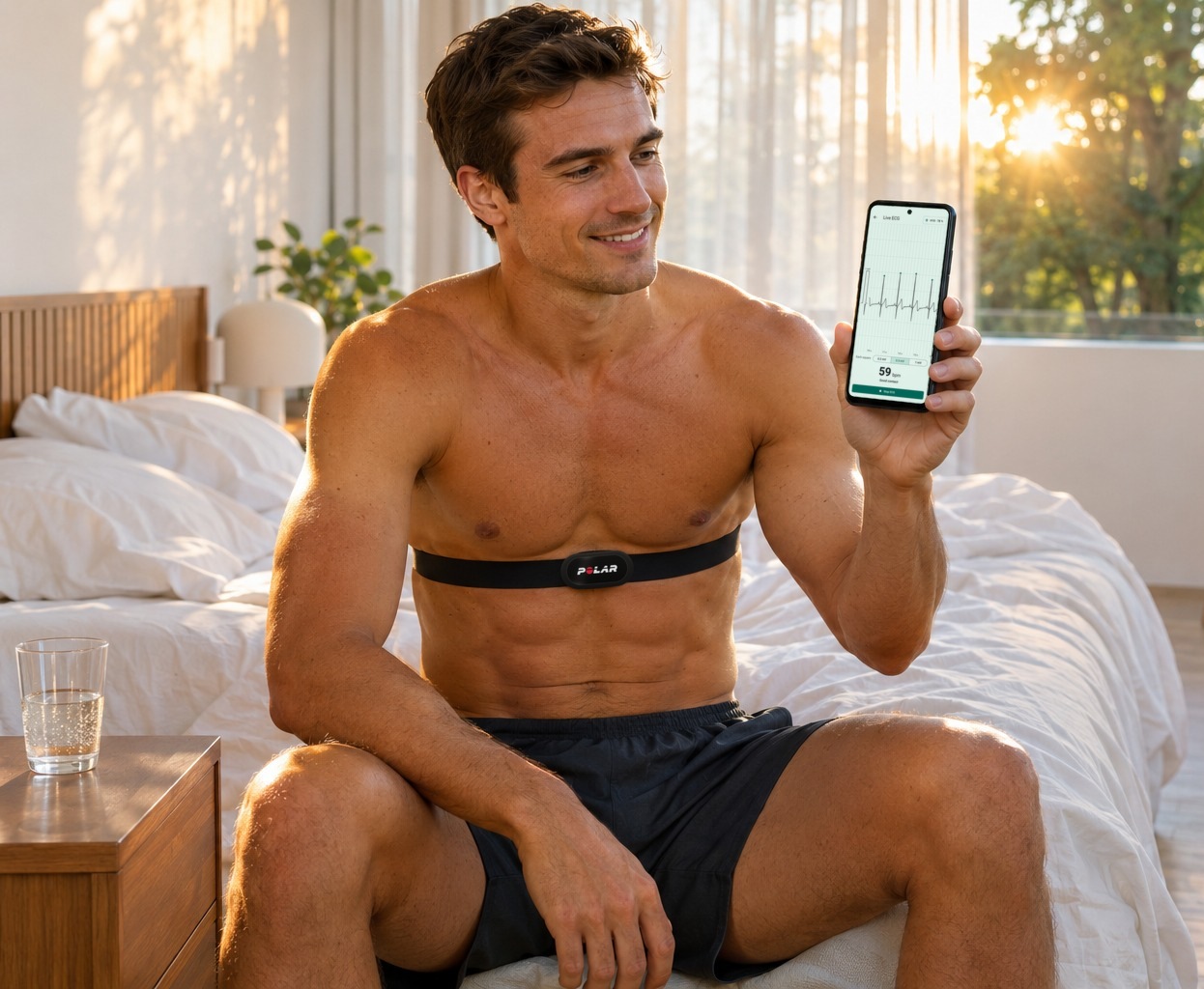
Every Polar H10 records a single-lead ECG, the heart’s electrical signal through one pair of electrodes, 130 times a second. Most owners never see it. Polar’s own apps work from the heart rate and beat intervals the strap calculates itself. To get at the trace, an owner has needed a data logger, a developer kit or a paid subscription.
That matters to anyone who takes a morning heart rate variability (HRV) reading. HRV is only as good as the beats behind it, and a number on a screen gives no way to check them. It cannot say whether the strap sat well or whether an extra beat slipped in, and it does not show the heartbeat itself.
Logix Pulse, a free Android app from LOGIXMOTION, is built on that hidden trace. It records the H10’s raw ECG and its motion sensor, detects the beats itself and checks each one. It then shows resting HRV, heart rate and breathing rate against the athlete’s own usual range, with the ECG behind each number one tap away. Every step of the analysis is published with its test results.
The app asks for no account or subscription. It is built for runners, cyclists and triathletes who already own an H10 and want more from it, and just as much for people who want to keep an eye on their own heart.
How Logix Pulse works
TL;DR: The athlete puts on the H10, taps one button and sits still for three minutes. Logix Pulse records the raw ECG and sends it to its analysis server, which detects the beats and checks each one. The result comes back as resting HRV, heart rate and breathing rate, each set against the athlete’s own usual range.
The app connects to the strap directly over Bluetooth, so no Polar app or Polar account is involved. It keeps the ECG, the strap’s own beat intervals and its motion data on the phone. At first launch, it asks for no name, email or password, and the install gets a random ID instead. Each finished recording goes to LOGIXMOTION’s analysis server, and the result opens by itself.
In a morning check, the first minute is left out while body and strap settle, and the rest is analysed. The result page leads with the three numbers. Below them come the average heartbeat and the whole ECG strip, with every beat that was left out of HRV marked on it.
Once seven mornings are in, each number carries a short note saying whether it is within, below or above the athlete’s usual range. The range comes only from the athlete’s own recent checks, so an athlete whose HRV always runs low or high is compared only with themselves.
There is no readiness score to obey. The app shows the numbers and the trace behind them and leaves the judgement to the athlete. The Today screen adds a chart of recent mornings against the usual range and a one-line summary of how the past week compares.
What Logix Pulse does that is hard to do
Most of the work happens where a runner never looks.
- HRV from beats that can be seen: the analysis detects the heartbeats in the raw ECG itself rather than relying on the beat intervals the strap reports. Every beat behind the HRV figure can be checked on the trace.
- Every beat checked, and the rejects on show: one extra or missed beat can swing a short HRV reading. Logix Pulse checks each beat and leaves out the ones that do not belong. The result counts them, and the athlete can step through them on the ECG strip.
- The strap’s own filter, undone: the H10 passes its ECG through a built-in filter that removes slow drift and, with it, bends the end of each heartbeat’s recovery wave. LOGIXMOTION measured that filter on one strap on the bench, and the analysis reverses it before it looks for where the wave ends. That is how it reads the QT interval, the time the heart takes to contract and recover. The paper claims only the reading the analysis would make without the filter, not a more accurate QT.
- The shape of a heartbeat, measured: PR, QRS and QT are the standard timings inside one beat. They are measured on every clean beat and drawn on an “Average heartbeat” picture. On a morning check, they sit beside published reference ranges for athletes.
- A map of irregular beat intervals: when the time between beats was irregular for five minutes or more in a row, the “Time between beats” chart shows where, and a tap opens that stretch of ECG. Irregularity is judged against a fixed limit and confirmed by the strap’s own intervals.
- Breathing rate from the strap already on the chest: the morning check works out breathing from the strap’s motion sensor and the ECG together. A separate 24-hour heart rate and breathing mode reads it from the motion sensor alone, in moments when the wearer is still. None of the other H10 apps LOGIXMOTION looked at shows a breathing rate from the strap.
- A threshold estimate from a ramp test: a guided ramp on a bike or treadmill gives an estimated heart rate at the top of the easy zone. It comes from DFA alpha1, a measure of how the beat-to-beat pattern changes as effort rises. The test page says plainly what the estimate rests on and how far to trust it.
- Files that research software opens: every recording exports as CSV, as a printable PDF of the ECG and as EDF+, a standard file format for biosignal software.
Free Android apps for the H10 tend to do one part of this. Some log the raw ECG, and others work out HRV and DFA alpha1 from the strap’s own beat intervals. The apps LOGIXMOTION found that analyse the ECG waveform itself charge a subscription or limit free use, and no other free Android app it found puts all of this in one place.
A demo morning
The numbers here are the app’s demo data, a few weeks into use, not a real athlete’s mornings. The result opens with a one-line headline of its three numbers, and the card below sets each against the athlete’s own usual range:
- Resting HRV 51 ms: “above your usual 38 to 50”, the one value in colour
- Heart rate 58 bpm: “within your usual 56 to 61”
- Breathing: within its usual range
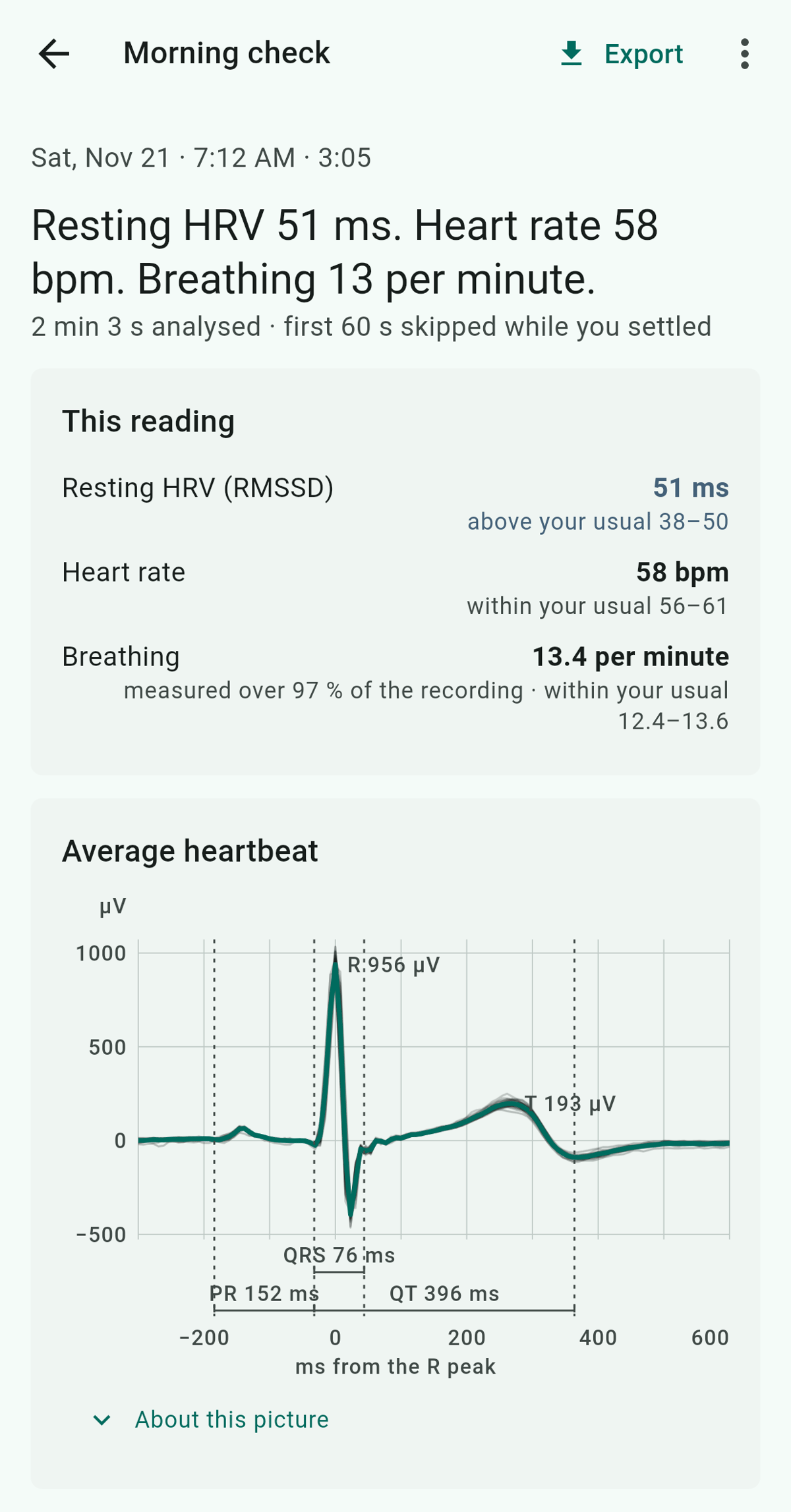
“Above” only says where the number sits. The app does not grade the day with a score or a colour, gives no advice and does not say whether higher is better.
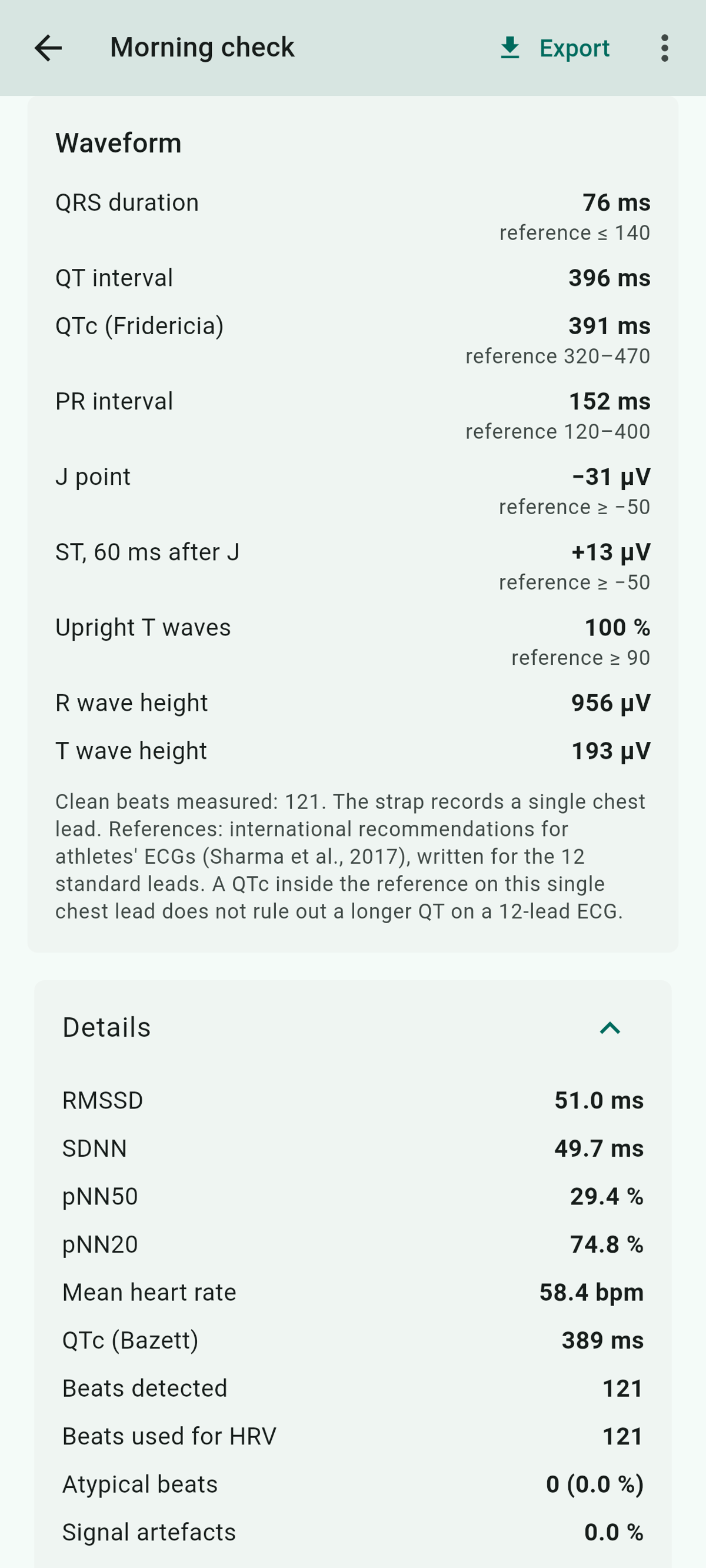
Everything behind the number is there to check, beat by beat, on the ECG strip. No beats were left out this morning, and the Details card shows 121 beats detected and all 121 used for HRV.
The average heartbeat shows the beats laid over one another, with PR, QRS and QT marked. Further down, the Waveform card lists these intervals and QTc (QT corrected for heart rate), with the athletes’ reference range beside those that have one. This morning, all of them are inside it.
Everything else, and what the exports hold
- Free ECG recording: a short check or a long session, with the same analysis as a morning check.
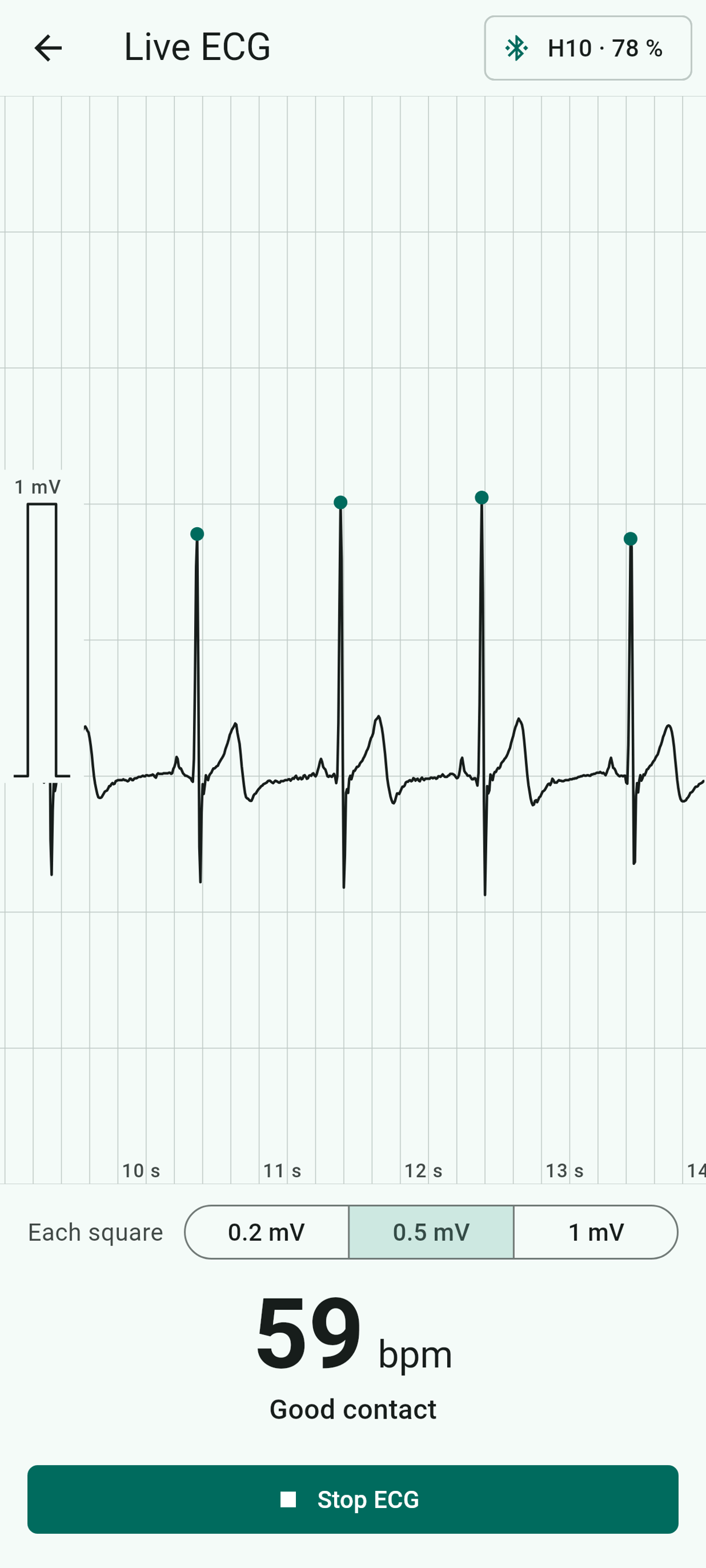
- Live ECG: a strap check before a race or after moistening the electrodes. It shows the live trace with a dot on each beat, the heart rate and skin contact, and saves nothing.
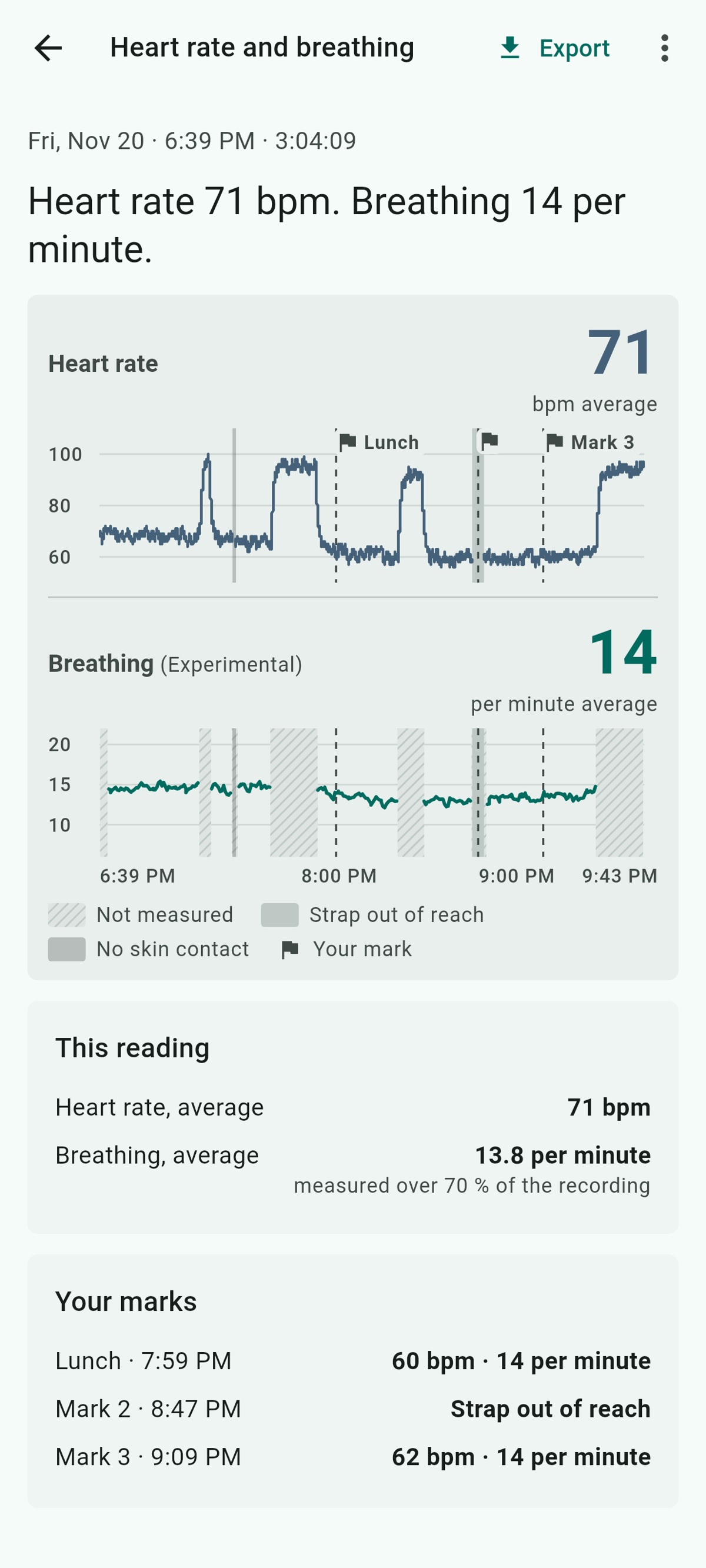
- Heart rate and breathing (new): a long recording without ECG, up to a whole day. Marks note moments such as a meal or a walk, and their labels stay on the phone. A Polar H9 works here too, for heart rate only.
- History, limits and backup: history with filters, optional heart rate limits that alert when switched on, and backup and restore of everything in one file for a new phone.
- Eight languages: English, German, French, Spanish, Polish, Dutch, Finnish and Italian.
Every export is free and sits behind the Export button of a recording.
| Export | What it holds |
|---|---|
| CSV | Every ECG sample, the strap’s own beat intervals with its skin-contact flag, and the motion sensor, each with the strap’s timestamps |
| PDF summary | Date, strap, beats found and left out, breathing rate, and the first stretch of ECG on the scale of a printed clinical ECG, or a strip from each irregular stretch |
| PDF of the whole recording | The same first page, then the whole ECG strip by strip |
| EDF+ | The ECG and the three motion axes, with notes for start, end and gaps, for EDFbrowser and similar software. Its header names nobody. |
| Heart rate and breathing | As CSV, heart rate each second, every breathing window, each mark with its label and each gap. As PDF, a one-page chart. As EDF+, the same recording. |
The exports are the recording itself, and the computed numbers stay in the app.
Every step is published
LOGIXMOTION has published the whole analysis in a methods paper. It sets out every step from raw ECG to result with its formulas, the measurement of the strap’s filter, and benchmark results on public data sets. The developer’s own H10 recordings and the scripts behind each figure are published with it at github.com/LOGIXMOTION/logix-pulse-lab. Research groups can run the same analysis on their own recordings with a program from the same repository, although the analysis code itself is not public.
So an athlete can check the numbers, down to the rule by which a beat is left out. Publishing methods, validation and source recordings together is uncommon among the H10 apps LOGIXMOTION looked at.
Three headline results, as the paper states them:
- Beat detection: on public data, it reached 99.6% sensitivity, the share of the beats marked by cardiologists that it found.
- The strap’s filter: measured on one strap on the bench, it cuts in near 0.98 Hz. Polar states a lower limit of 0.7 Hz.
- Breathing from the motion sensor alone: on a public data set, in still moments of people the method had not been tuned on, a value appeared 14% of the time. Of those values, 2.5% were more than 2 breaths per minute off, or 3.8% across all 15 people in the data set, ranging from none to 40% by person.
For how chest straps compare with optical sensors and full ECG devices, see the heart rate accuracy hub, and for the evidence on wearable HRV, see Garmin, Apple Watch or Oura? HRV and VO2max accuracy. The Frontier X3 takes the opposite approach and keeps its ECG trace to itself.
Price, platforms and limits
Free on Android, now and later. All current and future features of the Android app will remain free. Today it has no advertising, no account and no in-app purchase.
iPhone next. As of November 2026, LOGIXMOTION plans an iPhone release in the coming month, and that version may be paid.
Limits. Logix Pulse is not a medical device. It names no condition and gives no advice, and its waveform reference ranges were written for the hospital’s 12-lead ECG, not for a chest strap. The analysis has been benchmarked on public hospital recordings and checked against the strap’s own beat timing, but it has not yet been checked on a worn strap against a simultaneous reference ECG.
Breathing is the least certain of the numbers. The paper finds the morning value holds up lying still at rest. In the heart rate and breathing mode, it is experimental, appears only while the wearer is still and has not been tested in sleep.
The threshold result is an estimate. It could be tested on only one public data set, laboratory ramp tests of young athletes. There it read on average about 20 bpm above the laboratory value and did not follow individual athletes, so it is no basis for setting training zones.
Screenshots show the app’s demo data.
More information: Logix Pulse on Google Play and a short screen recording with a live H10.
Author: LOGIXMOTION, developer of Logix Pulse, edited by the5krunner.
Quick answers
What is sent to the server in Germany, and what is kept?
Only recordings, and only while “Upload recordings for analysis” is switched on: the raw ECG, the beat intervals and the motion data, plus the strap’s name, Bluetooth address and firmware, and the app version. No name, email address or account goes with them. The server knows the app only by a random ID and a two-letter country code, and the ID is registered even with uploads off, when the app checks for updates. Usage counts are sent only with a second switch, and the web server keeps standard access logs with IP addresses for about five weeks. Recordings stay on the server until the user deletes them with “Delete all my data on the server”, which removes the recordings and their results but not the random ID, the logs, backups or the copy the developer keeps to check and improve the analysis.
Is there an iPhone version?
Not yet. As of November 2026, LOGIXMOTION plans an iPhone release in the coming month, and it may be paid. The Android app stays free, including every future feature.
Which straps and phones work?
A Polar H10 for everything. A Polar H9 works in the heart rate and breathing mode and records heart rate only. Any Android phone with Bluetooth Low Energy will do, and no Polar app or account is needed.
If you enjoyed reading this, here is another in the Indie Spotlight series: Indie App Spotlight: Gone Surfing points Apple Watch surfers back to the peak.
Last Updated on 22 November 2026 by tfk the5krunner
Small things I always use
- Garmin 90-degree charging adapter: Charges your Garmin with any USB-C cable. Essential when travelling. I use one.
- Body Glide: The blue anti-chafing stick swimmers and runners carry. I use it.
- Speedo earplugs: Fewer ear infections and no cold-water dizziness. I use them.
- Dryrobe Advance: My winter changing robe for open-water swims. I use one. A cheaper option is the AONYIYI changing robe.
- Maurten: Race fuel that stays easy on the stomach. I use them.
- Beet It Sport nitrate shots: Beetroot shots I take in the days before a race. I use them.
- Garmin charging puck: The quickest way to top up before a session. I use one.
- Injinji: Toe socks that stop rubbing, so you run more. I use them.
- Ultimate toe protectors: Stop black toenails on long runs. They work. I use them.
- Compressport R2 v2 calf sleeves: My calf sleeves of choice. I use them.
- Cellucor C4: My pre-workout before hard sessions.
- TPU tubes: Schwalbe Aerothan, Tubolito and Pirelli SmarTube. Light, tiny spares. I use all three.
- G8 insoles: Adjustable arches, perfect position. I use them.
- Cycplus Cube: A 97g electric pump that gets a road tyre rideable in two minutes. I carry one. 5% off with code THE5KRUNNER.
Health, recovery and sleep
- Kineon MOVE+: Red and infrared light for sore knees, Achilles and other joints after hard training. I use it.
- FreeStyle Libre 3 Plus: Shows how my blood sugar responds to diet. Occasional use.
- hDrop: Measures my sweat loss in summer and indoors. I use it.
- Fourth Frontier Zone: Checks my heart under load in hard sessions.
- Oura Ring 5: My partner’s recovery tracker of choice.
- Eight Sleep: A cooling mattress cover my partner and I use nightly.
Watches and sensors
- Polar H10: My daily driver for waking HRV.
- Polar Verity Sense: My backup arm-worn HR sensor.
- Nomad bedside charger: Charges my iPhone and Apple Watch overnight. I use it, and many of their bands.
- Train.Red: The best muscle oxygen sensor I’ve used. Occasional use.
- Tymewear: Accurate heart rate and reliable ventilatory zones. I use it to pace endurance rides over an hour.
- Garmin Forerunner 970: A pro-grade triathlon watch. I use this.
- Apple Watch Ultra 4: My daily smartwatch. No phone needed on rides.
On the bike
- Continental GP5000 for everyday riding, and Aero 111 on the front for special occasions. I use both.
- Helmets: Specialized S-Works Evade 3 for road riding, and Rudy Project Wing for TT-style races. I use both.
- Ravemen FR300: A front light that mounts under your Garmin or Wahoo. I use one.
- Ravemen FR1000: The light and the computer mount in one unit, so nothing else goes on the bars. Better than mine.
- Ravemen FR1500SE: 1,500 lumens hanging under your Garmin, for proper night rides.
- Ravemen FR1100SE: 1,100 lumens under your Garmin, and up to 46 hours on slow flash.
- Ravemen FR500: A brighter FR300 with the same mount.
- Wahoo TRACKR Radar: I use it on one bike and Varia on the other. They perform the same.
- Garmin Varia RTL515: Radar that warns you of cars from behind. I use this model.
- Wahoo ELEMNT Roam 3: The bike computer that’s easy to use. I use mine on most rides.
- Favero Assioma Pro RS2: Accurate power pedals that swap easily between bikes. I use this model.
Home and indoor training
- NPE Runn: Makes my basic treadmill smart, sending more accurate speed and distance to my watch and Zwift. I use it.
- Google Wifi: Keeps Zwift connected in my pain cave. I use it.
- Apple TV 4K: Zwift on the big screen. I use two.
- Google Nest Doorbell (wired, 2nd gen): My video doorbell, running in both Google Home and Apple Home via Starling. I use it.
Reader-Powered Content

This content is not sponsored. It’s mostly me behind the labour of love, which is this site, and I appreciate everyone who supports it.
Support the site: Follow (free, fewer ads) · Subscribe (paid, ad-free) · Buy Me A Coffee
Written by real people, with AI assistance. Fact-checked and verified for originality. See the Editorial Policy. FTC: Affiliate Disclosure — some links pay commission. As an Amazon Associate, I earn from qualifying purchases.
tfk is the founder and author of the5krunner, an independent endurance sports technology publication. With 20 years of hands-on testing of GPS watches and wearables, and competing in triathlons at an international age-group level, tfk provides in-depth expert analysis of fitness technology for serious athletes and endurance sport competitors. See the gear tfk uses. ID
