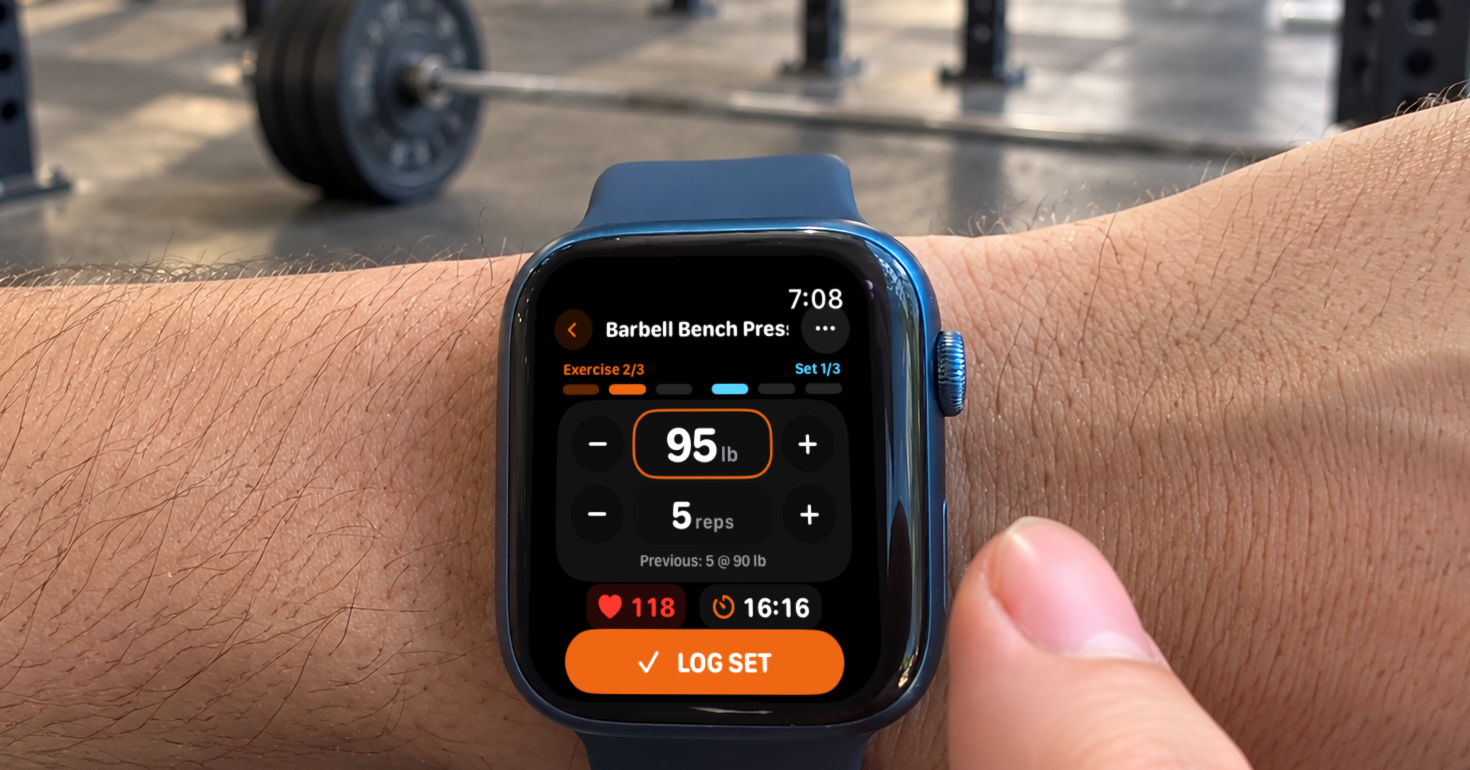
Runners and triathletes often fit two strength sessions a week around their endurance training to stay injury-free, and each set can turn into phone admin: unlock the phone, find the exercise, type the load and reps, restart the rest timer. A watch app does not always fix that. If it needs a live phone connection for every entry, it stalls when the phone is in a locker, a gym bag or simply out of Bluetooth range.
Massiv, a self-funded strength training app built by developer Alan and published by Aristocoded LLC, moves the working set to Apple Watch and Wear OS. The watch shows the exercise and the previous result, adjusts weight and reps, runs the rest countdown and, for Pro users, opens a plate calculator. If the phone connection drops, the watch keeps logging and delivers the sets when the phone is back in range. The phone still starts and stores the workout, so Massiv is a phone-and-watch system rather than a watch-only app.
Why strength logging slips
Strength sessions get skipped or logged badly when recording each set takes more effort than lifting it. For an endurance athlete the useful record is simple: what was lifted, how many reps were completed, and how that compares with last time.
When every set means reaching for a phone and finding the right exercise again, logging gets put off until later, when the details are easier to forget. A watch screen that only starts a workout or shows a timer still leaves the actual set log on the phone.
How Massiv keeps the set on the wrist
TL;DR: The workout starts on the phone and every set is logged on Apple Watch or Wear OS. The watch shows the previous result, adjusts weight and reps, runs the rest countdown and, with Massiv Pro, opens a plate calculator. If the phone connection drops, logged sets wait on the watch and are delivered when the phone reconnects.
Once the lifter starts a workout on the phone, the whole session is copied to the watch and saved there, and the watch screens take over between sets.
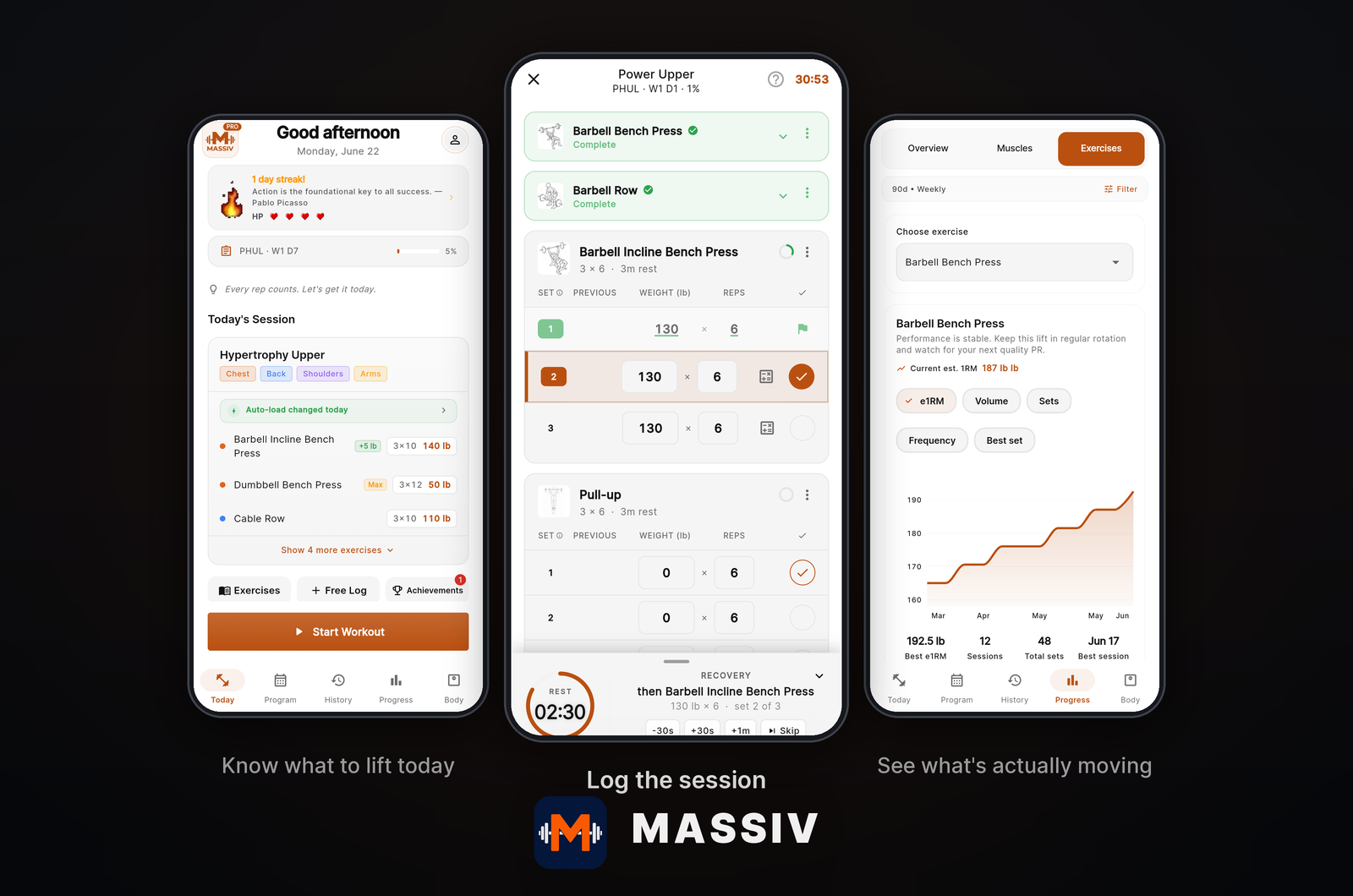
The set screen
The exercise name sits at the top with two progress rails, Exercise (for example 2/4) and Set (for example 1/3). Below them are the weight and reps, each with minus and plus buttons. Turning the Digital Crown on Apple Watch, or the rotary input on Wear OS, changes the value in steps that match the bar and plates set up in Massiv. A full-width Log Set button records the set, with heart rate and elapsed time just above it.
Previous-set context
A line under the reps shows the most recent working set of that exercise from an earlier session, such as “Previous: 5 @ 125 lb”, or the planned target when there is no history. On smaller Wear OS screens, such as the 41mm Pixel Watch, the line is hidden to keep the controls readable.
Rest countdown
Logging a working set starts a countdown ring on the watch using that exercise’s rest time. The rest screen shows what comes next, such as “Set 2/3 · 5 reps @ 135 lb”, with buttons to add 30 seconds or skip the rest. The countdown runs on the watch itself, so it does not depend on the phone.
More actions with Pro
A ••• button opens the plate calculator, set types, adding or deleting a set, and swapping the exercise. The plate calculator uses the bar and plates saved in Massiv’s equipment settings and shows what to load on each side. On Apple Watch it appears for barbell exercises.
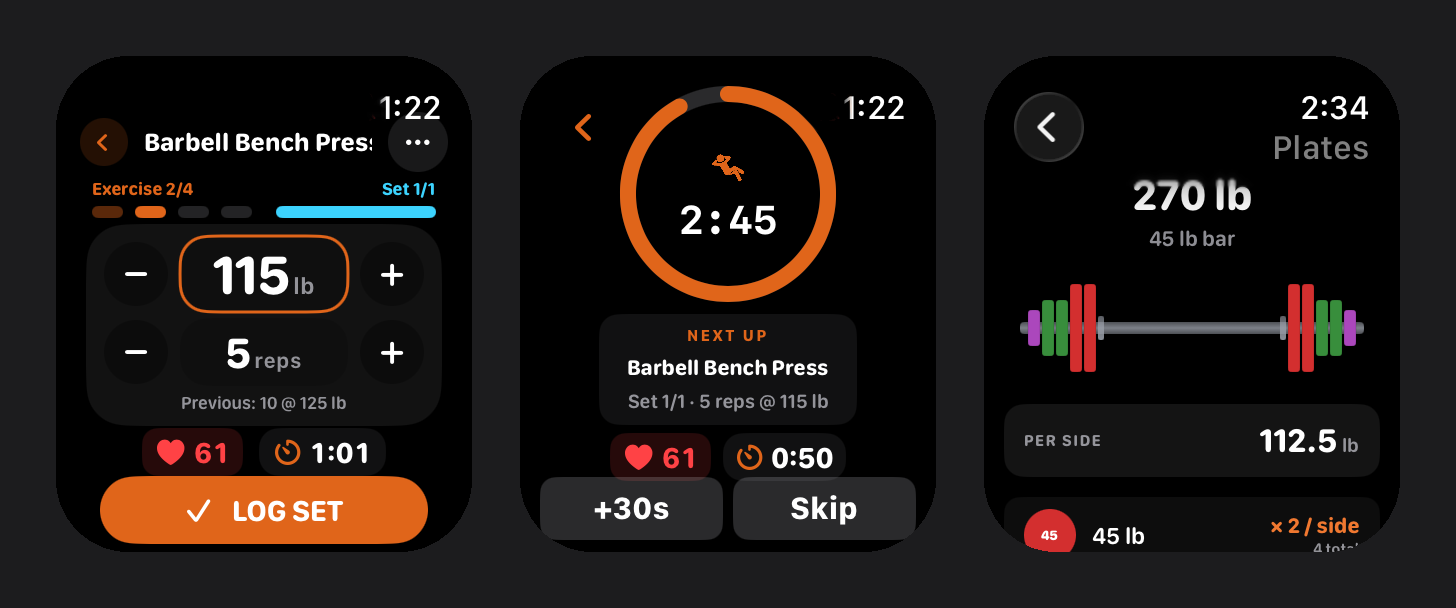
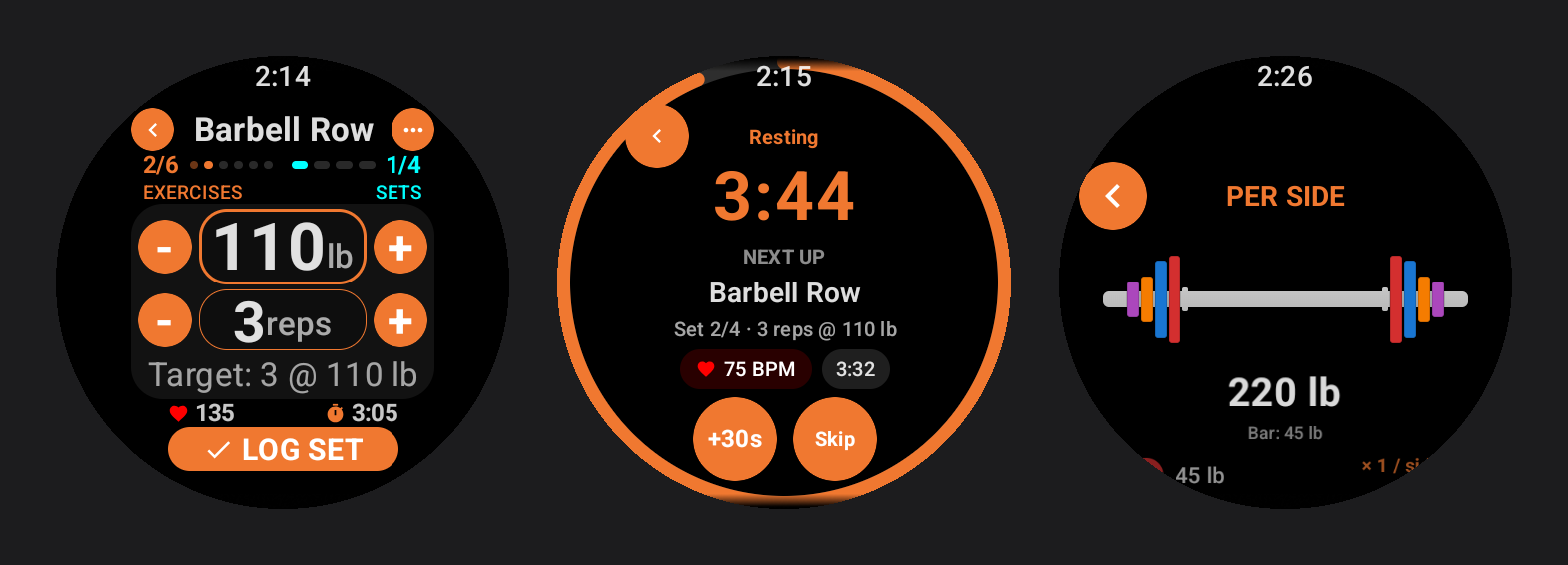
On Apple Watch, the session also runs as a strength training workout, so heart rate and active calories are recorded and saved to Apple Health when it ends. On Wear OS, the same screens adapt to a round display, and heart rate is shown live on the watch.
Worked example: seven sets and one dropped connection
This is an illustrative session, not a recorded test. It shows how the screens and the offline queue behave for a lifter training in pounds on Massiv Pro, with a 45 lb (20 kg) bar and standard plates set up in the app.
The athlete starts the workout on the phone, waits a moment for it to appear on the watch, then leaves the phone in a gym bag on the other side of the room.
Barbell squat, 3 × 5 at 135 lb (61 kg)
The watch shows “Previous: 5 @ 125 lb” from the last session, so the plan is a 10 lb increase. The plate calculator shows one 45 lb plate per side. The first set is logged while the phone is still in range, and the rest countdown starts on the wrist.
The connection drops
Partway through the first rest, the phone falls out of range. Nothing on the set screen changes. Massiv shows no separate offline warning, and on Apple Watch the only sign is watchOS’s own disconnected-iPhone icon beside the clock. Squat sets two and three are logged on the watch anyway, and both wait in the watch’s queue.
Barbell bench press, 3 × 5 at 95 lb (43 kg)
Because the whole session is already on the watch, the athlete moves on to the next exercise with the phone still out of range. The watch shows “Previous: 5 @ 90 lb”, and the plate calculator shows one 25 lb plate per side. All three sets are logged and queued.
Barbell deadlift, 1 × 5 at 185 lb (84 kg)
The watch shows “Previous: 5 @ 175 lb”, and the plate calculator shows a 45 lb and a 25 lb plate per side. The set is logged and queued.
Reconnection
Back at the gym bag, the phone is in range again. The six queued sets are delivered from the watch, and the phone’s session shows all seven: three squat, three bench and one deadlift. No weight was typed into the phone.
Integrations and compatibility
- Apple Watch needs watchOS 11 or later, which covers Series 6 and newer, SE (2nd generation) and newer, and every Ultra. It pairs with Massiv on iPhone.
- Wear OS needs version 3 or later, including Samsung Galaxy Watch4 and newer and Google Pixel Watch models. It pairs with Massiv on an Android phone.
- Phones need iOS 16.2 or Android 8.0 or later. Apple Watch works only with the iPhone app, and Wear OS only with the Android app.
- With the setting on, Massiv writes completed workouts and body weight to Apple Health on iPhone or Health Connect on Android. Writes go one way, and Massiv does not read them back.
- Training history imports from CSV exports of Strong, Hevy, Fitbod, StrongLifts, FitNotes and Jefit, and exports as CSV or a full JSON backup.
- There is no Garmin, COROS, Polar or Suunto app, and no direct sync with Strava, TrainingPeaks or intervals.icu.
- No account is needed. Records stay on the device unless encrypted backup to iCloud or Google Drive is turned on.
- Weights can be in kilograms or pounds, with the bar, plates and dumbbells the lifter actually owns.
Price
Watch set logging is free. The free tier includes every built-in program, unlimited history, CSV import and export, and logging from the watch with the previous-set line, rest countdown and offline queue.
Massiv Pro costs $4.99 a month, $29.99 a year or $99.99 once in the US, and local store prices vary. It adds automatic weight progression after a 30-day free preview, the program builder, body and progress photo tracking, deeper analytics and unlimited custom exercises. On the watch, Pro unlocks the plate calculator, set types, adding or deleting sets and swapping an exercise.
More: Massiv’s Apple Watch and Wear OS logging
Quick answers
Can an Android phone owner use Massiv?
Yes. Massiv has a full Android app and the Wear OS app pairs with it, so an Android owner never needs an iPhone. Apple Watch works only with the iPhone app, and a Wear OS watch only with the Android app.
Does Massiv need the phone nearby during a workout?
Only at the start. Once the workout reaches the watch, the lifter can log sets, change exercise and run rest timers with the phone out of range. Logged sets wait on the watch and are delivered when the phone reconnects.
Does Massiv work with Garmin or Strava?
Not directly. Massiv has no Garmin Connect IQ app and no Strava or TrainingPeaks connection. Workouts go to Apple Health on iPhone, Health Connect on Android, or CSV and JSON export files.
Is Massiv free?
Logging sets from the watch is free, including the previous-set line, rest timer and offline queue. Massiv Pro, at $4.99 a month, $29.99 a year or $99.99 once in the US, adds the plate calculator, automatic progression and the program builder.
Related reading
- Compound: one strength routine, run from your Apple Watch
- HYROX sports tech hub
- Google Pixel Watch 4 review
Author: Alan, developer of Massiv (Aristocoded LLC), edited by the5krunner.
If you enjoyed reading this, here is another in the Indie Spotlight series: Ready to Run shows Garmin runners when heat makes a run risky.
Last Updated on 16 October 2026 by tfk the5krunner
Small things I always use
- Garmin 90-degree charging adapter: Charges your Garmin from any USB-C cable. Essential when travelling. I use one.
- Body Glide: The blue anti-chafe stick swimmers and runners carry. I use it.
- Speedo earplugs: Fewer ear infections and no cold-water dizziness. I use them.
- Dryrobe Advance: My winter changing robe for open-water swims. I use one. A cheaper option is the AONYIYI changing robe.
- Maurten: Race fuel that stays easy on the stomach. I use them.
- Garmin charging puck: The quickest way to top up before a session. I use one.
- Injinji: Toe socks that stop rubbing, so you run more. I use them.
- Ultimate toe protectors: Stop black toenails on long runs. They work. I use them.
- Compressport R2 v2 calf sleeves: My calf sleeves of choice. I use them.
- Cellucor C4: My pre-workout before hard sessions.
- TPU tubes: Schwalbe Aerothan, Tubolito and Pirelli SmarTube. Light, tiny spares. I use all three.
- G8 insoles: Adjustable insoles that are good. I use them.
- Cycplus Cube: A 97g electric pump that gets a road tyre rideable in two minutes. I carry one. 5% off with code THE5KRUNNER.
Watches and sensors
- Polar H10: My daily driver for waking HRV.
- Polar Verity Sense: My backup arm-worn HR sensor.
- Nomad bedside charger: Charges my iPhone and Apple Watch overnight. I use it, and many of their bands.
- Train.Red: The best muscle oxygen sensor I’ve used.
- Tymewear: Accurate heart rate and reliable ventilatory zones. I use it to pace endurance rides over an hour.
- Garmin Forerunner 970: A pro-grade triathlon watch. I use this.
- Apple Watch Ultra 4: My daily smartwatch. No phone needed on rides.
- Garmin Fenix 9 Pro: I’ve just bought one.
On the bike
- Continental GP5000 for everyday riding, and Aero 111 on the front for special occasions.
- Helmets: Specialized S-Works Evade 3 for road riding, and Rudy Project Wing for TT-style races. I use both.
- Ravemen FR300: A front light that mounts under your Garmin or Wahoo. I use one.
- Wahoo TRACKR Radar: I use it on one bike and Varia on the other. They perform the same.
- Garmin Varia RTL515: Radar that warns you of cars from behind. I use this model.
- Wahoo ELEMNT Roam 3: The bike computer that’s easy to use. I use mine on most rides.
- Favero Assioma Pro RS2: Accurate power pedals that swap easily between bikes. I use this model.
Home and indoor training
- NPE Runn: Makes my basic treadmill smart, sending more accurate speed and distance to my watch and Zwift. I use it.
- Google Wifi: Keeps Zwift connected in my pain cave. I use it.
- Apple TV 4K: Zwift on the big screen. I use two.
- Google Nest Doorbell (wired, 2nd gen): My video doorbell, running in both Google Home and Apple Home. I use it.
Health, recovery and sleep
- FreeStyle Libre 3 Plus: Shows how my blood sugar responds to diet.
- hDrop: Measures my sweat loss in summer and indoors.
- Fourth Frontier Zone: Checks my heart under load in hard sessions.
- Oura Ring 5: My partner’s recovery tracker of choice.
- Kineon MOVE+: Red light therapy for niggles. It works.
- Eight Sleep: A cooling mattress cover my partner and I use nightly.
Reader-Powered Content

This content is not sponsored. It’s mostly me behind the labour of love, which is this site, and I appreciate everyone who supports it.
Support the site: Follow (free, fewer ads) · Subscribe (paid, ad-free) · Buy Me A Coffee ❤️
Written by real people, with AI assistance. Fact-checked and verified for originality. See the Editorial Policy. FTC: Affiliate Disclosure — some links pay commission. As an Amazon Associate, I earn from qualifying purchases.

tfk is the founder and author of the5krunner, an independent endurance sports technology publication. With 20 years of hands-on testing of GPS watches and wearables, and competing in triathlons at an international age-group level, tfk provides in-depth expert analysis of fitness technology for serious athletes and endurance sport competitors. ID
