One study found a Garmin band overestimated moderate-to-vigorous minutes
Checking a week of everyday activity against public health guidelines
Judged against resting heart rate, so a poor baseline skews it
Plain English: Intensity minutes count the time in a week spent moving hard enough to raise the heart rate, such as a brisk walk, a run or a ride. Moderate effort counts once and vigorous effort counts twice, towards a default weekly target of 150. A higher weekly total means more time spent working at a health-promoting effort.
In practice: This is one of those metrics that needs you to wear your watch throughout the day or, at the very least, in your more active periods. It relies on your heart rate being correct, but as this metric is aimed at non-athletes, those heart rate levels may be well below your maximum, which gives Garmin’s heart rate technology a better chance of recording the correct values.
Quick answers
How does Garmin calculate intensity minutes?
Garmin compares your current heart rate with your average resting heart rate. If heart rate is turned off, the watch estimates moderate minutes from steps per minute, but it needs heart rate to count vigorous minutes.
Why do vigorous intensity minutes count double on Garmin?
Garmin counts each vigorous minute twice to reflect its larger benefit, following public health guidance that 75 minutes of vigorous activity a week gives similar benefits to 150 minutes of moderate activity.
Why is my Garmin not counting intensity minutes?
Older Garmin devices only count effort sustained for at least 10 continuous minutes, so shorter bursts earn nothing. Garmin also suggests checking the user profile, wearing the watch at night for an accurate resting heart rate, and checking the heart rate zone settings if zones are used.
Can I change my Garmin intensity minutes goal?
Yes. Garmin sets the weekly target at 150 by default and lets the wearer change it to suit their own needs.
Intensity Minutes – a deep dive
When intensity minutes are actually useful
Intensity minutes are wellness targets rather than training targets. They are a good, rough-and-ready metric to check against, broadly guiding you towards a reasonable amount of moderate or vigorous activity each week.
Introduction
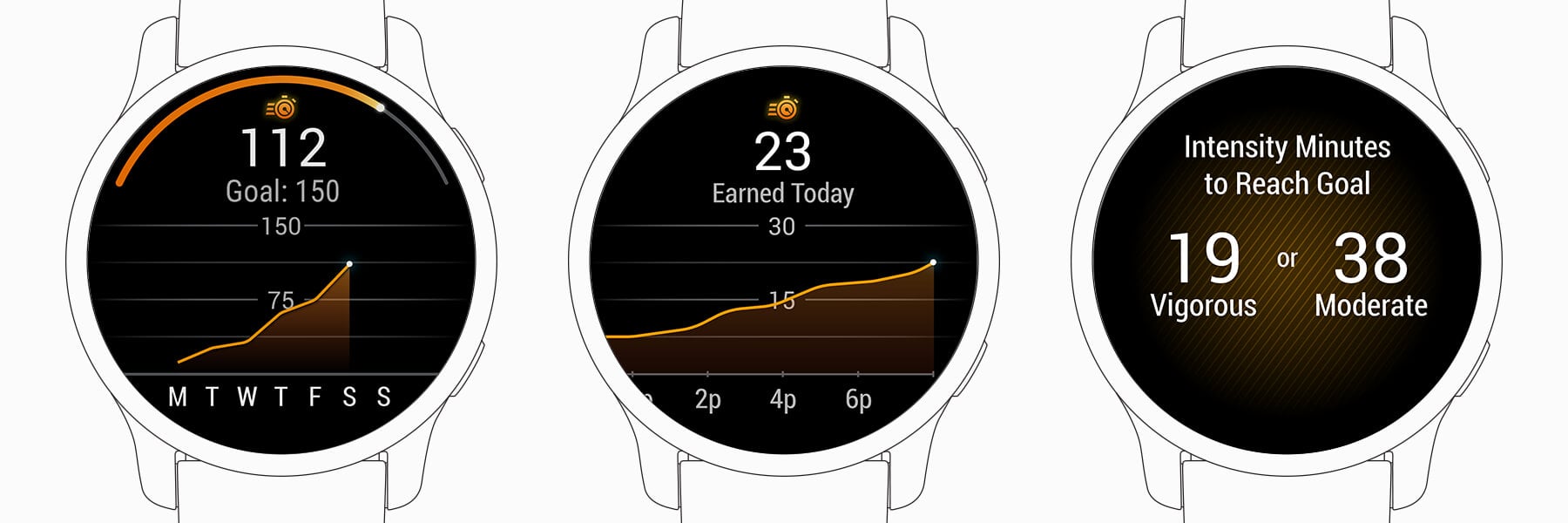
Garmin Intensity Minutes are Garmin’s weekly count of activity at a health-promoting effort, and Garmin defines one as “a 60-second time period spent in either moderate or vigorous physical activity.” Moderate minutes count once and vigorous minutes count twice, against a default target of 150 a week, which Garmin bases on the US Department of Health and Human Services’ Physical Activity Guidelines for Americans (2018).
Garmin introduced the feature on the vívosmart HR, announced on 27 October 2015, which “measures activity intensity through Intensity Minutes so users can monitor their progress against weekly aerobic activity goals recommended by leading health organizations”. It is now on almost every Garmin wearable. Because it judges effort against the wearer’s resting heart rate, it works as a rough health measure rather than a training metric.
What intensity minutes actually mean
A higher weekly total means more time spent at moderate or vigorous effort. The target of 150 is met by 150 moderate minutes, by 75 vigorous minutes, or by any mix, because “Vigorous intensity minutes are counted twice (x2) to reflect the larger benefit they have on your body compared to moderate intensity.” Garmin publishes no age or sex norms; the target is the public health guideline, and the wearer can raise or lower it.
Garmin also advises spreading the week out rather than earning it in one go: “Breaking it up into smaller chunks (e.g., working out on 5 different days) is considered a good idea and could help you develop stronger, more consistent habits.”
How Garmin calculates intensity minutes
Garmin states the method in its support pages and manuals. “Intensity minutes are earned based on your current heart rate compared to your average resting heart rate.” Without heart rate, the Forerunner 970 manual says the watch “calculates moderate intensity minutes by analyzing your steps per minute”, and “heart rate data is required to quantify vigorous intensity.” Some devices let the wearer choose heart rate zones for moderate and vigorous minutes instead of the resting heart rate method.
Garmin does not publish the default thresholds, so how far above resting heart rate counts as moderate or vigorous is unknown. Older devices add a rule: “Some devices require you to have an elevated heart rate for a minimum of 10 continuous minutes, while others will count without needing to meet that ten minute threshold.”
What affects the intensity minutes reading
The resting heart rate baseline has the largest effect, because every minute is judged against it. Garmin’s support page advises: “Wear your device while sleeping for the most accurate resting heart rate.” A watch worn only for workouts has a poorer baseline and can misjudge intensity.
Activity type changes the count through the sensor that can see it. Cycling, swimming and gym work earn minutes only from heart rate, because they produce few steps. Swim intensity minutes need the Pool Swim or Open Water Swim profile on a watch with an optical sensor, and Garmin says activities recorded with third-party apps or Tacx Training apps are not compatible.
How accurate are Garmin intensity minutes
The independent evidence is thin and not encouraging. Briggs and colleagues (Frontiers in Sports and Active Living, 2021) compared a Garmin vívosmart HR with a research-grade ActiGraph accelerometer in older adults and found that the Garmin overestimated moderate-to-vigorous activity, with poor agreement between the two (ICC 0.16 to 0.35). In children, Mayorga-Vega and colleagues (2023, PMID 37554735) found mean absolute errors of 36.6% to 90.3% for moderate-to-vigorous activity on the Garmin vívofit jr. 2.
The count works better as a weekly habit check than as a precise figure. Week to week, on the same watch worn the same way, a rising or falling total is a fair guide to how active the wearer has been.
Competitor equivalents
- Apple Watch has Exercise minutes, a daily ring that needs at least 30 minutes at or above a brisk walk, with no extra credit for vigorous effort.
- Polar has no direct equivalent; its 24/7 activity tracking counts active time at low, medium and high intensity against a daily goal.
- COROS shows Exercise Time, the recorded activity time for the day, without an intensity threshold.
- Suunto has no equivalent in its current user guides, which track steps and calories.
Which Garmin devices support intensity minutes
Almost every Garmin wearable with activity tracking records intensity minutes, and Garmin’s support page lists them by family, from Approach golf watches and CIRQA to Forerunner, Fenix, Venu and vívoactive. Older models such as the original Enduro, Descent Mk1, D2 Bravo and Approach S40 to S62 need the 10-minute threshold; current models count without it and add swim intensity minutes. Edge bike computers count intensity minutes only with a paired heart rate sensor. Garmin introduced the feature on the vívosmart HR in October 2015.
Where to find intensity minutes on Garmin
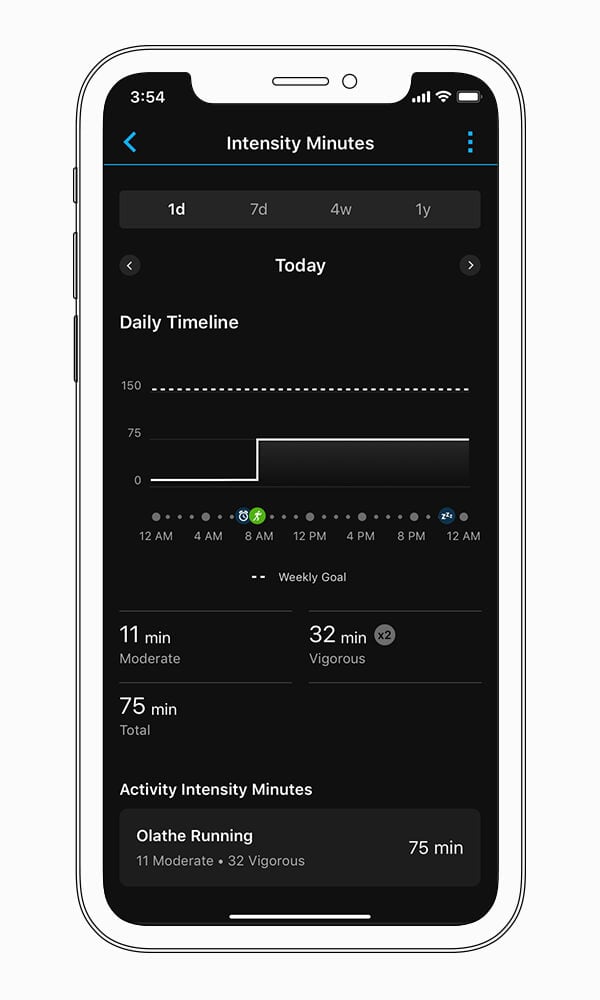
- Watch: an intensity minutes screen or widget showing the weekly total against the goal.
- Garmin Connect: the weekly total and history, and the user settings where the weekly goal can be changed from the default of 150.
- Paired heart rate monitor: a compatible strap paired to the Garmin Connect app earns intensity minutes for activities that would otherwise miss them.
Common problems and misreadings
Missing minutes after a short, hard effort usually come from the 10-minute threshold on older devices. See Quick answers above.
Wearing two Garmin devices at once can change the total after syncing. Garmin notes that when a device with the 10-minute threshold and one without it record the same activity, “it is expected that the intensity minutes can be adjusted after both devices sync”. Garmin recommends using a heart rate strap as the only heart rate source when one is worn.
Firmware has caused faults too. the5krunner’s Fix Files logged Instinct 3 undercounting outside recorded activities in August 2026, and Fenix 8 owners getting one or two intensity minutes, or none, on software 22.35 in September 2026. Both followed software updates rather than sensor faults.
How to improve intensity minutes
Intensity minutes rise with time spent moving at a moderate or harder effort, so the plainest route is more brisk walking, running, cycling or swimming spread through the week. Vigorous sessions earn twice as fast. A wearer who rarely reaches the target can lower it to a realistic starting point, and one who passes it every week can raise it.
Scientific basis
Bull FC, Al-Ansari SS, Biddle S and colleagues. British Journal of Sports Medicine, 2020. PMID 33239350. The World Health Organization’s 2020 guidelines recommend 150 to 300 minutes of moderate or 75 to 150 minutes of vigorous activity a week for adults, the basis of Garmin’s target and double counting.
Briggs BC, Hall KS, Jain C and colleagues. Frontiers in Sports and Active Living, 2021. PMID 35047769. A Garmin vívosmart HR overestimated moderate-to-vigorous activity against a research-grade accelerometer in older adults, with poor agreement.
How intensity minutes connect to other Garmin features
Intensity minutes use the same heart rate data as VO2 max, so a poor reading weakens both. The same daily activity also feeds calories, while recorded workouts with heart rate feed training load.
Small things I always use
- Garmin 90-degree charging adapter: Charges your Garmin with any USB-C cable. Essential when travelling. I use one.
- Body Glide: The blue anti-chafing stick swimmers and runners carry. I use it.
- Speedo earplugs: Fewer ear infections and no cold-water dizziness. I use them.
- Dryrobe Advance: My winter changing robe for open-water swims. I use one. A cheaper option is the AONYIYI changing robe.
- Maurten: Race fuel that stays easy on the stomach. I use them.
- Beet It Sport nitrate shots: Beetroot shots I take in the days before a race. I use them.
- Garmin charging puck: The quickest way to top up before a session. I use one.
- Injinji: Toe socks that stop rubbing, so you run more. I use them.
- Ultimate toe protectors: Stop black toenails on long runs. They work. I use them.
- Compressport R2 v2 calf sleeves: My calf sleeves of choice. I use them.
- Cellucor C4: My pre-workout before hard sessions.
- TPU tubes: Schwalbe Aerothan, Tubolito and Pirelli SmarTube. Light, tiny spares. I use all three.
- G8 insoles: Adjustable arches, perfect position. I use them.
- Cycplus Cube: A 97g electric pump that gets a road tyre rideable in two minutes. I carry one. 5% off with code THE5KRUNNER.
Health, recovery and sleep
- Kineon MOVE+: Red and infrared light for sore knees, Achilles and other joints after hard training. I use it.
- FreeStyle Libre 3 Plus: Shows how my blood sugar responds to diet. Occasional use.
- hDrop: Measures my sweat loss in summer and indoors. I use it.
- Fourth Frontier Zone: Checks my heart under load in hard sessions.
- Oura Ring 5: My partner’s recovery tracker of choice.
- Eight Sleep: A cooling mattress cover my partner and I use nightly.
Watches and sensors
- Polar H10: My daily driver for waking HRV.
- Polar Verity Sense: My backup arm-worn HR sensor.
- Nomad bedside charger: Charges my iPhone and Apple Watch overnight. I use it, and many of their bands.
- Train.Red: The best muscle oxygen sensor I’ve used. Occasional use.
- Tymewear: Accurate heart rate and reliable ventilatory zones. I use it to pace endurance rides over an hour.
- Garmin Forerunner 970: A pro-grade triathlon watch. I use this.
- Apple Watch Ultra 4: My daily smartwatch. No phone needed on rides.
On the bike
- Continental GP5000 for everyday riding, and Aero 111 on the front for special occasions. I use both.
- Helmets: Specialized S-Works Evade 3 for road riding, and Rudy Project Wing for TT-style races. I use both.
- Ravemen FR300: A front light that mounts under your Garmin or Wahoo. I use one.
- Ravemen FR1000: The light and the computer mount in one unit, so nothing else goes on the bars. Better than mine.
- Ravemen FR1500SE: 1,500 lumens hanging under your Garmin, for proper night rides.
- Ravemen FR1100SE: 1,100 lumens under your Garmin, and up to 46 hours on slow flash.
- Ravemen FR500: A brighter FR300 with the same mount.
- Wahoo TRACKR Radar: I use it on one bike and Varia on the other. They perform the same.
- Garmin Varia RTL515: Radar that warns you of cars from behind. I use this model.
- Wahoo ELEMNT Roam 3: The bike computer that’s easy to use. I use mine on most rides.
- Favero Assioma Pro RS2: Accurate power pedals that swap easily between bikes. I use this model.
Home and indoor training
- NPE Runn: Makes my basic treadmill smart, sending more accurate speed and distance to my watch and Zwift. I use it.
- Google Wifi: Keeps Zwift connected in my pain cave. I use it.
- Apple TV 4K: Zwift on the big screen. I use two.
- Google Nest Doorbell (wired, 2nd gen): My video doorbell, running in both Google Home and Apple Home via Starling. I use it.
Reader-Powered Content

This content is not sponsored. It’s mostly me behind the labour of love, which is this site, and I appreciate everyone who supports it.
Support the site: Follow (free, fewer ads) · Subscribe (paid, ad-free) · Buy Me A Coffee
Written by real people, with AI assistance. Fact-checked and verified for originality. See the Editorial Policy. FTC: Affiliate Disclosure — some links pay commission. As an Amazon Associate, I earn from qualifying purchases.
