Most self-coached athletes now train across two windows. The plan lives in a training calendar. The thinking happens in a chatbot: they paste last week’s numbers, ask what to change, then type the answer back into the calendar one interval at a time. The chatbot never sees the ride file, and its advice comes from whatever it found on the open internet.
Blocks is built to close that gap. It is an AI-native training platform for cyclists, runners and triathletes. Mikhail Gavrilov, a cyclist, built it after running his own training through more than 800 conversations with Claude. Blocks launched in June 2026 and has about 1,300 athletes.
How Blocks works
TL;DR: Blocks puts a training calendar, a workout builder and an AI assistant on one set of data. The assistant sees every planned session, every recorded interval, the athlete’s thresholds and their sleep. It answers from a built-in base of sports-science research, and any change it suggests waits for the athlete’s yes. Finished workouts go to Wahoo, Hammerhead Karoo, Zwift and Garmin.
Most training platforms are now adding AI on the side: an MCP server here, a chat window there, on top of software designed for clicking through forms. Blocks was built the other way round. The assistant runs on the same tools as the interface, so anything an athlete can do by hand, the AI can do too.
Rides and runs arrive from Strava, from intervals.icu or as a .FIT file. Blocks reads the laps and detects the intervals in each file, so a 12 × 3-minute session shows up as twelve reps with their own power, heart rate and cadence, not as one average. Sleep, HRV and resting heart rate come from Oura or WHOOP, or from a short morning check-in.
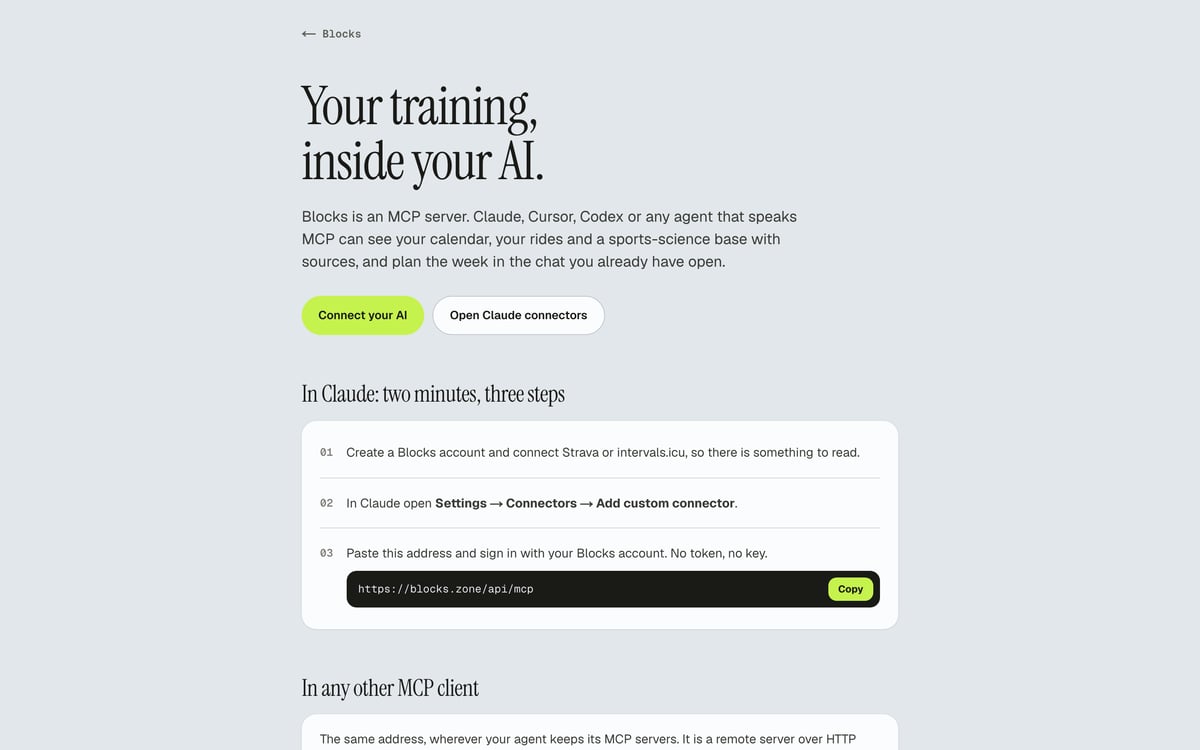
There are two ways to use the AI. The assistant lives inside Blocks. Or the athlete connects their own: Blocks is an MCP server, so Claude, Cursor, Codex or any agent that speaks MCP gets the same calendar, the same data and the same research base inside the chat they already use.
The AI assistant inside the builder
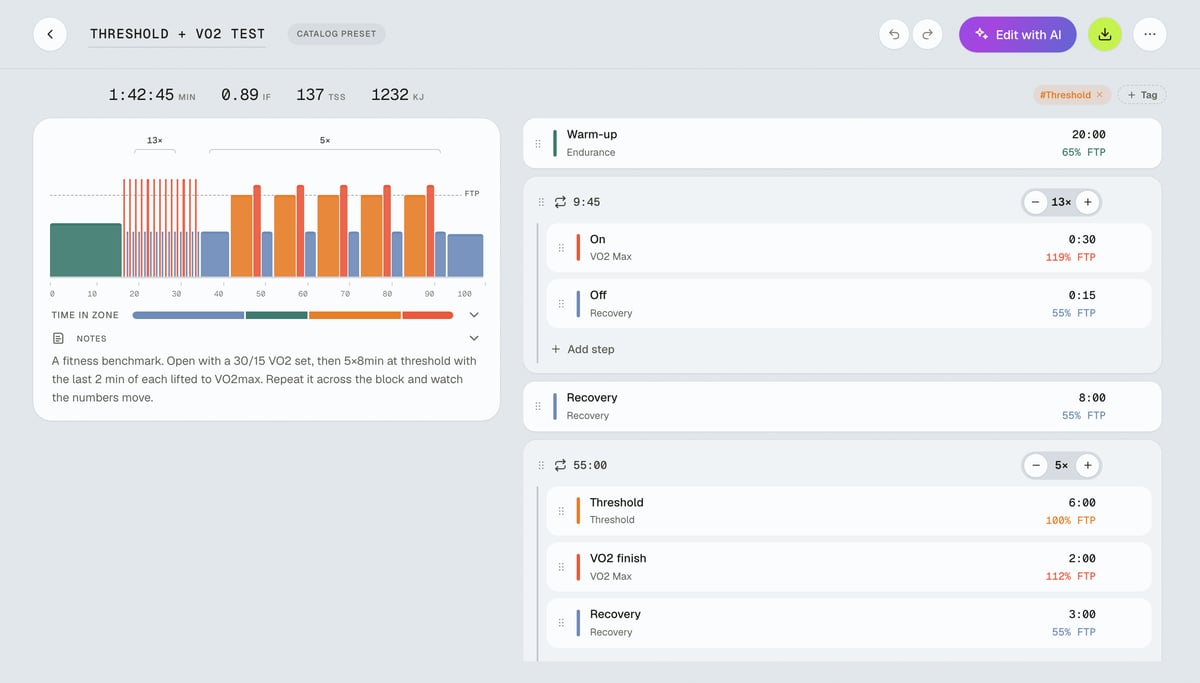
The builder draws a workout as a row of coloured blocks, one per step, sized by duration and intensity. There are three ways to fill it.
- Draw it. An athlete can drag blocks, set durations and targets, and group steps into repeat sets.
- Type it. Build from text takes a line such as “3×10 min at FTP with a warm-up”, or a whole session pasted from a coach’s message, and returns a finished workout to preview.
- Change it. Edit with AI takes one instruction, such as “make it 15% easier” or “change the main set to 4×8 min threshold”, and shows the workout before and after. You can undo the change like any manual edit.
Outside the builder, the assistant plans a week around the athlete’s days and hours, moves sessions when life gets in the way, reads a finished ride and estimates thresholds from recent files. Plan changes arrive as a card with an Apply button. Nothing in the calendar moves until the athlete presses it, and the assistant never starts a conversation on its own.
Answers come from Blocks’ own base of sports-science research, not the open internet. Each entry carries its source and an evidence grade from A+ to C, and the assistant cites them. When the base has nothing on a question, the assistant says so. Blocks calls it an assistant, not a coach, on purpose: every claim it makes can be checked against the data and the source.
A worked example: 12 × 3 minutes at threshold
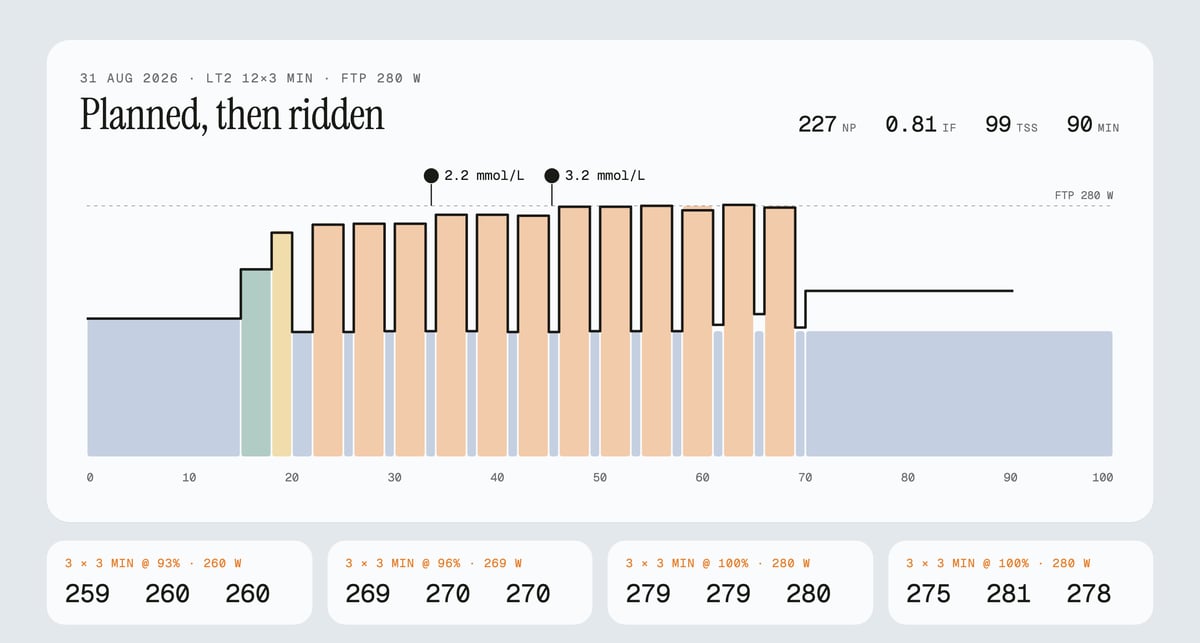
On 31 August, Mikhail’s calendar held a session called LT2 12×3 min. After a 22-minute warm-up with a 2-minute opener came twelve 3-minute reps with 1 minute easy between. The reps climbed in sets of three: 93%, 96%, and 100% of his 280 W FTP (260, 269, and 280 W). The plan said 100 minutes and 104 TSS, with a lactate reading after every third rep.
From Blocks, the session went to Zwift, and he rode it in ERG mode. The file came back with every rep in place.
| Set | Target | Ridden, average watts per rep |
|---|---|---|
| 1 | 93% · 260 W | 259 · 260 · 260 |
| 2 | 96% · 269 W | 269 · 270 · 270 |
| 3 | 100% · 280 W | 279 · 279 · 280 |
| 4 | 100% · 280 W | 275 · 281 · 278 |
The whole ride: 90 minutes, NP 227 W, IF 0.81, TSS 99.
The AI’s read of the ride, saved on the activity, went further than “completed”:
- Heart rate. Over four reps in a row at 280 W, heart rate at the end of each rep held at 154-155 bpm. Aerobically, the session was clean.
- Lactate. 2.2 mmol/L after rep 3 and 3.2 after rep 6. For an LT2 session aimed at about 3 mmol/L, that put the last third, at 280 W, slightly above target. A reading of 1.4 after rep 9 was set aside: lactate does not halve while power rises, and sweat on the finger dilutes the drop.
- Pacing. Mikhail rode the last two reps without ERG. They opened at 292 and 297 W and faded to 262-272 W. The averages looked fine. The shape did not. The read cited a study from the base, graded B+, that found self-pacing no worse than ERG, and named the fast start as the part that breaks.
- Cost. He rated the session 8 out of 10, above his usual 7 for hard days, and his self-rated recovery had been low for three days. The legs were right: the session cost more than the numbers suggested.
- Profile. His heart rate had topped out at 156-157 bpm for three sessions in a row, so the 180 bpm maximum in his profile was almost certainly an age formula.
The verdict: keep the plan as written, and cap the cool-down at 154 W. He had ridden it at 185.
Where the workouts go
Direct connections
- Wahoo: sends the plan to ELEMNT, BOLT and ROAM head units, or one workout at a time.
- Hammerhead: sends the plan to Karoo, or one workout at a time.
- intervals.icu: two-way. Imports the full history and thresholds, and pushes planned workouts back.
- Strava: imports activities.
- Oura and WHOOP: fill the morning check-in with sleep, HRV and resting heart rate. WHOOP adds its recovery score.
- Claude and other MCP clients: the whole account, as a connector.
Through intervals.icu
- Garmin: planned workouts reach Garmin watches and Edge computers through intervals.icu’s Garmin Connect sync.
- Zwift: sessions land in Zwift’s custom workouts the same way.
As files
Every workout exports as .FIT, .ZWO, .ERG and .MRC, for Garmin over USB, Zwift, MyWhoosh, TrainerRoad and others.
Garmin, plainly. Garmin has paused new access to its Connect Developer Program, and Blocks has been in the queue since July. Until it reopens, Blocks uses intervals.icu and FIT files to reach Garmin devices. Both work today.
Price
The calendar, the builder, device connections and file exports cost nothing. The in-app assistant runs on tokens: 300 at sign-up, 300 more when the first activity source connects, then packs from $10.99 for 1,000 tokens. Athletes who bring their own AI over MCP spend no Blocks tokens, and Claude’s free plan allows one custom connector, which is all Blocks needs.
Quick answers
Does Blocks work with Garmin today, and how?
Yes, Blocks reaches Garmin through intervals.icu: Connecting intervals.icu to both Blocks and Garmin Connect lets planned workouts travel from Blocks to the watch or Edge through intervals.icu’s Garmin sync, with finished activities coming back the same way. You can also download any workout as a .FIT file and copy it to the device over USB. A direct connection is possible once Garmin reopens its developer program.
Does an athlete need their own AI subscription to use Blocks?
No, the assistant is built in, and new accounts start with tokens. Connecting Claude or another MCP client is optional for athletes who already spend their day in that chat.
Will the AI change a training plan without asking?
No, in Blocks every change arrives as a card with an Apply button, and in an athlete’s own AI, the agent names the change and asks first. Nothing is written until the athlete agrees.
Author: Mikhail Gavrilov, founder of Blocks, edited by the5krunner.
Last Updated on 23 September 2026 by the5krunner
My favourite kit and nutrition
- Garmin Fenix 9 Pro — I’ve just bought one.
- Injinji – Runners protect your toes. Avoid discomfort and minor injury. Run more. Run faster. I use them.
- Garmin 90-degree charging adapter — A small keyring adapter you can use anywhere. Essential when away. I use one.
- Garmin charging puck — the fastest and most reliable way to top up your Garmin before a session. I use one.
- Ravemen FR300 — Front light that mounts directly under your Garmin or Wahoo head unit. Keeps your bars clean and your beam pointed where it matters. I use one.
- Body Glide – The blue anti-chafe stick that all swimmers and many runners use. I use it.
- Maurten — The race nutrition trusted by elite athletes. Gels and drink mixes engineered to be easy on the stomach. I use them.
- Garmin Varia RTL515 — A radar rear light that alerts you to vehicles approaching from behind. Pairs with your Edge or Wahoo. I use this model.
- Favero Assioma Pro RS2 — The power-meter pedals most serious cyclists choose. Accurate, easy to move between bikes. I use this model.
- Garmin Forerunner 970 — A serious choice for a pro-grade triathlon watch. I use this.
- Polar H10 — My daily driver for accurate, waking HRV readings.
- Wahoo ELEMNT Roam 3 — The bike computer that has the feature Garmin lacks: usability. I use mine on most rides.
Reader-Powered Content

This content is not sponsored. It’s mostly me behind the labour of love, which is this site, and I appreciate everyone who supports it.
Support the site: Follow (free, fewer ads) · Subscribe (paid, ad-free) · Buy Me A Coffee ❤️
All articles are written by real people, fact-checked, and verified for originality. See the Editorial Policy. FTC: Affiliate Disclosure — some links pay commission. As an Amazon Associate, I earn from qualifying purchases.

tfk is the founder and author of the5krunner, an independent endurance sports technology publication. With 20 years of hands-on testing of GPS watches and wearables, and competing in triathlons at an international age-group level, tfk provides in-depth expert analysis of fitness technology for serious athletes and endurance sport competitors. ID

Thanks for this article, MAC and Garmin works together now 🤓