The run ends halfway through an episode. Back on the phone, the podcast is still where it was before the run began. Finding the right minute becomes another small job that shouldn’t be necessary.
Getting podcasts onto a Garmin can mean managing a separate dashboard or using a music-streaming service whose playlist controls aren’t designed for podcast listening. Keeping episodes fresh and listening progress aligned can become another job. For runners who already organise their listening on their phone, the watch can feel like a second, disconnected library.
Podl, developed by Andy Cheney, was built to solve these frustrations and make podcast listening between phone and Garmin as seamless as possible. Podl is available now for iPhone and Garmin, with Android coming in October. The phone app manages podcasts and playlists; its Connect IQ companion downloads selected episodes or episodes from smart playlists to a compatible Garmin music watch. Listening progress can then sync back after the run. Apple Watch is part of the same Podl library too.
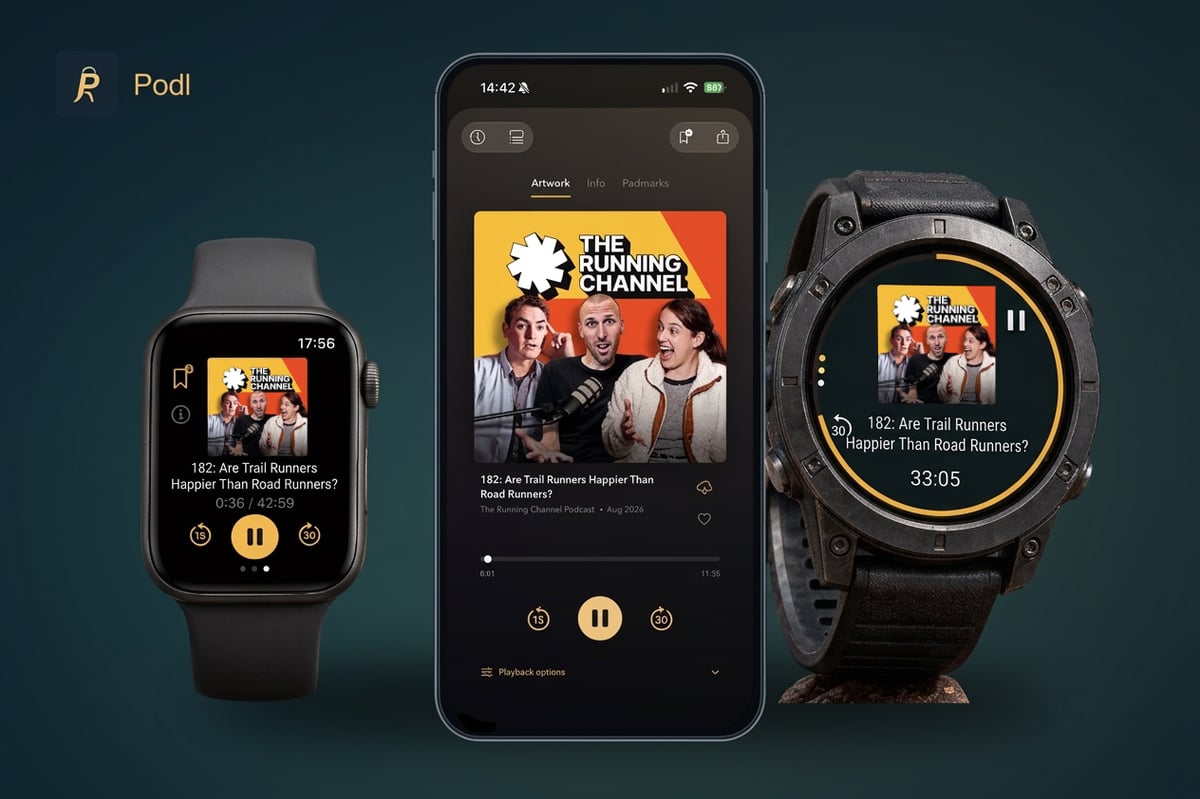
How Podl works on Garmin
TL;DR: Podl organises podcasts on the phone, downloads selected episodes or playlists to Garmin over Wi-Fi, plays them through Bluetooth headphones without the phone, then syncs listening progress back before the athlete resumes on the phone.
The phone remains the place to find podcasts, manage subscriptions and build playlists. On Garmin, Podl provides access to that library and lets the listener select episodes or playlists for the watch. Audio downloads over Wi-Fi and plays through Garmin’s native music player.
That separates preparation from listening. Wi-Fi is needed to download episodes, but the phone and an internet connection are not needed during offline playback once the files are on the watch. Bluetooth headphones connect directly to the Garmin. When connectivity returns, refreshing Podl removes completed episodes and downloads new additions from the selected playlists.
From installation to the first run
- Install Podl on the phone, create an account and activate Podl Plus, which includes Garmin and Apple Watch syncing.
- Install Podl from Garmin Connect IQ on a supported music watch. When you open it, it displays a pairing code, which you enter in Podl on the phone under Settings → Account → Garmin.
- Add podcasts and organise playlists on the phone. On the watch, browse the Podl library and choose the episodes or playlist to bring across.
- Run the watch’s refresh and download process with Wi-Fi available, and check that the downloads have finished before heading out.
- Connect Bluetooth headphones to the watch and play. After the run, reconnect and sync before continuing on the phone.
A worked example from phone to watch and back
Andy runs a few days a week but listens to podcasts every day. A smart playlist in Podl keeps his Garmin fēnix 8 supplied with episodes without rebuilding a queue before every run.
A typical morning starts with a sports podcast over breakfast. For example, if he pauses a 45-minute episode at 12:00, refreshing Podl on the Garmin brings across his listening position and prepares the playlist for the run. Once he’s finished procrastinating about putting his running shoes on, he can leave the phone behind and continue through Bluetooth headphones on his Garmin.
After 20 minutes of listening, the episode is at 32:00. Back home, another refresh syncs that position to Podl, so you can continue on the phone or through CarPlay.
The same approach helps after a longer break from running. Episodes finished on the phone are removed from the watch during the next refresh, with new episodes downloaded from the current smart playlist. You don’t need to rebuild the watch’s listening queue by hand.
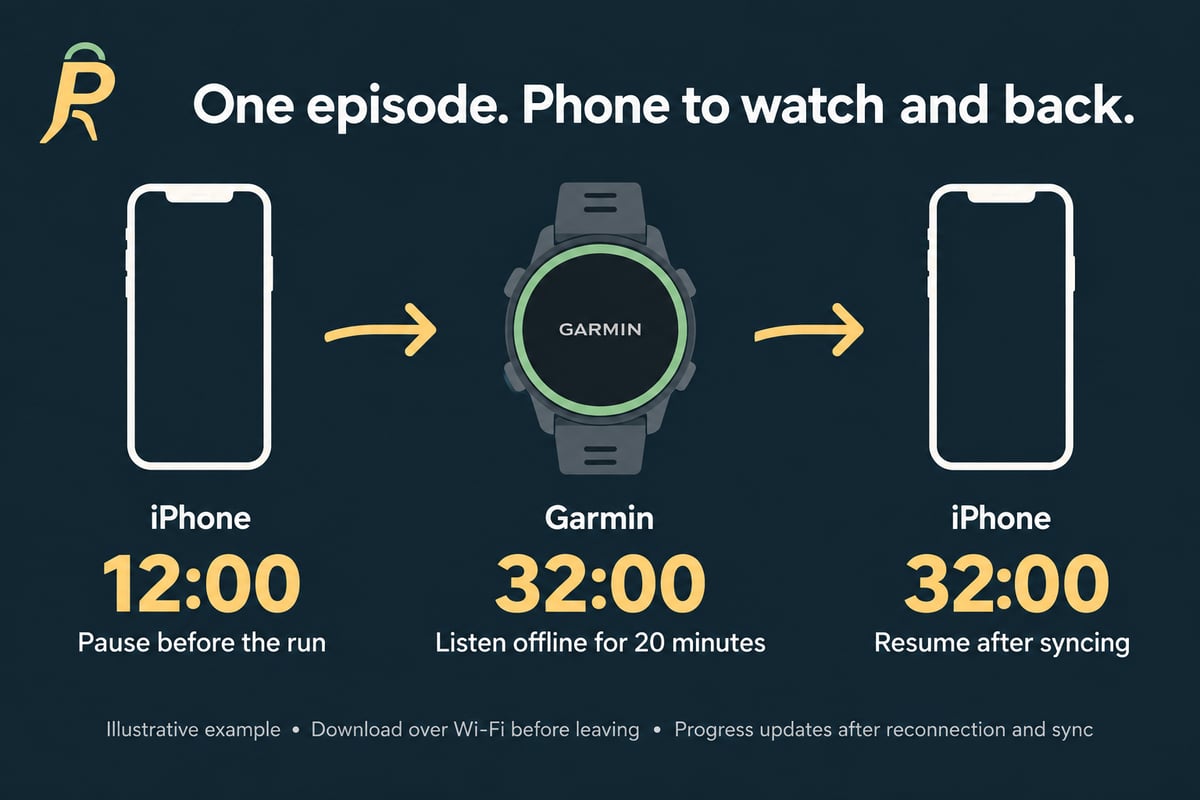
Syncing progress between phone and watch
A downloaded file solves the phone-free listening problem, but not necessarily the handover afterwards. Podl syncs playback position and played status so listening on the watch is reflected in the phone library. Progress from the phone also syncs to Garmin.
This is not a live connection during an offline run. Progress recorded away from connectivity needs a later sync. Refreshing before leaving and syncing after returning gives the devices an opportunity to exchange the latest listening state.
For a listener who moves between breakfast, a run and the commute, that makes the Garmin part of the same listening routine rather than a separate collection of audio files.
Garmin and Apple Watch in the same library
Podl supports compatible Garmin watches with onboard music storage. Examples include the Forerunner 165 Music, 255 Music, 265, 955 and 965, alongside supported models in the fēnix, epix, Venu and vívoactive families. Compatibility depends on the exact model and variant; check the Connect IQ listing before subscribing.
Apple Watch users can also access the shared Podl library, choose playlists from the iPhone, download episodes to the Watch and listen offline through Bluetooth headphones. Listening progress syncs between the Watch and iPhone. Podl Plus includes both watch integrations, so the library doesn’t have to be rebuilt for each device.
What is free and what needs Podl Plus
Podl is available now on the Apple App Store. Core phone podcast listening and downloads are free. Garmin syncing, Apple Watch syncing, and the other Plus features such as organising via folders and creating Podmarks, bookmarks for podcast episodes, require Podl Plus, even though the Garmin companion itself is free to install.
Podl Plus offers monthly and annual subscriptions, with a 14-day free trial for eligible subscribers. UK pricing is £1.99 per month or £14.99 per year. Prices vary by country; the app shows current local prices and trial terms before purchase.
Podl is an independent project built by Andy Cheney, rather than a large podcast platform. Its focus is practical: keeping a listener’s podcast library and progress connected across the phone and the watches used away from it.
Quick answers
Does every Garmin support Podl?
No, you need a compatible music-capable model; a watch that only controls music playing on a phone isn’t enough. The supported-device list on Podl’s Connect IQ page covers exact models and variants.
Is Podl a standalone podcast app for Garmin?
Podl for Garmin is a companion to the Podl phone app, rather than a standalone service. The iPhone app is available now; Android is currently in beta, with release planned for October 2026. Android users can apply for the beta through Podl’s website.
Can Garmin play podcasts faster than normal speed?
Not through Podl’s current Garmin integration: Garmin’s playback API doesn’t expose a playback-speed control to the app, so Podl’s phone playback-speed settings don’t translate into faster playback on the watch.
Further details and installation links are available on the Podl website.
Author: Andy Cheney, developer of Podl, edited by the5krunner.
Last Updated on 25 September 2026 by the5krunner
My favourite kit and nutrition
- Garmin Fenix 9 Pro — I’ve just bought one.
- Injinji – Runners protect your toes. Avoid discomfort and minor injury. Run more. Run faster. I use them.
- Garmin 90-degree charging adapter — A small keyring adapter you can use anywhere. Essential when away. I use one.
- Garmin charging puck — the fastest and most reliable way to top up your Garmin before a session. I use one.
- Ravemen FR300 — Front light that mounts directly under your Garmin or Wahoo head unit. Keeps your bars clean and your beam pointed where it matters. I use one.
- Body Glide – The blue anti-chafe stick that all swimmers and many runners use. I use it.
- Maurten — The race nutrition trusted by elite athletes. Gels and drink mixes engineered to be easy on the stomach. I use them.
- Garmin Varia RTL515 — A radar rear light that alerts you to vehicles approaching from behind. Pairs with your Edge or Wahoo. I use this model.
- Favero Assioma Pro RS2 — The power-meter pedals most serious cyclists choose. Accurate, easy to move between bikes. I use this model.
- Garmin Forerunner 970 — A serious choice for a pro-grade triathlon watch. I use this.
- Polar H10 — My daily driver for accurate, waking HRV readings.
- Wahoo ELEMNT Roam 3 — The bike computer that has the feature Garmin lacks: usability. I use mine on most rides.
Reader-Powered Content

This content is not sponsored. It’s mostly me behind the labour of love, which is this site, and I appreciate everyone who supports it.
Support the site: Follow (free, fewer ads) · Subscribe (paid, ad-free) · Buy Me A Coffee ❤️
All articles are written by real people, fact-checked, and verified for originality. See the Editorial Policy. FTC: Affiliate Disclosure — some links pay commission. As an Amazon Associate, I earn from qualifying purchases.

tfk is the founder and author of the5krunner, an independent endurance sports technology publication. With 20 years of hands-on testing of GPS watches and wearables, and competing in triathlons at an international age-group level, tfk provides in-depth expert analysis of fitness technology for serious athletes and endurance sport competitors. ID

Nice! Will give it a go this weekend:)))
Thanks for showing this. It really solves the hustle with Podcasts over Spozify on Garmin watches.
All my Podcasts are there, inserting steady links is easy. I skipped the 2 week testperiod because I think 18€ per year is really fair.