Garmin CIRQA: why I stopped using it
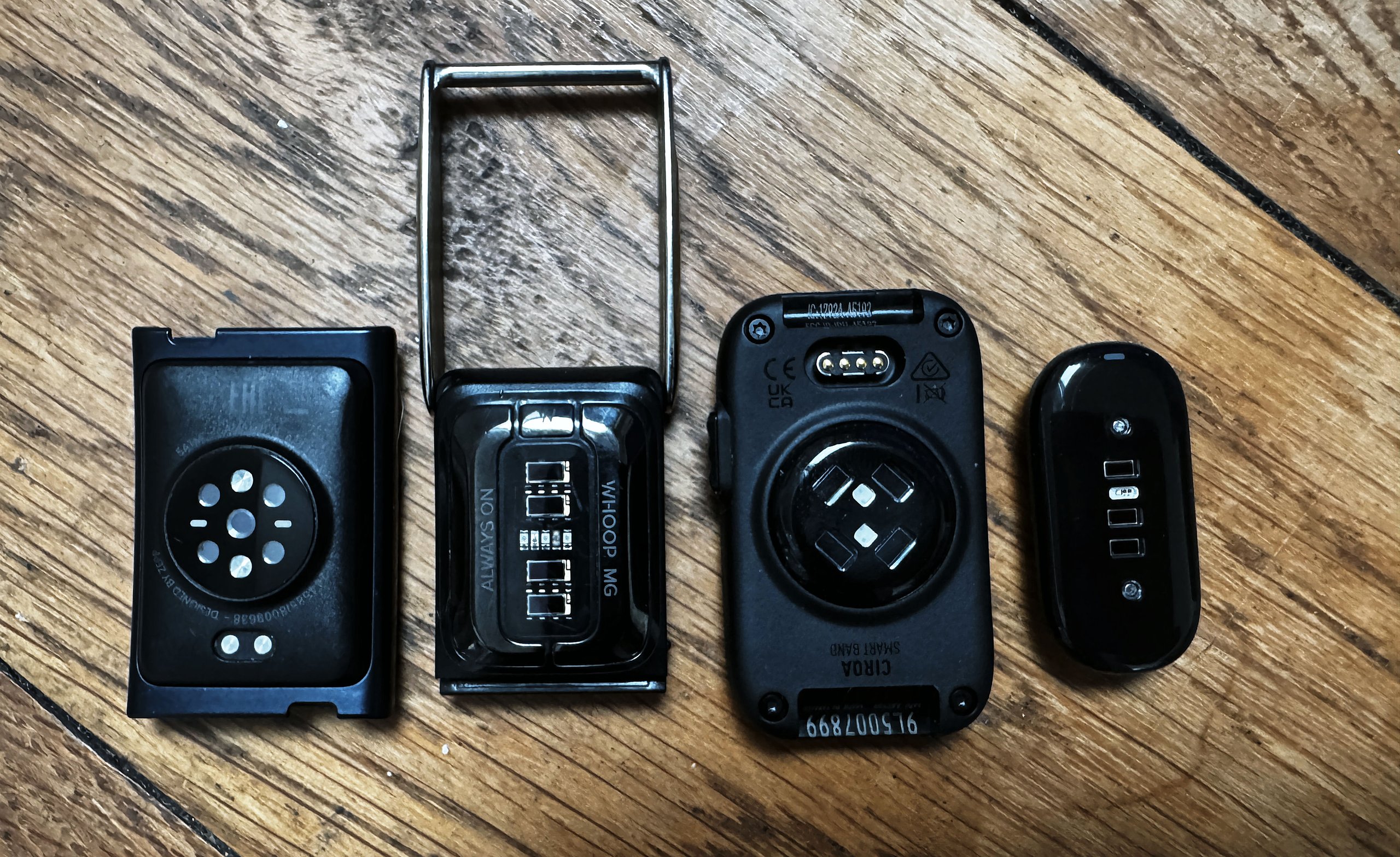
I took Garmin CIRQA off my biceps and went back to a Polar Verity Sense. CIRQA’s upper-arm heart rate is as good as it needs to be, but it doesn’t reliably save the workouts it records, and a reference sensor that occasionally loses a session is no use to me.
I bought CIRQA to replace the Verity Sense as my permanent second reference on my upper arm during accuracy testing. On paper, it had the perfect design for the job: a physical button to start a session, all-day wear, and data that feeds straight into Garmin Connect. I will go back to it once Garmin fixes the recording problem. In the meantime, Polar sent me a new Verity Sense, and it has worked perfectly, fixing the old button problem.
Accuracy was never the problem.
In the repeat-interval test from my CIRQA review, with CIRQA on the biceps, the bias (difference) was +0.2bpm against WHOOP MG, +0.3bpm against Polar Sense, and −0.3bpm against the Garmin HRM 600, all with tight limits of agreement.
The occasional wrist accuracy failure I recorded, including a 20 to 30bpm under-read in open water, disappeared on the upper arm. DC Rainmaker reached the same conclusion in his 30-day review: on the biceps, CIRQA delivers chest-strap-level heart rate.
The problem is whether the data makes it to Garmin Connect at all.
What goes wrong
CIRQA sometimes records a workout and then fails to save it, sometimes never records it in the first place, or maybe it gets overwritten and ignored if a watch also recorded the workout. There is no warning either way. You find out when the session is missing from Garmin Connect. I reported this early, and it has been on this site’s running CIRQA bug list since. The exact cause is still unclear, because owners on the Garmin Forums thread describe several different routes to the same result.
The scenarios reported so far.
- Button start, then End in the app. Opening Garmin Connect after a button-started session brings up an “Activity in Progress” prompt with Resume and End options. Tapping End discards the session. One owner lost more than eight workouts before realising it was not a sync delay. A Garmin moderator has now confirmed that End does not save the activity, and that the only way to keep it is to tap Resume, then stop and save from the recording screen.
- Start the app, then End on the same prompt. Two owners report the same prompt appearing for sessions they started in the app, with the same loss. One was running firmware 3.20 and Connect 5.29 on iOS; the other had a Fenix 9 Pro set as primary device.
- Mixed start and stop. One owner started a session in the app, stopped it with the button, and lost it.
- A missed button press. One owner’s second press at the end of a strength session did not register. The prompt then appeared, End was chosen, and the session was gone.
- A frozen app. Some owners find the app’s end button stops responding, and force-closing the app loses the session. This has been reported since August.
- Recording alongside another Garmin device. I lost three important workouts where I pressed the button, nothing saved, and nothing auto-detected either. A friend lost a strength session the same way. In each case, I was also recording with an HRM-600 or a Forerunner 970, which is the only common factor I can find. Separately, auto-detection never fired in my testing when I also wore a Garmin watch, even with CIRQA set as the primary device.
- Auto-detection gaps. CIRQA missed a 60-minute ride of mine on 2 August. DC Rainmaker lost a full 60-minute ride and split a three-hour ride into three separate activities. Extending an activity afterwards does not recover the missing heart rate, because CIRQA only records at full rate once it believes a workout has started.
- Sensor stops after charging. Three owners on r/Garmin report that the optical sensor does not restart after a charge until the band is powered off in the app and back on with the button. The band shows as connected and synced throughout.
Garmin’s own manual describes the button workflow as one press to start and another to stop (perfect! how it should be), with the activity appearing in Garmin Connect after the band syncs. Neither firmware 2.50 nor the eighteen-item firmware 3.20 changelog lists a fix for lost activities, and Garmin has given no date for one.
Why that rules out a reference sensor
A reference sensor has one job: record every session I test. Test sessions are hard to repeat, because the weather, the route and the effort all change – often I run a half marathon or do a 5-hour ride, they are not trivial to repeat. When the reference file is missing, the whole comparison is void, and I usually discover that only after the session has finished.
Garmin’s Resume workaround only covers one of the scenarios above. It does nothing for the button presses that saved nothing while I was also recording on another Garmin device, and it relies on remembering a counterintuitive tap straight after a hard effort. A lost session also removes that workout from Training Load and every recovery metric built on it, which undermines the other reason to wear CIRQA.
What would bring me back?
The answer is simple. Just fix the bug and make it work properly.
If you own a CIRQA now
- If the “Activity in Progress” prompt appears, tap Resume, then stop and save from the recording screen.
- Start and stop each session the same way, either both on the button or both in the app.
- Check that each important session has appeared in Garmin Connect before you rely on it.
- For a race or a test you cannot repeat, record on a second device as well.
Quick answers
Why do Garmin CIRQA workouts disappear?
The most common cause is tapping End on the Activity in Progress prompt in Garmin Connect, which Garmin has confirmed discards the session. Owners also report lost sessions after missed button presses, app freezes, and, in this site’s testing, button starts while another Garmin device was recording.
How do I stop losing CIRQA workouts?
When Garmin Connect shows the Activity in Progress prompt, tap Resume, then stop and save from the recording screen. Start and stop each session the same way, and check that it has appeared in Garmin Connect afterwards.
Is Garmin CIRQA accurate on the biceps?
Yes. In this site’s interval test, biceps-worn CIRQA was within 0.3bpm of WHOOP MG, Polar Sense and the Garmin HRM 600. The problem is recording reliability, not accuracy.
Last Updated on 26 September 2026 by the5krunner
Small things I always use
- Garmin 90-degree charging adapter: Charges your Garmin from any USB-C cable. Essential when travelling. I use one.
- Body Glide: The blue anti-chafe stick swimmers and runners carry. I use it.
- Speedo earplugs: Fewer ear infections and no cold-water dizziness. I use them.
- Maurten: Race fuel that stays easy on the stomach. I use them.
- Garmin charging puck: The quickest way to top up before a session. I use one.
- Injinji: Toe socks that stop rubbing, so you run more. I use them.
- Cellucor C4: My pre-workout before hard sessions.
- TPU tubes: Schwalbe Aerothan, Tubolito and Pirelli SmarTube. Light, tiny spares. I use all three.
Watches and sensors
- Polar H10: My daily driver for waking HRV.
- Polar Verity Sense: My backup arm-worn HR sensor.
- Nomad bedside charger: Charges my iPhone and Apple Watch overnight. I use it, and many of their bands.
- Train.Red: The best muscle oxygen sensor I’ve used.
- Garmin Forerunner 970: A pro-grade triathlon watch. I use this.
- Apple Watch Ultra 4: My daily smartwatch. No phone needed on rides.
- Garmin Fenix 9 Pro: I’ve just bought one.
On the bike
- Continental GP5000 for everyday riding, and Aero 111 on the front for special occasions.
- Ravemen FR300: A front light that mounts under your Garmin or Wahoo. I use one.
- Wahoo TRACKR Radar: I use it on one bike and Varia on the other. They perform the same.
- Garmin Varia RTL515: Radar that warns you of cars from behind. I use this model.
- Wahoo ELEMNT Roam 3: The bike computer that’s easy to use. I use mine on most rides.
- Favero Assioma Pro RS2: Accurate power pedals that swap easily between bikes. I use this model.
Home and indoor training
- Google Wifi: Keeps Zwift connected in my pain cave. I use it.
- Apple TV 4K: Zwift on the big screen. I use two.
- Google Nest Doorbell (wired, 2nd gen): My video doorbell, running in both Google Home and Apple Home. I use it.
Health, recovery and sleep
- FreeStyle Libre 3 Plus: Shows how my blood sugar responds to diet.
- hDrop: Measures my sweat loss in summer and indoors.
- Fourth Frontier Zone: Checks my heart under load in hard sessions.
- Oura Ring 5: My partner’s recovery tracker of choice.
- Kineon MOVE+: Red light therapy for niggles. It works.
- Eight Sleep: A cooling mattress cover my partner and I use nightly.
Reader-Powered Content

This content is not sponsored. It’s mostly me behind the labour of love, which is this site, and I appreciate everyone who supports it.
Support the site: Follow (free, fewer ads) · Subscribe (paid, ad-free) · Buy Me A Coffee ❤️
Written by real people, with AI assistance. Fact-checked and verified for originality. See the Editorial Policy. FTC: Affiliate Disclosure — some links pay commission. As an Amazon Associate, I earn from qualifying purchases.

tfk is the founder and author of the5krunner, an independent endurance sports technology publication. With 20 years of hands-on testing of GPS watches and wearables, and competing in triathlons at an international age-group level, tfk provides in-depth expert analysis of fitness technology for serious athletes and endurance sport competitors. ID
