A Garmin watch will record a strength session, but Garmin Connect makes it hard to plan one. Lifters can’t easily add their own exercises, scheduling a multi-week routine is clumsy, and editing it later is worse. The app offers little analysis of strength work, and Garmin’s training load doesn’t always count a heavy lifting session properly.
Many lifters move to phone-first apps such as Hevy and Strong for a better interface, but those workouts don’t run in Garmin’s own Strength activity. The phone comes onto the gym floor, and the data ends up split between two places.
Evan Noble, a computer engineer, built LiftTrack to close that gap. It works alongside Garmin Connect rather than replacing it, so workouts are planned on the phone and then run on the watch, and the phone can stay in the locker. the5krunner first looked at building a LiftTrack workout in December 2025, and the app has added a good deal since.
How LiftTrack works
TL;DR: LiftTrack plans and builds strength workouts on the phone, sends them to Garmin Connect through Garmin’s official API, and runs them in the watch’s own Strength activity. After each session, it reads what was lifted and sets the next target, so the programme moves forward without the lifter keeping notes.
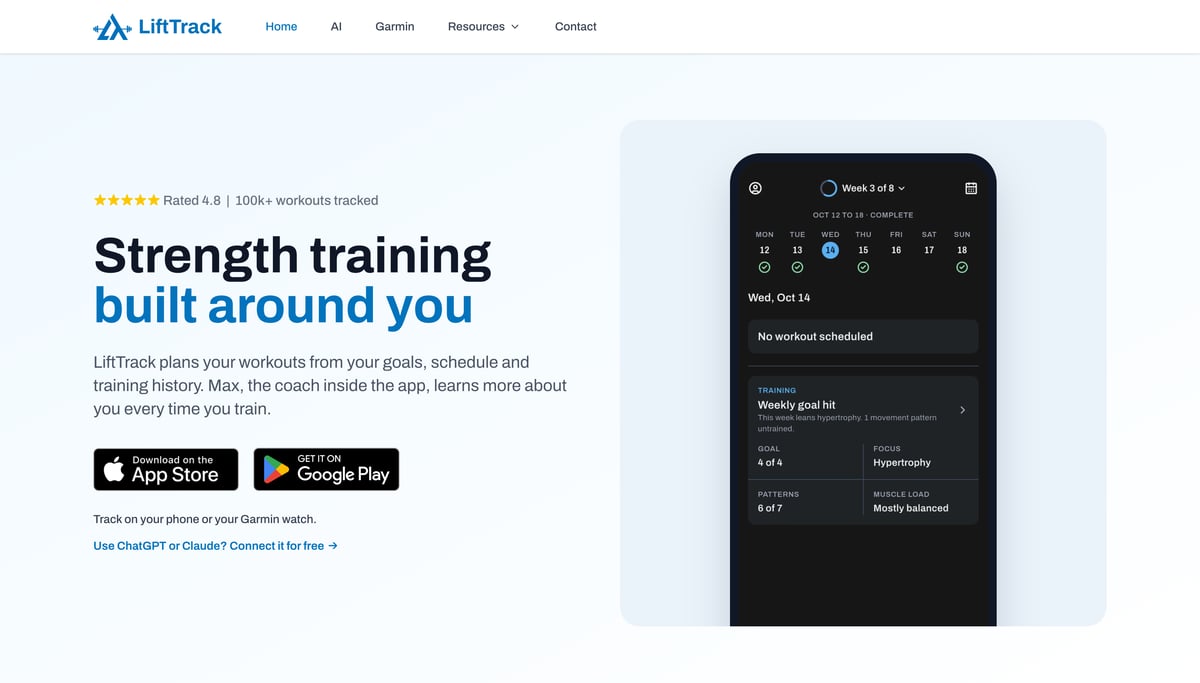
Scheduled workouts appear on the Garmin Connect calendar and in the watch’s workout menu, and nothing needs installing on the watch. After the session, the sets return to LiftTrack for review and progression. The app has four tabs:
- Home: a calendar with a button to schedule the day’s workout, and a summary of the week’s training covering the goal, focus, movement patterns and load on each muscle group.
- Workouts: a catalogue of more than 900 exercises, room for custom exercises, and the lifter’s current workouts.
- Progress: streaks, exercises tracked over the last 28 days, trends over periods from a week to a year, and a workout history where logged sets can be checked and corrected.
- Coach: Max, LiftTrack’s AI coach. The lifter sets out their experience, goal, favourite exercises, exercises to avoid, injuries, schedule and equipment, and Max builds workouts to fit that sync to the watch like any other.
A recent update added tracking inside the app itself, so lifters without a Garmin watch, or any wearable, can use every feature except watch sync.
Three ways to build a workout
Typing a routine in exercise by exercise still works, but LiftTrack offers three quicker routes:
- Capture Photo: photograph a workout written on a whiteboard or in a notebook. LiftTrack reads the text and matches each line to its exercise catalogue.
- Import Photo: the same from the phone’s photo library, such as a screenshot of a session a coach posted on social media.
- Describe Routine: type or dictate the workout wanted, and the AI turns it into a routine. It works best with specifics such as sets, reps and equipment.
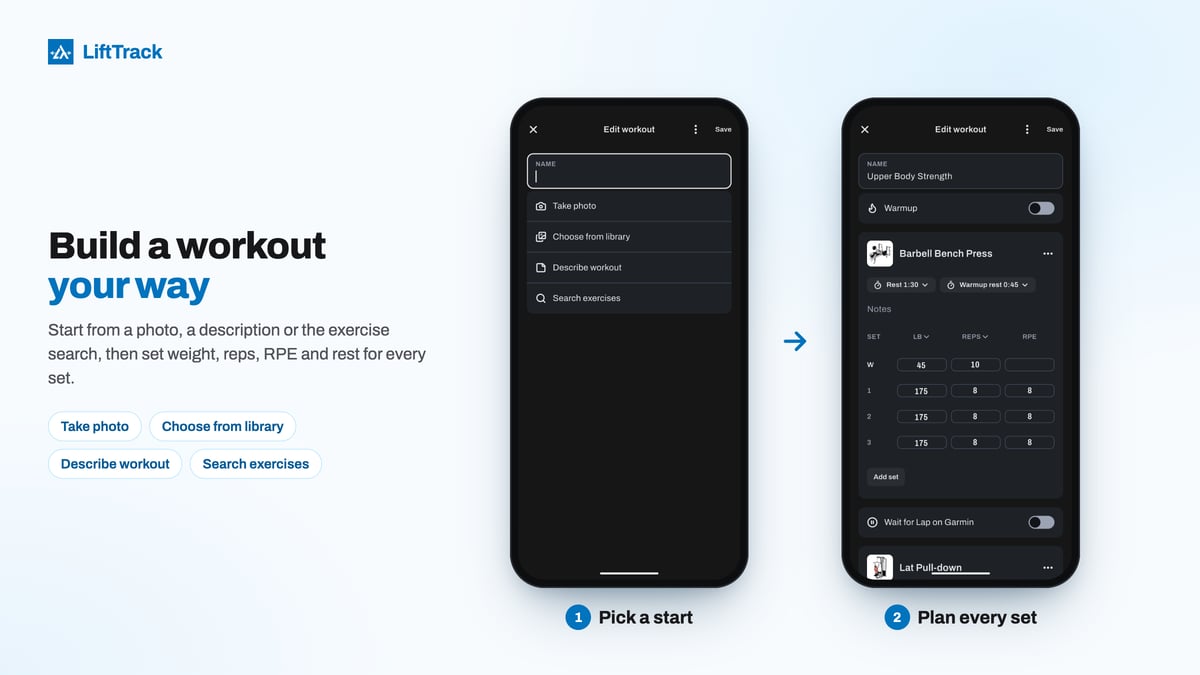
Coach-written programmes lasting several weeks are also available, and each can be edited to suit. LiftTrack’s own guide to building a workout covers each step.
Worked example: double progression on the bench press
Built-in progression is the feature that most separates LiftTrack from lifting with Garmin alone, and YouTuber HelloChen picks it out 4 minutes 21 seconds into his review. After every session, LiftTrack updates the next workout using the progression the lifter chose: weight only, or double progression, which adds reps first and weight second.
Under double progression, the lifter adds reps each session until every working set reaches the top of the rep range. LiftTrack then adds weight and drops every set back to the bottom of the range. Take a programme of 3 sets of 8 to 12 reps on the barbell bench press at 175 lb (79 kg):
| Session | Weight | Reps per set | What LiftTrack does |
|---|---|---|---|
| This session | 175 lb (79 kg) | 12, 12, 12 | Spots where all three sets reached the top of the range |
| Next session | 180 lb (82 kg) | Target of 8 per set | Adds 5 lb (2.3 kg) and resets the reps to the bottom of the range |
The post-workout review screen catches the 12, 12, 12 and suggests the double progression. One tap applies it, and the next bench session updates straight away, with no need to remember last week’s numbers.
What else LiftTrack does
- Recurring schedules: build a weekly split or a multi-week alternating plan and roll it forward indefinitely, with Max able to rebalance the rest of the week’s volume after a change.
- Warm-up sets: for compound lifts such as the squat and deadlift, LiftTrack works out progressive warm-up sets as percentages of the target weight or training max.
- RPE: a target rating of perceived exertion, from 1 to 10, can be set for any set when building a routine, and the actual RPE logged during the workout. The post-workout review uses it alongside weights and reps.
- Supersets: two or more exercises can be grouped into one block, and the watch alternates between them, A then B, then rest, then A and B again.
- Unplanned sessions: a freestyle workout started straight from the Strength activity on the watch is picked up afterwards, and its sets can be matched into the lifter’s history so future progressions stay accurate.
- AI assistants: LiftTrack has its own MCP server, the standard that connects AI assistants to apps, so ChatGPT, Claude, Gemini, Grok, Perplexity and other assistants that support it can read training history, muscle load, one-rep maxes, coach profile and equipment. With Premium, a workout agreed in the chat can be saved straight into LiftTrack.
Garmin for the watch, LiftTrack for the plan
LiftTrack adds to Garmin Connect rather than competing with it. Garmin keeps the recording and the health data, and LiftTrack handles the planning, progression and analysis that Connect lacks for strength work. Lifters get more from the watch they already own, and the phone stays in the locker. LiftTrack is available for iPhone and Android.
More information: lifttrackapp.com and HelloChen’s LiftTrack review.
Author: Evan Noble, founder of LiftTrack, edited by the5krunner.
Quick answers
Which Garmin watches work with LiftTrack?
Any Garmin that can run strength workouts sent from Garmin Connect, because LiftTrack workouts run in the watch’s own Strength activity. Garmin keeps a compatibility list, and LiftTrack also works with the Garmin CIRQA band.
What does LiftTrack cost, and what is free?
The free version covers three of the lifter’s own workouts, phone tracking, sending workouts to Garmin, a weekly schedule, progressions and full workout history. Premium adds unlimited workouts, the Max coach, programmes, and the ability to build workouts from a photo or description. The split changes as features are added.
Do I need to install a LiftTrack app on my watch?
No. LiftTrack workouts run in Garmin’s built-in Strength activity, so nothing needs to be downloaded to the watch.
If you enjoyed reading this, here is another in the Indie Spotlight series: Indie App Spotlight: InnerRipple tells Apple Watch owners what’s normal for them.
Last Updated on 17 November 2026 by tfk the5krunner
Small things I always use
- Garmin 90-degree charging adapter: Charges your Garmin with any USB-C cable. Essential when travelling. I use one.
- Body Glide: The blue anti-chafing stick swimmers and runners carry. I use it.
- Speedo earplugs: Fewer ear infections and no cold-water dizziness. I use them.
- Dryrobe Advance: My winter changing robe for open-water swims. I use one. A cheaper option is the AONYIYI changing robe.
- Maurten: Race fuel that stays easy on the stomach. I use them.
- Beet It Sport nitrate shots: Beetroot shots I take in the days before a race. I use them.
- Garmin charging puck: The quickest way to top up before a session. I use one.
- Injinji: Toe socks that stop rubbing, so you run more. I use them.
- Ultimate toe protectors: Stop black toenails on long runs. They work. I use them.
- Compressport R2 v2 calf sleeves: My calf sleeves of choice. I use them.
- Cellucor C4: My pre-workout before hard sessions.
- TPU tubes: Schwalbe Aerothan, Tubolito and Pirelli SmarTube. Light, tiny spares. I use all three.
- G8 insoles: Adjustable arches, perfect position. I use them.
- Cycplus Cube: A 97g electric pump that gets a road tyre rideable in two minutes. I carry one. 5% off with code THE5KRUNNER.
Health, recovery and sleep
- Kineon MOVE+: Red and infrared light for sore knees, Achilles and other joints after hard training. I use it.
- FreeStyle Libre 3 Plus: Shows how my blood sugar responds to diet. Occasional use.
- hDrop: Measures my sweat loss in summer and indoors. I use it.
- Fourth Frontier Zone: Checks my heart under load in hard sessions.
- Oura Ring 5: My partner’s recovery tracker of choice.
- Eight Sleep: A cooling mattress cover my partner and I use nightly.
Watches and sensors
- Polar H10: My daily driver for waking HRV.
- Polar Verity Sense: My backup arm-worn HR sensor.
- Nomad bedside charger: Charges my iPhone and Apple Watch overnight. I use it, and many of their bands.
- Train.Red: The best muscle oxygen sensor I’ve used. Occasional use.
- Tymewear: Accurate heart rate and reliable ventilatory zones. I use it to pace endurance rides over an hour.
- Garmin Forerunner 970: A pro-grade triathlon watch. I use this.
- Apple Watch Ultra 4: My daily smartwatch. No phone needed on rides.
On the bike
- Continental GP5000 for everyday riding, and Aero 111 on the front for special occasions. I use both.
- Helmets: Specialized S-Works Evade 3 for road riding, and Rudy Project Wing for TT-style races. I use both.
- Ravemen FR300: A front light that mounts under your Garmin or Wahoo. I use one.
- Ravemen FR1000: The light and the computer mount in one unit, so nothing else goes on the bars. Better than mine.
- Ravemen FR1500SE: 1,500 lumens hanging under your Garmin, for proper night rides.
- Ravemen FR1100SE: 1,100 lumens under your Garmin, and up to 46 hours on slow flash.
- Ravemen FR500: A brighter FR300 with the same mount.
- Wahoo TRACKR Radar: I use it on one bike and Varia on the other. They perform the same.
- Garmin Varia RTL515: Radar that warns you of cars from behind. I use this model.
- Wahoo ELEMNT Roam 3: The bike computer that’s easy to use. I use mine on most rides.
- Favero Assioma Pro RS2: Accurate power pedals that swap easily between bikes. I use this model.
Home and indoor training
- NPE Runn: Makes my basic treadmill smart, sending more accurate speed and distance to my watch and Zwift. I use it.
- Google Wifi: Keeps Zwift connected in my pain cave. I use it.
- Apple TV 4K: Zwift on the big screen. I use two.
- Google Nest Doorbell (wired, 2nd gen): My video doorbell, running in both Google Home and Apple Home via Starling. I use it.
Reader-Powered Content

This content is not sponsored. It’s mostly me behind the labour of love, which is this site, and I appreciate everyone who supports it.
Support the site: Follow (free, fewer ads) · Subscribe (paid, ad-free) · Buy Me A Coffee
Written by real people, with AI assistance. Fact-checked and verified for originality. See the Editorial Policy. FTC: Affiliate Disclosure — some links pay commission. As an Amazon Associate, I earn from qualifying purchases.
tfk is the founder and author of the5krunner, an independent endurance sports technology publication. With 20 years of hands-on testing of GPS watches and wearables, and competing in triathlons at an international age-group level, tfk provides in-depth expert analysis of fitness technology for serious athletes and endurance sport competitors. See the gear tfk uses. ID
