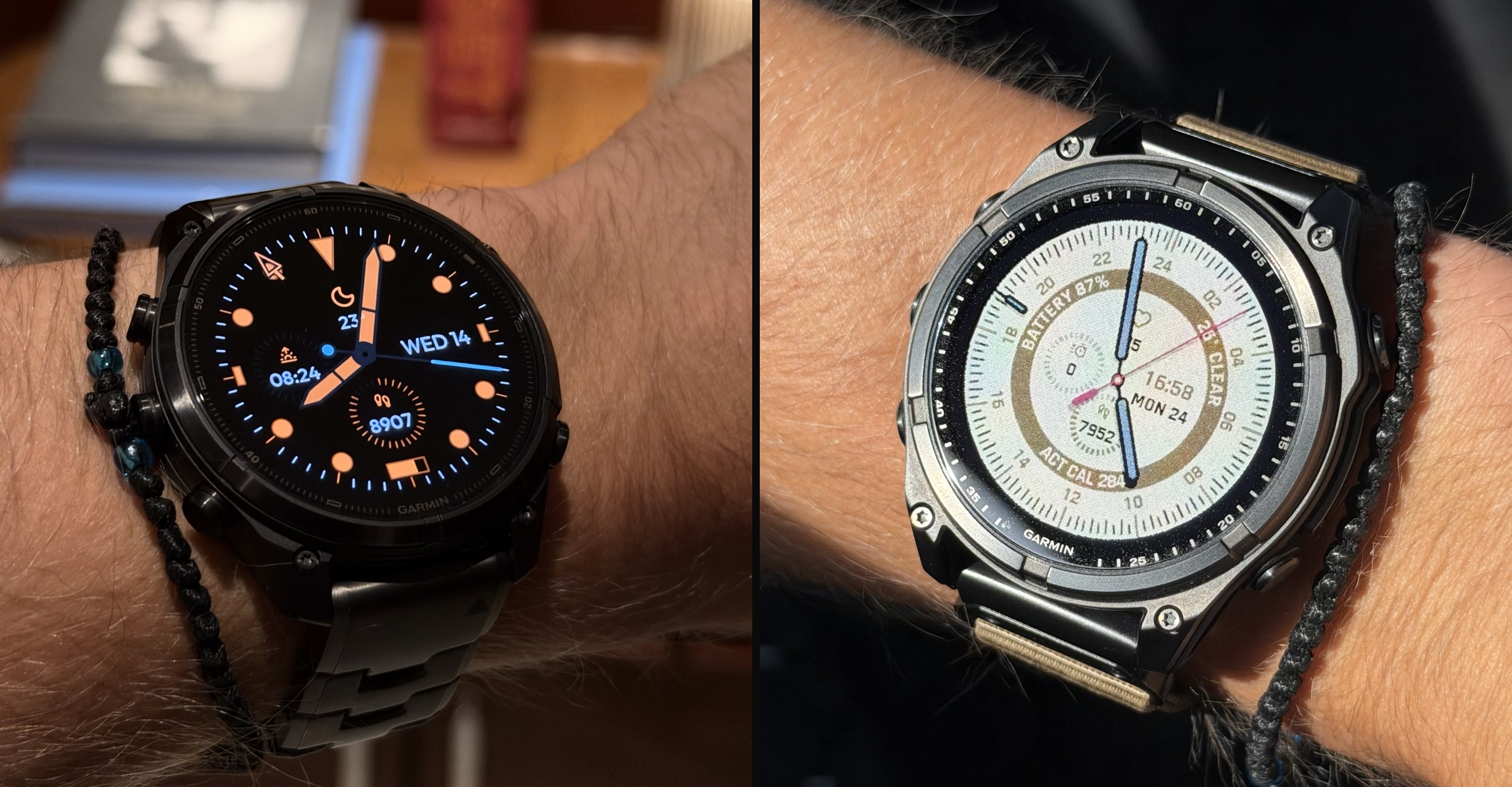
Scroll through the Connect IQ store and many watch faces look great. The trouble starts on the wrist. A lot of store images are AI mock-ups, made to look as crisp as possible, and they have little in common with what appears on the watch, let alone how the face performs or how much battery it uses. Install one and it can be a different story: soft edges, colours that don’t suit the display, a dial that lags when the wrist comes up, and settings that can only be changed from a phone.
Stash Digitale was set up to close that gap. Every face the studio makes is drawn in code and rendered live on the Garmin watch it runs on. What a buyer sees on the wrist is the real thing, adapted to that watch’s screen, not a picture of what it might look like.
Taste is the only feature that matters
Stash Digitale is an independent, EU-based studio of two people, Michael and Eugene. Its four watch faces, Modello GMT, Portal Hybrid, Helix Heritage and Aperture Digital, are sold through Connect IQ, each with a free trial, and hold an average rating of 4.8 to 4.9 stars across more than 2,500 reviews.
The studio works to one motto: taste is the only feature that matters. A feature list is easy to copy, but proportion, restraint and the way a dial feels when the wrist comes up are not. Every decision, from the weight of a hand to the colour of a data field, is judged on the watch first and on a spec sheet second.
That also means saying no. Garmin watches have strict memory limits, and the studio would rather keep a face fast and stable on older models than squeeze in one more option. Its faces are bought once and owned for good: owners download them again at no cost when they upgrade, so every face has to keep working across many generations of Garmin hardware.
How Stash Digitale builds a watch face
TL;DR: Stash Digitale draws every hand, marker and number in code instead of using pre-made images. Each watch renders the dial itself, at its own resolution and for its own screen type, so the faces stay sharp and responsive and can be set up fully on the watch, without a phone.
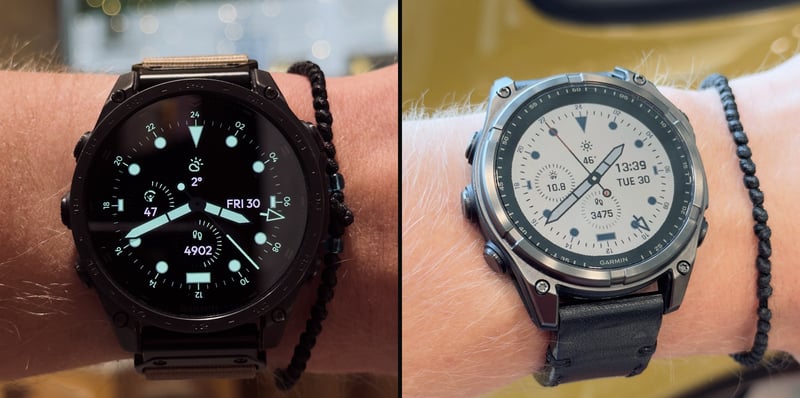
Most watch faces are built from images: a dial background, hands and markers exported as picture files and layered on top of each other. It is a quick way to make a face look good in a render, but each image is made for one resolution. On other watches it gets scaled, the edges go soft, and every image takes up memory the face could use for something else.
Stash Digitale works the other way round. There are no PNG or SVG files in its faces. Shapes are described in code, such as the angle of a hand, the length of a marker or the width of an outline, and the watch draws them fresh for its own display. A large AMOLED fēnix and a smaller MIP Forerunner each get a dial built for their exact screen.
Screen technology matters as much as resolution, so each type is treated on its own terms:
- MIP: memory-in-pixel screens show a limited colour palette and are read in direct sunlight, so colours, hand thickness and shadows are tuned specifically for them.
- AMOLED: these screens, used across Garmin’s high-end range, light every pixel individually, so the faces lean on dark dials, outlines and a Minimal AOD mode that shows only the essentials while the watch rests.
- MicroLED: so far found only on the fēnix 8 Pro, it gets its own treatment rather than being handled as another AMOLED screen.
Testing happens on real hardware, not just in Garmin’s simulator. The studio keeps a collection of Garmin watches across screen types and generations, and a face does not ship until it looks and runs right on each of them, as well as each display allows.
Set up on the wrist, with a live preview
Stash Digitale uses the latest Connect IQ features to make every face fully configurable on the watch itself. Colours, data fields, hand styles and individual features all live in the watch’s Customize menu.
Most settings can also be changed from the phone, but the studio’s users say they prefer doing it on the watch. The reason is the preview: every change shows up live on the dial before it is applied, as it does with Garmin’s own built-in faces. Scrolling through accent colours, for example, recolours the hands and dial in the preview. That matters most for the details that make a face look right, such as matching a data colour to the accent colour. Instead of guessing from a phone screen, the owner sees the result on their own watch, in their own light, and keeps it only if it works.
Modello GMT and Portal Hybrid: one craft, two characters
The studio’s two most popular faces apply the same approach in opposite directions.
Modello GMT: minimal and brutalist
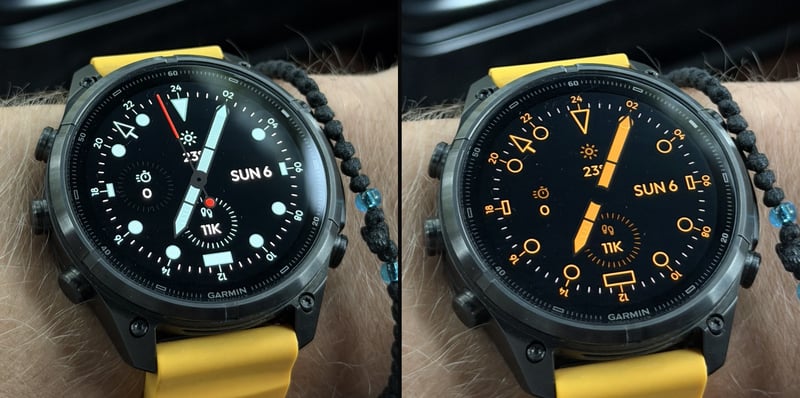
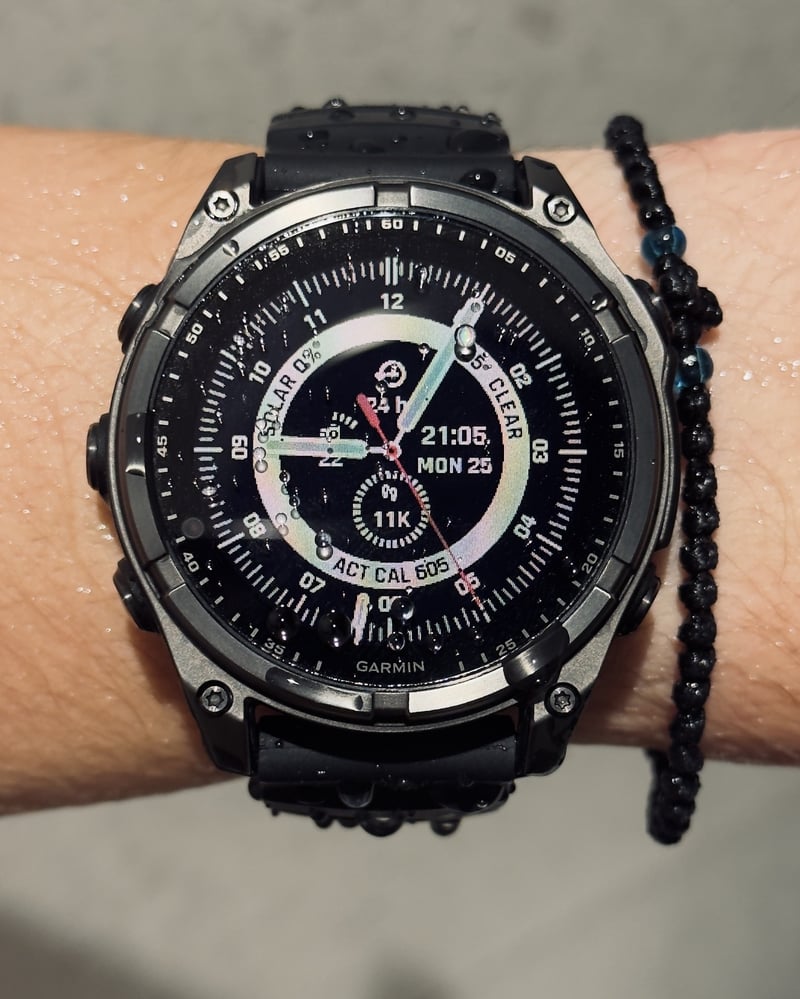
Modello GMT is the quiet one. Its dial draws on Italian tool-watch tradition and on Garmin’s own typography, so it sits naturally beside the watch’s built-in screens. Behind the calm dial is the deepest set of options in the range:
- A GMT hand with 12-hour, 24-hour and seconds bezel modes. Owners who don’t need a second time zone can switch the GMT bezel off altogether, which opens up the dial.
- Hand outline colours, and filled or outlined hour marks, set separately for the active and always-on states.
- A dedicated always-on look. A lume colour of the owner’s choice turns the whole dial into one colour, the hour marks switch to outlines, and the seconds hand rests, in line with Garmin’s always-on rules.
- Data colour options such as Mono When Inactive, so the dial calms down when the wrist is lowered.
- Hour marks that work as shortcuts. With the 6 o’clock mark set to show battery as a gauge, a long press opens Garmin’s battery widget.
- Minimal AOD, which hides the data in always-on mode for a cleaner look and lower power draw.
- Support for the physical hands of the Instinct Crossover AMOLED, with matching lume.
Almost every element can be turned off, so the same face can be a busy tool watch or an almost bare dial. One owner described it in a Connect IQ review as “elegant and noticeably light on battery”.
Portal Hybrid: geeky and data-heavy
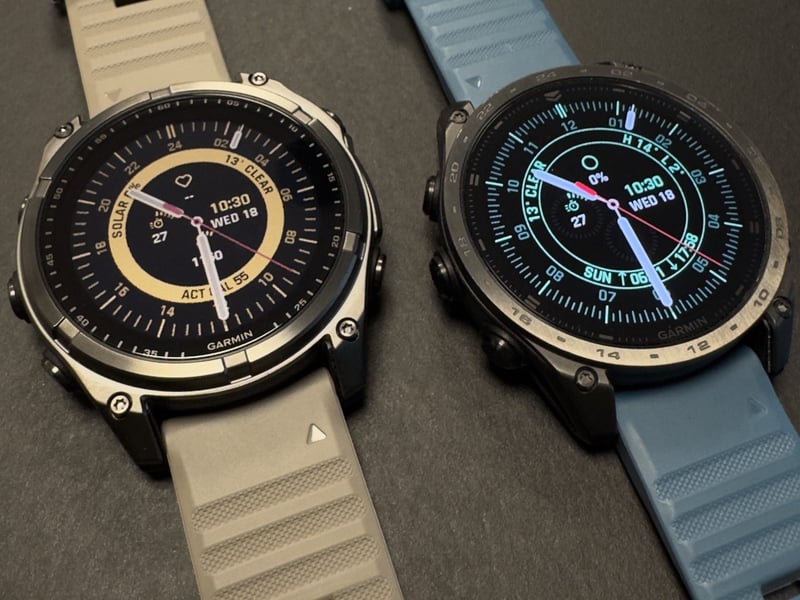
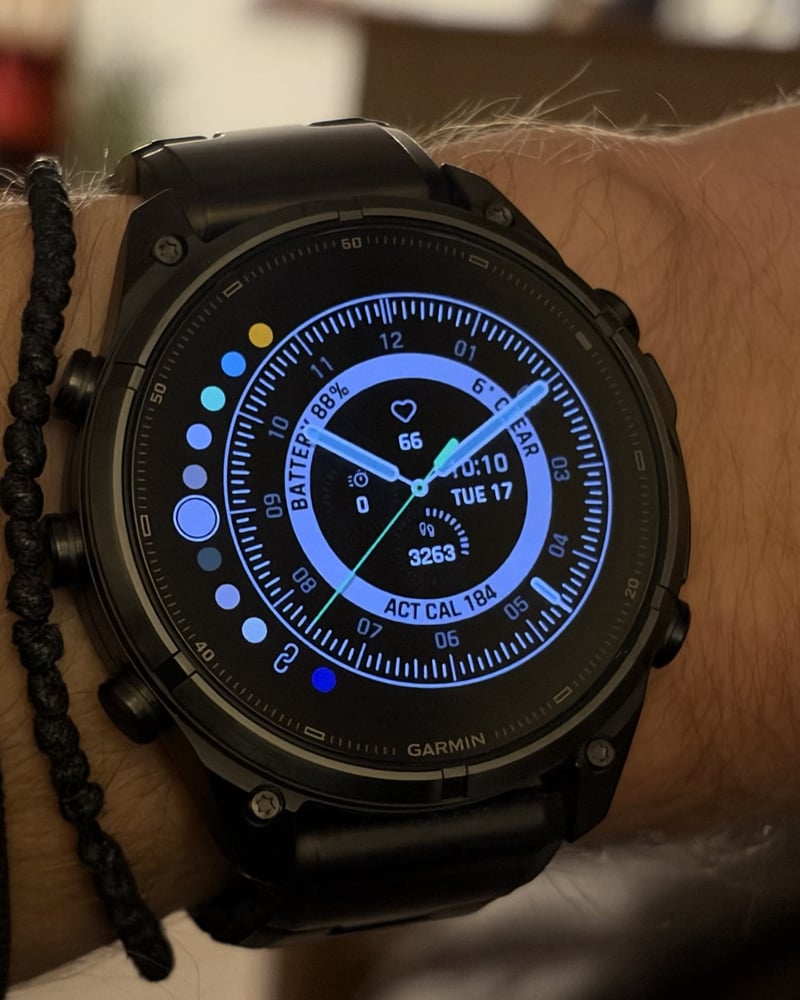
Portal Hybrid is the opposite character: analogue hands over a dense layer of digital data, for owners who want everything on one screen without clutter. It also suits people moving from an Apple Watch to Garmin, because it pairs Garmin’s configurability with a clean, utilitarian design.
- Weather, sun events, tides and moon phase, plus pressure with a pressure-trend complication.
- A Feels Like temperature toggle, and metric or imperial units set independently of the watch.
- Pressure in the owner’s choice of inHg, mmHg, mbar or hPa.
- Hand colour and transparency options on every watch that supports transparency. The free trial shows exactly what a given watch can do.
- A hybrid layout that stays readable on both MIP and AMOLED screens.
The full line-up and the watches it runs on
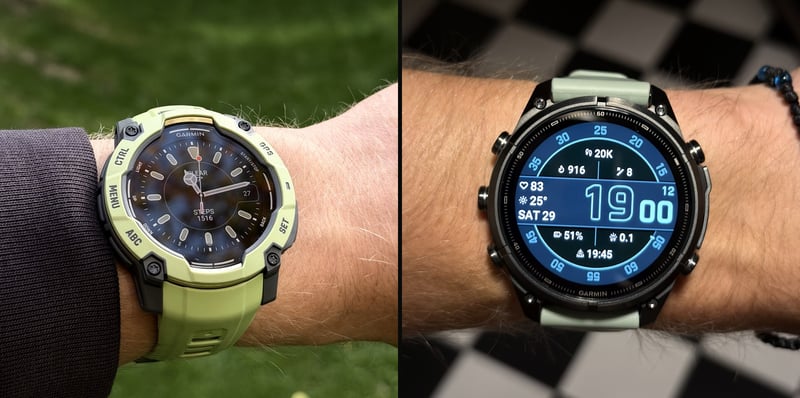
Helix Heritage is a classical analogue face. Version 2.0 was rebuilt for performance and battery life, and pressing and holding the 12 or 6 o’clock marks opens the matching complication.
Aperture Digital is a digital face with an analogue feel. Version 2.0 adds a choice of rotating or fixed seconds bezel, separate hour and minute styles, progress arcs for data with a goal, and separate defaults for MIP and AMOLED screens.
All four faces are set up on the watch through the Customize menu, and each has a free trial on the Connect IQ store before a one-off purchase. Where Garmin Pay isn’t available, the full version can be unlocked directly from the trial.
Watches that run Modello GMT, Helix Heritage and Aperture Digital
These three faces share the widest list of supported watches:
- fēnix: fēnix 7, 7S and 7X (including Pro, Solar and Sapphire editions), fēnix 8 AMOLED (43, 47 and 51 mm), fēnix 8 Pro (AMOLED and MicroLED), fēnix 8 Solar (47 and 51 mm), fēnix 9 (43, 47 and 51 mm), fēnix 9 Pro (43, 47 and 51 mm, including inReach and Solar) and fēnix E.
- epix and quatix: epix (Gen 2), epix Pro (42, 47 and 51 mm), quatix 7, 7 Pro and 7X Solar, quatix 8 AMOLED and quatix 8 Pro.
- Forerunner: 70, 165, 165 Music, 170, 170 Music, 255, 255 Music, 255S, 255S Music, 265, 265S, 570 (42 and 47 mm), 955 Dual Power, 965 and 970.
- Venu and vívoactive: Venu 2, 2 Plus, 2S, 3, 3S, 4 (41 and 45 mm), Venu Sq. 2, Venu Sq. 2 Music, Venu X1, Mercedes-Benz Venu 2 and 2S, and vívoactive 5 and 6.
- Instinct: Instinct 3 AMOLED (45 and 50 mm, including Tactical) and Instinct Crossover AMOLED.
- Enduro, tactix and Descent: Enduro 2, 3 and 4, tactix 7 (including Pro, Pro Ballistics and AMOLED editions), tactix 8 (47 and 51 mm AMOLED, 51 mm Solar and Elite), Descent G2, Descent MK3 (43 mm) and MK3i (43 and 51 mm).
- D2, MARQ and Approach: D2 Air X15, D2 Mach 1, Mach 1 Pro, Mach 2 and Mach 2 Pro, MARQ (Gen 2) including the Carbon, Damascus Steel and Commander Carbon editions, MARQ Aviator (Gen 2), MARQ (Gen 3) Adventurer, Athlete, Aviator, Commander, Diver and Golfer, and Approach S50, S70 (42 and 47 mm) and S72 (43 and 47 mm).
Watches that run Portal Hybrid
Portal Hybrid runs on a shorter list. Its curved data labels rely on rotating fonts, which not every Garmin watch supports, yet it is still the studio’s second most popular face. It runs on every watch above except the Forerunner 255 family, the Venu 2 family (including Venu Sq. 2 and the Mercedes-Benz editions), vívoactive 5, Instinct 3 AMOLED, Instinct Crossover AMOLED, Descent G2 and Approach S50.
New Garmin watches are added as they launch, most recently the Enduro 4.
Which face for which Garmin watch
The faces run across most of Garmin’s current range, but some pairings stand out:
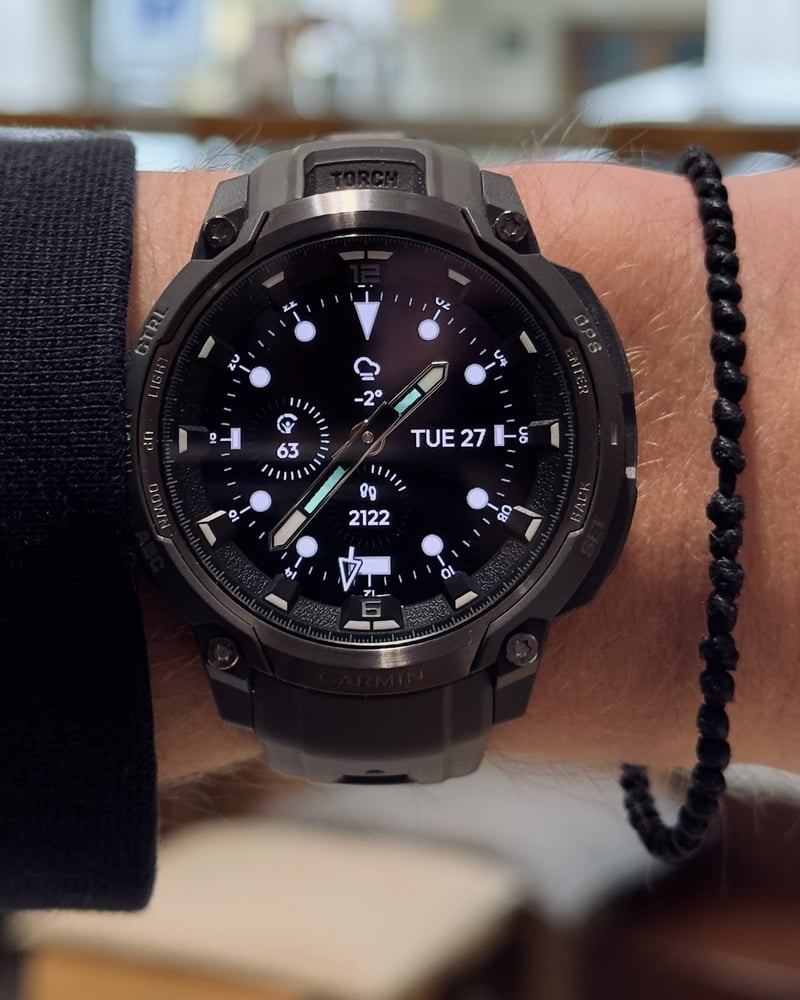
- fēnix 8 and fēnix 9 Pro: Modello GMT. The large AMOLED screen and tool-watch case suit its GMT bezel and outlined hands, so the watch reads like a proper instrument. Portal Hybrid is the pick for owners who want more data on the same dial.
- Forerunner 965 and Forerunner 970: Portal Hybrid, for runners who want weather, sun events and pressure at a glance, or Aperture Digital for a bold digital readout.
- Venu 4: Helix Heritage, whose classical analogue look matches the Venu’s everyday design, or Aperture Digital for a modern digital face.
- Instinct Crossover AMOLED: Modello GMT or Helix Heritage, both with markers and lume matched to the watch’s physical hands.
The free trial is the real test, because a few minutes on the owner’s own watch says more than any screenshot.
More information: stashdigitale.com.
Author: Michael and Eugene of Stash Digitale, edited by the5krunner.
Quick answers
Does drawing a watch face in code save battery on AMOLED watches?
Mostly it makes the face sharper and quicker to respond, because the watch does not have to load and scale large images. On AMOLED, battery use depends largely on how many pixels are lit and how often the screen updates, so the bigger savings come from dark dials, outlines and Minimal AOD, and from each data field refreshing only as often as it needs to.
Can a Stash Digitale face be set up without the phone?
Yes. Colours, data fields, hand styles, the GMT mode and always-on behaviour all live in the watch’s Customize menu, with a live preview of every change before it is applied.
Do I have to buy the face again when I upgrade my Garmin?
No. The faces can be downloaded again at no cost on a new watch, and the studio tests each new model to make sure the face performs as expected before adding it.
If you enjoyed reading this, here is another in the Indie Spotlight series: Indie App Spotlight: LiftTrack plans your next lift for your Garmin.
Last Updated on 18 November 2026 by tfk the5krunner
Small things I always use
- Garmin 90-degree charging adapter: Charges your Garmin with any USB-C cable. Essential when travelling. I use one.
- Body Glide: The blue anti-chafing stick swimmers and runners carry. I use it.
- Speedo earplugs: Fewer ear infections and no cold-water dizziness. I use them.
- Dryrobe Advance: My winter changing robe for open-water swims. I use one. A cheaper option is the AONYIYI changing robe.
- Maurten: Race fuel that stays easy on the stomach. I use them.
- Beet It Sport nitrate shots: Beetroot shots I take in the days before a race. I use them.
- Garmin charging puck: The quickest way to top up before a session. I use one.
- Injinji: Toe socks that stop rubbing, so you run more. I use them.
- Ultimate toe protectors: Stop black toenails on long runs. They work. I use them.
- Compressport R2 v2 calf sleeves: My calf sleeves of choice. I use them.
- Cellucor C4: My pre-workout before hard sessions.
- TPU tubes: Schwalbe Aerothan, Tubolito and Pirelli SmarTube. Light, tiny spares. I use all three.
- G8 insoles: Adjustable arches, perfect position. I use them.
- Cycplus Cube: A 97g electric pump that gets a road tyre rideable in two minutes. I carry one. 5% off with code THE5KRUNNER.
Health, recovery and sleep
- Kineon MOVE+: Red and infrared light for sore knees, Achilles and other joints after hard training. I use it.
- FreeStyle Libre 3 Plus: Shows how my blood sugar responds to diet. Occasional use.
- hDrop: Measures my sweat loss in summer and indoors. I use it.
- Fourth Frontier Zone: Checks my heart under load in hard sessions.
- Oura Ring 5: My partner’s recovery tracker of choice.
- Eight Sleep: A cooling mattress cover my partner and I use nightly.
Watches and sensors
- Polar H10: My daily driver for waking HRV.
- Polar Verity Sense: My backup arm-worn HR sensor.
- Nomad bedside charger: Charges my iPhone and Apple Watch overnight. I use it, and many of their bands.
- Train.Red: The best muscle oxygen sensor I’ve used. Occasional use.
- Tymewear: Accurate heart rate and reliable ventilatory zones. I use it to pace endurance rides over an hour.
- Garmin Forerunner 970: A pro-grade triathlon watch. I use this.
- Apple Watch Ultra 4: My daily smartwatch. No phone needed on rides.
On the bike
- Continental GP5000 for everyday riding, and Aero 111 on the front for special occasions. I use both.
- Helmets: Specialized S-Works Evade 3 for road riding, and Rudy Project Wing for TT-style races. I use both.
- Ravemen FR300: A front light that mounts under your Garmin or Wahoo. I use one.
- Ravemen FR1000: The light and the computer mount in one unit, so nothing else goes on the bars. Better than mine.
- Ravemen FR1500SE: 1,500 lumens hanging under your Garmin, for proper night rides.
- Ravemen FR1100SE: 1,100 lumens under your Garmin, and up to 46 hours on slow flash.
- Ravemen FR500: A brighter FR300 with the same mount.
- Wahoo TRACKR Radar: I use it on one bike and Varia on the other. They perform the same.
- Garmin Varia RTL515: Radar that warns you of cars from behind. I use this model.
- Wahoo ELEMNT Roam 3: The bike computer that’s easy to use. I use mine on most rides.
- Favero Assioma Pro RS2: Accurate power pedals that swap easily between bikes. I use this model.
Home and indoor training
- NPE Runn: Makes my basic treadmill smart, sending more accurate speed and distance to my watch and Zwift. I use it.
- Google Wifi: Keeps Zwift connected in my pain cave. I use it.
- Apple TV 4K: Zwift on the big screen. I use two.
- Google Nest Doorbell (wired, 2nd gen): My video doorbell, running in both Google Home and Apple Home via Starling. I use it.
Reader-Powered Content

This content is not sponsored. It’s mostly me behind the labour of love, which is this site, and I appreciate everyone who supports it.
Support the site: Follow (free, fewer ads) · Subscribe (paid, ad-free) · Buy Me A Coffee
Written by real people, with AI assistance. Fact-checked and verified for originality. See the Editorial Policy. FTC: Affiliate Disclosure — some links pay commission. As an Amazon Associate, I earn from qualifying purchases.
tfk is the founder and author of the5krunner, an independent endurance sports technology publication. With 20 years of hands-on testing of GPS watches and wearables, and competing in triathlons at an international age-group level, tfk provides in-depth expert analysis of fitness technology for serious athletes and endurance sport competitors. See the gear tfk uses. ID
