
If you already own an Apple Watch, the question isn’t whether Ultra 4 is good- it is- but whether it justifies the cost from where you are starting. This guide covers every relevant starting point from Watch Ultra 1 through to older Watch Series models, answering a simple question: what does Ultra 4 add that your current watch genuinely cannot do, even after a software update?
For full specifications, see the Apple Watch Ultra 4 specifications. We’ll link a full hands-on review here once testing is complete.
Quick planning table: upgrade now or wait?
This table shows the upgrade recommendation for 2026 and how it shifts in 2027, when Ultra 4 owners will be one year in and older models will be one year closer to their last upgrade.
| Current watch | watchOS 27? | 2026 recommendation | 2027 recommendation |
|---|---|---|---|
| Apple Watch Ultra 1 | ✗ Not supported | Consider upgrade | Upgrade |
| Apple Watch Ultra 2 | ✓ Supported | Consider upgrade | Consider upgrade |
| Apple Watch Ultra 3 | ✓ Supported | Don’t upgrade | Consider upgrade |
| Series 6, 7, 8 or SE 2 | ✗ Not supported | Upgrade | Upgrade |
| Series 9, 10, 11 or SE 3 | ✓ Supported | Consider (feature-led) | Consider (feature-led) |
What Ultra 4 adds that no software update can deliver
watchOS 27 brings Siri AI, the new Steps complication, improved distance algorithms, perimenopause support in Cycle Tracking, and Workout Buddy without iPhone to every supported Apple Watch. Those aren’t the reasons to upgrade; the hardware features are:
| Feature | Ultra 4 | Older models via watchOS 27 |
|---|---|---|
| Health Sensing System | ✓ | ✗ |
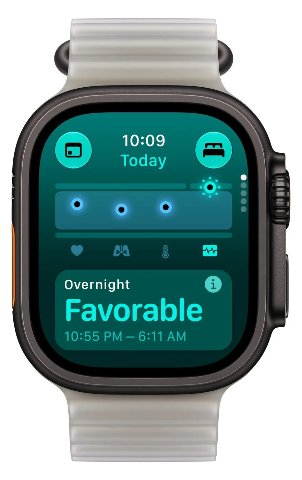
| Readiness app (0–10 daily score) | ✓ | ✗ |
| Continuous HR every 5 seconds | ✓ | ✗ |
| HRV as often as every 5 minutes (best) | ✓ | ✗ |
| Recovery HRV + overall HRV | ✓ | ✗ |
| Improved calorie estimates | ✓ | ✗ |
| Audio Intelligence (S11) | ✓ | ✗ |
| Outdoor workout battery | 18 hrs | 14 hrs (Ultra 3) / 12 hrs (Ultra 1/2) |
| Normal use battery | 50 hrs | 42 hrs (Ultra 3) / 36 hrs (Ultra 1/2) |
| Extended Workout mode | 25 hrs GPS | ✗ |
| Max Extended Workout mode | 45 hrs GPS | ✗ |
| Satellite Emergency SOS / Messages | ✓ | Ultra 3 ✓ / Ultra 1 and 2 ✗ |
| S11 chip (CPU, GPU and Neural Engine derived from A20 Pro, per Apple) | ✓ | ✗ |
| Fast charging (15 min = 18 hrs use) | ✓ (0–80% in ~45 min) | Ultra 3 ✓ (0–80% in ~45 min) / Ultra 2 ✓ (0–80% in ~60 min) / Ultra 1 ✓ (0–80% in ~60 min) |
| Siri AI, Steps complication, Workout Buddy | ✓ | ✓ (via watchOS 27 on supported models) |
Extended Workout mode turns off the always-on display and on-screen running metrics but keeps GPS logging at full one-second fidelity and cellular function largely intact. Max Extended Workout mode also keeps GPS logging at full one-second fidelity internally, but the on-screen heart rate display switches to a 5-minute rolling average, and splits, alerts and custom workouts are unavailable. It replaces what Apple previously called Reduced Fidelity mode.
Ultra owners: no one needs to upgrade
If you own an Apple Watch Ultra, you don’t need Ultra 4. Your watch will run watchOS 27 (Ultra 2 and 3) or has reached its software support limit (Ultra 1) and will continue to function exactly as before. What follows is for those who want to know whether the case for upgrading is strong, marginal or negligible for their specific model.
If you have an Apple Watch Ultra 1
Ultra 1 launched in September 2022. It is now four years old and no longer supports watchOS 27.
| Factor | Position |
|---|---|
| watchOS 27 support | ✗ Dropped — no new software features from this point |
| Satellite Emergency SOS | ✗ Hardware only on Ultra 3 and Ultra 4 |
| Outdoor workout battery | 12 hrs — Ironman requires Low Power Mode |
| Readiness / continuous HRV | ✗ Hardware exclusive to Ultra 4 and Series 12 |
| Battery condition (4 years, typical use) | Still multi-day, but degrading |
| Chip | S8 — three generations behind S11 |
- Ultra 1 will receive no further watchOS features. The software gap between Ultra 1 and any current model will only grow from here.
- Ultra 1 never had satellite connectivity. If you spend time in remote areas, that alone is a reason to upgrade – to a discounted Ultra 3 or to Ultra 4.
- If you race Ironman or events over 12 hours, Ultra 4’s 18-hour GPS battery removes the Low Power Mode requirement that Ultra 1 imposes.
- If Readiness and continuous HRV matter to you, Ultra 4 is the only path. Ultra 1 cannot run the Readiness app regardless of software version.
- Ultra 1 supports fast charging but at a slower rate – 0 to 80% in about an hour versus 45 minutes on Ultra 3 and Ultra 4.
- Battery replacement costs approximately £ 95- 99 / $99. At four years old, some Ultra 1 owners are approaching the point where runtime becomes a practical issue.
Verdict: The strongest upgrade case is here for any current Ultra owner. Four generations of chip, three generations of battery improvement, satellite connectivity, and the Health Sensing System represent a meaningful cumulative improvement. Still not essential, but the easiest yes in this guide.
Full review: Apple Watch Ultra 1 review.
If you have an Apple Watch Ultra 2
Ultra 2 launched in September 2023. It is now three years old and supports watchOS 27.
| Factor | Position |
|---|---|
| watchOS 27 support | ✓ Supported — gets Siri AI, Steps, Workout Buddy, Cycle Tracking updates |
| Satellite Emergency SOS | ✗ Hardware only on Ultra 3 and Ultra 4 |
| Outdoor workout battery | 12 hrs — same as Ultra 1; Ironman requires Low Power Mode |
| Readiness / continuous HRV | ✗ Hardware exclusive to Ultra 4 and Series 12 |
| Battery condition (3 years, typical use) | Still very healthy |
| Chip | S9 — new dual-core CPU with 60% more transistors than S8, 4-core Neural Engine; two generations behind S11 |
- Ultra 2 gets all the watchOS 27 software features. The software-upgrade argument doesn’t apply here.
- S9 brought the first new Apple Watch CPU since S6: 5.6 billion transistors, 60% more than S8, and a new 4-core Neural Engine. In practical sporting terms the watches perform similarly, but S9 is a genuine step up.
- Ultra 2 never had satellite connectivity. The satellite argument is the same as for Ultra 1 owners.
- Battery health at three years is typically still excellent and not a meaningful factor in the upgrade decision.
- Readiness and continuous HRV require the new Health Sensing System on Ultra 4. If those capabilities matter, Ultra 4 is the upgrade.
Verdict: A reasonable upgrade if satellite connectivity, Readiness, or the jump to 18-hour GPS battery are genuinely important for your sport. Difficult to justify otherwise.
Full review: Apple Watch Ultra 2 review.
If you have an Apple Watch Ultra 3
Ultra 3 launched in September 2025. It is one year old and supports watchOS 27.
| Factor | Position |
|---|---|
| watchOS 27 support | ✓ Supported |
| Satellite Emergency SOS | ✓ Available |
| Outdoor workout battery | 14 hrs — needs Low Power Mode for full Ironman |
| Readiness / continuous HRV | ✗ Hardware exclusive to Ultra 4 and Series 12 |
| Battery condition (1 year, typical use) | Near-new |
| Chip | S10 — one generation behind S11 |
- Ultra 3 already has satellite, the full watchOS 27 feature set, and a near-new battery.
- The 4-hour GPS battery improvement (14 to 18 hours) matters only if you race events between 14 and 18 hours — specifically full Ironman distance.
- Readiness is the only new capability with no workaround on Ultra 3.
Verdict: Don’t upgrade. The changes are real but small for a one-year-old watch. Wait for Ultra 5.
Full review: Apple Watch Ultra 3 review.
Series owners: the cut-off point
Series 6, 7, 8 and SE 2 do not support watchOS 27. The software gap between those watches and any current model will only widen. If you have one of those models, the question isn’t whether to upgrade, but which model to choose. We’ll cover the rationale for upgrading to the latest Watch Series model in a separate post; here, we focus on what you gain by switching to the latest Ultra model.
Series 9, 10, 11 and SE 3 all support watchOS 27 and will receive Siri AI, the new Steps complication, improved algorithms, perimenopause support, and Workout Buddy without iPhone. For those owners, the real decision is what the Ultra tier adds over their current watch – and whether the significant price jump of about £380 over Series 12 is justified.
If you have a Series 9, 10 or 11
| What you gain moving to Ultra 4 | What you already have or get via watchOS 27 |
|---|---|
| 18-hour GPS outdoor workout battery | Siri AI, Steps complication, Workout Buddy |
| Readiness app and continuous HRV | Hypertension notifications, Sleep Score, Sleep Apnea detection |
| Satellite Emergency SOS and Messages | ECG, SpO2, skin temperature, shallow depth tracking to 6m (Series 10+) |
| 49mm titanium case, sapphire crystal | Fall detection, crash detection, Check In |
| 100m water resistance, EN13319 dive cert | |
| 86dB emergency siren | |
| Action button | |
| Precision dual-frequency L1+L5 GPS |
- Series 9/10/11 owners are crossing a tier boundary. The price gap is approximately £380 (Series 12 at £369 vs Ultra 4 at £749).
- If you race long-course triathlon or events over 10 hours, the Ultra’s GPS battery is an attractive benefit. See the best triathlon watch guide for how battery requirements map to race distance.
- If Readiness is your main motivation, Series 12 delivers it at half the price.
- If you want satellite, dual-frequency GPS, the siren, or dive certification, only the Ultra 4 delivers.
Verdict: If your sport demands long GPS battery life, satellite, and durability, Ultra 4 is the right call. If Readiness or better HR accuracy is the main motivation, Series 12 covers both at £380 less. See the Series 12 vs Series 11 comparison.
If you have a Series 6, 7, 8 or SE 2
- These watches do not support watchOS 27 and will receive no further software features.
- At 3-5 years of daily charging, many users are approaching the point where the watch struggles to last a full day with workouts.
- Battery replacement costs approximately £95-99 / $99. Facing that cost on a 3- 5-year-old watch, also missing Readiness, continuous HRV, satellite, and dual-frequency GPS, makes the upgrade case compelling.
- Series 12 at £369 gets you Readiness and better HR. Ultra 4 at £749 adds long-course battery, satellite, titanium, and dive certification.
- If you have never raced beyond 10 hours, Series 12 is the more rational choice. If you have, Ultra 4 changes your race-day experience in a way Series 12 cannot.
Verdict: Upgrade. Battery degradation and the software cut-off together make staying put hard to justify. See the best Apple Watch guide to compare all current models.
GPS, heart rate and elevation accuracy
All Apple Watch Ultra models from Ultra 1 onwards have dual-frequency L1+L5 GPS, covering GPS, Galileo, QZSS and BeiDou (Ultra 3 also includes GLONASS; Ultra 4 drops GLONASS, which is unlikely to affect practical accuracy). Dual-frequency reception is a meaningful accuracy advantage over the Series line, where single-frequency L1 GPS is less precise in challenging environments such as urban canyons or dense tree cover.
Within the Ultra line, GPS accuracy is broadly equivalent across all four generations. Ultra 4’s GNSS constellation change does not represent a meaningful accuracy improvement over Ultra 1, 2 or 3 in normal conditions. Independent testing of Ultra 4’s “most accurate on-device GPS yet” claim has not been published, but this site has already tested AWU3’s accuracy and found it generally market-leading.
Elevation accuracy is acceptable across all Ultra generations and all current Series models. No generational change is expected on Ultra 4, and Apple has not claimed one.
Ultra 4 makes a genuine hardware step forward in heart rate and HRV accuracy over all previous Ultras. The Health Sensing System introduces larger, more power-efficient green LEDs, eight photodiode windows with double photodiodes in each (up from four single windows previously), and a 24% increase in ECG electrode surface area. Background (non-exercise) heart rate now samples every 5 seconds rather than at extended intervals.
HRV granularity improves significantly: in overnight testing on this site, Ultra 3 HRV readings landed close to every 15 minutes. Ultra 4 measures HRV as often as every 5 minutes (best) and, for the first time, surfaces RMSSD alongside SDNN in Apple’s own app; both have always been calculable from the underlying beat-to-beat data available to developers via HealthKit. Apple uses RMSSD for Recovery HRV and SDNN for its other HRV measurements. That improvement in sampling density compounds across every algorithm that reads from Apple Health. Independent validation of Apple’s accuracy claims will follow in due course from the5krunner and others; the white paper critique on this site covers the methodology and its gaps in detail.
The battery question
Battery health percentage on Apple Watch is a calculated estimate, not a direct measurement of cell capacity. Runtime is the real indicator – specifically, whether the watch covers your training day or event.
| Watch | Age | Practical position |
|---|---|---|
| Series 6/7/8/SE 2 | 3–5 years | Often struggling to last a full day with workouts |
| Series 9/10/11/SE 3 | 1–3 years | Healthy; not a factor |
| Ultra 1 | 4 years | Still multi-day; approaching the trigger zone |
| Ultra 2 | 3 years | Healthy; not a factor |
| Ultra 3 | 1 year | Near-new |
Battery replacement costs approximately £ 95- 99 in the UK and $99 in the US. This is a compelling upgrade trigger for Series owners at year 3-4, but rarely for Ultra owners whose larger battery and lower charging frequency mean the practical limit arrives several years later.
The resale and software support timing question
Smartwatch depreciation is heaviest in year one. An eBay resale study found the Ultra 3 retained 65% of its launch price after six months, and the Ultra 2 retained 69%. By years 3-4, resale value on most models drops to minimal. An organised Ultra 2 owner who sells now recovers meaningfully more than one who waits another year. Apple’s trade-in programme typically pays less than a private sale, so selling ahead of launch maximises return.
Software support runway matters independently of today’s feature gap. Ultra 1 has already lost watchOS support. Ultra 2 and Ultra 3 remain supported, but each generation Apple drops the oldest hardware. Buying Ultra 4 now resets that clock and locks in several years of guaranteed software updates.
Consider a new, genuine £100/$100 battery from Apple, which will likely buy you at least 3 more years of use. That’s a good investment to keep your old Watch Ultra ticking over, less so for a near-worthless old Watch Series model.
Considering Series 12 instead of Ultra 4?
If your decision is Series 12 versus Ultra 4 rather than whether to upgrade at all, the core question is whether your sport demands what only the Ultra tier delivers: long-course GPS battery, satellite, dual-frequency GPS, dive certification, and the titanium case. If not, Series 12 delivers Readiness, continuous HRV, and better heart rate at £380 less. See the four unexpected changes in Series 12 and Ultra 4 for the full health and sensor picture, or the Ultra 4 vs Series 12 comparison for every spec side by side. Weighing Ultra 4 against a Garmin instead? See Garmin Fenix 9 vs Apple Watch Ultra 4.
Apple Watch Ultra 4
GPS adventure watch
Apple Watch Series 12
Smart sport watch
RRP from $399
£369, €449
- use code:
Get it nowOrder now – Apple Watch Series 12 Also sold direct byQuick answers
Should I upgrade from Apple Watch Ultra 1 to Ultra 4?
Ultra 1 is the strongest upgrade case. It does not support watchOS 27, never had satellite connectivity, has a 12-hour GPS battery that requires Low Power Mode for Ironman, and is now four years old. The cumulative delta across four generations — satellite, 18-hour GPS, Health Sensing System, Readiness, S11 chip — is meaningful for endurance athletes. Still not essential, but the easiest yes in this guide.
Should I upgrade from Apple Watch Ultra 2 to Ultra 4?
Reasonable if satellite connectivity, Readiness, or 18-hour GPS battery matter for your sport. Ultra 2 supports watchOS 27, so the software gap is limited. Battery health at three years is typically still excellent. The honest answer for most Ultra 2 owners is: wait unless one of those specific features is genuinely important.
Should I upgrade from Apple Watch Ultra 3 to Ultra 4?
No. Ultra 3 is one year old, has satellite, supports watchOS 27, and its battery is near-new. The main gains on Ultra 4 are Readiness, the Health Sensing System, and 4 more hours of GPS battery. Wait for Ultra 5.
Does Apple Watch Ultra 1 support watchOS 27?
No. Apple Watch Ultra 1 does not support watchOS 27. It will not receive Siri AI, the new Steps complication, Cycle Tracking updates, Workout Buddy improvements, or any future watchOS features.
What Apple Watch models support watchOS 27?
watchOS 27 is supported on Apple Watch Series 9, Series 10, Series 11, Series 12, SE 3, Ultra 2, Ultra 3 and Ultra 4. It is not supported on Series 6, 7, 8, SE 2, or Ultra 1.
Is Apple Watch Ultra 4 worth upgrading from a Series 7 or Series 8?
Yes — but the question is whether you choose Ultra 4 or Series 12. Series 7 and 8 do not support watchOS 27, batteries are approaching the practical trigger point at 3-5 years, and the feature gap is large. Ultra 4 makes sense if you race long-course triathlon or need satellite. Series 12 at £369 covers Readiness and better HR at half the price.
What does Apple Watch Ultra 4 add that older Apple Watches cannot get via watchOS 27?
The hardware-exclusive features are the Health Sensing System (continuous heart rate every 5 seconds, HRV every 5 minutes (best), ECG electrode surface area +24%), the Readiness app, improved calorie estimates, Audio Intelligence via the S11 chip, 18-hour outdoor workout battery, Extended Workout (25 hours) and Max Extended Workout (45 hours) GPS modes, and the S11 chip.
When does Apple Watch battery degradation become a reason to upgrade?
For Series watches that charge daily, most users start struggling to get through a full day with workouts by year 3-4. Facing a battery replacement cost of about £95-99 on a watch that also lacks Readiness, satellite, and better GPS makes the upgrade case compelling. For Ultra owners, the practical limit arrives several years later.
Should a Series 6 owner upgrade to Ultra 4?
Series 6 does not support watchOS 27. Upgrade regardless of battery condition — the software gap will only widen. Whether you choose Series 12 or Ultra 4 depends on whether long-course GPS battery, satellite, and Ultra-tier durability matter for your sport.
Small things I always use
- Garmin 90-degree charging adapter: Charges your Garmin from any USB-C cable. Essential when travelling. I use one.
- Body Glide: The blue anti-chafe stick swimmers and runners carry. I use it.
- Speedo earplugs: Fewer ear infections and no cold-water dizziness. I use them.
- Dryrobe Advance: My winter changing robe for open-water swims. I use one. A cheaper option is the AONYIYI changing robe.
- Maurten: Race fuel that stays easy on the stomach. I use them.
- Beet It Sport nitrate shots: Beetroot shots I take in the days before a race. I use them.
- Garmin charging puck: The quickest way to top up before a session. I use one.
- Injinji: Toe socks that stop rubbing, so you run more. I use them.
- Ultimate toe protectors: Stop black toenails on long runs. They work. I use them.
- Compressport R2 v2 calf sleeves: My calf sleeves of choice. I use them.
- Cellucor C4: My pre-workout before hard sessions.
- TPU tubes: Schwalbe Aerothan, Tubolito and Pirelli SmarTube. Light, tiny spares. I use all three.
- G8 insoles: Adjustable insoles that are good. I use them.
- Cycplus Cube: A 97g electric pump that gets a road tyre rideable in two minutes. I carry one. 5% off with code THE5KRUNNER.
Watches and sensors
- Polar H10: My daily driver for waking HRV.
- Polar Verity Sense: My backup arm-worn HR sensor.
- Nomad bedside charger: Charges my iPhone and Apple Watch overnight. I use it, and many of their bands.
- Train.Red: The best muscle oxygen sensor I’ve used.
- Tymewear: Accurate heart rate and reliable ventilatory zones. I use it to pace endurance rides over an hour.
- Garmin Forerunner 970: A pro-grade triathlon watch. I use this.
- Apple Watch Ultra 4: My daily smartwatch. No phone needed on rides.
- Garmin Fenix 9 Pro: I’ve just bought one.
On the bike
- Continental GP5000 for everyday riding, and Aero 111 on the front for special occasions.
- Helmets: Specialized S-Works Evade 3 for road riding, and Rudy Project Wing for TT-style races. I use both.
- Ravemen FR300: A front light that mounts under your Garmin or Wahoo. I use one.
- Wahoo TRACKR Radar: I use it on one bike and Varia on the other. They perform the same.
- Garmin Varia RTL515: Radar that warns you of cars from behind. I use this model.
- Wahoo ELEMNT Roam 3: The bike computer that’s easy to use. I use mine on most rides.
- Favero Assioma Pro RS2: Accurate power pedals that swap easily between bikes. I use this model.
Home and indoor training
- NPE Runn: Makes my basic treadmill smart, sending more accurate speed and distance to my watch and Zwift. I use it.
- Google Wifi: Keeps Zwift connected in my pain cave. I use it.
- Apple TV 4K: Zwift on the big screen. I use two.
- Google Nest Doorbell (wired, 2nd gen): My video doorbell, running in both Google Home and Apple Home. I use it.
Health, recovery and sleep
- FreeStyle Libre 3 Plus: Shows how my blood sugar responds to diet.
- hDrop: Measures my sweat loss in summer and indoors.
- Fourth Frontier Zone: Checks my heart under load in hard sessions.
- Oura Ring 5: My partner’s recovery tracker of choice.
- Eight Sleep: A cooling mattress cover my partner and I use nightly.
Reader-Powered Content

This content is not sponsored. It’s mostly me behind the labour of love, which is this site, and I appreciate everyone who supports it.
Support the site: Follow (free, fewer ads) · Subscribe (paid, ad-free) · Buy Me A Coffee
Written by real people, with AI assistance. Fact-checked and verified for originality. See the Editorial Policy. FTC: Affiliate Disclosure — some links pay commission. As an Amazon Associate, I earn from qualifying purchases.
