Garmin has published no validation; watch estimates tested at 25% to 33% average error
A rough idea of how much to drink after a long or hot session
An estimate from a model, never a measurement of sweat
Plain English: Sweat loss is Garmin’s estimate of how much fluid an athlete lost during a workout, shown in millilitres after the activity syncs. A higher figure means more fluid to replace, and it grows with harder, longer and hotter sessions. It is calculated from effort, body weight, and conditions, not measured from the skin.
In practice: Garmin estimates sweat loss. Even sensors that measure sweat loss struggle to get the answer right, so expect this estimate to be wrong. That said, treat it as the minimum amount of water needed to replace what was lost in sweat. Athletes competing in endurance events over one hour should not rely on this metric; instead, establish their own baseline sweat loss from weight changes before and after a long session, taken naked (1 litre of water is 1 kg).
Quick answers
How does Garmin calculate sweat loss?
Garmin says sweat loss is calculated from effort during the activity, FTP, weight, distance, speed, elevation gain, temperature, heart rate and other variables. Garmin does not publish the model that combines them.
Where do I see sweat loss in Garmin Connect?
In the Garmin Connect app, open More, then Activities, then All Activities, choose the activity and scroll down the Stats tab to Nutrition & Hydration. The estimate appears after the activity has synced.
How accurate is Garmin sweat loss?
Garmin has published no validation of its estimate. A 2026 study of smartwatch sweat loss estimates in 111 runners found average errors of about 25% to 33% against changes in body weight.
Does sweat loss change my Garmin hydration goal?
Yes, if the automatic hydration goal is turned on. Garmin says the goal “will increase dynamically based on estimated sweat loss for timed activities you perform.”
Sweat Loss – a deep dive
When sweat loss is actually useful
This metric is not generally useful. You can easily sweat 1 litre (1 kg) in one hour, and Garmin’s own example in the next section, 212 ml for 50 minutes, could well be a significant understatement.
Introduction
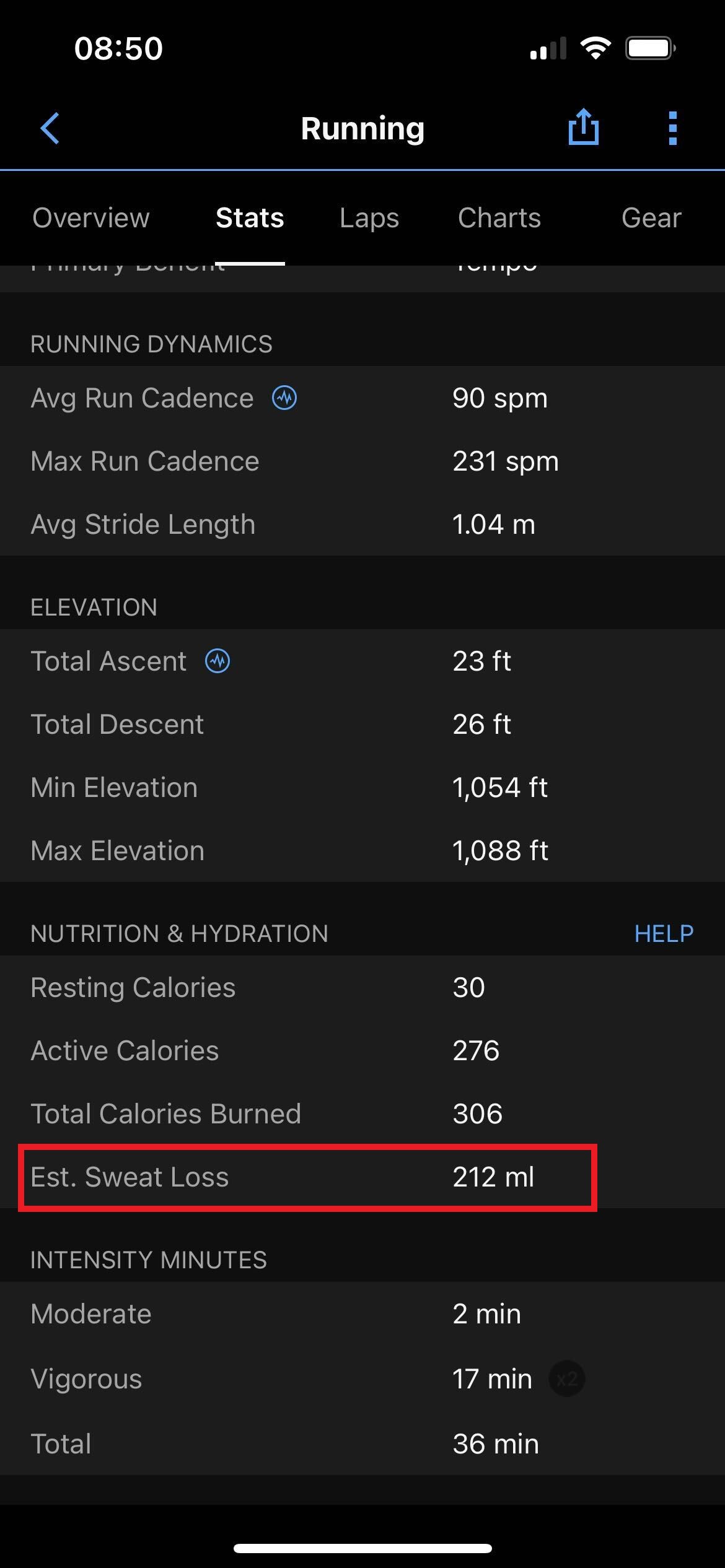
Garmin Sweat Loss, or estimated sweat loss, is the fluid Garmin calculates an athlete lost during a timed activity. Garmin’s support page puts its purpose this way: “Select Garmin devices can track your fluid use during activities to help you evaluate and maximise your training performance.” The figure appears in Garmin Connect after the activity syncs, next to any fluids the athlete logged.
It belongs to Garmin’s hydration tracking, which sets a daily fluid goal and raises it after workouts when the automatic goal is on. DC Rainmaker reported it as new on the vívoactive 4 and Venu in September 2019, describing the inputs as “the known outside temperature, your weight, humidity, and general black magic.” No Garmin press release names the feature. Garmin has published no test of how close the estimate comes to real sweat loss.
What sweat loss actually means
A higher figure means more fluid lost and more to replace; a lower one means less. It is an estimate in millilitres for that one session, so a long run in heat can show several times the figure of a short run in the cold. DC Rainmaker’s first example was 163 ml for a 27-minute run. Garmin publishes no norms or bands, and the right figure varies widely between athletes, because sweat rate differs from person to person at the same effort and temperature.
How Garmin calculates sweat loss
Garmin lists the inputs but not the method. “Your sweat loss is calculated using effort during an activity, FTP, weight, distance traveled, speed, elevation gain, temperature, heart rate, and other variables.” Garmin’s hydration technology page gives a shorter version: “Sweat loss is estimated by analysing exertion and the ambient temperature.”
How those inputs are combined, and what the “other variables” are, is unknown. Because none of them is a direct reading of sweat, the watch cannot see an athlete who sweats more or less than the model expects for the same work.
What affects the sweat loss reading
Temperature and effort have the largest effect, according to Garmin’s own description. An incorrect body weight in the user profile also changes the estimate, because weight is one of the listed inputs. FTP is also listed, so an out-of-date FTP is likely to shift ride estimates.
Conditions the watch does not record are a further source of error. Wind, clothing and acclimatisation all change real sweat rate, and Garmin does not say what temperature it uses for an indoor session on a trainer or treadmill.
How accurate is Garmin sweat loss
Garmin has not published a validation. Carrier and colleagues (Sports Health, 2026, PMID 41320899) compared sweat loss estimates from two smartwatches with changes in body weight in 111 runners and found agreement between 0.71 and 0.90 (concordance correlation) and mean absolute percentage errors of 25.38% to 33.21%. The paper’s full text was not available to confirm which watch brands were tested, so the result describes smartwatch estimates in general rather than Garmin’s specifically.
The reference method is simple and cheap. Baker (Sports Medicine, 2017, PMID 28332116) describes the change in body mass before and after exercise, adjusted for fluid drunk, as the standard field measure of sweat loss. the5krunner has used the same approach in its hDrop calibration tests, for example a pre-workout weight of 73 kg and a post-workout weight of 71.5 kg.
Competitor equivalents
- Polar has no per-workout estimate; FuelWise uses a generic hydration guide of 0.4 to 0.8 litres an hour.
- Apple Watch has no sweat loss estimate.
- COROS has no native estimate, but its watches can show data from the AbsolutSweat sensor.
- Sweat sensors such as hDrop measure on the skin and show fluid loss live on a Garmin through Connect IQ.
- Suunto has no equivalent.
- WHOOP has no equivalent.
Which Garmin devices support sweat loss
Most Garmin running, multisport and outdoor watches from 2019 onwards support it. Garmin’s support page lists them, including the Forerunner 245, 255, 265, 570, 745, 945, 955, 965 and 970, the Fenix 6, 7, 8, 9 and E, every Enduro, the Venu and vívoactive 4 and later, Epix (Gen 2), MARQ, Quatix, Tactix and D2 models, and the CIRQA band. The feature arrived with the vívoactive 4 and Venu in September 2019.
Where to find sweat loss on Garmin
- Garmin Connect app: More, then Activities, then All Activities, choose the activity, then the Stats tab and scroll to Nutrition & Hydration.
- Hydration goal: with the automatic goal turned on, the day’s hydration target rises after the activity to cover the estimate.
Common problems and misreadings
Reading the figure as a measurement is the main misreading. See Quick answers above.
A missing figure is worth checking in Garmin Connect after a sync, because the estimate is shown there after upload rather than on the watch. Garmin’s support pages do not confirm an on-watch sweat loss data field.
A figure that looks too low or too high for the athlete is expected from a model that cannot see individual sweat rate. Weighing before and after a few typical sessions shows which way it errs for that athlete.
How to improve sweat loss
Sweat loss is not a trainable score, so there is nothing to improve in the figure itself. Its value comes from replacing the fluid it suggests, and from checking it against body weight so the athlete knows how far to trust it.
Scientific basis
Baker LB. Sports Medicine, 2017. PMID 28332116. A review of sweating rate and sweat sodium in athletes, showing large differences between individuals and setting body mass change as the field reference for sweat loss.
Carrier B and colleagues. Sports Health, 2026. PMID 41320899. Smartwatch sweat loss estimates in 111 runners agreed moderately well with body mass change but carried mean errors of 25% to 33%.
How sweat loss connects to other Garmin features
Sweat loss feeds the automatic goal in Garmin’s hydration tracking, and it shares its effort inputs with calories and training load. It also uses the athlete’s FTP and the same heart rate data as VO2 max.
Small things I always use
- Garmin 90-degree charging adapter: Charges your Garmin with any USB-C cable. Essential when travelling. I use one.
- Body Glide: The blue anti-chafing stick swimmers and runners carry. I use it.
- Speedo earplugs: Fewer ear infections and no cold-water dizziness. I use them.
- Dryrobe Advance: My winter changing robe for open-water swims. I use one. A cheaper option is the AONYIYI changing robe.
- Maurten: Race fuel that stays easy on the stomach. I use them.
- Beet It Sport nitrate shots: Beetroot shots I take in the days before a race. I use them.
- Garmin charging puck: The quickest way to top up before a session. I use one.
- Injinji: Toe socks that stop rubbing, so you run more. I use them.
- Ultimate toe protectors: Stop black toenails on long runs. They work. I use them.
- Compressport R2 v2 calf sleeves: My calf sleeves of choice. I use them.
- Cellucor C4: My pre-workout before hard sessions.
- TPU tubes: Schwalbe Aerothan, Tubolito and Pirelli SmarTube. Light, tiny spares. I use all three.
- G8 insoles: Adjustable arches, perfect position. I use them.
- Cycplus Cube: A 97g electric pump that gets a road tyre rideable in two minutes. I carry one. 5% off with code THE5KRUNNER.
Health, recovery and sleep
- Kineon MOVE+: Red and infrared light for sore knees, Achilles and other joints after hard training. I use it.
- FreeStyle Libre 3 Plus: Shows how my blood sugar responds to diet. Occasional use.
- hDrop: Measures my sweat loss in summer and indoors. I use it.
- Fourth Frontier Zone: Checks my heart under load in hard sessions.
- Oura Ring 5: My partner’s recovery tracker of choice.
- Eight Sleep: A cooling mattress cover my partner and I use nightly.
Watches and sensors
- Polar H10: My daily driver for waking HRV.
- Polar Verity Sense: My backup arm-worn HR sensor.
- Nomad bedside charger: Charges my iPhone and Apple Watch overnight. I use it, and many of their bands.
- Train.Red: The best muscle oxygen sensor I’ve used. Occasional use.
- Tymewear: Accurate heart rate and reliable ventilatory zones. I use it to pace endurance rides over an hour.
- Garmin Forerunner 970: A pro-grade triathlon watch. I use this.
- Apple Watch Ultra 4: My daily smartwatch. No phone needed on rides.
On the bike
- Continental GP5000 for everyday riding, and Aero 111 on the front for special occasions. I use both.
- Helmets: Specialized S-Works Evade 3 for road riding, and Rudy Project Wing for TT-style races. I use both.
- Ravemen FR300: A front light that mounts under your Garmin or Wahoo. I use one.
- Ravemen FR1000: The light and the computer mount in one unit, so nothing else goes on the bars. Better than mine.
- Ravemen FR1500SE: 1,500 lumens hanging under your Garmin, for proper night rides.
- Ravemen FR1100SE: 1,100 lumens under your Garmin, and up to 46 hours on slow flash.
- Ravemen FR500: A brighter FR300 with the same mount.
- Wahoo TRACKR Radar: I use it on one bike and Varia on the other. They perform the same.
- Garmin Varia RTL515: Radar that warns you of cars from behind. I use this model.
- Wahoo ELEMNT Roam 3: The bike computer that’s easy to use. I use mine on most rides.
- Favero Assioma Pro RS2: Accurate power pedals that swap easily between bikes. I use this model.
Home and indoor training
- NPE Runn: Makes my basic treadmill smart, sending more accurate speed and distance to my watch and Zwift. I use it.
- Google Wifi: Keeps Zwift connected in my pain cave. I use it.
- Apple TV 4K: Zwift on the big screen. I use two.
- Google Nest Doorbell (wired, 2nd gen): My video doorbell, running in both Google Home and Apple Home via Starling. I use it.
Reader-Powered Content
This content is not sponsored. It’s mostly me behind the labour of love, which is this site, and I appreciate everyone who supports it.
Support the site: Follow (free, fewer ads) · Subscribe (paid, ad-free) · Buy Me A Coffee
Written by real people, with AI assistance. Fact-checked and verified for originality. See the Editorial Policy. FTC: Affiliate Disclosure — some links pay commission. As an Amazon Associate, I earn from qualifying purchases.
