Plug a Garmin watch into a Linux PC and the file manager can browse its storage, but official desktop support stops there. Garmin Express, the desktop app for software updates, maps and wired sync, runs only on Windows and macOS, so Linux users run it through Wine or boot into Windows.
openExpress is a free, open-source alternative built by Tomasz Bojanowski, a fēnix 8 owner. It handles those jobs natively on Linux. It also installs Connect IQ apps over USB on watches such as the fēnix 8, which do not expose their app folder through normal file access, something Garmin offers no Linux tool for.
The project began with a simple question: what does Garmin Express actually do when a watch is connected, and could a Linux program reproduce those steps? Nearly 30 releases later, it covers updates, maps, apps, music and sync.
How openExpress works
TL;DR: Connect the watch over USB and sign in to Garmin Connect once, and openExpress shows the device alongside pages for updates, maps, apps and music. Nothing is written to the watch or the account until the user confirms.
Setup
openExpress pairs a GTK4 and libadwaita interface that fits naturally into GNOME with a command-line tool offering the same features. It is distributed as a Flatpak. It is written in Python, with around 11,000 lines of code and more than 1,300 automated tests. During setup it reads a few values from the official Garmin Express installer, which the user downloads from Garmin. It never runs the installer and includes no Garmin code or keys.
Safety first
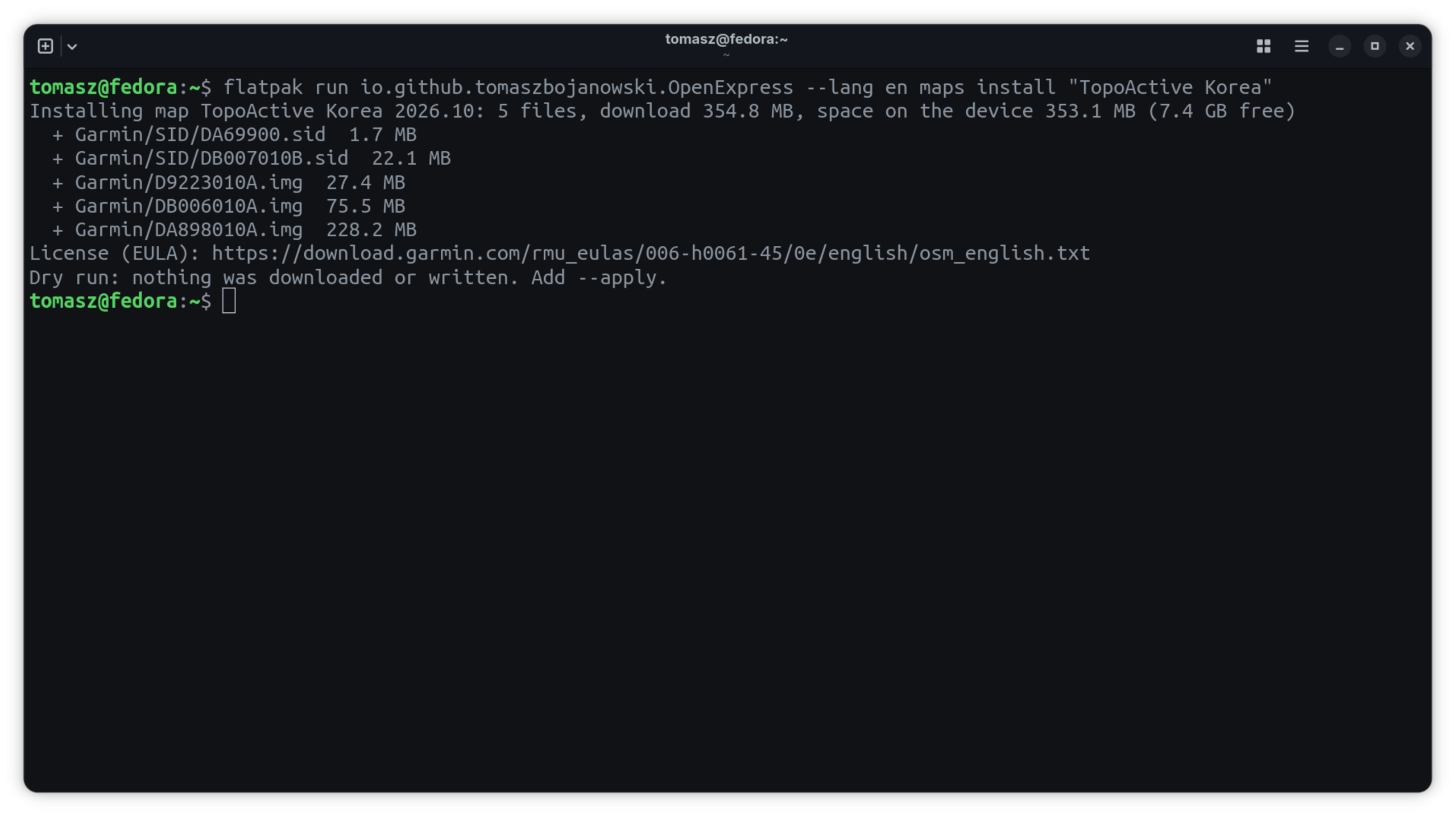
openExpress checks whether the connected watch is registered to the signed-in account and refuses to modify a watch that belongs to someone else. On the command line, anything that makes changes runs as a dry run unless –apply is added. Automatic background sync is off by default, so plugging in a watch does not start a sync.
Every file copied to the watch is verified afterwards. Shared Garmin map files are never deleted while another installed map still needs them. If the watch refuses a map’s small unlock file, openExpress retries up to five more times at five-second intervals, as Garmin Express does. Serial numbers and unit IDs are masked in logs and device reports.
The window and the command line
After sign-in, the main window shows the connected device, its storage and last sync time, with separate pages for updates, maps, apps and music. A status dot at the bottom of the sidebar shows whether Garmin’s servers answered the app’s most recent requests, and clicking it shows the status of each service. Every feature is also available through the openexpress command, so the app suits scripts and remote machines.
Over USB
Most operations use standard file transfers through the desktop’s file-access system (GVFS over MTP), without root privileges or udev rules. Installing or removing Connect IQ apps on watches that hide their app folder is the exception. For those, openExpress talks to the watch over PTP, the same channel Garmin Express uses.
Worked example: a 4.7 GB map over USB
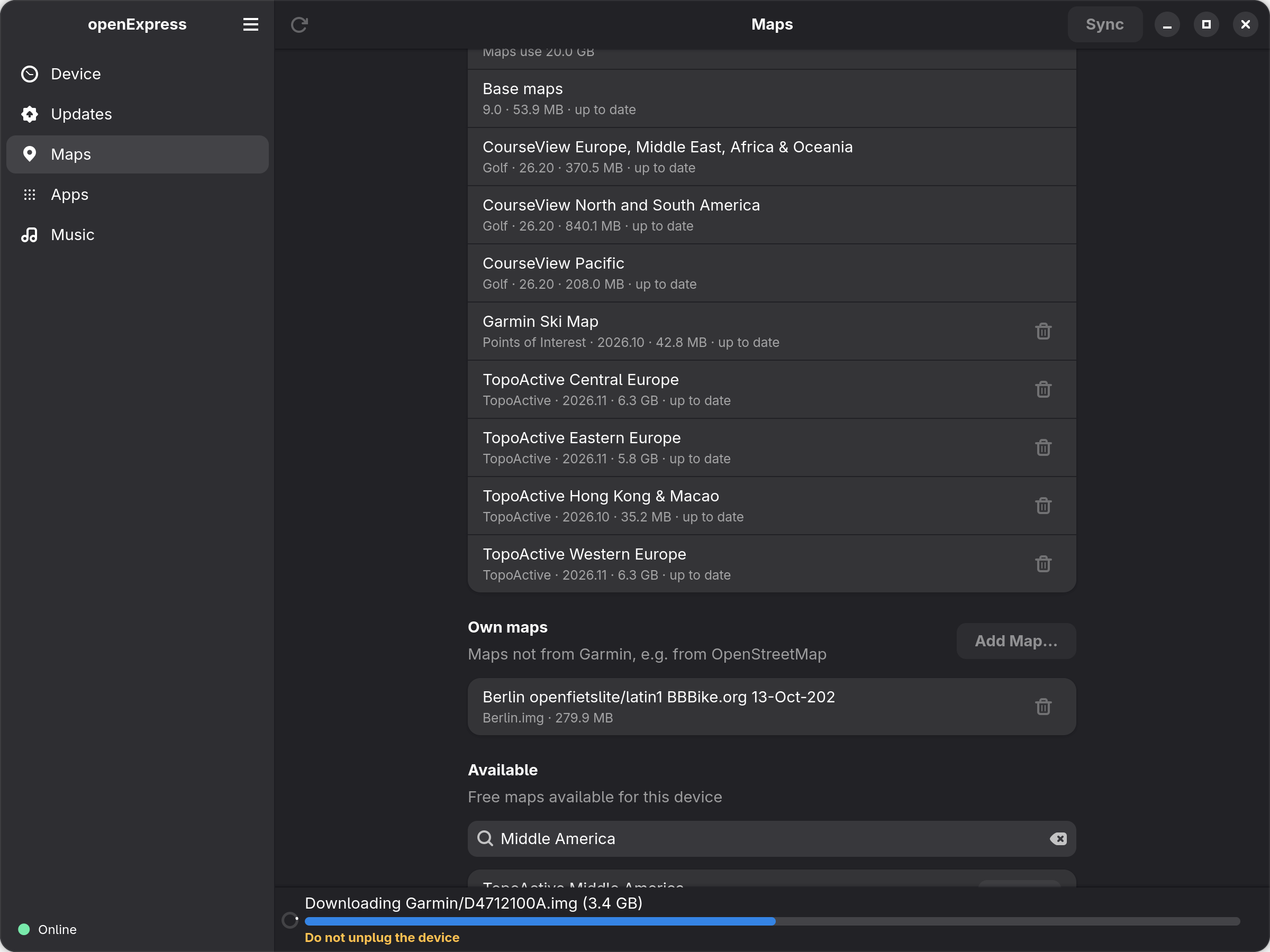
A single TopoActive region can run to several gigabytes, and Linux users have had no native way to download and install one. This is how TopoActive Middle America went onto a fēnix 8 Solar (47mm):
- The Maps page listed the maps already on the watch, showed which had updates, and reported 12.1 GB free out of 31.1 GB.
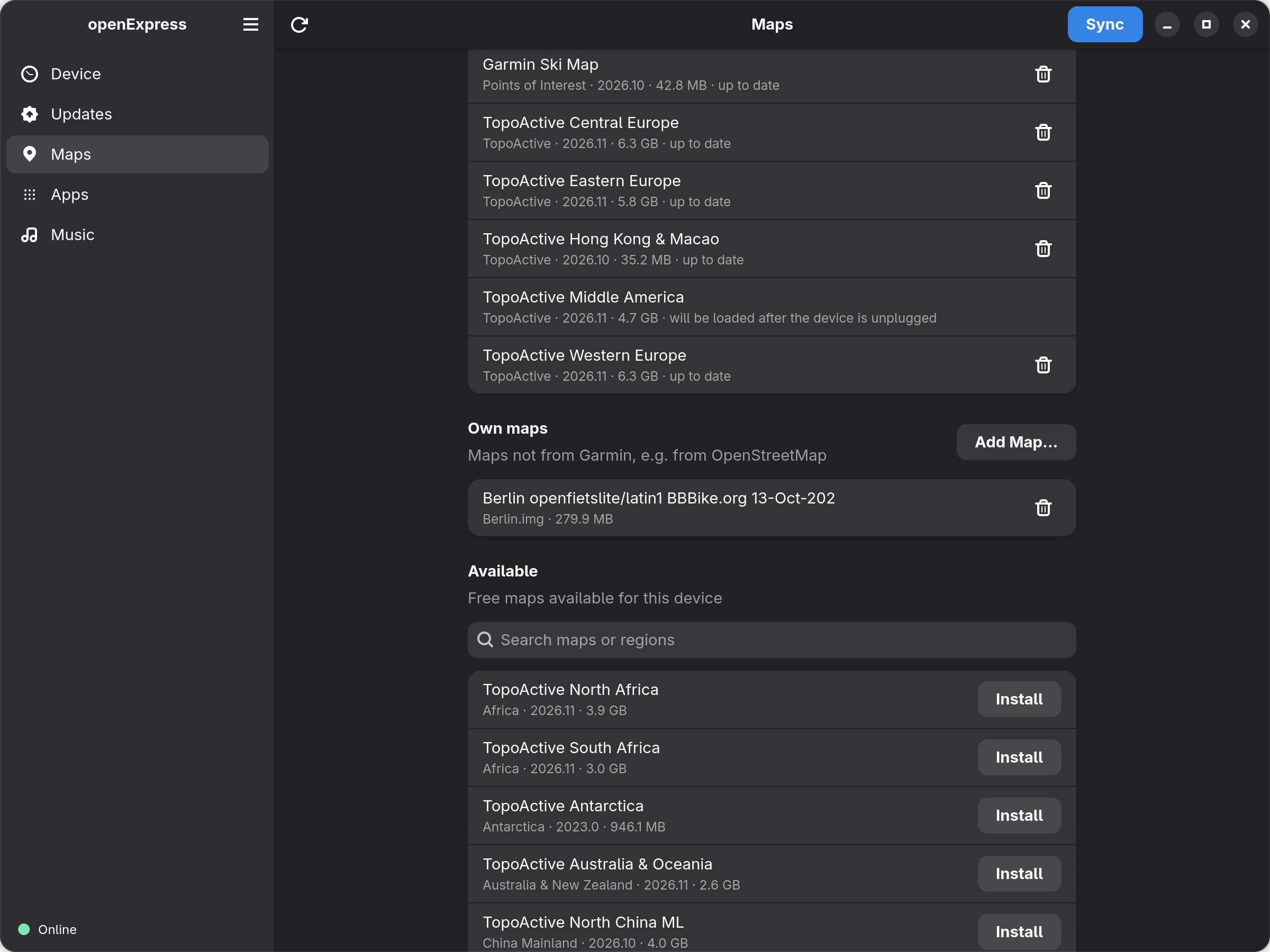
- TopoActive Middle America, covering Mexico, Central America and the Caribbean, was not installed. The confirmation dialog showed its size, 4.7 GB, and the space that would remain. openExpress will not start an installation that will not fit.
- Downloading the five map files took 46 seconds, at around 100 MB/s.
- Copying them to the watch took 4 minutes 16 seconds, at around 18.5 MB/s. The files went smallest first, as in Garmin Express, and each was verified afterwards.
- The whole process took 5 minutes 6 seconds. Once unplugged, the watch checked its maps and the new region appeared in its map manager.
The files went across in the same order and at the same speed as with Garmin Express over the same cable, so running on Linux carried no speed penalty in this test. Times vary with the device, connection and map.
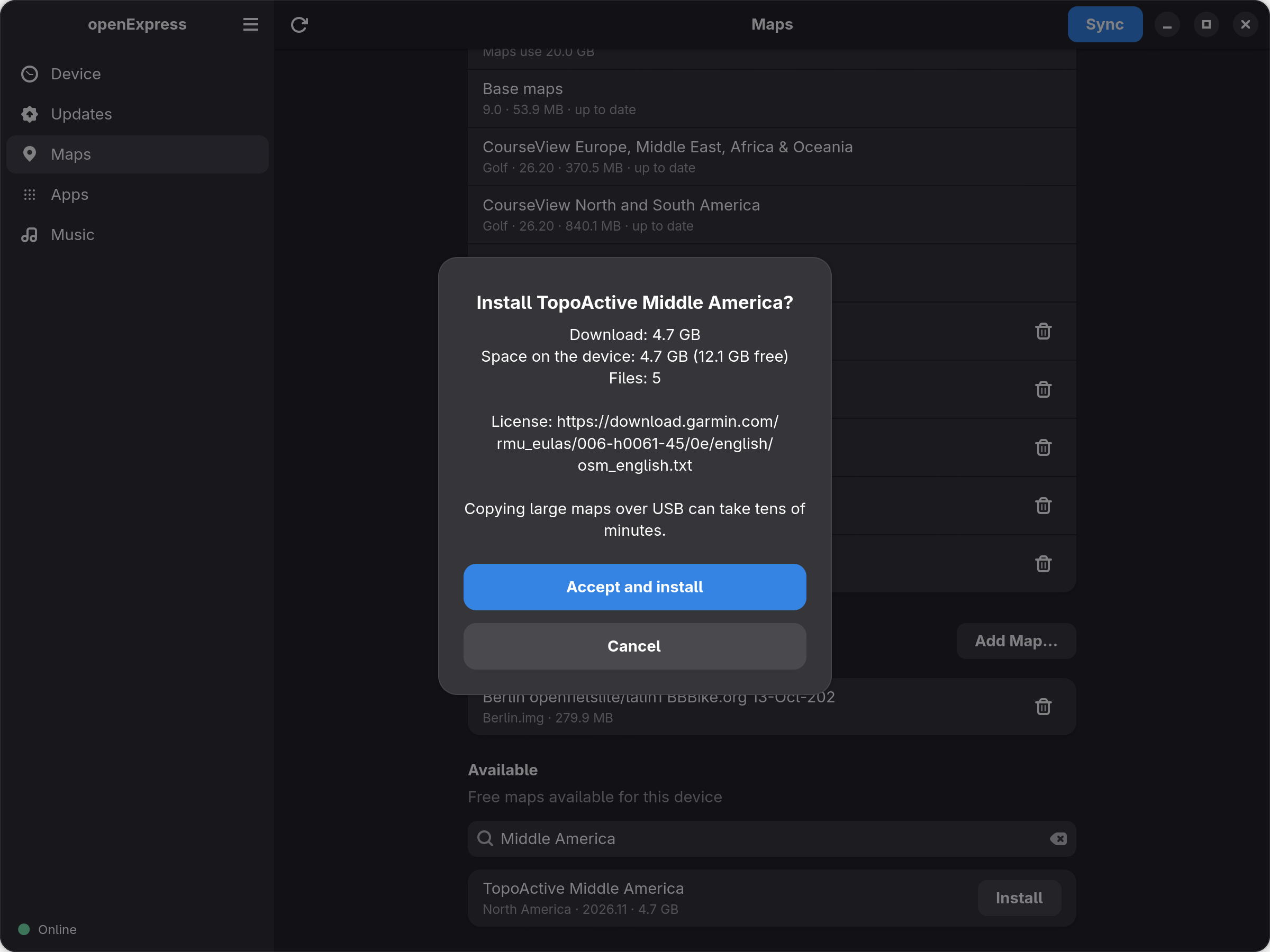
Removing a map leaves any files that other installed maps still need, following the same rule as Garmin Express. Until the watch is unplugged, newly installed or removed maps are marked as pending, so the same installation cannot be started twice.
On the command line, openexpress maps –all lists what is available, and openexpress maps install “TopoActive Middle America” previews the installation. Adding –apply to the same command carries it out.
What it does
- Sync: uploads new activities and health files to Garmin Connect and transfers files Garmin Connect has queued for the device.
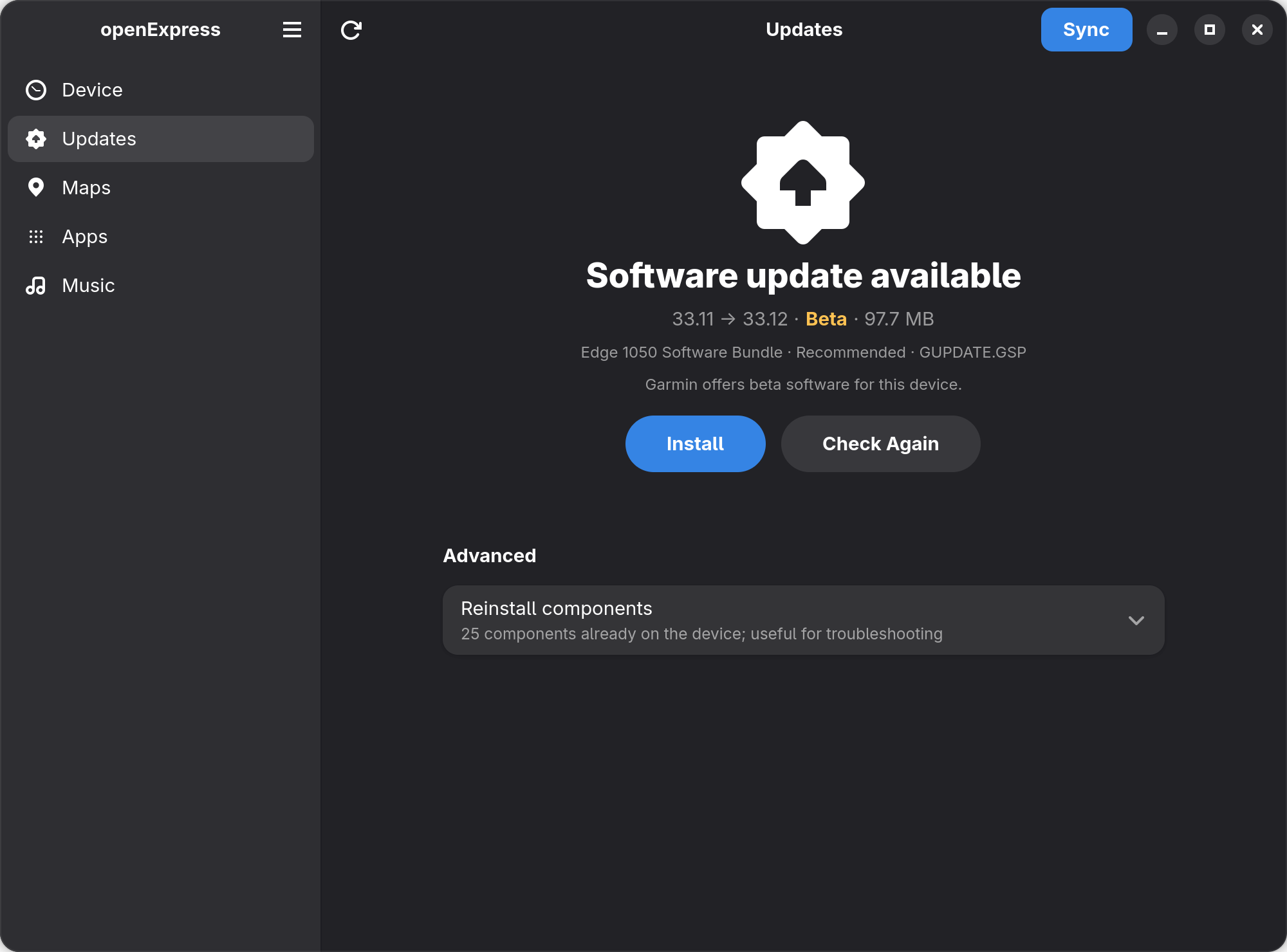
- Software updates: copies the updates Garmin offers for the device, which installs them after it is unplugged. Public betas are labelled and come with a warning.
- Garmin maps: installs, updates and removes maps such as TopoActive, and adds the user’s own maps, including ones built from OpenStreetMap data.
- Connect IQ apps: installs and removes apps linked to the Garmin account while keeping the order of glances and widgets.
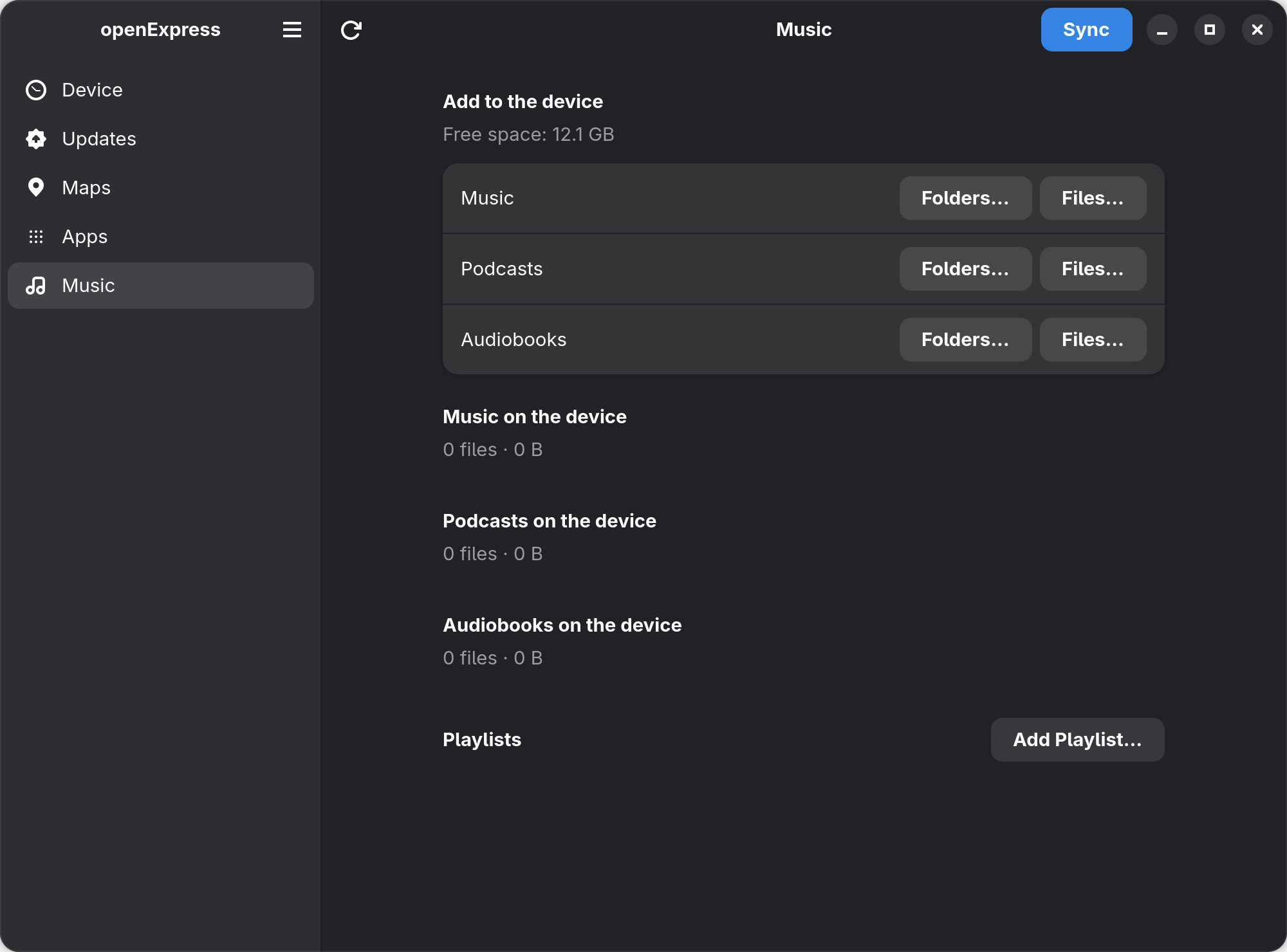
- Music: copies music, podcasts, audiobooks and playlists.
- Other features: backs up device files, sets the primary training device and generates device reports with masked serial numbers. The app is in English and Polish.
Updates, apps and your own maps
Software updates, including betas
openExpress checks which software updates Garmin offers for the device and copies the files across. The device installs them after it is unplugged, just as with Garmin Express. The Edge 1050 public beta 33.12 was installed this way. If the transfer is interrupted, nothing has been installed yet: reconnect the device and run the update again.
Connect IQ apps
Apps, watch faces and data fields linked to the Garmin account can be installed and removed from the Apps page. Installing or removing an app does not reshuffle the glances and widgets on the watch. openExpress keeps their order and saves a copy of the app list before each change, so an earlier order can be restored from the Apps page.
Maps from outside Garmin
Maps made from OpenStreetMap data can be added from the same Maps page. A 280 MB map of Berlin copied to the fēnix 8 in about 15 seconds, at roughly 19 MB/s.
Compatibility
Four devices have been tested so far, to very different depths. The fēnix 8 Solar has the broadest coverage. The epix check only confirmed that openExpress refuses to modify a watch on another account; it did not test the management features.
| Device | Account status | What was tested |
|---|---|---|
| fēnix 8 Solar (47mm) | Registered to the signed-in account | Sync, Garmin map installation and removal, own maps, Connect IQ apps, music, update checks |
| Edge 1050 | Registered to the signed-in account | Sync including queued files, installing public beta software 33.12 |
| Venu 2 | Not registered to the signed-in account | Reading device information and installing update components; other functions unconfirmed |
| epix (Gen 2) | Registered to another account | Refusal to modify the watch; other functions unconfirmed |
openExpress is developed on Fedora 44 with GNOME. Other distributions with Flatpak and GVFS, and other Garmin devices that connect over USB in MTP mode, should work but still need testing. A working USB connection does not guarantee every feature is supported.
openExpress is not on Flathub. The Flatpak bundle is on the project’s GitHub releases page and installs with flatpak install –user openexpress-0.5.2.flatpak. It is in beta, currently version 0.5.2.
Things to know
- It is unofficial. openExpress uses the same Garmin services as Garmin Express. Garmin does not document or support third-party access to them, so changes on Garmin’s side can break features until openExpress is updated.
- Garmin’s terms. openExpress signs in with the user’s own account and stores the sign-in locally. Garmin has not approved third-party use of its services, so check Garmin’s terms and decide.
- How it was built. The developer observed how Garmin Express talks to a connected watch and recreated those steps for Linux, using AI coding tools to speed up development.
- Recovery. openExpress copies update files, and the device installs them after it is unplugged. Garmin Express on Windows or macOS and the Garmin Connect app remain the official recovery options if a device misbehaves.
- Limited testing. The results here come from real hardware, but only four devices have been tested, to different depths.
Help test another Garmin device
Reports from owners of other watches, bike computers and Linux distributions are especially useful, even when everything works. In the app, Report a Device or Problem opens a prefilled report form on the project’s GitHub page. On the command line, openexpress report generates a device summary to attach, with serial numbers and unit IDs masked.
More: openExpress on GitHub
Quick answers
Is openExpress safe for my Garmin account?
It asks for confirmation before making changes, refuses to modify a device registered to another account, and masks serial numbers and unit IDs in logs and reports. It is still unofficial software that Garmin has not approved.
Which Garmin devices work with openExpress?
The fēnix 8 Solar, Edge 1050, Venu 2 and epix (Gen 2) have been tested to different depths. Other Garmin devices that connect over USB in MTP mode should work but still need testing.
Does openExpress run in the background?
No. Automatic sync is off by default, and openExpress only talks to Garmin’s servers while its window is open or a command is running.
What happens if the cable comes out during an update?
Nothing has been installed yet, because the device installs updates only after it is unplugged. Reconnect the device and run the update again.
Is openExpress free?
Yes. It is free and open source, distributed as a Flatpak from the project’s GitHub releases page.
Related reading
- Garmin Connect IQ store: weeks of delays ahead
- Ready to Run shows Garmin runners when heat makes a run risky
- Garmin fēnix 8 review
Author: Tomasz Bojanowski, developer of openExpress, edited by the5krunner.
If you enjoyed reading this, here is another in the Indie Spotlight series: IntervalCoach keeps your edited workout when the plan updates.
Last Updated on 17 October 2026 by tfk the5krunner
Small things I always use
- Garmin 90-degree charging adapter: Charges your Garmin from any USB-C cable. Essential when travelling. I use one.
- Body Glide: The blue anti-chafe stick swimmers and runners carry. I use it.
- Speedo earplugs: Fewer ear infections and no cold-water dizziness. I use them.
- Dryrobe Advance: My winter changing robe for open-water swims. I use one. A cheaper option is the AONYIYI changing robe.
- Maurten: Race fuel that stays easy on the stomach. I use them.
- Garmin charging puck: The quickest way to top up before a session. I use one.
- Injinji: Toe socks that stop rubbing, so you run more. I use them.
- Ultimate toe protectors: Stop black toenails on long runs. They work. I use them.
- Compressport R2 v2 calf sleeves: My calf sleeves of choice. I use them.
- Cellucor C4: My pre-workout before hard sessions.
- TPU tubes: Schwalbe Aerothan, Tubolito and Pirelli SmarTube. Light, tiny spares. I use all three.
- G8 insoles: Adjustable insoles that are good. I use them.
- Cycplus Cube: A 97g electric pump that gets a road tyre rideable in two minutes. I carry one. 5% off with code THE5KRUNNER.
Watches and sensors
- Polar H10: My daily driver for waking HRV.
- Polar Verity Sense: My backup arm-worn HR sensor.
- Nomad bedside charger: Charges my iPhone and Apple Watch overnight. I use it, and many of their bands.
- Train.Red: The best muscle oxygen sensor I’ve used.
- Tymewear: Accurate heart rate and reliable ventilatory zones. I use it to pace endurance rides over an hour.
- Garmin Forerunner 970: A pro-grade triathlon watch. I use this.
- Apple Watch Ultra 4: My daily smartwatch. No phone needed on rides.
- Garmin Fenix 9 Pro: I’ve just bought one.
On the bike
- Continental GP5000 for everyday riding, and Aero 111 on the front for special occasions.
- Helmets: Specialized S-Works Evade 3 for road riding, and Rudy Project Wing for TT-style races. I use both.
- Ravemen FR300: A front light that mounts under your Garmin or Wahoo. I use one.
- Wahoo TRACKR Radar: I use it on one bike and Varia on the other. They perform the same.
- Garmin Varia RTL515: Radar that warns you of cars from behind. I use this model.
- Wahoo ELEMNT Roam 3: The bike computer that’s easy to use. I use mine on most rides.
- Favero Assioma Pro RS2: Accurate power pedals that swap easily between bikes. I use this model.
Home and indoor training
- NPE Runn: Makes my basic treadmill smart, sending more accurate speed and distance to my watch and Zwift. I use it.
- Google Wifi: Keeps Zwift connected in my pain cave. I use it.
- Apple TV 4K: Zwift on the big screen. I use two.
- Google Nest Doorbell (wired, 2nd gen): My video doorbell, running in both Google Home and Apple Home. I use it.
Health, recovery and sleep
- FreeStyle Libre 3 Plus: Shows how my blood sugar responds to diet.
- hDrop: Measures my sweat loss in summer and indoors.
- Fourth Frontier Zone: Checks my heart under load in hard sessions.
- Oura Ring 5: My partner’s recovery tracker of choice.
- Eight Sleep: A cooling mattress cover my partner and I use nightly.
Reader-Powered Content

This content is not sponsored. It’s mostly me behind the labour of love, which is this site, and I appreciate everyone who supports it.
Support the site: Follow (free, fewer ads) · Subscribe (paid, ad-free) · Buy Me A Coffee ❤️
Written by real people, with AI assistance. Fact-checked and verified for originality. See the Editorial Policy. FTC: Affiliate Disclosure — some links pay commission. As an Amazon Associate, I earn from qualifying purchases.

tfk is the founder and author of the5krunner, an independent endurance sports technology publication. With 20 years of hands-on testing of GPS watches and wearables, and competing in triathlons at an international age-group level, tfk provides in-depth expert analysis of fitness technology for serious athletes and endurance sport competitors. ID
