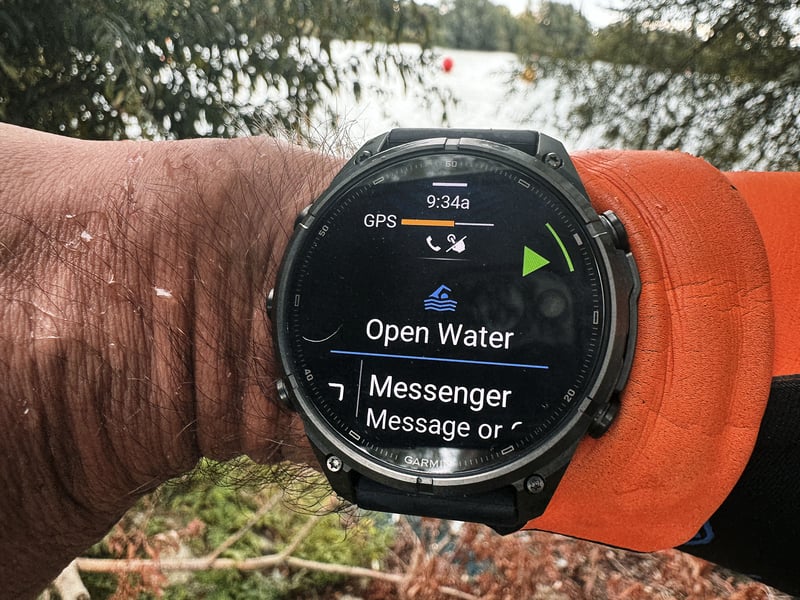
Neither watch matched the official transition times at my last triathlon because neither could tell me where the timing mats were. Fenix 9 Pro and Apple Watch Ultra 3 both overran T1 by more than 40 seconds, and Apple’s near-perfect T2 was luck.
As an end-of-season treat, a friend forced me to do an early-morning sprint triathlon at Eton Dorney Lake, the venue for the 2012 Olympic rowing. I hadn’t done a tri in a few months and was going to do some open water testing at Shepperton Lake anyway, so it made sense to get up even earlier and race instead. Shame I’d had a hard training week and done a parkrun the day before. The times wouldn’t be good, but I was determined to have some fun.
This is one of several posts building up detail for my Fenix 9 Pro review. My tech goals for the race were these:
- Auto transition. I’ve used it a fair bit in testing but never in a real race, and this race wasn’t important, so I gave it a go on the Fenix 9 Pro.
- Open water GPS accuracy of the Fenix 9 Pro against the Apple Watch Ultra 3. Two devices make a weak test, but two devices is one too many for a race anyway.
- Open water heart rate accuracy from the Fenix 9 Pro’s Elevate 5 sensor against a Polar Verity Sense on my upper arm, Apple Watch Ultra 3, and a HRM 600 chest strap caching data for a Forerunner 970 left running in my rucksack.
- The Foresight compass heading in FORM swim goggles during a race. Again, I’d only ever tried it for fun.
How each watch handles auto transition
Here is how far each watch’s transition times were from the official results.
| Transition | Fenix 9 Pro | Apple Watch Ultra 3 |
|---|---|---|
| T1 | 44 seconds too long | 43 seconds too long |
| T2 | 14 seconds too short | 2 seconds too long |
The problem with auto transition is my expectation. I want the recorded times to match the race results exactly, and that means the watch would have to know when I crossed each timing mat. That isn’t when I change from one sport to the next, nor when I mount, dismount or reach my rack. The only perfect solution is for the watch to sense the timing mats, or for me to mark their GPS positions before the race. Or I could just press the button.
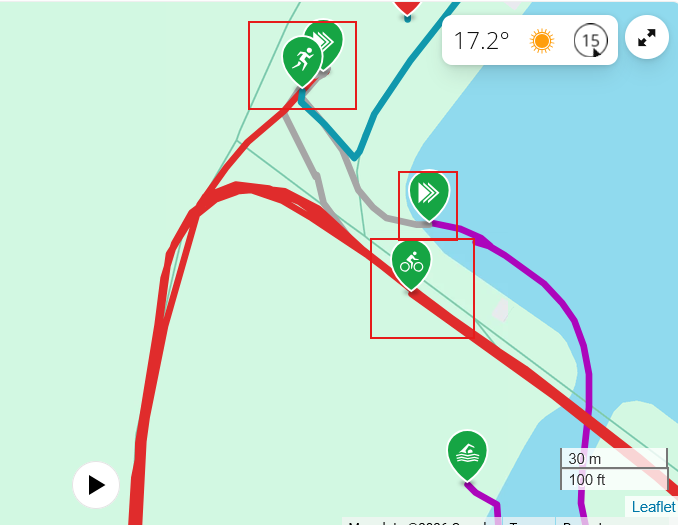
Fenix 9 Pro does a good job of spotting when my movement changes. As soon as I left the water, it started T1, shown as the grey line of me running to the bike and then pushing it to the mount line. That looks like the correct motion detection ie from swimming to running.
It didn’t detect when I dismounted from the bike (red line). Instead, it kept me on the bike until I reached my rack, where I changed into my running shoes, so its T2 covers only the shoe change. It then started the run as soon as I left the rack. It seems it triggers T2 by a pause in motion (to change shoes), not by a change in motion from cycling to running
Apple’s Multisport workout does the opposite. On the map, it records the swim all the way to the first bike-mount line, then records the bike dismount 20 km later and starts the run from the dismount line. Its T2 is within two seconds of the official time, but that’s luck. It records the boundaries in the wrong places, and the errors happen to cancel out.
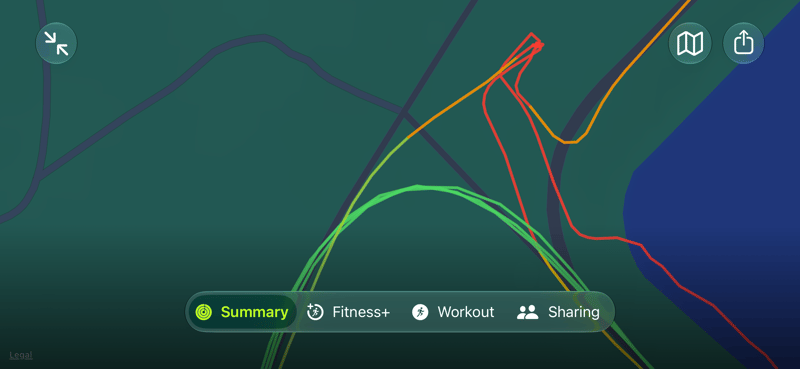
Both watches also overran T1 by 43 and 44 seconds.
What auto transition is good for
Neither brand seems to have given transitions more thought than it had to. Even working only from motion, a watch should time T1 and T2 more precisely, from the water exit to the first running steps out of T2. I’d like Garmin to go further by breaking down how long the gear change took and triggering a bike start based on the first power reading. The same power trigger could switch a brick session from run to bike on an indoor trainer.
As it stands, auto transition is a convenience. Your overall time is unaffected because the race clock never stops, the watch shows the right data screens on each leg most of the time, and you can’t miss a button press. If you want transition times that match the results, press the lap button instead. If you’re racing to win, you probably don’t care about matching them, and you don’t want to fiddle with buttons either.
Open water heart rate accuracy
I’ve had some good results so far testing the Fenix 9 Pro. This wasn’t one of them. It significantly overread, possibly because the wetsuit was tight, which moved it and exacerbated motion artefacts. Without a reference device, I suppose I would have believed the data, but I’m certain it’s wrong and that Polar Verity Sense is closer to reality.
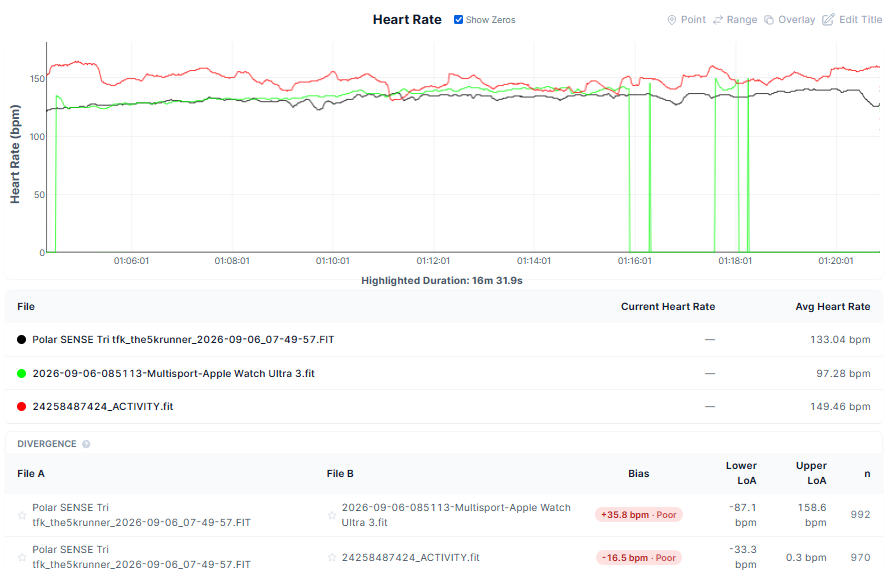
During the open-water swim under a wetsuit sleeve, the Fenix 9 Pro showed large errors against the Polar Verity Sense armband I used as the reference. Across 970 data points, the Fenix 9 Pro recorded a mean bias of +16.5 bpm higher than the Polar Sense, with wide limits of agreement spanning -0.3 bpm to +33.3 bpm. The Apple Watch Ultra 3 under the sleeve of the other arm was more accurate during recording but had extended dropouts.
Open water GPS accuracy
The new Holoswim Pro 3 Goggles with GPS arrived after this race, which was a bit disappointing, as I would have had a third GPS source for comparison (they’re quite good, review to follow).
I’m a half-decent swimmer when I put my mind to it, but today was not one of those days. The Garmin seems overly generous near the start, heading towards the bottom right of the image, where it has me swimming in straight but smoothed lines. Turning around the buoy in the bottom right and heading up next to the bank, some GPS signal would have been restricted, and this clearly impacted Fenix, causing jagged bounces away from the bank, which I didn’t do. Going under the bridge just above the centre of the image, Fenix also cuts the corner through the bank.
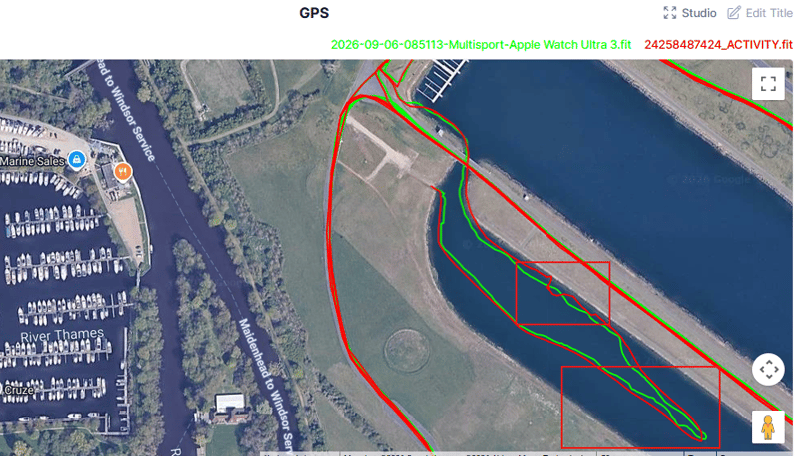
Lake swimming usually has good GPS reception, which favours Garmin, which normally benefits from smoothing out the points it records. Today that didn’t quite work, and I would say Apple was more accurate.
The bike leg
From the same power source, the ELEMNT only recorded 9 minutes of data, whereas the Fenix displayed and recorded it all (as you would expect).
The Fenix’s GPS accuracy is more than acceptable here, with near-perfect reception. There was a small amount of corner cutting and slight positional inaccuracy of a few metres at several points each lap, but that appears fine at the level of zoom shown below. What you can see here is an example of the Apple Watch cutting a corner in the centre, a known behaviour.
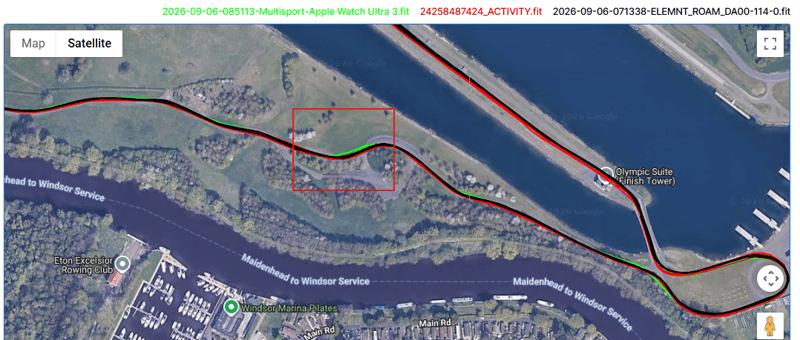
Overall, ROAM 3 had the best GPS track, but Fenix was nearly identical for all intents and purposes.
The distances recorded on the bike leg were as follows:
- ELEMNT ROAM 3 – 20.00km (!)
- Apple Watch Ultra 3 – 19.77km
- Garmin Fenix 9 Pro – 19.91km
So the Garmin was sufficiently accurate.
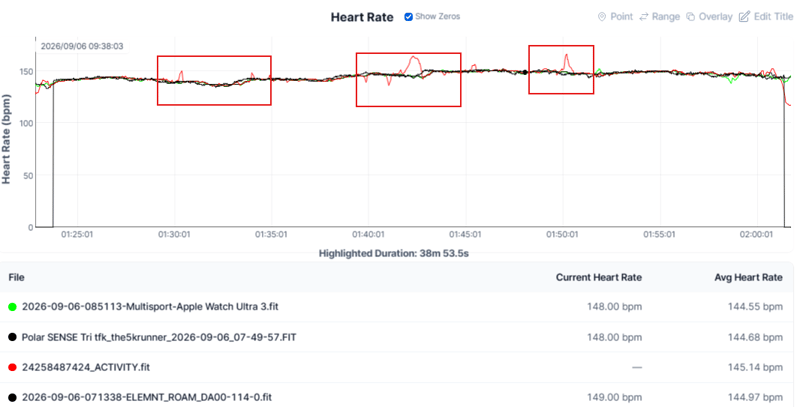
Polar Verity Sense, Apple Watch Ultra 3, and HRM 600 (recorded on the Wahoo) showed near-perfect agreement, and the Garmin’s Elevate 5 sensor wasn’t far behind. However, it had a few incorrect peaks, nothing to worry about.
The run
I struggled on the run but maintained a constant pace. There wasn’t much for me to see with how quickly the pace accuracy of each watch responded.
The Apple Watch recorded a distance of 5.25 km, and the Garmin was 5.26km in open skies. Both GPS tracks appeared similar on the map, with the Garmin appearing slightly more correct due to a 1- 2 m parallel shift of the Apple Watch track.
Heart rate across all 3 devices (HRM 600, Fenix 9 Pro Elevate 5 and Apple Watch Ultra 3) were inseparable, and all had an excellent track with only one tiny bump from the Garmin Fenix.
What went wrong
I lost the FORM goggles somewhere on the 400 m walk from the car park to transition so that I couldn’t do the compass test; someone handed them in, which restored my faith in humanity. The HRM 600 also failed to send its cached data to Forerunner 970, and my Wahoo ROAM 3 didn’t pick up power from the Favero Assioma Pro RS2 pedals for about 20 minutes.
Who this works well for
If you use your triathlon watch as a pacing device and want the correct data on your wrist when you glance at it, then auto transitions is a good feature. All you care about is that the right numbers show when you need them, and both Garmin and Apple do that.
Would I use it?
The reality is that I use a multisport watch mostly when training. On race day, I use my very expensive Garmin multisport watch only to log the race and pace my run. When I’m swimming, I don’t look at it, and when I’m cycling I look at the Wahoo.
Race result
Did I win? Yes. As you get older, it is very much easier to win age groups at small local events!
I enjoyed the race and had a nice time, but it was one of my worst performances ever, both technically and physically. At least I didn’t get injured!
Eton Dorney is a superb venue for anyone’s first tri because it’s wholly off-road and can be a fast, flat course, though wind is almost always a factor. Even on this apparently windless morning, there was, for some reason, a 10 km/h easterly breeze.
Quick answers
How does Garmin auto transition decide when you change sport?
Garmin doesn’t publish how it works. In this race, Fenix 9 Pro switched when my movement changed. It started T1 as I left the water and started the bike after the mount line. It then kept me on the bike until I reached my rack, so T2 covered only the shoe change, and it started the run as I left the rack.
How does Apple Watch auto transition decide when you change sport?
Apple says its Multisport workout uses the watch’s motion sensors to recognise the movement patterns of swimming, cycling and running. In this race, Apple Watch Ultra 3 ended the swim at the bike mount line, got the bike dismount right and started the run at the dismount line.
Do auto transition times match the official race results?
They don’t. Official transition times run from one timing mat to the next, and neither watch can detect the mats. Both watches overran the official T1 by more than 40 seconds. Fenix 9 Pro recorded T2 14 seconds short, and Apple Watch Ultra 3 came within two seconds of T2 only because its errors cancelled out.
Does Apple Watch record T1 and T2?
Yes. The workout summary lists T1 and T2 with their times. The combined map in the Fitness app doesn’t draw the transitions as separate lines, so they look like part of the swim, bike or run. Exporting the workout with HealthFit shows the transition paths.
Can I correct a wrong automatic transition?
On Garmin, you can undo a transition during the race by long-pressing the lap button or pressing Down, and you can edit the transitions afterwards in Garmin Connect. Apple Watch has a manual transitions option in the Multisport workout settings, which lets you move to the next leg yourself.
Which Garmin watches have auto transition for triathlon?
Garmin added it in January 2024 to the Fenix 7, Epix, Enduro 2, and Forerunner 255, 955, and 965, among others. Fenix 9 Pro has it, and Garmin asks whether you want it on when you start the triathlon activity.
Should I use auto transition in a race?
Use it if you would rather not think about buttons. Your overall time is unaffected because the race clock never stops, and the watch shows the right data screens on each leg. Turn it off and press the lap button if you want transition times you can compare with the results.
Last Updated on 26 October 2026 by tfk the5krunner
Small things I always use
- Garmin 90-degree charging adapter: Charges your Garmin from any USB-C cable. Essential when travelling. I use one.
- Body Glide: The blue anti-chafe stick swimmers and runners carry. I use it.
- Speedo earplugs: Fewer ear infections and no cold-water dizziness. I use them.
- Dryrobe Advance: My winter changing robe for open-water swims. I use one. A cheaper option is the AONYIYI changing robe.
- Maurten: Race fuel that stays easy on the stomach. I use them.
- Beet It Sport nitrate shots: Beetroot shots I take in the days before a race. I use them.
- Garmin charging puck: The quickest way to top up before a session. I use one.
- Injinji: Toe socks that stop rubbing, so you run more. I use them.
- Ultimate toe protectors: Stop black toenails on long runs. They work. I use them.
- Compressport R2 v2 calf sleeves: My calf sleeves of choice. I use them.
- Cellucor C4: My pre-workout before hard sessions.
- TPU tubes: Schwalbe Aerothan, Tubolito and Pirelli SmarTube. Light, tiny spares. I use all three.
- G8 insoles: Adjustable insoles that are good. I use them.
- Cycplus Cube: A 97g electric pump that gets a road tyre rideable in two minutes. I carry one. 5% off with code THE5KRUNNER.
Watches and sensors
- Polar H10: My daily driver for waking HRV.
- Polar Verity Sense: My backup arm-worn HR sensor.
- Nomad bedside charger: Charges my iPhone and Apple Watch overnight. I use it, and many of their bands.
- Train.Red: The best muscle oxygen sensor I’ve used.
- Tymewear: Accurate heart rate and reliable ventilatory zones. I use it to pace endurance rides over an hour.
- Garmin Forerunner 970: A pro-grade triathlon watch. I use this.
- Apple Watch Ultra 4: My daily smartwatch. No phone needed on rides.
- Garmin Fenix 9 Pro: I’ve just bought one.
On the bike
- Continental GP5000 for everyday riding, and Aero 111 on the front for special occasions.
- Helmets: Specialized S-Works Evade 3 for road riding, and Rudy Project Wing for TT-style races. I use both.
- Ravemen FR300: A front light that mounts under your Garmin or Wahoo. I use one.
- Wahoo TRACKR Radar: I use it on one bike and Varia on the other. They perform the same.
- Garmin Varia RTL515: Radar that warns you of cars from behind. I use this model.
- Wahoo ELEMNT Roam 3: The bike computer that’s easy to use. I use mine on most rides.
- Favero Assioma Pro RS2: Accurate power pedals that swap easily between bikes. I use this model.
Home and indoor training
- NPE Runn: Makes my basic treadmill smart, sending more accurate speed and distance to my watch and Zwift. I use it.
- Google Wifi: Keeps Zwift connected in my pain cave. I use it.
- Apple TV 4K: Zwift on the big screen. I use two.
- Google Nest Doorbell (wired, 2nd gen): My video doorbell, running in both Google Home and Apple Home. I use it.
Health, recovery and sleep
- FreeStyle Libre 3 Plus: Shows how my blood sugar responds to diet.
- hDrop: Measures my sweat loss in summer and indoors.
- Fourth Frontier Zone: Checks my heart under load in hard sessions.
- Oura Ring 5: My partner’s recovery tracker of choice.
- Eight Sleep: A cooling mattress cover my partner and I use nightly.
Reader-Powered Content

This content is not sponsored. It’s mostly me behind the labour of love, which is this site, and I appreciate everyone who supports it.
Support the site: Follow (free, fewer ads) · Subscribe (paid, ad-free) · Buy Me A Coffee
Written by real people, with AI assistance. Fact-checked and verified for originality. See the Editorial Policy. FTC: Affiliate Disclosure — some links pay commission. As an Amazon Associate, I earn from qualifying purchases.

tfk is the founder and author of the5krunner, an independent endurance sports technology publication. With 20 years of hands-on testing of GPS watches and wearables, and competing in triathlons at an international age-group level, tfk provides in-depth expert analysis of fitness technology for serious athletes and endurance sport competitors. See the gear tfk uses. ID

What this solves is the entire triathlon is a swim because you are too caught up in the race to remember to push buttons.
If your are that guy (and I have a buddy who is) this is a good feature.
yes but does that matter? for me it doesn’t as i have the wahoo coming up on the bike. no tech-serious triathlete will look at a watch when cycling (unless like me their bike computer fails to pick up power #sigh). All he’s doing is logging (which is fine)
If you had an Edge on your bike and your f970 would you not use “ Extended Display“ mode to project the bike leg form the watch onto the Edge? The watch is what you have for all three legs.
I’m not a triathlete.