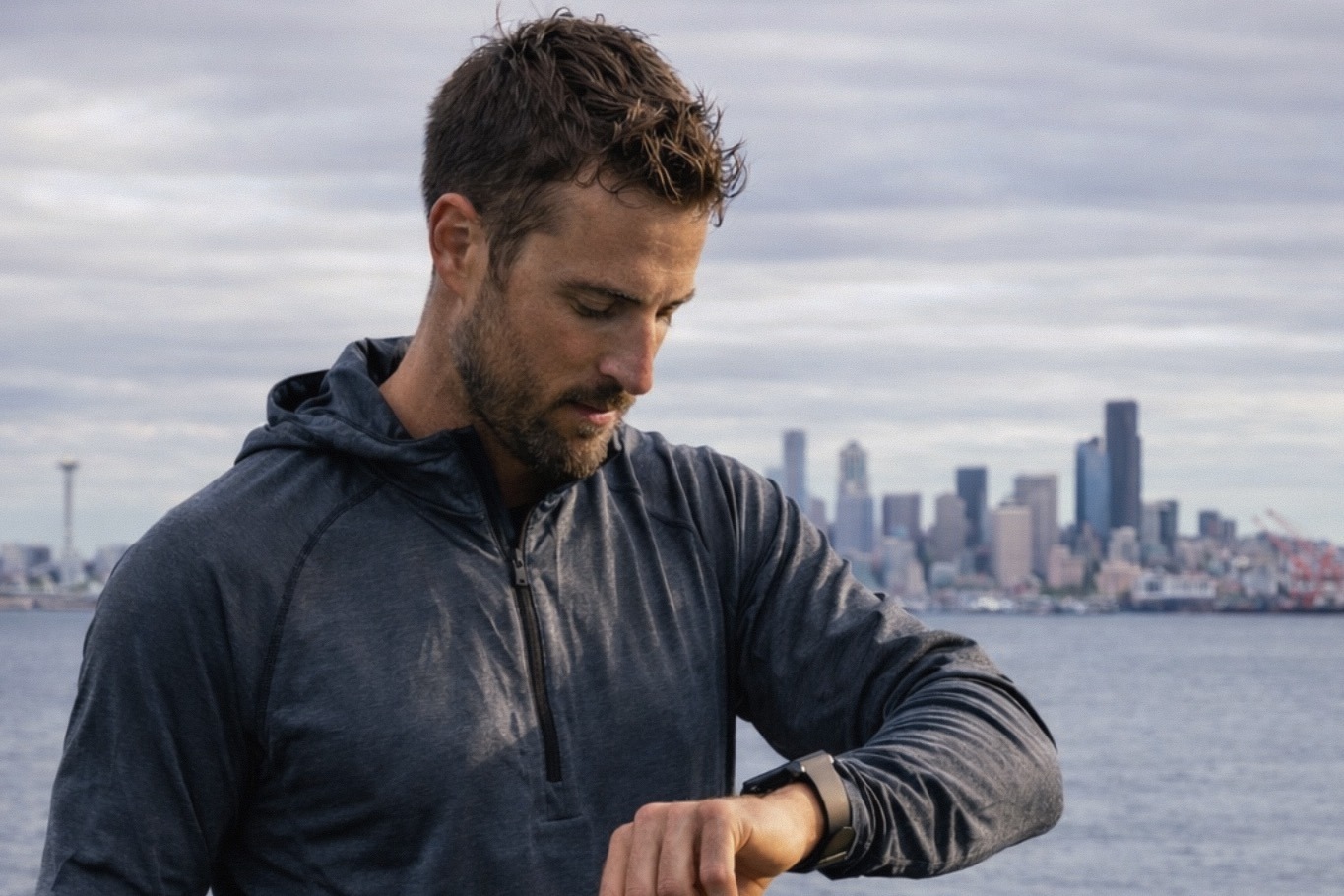
It’s Friday night, and the plan says 12 miles in the morning. The calorie app says to eat the same as every other day. So the runner guesses: a bit more pasta tonight, a bagel before heading out, and somewhere around mile 9 they find out whether the guess was any good.
Most runners who train with a plan live with three apps that never talk to each other: one for the plan, one for the run and one for the food. That means three accounts and three companies holding a copy of their runs, weight and everything they eat. The plan knows Saturday is the big day, but the food diary has no idea. Calorie apps that count exercise at all usually add it after the watch syncs, when breakfast is already eaten, and they don’t say whether the extra should be carbohydrate or protein. Trying to lose a few pounds during a build makes it worse, because the same flat deficit lands on the long-run day as on the rest day.
Buena Vida puts the plan, the run and the food diary in one app for iPhone and Apple Watch, so they share one set of numbers, kept on the runner’s own devices rather than on anyone’s servers. Saturday’s target is higher from the moment Saturday starts, most of the extra is carbohydrate, and after the run the target resets from what was actually burned. The app is designed and built in Seattle by David Cole, a runner who led UX and research for Amazon Halo.
How Buena Vida works
TL;DR: The runner picks a goal and the days they can run, and Buena Vida builds a plan to fit their fitness and calendar. It coaches each run on the iPhone or Apple Watch and sets each day’s calorie and macro targets from that day’s training: more carbohydrate before a long run and less on a rest day. The data stays on the runner’s own devices.
- The food diary knows the plan: the long run is in Saturday’s target from the moment Saturday starts, so breakfast and the pre-run snack are eaten against the right number.
- Losing weight doesn’t starve the long run: in weight-loss mode the deficit is a share of each day, so a long-run day still carries plenty of carbohydrate.
- The plan bends to the week: the runner chooses the days, and when a key workout slips, the app suggests the best day to make it up.
- Logging food is quick: say it (“two tablespoons of peanut butter”), scan the barcode or search more than 3.5 million foods. A gel taken at mile 8 is tagged to that run.
- One app on the run: voice coaching talks the runner through every interval, and with the Apple Watch app the phone can stay at home.
- The diary stays private: there is no account, the plan, runs, weight and food log are stored on the iPhone and Apple Watch, and the app has no ads and no trackers.
- The small things are handled: Shoe Rack counts the miles on each pair, and resting heart rate, VO2 max and race-time predictions update from the runner’s own runs.
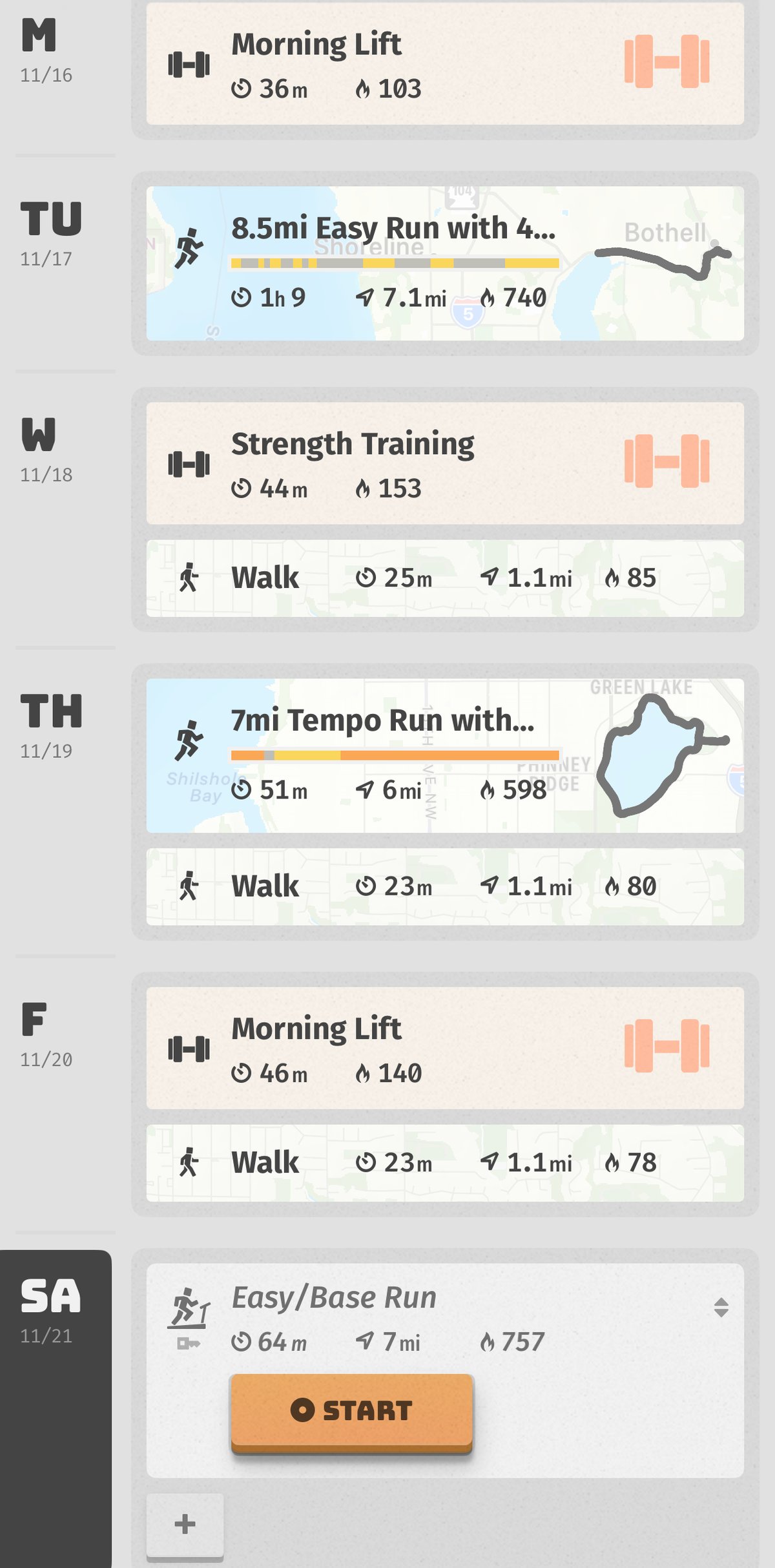
Worked example: one real week of eating for the run ahead
This is a real week from the developer’s own calendar. Cole is 44 and weighs 155 lb, set to maintain his weight, on the app’s Peak Performance macro profile (0.9 g of protein per pound and 20% of calories from fat). The week has three runs, three strength sessions, a few walks and a rest day.
| Day | Session | Calories | Carbohydrate |
|---|---|---|---|
| Mon | Strength, 36 min | 1,992 | 258 g |
| Tue | Easy run, 7.1 mi | 2,593 | 379 g |
| Wed | Strength and a walk | 2,041 | 268 g |
| Thu | Tempo run, 6 mi, and a walk | 2,525 | 365 g |
| Fri | Strength and a walk | 2,019 | 264 g |
| Sat | Easy run, 7.1 mi | 2,578 | 376 g |
| Sun | Rest | 1,992 | 258 g |
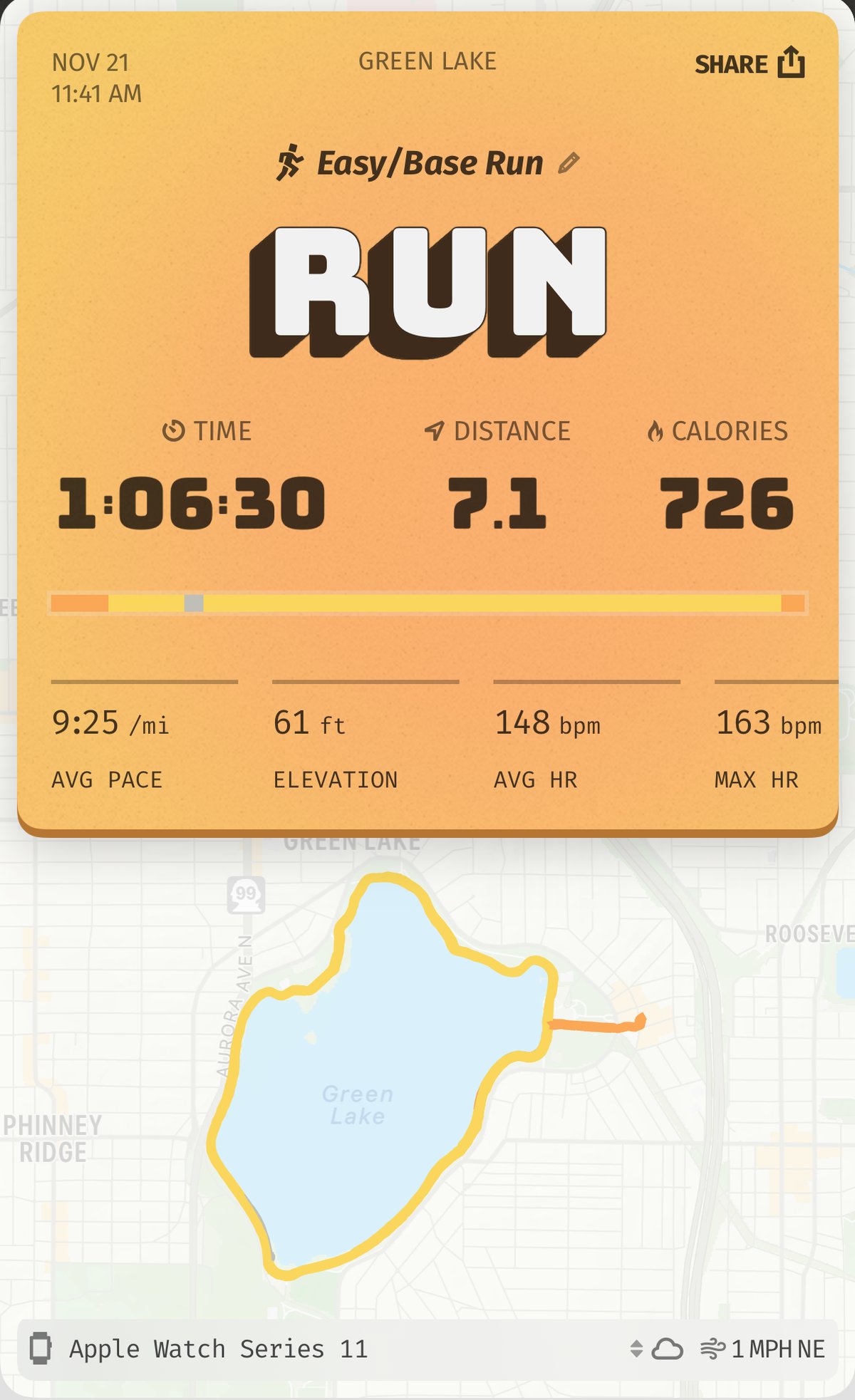
- Saturday’s food was right before the run started: the plan had a 7-mile easy run, estimated at 757 calories, so Saturday opened at 2,612 calories with the run already counted. After the run, the app swapped the estimate for the 726 calories measured from his heart rate, and the day settled at 2,578, about 1% lower.
- Run days get about 600 calories more than rest days: the three runs put their days between 2,525 and 2,593 calories, against 1,992 on Sunday’s rest day.
- The extra goes to carbohydrate: Saturday gets 376 g and Sunday 258 g, about 5.3 and 3.7 g per kilogram of body weight. Protein holds at 140 g every day because it is set by body weight, and fat moves only a little, from 44 g on Sunday to 57 g on Saturday.
- A short session isn’t counted twice: every day already includes a small Daily Activity amount for walking, chores and work. A workout replaces it rather than stacking on top, so Monday’s 36-minute lift leaves the day level with Sunday, while the runs lift the day properly.
- Losing weight would still leave room for the run: with a 15% deficit, the same week would give about 1,693 calories on Sunday and 2,191 on Saturday, with about 298 g of carbohydrate still on Saturday.
Tapping the day’s total shows where it comes from. Saturday’s 2,578 breaks down like this:
| Part of the day | Calories |
|---|---|
| Energy at rest (Mifflin-St Jeor) | 1,617 |
| Daily Activity | 0 (194 on a rest day, but the run is bigger, so the run counts instead) |
| 7.1-mile easy run, measured | 726 |
| Digestion | 235 |
| Total | 2,578 |
Where the numbers come from
Calorie numbers deserve some scepticism, so this is what goes into them. All of it is worked out on the phone, from data stored on the phone.
- Energy at rest: calculated from weight, height, age and sex with a published equation. Mifflin-St Jeor is the default, and six others, including Harris-Benedict, Schofield and Katch-McArdle, are a tap away.
- Workouts: estimated before the run from the predicted pace for each part of the session, so they count from the morning. Afterwards, the estimate is replaced by the measured burn, from heart rate first, with pace and GPS as back-ups.
- Daily Activity: 12% of energy at rest, for walking, chores and work. The app counts whichever is bigger, Daily Activity or the day’s workouts, not both.
- Digestion: digesting food costs energy too, more for protein than for carbohydrate or fat, so the target rises slightly to cover it.
- The goal comes last: maintain, lose or gain. A weight-loss deficit applies to the whole day, and a weight-gain surplus applies only to energy at rest, which keeps the gain lean.
The macros then split the total. Protein is set per pound of body weight, fat is a fixed share of the day, and carbohydrate takes the rest, which is why a long-run day’s extra lands mostly as carbohydrate. There are 17 macro profiles, each described in plain words, or the runner can set their own percentages or grams.
Every calorie number is an estimate, in any app, because nobody’s daily burn is measured directly outside a lab. Buena Vida shows its working, so the runner can check it against their weight trend, and switch equations or set their own target if the two disagree.
Daily Activity is set low on purpose. Research puts everyday living and digestion at 40 to 70% above resting energy for adults who don’t exercise, but Buena Vida’s two together come to about 23%, close to the 20 to 25% other calorie apps use. A calorie goal tells a runner what to eat rather than what they burn, and food logs usually miss things: in one study, athletes’ diaries came in 19% below the energy they were measured to burn. If weight drifts over three or four weeks, the Activity slider in manual calorie mode adjusts it, and moving it from 12% to 18% adds about 100 calories a day. The full reasoning is on Buena Vida’s Daily Activity page.
Heart rate numbers are only as good as the heart rate data, and a chest strap beats a loose watch on a cold morning. Buena Vida is not medical or dietetic advice, and anyone managing a medical condition or an eating disorder should set their targets with a professional.
A plan that fits the week a runner actually has
Most plans assume a week that doesn’t exist: always free on Tuesdays, never busy on Saturdays, never ill. Real weeks bend, and the usual result is a skipped tempo run nobody makes up, or a long run pushed up against intervals because Saturday filled up.
The runner picks a goal, such as a first 5K, a faster half marathon, a marathon, a Boston qualifier, weight loss, a return to running or general fitness, and the days they can train. The app reads recent running from Apple Health, matches a plan to current fitness, and fits it to the calendar and race date. Strength sessions are optional.
- A missed key workout gets a make-up day: each plan marks the sessions that matter most each week, usually the long run and the hardest workout. If one is missed, the Today page lists the days left that could take it, and recommends the one that keeps the week on track without putting two hard days together.
- A deliberate skip gets the same help: marking a key workout as skipped brings up the same options.
- Moving sessions comes with a warning: dragging a workout to another day shows whether it puts two hard sessions back to back, and explains why the easy day in between matters. The call stays with the runner.
- A rough week isn’t nagged: if several sessions slip in one week, Buena Vida treats it as a break rather than a pile of make-ups.
Moves made in Buena Vida or in iOS Calendar stay in step. The whole first week, coaching notes included, can be read before the free trial starts, and every plan is scored on 30 measures, such as how quickly mileage rises and how much recovery is built in, each linked to the research behind it.
Running with the phone at home
The Apple Watch app is optional, because the iPhone app plans, guides and records runs on its own, and Bluetooth heart rate straps and sensors connect straight to the phone.
- Phone-free runs: start today’s planned workout on the watch, and voice cues and on-screen guidance take the runner through each interval, with live pace, heart rate and zones.
- What’s coming: the watch shows today’s and tomorrow’s workouts, so on Friday night the runner knows what Saturday holds.
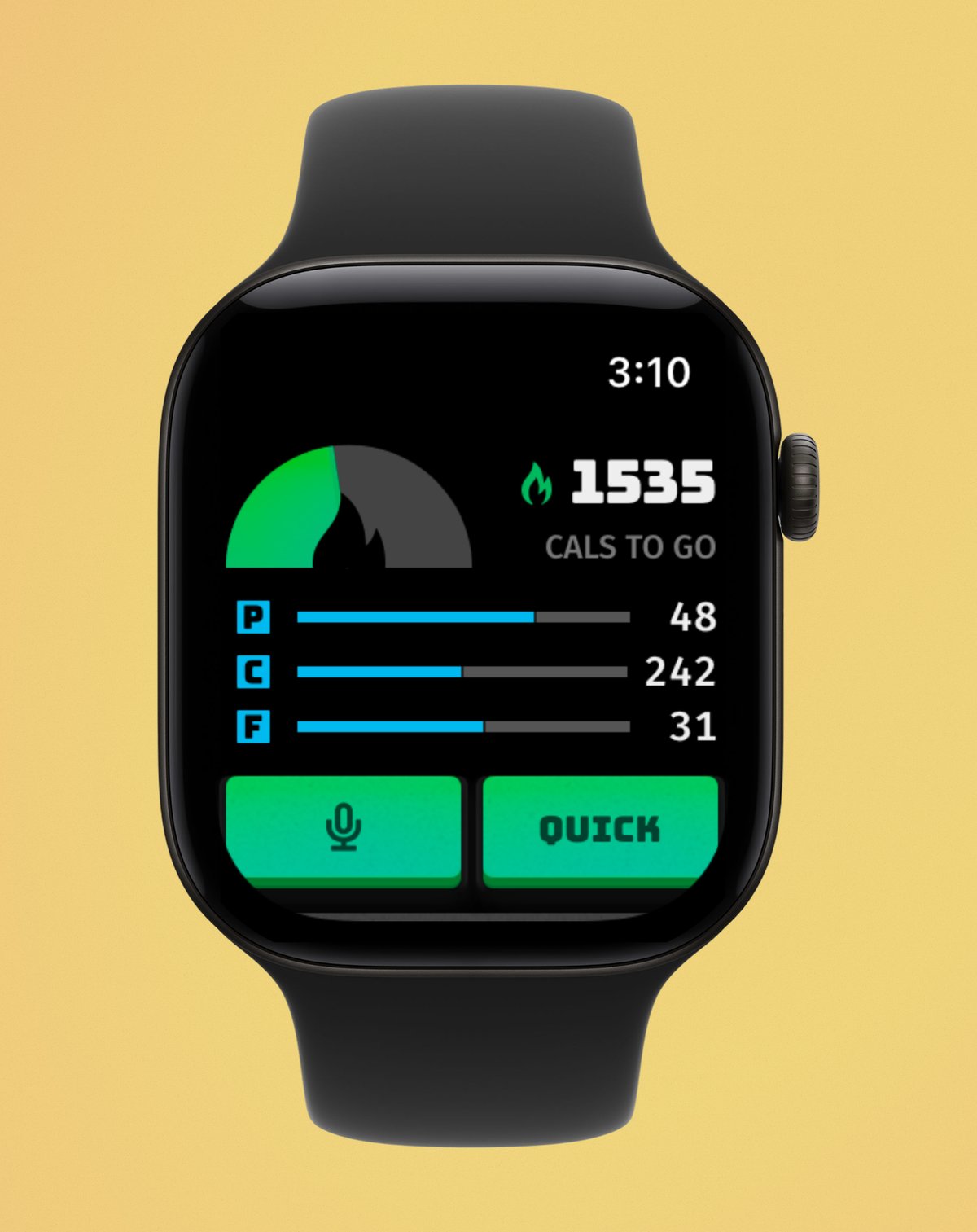
- Food from the wrist: the recovery meal can be logged by voice or search, with the calories, protein, carbohydrate and fat left for the day.
- The day on the watch face: complications and Smart Stack widgets show the day’s workout and targets, and the watch and phone sync directly with no server in between.
Works with Garmin and Strava through Apple Health
Plenty of runners already train with a Garmin, and that works. Turning on Apple Health sharing in Garmin Connect once means every run from the watch appears in Buena Vida automatically and counts towards the day’s calorie target. Strava has the same setting. Apple Health is the bridge and it lives on the phone, so Buena Vida never asks for a Garmin or Strava login. Older runs may not carry over when a runner starts.
- Platforms: iPhone on iOS 18.6 or later and Apple Watch on watchOS 11 or later. There is no Android or web version.
- Apple Health reads: workouts from any app, heart rate, resting heart rate, VO2 max, weight and height, among more than 40 data types.
- Apple Health writes: workouts recorded in Buena Vida, and logged food with calories, macros and micronutrients.
- Bluetooth sensors: heart rate straps, foot pods and running sensors, cycling speed, cadence and power sensors, and Bluetooth treadmills, indoor bikes, rowers, ellipticals and stair climbers.
- Food data: more than 3.5 million foods from USDA FoodData Central, Health Canada’s Canadian Nutrient File and Open Food Facts.
- Calendar and iPhone: two-way iOS Calendar sync, home-screen widgets, Live Activities and the Dynamic Island during runs, and Control Center actions.
- Sports: more than 80 workout types, from running and cycling to strength and pickleball.
What it costs, and who is behind it
Buena Vida costs $14.99 a month or $99.99 a year after a seven-day free trial. There is no free tier, and that is deliberate: with no ads and no data to sell, the subscription is the whole business. Buena Vida compares itself with the usual pair of apps at US prices:
| Setup | Monthly | Yearly |
|---|---|---|
| Runna plus MyFitnessPal Premium | $39.98 | $199.98 |
| Buena Vida | $14.99 | $99.99 |
Cole spent 11 years at Amazon, where he led UX and research for Amazon Halo, the company’s first health and fitness product. He started running at 37, while designing Halo, and has since run six marathons, 11 half marathons and three Ironman 70.3 triathlons. He founded Buena Vida in 2025, launched it in March 2026, and designs and builds it himself, with no investors and no advertising.
More information: buenavida.run and the App Store.
Author: David Cole, founder of Buena Vida, edited by the5krunner.
Quick answers
How does Buena Vida set calorie targets on a rest day?
It starts from energy at rest and adds the day’s workouts, planned ones from the morning and measured ones once they’re done. If the workouts are smaller than the Daily Activity allowance, that counts instead, then digestion and the goal are added. On a rest day only Daily Activity is left, so the target drops, mostly from carbohydrate. In Cole’s week, that was 1,992 calories on the rest day against 2,578 after a 7-mile run.
Does Buena Vida work with Garmin or Strava?
Yes, through Apple Health. Turning on Apple Health sharing once in Garmin Connect or Strava means every run from the watch appears in Buena Vida automatically and counts towards the day’s target. Buena Vida’s own guided workouts and voice coaching run on the iPhone or Apple Watch.
Where is my Buena Vida data stored?
On the iPhone and Apple Watch. There is no account, and the plan, runs, weight and food diary are not stored on Buena Vida’s servers. The watch and phone sync directly, runs from Garmin or Strava arrive through Apple Health, and there are no ads or trackers.
If you enjoyed reading this, here is another in the Indie Spotlight series: Indie App Spotlight: Nomadic Max puts cockpit-style gauges on a Garmin.
Last Updated on 24 November 2026 by tfk the5krunner
2026 Seasonal Gifts
- Garmin CIRQA: Garmin’s screenless band, which uses your phone as the display. I tested it and sometimes use it as a backup on the site.
- HoloSwim 3 Pro: Swim goggles with GPS and your pace in the lens, so you can swim without a watch. Code THE5KRUNNER takes 10% off. I tested them.
- Kineon MOVE+: Red and infrared light for sore knees, Achilles and other joints after hard training. I use it.
- Fitbit Air: A screenless band for steps, sleep and heart rate, with no subscription needed. It was closest to a manual 9,000-step test. I use it as a backup sometimes.
Small things I always use
- Garmin 90-degree charging adapter: Charges your Garmin with any USB-C cable. Essential when travelling. I use one.
- Body Glide: The blue anti-chafing stick swimmers and runners carry. I use it.
- Speedo earplugs: Fewer ear infections and no cold-water dizziness. I use them.
- Dryrobe Advance: My winter changing robe for open-water swims. I use one. A cheaper option is the AONYIYI changing robe.
- Maurten: Race fuel that stays easy on the stomach. I use them.
- Beet It Sport nitrate shots: Beetroot shots I take in the days before a race. I use them.
- Garmin charging puck: The quickest way to top up before a session. I use one.
- Injinji: Toe socks that stop rubbing, so you run more. I use them.
- Ultimate toe protectors: Stop black toenails on long runs. They work. I use them.
- Compressport R2 v2 calf sleeves: My calf sleeves of choice. I use them.
- Cellucor C4: My pre-workout before hard sessions.
- TPU tubes: Schwalbe Aerothan, Tubolito and Pirelli SmarTube. Light, tiny spares. I use all three.
- G8 insoles: Adjustable arches, perfect position. I use them.
- Cycplus Cube: A 97g electric pump that gets a road tyre rideable in two minutes. I carry one. 5% off with code THE5KRUNNER.
Health, recovery and sleep
- FreeStyle Libre 3 Plus: Shows how my blood sugar responds to diet. Occasional use.
- hDrop: Measures my sweat loss in summer and indoors. I use it.
- Fourth Frontier Zone: Checks my heart under load in hard sessions.
- Oura Ring 5: My partner’s recovery tracker of choice.
- Eight Sleep: A cooling mattress cover my partner and I use nightly (see next).
- Chilipad 2.0: Cools or heats your side of the bed on a schedule, with no subscription. US only. I am testing it; it seems pretty good.
Watches and sensors
- Polar H10: My daily driver for waking HRV.
- Polar Verity Sense: My backup arm-worn HR sensor.
- Nomad bedside charger: Charges my iPhone and Apple Watch overnight. I use it, and many of their bands.
- Train.Red: The best muscle oxygen sensor I’ve used. Occasional use.
- Tymewear: Accurate heart rate and reliable ventilatory zones. I use it to pace endurance rides over an hour.
- Garmin Forerunner 970: A pro-grade triathlon watch. I use this.
- Apple Watch Ultra 4: My daily smartwatch. No phone needed on rides.
On the bike
- Continental GP5000 for everyday riding, and Aero 111 on the front for special occasions. I use both.
- Helmets: Specialized S-Works Evade 3 for road riding, and Rudy Project Wing for TT-style races. I use both.
- Ravemen FR300: A front light that mounts under your Garmin or Wahoo. I use one.
- Ravemen FR1000: The light and the computer mount in one unit, so nothing else goes on the bars. Better than mine.
- Ravemen FR1500SE: 1,500 lumens hanging under your Garmin, for proper night rides.
- Ravemen FR1100SE: 1,100 lumens under your Garmin, and up to 46 hours on slow flash.
- Ravemen FR500: A brighter FR300 with the same mount.
- Wahoo TRACKR Radar: I use it on one bike and Varia on the other. They perform the same.
- Garmin Varia RTL515: Radar that warns you of cars from behind. I use this model.
- Wahoo ELEMNT Roam 3: The bike computer that’s easy to use. I use mine on most rides.
- Favero Assioma Pro RS2: Accurate power pedals that swap easily between bikes. I use this model.
Home and indoor training
- NPE Runn: Makes my basic treadmill smart, sending more accurate speed and distance to my watch and Zwift. I use it.
- Google Wifi: Keeps Zwift connected in my pain cave. I use it.
- Apple TV 4K (4th generation): Zwift on the big screen. I use two.
- Google Nest Doorbell (wired, 2nd gen): My video doorbell, running in both Google Home and Apple Home via Starling. I use it.
Reader-Powered Content
This content is not sponsored. It’s mostly me behind the labour of love, which is this site, and I appreciate everyone who supports it.
Support the site: Follow (free, fewer ads) · Subscribe (paid, ad-free) · Buy Me A Coffee
Written by real people, with AI assistance. Fact-checked and verified for originality. See the Editorial Policy. FTC: Affiliate Disclosure — some links pay commission. As an Amazon Associate, I earn from qualifying purchases.
tfk is the founder and author of the5krunner, an independent endurance sports technology publication. With 20 years of hands-on testing of GPS watches and wearables, and competing in triathlons at an international age-group level, tfk provides in-depth expert analysis of fitness technology for serious athletes and endurance sport competitors. See the gear tfk uses. ID
