The Fenix 9 Pro drops an entire satellite constellation mid-run to save power. Testing here over the last few days has confirmed that behaviour.
I thought this meant a new GPS chip, but that’s not the case: the same GPS firmware version also appears on the Fenix 8 and Fenix 8 Pro.
Two more changes: GPS-only mode is no more, with GPS bundled with Galileo for the extended battery mode, and SatIQ no longer exists as an option; it’s now managed automatically in each satellite/accuracy/power mode.
Benefits
- Fewer satellites to manage saves battery
- Removing a weak signal can only maintain or improve position quality.
Testing I’ve done so far under significant tree cover shows the Fenix 9 Pro is accurate.
What changed
Garmin renamed its satellite settings for the Fenix 9 generation. I worked extensively with Michael George at gps-details on the data and background for this article, and he has confirmed most of it is a straight relabel, with one exception.
| Fenix 8 name | Fenix 9 name | Default satellite configuration |
|---|---|---|
| Auto Select | Normal | Unchanged: SatIQ dynamic selection |
| All + Multi-Band | Max Accuracy | Unchanged: full multi-band, all constellations |
| GPS Only | Extended Battery | Changed: now GPS + Galileo |
| UltraTrac | Max Battery | Unchanged |
There’s another change worth knowing if you use these modes. Extended Battery and Max Battery both quietly reduce how often the watch records a GPS point: Michael George found Extended Battery sometimes drops to every 2 seconds and Max Battery to every 5 seconds, even when your activity profile is set to record every second. He’s documented it on gps-details, along with everything else in this piece.
SatIQ isn’t a separate setting any more
In the Fenix 8 manual, SatIQ is described under Auto Select.
Garmin’s Fenix 9 manual moves that description into the shared introduction, so every mode now enables it, though Mike and I both doubt SatIQ is routinely used in UltraTrac mode, if at all.
What the GPS log shows – Constellation Shedding
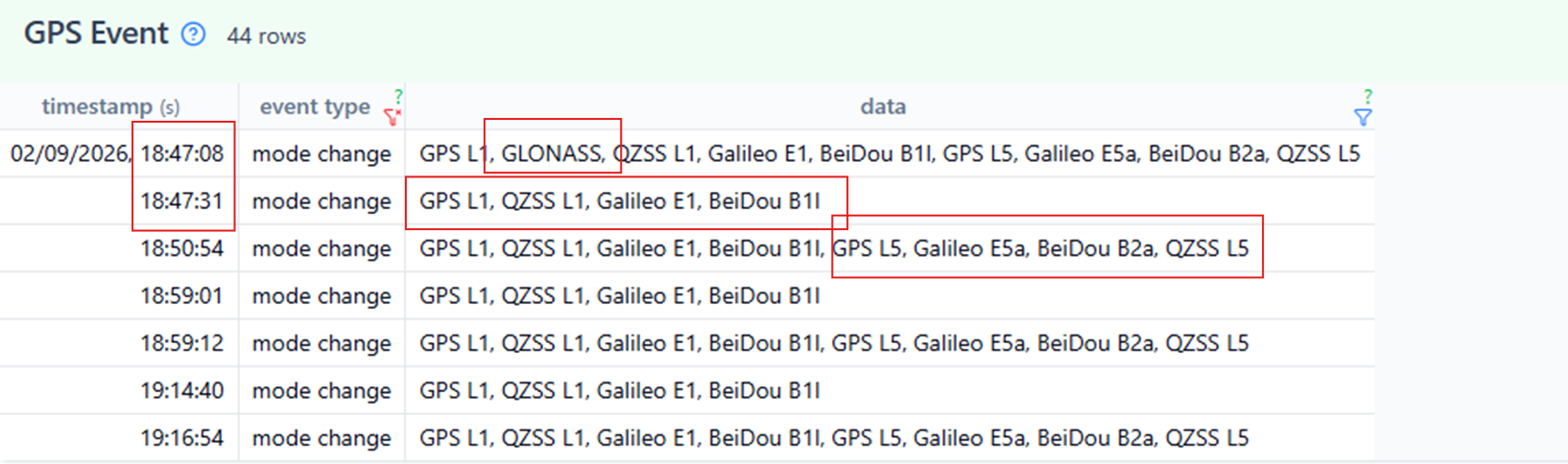
A GPS Event export from a Fenix 9 Pro, recorded under tree cover in Normal mode, starts with everything switched on: GPS, GLONASS, Galileo, BeiDou and QZSS, tracking both the L1 and L5 frequency bands. About twenty seconds later, GLONASS disappears and doesn’t return for the rest of that particular session, while the watch keeps switching between single-frequency and dual-frequency tracking throughout.
A Garmin forum thread since gathered by Michael George shows this isn’t always permanent: GLONASS can switch back on mid-session too, and Normal mode can downgrade further than my own log shows, all the way down to the same bare GPS-plus-Galileo configuration Extended Battery uses by default. He also suspects one of the still-unidentified flags in the event data represents NavIC, India’s regional satellite system.
I’d like to call the dropping of GLONASS signals constellation shedding. The watch decides mid-run which constellations are worth the power cost, and cuts the weakest one loose once it makes that call.
Ray Maker at DC Rainmaker described this behaviour with the Fenix 7 in 2022: Garmin “switching between GPS, GLONASS, GALILEO, BeiDou, and QZSS based on the quality of the satellites from each.” But that is the only source of Garmin using constellation shedding previously (he may have got confused with frequency dropping), and the behaviour is unconfirmed in Garmin documentation. Regardless, I can confirm that the chipset capability predates the Fenix 9 Pro, so it would have been possible in 2022.
Michael George has since adopted the term himself, crediting it back to this site on his own gps-details write-up.
Why shedding GLONASS makes sense
GLONASS is typically the least accurate of the four major constellations, which is likely why Garmin drops it rather than GPS, Galileo, or BeiDou.
Most likely, it is dropped when the signal quality is known to have deteriorated rather than as an automatic or preemptive measure.
Where is Tri-Band
This is a dual-frequency story, not a tri-band one. I covered the case for tri-band GNSS reaching Garmin’s flagship watches back in March. It hasn’t happened here. Garmin’s own marketing still describes the Fenix 9 as offering “dual-frequency tracking across five satellite systems,” identical wording to what it said about the Fenix 8. Whatever has changed, a third-frequency capability isn’t it. Nevertheless, tri-band will come soon enough.
This is by design, not a fluke
Garmin’s Connect IQ developer documentation lists named, fixed GNSS configurations that app developers can request directly: GPS alone, GPS plus GLONASS, GPS plus Galileo, GPS plus BeiDou, and two combined configurations covering all four constellations, one single-frequency and one dual-frequency. Alongside those sits a separate configuration for AutoGNSS, Garmin’s SatIQ system, the dynamically selected mode responsible for the switching in the log above.
That confirms two things. The GPS plus Galileo mode is a real, deliberately engineered configuration, and Garmin’s own software architecture already assumes a device might need to shed constellations mid-activity, which is what SatIQ did in a similar fashion. Neither proves a new chip.
For other GPS and software problems owners have found, see the full Fenix 9 bug list.
Quick answers
Does the Fenix 9 Pro use a different GPS chip to the Fenix 8?
Unlikely. I initially suspected this from a firmware version difference, but the same firmware version also turns up on the Fenix 8, whose chip is already confirmed unchanged.
What is GPS constellation shedding?
It’s when a watch drops a weaker satellite constellation mid-activity to save power, rather than tracking every available system throughout.
Why does the Fenix 9 Pro drop GLONASS specifically?
GLONASS is typically the least accurate of the four major constellations. Dropping it saves power with little effect on position quality, leaving more budget for GPS, Galileo and BeiDou.
Does the Fenix 9 Pro support tri-band GPS?
No. Garmin’s own marketing still describes dual-frequency tracking, identical wording to the Fenix 8.
Last Updated on 26 September 2026 by tfk the5krunner
Small things I always use
- Garmin 90-degree charging adapter: Charges your Garmin from any USB-C cable. Essential when travelling. I use one.
- Body Glide: The blue anti-chafe stick swimmers and runners carry. I use it.
- Speedo earplugs: Fewer ear infections and no cold-water dizziness. I use them.
- Dryrobe Advance: My winter changing robe for open-water swims. I use one. A cheaper option is the AONYIYI changing robe.
- Maurten: Race fuel that stays easy on the stomach. I use them.
- Beet It Sport nitrate shots: Beetroot shots I take in the days before a race. I use them.
- Garmin charging puck: The quickest way to top up before a session. I use one.
- Injinji: Toe socks that stop rubbing, so you run more. I use them.
- Ultimate toe protectors: Stop black toenails on long runs. They work. I use them.
- Compressport R2 v2 calf sleeves: My calf sleeves of choice. I use them.
- Cellucor C4: My pre-workout before hard sessions.
- TPU tubes: Schwalbe Aerothan, Tubolito and Pirelli SmarTube. Light, tiny spares. I use all three.
- G8 insoles: Adjustable insoles that are good. I use them.
- Cycplus Cube: A 97g electric pump that gets a road tyre rideable in two minutes. I carry one. 5% off with code THE5KRUNNER.
Watches and sensors
- Polar H10: My daily driver for waking HRV.
- Polar Verity Sense: My backup arm-worn HR sensor.
- Nomad bedside charger: Charges my iPhone and Apple Watch overnight. I use it, and many of their bands.
- Train.Red: The best muscle oxygen sensor I’ve used.
- Tymewear: Accurate heart rate and reliable ventilatory zones. I use it to pace endurance rides over an hour.
- Garmin Forerunner 970: A pro-grade triathlon watch. I use this.
- Apple Watch Ultra 4: My daily smartwatch. No phone needed on rides.
- Garmin Fenix 9 Pro: I’ve just bought one.
On the bike
- Continental GP5000 for everyday riding, and Aero 111 on the front for special occasions.
- Helmets: Specialized S-Works Evade 3 for road riding, and Rudy Project Wing for TT-style races. I use both.
- Ravemen FR300: A front light that mounts under your Garmin or Wahoo. I use one.
- Wahoo TRACKR Radar: I use it on one bike and Varia on the other. They perform the same.
- Garmin Varia RTL515: Radar that warns you of cars from behind. I use this model.
- Wahoo ELEMNT Roam 3: The bike computer that’s easy to use. I use mine on most rides.
- Favero Assioma Pro RS2: Accurate power pedals that swap easily between bikes. I use this model.
Home and indoor training
- NPE Runn: Makes my basic treadmill smart, sending more accurate speed and distance to my watch and Zwift. I use it.
- Google Wifi: Keeps Zwift connected in my pain cave. I use it.
- Apple TV 4K: Zwift on the big screen. I use two.
- Google Nest Doorbell (wired, 2nd gen): My video doorbell, running in both Google Home and Apple Home. I use it.
Health, recovery and sleep
- FreeStyle Libre 3 Plus: Shows how my blood sugar responds to diet.
- hDrop: Measures my sweat loss in summer and indoors.
- Fourth Frontier Zone: Checks my heart under load in hard sessions.
- Oura Ring 5: My partner’s recovery tracker of choice.
- Eight Sleep: A cooling mattress cover my partner and I use nightly.
Reader-Powered Content

This content is not sponsored. It’s mostly me behind the labour of love, which is this site, and I appreciate everyone who supports it.
Support the site: Follow (free, fewer ads) · Subscribe (paid, ad-free) · Buy Me A Coffee
Written by real people, with AI assistance. Fact-checked and verified for originality. See the Editorial Policy. FTC: Affiliate Disclosure — some links pay commission. As an Amazon Associate, I earn from qualifying purchases.

tfk is the founder and author of the5krunner, an independent endurance sports technology publication. With 20 years of hands-on testing of GPS watches and wearables, and competing in triathlons at an international age-group level, tfk provides in-depth expert analysis of fitness technology for serious athletes and endurance sport competitors. See the gear tfk uses. ID

It’s much more simple: Inreach devices don’t support GLONASS, even though the chipset does. It’s filtered out because the frequency is too close to the Iridium frequency. The chipset probably drops it because it can’t see a single satellite.
interesting, i didn’t know that.
my version doesn’t have inreach tho
Fenix is *not* an Iridium device. Garmin uses the name “InReach” for any satellite connectivity, but on the watches the geostationary Skylonetwork is used (vs. Iridium on dedicated devices, which is LEO).
My Fenix 8 has GPS firmware v11.02 from 07/2026, when Garmin released a beta version of firmware 23.xx (from v23.11 to the latest v23.28 which was released yesterday):
F8 firmware 23.28 (beta): GPS: 11.02, Wi-Fi: 29.27, CIQ: 6.0.3, BMX: 25.09, ASR: 1.22, VPW: 2.12, ANT/BLE/BT: 29.27, Wireless Status:0, TSC: 0.19, Sensor Hub: 40.08, NFC: 3.8.2, WLT: 3.3.7, Firstbeat Analytics: ETE: 6.29.0.3, LHA: 2.15.0.3
Well, where it was scientifically proved that the accuracy of Glonass is worse from eg. that of Galileo?
My non-scientific impression was that adding Glonass to GPS resulted in better accuracy for my earlier watches and Edge 530, too.
Nevertheless I made the last comparison like 2 years ago.
Place: Hungary.
the Glonass has the worst accuracy (oldest gnss system without any upgrades), newer cars which are using self-driving like Tesla also is skipping the Glonass and using only GPS/Galileo/Beidou L1/L5 because the final accuracy is much better this way (if you have raw gnss recording capable device you can test is easily with post processing, turning on/off the used satellite system, the end result is always best without Glonass. ofc , old gnss chip and the used antenne design in the previous Garmin or other devices are so inaccurate that it is irrelevant and the most used sat numbers are the primary goal. especially with old single-band chips)