An Apple Watch already records overnight HRV, resting heart rate, sleep stages, exercise minutes and active energy. The raw data most recovery products charge to interpret is already sitting in Apple Health. Turning it into recovery, strain and sleep scores, or asking whether a longer session today actually moved HRV a few days later, has meant buying a second wearable and paying a yearly subscription for the app that reads it. Cancel the subscription and the history tends to stay locked in that account.
Correlate is built around that gap. It is an iPhone app from Taipei-based developer David Tseng that reads Apple Health, computes recovery, strain and sleep scores on the phone, and tests relationships between one health metric and another. Official Oura CSV and WHOOP .zip exports import into the same app, so an athlete leaving one of those services keeps the archive. Correlate costs $4.99 once. There is no subscription.
The gap: recovery from Apple Watch data
Apple Watch recovery apps have become a recurring topic on this site. Cinder publishes the math behind its recovery score. Reps rewrites the day’s workout based on the score. Correlate sits alongside them. What sets it apart is the analytical side: it will test whether one health metric affects another, including at a chosen delay of days, on the athlete’s own data.
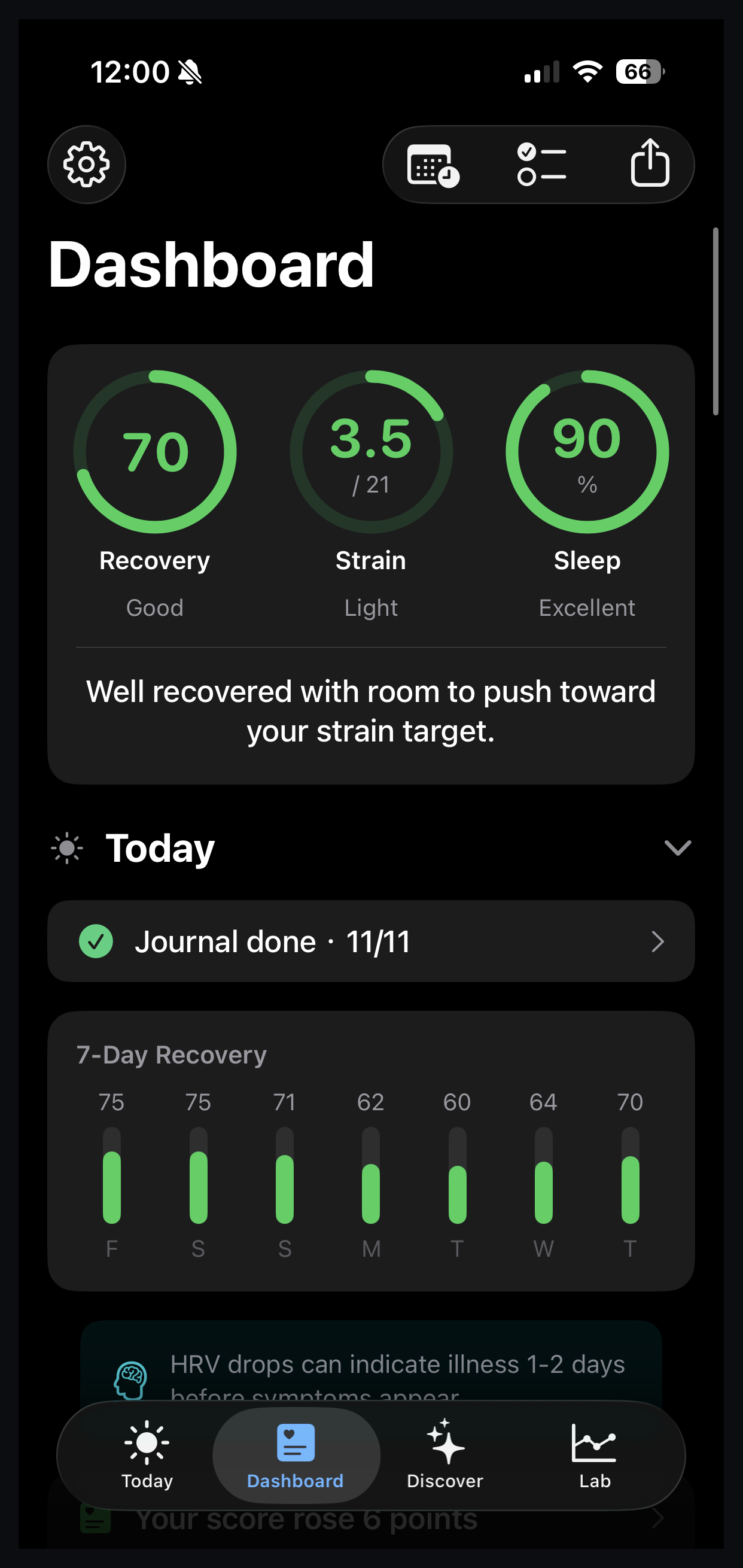
On the developer’s own Dashboard, his three rings read Recovery 70 (Good), Strain 3.5/21 (Light), Sleep 90% (Excellent), with the line: “Well recovered with room to push toward your strain target.” The seven-day recovery bars beneath the rings read: Friday 75, Saturday 75, Sunday 71, Monday 62, Tuesday 60, Wednesday 64, Thursday 70.
The intended setup is for an athlete who already sleeps in an Apple Watch. You can also use WHOOP or Oura history.
How Correlate works
TL;DR: Correlate reads Apple Health data on the iPhone, imports optional Oura CSV and WHOOP .zip exports, and runs its statistics on the phone. It answers a question with a correlation strength, a time lag, a sample size and a statistical significance value.
Everything happens on the iPhone. The Ask Your Data footer states it directly: “Runs entirely on your iPhone. Nothing is sent to a server.”
Integrations
Correlate integrates with three sources.
- Apple Health integration is native and covers Apple Watch data.
- Oura data imports via the official CSV export and is read on the phone.
- WHOOP data imports via the official .zip export and is read on the phone.
All three sources are files or data an athlete already has access to. There is no Garmin Connect link, no WHOOP API and no Oura account login.
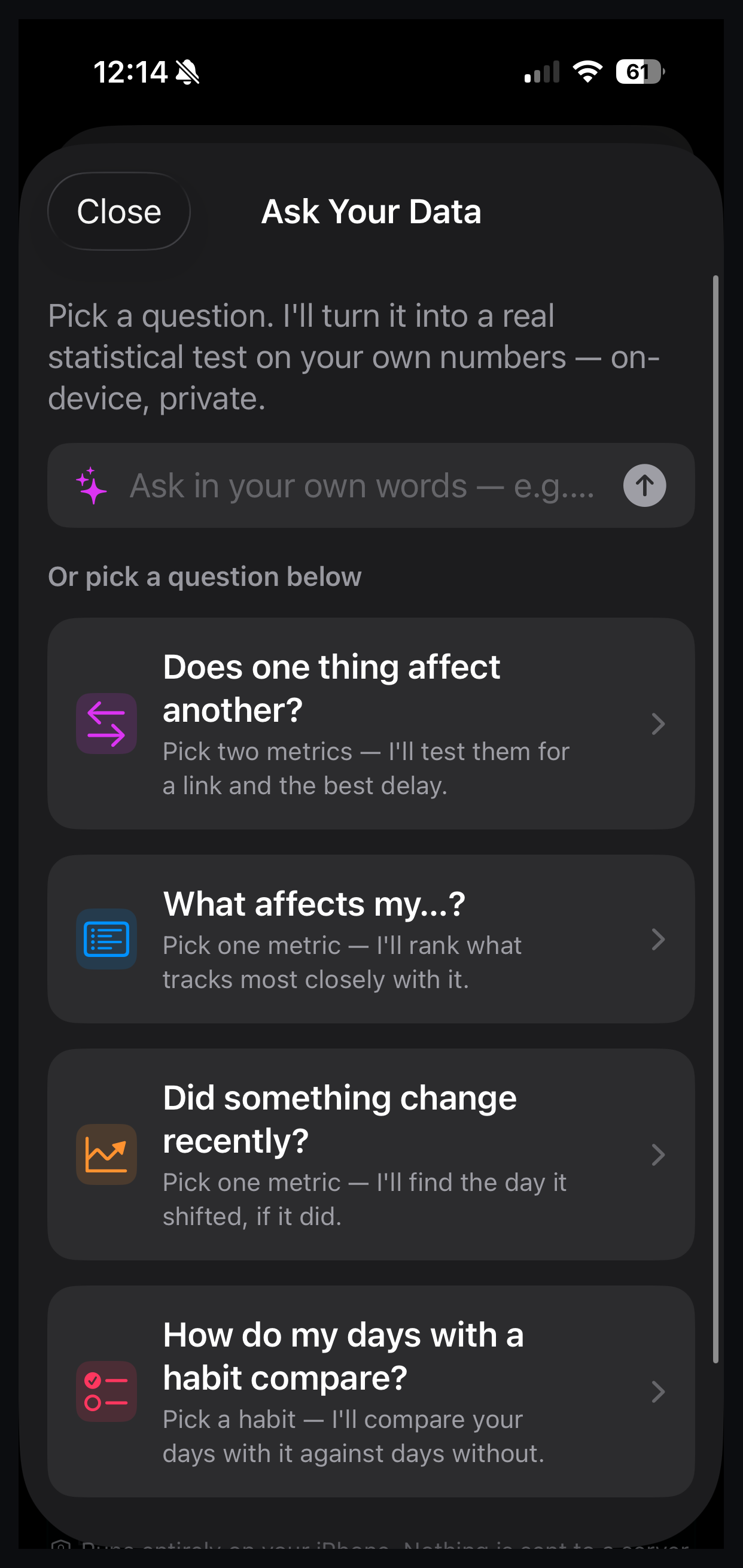
Ask Your Data offers four question templates plus a free-text box.
- Does one thing affect another? Pick two metrics; test for a link and the best delay.
- What affects my…? Pick one metric; rank what tracks most closely with it.
- Did something change recently? Pick one metric; find the day it shifted, if it did.
- How do my days with a habit compare? Pick a habit; compare days with it against days without.
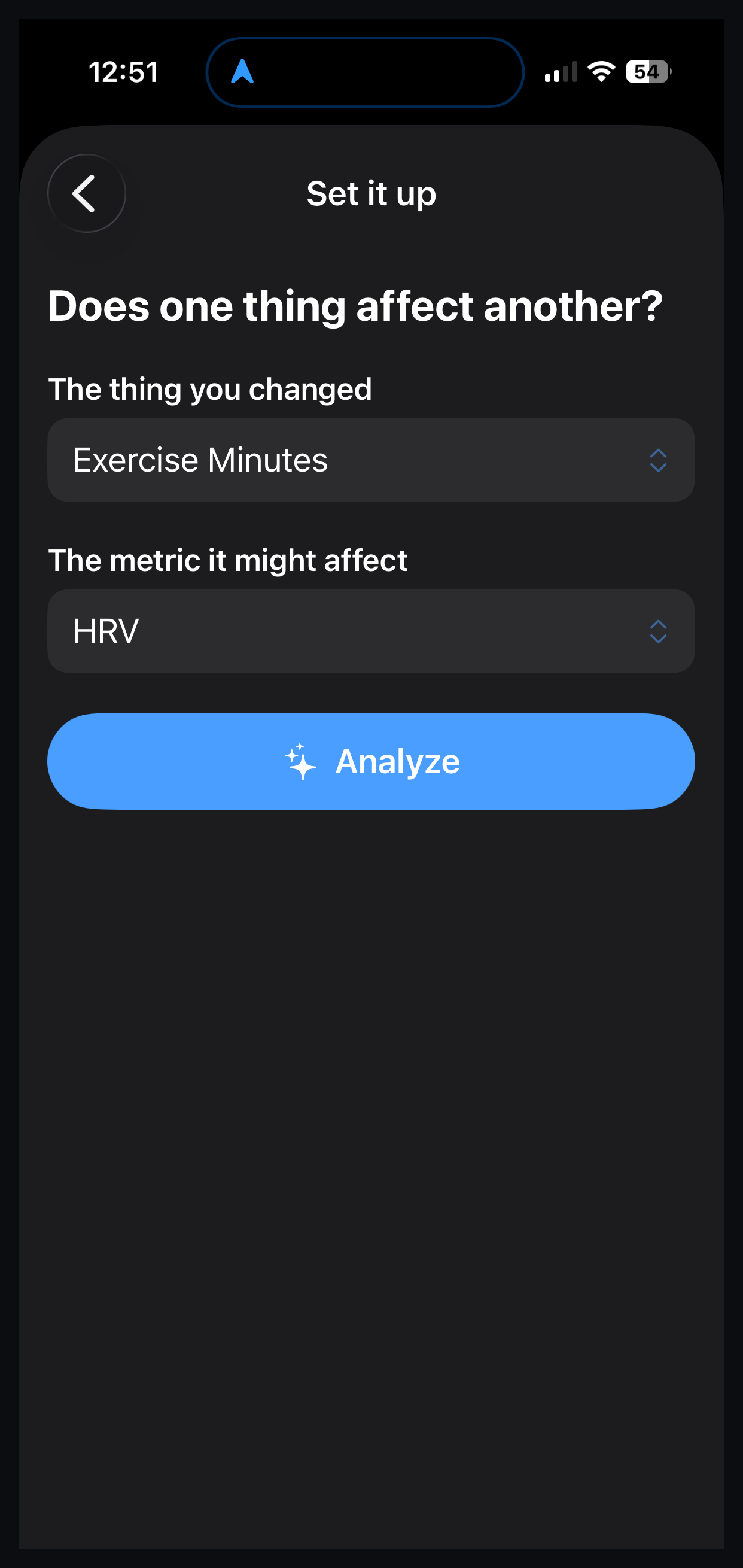
The worked example below uses the first template. The setup involves picking two dropdown selections (“The thing you changed” and “The metric it might affect”) and then tapping Analyze.
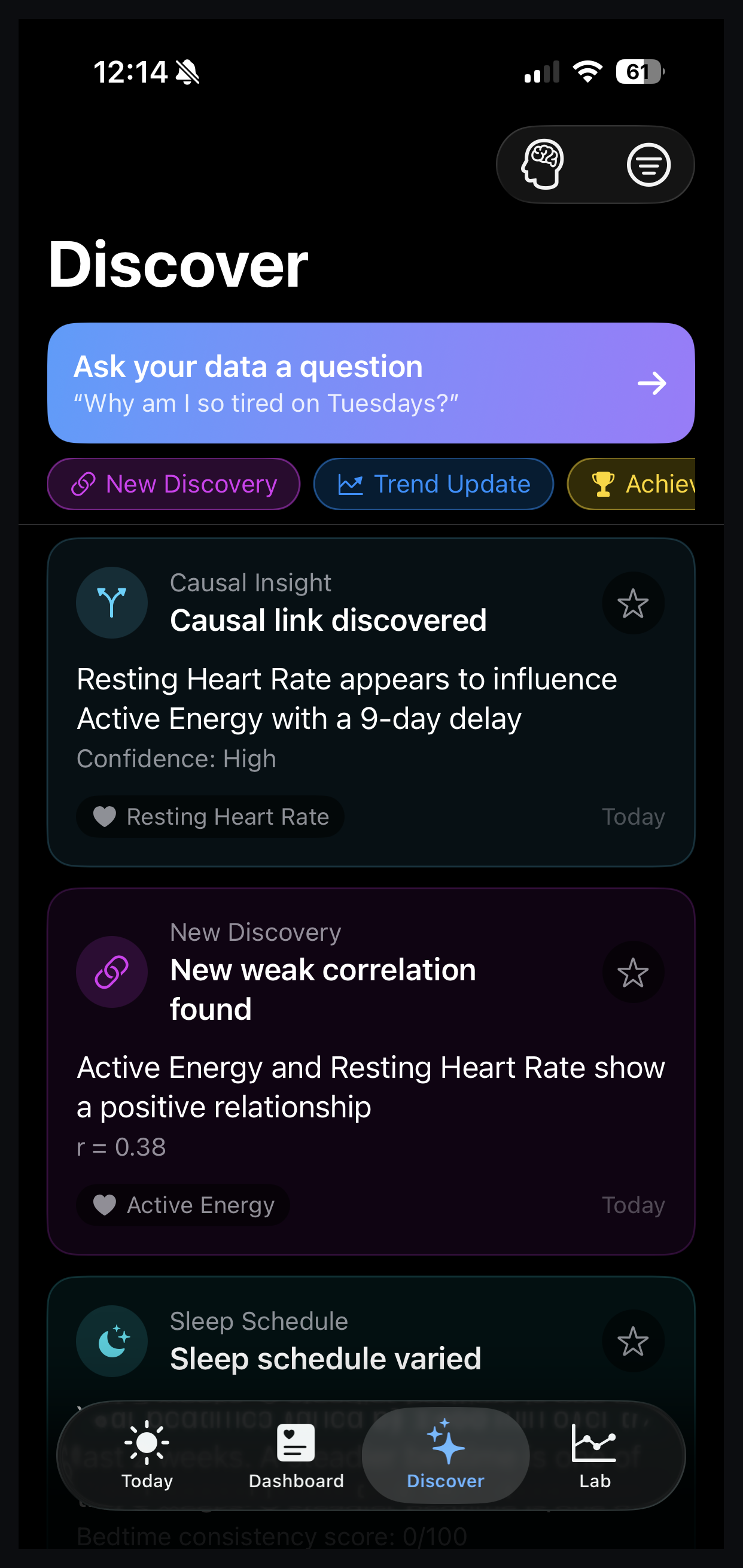
The Discover tab identifies lagged relationships without being asked. One example card on the developer’s phone read: “Resting Heart Rate appears to influence Active Energy with a 9-day delay. Confidence: High.” It is a hypothesis generator.
A worked example: exercise minutes and HRV, three days later
The useful question for a runner or cyclist is whether a longer session today shows up in HRV three days later, after the nervous system has had time to respond. Correlate was asked exactly that on the developer’s own Apple Health data on 4 September 2026:
Does Exercise Minutes affect HRV?
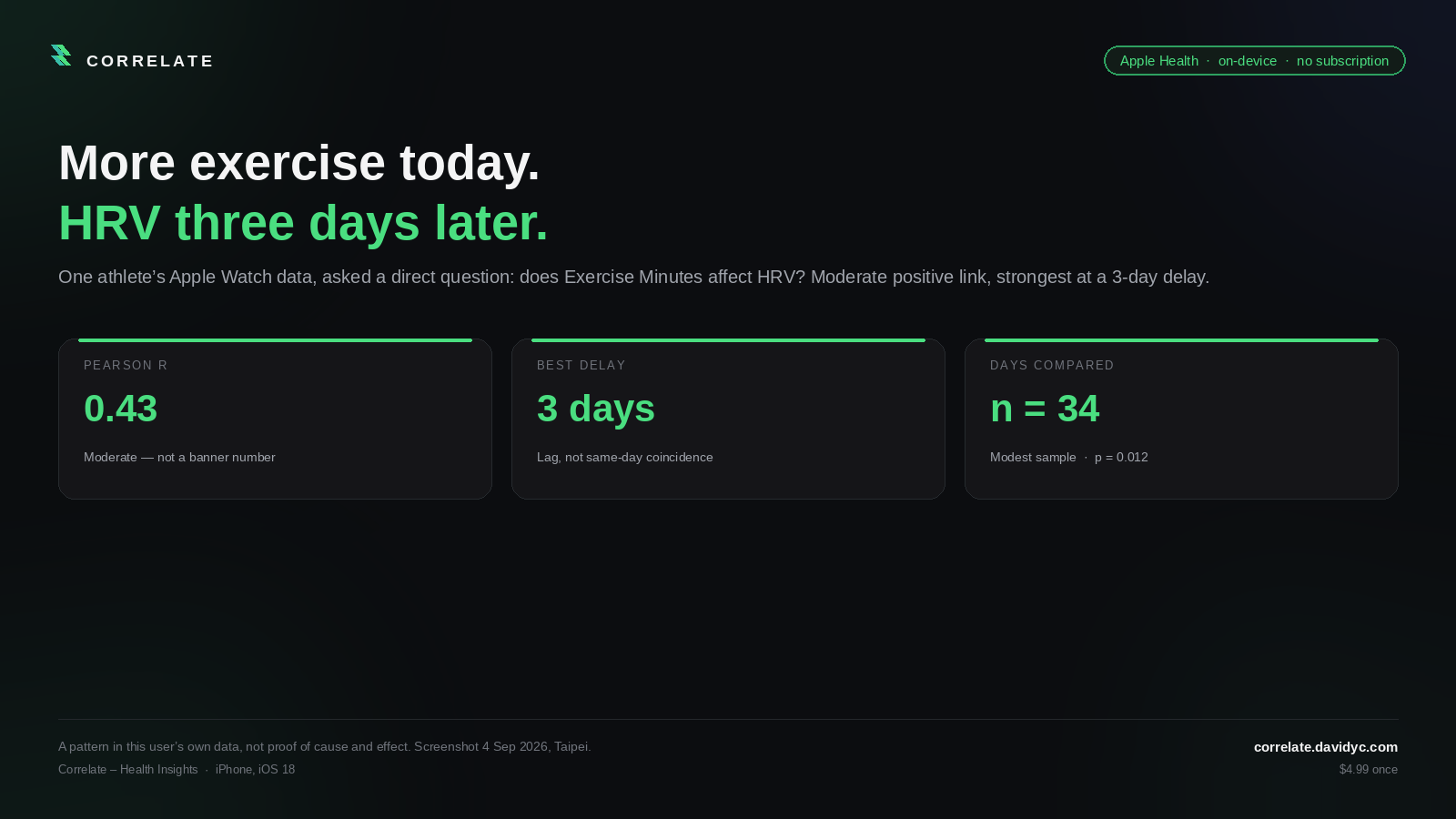
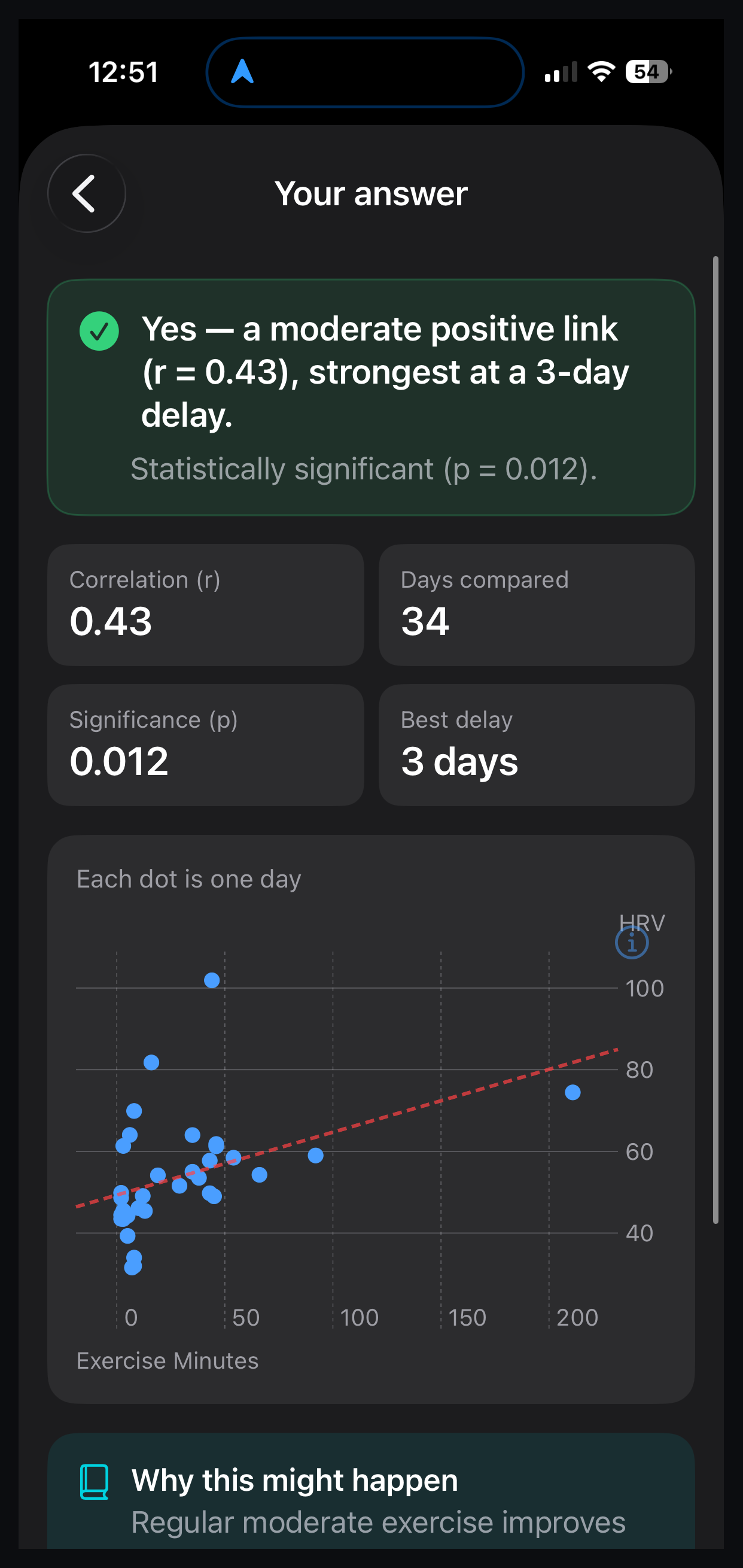
The answer screen read: “Yes, a moderate positive link (r = 0.43), strongest at a 3-day delay.” The result was statistically significant at p = 0.012, based on 34 days of paired data.
In plain terms, on days with more exercise minutes, HRV tends to shift three days later. That is what this athlete’s data shows.
What the numbers mean
The Pearson r value scores how strongly two numbers move together, from -1 (perfectly opposite) through 0 (no relationship) to +1 (perfectly together). An r of 0.43 shows a moderately positive relationship. The effect is real but not strong. The n value is the sample size: 34 pairs of days went into this calculation. A p value of 0.012 means the odds of a link this strong appearing by pure coincidence are roughly one in a hundred, below the 0.05 threshold that statisticians call significant. Confounding, outliers and repeated-testing bias still apply.
The scatter
Exercise minutes sit on the horizontal axis and HRV on the vertical. Each dot is one day. Most days cluster on the left at low exercise minutes and mid-range HRV. One outlier sits far to the right, near 200 minutes of exercise, with a slightly high HRV. A trendline slopes upward. That single long day is carrying part of the trend, and without it the correlation would still be positive but weaker.
Correlation, not causation
Correlate’s own framing on the result screen is a cue to explore, not a verdict. A run of shorter days landing three days after longer ones would look the same in the data. The app reports the numbers and leaves the training decision to the athlete.
The same Lab view will, if asked, report a strong positive correlation between Active Energy and Exercise Minutes (r = 0.75, n = 95). That scatter looks clean because the two series measure essentially the same thing: minutes of exercise and calories burned during that exercise. Correlate will compute it. The result belongs in the data-artefact bin rather than the health-finding one.
The WHOOP-imported Lab figures (HRV against Recovery, drinking against HRV, steps against Recovery) are a separate dataset.
The Health Score you can actually audit
WHOOP’s recovery score is a closed model. Several Apple Watch apps have started publishing the formulas behind theirs. Correlate does the same and shows the weights on the same screen as the number.
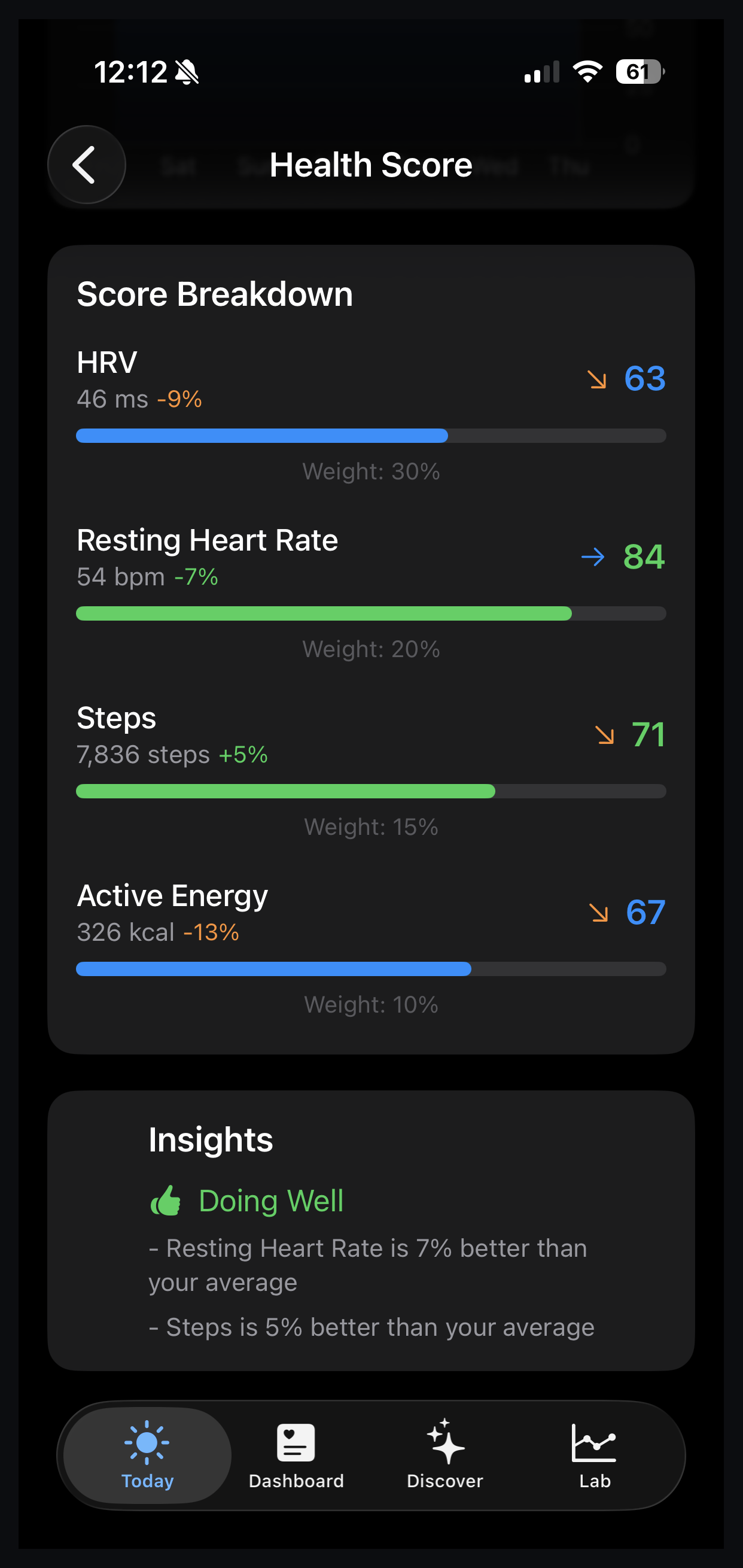
On the developer’s phone, Health Score broke down as follows.
| Input | Value | Change vs baseline | Sub-score | Weight |
|---|---|---|---|---|
| HRV | 46 ms | -9% | 63 | 30% |
| Resting Heart Rate | 54 bpm | -7% (better) | 84 | 20% |
| Steps | 7,836 | +5% | 71 | 15% |
| Active Energy | 326 kcal | -13% | 67 | 10% |
The status label read “Doing Well.” Resting heart rate came in 7% better than the athlete’s own average. Steps were 5% up. HRV is the largest listed weight. Resting heart rate is second. Both are visible on the same screen.
Leaving WHOOP or Oura without leaving the history
Anyone considering an Apple Watch recovery app has probably paid for a strap or a ring at some point. The useful question is what happens to the archive when the membership ends.
Correlate imports the files those companies already provide: Oura’s official CSV and WHOOP’s official .zip. Both are read on the iPhone.
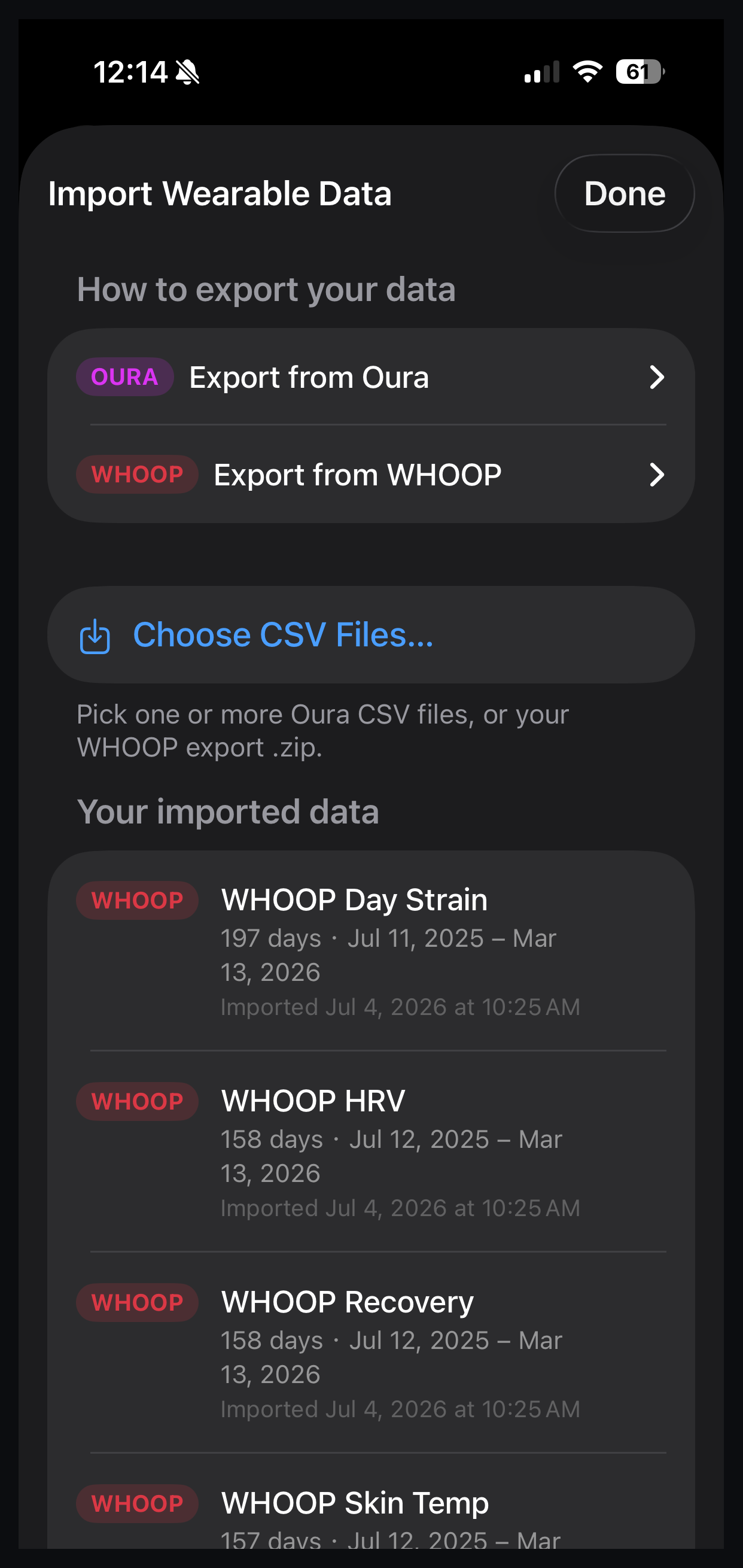
On the developer’s phone, a WHOOP .zip imported on 4 July 2026 produced the following.
| Data type | Days imported | Date range |
|---|---|---|
| Day Strain | 197 | 11 July 2025 to 13 March 2026 |
| HRV | 158 | 12 July 2025 to 13 March 2026 |
| Recovery | 158 | 12 July 2025 to 13 March 2026 |
Ask and Discover statistics run on imported history the same way they run on Apple Health. The archive stays. The second charger goes. Fresh data lands only when the athlete exports again.
Summary
Correlate is an iPhone app that reads Apple Health and turns the data an Apple Watch already collects into recovery, strain and sleep scores.
What sets it apart from other apps in this category is that it will also test whether one health metric affects another, including at a chosen number of days’ delay. The worked example on the developer’s own data tested Exercise Minutes against HRV and produced r = 0.43, strongest at three days, n = 34 pairs, p = 0.012. Health Score weights are shown on screen. Oura and WHOOP archives import via official exports and stay on the phone. Correlate costs $4.99 once. More at correlate.davidyc.com.
Note: The Apple Watch Series 12 introduces a native Readiness app that covers some of this ground for Apple Watch owners, using continuous HRV and training load data from the new Health Sensing System. Correlate remains relevant for athletes who want the correlation-testing layer, or who are using older Apple Watch models.
Download: at the iOS App Store
Quick answers
Does Correlate need an Apple Watch?
For recovery, strain, sleep and HRV-based questions, the practical answer is yes. Those series have to exist in Apple Health, and the usual source is sleeping with an Apple Watch. The app is iPhone-only (iOS 18). A WHOOP or Oura export can fill history, though live overnight Watch data going forward comes only from the Watch.
Does cancelling WHOOP or Oura mean losing the historical data?
Cancelling does not lose the historical data. Both companies provide official export files (Oura CSV, WHOOP .zip) that Correlate can import and read on the iPhone. The import on the developer’s phone held 197 days of WHOOP Day Strain and 158 days of WHOOP HRV and Recovery. There is no live account link.
Does a result like r = 0.43 at a 3-day lag mean exercise caused the HRV change?
Correlate reports a pattern in the athlete’s own data. The Ask screens say so. A statistically significant p-value and a delay are useful leads for how to train. Treat the result as a hypothesis to explore rather than causal proof.
Does Correlate send data to a server?
Correlate does not send data to a server. Everything runs on the iPhone: recovery and strain scoring, correlation testing, and imports from Oura CSV or WHOOP .zip files. The Ask Your Data footer states this directly. The app requires no account.
Does Correlate work with Garmin?
Correlate reads Apple Health and imports Oura CSV and WHOOP .zip exports. Garmin data reaches Correlate only if it also lands in Apple Health, either via a Garmin phone-app sync setting or a third-party bridge. A direct Garmin Connect link is on the developer’s roadmap rather than in the current release.
Related reading on the5krunner
- Cinder: An Apple Watch Recovery App That Shows Its Working. This is the closest sibling and another Apple Health recovery product whose developer publishes the math behind the composite score.
- Reps: A Recovery Score That Rewrites Today’s Workout. This is another Apple Health recovery product with a fully published weighted composite behind it.
- Vitara: Apple Health Tells You What Happened, Vitara Shows What Changed. This is another privacy-first iPhone app that operates on Apple Health data locally on the device.
Author: David Tseng, developer of Correlate, edited by the5krunner.
If you enjoyed reading this, here is another in the Indie Spotlight series: Sugar Sense: Libre, Dexcom and Nightscout Glucose on Garmin.
Last Updated on 12 October 2026 by tfk the5krunner
Small things I always use
- Garmin 90-degree charging adapter: Charges your Garmin from any USB-C cable. Essential when travelling. I use one.
- Body Glide: The blue anti-chafe stick swimmers and runners carry. I use it.
- Speedo earplugs: Fewer ear infections and no cold-water dizziness. I use them.
- Dryrobe Advance: My winter changing robe for open-water swims. I use one. A cheaper option is the AONYIYI changing robe.
- Maurten: Race fuel that stays easy on the stomach. I use them.
- Beet It Sport nitrate shots: Beetroot shots I take in the days before a race. I use them.
- Garmin charging puck: The quickest way to top up before a session. I use one.
- Injinji: Toe socks that stop rubbing, so you run more. I use them.
- Ultimate toe protectors: Stop black toenails on long runs. They work. I use them.
- Compressport R2 v2 calf sleeves: My calf sleeves of choice. I use them.
- Cellucor C4: My pre-workout before hard sessions.
- TPU tubes: Schwalbe Aerothan, Tubolito and Pirelli SmarTube. Light, tiny spares. I use all three.
- G8 insoles: Adjustable insoles that are good. I use them.
- Cycplus Cube: A 97g electric pump that gets a road tyre rideable in two minutes. I carry one. 5% off with code THE5KRUNNER.
Watches and sensors
- Polar H10: My daily driver for waking HRV.
- Polar Verity Sense: My backup arm-worn HR sensor.
- Nomad bedside charger: Charges my iPhone and Apple Watch overnight. I use it, and many of their bands.
- Train.Red: The best muscle oxygen sensor I’ve used.
- Tymewear: Accurate heart rate and reliable ventilatory zones. I use it to pace endurance rides over an hour.
- Garmin Forerunner 970: A pro-grade triathlon watch. I use this.
- Apple Watch Ultra 4: My daily smartwatch. No phone needed on rides.
- Garmin Fenix 9 Pro: I’ve just bought one.
On the bike
- Continental GP5000 for everyday riding, and Aero 111 on the front for special occasions.
- Helmets: Specialized S-Works Evade 3 for road riding, and Rudy Project Wing for TT-style races. I use both.
- Ravemen FR300: A front light that mounts under your Garmin or Wahoo. I use one.
- Wahoo TRACKR Radar: I use it on one bike and Varia on the other. They perform the same.
- Garmin Varia RTL515: Radar that warns you of cars from behind. I use this model.
- Wahoo ELEMNT Roam 3: The bike computer that’s easy to use. I use mine on most rides.
- Favero Assioma Pro RS2: Accurate power pedals that swap easily between bikes. I use this model.
Home and indoor training
- NPE Runn: Makes my basic treadmill smart, sending more accurate speed and distance to my watch and Zwift. I use it.
- Google Wifi: Keeps Zwift connected in my pain cave. I use it.
- Apple TV 4K: Zwift on the big screen. I use two.
- Google Nest Doorbell (wired, 2nd gen): My video doorbell, running in both Google Home and Apple Home. I use it.
Health, recovery and sleep
- FreeStyle Libre 3 Plus: Shows how my blood sugar responds to diet.
- hDrop: Measures my sweat loss in summer and indoors.
- Fourth Frontier Zone: Checks my heart under load in hard sessions.
- Oura Ring 5: My partner’s recovery tracker of choice.
- Eight Sleep: A cooling mattress cover my partner and I use nightly.
Reader-Powered Content

This content is not sponsored. It’s mostly me behind the labour of love, which is this site, and I appreciate everyone who supports it.
Support the site: Follow (free, fewer ads) · Subscribe (paid, ad-free) · Buy Me A Coffee
Written by real people, with AI assistance. Fact-checked and verified for originality. See the Editorial Policy. FTC: Affiliate Disclosure — some links pay commission. As an Amazon Associate, I earn from qualifying purchases.

tfk is the founder and author of the5krunner, an independent endurance sports technology publication. With 20 years of hands-on testing of GPS watches and wearables, and competing in triathlons at an international age-group level, tfk provides in-depth expert analysis of fitness technology for serious athletes and endurance sport competitors. See the gear tfk uses. ID

Very interesting. I used to do something similar with an excel file, but I had to “code” more or less what I wanted to correlate, so eventually stopped working on it.
Will give it a shot, thanks for writing about it.