On a long ride somewhere unfamiliar, the question is never “where is the nearest cafe”. It is “where is the next one I will actually pass, and will it be open when I get there?” A nearby search answers only the first. It draws a circle around the rider and sorts by straight-line distance, so a fountain already behind them, a shop across the valley and a cafe two kilometres up the road land in the same list. It also says “open now”, but “now” isn’t when the rider gets there. A bakery open at 09:00 can be shut by 13:15, as many places in Europe close for two hours at lunchtime.
So before a long ride, riders plan it by hand: drag the map along the route, zoom into each village, tap the shops to read the hours and note the ones that matter. Runners planning a long trail day do the same for water.
Florian, a software developer in Switzerland, got tired of doing that by hand for every ride and built Route Companion. It searches along the route rather than around the rider. A route goes in, the rider says what is needed and how far off the line a stop may be, and the stops come back in the order they will be reached, each with its distance along the route, its detour and, where the hours are mapped, whether it will be open on arrival. It is free and works for cycling, running and hiking.
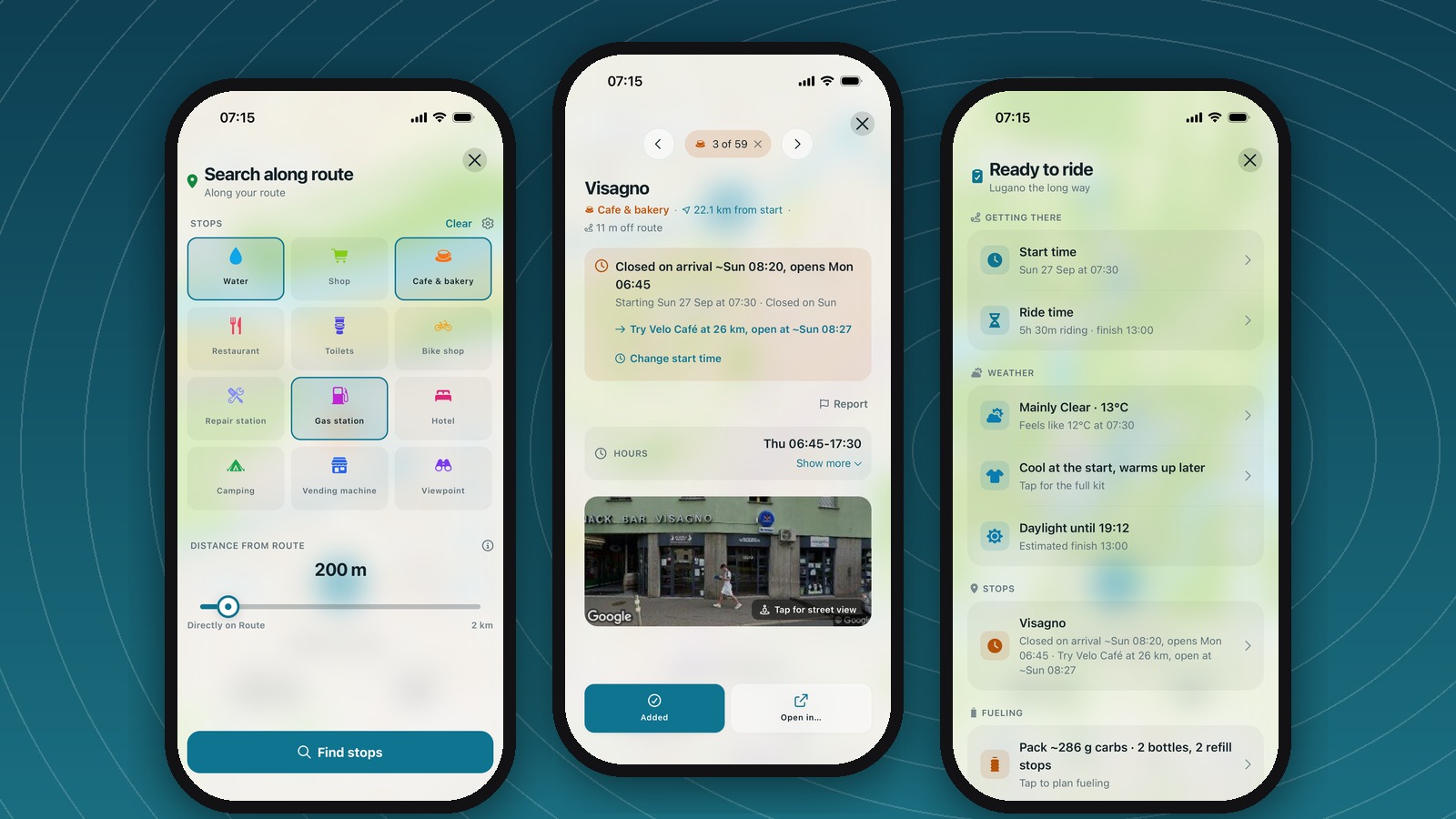
How Route Companion works
TL;DR: Route Companion takes a route, finds the stops along it in the order the rider reaches them, and says whether each one will be open at the estimated arrival time. The plan then rides on the phone, or goes to a Garmin, Wahoo or Hammerhead with the stops attached.
A route comes from a connected Strava account, a connected Ride with GPS account, or a GPX file. The app also has its own planner: tap the map to place waypoints, with five routing profiles from road to hiking.
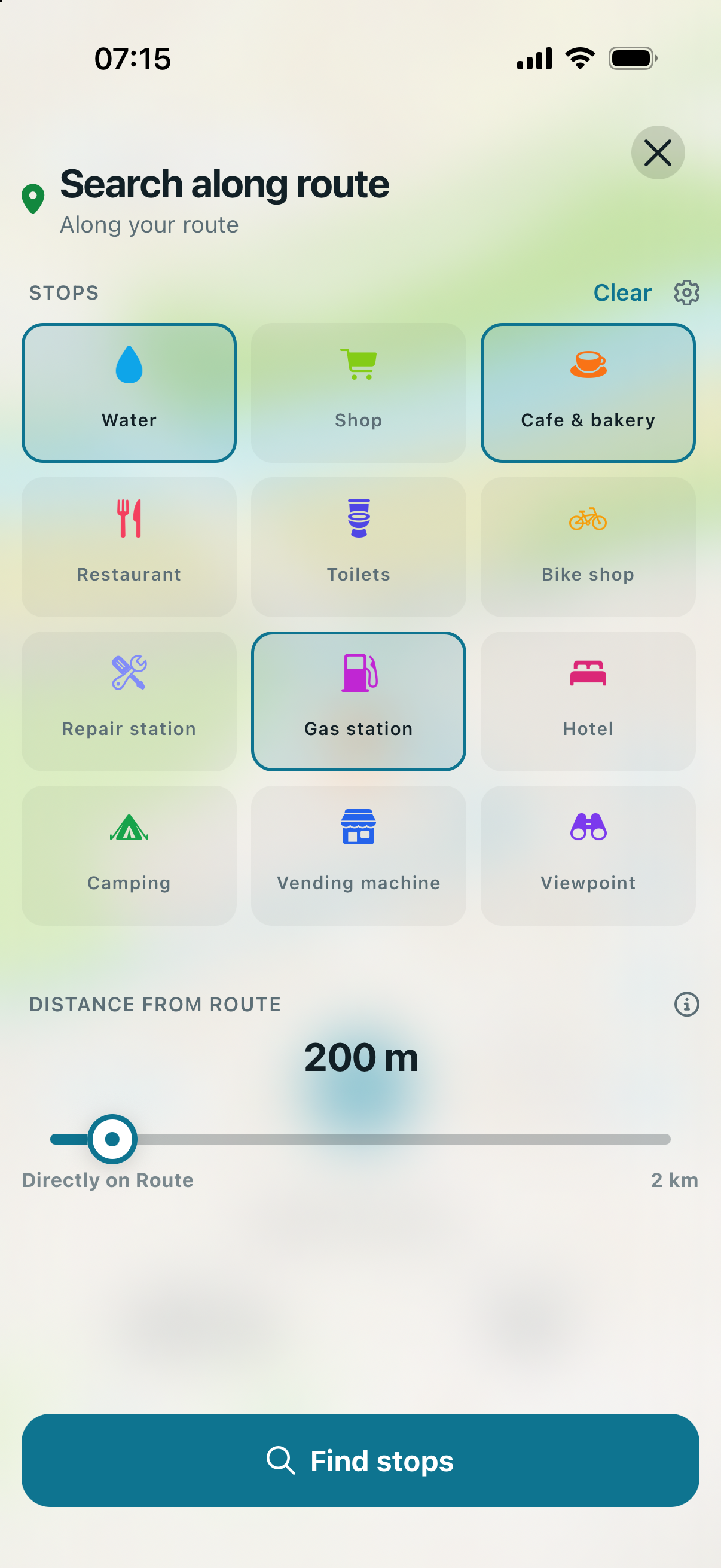
With a route on the map, the search sheet asks two things. What kind of stop: 21 types, from water and bakeries to bike shops and train stations. And how far off the route it may be, on a slider from “directly on route” to two kilometres. The default is 50 metres, which finds what is on the road. A rider low on water moves it to 500 metres and accepts the detour.
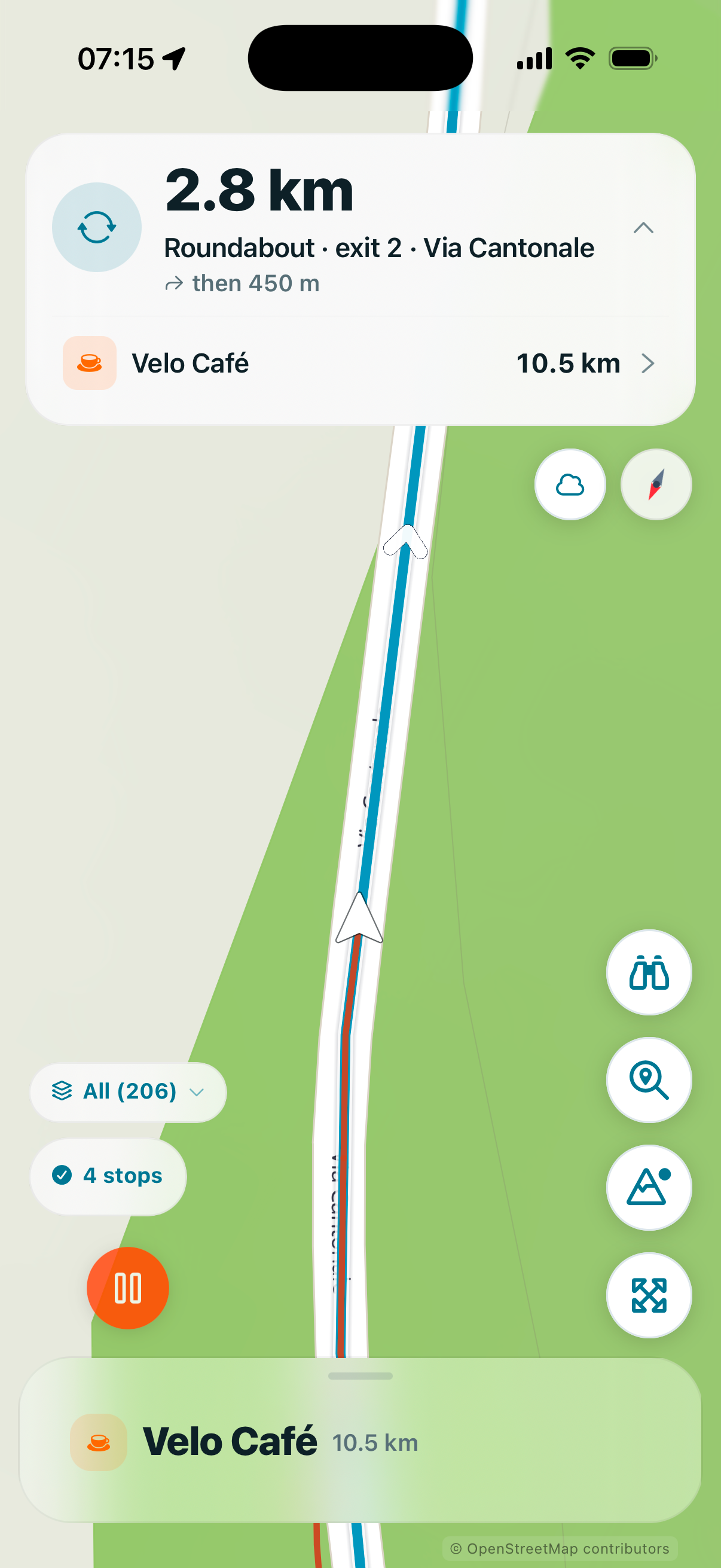
Every result sits on the route line. When opened, it shows how far ahead it is and how far off the road, plus a photo, the mapped hours, and a street-view link so a rider can confirm the fountain is a fountain. Through towns, that is a lot of pins, so Auto-Mark picks a working set at a spacing the rider chooses. While riding, Quick Find answers “nearest water ahead of me” in one tap.
A worked example: a Sunday start, and a cafe that stays shut
Biasca to Lugano is about 40 km in a straight line. This route takes around 125 km and climbs close to 2,000 metres through Ticino, the Italian-speaking south of Switzerland. It runs down the valley to Bellinzona, over Monte Ceneri, and loops into Italy along Lake Lugano before finishing in Lugano. This is a real route, not a demo file, planned for a 07:30 start on a Sunday morning in late September.
Water, cafes and bakeries, and petrol stations within 200 metres of the route returned a little over 200 stops, far more than anyone needs, which is what Auto-Mark and the ordering are for. The first coffee of the morning matters most.
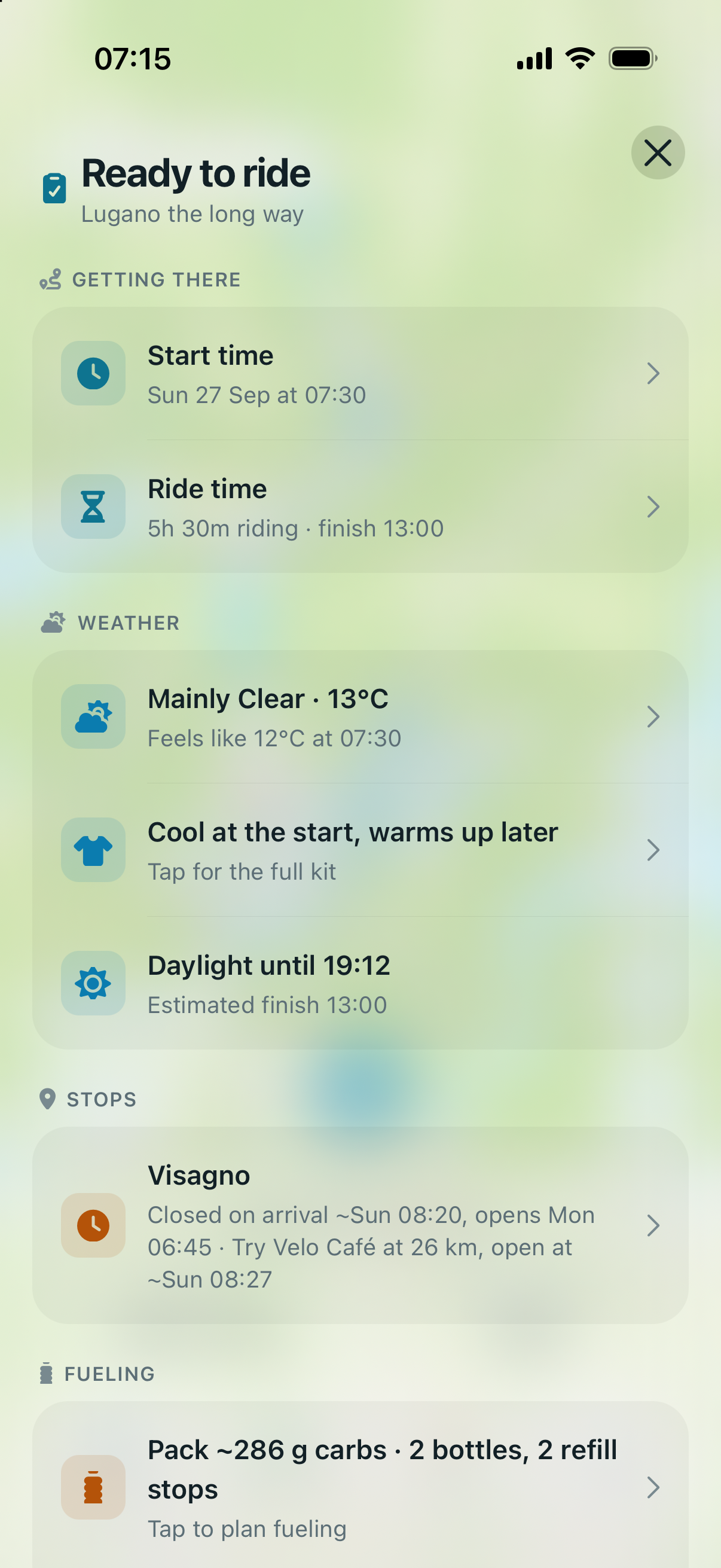
Visagno, a cafe in Bellinzona about 20 km in, sits right on the road. It opens early on weekdays, making it a natural first stop for an espresso to start the day. The verdict: “Closed on arrival ~Sun 08:20, opens Mon 06:45”.
It does not open on Sundays, which is easy to miss when planning the night before. The app had already found a workaround: “Try Velo Cafe at 26 km, open at ~Sun 08:27”, a cafe for cyclists a few minutes further on.
The Ready to ride briefing gathered that onto one screen before the start: five and a half hours of riding with a finish around one o’clock, a clear morning with “Cool at the start, warms up later” and the kit advice to dress for it, and the Visagno warning with its alternative.
Will it still be open when you get there?
This works because the stops are already ordered along the route. Once the app knows how far in a stop is, it can estimate when the rider gets there and read its opening hours at that time.
The estimate starts from the stop’s distance along the route, allows for the climbing in between, and uses the rider’s own pace.
The result is one line on the stop sheet: “Open on arrival ~Sun 08:27” or “Closed on arrival ~Sun 08:20” from the example above, and a “Closes …, you arrive ~…” warning when a place shuts before the rider gets there. A stop closing within 30 minutes of arrival counts as a warning, not a pass. When one fails, the app looks for the same type within ten kilometres either side along the route that is open at its own arrival time, and offers it in one tap.
Taking the stops with you
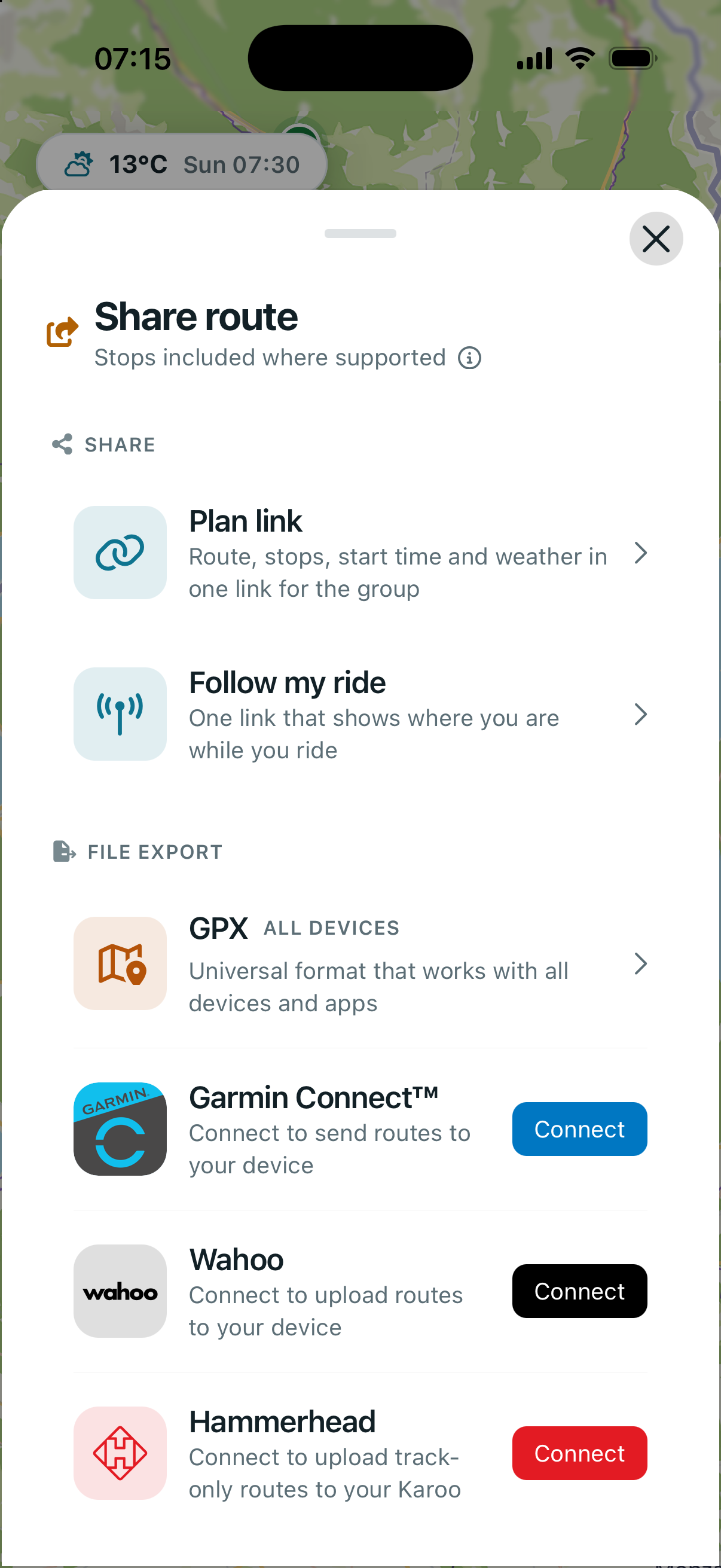
Route Companion sends the route and its marked stops straight to a connected Garmin, Wahoo or Hammerhead account. The stops arrive as course points, which a Garmin lists under Up Ahead. For anything else, you can share a GPX file through the share sheet, with the stops as waypoints.
The phone can also navigate the route itself, which is how a runner carrying only a phone gets the same plan. Turn cues appear on the map and are spoken, and it reroutes if the rider leaves the line. With Pro, every marked stop gets a heads-up notification at 300 metres, 500 metres or one kilometre, and an arrival cue such as “Cafe on your left”. Maps download beforehand, so route, stops and cues work without signal.
Everything it does, in one place
Stops are the reason the app exists, but the same mechanism, knowing where the rider will be and when, drives the rest. The weather is read per point of the route at the hour the rider reaches it, so a headwind in the last hour shows up as such. The fuelling estimate comes from the route’s distance, climbing and conditions rather than a flat number per hour. A group ride plan can be shared as a link carrying the route, stops, start time and meeting point.
- Routes in: Strava, Ride with GPS, GPX, TCX and FIT files, including Komoot exports, the in-app planner, suggested routes nearby.
- Stop search: 21 stop types (water, cafes and bakeries, shops, restaurants, toilets, bike shops, repair stations, pharmacies, petrol stations, hotels, shelters, campsites, viewpoints, e-bike charging, train stations and more), a distance-from-route slider up to 2 km, results in route order, Auto-Mark, Quick find.
- Opening at arrival: a verdict per stop, with an open alternative of the same type when it fails.
- Routes out: GPX, TCX, and FIT with the stops included; direct upload to Garmin Connect, Wahoo, and Hammerhead; a plan link for group rides; a follow-my-ride link.
- Navigation: spoken turn cues, rerouting, a heads-up and an arrival cue per marked stop, Lock Screen Live Activity, offline map packs.
- Weather: the forecast for each point on the route when the rider will be there, wind along the line, a departure-time comparison, a clothing suggestion, a sunset check.
- Fuelling and kit: carbs per hour, bottles and a packing list from the route, eat reminders while riding, a tyre pressure calculator.
- Platforms and languages: iPhone and iPad on iOS 16 or later, plus an Android beta anyone can join. English, German and French. No account needed.
What it cannot know, and what it costs
The stops come from OpenStreetMap: about 15.5 million of them, held on Route Companion’s own servers rather than queried from a third-party search API. Opening hours are a separate tag, and not every place has one.
In Switzerland, where the example route runs, two-thirds of shops have mapped hours, as do most bike shops and pharmacies, about half of cafes and four in ten restaurants. Worldwide the figures are lower.
Where the map is wrong, a rider can say so from the stop itself. Reporting a place that has gone, or a fountain switched off for winter, hides it immediately for that rider, and once enough independent reports agree, for everyone. A rider can also confirm a stop still works, which later riders see as dated evidence (“Confirmed by a rider 3 days ago”) rather than a promise.
The verdict is still an estimate built from mapped hours and a predicted pace. It cannot know that a bakery shut early today.
Route Companion is free to download. Pro is $1.99 a month, $14.99 a year or $19.99 once, with local pricing by country, and any rider can switch on a one-time preview first: full Pro for the next three rides, up to seven days.
Route Companion is written and maintained by one developer in Switzerland. The app is on the App Store, with guides and browser tools at routecompanion.app.
Quick answers
What happens when a stop turns out to be closed when I get there?
Usually, the app says so before the ride: the stop sheet and briefing show arrival and closing times and offer a similar open stop nearby on the route, and the stops list repeats the warning while riding. If the hours were wrong and the door is shut anyway, one tap reports it and hides it.
What does Pro unlock, and what stays free?
The stop search, Auto-Mark, the opening-at-arrival verdict, the briefing, navigation with turn cues, three saved plans, and the group and follow-my-ride links are all free. Pro adds export and direct upload, the stop heads-up and arrival alerts, the Live Activity, hourly and seven-day weather, fine-tuned fuelling and unlimited route plans.
Does it work with Garmin or Wahoo, and is the phone needed while riding?
Yes, it sends the route and its stops straight to a connected Garmin, Wahoo or Hammerhead account, where a Garmin lists them under Up Ahead, and the ride can then happen with the phone at home. The phone is only needed for Route Companion’s navigation, stop alerts, Quick Find, and live verdicts.
Related reading: TouchTrails, Tooboo.
Author: Florian, developer of Route Companion, edited by the5krunner.
Last Updated on 26 September 2026 by the5krunner
My favourite kit and nutrition
- Garmin Fenix 9 Pro — I’ve just bought one.
- Injinji – Runners protect your toes. Avoid discomfort and minor injury. Run more. Run faster. I use them.
- Garmin 90-degree charging adapter — A small keyring adapter you can use anywhere. Essential when away. I use one.
- Garmin charging puck — the fastest and most reliable way to top up your Garmin before a session. I use one.
- Ravemen FR300 — Front light that mounts directly under your Garmin or Wahoo head unit. Keeps your bars clean and your beam pointed where it matters. I use one.
- Body Glide – The blue anti-chafe stick that all swimmers and many runners use. I use it.
- Maurten — The race nutrition trusted by elite athletes. Gels and drink mixes engineered to be easy on the stomach. I use them.
- Garmin Varia RTL515 — A radar rear light that alerts you to vehicles approaching from behind. Pairs with your Edge or Wahoo. I use this model.
- Favero Assioma Pro RS2 — The power-meter pedals most serious cyclists choose. Accurate, easy to move between bikes. I use this model.
- Garmin Forerunner 970 — A serious choice for a pro-grade triathlon watch. I use this.
- Polar H10 — My daily driver for accurate, waking HRV readings.
- Wahoo ELEMNT Roam 3 — The bike computer that has the feature Garmin lacks: usability. I use mine on most rides.
Reader-Powered Content

This content is not sponsored. It’s mostly me behind the labour of love, which is this site, and I appreciate everyone who supports it.
Support the site: Follow (free, fewer ads) · Subscribe (paid, ad-free) · Buy Me A Coffee ❤️
All articles are written by real people, fact-checked, and verified for originality. See the Editorial Policy. FTC: Affiliate Disclosure — some links pay commission. As an Amazon Associate, I earn from qualifying purchases.

tfk is the founder and author of the5krunner, an independent endurance sports technology publication. With 20 years of hands-on testing of GPS watches and wearables, and competing in triathlons at an international age-group level, tfk provides in-depth expert analysis of fitness technology for serious athletes and endurance sport competitors. ID
