A plan that carries on as if nothing happened
Most runners know the pattern. You sleep four hours, catch a cold or lose a week to work, and the plan carries on regardless. The intervals on Thursday are still there and the long run on Sunday has not got any shorter. When you come back, the first session is pitched at the athlete you were ten days ago. Either you force it and dig a deeper hole, or you start rewriting the plan yourself, which is the job you were paying the app to do.
The opposite problem is just as common. You get fitter, but your threshold pace and heart-rate zones stay where you set them in spring. Your easy runs get quicker while the app keeps calling them easy, and your hard days slowly stop being hard.
Trimetra, an independent training app founded by Maikel Rooyakkers in the Netherlands, is built around both problems. The plan adjusts to what you did and how you recovered, and not only overnight: log a different session, or skip yesterday’s run because of an accident, and today’s session is recalculated straight away. Your thresholds are learned from your own training, and every threshold change arrives as a proposal you can apply or ignore.
How it works
TL;DR: Trimetra plans running, cycling, walking, swimming, inline skating and triathlon one day at a time from your own data. Sleep, resting heart rate, HRV, complaints and missed sessions feed into the next session. Thresholds (threshold pace, FTP, lactate threshold heart rate, aerobic threshold, swim CSS, maximum heart rate) are estimated from what you actually ran or rode, and every change shows up as a proposal with Apply and Ignore until it changes. It runs on iPhone, Android and the web, in English, Dutch, German and French.
The plan is a week of build-up, quality and recovery days that is recalculated as soon as something new comes in: a finished session, a skip, a complaint or a new night of sleep data. After every session Trimetra compares what was planned with what you did. Each planned session has a “Why this session” box that says, in plain language, what is steering that day: a hard day before it, a short night, a deliberately easy session, or training load that climbed faster than you are used to. If nothing is there, nothing steered it.
With a goal and a date, the weeks are planned towards it:
- Phases. Trimetra divides the weeks before your race into base, build, peak and taper. Each block runs in a cycle of build weeks followed by a recovery week, and when your fatigue signals keep showing up late in the cycle, the app can propose a shorter or longer cycle.
- Taper. In the final stretch the volume comes down while some intensity stays in, and the race week has its own set of sessions. After the race, the plan gives you recovery days before it builds again.
- Race day. In the two weeks before the race, the Race plan appears: pacing per phase of the race, fuelling matched to the expected duration, and what to do in the days before. The goal card shows the time your current form points to on the goal date and moves as your training does. If your target time drifts far from it, Trimetra proposes a sharper or more realistic one. Goals can be a 10 km, half marathon, marathon, triathlon or gran fondo, and walkers and inline skaters can add an outing with a date, multi-day hikes included.
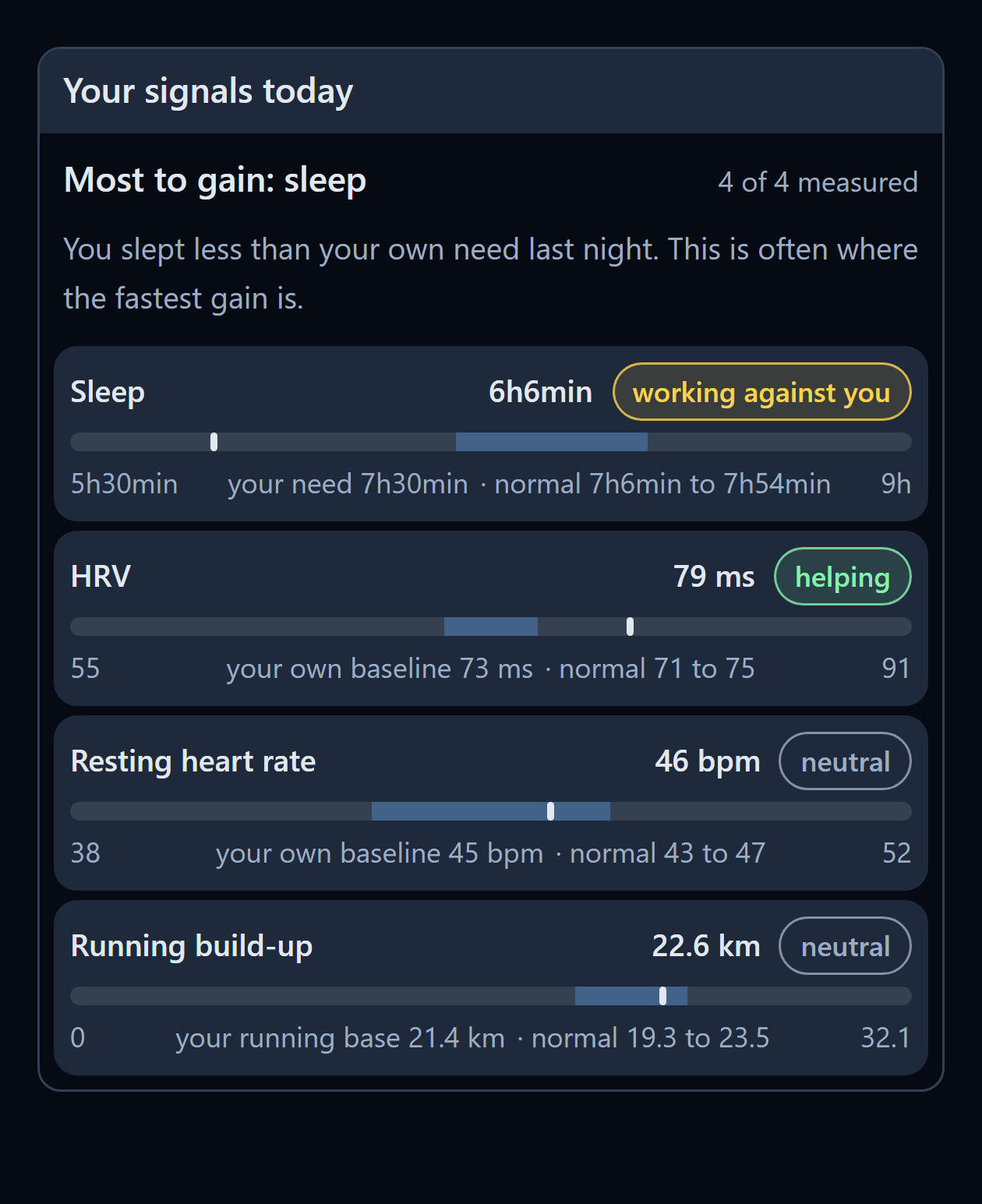
Recovery signals are compared with your own baseline, not with a population average. A resting heart rate of 46 means something different for someone whose normal is 45 than for someone whose normal is 58. The “Your signals today” card shows which signal is helping and which is holding you back, and the plan acts on that: when recovery drops, it chooses endurance or rest over quality.
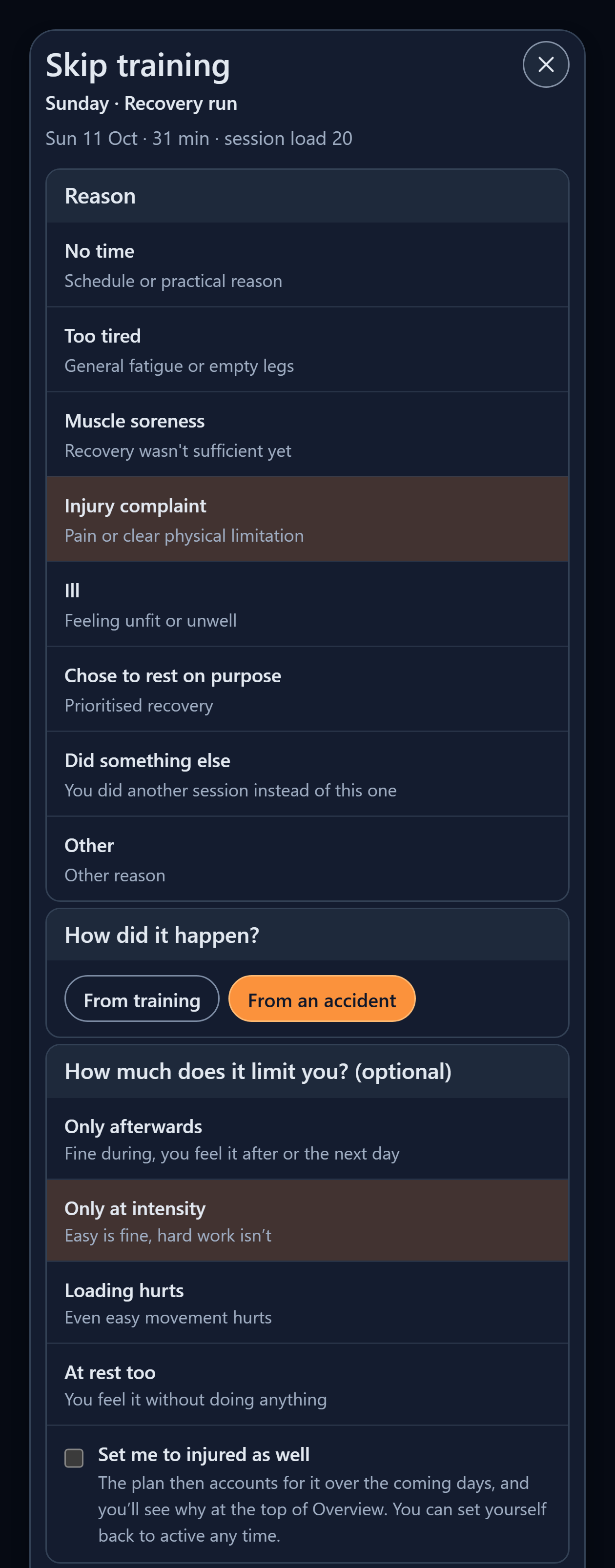
When something happens, you tell the app and it brakes. If you skip a session with “Injury complaint”, Trimetra asks how much it limits you (only afterwards, only at intensity, loading hurts, at rest too) and, since October 2026, how it happened: from training or from an accident. An accident brakes the plan in exactly the same way: no quality, shorter easy work, a rest day where needed. It teaches the app nothing about how much load you can handle, though. A fall on a mountain bike does not mean your running build-up was too steep, so it does not lower what Trimetra has learned you can carry. A complaint caused by training does.
Push notifications keep the plan in view without opening the app. You choose each type separately: a Daily training reminder with the planned session at a time you pick, a Recovery adjustment when the day plan changes later in the day because of your recovery, a Check-in reminder in the evening if today’s measurements are still missing, and a Week in review on Sunday evening that says what the week taught the plan.
All of the calculation runs on Trimetra’s servers. The app on your phone shows the result and the reason behind it, so your phone, tablet and browser always show the same plan.
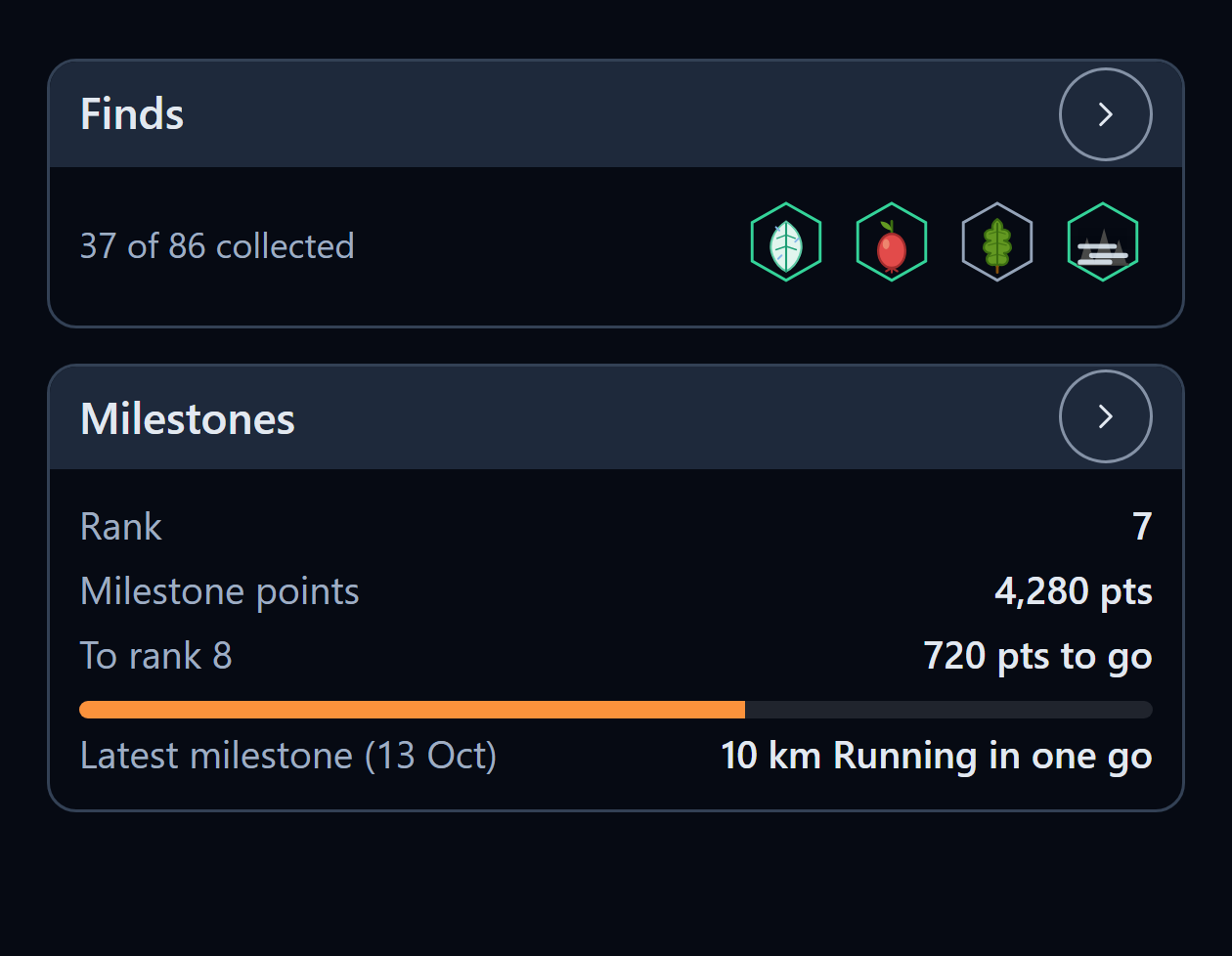
Alongside the training there is an optional collecting game. On activities you record with a route, you come across finds along the way, 86 to collect, some rare and some tied to a season, a time of day or the weather. You can hand in duplicates at the market for points, and milestones reward what you already do with points and a rank. You can switch it off in your profile.
Threshold proposals, learned from your training
The app keeps estimating your thresholds from your own sessions:
- Threshold pace (running) from your duration curve, meaning your fastest efforts across durations over the past months turned into the pace you could hold for about an hour, and from recognised tests and races.
- Aerobic threshold (LT1) from your easy endurance runs: the ceiling below which your heart rate stays flat during easy work.
- Lactate threshold heart rate from race-like efforts. On the bike it comes from the last part of your hardest continuous half hour.
- FTP and Critical Power from rides with a real power meter. Power that Strava estimates for you does not count.
- Swim CSS from swims over different distances, and maximum heart rate from peaks that are actually sustained, not a single spike.
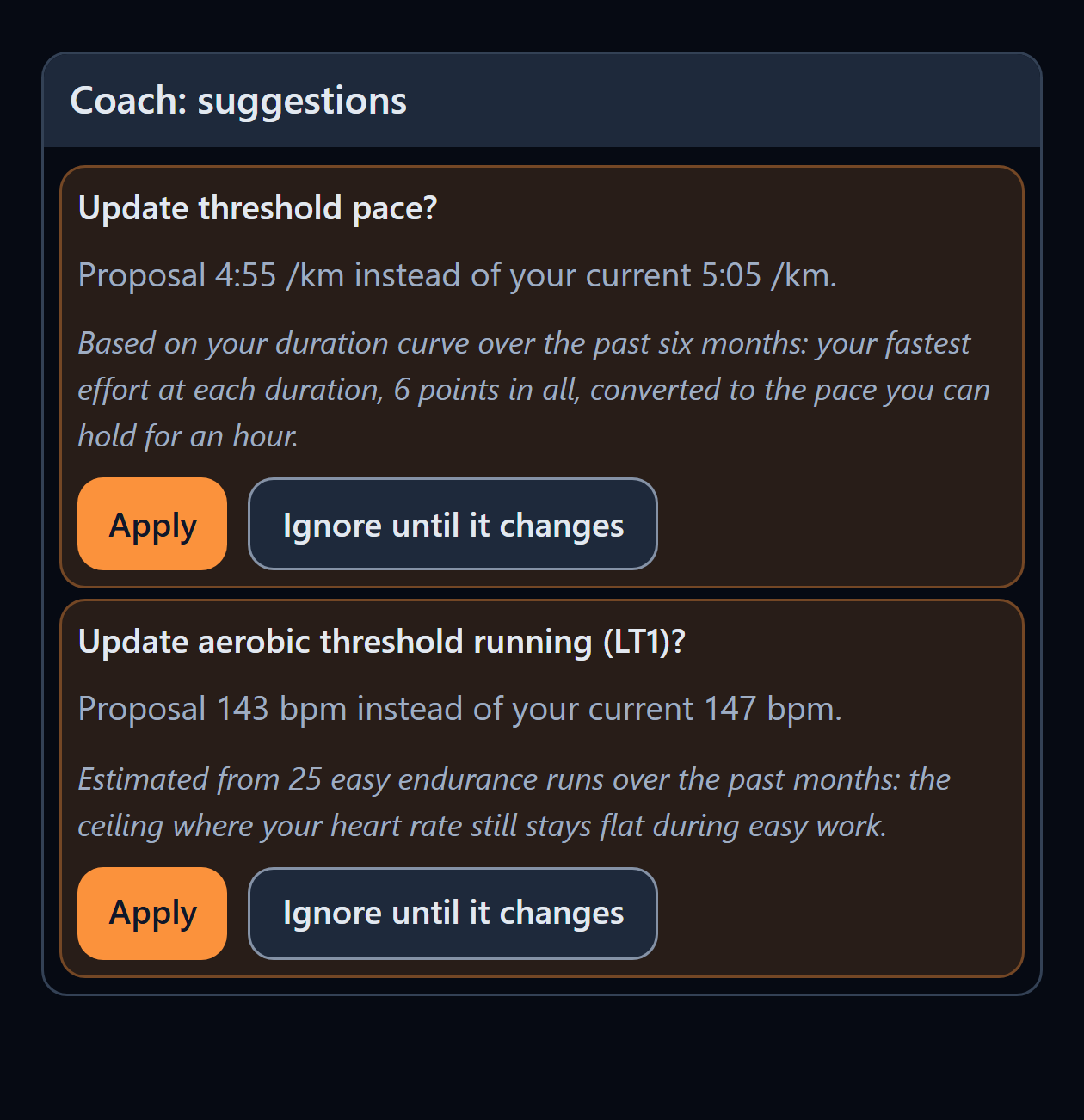
When an estimate moves far enough from what is in your profile, a card appears on the Coach screen: “Update threshold pace? Proposal 4:55 /km instead of your current 5:05 /km.” Under it, one line says where the number comes from and how many sessions or data points it rests on. Two buttons follow:
- Apply writes the new value to your profile. Your zones and every planned pace and heart-rate band move with it from the next plan onwards.
- Ignore until it changes remembers the value you turned down. The same proposal does not come back the next morning. It returns only if your training moves the estimate meaningfully away from what you ignored.
Trimetra never changes a threshold without a tap from you, and a declined proposal is not quietly applied later.
Trimetra is deliberately slower to lower a threshold than to raise it. A quiet week, a holiday or a stretch without hard sessions is not proof that you got slower. A downward proposal needs positive evidence: repeated hard efforts with heart-rate data, no contradicting signals from the rest of your training, and a pattern that holds for several weeks. Even then it moves in small steps. When your easy runs have been quicker than planned for weeks at the same heart rate, Trimetra first suggests a test rather than guessing a new number. A test is more accurate than an estimate, and the card says so.
A real example: an October threshold update
The numbers below come from a real Trimetra account, used with permission.
In late September this runner’s profile held a threshold pace of 5:05 /km and an aerobic threshold (LT1) of 147 bpm. On that basis his easy runs were prescribed at 6:06 to 6:37 /km with heart rate around 128 to 147 bpm, and recovery runs at 6:37 to 7:07 /km.
On 1 October 2026 the plan scheduled a benchmark: a 5 km time trial after a 15-minute warm-up. He ran 5.01 km in 23 minutes, an average of 4:40 /km, with an average heart rate of 159 bpm (maximum 173) and a perceived effort of 9 out of 10.
The next day two proposals were waiting: threshold pace 4:55 /km instead of 5:05 /km, and LT1 143 bpm instead of 147 bpm. He applied both on 2 October. The effect on the following sessions was immediate:
| Before (late September) | After (from 3 October) | |
|---|---|---|
| Threshold pace | 5:05 /km | 4:55 /km |
| Aerobic threshold (LT1) | 147 bpm | 143 bpm |
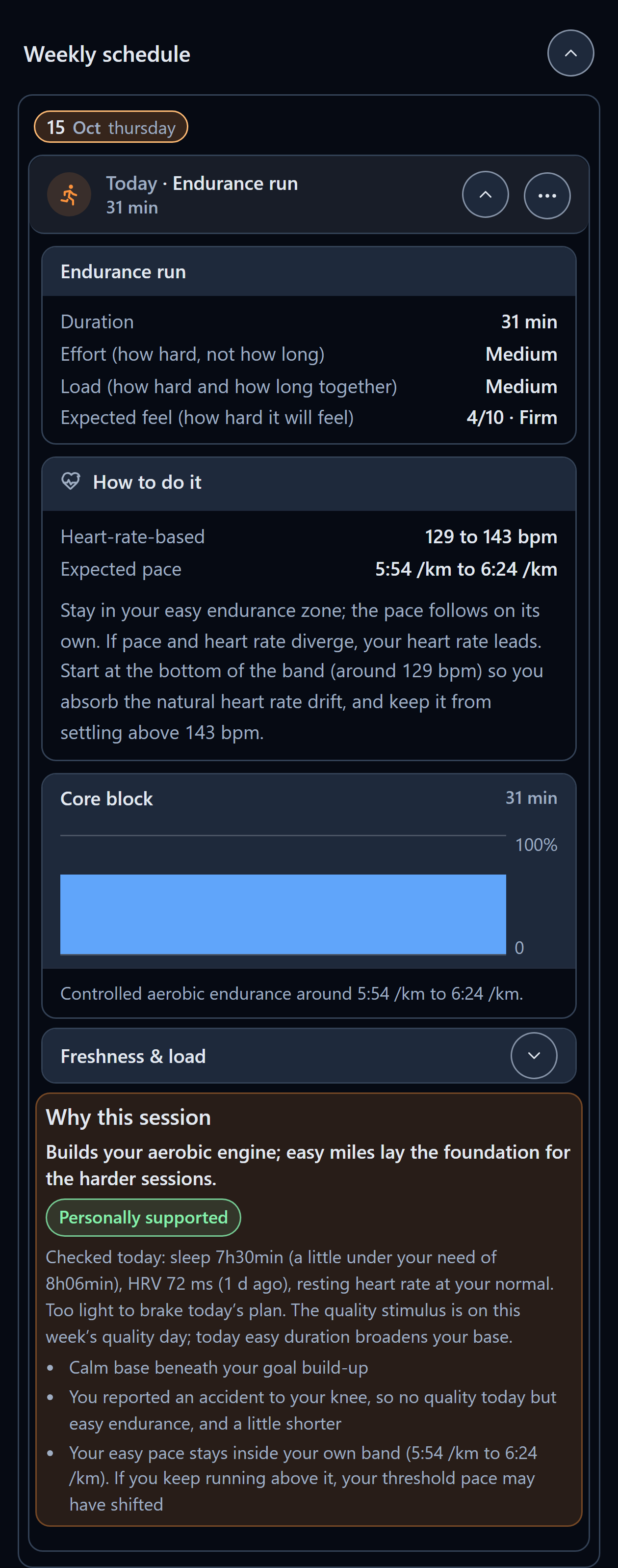
| Easy run, prescribed pace | 6:06 to 6:37 /km | 5:54 to 6:24 /km |
| Easy run, heart-rate band | 128 to 147 bpm | 129 to 143 bpm |
| Recovery run, prescribed pace | 6:37 to 7:07 /km | 6:24 to 6:53 /km |
The pace bands got quicker because the threshold went up. The heart-rate ceiling for easy work went down because the aerobic threshold, learned from his own easy runs, came out lower than the value he had entered. The two moved in opposite directions, and each one followed its own evidence.
Had he tapped Ignore until it changes, his profile would have stayed at 5:05 /km and 147 bpm, the plan would have kept the old bands, and neither proposal would have reappeared unless later training pushed the estimate meaningfully further.
A real comeback: what the plan did after a mountain-bike crash
The opening problem of this article happened to a Trimetra runner last week.
- Saturday 10 October. The runner’s plan had a 48-minute run with rolling tempo blocks. He went mountain biking instead (80 minutes, 20.1 km), crashed and bruised his knee. He logged the planned run as “Did something else”.
- Sunday 11 October. The plan had a 31-minute recovery run. He skipped it with Injury complaint, Only at intensity, From an accident.
- Monday 12 October. The plan had a 48-minute endurance run with a fast finish. He logged Sunday’s skip on Monday evening, and the plan turned Monday into a rest day: “Rest day after a skipped session: you skipped your last session because of an injury.”
- Tuesday 13 October. An endurance run with strides: 48 minutes at 5:54 to 6:24 /km with 6 x 20-second strides, and no tempo work. He recorded it with Trimetra’s own recorder: 48 minutes, 8.5 km, 5:40 /km average, average heart rate 145 bpm. The knee held up, although he ran faster than the easy band asked.
- Wednesday 14 October. With the brake window over, the plan brought back a 62-minute rolling-tempo session. He walked instead and logged a complaint in his left knee, again caused by the accident.
- Thursday 15 October. The brake came straight back. That morning the session was a 31-minute endurance run with no quality, and “Why this session” says: “You reported an accident to your knee, so no quality today but easy endurance, and a little shorter.” Once he had logged Wednesday’s knee complaint as caused by an accident, Thursday’s session had already been recalculated that evening and carried this reason.
The plan did not wait for him to rearrange anything: the skip, the rest day and the easier sessions followed from two taps. Because he gave an accident as the cause, none of it counted against his learned load tolerance or his complaint history. The crash slowed the plan down without teaching the app that he can handle less training.
Connections: what Trimetra reads, and where planned sessions go
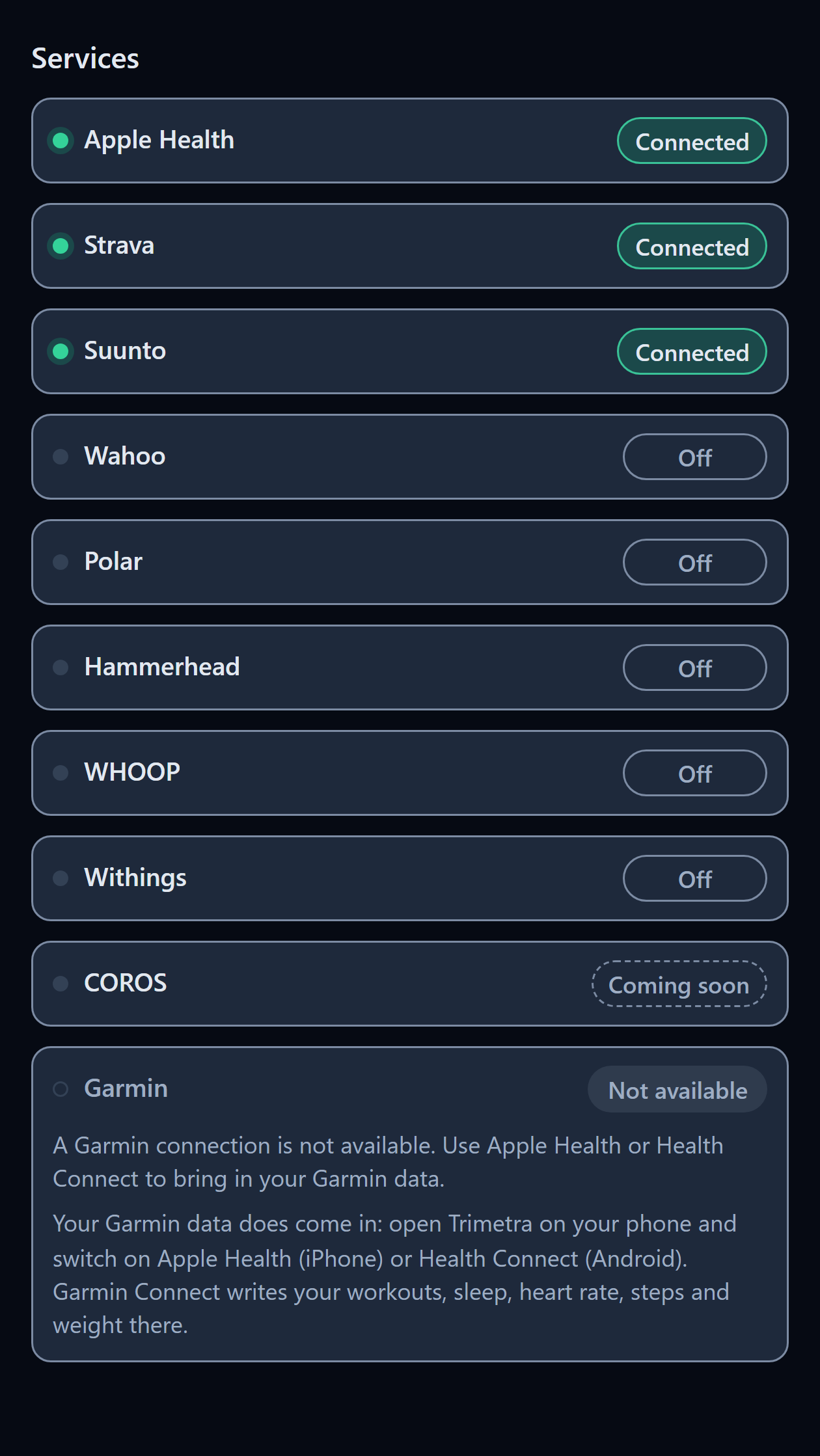
Trimetra reads from:
- Apple Health (iPhone): workouts with route, heart rate, time in zones and calories, plus steps, sleep, resting heart rate, HRV and weight. Anything that writes to Apple Health comes along, including Apple Watch and Garmin Connect.
- Health Connect (Android): workouts with heart rate, steps, sleep, resting heart rate, HRV and weight.
- Strava: activities with route and heart-rate stream.
- Wahoo, Suunto, Polar and Hammerhead: workouts directly from the brand’s cloud. Suunto and Polar also send steps and sleep, and Polar sends resting heart rate and HRV as well.
- WHOOP: workouts, sleep, resting heart rate and HRV.
- Withings: weight, body composition, sleep, resting heart rate and workouts.
- COROS (coming soon): a direct COROS connection is built and being verified.
- Manual entry and Trimetra’s own recorder: any session, plus HRV, resting heart rate, sleep and weight by hand.
Planned sessions can be sent to:
- Apple Watch through Apple’s WorkoutKit: running and cycling with steps and target ranges, plus walking and inline skating.
- Suunto watches: running and cycling sessions as Suunto guides for the coming days.
- Wahoo ELEMNT: cycling sessions with %FTP targets, pushed to your Wahoo calendar.
- Files: .zwo for Wahoo or Zwift, .mrc for a Hammerhead Karoo, and a TCX workout for other apps and devices.
- Your own calendar: a personal calendar subscription for Google, Apple or Outlook. It updates itself when the plan shifts and carries only the session type, the duration and your races; pace, power and heart rate stay in the app.
For Apple Watch, Suunto and Wahoo there is an optional automatic mode: once you have sent a session yourself, later plan changes are re-sent without another tap. It can be switched off per destination.
Garmin is not on either list. Trimetra does not use the Garmin Connect API. Garmin activities reach Trimetra through Apple Health, Health Connect or Strava. Planned sessions cannot be sent to a Garmin watch.
Quick answers
Does Trimetra work with Garmin?
Partly. There is no direct Garmin connection; Garmin workouts reach Trimetra through Apple Health on iPhone or Health Connect on Android, which Garmin Connect fills itself, and through Strava. Sleep, heart rate, steps and weight come along the same way, and Strava also brings routes. Garmin Connect does not pass its HRV to Apple Health or Health Connect, so if HRV matters to you, enter your morning HRV by hand or use a device that does write HRV, such as an Apple Watch, WHOOP or Polar. Garmin-only metrics such as Body Battery, Training Status and Garmin’s VO2max estimate do not come through either. Trimetra cannot put planned sessions on a Garmin watch. For athletes looking for an alternative after Garmin’s API change, that is the trade-off: your data comes in, but the workouts do not go out to the watch.
Will Trimetra change my zones or thresholds without asking?
No. Every threshold change is a proposal with Apply and Ignore until it changes. Ignoring is remembered, and the same proposal does not come back unless your training moves the estimate meaningfully. Lowering a threshold needs repeated hard evidence over several weeks, and a quiet spell is never treated as proof that you got slower.
What does Trimetra cost?
The first month is free with everything switched on. After that a subscription is EUR 9.99 a month or EUR 99.99 a year, and the App Store and Google Play show the price in your own currency. There is no free tier: the trial shows the whole app, and after it the subscription covers everything. Trimetra runs on iPhone, Android and the web, in English, Dutch, German and French. Your data is stored in the EU (Frankfurt), is never shared for advertising, and can be deleted at any time.
Author: Maikel Rooyakkers, developer of Trimetra, edited by the5krunner.
If you enjoyed reading this, here is another in the Indie Spotlight series: openExpress brings Garmin updates, maps and apps to Linux.
Last Updated on 18 October 2026 by tfk the5krunner
Small things I always use
- Garmin 90-degree charging adapter: Charges your Garmin from any USB-C cable. Essential when travelling. I use one.
- Body Glide: The blue anti-chafe stick swimmers and runners carry. I use it.
- Speedo earplugs: Fewer ear infections and no cold-water dizziness. I use them.
- Dryrobe Advance: My winter changing robe for open-water swims. I use one. A cheaper option is the AONYIYI changing robe.
- Maurten: Race fuel that stays easy on the stomach. I use them.
- Beet It Sport nitrate shots: Beetroot shots I take in the days before a race. I use them.
- Garmin charging puck: The quickest way to top up before a session. I use one.
- Injinji: Toe socks that stop rubbing, so you run more. I use them.
- Ultimate toe protectors: Stop black toenails on long runs. They work. I use them.
- Compressport R2 v2 calf sleeves: My calf sleeves of choice. I use them.
- Cellucor C4: My pre-workout before hard sessions.
- TPU tubes: Schwalbe Aerothan, Tubolito and Pirelli SmarTube. Light, tiny spares. I use all three.
- G8 insoles: Adjustable insoles that are good. I use them.
- Cycplus Cube: A 97g electric pump that gets a road tyre rideable in two minutes. I carry one. 5% off with code THE5KRUNNER.
Watches and sensors
- Polar H10: My daily driver for waking HRV.
- Polar Verity Sense: My backup arm-worn HR sensor.
- Nomad bedside charger: Charges my iPhone and Apple Watch overnight. I use it, and many of their bands.
- Train.Red: The best muscle oxygen sensor I’ve used.
- Tymewear: Accurate heart rate and reliable ventilatory zones. I use it to pace endurance rides over an hour.
- Garmin Forerunner 970: A pro-grade triathlon watch. I use this.
- Apple Watch Ultra 4: My daily smartwatch. No phone needed on rides.
- Garmin Fenix 9 Pro: I’ve just bought one.
On the bike
- Continental GP5000 for everyday riding, and Aero 111 on the front for special occasions.
- Helmets: Specialized S-Works Evade 3 for road riding, and Rudy Project Wing for TT-style races. I use both.
- Ravemen FR300: A front light that mounts under your Garmin or Wahoo. I use one.
- Wahoo TRACKR Radar: I use it on one bike and Varia on the other. They perform the same.
- Garmin Varia RTL515: Radar that warns you of cars from behind. I use this model.
- Wahoo ELEMNT Roam 3: The bike computer that’s easy to use. I use mine on most rides.
- Favero Assioma Pro RS2: Accurate power pedals that swap easily between bikes. I use this model.
Home and indoor training
- NPE Runn: Makes my basic treadmill smart, sending more accurate speed and distance to my watch and Zwift. I use it.
- Google Wifi: Keeps Zwift connected in my pain cave. I use it.
- Apple TV 4K: Zwift on the big screen. I use two.
- Google Nest Doorbell (wired, 2nd gen): My video doorbell, running in both Google Home and Apple Home. I use it.
Health, recovery and sleep
- FreeStyle Libre 3 Plus: Shows how my blood sugar responds to diet.
- hDrop: Measures my sweat loss in summer and indoors.
- Fourth Frontier Zone: Checks my heart under load in hard sessions.
- Oura Ring 5: My partner’s recovery tracker of choice.
- Eight Sleep: A cooling mattress cover my partner and I use nightly.
Reader-Powered Content

This content is not sponsored. It’s mostly me behind the labour of love, which is this site, and I appreciate everyone who supports it.
Support the site: Follow (free, fewer ads) · Subscribe (paid, ad-free) · Buy Me A Coffee ❤️
Written by real people, with AI assistance. Fact-checked and verified for originality. See the Editorial Policy. FTC: Affiliate Disclosure — some links pay commission. As an Amazon Associate, I earn from qualifying purchases.

tfk is the founder and author of the5krunner, an independent endurance sports technology publication. With 20 years of hands-on testing of GPS watches and wearables, and competing in triathlons at an international age-group level, tfk provides in-depth expert analysis of fitness technology for serious athletes and endurance sport competitors. See the gear tfk uses. ID
