
For most riders, the best device for Zwift and other indoor cycling apps is an Apple TV 4K plugged into a TV they already own. It costs £299 / $299 new, runs Zwift, MyWhoosh and Rouvy, and is ready as soon as the TV is on. Before buying anything, try the phone, tablet or laptop you already have, because each of them runs the main apps. The best picture comes from a gaming PC and a 120Hz TV, which is also the most expensive option.
I’ve ridden Zwift and MyWhoosh on an iPhone, an iMac, an Apple TV 4K and a Windows PC with an RTX 3080 graphics card, and my Zwift and MyWhoosh setup comparison has video from each one. I use two Apple TVs at home.
From cheapest to best
| Setup | What you buy | Cost | What you get |
|---|---|---|---|
| Phone you already own | Nothing, or a cable to the TV | Nothing | Every major app on a small screen, with simpler graphics |
| iPad or tablet | A tablet and a stand or bar mount | About £399 / $399 for a new iPad | A screen you can read on the bars, and every major app |
| Computer you already own | An HDMI cable, and an ANT+ USB stick if a sensor needs one | Close to nothing | The full desktop apps on your TV, with graphics that depend on the computer’s age |
| Apple TV 4K | A new fourth-generation box, or a used third-generation model | £299 / $299 new. Gen 3 $50 (used) | Zwift, MyWhoosh and Rouvy on a big screen from one small, silent box |
| Mac mini | A Mac mini and an HDMI cable | About £809 / $779 | A quiet computer with better graphics than Apple TV |
| Gaming PC and 120Hz TV | A Windows PC with a strong graphics card, and a 4K TV that runs at 120Hz | The most | Zwift’s best graphics at 4K and 120fps |
Most riders end up somewhere in between. A household with a decent laptop and a TV needs only a cable, while a rider building a permanent pain cave gets more from a dedicated box than from a phone on the handlebars.
Which apps run on which device
| App | Computer | Phone or tablet | Apple TV |
|---|---|---|---|
| Zwift | Yes | Yes | Yes |
| MyWhoosh | Yes | Yes | Apple TV 4K from 2021 onwards |
| Rouvy | Yes | Yes | Yes |
| TrainingPeaks Virtual | Yes | Yes | Yes |
| FulGaz | Yes | Yes | Yes |
| Kinomap | Browser on Windows, iPad app on Apple silicon Macs | Yes | Yes |
| TrainerRoad | Yes | Yes | No |
| Wahoo SYSTM | Yes | Yes | No |
TrainerRoad and Wahoo SYSTM have no Apple TV app, so their users need a computer, tablet or phone, or must mirror that screen to the TV. MyWhoosh needs the 2021 second-generation Apple TV 4K or later, so check the model before buying a used box. Some older Macs running Intel silicon will have compatibility issues.
The best indoor cycling apps guide has prices for these and more than 100 smaller apps.
Phone or tablet: start with what you own
A phone runs the full app, and it is the cheapest way to find out whether you will keep training indoors. My iPhone 15 Pro ran Zwift at 30fps on its Basic graphics setting, and the picture was perfectly usable, although the menus were fiddly on a screen that size. You can probably mirror the phone to your TV, which gives you the big screen.
More expensive trainers can link to your home router by cable if you buy an Ethernet adapter. This is the solution to avoid Wi-Fi dropouts.
An iPad is the better small-screen choice, because it is big enough to read on the bars or on a stand in front of the bike. Apple’s cheapest iPad sells for about £399 / $399 on Amazon. MyWhoosh needs at least 3GB of memory, so some older iPads won’t run it.
A computer you already own
A laptop or desktop connected to the TV by HDMI puts the full desktop version of each app on a big screen. Zwift’s minimum is an Intel Core i3 or AMD Athlon processor with 8GB of memory, and it recommends an Intel Core i7 or Apple silicon with 16GB. My 2019 iMac ran Zwift on its Medium graphics setting at about 53fps, which looked better than the phone but showed less detail than the gaming PC. A USB ANT+ stick adds any sensor that doesn’t use Bluetooth.
A Mac mini is the quiet way to buy a computer for the job. It sells for about £809 / $779 on Amazon, and Zwift lists Apple silicon in its recommended specification. In my experience Zwift still runs better on Windows, so a Mac mini isn’t the route to the best picture.
Apple TV 4K: the pick for most riders
Apple TV 4K is the simplest way to put the main apps on a big screen. The small, silent box runs Zwift, MyWhoosh, Rouvy, TrainingPeaks Virtual, FulGaz, and Kinomap, and it also gives an old TV modern streaming apps. The fourth-generation model costs £299 / $299 and has an A19 chip and Ethernet on every unit. Apple announced nothing for indoor training, so a used third-generation Apple TV 4K does the same job for less.
Zwift runs its Basic graphics profile on Apple TV, which leaves out the high-resolution textures a good computer shows. MyWhoosh ran at 30fps on every device I tested, and the 60fps option it added in 2025 has since been switched off. Even so, my Apple TV gave a noticeably better picture than my 2019 iMac.
Zwift on Apple TV allows only two Bluetooth connections, so a trainer and a heart rate strap use them both. A trainer connected by Wi-Fi or Ethernet, such as a Wahoo KICKR V6 with Direct Connect, doesn’t take a Bluetooth slot. Some trainers also pass on the heart rate from your strap, and the Zwift Companion app can act as a bridge for an extra sensor, although not always reliably. MyWhoosh on Apple TV also relies on its Link phone app.
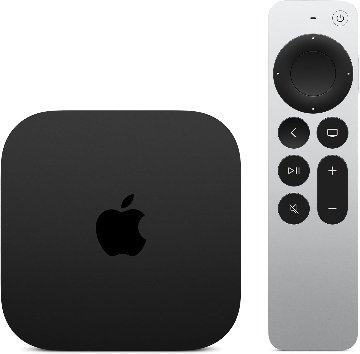
Apple TV 4K (4th generation)
Apple's fastest streaming box answers Siri hands-free from across the room, plays surround sound through four HomePods and helps you find a lost remote.
Gaming PC and a 120Hz TV: the best picture
The best Zwift picture I’ve had came from a Windows PC with an Nvidia RTX 3080 graphics card driving a 48-inch LG OLED TV. Zwift ran its Ultra profile at 4K and 120fps, with crisp shadows, roadside crowds, and scenery that loaded before I reached it. MyWhoosh also looked better on the PC, with moving ripples on water, even though it ran at 30fps.
The app, the graphics card, and the TV all have to support 120fps to get it, and Apple TV and MyWhoosh don’t. Zwift depends more on the processor’s clock speed than on its number of cores, and a faster processor helps most in big group rides. A used RTX 3080 is still enough for both apps, and 16GB of memory is the sensible minimum. Connecting the trainer and the PC by cable to the same network switch gives the most reliable link.
Few riders will build a PC just for Zwift. A good gaming PC you already own will run every app well.
Quick answers
Can I run Zwift on my phone?
Yes. Zwift runs on iPhone and on Android phones with Android 9 or later and 3GB of memory. The small screen makes the menus fiddly, so a tablet or a TV is better for regular riding.
Which Apple TV do I need for MyWhoosh?
MyWhoosh needs the second-generation Apple TV 4K, from 2021, or a later model. Zwift runs on every Apple TV 4K and on the older Apple TV HD.
Does TrainerRoad work on Apple TV?
No. TrainerRoad and Wahoo SYSTM have no Apple TV app. Use a computer, tablet or phone instead, or mirror its screen to the TV.
How many sensors can I connect to Zwift on Apple TV?
Zwift on Apple TV allows two Bluetooth connections. A trainer connected by Wi-Fi or Ethernet does not count towards them, and the Zwift Companion app can bridge an extra sensor.
Is a gaming PC worth it for Zwift?
Only if you want the best picture. A gaming PC runs Zwift at its Ultra graphics setting and up to 120fps on a suitable TV, while Apple TV 4K is good enough for everyday training.
Screen size and position
| Screen | Where it works |
|---|---|
| 11 to 13 inches | Tablet on the bars or a stand |
| 24 to 32 inches | Monitor on a desk in front of the bike |
| 43 to 55 inches | TV in a spare room or garage |
| Over 55 inches | A permanent room with space to sit further back |
Put the screen straight ahead at eye height when you ride on the hoods, so you aren’t craning your neck on long rides. My OLED TV was a clear step up from a 2014 LCD TV, and I’d choose something bigger than 48 inches for a permanent room.
Use Ethernet where you can, for the device and for the trainer if it supports it. Filmed-route apps also need fast broadband, because Zwift Video used about 15GB per 30 minutes at 4K in Shane Miller’s test. Zwift and MyWhoosh publish their own device lists, at Zwift support and MyWhoosh help.
For the hardware under the bike, see the best smart trainer guide. If you already own a bike, the best indoor cycling setup page lists a complete starter kit.
Best-of guides
Explore the full resource library
This site covers endurance sport technology across a range of dedicated reference sections. Each one collects the most relevant articles, tests, and analysis on its topic in one place.
Buyer guides
- Best sports watch: tested recommendations by sport and athlete type (triathlon, running, marathon, cycling, hiking, and women)
- Best Garmin watch: Forerunner versus Fenix by series, sport, and budget
- Best wearables: fitness trackers, recovery trackers, heart rate monitors, running power meters, and female athlete tech
- Best cycling products: computers, smart trainers, indoor cycling apps, power meters, and cycling heart rate monitors
- Buying guides: every upgrade guide and product comparison in one place, by brand, for owners deciding whether to move to the newest model
- Gear I use: the watches, bikes, sensors, fuel and sleep kit tfk actually trains and races with, and what his partner uses
Brand and product guides
- Amazfit: the full Amazfit range from Balance to Cheetah to T-Rex, accuracy tests, HYROX partnership, and Zepp Health analysis
- Apple Watch: athlete-first coverage of Apple Watch across running, cycling, and triathlon
- COROS: watches, features, and firmware across the full COROS range
- Garmin: the company, the platform and the full range, and the starting point for choosing across every Garmin product line
- Garmin Edge: bike computers from entry-level navigation to flagship endurance and mountain biking
- Bike computers: Garmin, Wahoo, Hammerhead, COROS and the value brands compared
- Bryton: the Rider range compared, from basic GPS units to the S810 with maps
- Garmin Fenix: every model, feature, and firmware development for Garmin's flagship outdoor watch
- Garmin Fenix 8 Series: which variant to buy, upgrade advice, accuracy data, and the full Fenix 8 review and firmware coverage
- Garmin Forerunner: the full Forerunner line covered from entry level to triathlon flagship
- Garmin Instinct: rugged GPS watches for endurance and adventure athletes
- Garmin Features Explained: how Garmin's metrics work, from Training Load and Body Battery to Race Predictor and HRV Status
- Garmin Connect IQ charts: the most popular watch faces, apps, data fields and music services on the Connect IQ Store, updated monthly
- Google Fitbit: Fitbit Edge, Fitbit Air, Google Health, Pixel Watch and the Wear OS platform
- Magene: which Magene bike computer to buy, from the C506 to the C706, with tested verdicts
- Polar: watches, sensors, Polar Flow and training science across the full Polar range
- Runna: coach-written running plans that adapt as you train
- Suunto: Race, Vertical, Run and the SuuntoPlus ecosystem
- Strava: features, privacy, segments, and how Strava fits into a serious training setup
- Ride with GPS: route planning, navigation and how it works alongside Strava
- Wahoo: KICKR trainers, ELEMNT bike computers, and the Wahoo ecosystem
- WHOOP: strain, recovery, sleep and the full WHOOP ecosystem
Specifications database
- Full Specifications Database: detailed spec sheets, battery life, sensor lists and generation-on-generation comparisons for current Garmin, COROS, Amazfit, Samsung, Google Fitbit, Huawei, Polar, Suunto, Wahoo and Apple Watch models
Glossary
- Sports Technology Glossary: non-branded terminology across running, cycling, swimming, triathlon, hiking, strength training, HYROX, sensors, ecosystems, and brands
Sport and topic guides
- Running Watches: how to choose by discipline (road racing, trail, track, beginner, and multisport)
- Triathlon and Multisport Technology: watches, sensors, and race-day tools for swimmers, cyclists, and runners
- HYROX: training science, race analysis, and technology for the functional fitness race format
- parkrun: technology, training, and performance for the weekly 5K
- Hiking Technology: navigation, safety, and trail tech for walkers and hikers
- Heart Rate Monitoring: optical sensors, chest straps, accuracy comparisons, and how to set training zones
- Optical Sensors (PPG): the 40 things a wrist optical sensor could measure, from heart rate to glucose, ranked by evidence
- GPS Accuracy: how satellite systems perform across brands, terrains, and conditions
- Sports Watch Battery Life: battery claims, real-world tests, and how to manage battery life across Garmin, Apple, Amazfit and COROS
- Recovery Trackers: WHOOP, Oura, and the science of readiness scoring
- Muscle Oxygen Sensors: SmO2 and NIRS explained, Train Red and Moxy compared, and the category from BSX and Humon to Garmin and WHOOP
- Female Athlete Tech: wearables, physiology, and performance for female endurance athletes, covering cycle-synced training, RED-S, HR accuracy, and VO2max
- Sports Science: peer-reviewed research on HRV, VO2max, lactate threshold, running power, wearable accuracy, and supplementation
- Testing Methodology: how this site tests GPS accuracy, heart rate, battery life, and other performance claims
Content series
- Release Radar: confirmed launches, leaks, and rumours across Garmin, Apple, COROS, Polar, Suunto, and Wahoo
- Deep Dive Feature Files: weekly firmware feature updates across all brands (bug fixes excluded)
- Fix Files: weekly firmware bug fix tracking across all brands
Small things I always use
- Garmin 90-degree charging adapter: Charges your Garmin from any USB-C cable. Essential when travelling. I use one.
- Body Glide: The blue anti-chafe stick swimmers and runners carry. I use it.
- Speedo earplugs: Fewer ear infections and no cold-water dizziness. I use them.
- Dryrobe Advance: My winter changing robe for open-water swims. I use one. A cheaper option is the AONYIYI changing robe.
- Maurten: Race fuel that stays easy on the stomach. I use them.
- Beet It Sport nitrate shots: Beetroot shots I take in the days before a race. I use them.
- Garmin charging puck: The quickest way to top up before a session. I use one.
- Injinji: Toe socks that stop rubbing, so you run more. I use them.
- Ultimate toe protectors: Stop black toenails on long runs. They work. I use them.
- Compressport R2 v2 calf sleeves: My calf sleeves of choice. I use them.
- Cellucor C4: My pre-workout before hard sessions.
- TPU tubes: Schwalbe Aerothan, Tubolito and Pirelli SmarTube. Light, tiny spares. I use all three.
- G8 insoles: Adjustable insoles that are good. I use them.
- Cycplus Cube: A 97g electric pump that gets a road tyre rideable in two minutes. I carry one. 5% off with code THE5KRUNNER.
Watches and sensors
- Polar H10: My daily driver for waking HRV.
- Polar Verity Sense: My backup arm-worn HR sensor.
- Nomad bedside charger: Charges my iPhone and Apple Watch overnight. I use it, and many of their bands.
- Train.Red: The best muscle oxygen sensor I’ve used.
- Tymewear: Accurate heart rate and reliable ventilatory zones. I use it to pace endurance rides over an hour.
- Garmin Forerunner 970: A pro-grade triathlon watch. I use this.
- Apple Watch Ultra 4: My daily smartwatch. No phone needed on rides.
- Garmin Fenix 9 Pro: I’ve just bought one.
On the bike
- Continental GP5000 for everyday riding, and Aero 111 on the front for special occasions.
- Helmets: Specialized S-Works Evade 3 for road riding, and Rudy Project Wing for TT-style races. I use both.
- Ravemen FR300: A front light that mounts under your Garmin or Wahoo. I use one.
- Ravemen FR1000: The light and the computer mount in one unit, so nothing else goes on the bars. Better than mine.
- Ravemen FR1500SE: 1,500 lumens hanging under your Garmin, for proper night rides.
- Ravemen FR1100SE: 1,100 lumens under your Garmin, and up to 46 hours on slow flash.
- Ravemen FR500: A brighter FR300 with the same mount.
- Wahoo TRACKR Radar: I use it on one bike and Varia on the other. They perform the same.
- Garmin Varia RTL515: Radar that warns you of cars from behind. I use this model.
- Wahoo ELEMNT Roam 3: The bike computer that’s easy to use. I use mine on most rides.
- Favero Assioma Pro RS2: Accurate power pedals that swap easily between bikes. I use this model.
Home and indoor training
- NPE Runn: Makes my basic treadmill smart, sending more accurate speed and distance to my watch and Zwift. I use it.
- Google Wifi: Keeps Zwift connected in my pain cave. I use it.
- Apple TV 4K: Zwift on the big screen. I use two.
- Google Nest Doorbell (wired, 2nd gen): My video doorbell, running in both Google Home and Apple Home. I use it.
Health, recovery and sleep
- FreeStyle Libre 3 Plus: Shows how my blood sugar responds to diet.
- hDrop: Measures my sweat loss in summer and indoors.
- Fourth Frontier Zone: Checks my heart under load in hard sessions.
- Kineon MOVE+: Red and infrared light for sore knees, Achilles and other joints after hard training. I use it.
- Oura Ring 5: My partner’s recovery tracker of choice.
- Eight Sleep: A cooling mattress cover my partner and I use nightly.
Reader-Powered Content

This content is not sponsored. It’s mostly me behind the labour of love, which is this site, and I appreciate everyone who supports it.
Support the site: Follow (free, fewer ads) · Subscribe (paid, ad-free) · Buy Me A Coffee
Written by real people, with AI assistance. Fact-checked and verified for originality. See the Editorial Policy. FTC: Affiliate Disclosure — some links pay commission. As an Amazon Associate, I earn from qualifying purchases.
