Garmin Recovery Time
Reliable for cardiovascular stress; underestimates neuromuscular recovery after hard races and downhill running
Judging whether a session was genuinely hard or merely felt hard; spotting accumulated fatigue across a training block
Heat, dehydration and optical HR errors inflate the figure independently of actual effort
Quick answers
Does Garmin Recovery Time mean I cannot train at all?
Recovery Time flags the hours before another hard effort is advisable — easy aerobic activity during the countdown is fine and consistent with active recovery guidelines. The metric specifically targets readiness for high-intensity sessions, not movement in general.
Why is my Garmin Recovery Time so high after an easy run?
Any recorded activity generates some EPOC and therefore a non-zero figure; an easy run at genuinely low intensity typically produces under 24 hours. A figure that seems high for a low-effort session usually indicates heart rate was elevated by heat, dehydration, or pre-existing fatigue.
Does Garmin Recovery Time update based on sleep?
The initial post-activity estimate is based on the session’s Training Effect; the countdown then updates throughout the day using sleep, stress, relaxation, and daily activity. Training Readiness combines Recovery Time, sleep, HRV status, and training load for a composite morning readiness score.
Why does my Garmin Recovery Time seem inaccurate?
Recovery Time measures cardiovascular stress via heart rate and cannot detect muscular or neuromuscular fatigue directly. Sessions in heat, with wrist-based HR during intervals, or completed while dehydrated will produce inflated figures relative to actual physiological demand.
How accurate is Garmin Recovery Time?
Garmin Recovery Time is accurate when its source heart rate data is accurate and when used for running/cycling activities rather than strength activities.
Garmin Recovery Time — A Deep Dive
When Garmin Recovery Time Is Actually Useful
- Recovery Time earns its place in edge scenarios. If the watch shows 8 hours remaining and a hard morning session is planned, I have learned to trust it and shift the workout to the afternoon — on several occasions, that call has been the right one.
- Stretching, a dog walk, or a period of genuine low stress can trigger Garmin’s behind-the-scenes adjustment and shorten the figure, though in practice it has never moved by more than an hour.
- A Recovery Time of 1 or 2 hours is a prompt to crack on and bring a session forward before the day gets away.
- The one area where I treat the figure with scepticism is after strength sessions — a hard leg day barely registers, yet the impact on the next run or ride is real and consistent.
Recovery Time tells an athlete how many hours must elapse before the body is ready to handle another hard training session.
Garmin Recovery Time is a post-activity estimate, expressed in hours, of the minimum period required for full physiological recovery from a completed workout. The metric is calculated by Garmin using a methodology developed by Firstbeat Analytics and draws on heart rate data collected throughout the activity. It appears on the watch immediately after a session ends and declines as the recovery window progresses. The estimate is based on the cardiovascular stress of the just-completed session. It accounts for residual fatigue from up to 4 days and updates throughout the day based on sleep, stress, relaxation, and physical activity (but not nutrition or illness).
What the Number Actually Means
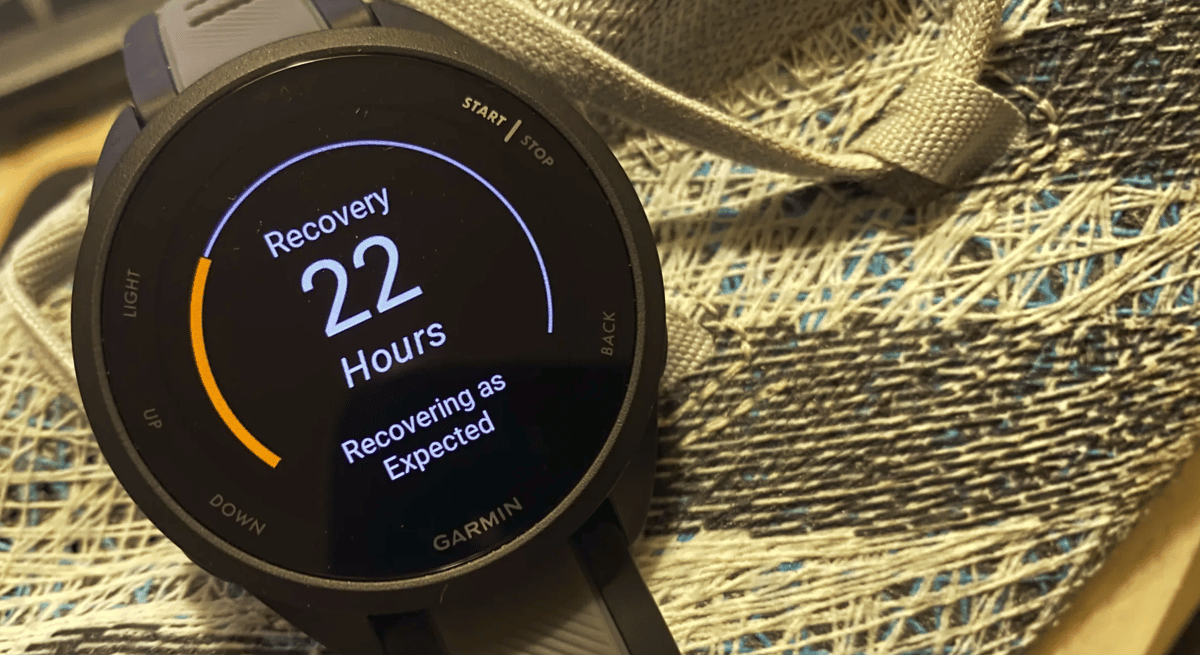
Recovery Time is expressed as a single integer — typically between 0 and 96 hours — representing the estimated time needed for full physiological recovery from the completed activity. A figure of 24 hours or below indicates a session the body can absorb quickly; figures above 48 hours indicate a high-stress effort such as a long run, tempo session, or race. The figure reflects training load intensity rather than duration alone. A short, very high-intensity interval session can produce a recovery estimate comparable to a long steady run, because both generate significant cardiovascular stress. Age affects recovery capacity, so two athletes completing identical sessions may receive different estimates if their physiological profiles differ.
How Garmin Calculates It
Garmin calculates Recovery Time using Firstbeat Analytics methodology, which was developed before Garmin acquired Firstbeat in 2020. The calculation is based on excess post-exercise oxygen consumption (EPOC), a physiological measure of the metabolic disturbance caused by exercise. EPOC is estimated from heart rate data collected during the activity. The algorithm models the relationship between heart rate, oxygen consumption, and the biochemical debt accumulated by working muscle tissue. A higher EPOC value produces a longer Recovery Time estimate.
The watch requires a recorded activity with continuous heart rate data to generate Recovery Time. Sessions recorded without heart rate — or where heart rate data is significantly interrupted — will produce no estimate or an unreliable one. The metric updates on the watch face as the recovery window counts down, reaching zero when the estimated recovery period has elapsed.
On compatible devices, the figure continues to adjust throughout the day after the initial post-activity estimate is set. An especially stressful day or a poor night’s sleep will extend the recommended time; good sleep, low stress, and light daily activity can all shorten it.
What Affects the Reading
Heat and humidity elevate heart rate beyond what the underlying effort alone would produce, and wrist-based optical heart rate introduces measurement error that the EPOC calculation inherits. Because the algorithm uses heart rate as its primary input, sessions in hot conditions or recorded with an optical sensor during high-cadence intervals generate higher EPOC estimates than equivalent efforts in cool conditions or with a chest strap.
Caffeine, dehydration, and elevated stress all raise exercise heart rate, biasing the estimate upward. Activity type also matters: cycling and swimming typically generate lower Recovery Time estimates than running at equivalent perceived effort, because those sports place less eccentric load on the body. Recovery Time reflects cardiovascular stress as measured by heart rate; it captures no information about muscle damage from downhill running or prolonged racing.
How Accurate Is It
Independent validation of Garmin’s specific Recovery Time implementation is limited. The underlying EPOC methodology has a stronger evidence base. Firstbeat published a white paper documenting the relationship between heart rate, EPOC, and recovery requirements, which Garmin’s algorithm draws upon. Research on EPOC-based recovery models suggests that heart rate alone captures cardiovascular recovery well but underestimates neuromuscular recovery time, particularly after eccentric-dominant exercise such as downhill running or marathon racing.
Trend reliability — the degree to which the metric accurately distinguishes harder sessions from easier ones within an individual’s training log — is generally considered stronger than absolute accuracy. The estimate is more useful as a relative indicator of session demand than as a precise countdown to readiness.
Competitor Equivalents
- Polar: Polar provides Recovery Status within Training Load Pro, estimated using orthostatic HRV test data alongside training load history — a broader physiological input than Garmin’s single-session heart rate trace.
- Apple: Apple Watch offers no post-activity recovery hour countdown; its Fitness app surfaces Training Load as a weekly metric only.
- COROS: COROS provides a Recovery Time estimate in Training Hub calculated from acute-to-chronic load ratios, weighting session history more heavily than Garmin’s EPOC-based single-session approach.
- Suunto: Suunto’s Resources metric expresses recovery readiness as a percentage of available energy rather than a time-based countdown, drawing on heart rate, sleep, and stress data.
- Wahoo: Wahoo SYSTM provides recovery guidance via the TRIMP model targeting primarily cycling, with no post-activity recovery hour countdown equivalent to Garmin’s implementation.
Which Garmin Devices Support It
Recovery Time was introduced alongside Firstbeat’s EPOC-based training load features, making it available on mid-range and high-end Garmin running watches from approximately 2014 onwards. The Forerunner 265 and later models in the same tier carry Recovery Time as part of the full training intelligence suite. The Forerunner 970 and Fenix 8 series, as current-generation flagship and high-tier devices, support the feature in full. The Forerunner 165 carries a partial training intelligence suite. The Forerunner 55 and entry-tier devices below the Forerunner 165 level support only VO2 max estimation and do not include Recovery Time. The Instinct 3 series carries a partial training intelligence suite. Garmin Edge cycling computers, including the Edge 540, Edge 840, and Edge 1050, support Recovery Time for recorded cycling activities using the same EPOC methodology.
Where to Find It
- Post-activity summary — appears automatically on the watch immediately after saving an activity, alongside Training Effect and other post-activity metrics.
- Watch widget — available in the widget loop on supported devices; displays remaining hours counting down in real time; the figure updates throughout the day as sleep, stress, and activity data adjusts the estimate up or down.
- Activity data field — available as a data field during a subsequent recorded activity on supported devices.
- Garmin Connect mobile — visible in the activity details view under the Training section; presents the figure as recorded at session end; historical figures accessible within individual activity records; no dedicated trend chart.
- Garmin Connect web — appears in the activity summary, matching the mobile app presentation with no additional detail.
- Subscription — no Garmin Connect Plus subscription required to access Recovery Time.
Common Problems and Misreadings
Athletes often see Recovery Time lower than expected after a seemingly hard session. This happens when heart rate stays lower than usual — heat adaptation, conservative pacing, or fatigue blunting cardiac response. See FAQ above for detail.
Recovery Time can exceed 72 hours after races or very long efforts, reflecting only the acute stress of that single session. It does not account for training history or adaptation from high-volume training. Experienced high-mileage runners typically recover faster than the number suggests.
The metric resets to zero when the countdown expires regardless of subsequent training or poor sleep. Two moderate sessions on consecutive days can leave more cumulative fatigue than the figure shows, because it evaluates each session in isolation.
How to Improve It
Recovery Time is guidance, not a strict training target. The goal is balanced intensity distribution: hard sessions followed by enough recovery, easy sessions that produce low EPOC and clear the clock quickly. A sustained pattern of Recovery Time figures that persistently overlap with scheduled hard sessions indicates training load exceeds current recovery capacity; reducing session intensity or adding an easy day typically restores alignment.
For better accuracy, use a chest strap during intervals — it significantly reduces motion artefact and gives a cleaner heart-rate trace. In hot conditions, heart rate rises independently of effort, so longer Recovery Time figures should be interpreted with that context rather than taken at face value.
Other Points
Research on EPOC and training load links chronic underrecovery — training through elevated Recovery Time — to higher injury risk and early overreaching. Meeusen et al.’s (2013) consensus statement identifies excessive training load, along with inadequate recovery, as the primary cause of non-functional overreaching and overtraining syndrome. Recovery Time is not a clinical diagnostic tool, but persistent elevation beyond planned recovery windows matches the load patterns that precede overreaching.
Scientific Basis
Firstbeat Technologies. Science behind Firstbeat Fitness Features. White paper, 2014 (updated 2017). Precursor methodology document establishing the EPOC-based approach to estimating training load and recovery requirements from heart rate data.
Borsheim, E. and Bahr, R. (2003). Effect of Exercise Intensity, Duration and Mode on Post-Exercise Oxygen Consumption. Sports Medicine, 33(14), pp. 1037–1060. Quantified the relationship between exercise intensity, duration, and EPOC magnitude, providing the physiological basis for using EPOC as a proxy for recovery requirement.
Meeusen, R. et al. (2013). Prevention, Diagnosis and Treatment of the Overtraining Syndrome. European Journal of Sport Science, 13(1), pp. 1–24. Established consensus definitions for overreaching and overtraining and identified chronic underrecovery as the primary precipitating factor.
Halson, S.L. (2014). Monitoring Training Load to Understand Athletes’ Fatigue. Sports Medicine, 44(Suppl 2), pp. 139–147. Reviewed the limitations of single-variable models — including heart rate — for capturing neuromuscular recovery.
How It Connects to Other Features
Recovery Time feeds directly into Training Readiness, which incorporates the outstanding recovery window alongside HRV status, sleep, and acute training load to produce a composite readiness score each morning. The metric uses the same EPOC calculation as Training Effect and Training Load — Training Load aggregates EPOC across sessions over a rolling period, while Recovery Time expresses the acute recovery requirement of the most recent session alone.
Recovery Time also interacts with Training Status: a sustained pattern of sessions completed before the recovery clock has cleared is one of the signals the Training Status algorithm uses to identify an overreaching trend. [LINK: hrv-status] provides complementary information from a different physiological domain — where Recovery Time reflects cardiovascular stress from a completed session, HRV Status reflects autonomic nervous system state accumulated across multiple days.
Small things I always use
- Garmin 90-degree charging adapter: Charges your Garmin from any USB-C cable. Essential when travelling. I use one.
- Body Glide: The blue anti-chafe stick swimmers and runners carry. I use it.
- Speedo earplugs: Fewer ear infections and no cold-water dizziness. I use them.
- Dryrobe Advance: My winter changing robe for open-water swims. I use one. A cheaper option is the AONYIYI changing robe.
- Maurten: Race fuel that stays easy on the stomach. I use them.
- Beet It Sport nitrate shots: Beetroot shots I take in the days before a race. I use them.
- Garmin charging puck: The quickest way to top up before a session. I use one.
- Injinji: Toe socks that stop rubbing, so you run more. I use them.
- Ultimate toe protectors: Stop black toenails on long runs. They work. I use them.
- Compressport R2 v2 calf sleeves: My calf sleeves of choice. I use them.
- Cellucor C4: My pre-workout before hard sessions.
- TPU tubes: Schwalbe Aerothan, Tubolito and Pirelli SmarTube. Light, tiny spares. I use all three.
- G8 insoles: Adjustable insoles that are good. I use them.
- Cycplus Cube: A 97g electric pump that gets a road tyre rideable in two minutes. I carry one. 5% off with code THE5KRUNNER.
Watches and sensors
- Polar H10: My daily driver for waking HRV.
- Polar Verity Sense: My backup arm-worn HR sensor.
- Nomad bedside charger: Charges my iPhone and Apple Watch overnight. I use it, and many of their bands.
- Train.Red: The best muscle oxygen sensor I’ve used.
- Tymewear: Accurate heart rate and reliable ventilatory zones. I use it to pace endurance rides over an hour.
- Garmin Forerunner 970: A pro-grade triathlon watch. I use this.
- Apple Watch Ultra 4: My daily smartwatch. No phone needed on rides.
- Garmin Fenix 9 Pro: I’ve just bought one.
On the bike
- Continental GP5000 for everyday riding, and Aero 111 on the front for special occasions.
- Helmets: Specialized S-Works Evade 3 for road riding, and Rudy Project Wing for TT-style races. I use both.
- Ravemen FR300: A front light that mounts under your Garmin or Wahoo. I use one.
- Wahoo TRACKR Radar: I use it on one bike and Varia on the other. They perform the same.
- Garmin Varia RTL515: Radar that warns you of cars from behind. I use this model.
- Wahoo ELEMNT Roam 3: The bike computer that’s easy to use. I use mine on most rides.
- Favero Assioma Pro RS2: Accurate power pedals that swap easily between bikes. I use this model.
Home and indoor training
- NPE Runn: Makes my basic treadmill smart, sending more accurate speed and distance to my watch and Zwift. I use it.
- Google Wifi: Keeps Zwift connected in my pain cave. I use it.
- Apple TV 4K: Zwift on the big screen. I use two.
- Google Nest Doorbell (wired, 2nd gen): My video doorbell, running in both Google Home and Apple Home. I use it.
Health, recovery and sleep
- FreeStyle Libre 3 Plus: Shows how my blood sugar responds to diet.
- hDrop: Measures my sweat loss in summer and indoors.
- Fourth Frontier Zone: Checks my heart under load in hard sessions.
- Oura Ring 5: My partner’s recovery tracker of choice.
- Eight Sleep: A cooling mattress cover my partner and I use nightly.
Reader-Powered Content

This content is not sponsored. It’s mostly me behind the labour of love, which is this site, and I appreciate everyone who supports it.
Support the site: Follow (free, fewer ads) · Subscribe (paid, ad-free) · Buy Me A Coffee
Written by real people, with AI assistance. Fact-checked and verified for originality. See the Editorial Policy. FTC: Affiliate Disclosure — some links pay commission. As an Amazon Associate, I earn from qualifying purchases.
