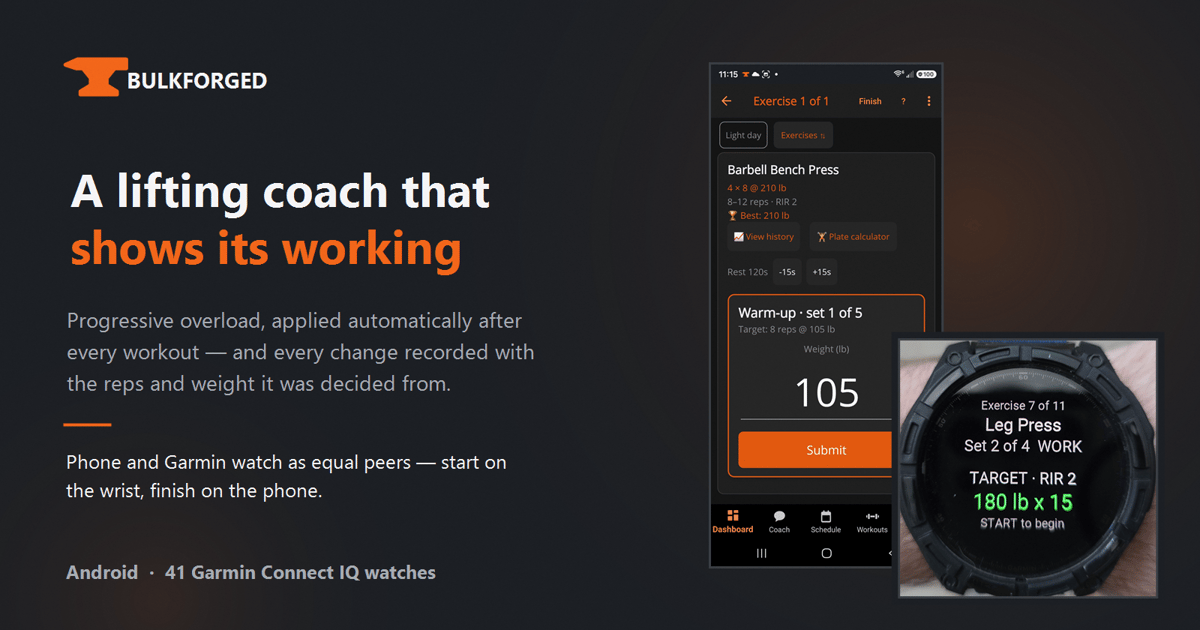
Progressive overload is the boring truth of getting stronger. Add a little more weight, or squeeze out one more rep, then track and eat and sleep, week after week. It is not a secret. It is not glamorous. And on most training apps it is also not automatic. The runner or lifter still opens a spreadsheet, or an app that behaves like one, and decides whether to add 2.5 lb to the bar or push for one more rep.
Bulkforged is designed to close that gap.
The idea: automate the small decisions, log the reasoning
TL;DR: Log a set. Bulkforged writes the next target from that set, on an Android phone or on any of 41 Garmin Connect IQ watches, and writes a plain-English change record the athlete can read and reverse.
Bulkforged is a strength-training app for Android and Garmin Connect IQ, built by Chris Jestice, that decides each week’s targets from the reps and weight the athlete actually did. Every progression call, up or down, is written to a log the athlete can read, filter and overrule.
Automatic overload is common. Adding a plain-English log of the decision behind each change, one the athlete can read, filter and overrule, is rare.
The three problems Bulkforged answers
Progression is manual. The rules of progressive overload are simple: hit the target, add a small amount next time; miss it badly, back off. Applying them by hand across dozens of lifts is tedious, and most apps make the athlete do it. Bulkforged runs that logic automatically on the reps and weight it just saw the athlete perform.
The watch is second-class. Most watch companions for training apps are a display for a phone that is doing the thinking. In Bulkforged the phone and the Garmin are peers. Either can start a session, either can finish it, and neither is a passive screen for the other.
The engine is a black box. Automatic progression is common. Bulkforged records the decision behind each change, showing the reps and weight it was decided from and the direction the target moved in.
The topology worth explaining
The watch app is a peer, not a mirror. Sessions can start on the wrist and finish on the phone, or the other way around, and progression is decided from whichever device the last set was logged on.
They never talk to each other directly. Instead, the two devices reconcile through a sync service in the background.
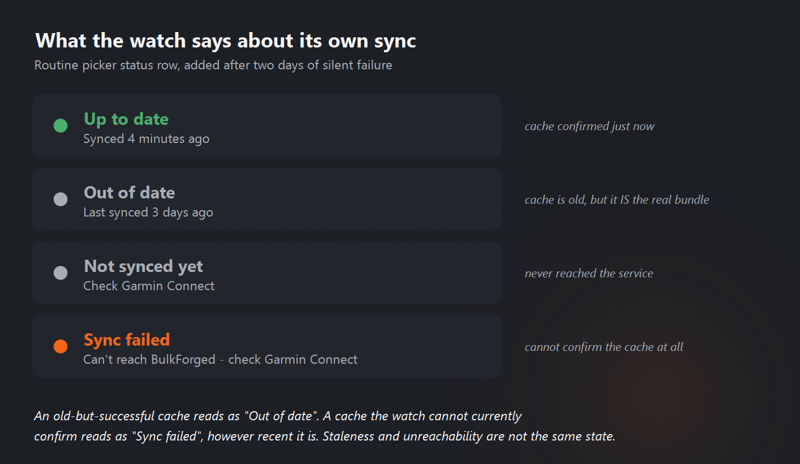
The important test for any two-peer topology is what happens when connectivity goes wrong. Bulkforged shows this as a status, not a mystery.
The Garmin app displays four sync states in plain language: “Up to date. Synced 4 minutes ago” in green. “Out of date. Last synced 3 days ago” in orange. “Not synced yet. Check Garmin Connect” in orange. “Sync failed. Can’t reach Bulkforged. Check Garmin Connect” in orange.
A stale cache and an unreachable service are different problems, and the app says so.
The decision log
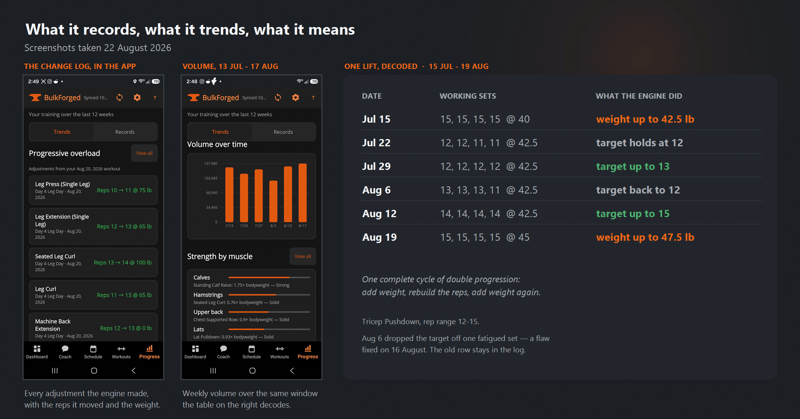
The change log lists every progressive-overload adjustment. It shows the exercise, the value that moved (reps or weight), the direction it moved in (up or down), and the working sets it was decided from.
For a given lift, the athlete can see the full history: on July 15 the target was 40 lb for 12 reps, actual was 40 lb for 12; on July 22, target 40 for 13, actual 40 for 13; on July 29, target 40 for 14, actual 40 for 14; on Aug 5, target 40 for 15, actual 40 for 15. Then, on Aug 12, the target moves from 40 lb x 15 to 42.5 lb x 12. The change is stamped with the reps and weight it was decided from.
That is a decision the athlete can read and disagree with.
A worked example: Tuesday, week three of a mesocycle
On Tuesday, a Chest and Triceps day, one of the exercises is Tricep Pushdown. In the previous week, the athlete completed all four working sets at 40 lb x 15 with an RIR of 2. The engine has watched the same lift creep from 12 reps at 40 lb to 15 reps at 40 lb over the last four weeks, and the athlete is now at the top of the target range.
When the athlete opens the session, the prescribed load is 42.5 lb x 12. That decision was made by the automation, not by a coach, and every input to it is visible in the log: previous week’s actuals, four-week trend, and the top-of-range rule that triggered the weight jump.
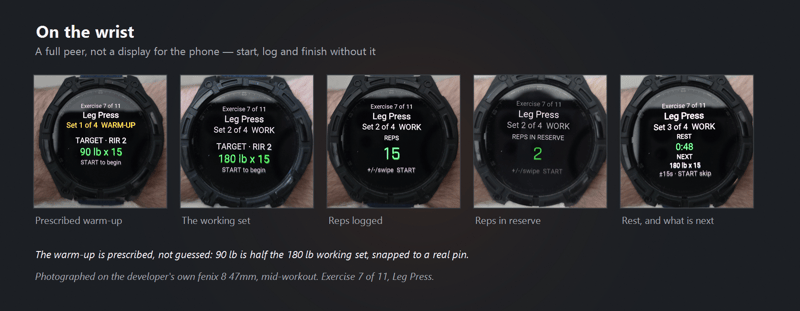
On the Garmin, the same session unfolds one screen at a time. Set 1 of 4 shows as warm-up at 90 lb x 15 with RIR 2, which is half the working weight snapped to a real plate loading. Set 2 of 4 flips to Work with target 180 lb x 15 (not the Tricep Pushdown; the wearer of the Fenix 8 in the photograph is doing a different lift). The wrist logs reps as 15, RIR as 2, then a 48 second rest timer counts down with “NEXT 180 lb x 15” beneath it.
The 90 lb warm-up is half the 180 lb working set, snapped to a real pin, not a made-up number.
Recovery, volume and the muscle map
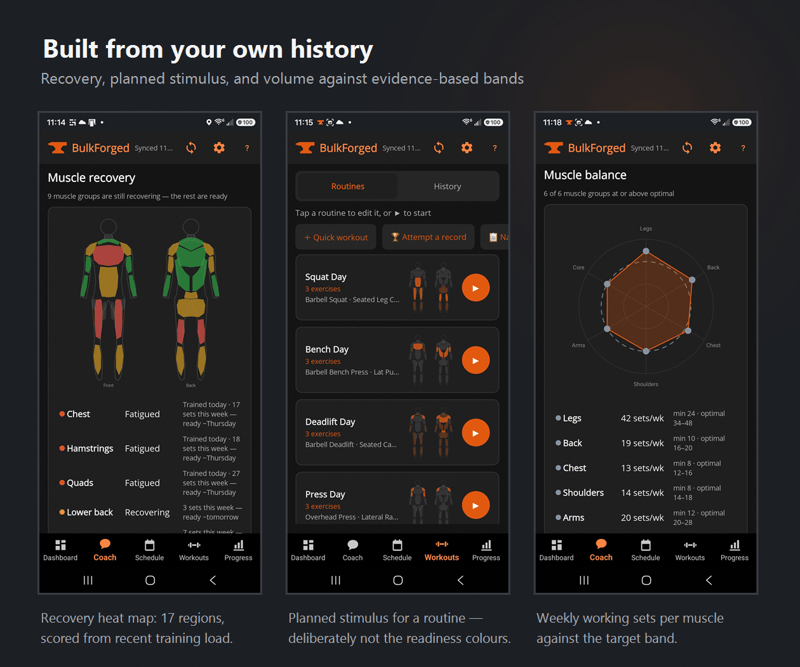
Progression by itself is not enough. Bulkforged also tracks recovery and volume, because a program that only pushes forward misses the reason for backing off.
A muscle-recovery heat map colours the front and back body silhouettes by readiness and lists the muscle groups that are still fatigued.
Every routine carries a small silhouette badge showing the stimulus it delivers, so the athlete can see at a glance which muscles a routine hits before starting it.
A weekly training-volume chart tracks working sets per muscle group over rolling six-week windows, and a muscle-balance radar chart maps that volume against target bands per muscle group.
Volume and balance are ways of describing the same problem: is the athlete training the whole body, or has one muscle group been quietly ignored for six weeks.
Watch compatibility and honest limits
Bulkforged runs on 41 Garmin Connect IQ watches from the Forerunner and Fenix families through to Edge bike computers. The phone side is Android only today. There is no iOS build and the developer does not want to promise a date; better to say so than to over-commit.
Availability and pricing
Bulkforged is available as a phone app on Android via Google Play, and as a Connect IQ app on the Garmin store. The two are meant to be installed together, but each will function on its own if the other is temporarily unavailable.
Pricing is a 14 day free trial of all features, then a basic free tier or a paid subscription at $7.99 monthly or $49.99 yearly.
The developer is one person, so the honest fine print is: report bugs, expect the occasional rough edge, and accept that this is not the same experience as an app with a team behind it. The trade-off is a design decision that a bigger team would probably have compromised.
Summary
Bulkforged is a strength app that does two things most competitors do not: it applies progressive overload automatically after every workout, and it writes every decision back to a log the athlete can read and reverse.
Under that is a two-peer topology where the Garmin watch and the Android phone are equals rather than a wrist display for the phone, and a sync-state UI that treats offline and stale as different problems.
That combination, automatic progression plus a decision log plus a peer watch, is what makes Bulkforged different from the rest of the Garmin-connected strength category. More at Bulkforged.
Quick answers
What makes Bulkforged different from other strength apps?
Two things. First, Bulkforged applies progressive overload automatically after every workout, deciding each week’s targets from the reps and weight the athlete actually did. Second, every progression decision is written to a plain-English log the athlete can read, filter and reverse. Automatic progression is common; showing the decision behind it, with the reps and weight it was decided from, is rare.
Which watches and phones does Bulkforged support?
Bulkforged runs on 41 Garmin Connect IQ watches, spanning the Forerunner and Fenix families through to Edge bike computers. The phone side is currently Android only via Google Play. There is no iOS build, and the developer has not committed to a date.
What happens if the phone and watch fall out of sync?
The Garmin app shows the sync state in plain language: ‘Up to date’ in green, or one of three orange states, ‘Out of date’, ‘Not synced yet’ or ‘Sync failed’. The app distinguishes a stale cache from an unreachable service, so the athlete can see which problem to fix rather than just knowing something has gone wrong.
Related reading on the5krunner
- Cinder: An Apple Watch Recovery App That Shows Its Working: closest editorial sibling, an Apple ecosystem strength and recovery app whose developer also publishes the math behind every score.
- Vertical AI Coach: Build Your Training Partner: another training tool built on the show-your-working principle, citing peer-reviewed research behind every coaching call.
- Beatpace: Garmin Running Music That Plays Your Workout Structure: another indie Garmin Connect IQ app, on the running rather than strength side of the platform.
Author: Chris Jestice, developer of Bulkforged, edited by the5krunner.
If you enjoyed reading this, here is another in the Indie Spotlight series: Tiles Turns Past Workouts Into a Map to Explore.
Last Updated on 12 October 2026 by tfk the5krunner
Small things I always use
- Garmin 90-degree charging adapter: Charges your Garmin from any USB-C cable. Essential when travelling. I use one.
- Body Glide: The blue anti-chafe stick swimmers and runners carry. I use it.
- Speedo earplugs: Fewer ear infections and no cold-water dizziness. I use them.
- Dryrobe Advance: My winter changing robe for open-water swims. I use one. A cheaper option is the AONYIYI changing robe.
- Maurten: Race fuel that stays easy on the stomach. I use them.
- Garmin charging puck: The quickest way to top up before a session. I use one.
- Injinji: Toe socks that stop rubbing, so you run more. I use them.
- Ultimate toe protectors: Stop black toenails on long runs. They work. I use them.
- Compressport R2 v2 calf sleeves: My calf sleeves of choice. I use them.
- Cellucor C4: My pre-workout before hard sessions.
- TPU tubes: Schwalbe Aerothan, Tubolito and Pirelli SmarTube. Light, tiny spares. I use all three.
- G8 insoles: Adjustable insoles that are good. I use them.
- Cycplus Cube: A 97g electric pump that gets a road tyre rideable in two minutes. I carry one. 5% off with code THE5KRUNNER.
Watches and sensors
- Polar H10: My daily driver for waking HRV.
- Polar Verity Sense: My backup arm-worn HR sensor.
- Nomad bedside charger: Charges my iPhone and Apple Watch overnight. I use it, and many of their bands.
- Train.Red: The best muscle oxygen sensor I’ve used.
- Tymewear: Accurate heart rate and reliable ventilatory zones. I use it to pace endurance rides over an hour.
- Garmin Forerunner 970: A pro-grade triathlon watch. I use this.
- Apple Watch Ultra 4: My daily smartwatch. No phone needed on rides.
- Garmin Fenix 9 Pro: I’ve just bought one.
On the bike
- Continental GP5000 for everyday riding, and Aero 111 on the front for special occasions.
- Helmets: Specialized S-Works Evade 3 for road riding, and Rudy Project Wing for TT-style races. I use both.
- Ravemen FR300: A front light that mounts under your Garmin or Wahoo. I use one.
- Wahoo TRACKR Radar: I use it on one bike and Varia on the other. They perform the same.
- Garmin Varia RTL515: Radar that warns you of cars from behind. I use this model.
- Wahoo ELEMNT Roam 3: The bike computer that’s easy to use. I use mine on most rides.
- Favero Assioma Pro RS2: Accurate power pedals that swap easily between bikes. I use this model.
Home and indoor training
- NPE Runn: Makes my basic treadmill smart, sending more accurate speed and distance to my watch and Zwift. I use it.
- Google Wifi: Keeps Zwift connected in my pain cave. I use it.
- Apple TV 4K: Zwift on the big screen. I use two.
- Google Nest Doorbell (wired, 2nd gen): My video doorbell, running in both Google Home and Apple Home. I use it.
Health, recovery and sleep
- FreeStyle Libre 3 Plus: Shows how my blood sugar responds to diet.
- hDrop: Measures my sweat loss in summer and indoors.
- Fourth Frontier Zone: Checks my heart under load in hard sessions.
- Oura Ring 5: My partner’s recovery tracker of choice.
- Kineon MOVE+: Red light therapy for niggles. It works.
- Eight Sleep: A cooling mattress cover my partner and I use nightly.
Reader-Powered Content

This content is not sponsored. It’s mostly me behind the labour of love, which is this site, and I appreciate everyone who supports it.
Support the site: Follow (free, fewer ads) · Subscribe (paid, ad-free) · Buy Me A Coffee ❤️
Written by real people, with AI assistance. Fact-checked and verified for originality. See the Editorial Policy. FTC: Affiliate Disclosure — some links pay commission. As an Amazon Associate, I earn from qualifying purchases.

tfk is the founder and author of the5krunner, an independent endurance sports technology publication. With 20 years of hands-on testing of GPS watches and wearables, and competing in triathlons at an international age-group level, tfk provides in-depth expert analysis of fitness technology for serious athletes and endurance sport competitors. ID
