A runner finds a session worth trying: the Mona fartlek, Billat 30/30s or Norwegian 10 × 1K. The explanation is easy enough to follow. Getting the warm-up, reps, recoveries and targets into Garmin Connect is another job.
Garmin’s workout builder can do it, and a saved session can be reused. The friction comes when trying something different: another set of steps to enter, check and sync.
The Fit File Forge Workout Library puts 120 classic sessions in one place, already structured for Garmin. Fifty are running workouts, each with an explanation, guidance on who it suits and a scaled alternative. Browsing is free, and a free account can save and send the workouts.
How Fit File Forge works
TL;DR: An athlete chooses a session, reviews its steps and selects Send to Garmin. After a Garmin account is connected, the workout goes to Garmin Connect and reaches a compatible Garmin watch on its next sync. Running sessions use effort cues, and Tailor to my paces can add targets from the athlete’s saved numbers.
The library uses the same generator as Fit File Forge’s plain-English workout builder. The generator turns a written session into timed or distance-based steps and checks the result against Garmin’s workout-format rules. Library sessions are built in advance, so choosing one does not require writing a prompt.
Sending uses Garmin’s Training API, which publishes workouts to the Garmin Connect calendar. Save to Vault keeps a copy in the athlete’s workout list, and the calendar control beside Send to Garmin schedules the session for a chosen day. The first send includes connecting Garmin and accepting the workout-transfer notice.
What is in the library
The running catalogue includes The Michigan, Mona fartlek, Deek’s quarters, Billat 30/30s, Daniels cruise intervals, Norwegian 10 × 1K and 25 × 400, and Canova-style alternating kilometres. Search and filters narrow the choice by sport, session type, difficulty and time.
Each page explains the session’s background, intended training stimulus and execution, then shows the actual workout steps. Named attributions carry sources, and adaptations are labelled “inspired by”. The athletes and coaches named do not endorse Fit File Forge.
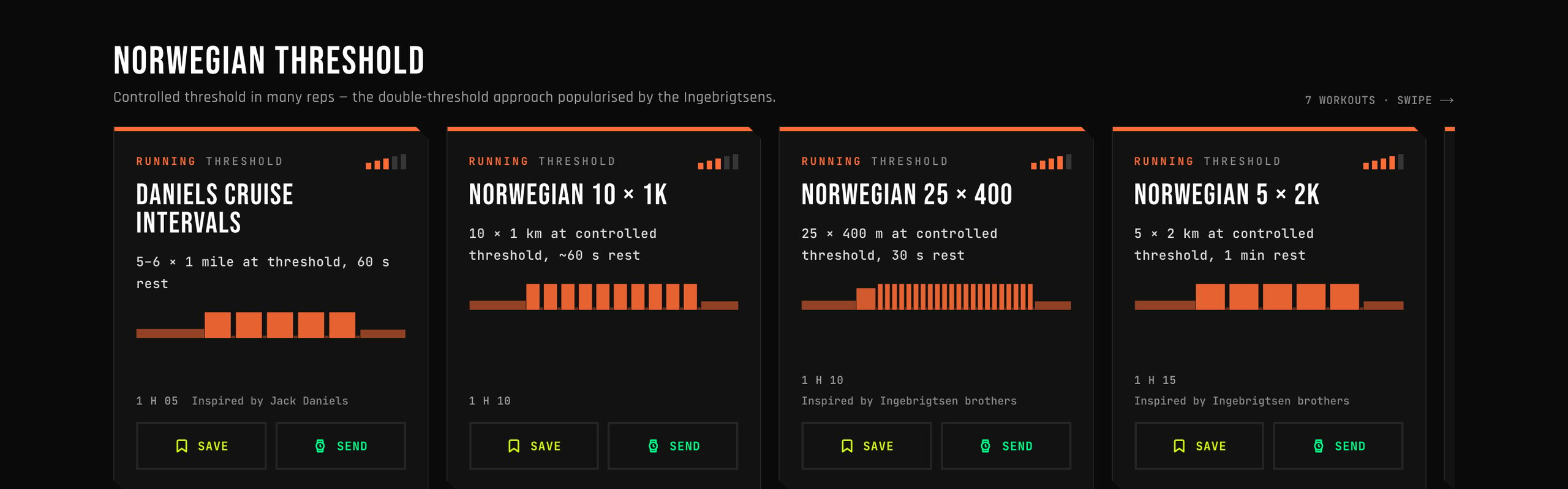
Every running session has a scaled alternative because removing an elite runner’s pace does not make an elite runner’s workload suitable for everyone. Ten 1 km reps still add up to 10 km of quality running, and the Norwegian session’s scaled version is 6 × 1 km. Tailoring the targets preserves a session’s volume; choosing fewer reps is a separate decision.
Worked example: Norwegian 10 × 1K from text to Garmin
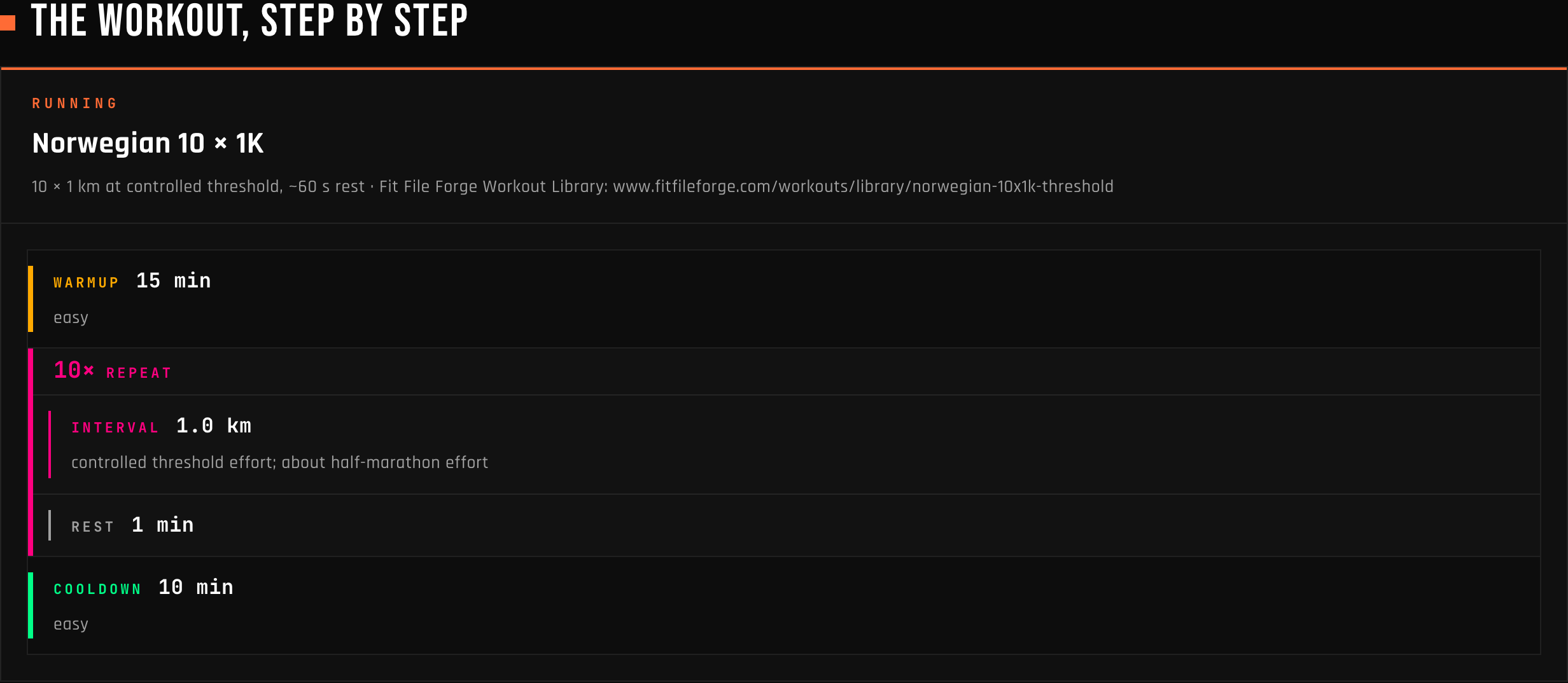
The library’s Norwegian session begins with this description:
Warm up 15 min easy. 10 × (1 km at controlled threshold effort, about half-marathon effort; 60 s rest). Cool down 10 min easy.
That becomes a workout named Norwegian 10 × 1K: a 15-minute warm-up, a ten-repeat block of 1 km running and 60 seconds of rest, then a 10-minute cool-down. The kilometre reps have no numerical pace target. Their step notes carry the effort cue, while the structure supplies the distances, timing and repeat count. The Norwegian 10 × 1K page shows the full session.
For a runner who wants pace targets, Tailor to my paces uses the key numbers saved in Settings and creates a separate tailored copy in the Vault. It is instructed to preserve the reps, distances and recoveries.
In the developer’s local tests, an illustrative profile with a threshold pace of 4:25/km, a 20:50 5K and a maximum heart rate of 188 bpm produced the following change.
| Detail | Library version | Tailored test result |
|---|---|---|
| Repeat block | 10 × 1 km | 10 × 1 km |
| Rep target | Controlled threshold effort, no pace band | 4:17 to 4:33/km |
| Rest after each rep | 60 seconds | 60 seconds |
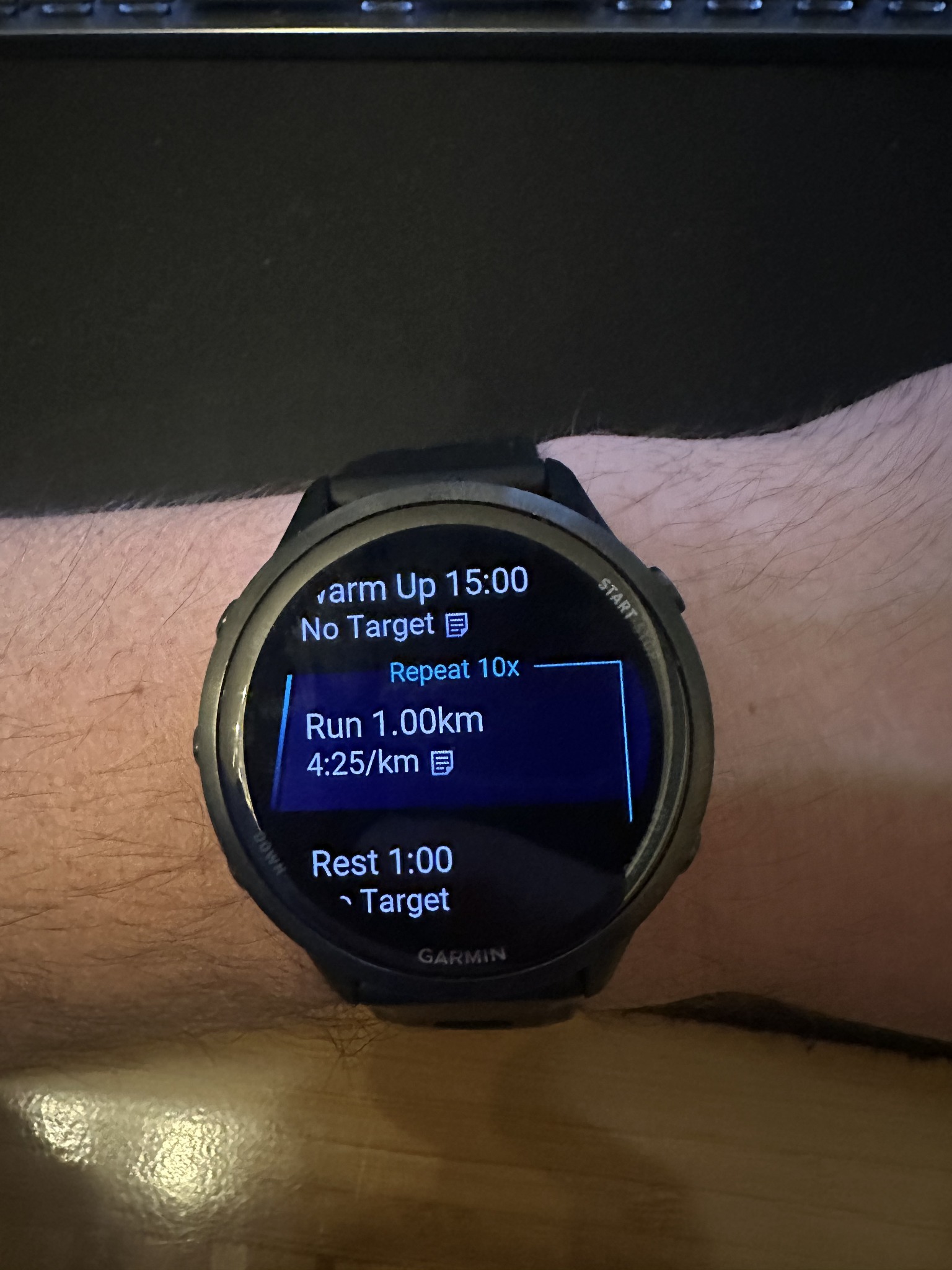
The pace band gives the watch a target range around 4:25/km. Caleb Wetherell’s watch photo above shows the ten-repeat structure, the 1 km distance, a displayed pace of 4:25/km and one-minute rests, but not the full pace band. The website preview shows the original effort-based version.
Billat 30/30s applies the same structure to shorter reps. The library version has 18 repeats of 30 seconds fast and 30 seconds of easy jogging, between a 15-minute warm-up and a 10-minute cool-down. The watch runs exactly 18 repeats, and a different number means changing the workout.
Other session types
The catalogue also has 50 cycling and 20 swimming sessions. The generator behind it covers these session types:
- Track and interval running, including distance or time reps, ladders, recoveries and strides.
- Cycling, including workouts with targets set as a percentage of FTP.
- Pool swims with send-offs, including a set pool length and departures on a repeating clock.
- Strength through Garmin’s exercise catalogue, with recognised exercise names, sets, reps and weights.
- Bricks and multisport sessions, such as a bike followed by a run.
Strength and bricks are generator capabilities rather than extra categories in the 120-session library. Sport and workout support depend on the receiving Garmin device.
What is free
The library is free to browse, and a free account can save, send and tailor its sessions without using the monthly AI-workout allowance. A paid subscription is not required to try any of the workouts described here.
Creating new workouts in the generator has a separate allowance of five per month on the free plan, and paid plans raise it. A reader arriving to try a classic session should start with the library.
The developer behind it
Fit File Forge is built by Caleb Wetherell, a Seattle-based data scientist and endurance athlete, through Forge Labs LLC. It began with his own frustration at entering structured sessions into Garmin Connect. The library extends that idea to workouts runners already know by name, keeping their context and structure together.
More: Fit File Forge Workout Library
Quick answers
How does an effort-cue workout differ from a paced workout?
The effort version gives a cue such as controlled threshold effort without a numerical pace target. A paced version adds a range for the watch to use and keeps the same interval structure. Step-note display and alerts vary by Garmin device, and neither version reduces the number of reps.
What does Tailor to my paces need from the athlete?
It needs a signed-in account and training numbers saved in Settings. For running, a current threshold pace or a recent race result gives the generator a basis for pace targets, and heart-rate values can support heart-rate targets. With no profile values saved, the page sends the athlete to Settings first.
What is needed to send a Fit File Forge workout to Garmin?
A free Fit File Forge account and a connected Garmin account are enough. Library sending needs no paid plan and no Connect IQ app. It uses Garmin’s Training API, followed by the usual sync to a device that supports the workout.
Is the Fit File Forge Workout Library free?
Yes, all 120 sessions can be browsed without an account, and a free account can save, send and tailor them. Library sessions do not count against the free plan’s five AI-generated workouts per month.
Related reading
- RunSync: structured running workout builder with Garmin sync and AI input
- Blocks: an AI-native training platform for endurance athletes
- Type to Run Weekly Coach: AI training plans for Garmin
Author: Caleb Wetherell, developer of Fit File Forge, edited by the5krunner.
Last Updated on 30 September 2026 by the5krunner
Small things I always use
- Garmin 90-degree charging adapter: Charges your Garmin from any USB-C cable. Essential when travelling. I use one.
- Body Glide: The blue anti-chafe stick swimmers and runners carry. I use it.
- Speedo earplugs: Fewer ear infections and no cold-water dizziness. I use them.
- Maurten: Race fuel that stays easy on the stomach. I use them.
- Garmin charging puck: The quickest way to top up before a session. I use one.
- Injinji: Toe socks that stop rubbing, so you run more. I use them.
- Cellucor C4: My pre-workout before hard sessions.
- TPU tubes: Schwalbe Aerothan, Tubolito and Pirelli SmarTube. Light, tiny spares. I use all three.
Watches and sensors
- Polar H10: My daily driver for waking HRV.
- Polar Verity Sense: My backup arm-worn HR sensor.
- Nomad bedside charger: Charges my iPhone and Apple Watch overnight. I use it, and many of their bands.
- Train.Red: The best muscle oxygen sensor I’ve used.
- Garmin Forerunner 970: A pro-grade triathlon watch. I use this.
- Apple Watch Ultra 4: My daily smartwatch. No phone needed on rides.
- Garmin Fenix 9 Pro: I’ve just bought one.
On the bike
- Continental GP5000 for everyday riding, and Aero 111 on the front for special occasions.
- Ravemen FR300: A front light that mounts under your Garmin or Wahoo. I use one.
- Wahoo TRACKR Radar: I use it on one bike and Varia on the other. They perform the same.
- Garmin Varia RTL515: Radar that warns you of cars from behind. I use this model.
- Wahoo ELEMNT Roam 3: The bike computer that’s easy to use. I use mine on most rides.
- Favero Assioma Pro RS2: Accurate power pedals that swap easily between bikes. I use this model.
Home and indoor training
- Google Wifi: Keeps Zwift connected in my pain cave. I use it.
- Apple TV 4K: Zwift on the big screen. I use two.
- Google Nest Doorbell (wired, 2nd gen): My video doorbell, running in both Google Home and Apple Home. I use it.
Health, recovery and sleep
- FreeStyle Libre 3 Plus: Shows how my blood sugar responds to diet.
- hDrop: Measures my sweat loss in summer and indoors.
- Fourth Frontier Zone: Checks my heart under load in hard sessions.
- Oura Ring 5: My partner’s recovery tracker of choice.
- Kineon MOVE+: Red light therapy for niggles. It works.
- Eight Sleep: A cooling mattress cover my partner and I use nightly.
Reader-Powered Content

This content is not sponsored. It’s mostly me behind the labour of love, which is this site, and I appreciate everyone who supports it.
Support the site: Follow (free, fewer ads) · Subscribe (paid, ad-free) · Buy Me A Coffee ❤️
Written by real people, with AI assistance. Fact-checked and verified for originality. See the Editorial Policy. FTC: Affiliate Disclosure — some links pay commission. As an Amazon Associate, I earn from qualifying purchases.

tfk is the founder and author of the5krunner, an independent endurance sports technology publication. With 20 years of hands-on testing of GPS watches and wearables, and competing in triathlons at an international age-group level, tfk provides in-depth expert analysis of fitness technology for serious athletes and endurance sport competitors. ID
