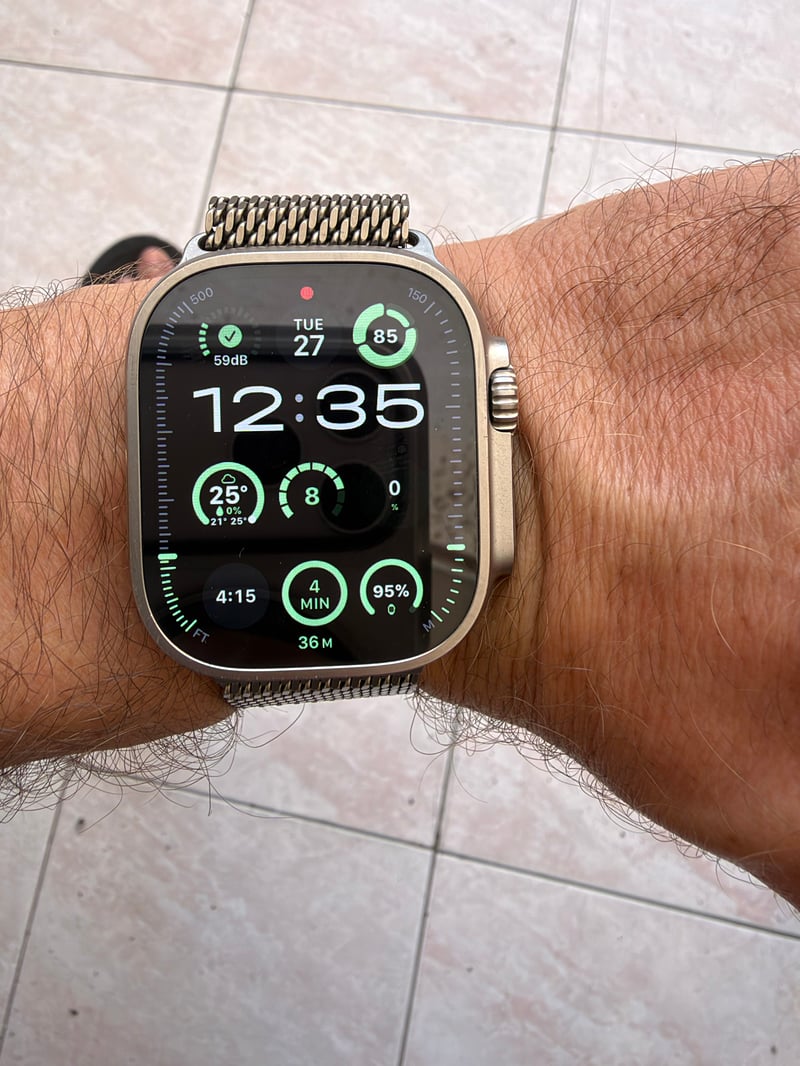
Picture a runner lacing up for an early run with their Apple Watch. Before heading out, they want three numbers on the watch face: how recovered they are, how last night’s heart rate variability compares with normal, and what the weather is doing. watchOS 27 introduced Apple’s own Readiness score, but only on Apple Watch Series 12 and Ultra 4. Earlier models don’t have is, and Apple doesn’t make that score available to third-party apps.
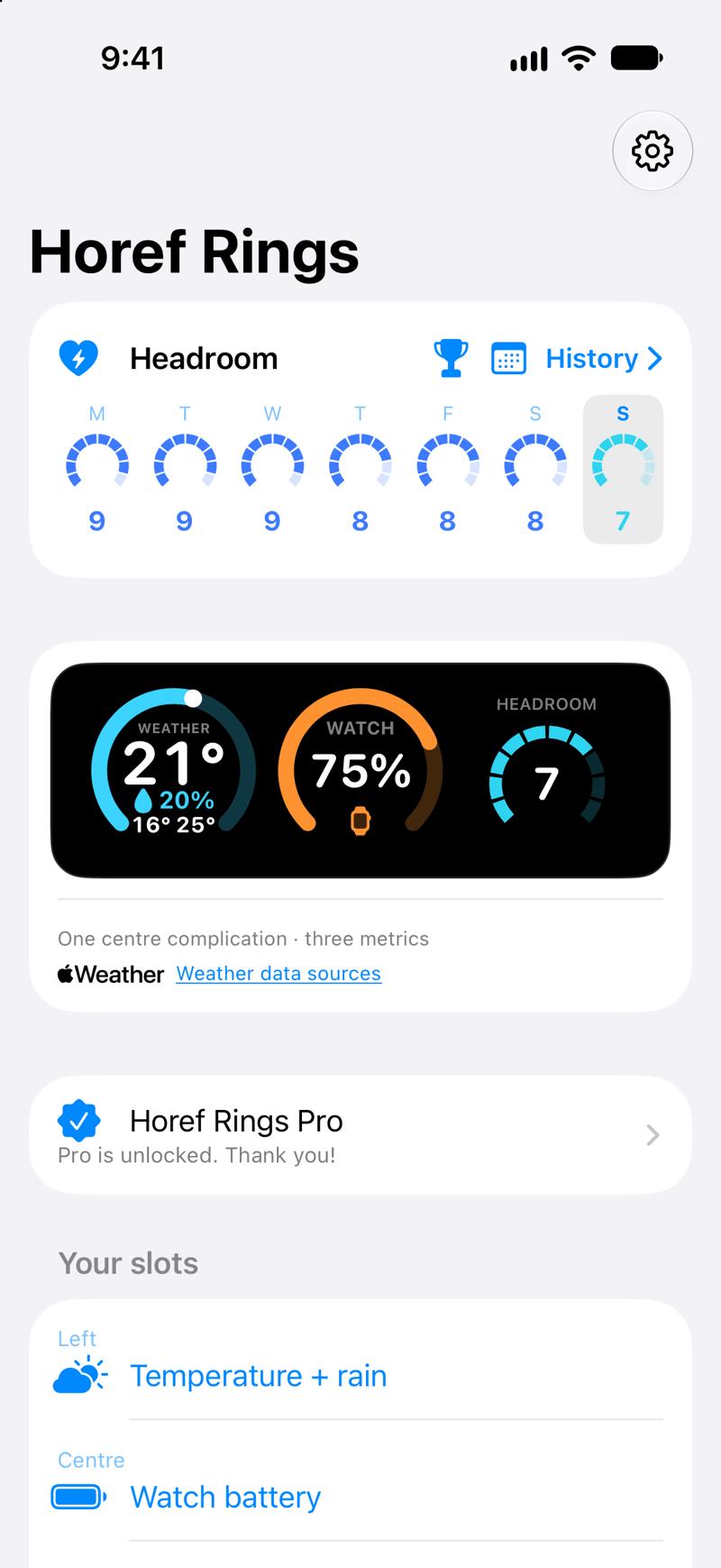
Horef Rings, an indie app by Anton Horef of Horef Labs, fills that gap. It calculates its own 0-to-10 score, called Headroom, on the user’s iPhone and Apple Watch from data the watch already records, and lets that number, or any of 75 metrics, sit in a complication on the watch face. Headroom isn’t Apple’s Readiness score or a medical measurement; it is a wellness estimate whose method is spelt out in the app spells out.
The problem: readiness on the watch you already own
Recovery scores have become standard in wearable training, but the good ones usually require a subscription, a separate band like WHOOP, or a new watch. Owners of earlier Apple Watch models record the same overnight heart rate variability, resting heart rate, breathing rate, and sleep, yet have no single number to turn those records into a morning decision.
The second gap is the watch face itself. Apple’s faces have a fixed number of complication slots, and most third-party complications show one value each. On a busy face, that leaves little room for weather, battery, sleep and a recovery number at the same time.
How Horef Rings works
TL;DR: Horef Rings reads the Health data the watch already collects, computes a daily 0 to 10 Headroom score on the device, and shows it, together with any of 75 metrics, as complications on any face and as iPhone widgets. There is no account, no ads, no analytics and no subscription.
- Three in one field. One rectangular complication on a face with a large rectangular slot, such as Modular or Modular Ultra, holds three metrics side by side, for example, weather with rain chance, Headroom and heart rate.
- Any metric, any face. Since version 1.0.2, any of the 75 metrics can also be its own circular, corner, inline or rectangular complication on any face that supports complications.
- Corners that look like watchOS. Corner complications show the value in the corner and a curved gauge along the bezel: the day’s low and high for temperature, battery level, Headroom from 0 to 10, or progress to a goal.
- iPhone widgets. Lock Screen and Home Screen widgets come in every size, including ready-made Weather, Headroom, Sleep, Activity arcs and battery widgets, a large panel and a month calendar. Home Screen widgets also appear on a Mac desktop as iPhone widgets.
- Metric pages. Tapping an iPhone widget or a one-metric complication on the watch opens that metric’s page: the forecast for the next 24 hours and 7 days, upcoming events, or the last 7 days of values such as sleep, heart rate, and Headroom.
- Battery time left. Watch and iPhone battery show how long the charge lasts at the current pace, with an optional alert when a device drains much faster than usual.
- History and awards. Every past day’s score can be opened to see what moved it, and 13 medals reward streaks and personal records, such as a Sleep week or a Recovery week.
Setup happens on the iPhone: pick the three metrics for the three-metric field, then choose and order up to 12 more metrics for the watch face editor. Settings sync to the watch, and all complications refresh together, so the same metric shows the same value everywhere.
How Headroom is calculated
Headroom compares the latest night with the user’s own recent normal rather than with population averages. Three parts are combined:
| Part | Weight | What goes in |
|---|---|---|
| Recovery | 45% | Overnight HRV and breathing rate (samples recorded between midnight and 10:00), Apple’s daily resting heart rate, and sleeping wrist temperature where the watch measures it, each against the median of up to 28 previous days |
| Sleep | 35% | Last night’s sleep (the night ending by noon) against the user’s own sleep need: 7.5 hours by default, adjustable from 5 to 10 hours |
| Load | 20% | Average active energy of the last 3 days against the average of up to 4 weeks; up to 10% above usual counts as fresh, and a much heavier block lowers it |
Each vital has a band of ordinary night-to-night variation that counts as normal: plus or minus 10% for HRV and 2 bpm for resting heart rate. Beyond that, better than usual raises recovery and worse lowers it, within caps. Breathing rate more than 1 breath per minute above normal, or wrist temperature more than 0.5 °C away from normal, can only lower it. A normal day, with vitals at the norm, enough sleep and the usual load, scores 7. Scores of 8 to 10 need vitals better than usual.
| Score | 0 to 1 | 2 to 4 | 5 to 7 | 8 to 10 |
|---|---|---|---|---|
| Label | Rest | Easy | Steady | Push |
The norm needs at least 5 days of history, and the app shows “calibrating” until then. The load part needs a week of activity. Scores are calculated on the user’s devices, and nothing is sent to a server.
A worked example
These example inputs were run through the app’s own Headroom code:
| Input | Last night | Personal norm |
|---|---|---|
| Sleep | 6 h 45 min | 7 h 30 min need |
| Overnight HRV (SDNN) | 57 ms | 50 ms (+14%) |
| Resting heart rate | 55 bpm | 58 bpm (-3 bpm) |
| Breathing rate | 14.3 /min | 14.0 /min (within band) |
| Wrist temperature | +0.2 °C | within 0.5 °C |
| Active energy, last 3 days | 620 kcal/day | 535 kcal/day over 4 weeks (x1.16) |
Sleep reaches 90% of the need. HRV 14% above normal and resting heart rate 3 bpm below normal both lift recovery a little above neutral, and a training block about 16% heavier than usual trims the load part slightly. The result is 7, “Steady”: a normal training day, where the short night is offset by good overnight vitals. A score of 3 or 4 on the same plan would suggest swapping intervals for an easy run.
Complications for every face
| Complication family | What Horef Rings shows |
|---|---|
| Rectangular (large slot) | Three metrics in one field, for example on Modular or Modular Ultra |
| Rectangular | One metric with label and detail, or a month calendar |
| Circular | One metric as a ring, dial or value |
| Corner | Value in the corner and a curved gauge along the bezel |
| Inline | One metric as a line of text |
watchOS lists at most 15 choices per app in the face editor. Horef Rings offers the Left, Centre and Right circles of the three-metric field plus 12 metrics the user picks on the iPhone. Headroom itself can be drawn as a ten-segment dial coloured by level, or as a single ring.
All 75 metrics
| Group | Metrics |
|---|---|
| Weather (17) | Temperature; Temperature + rain; Feels like; Conditions; Precipitation chance; UV index; Humidity; Wind; Wind gusts; Sunrise; Sunset; Daylight duration; Moon phase; Air pressure; Dew point; Visibility; Cloud cover |
| Activity (13) | Move; Exercise; Stand; Activity arcs; Steps; Walking + running distance; Active energy; Flights climbed; Standing minutes; Cycling distance; Swimming distance; Wheelchair distance; Wheelchair pushes |
| Sleep (8) | Sleep duration; Time in bed; Sleep stages; Sleep goal; Deep sleep; REM sleep; Core sleep; Awake during sleep |
| Health (25) | Headroom; Heart rate (latest, max over 15 min, average over 1 h); Resting heart rate; Resting heart rate trend; Heart rate variability (SDNN); Walking heart rate; Heart rate recovery; Cardio fitness (VO2 max); Blood oxygen; Respiratory rate; Wrist temperature deviation; Sleeping wrist temperature; Body temperature; Body weight; Body fat; Body mass index; Water intake; Caffeine intake; Dietary energy; Time in daylight; Environmental sound; Headphone audio level; Mindful minutes |
| Device and time (9) | Watch battery; iPhone battery; Date; Day of week; Local time; Week number; Day of year; Next calendar event; External storage |
| Workouts (3) | Last workout: duration, energy, distance |
Each metric depends on permissions, the watch model and existing records. Sleeping wrist temperature, for example, needs a watch that measures it, and weather needs location access. Local weather comes from Apple Weather.
Supported devices, pricing and privacy
| Apple Watch | Any model with watchOS 11 or later. The three-metric field fits faces with a large rectangular slot, such as Modular or Modular Ultra, and single-metric complications work on any face that supports complications. |
| iPhone | iOS 18 or later, with Lock Screen and Home Screen widgets |
| Mac | iPhone Home Screen widgets on the macOS desktop |
| Headroom | Needs an Apple Watch that records sleep and overnight vitals, and calibrates for the first 5 days |
| Price | Free download with all features free for 14 days. Horef Rings Pro is a one-time $4.99 purchase with Family Sharing, and there is no subscription. |
| Free tier | Date, day of week, time, Watch and iPhone battery, steps and activity arcs |
| Privacy | Health and Calendar access are optional and read-only, with no account, ads, tracking or analytics |
| Languages | English, Russian, German, French and Japanese |
Anton Horef is a solo developer at Horef Labs. He wears an Apple Watch Ultra 3 and wanted a morning recovery number without buying a new watch.
Quick answers
How is Headroom different from Apple's Readiness?
Apple’s Readiness score is available only on Apple Watch Series 12 and Ultra 4, and apps cannot read it. Horef Rings calculates a separate estimate from records any recent Apple Watch makes: sleep against the user’s own need, overnight HRV, resting heart rate, breathing rate and wrist temperature against a 28-day personal norm, and recent active energy. The weights and rules are shown in the app. It is a wellness estimate, not a medical measurement, and not Apple’s score.
What do the Horef Rings trial and Pro unlock?
The trial unlocks everything for 14 days and never charges or converts into a purchase. After it, date, time, batteries, steps and activity arcs stay free. Headroom with its history and awards, the full catalogue of 75 metrics, weather, calendar, health displays and iPhone widgets need Pro, a single $4.99 purchase shared with Family Sharing.
How often do Horef Rings complications update?
watchOS decides when complications refresh, so values are snapshots rather than continuous monitoring. Horef Rings shares one refresh between all of its complications and keeps the last good value when a reading is temporarily unavailable, such as Health data on a locked iPhone. The watch computes Headroom on its own and uses the iPhone’s longer history when it is fresh.
More information: horef.app and the App Store.
Author: Anton Horef, developer of Horef Rings, edited by the5krunner.
If you enjoyed reading this, here is another in the Indie Spotlight series: Indie App Spotlight: Klemy Treadmill takes distance from the treadmill belt.
Last Updated on 27 October 2026 by tfk the5krunner
Small things I always use
- Garmin 90-degree charging adapter: Charges your Garmin from any USB-C cable. Essential when travelling. I use one.
- Body Glide: The blue anti-chafe stick swimmers and runners carry. I use it.
- Speedo earplugs: Fewer ear infections and no cold-water dizziness. I use them.
- Dryrobe Advance: My winter changing robe for open-water swims. I use one. A cheaper option is the AONYIYI changing robe.
- Maurten: Race fuel that stays easy on the stomach. I use them.
- Beet It Sport nitrate shots: Beetroot shots I take in the days before a race. I use them.
- Garmin charging puck: The quickest way to top up before a session. I use one.
- Injinji: Toe socks that stop rubbing, so you run more. I use them.
- Ultimate toe protectors: Stop black toenails on long runs. They work. I use them.
- Compressport R2 v2 calf sleeves: My calf sleeves of choice. I use them.
- Cellucor C4: My pre-workout before hard sessions.
- TPU tubes: Schwalbe Aerothan, Tubolito and Pirelli SmarTube. Light, tiny spares. I use all three.
- G8 insoles: Adjustable insoles that are good. I use them.
- Cycplus Cube: A 97g electric pump that gets a road tyre rideable in two minutes. I carry one. 5% off with code THE5KRUNNER.
Watches and sensors
- Polar H10: My daily driver for waking HRV.
- Polar Verity Sense: My backup arm-worn HR sensor.
- Nomad bedside charger: Charges my iPhone and Apple Watch overnight. I use it, and many of their bands.
- Train.Red: The best muscle oxygen sensor I’ve used.
- Tymewear: Accurate heart rate and reliable ventilatory zones. I use it to pace endurance rides over an hour.
- Garmin Forerunner 970: A pro-grade triathlon watch. I use this.
- Apple Watch Ultra 4: My daily smartwatch. No phone needed on rides.
- Garmin Fenix 9 Pro: I’ve just bought one.
On the bike
- Continental GP5000 for everyday riding, and Aero 111 on the front for special occasions.
- Helmets: Specialized S-Works Evade 3 for road riding, and Rudy Project Wing for TT-style races. I use both.
- Ravemen FR300: A front light that mounts under your Garmin or Wahoo. I use one.
- Wahoo TRACKR Radar: I use it on one bike and Varia on the other. They perform the same.
- Garmin Varia RTL515: Radar that warns you of cars from behind. I use this model.
- Wahoo ELEMNT Roam 3: The bike computer that’s easy to use. I use mine on most rides.
- Favero Assioma Pro RS2: Accurate power pedals that swap easily between bikes. I use this model.
Home and indoor training
- NPE Runn: Makes my basic treadmill smart, sending more accurate speed and distance to my watch and Zwift. I use it.
- Google Wifi: Keeps Zwift connected in my pain cave. I use it.
- Apple TV 4K: Zwift on the big screen. I use two.
- Google Nest Doorbell (wired, 2nd gen): My video doorbell, running in both Google Home and Apple Home. I use it.
Health, recovery and sleep
- FreeStyle Libre 3 Plus: Shows how my blood sugar responds to diet.
- hDrop: Measures my sweat loss in summer and indoors.
- Fourth Frontier Zone: Checks my heart under load in hard sessions.
- Oura Ring 5: My partner’s recovery tracker of choice.
- Eight Sleep: A cooling mattress cover my partner and I use nightly.
Reader-Powered Content

This content is not sponsored. It’s mostly me behind the labour of love, which is this site, and I appreciate everyone who supports it.
Support the site: Follow (free, fewer ads) · Subscribe (paid, ad-free) · Buy Me A Coffee
Written by real people, with AI assistance. Fact-checked and verified for originality. See the Editorial Policy. FTC: Affiliate Disclosure — some links pay commission. As an Amazon Associate, I earn from qualifying purchases.

tfk is the founder and author of the5krunner, an independent endurance sports technology publication. With 20 years of hands-on testing of GPS watches and wearables, and competing in triathlons at an international age-group level, tfk provides in-depth expert analysis of fitness technology for serious athletes and endurance sport competitors. See the gear tfk uses. ID
